


AI Selfie Prompts for ChatGPT and Gemini: Mirror, Car and Night Selfies (12 Prompts)
12 AI selfie prompts for elevator and full-length mirrors, front camera at arm's length, night flash, a parked car, a cafe, Cappadocia, the laptop desk and a two-person selfie. We wrote out the phone's traces (distance, mirror, flash, clothes without text) line by line, and every reason behind a line is a number from our earlier Gemini tests.
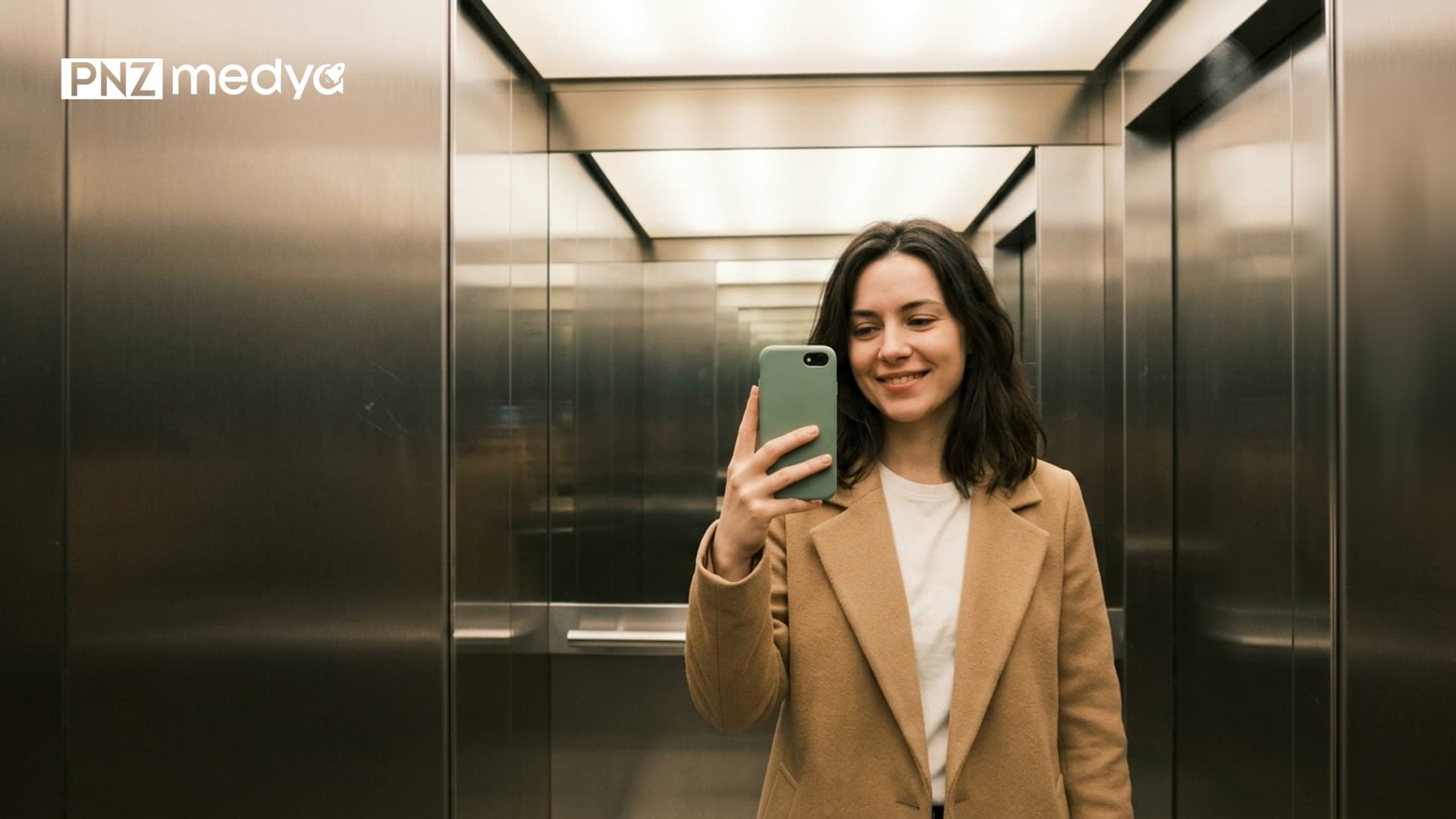
- This article has 12 selfie prompts: elevator and full-length mirror, front camera at arm's length, night flash, a parked car, a cafe, Cappadocia, the laptop desk, a two-person selfie, ChatGPT's own selfie and a follow-up message that fixes a shot that came out too smooth.
- What makes a selfie look like a selfie is the phone's trace: arm's-length distance, the front camera angle, the phone visible in the mirror, the flash. Write each of these into the prompt. If you leave them out, the model decides.
- Short distance really does change the face. A 2018 calculation in JAMA Facial Plastic Surgery found that a selfie taken from 30 centimeters (12 inches) makes the nose look 30% wider in men and 29% wider in women.
- Ask for no text on the clothes, on the back of the phone or in the background. In our November 10 test, half-visible text on clothing in the input photo turned into a meaningless brand name in 8 of 9 images.
- Upload a waist-up photo. In the November 3 test, when the face shrank to 10 to 23% of the frame, the similarity score dropped from 0.76 to 0.66. For the full-length mirror selfie (Prompt 8), name the marks on your face.
A selfie taken with the phone at arm's length can make your nose look up to 30% wider: a calculation published in JAMA Facial Plastic Surgery in 2018 found this for a distance of 30 centimeters. When you write a selfie prompt, you are the one who tells the model about these phone traces (short distance, front camera, mirror, flash). Every detail you leave out is left for Gemini or ChatGPT to decide.
All 12 prompts below work with your own photo; only Prompt 11 needs no photo. Under each prompt we note which test its lines came from.
The rest of our November test budget went to cover images, and we have no API key to run ChatGPT's image model, so apart from the cover image we did not run a new test for this article (the cover result is at the end). The lines in these prompts come from tests we ran with the original Turkish prompts in the Gemini API, using Nano Banana 2 Lite, Nano Banana 2 and Nano Banana Pro, between October 15 and November 11, 2026: the 3D figure test (October 29), the 80s trend (October 30), face preservation (November 3, 122 images), the snow trend (November 4, 81 images), face shape and the arm's-length selfie (November 6), the plan comparison and the hug test (November 10), and the men's portrait (November 11). The people in the tests were fictional, generated with AI.
How to Write a Selfie Prompt: Describe the Phone's Trace
What makes a photo read as a selfie is where the camera sits. In a mirror selfie the phone is in the frame. With the front camera the phone is out of sight, but an arm reaches out past the edge of the frame. A night flash leaves the face flat and bright and the background dark. The first line of the prompt names the type of selfie, the second says where the camera is; face, clothing and aspect ratio come after that.
| Selfie type | Phone trace written in the prompt | Also written | Prompt |
|---|---|---|---|
| Mirror (elevator, full-length mirror) | Phone at chest height, not covering the face; its back plain, no logo | Clothes without text, only you in the frame | 1, 8 |
| Front camera, arm's length | Camera slightly above the face, arm reaching out past the edge of the frame | No added moles or accessories that are not in the photo; items from the input photo are not carried over | 3, 6, 7 |
| Night flash | Face flat and bright, background dark, no red eye | No date stamp, no film border | 4 |
| Car and desk | The place's objects in frame: steering wheel or an open laptop | No logo on the steering wheel, screen or mug | 5, 9 |
| Two people | Who holds the phone and which edge the arm comes out of | Only these two people in the frame | 10 |
| Shot that is too smooth | Slight grain, skin texture, frame tilted a few degrees | Face stays the same | 12 |
The third column of the table shuts out things the model adds on its own. In the November 3 test, the person's wristwatch was carried into the new scene in 19 of 32 images; once we added the line "the watch from the photo is not in this shot, hands are empty", it appeared in 0 of 6.
How to Make a Selfie in Gemini: 4 Steps
- Open gemini.google.com or the Gemini app and sign in with your Google account. To edit a photo you upload, you need to be 18 or older.
- Add a waist-up photo where your face is clearly visible, using the + icon. If you wear glasses, a beard or a headscarf, they should be in the photo too.
- Copy a prompt from below, fill in the square brackets to match your own face and send it in the same message as the photo. In ChatGPT you can paste the same text together with the photo.
- If the shot comes out too smooth or the face looks different, send Prompt 12 in the same chat. Save the image you like with the download icon.
In the November 3 test, a generic line saying "keep the moles" added moles the bearded man did not have and erased his glasses in 2 of 32 images. Write what is actually on your face inside the square brackets, and delete the whole line for any feature you do not have.
12 Ready-to-Use Selfie Prompts (Copy and Paste)
Fill in the square brackets. If you wear a headscarf, add "headscarf in place, color and wrapping as in the photo" to the face line. We spelled out the aspect ratio at the end of each prompt: 9:16 for an Instagram story, 4:5 for the feed.
1) Elevator mirror selfie
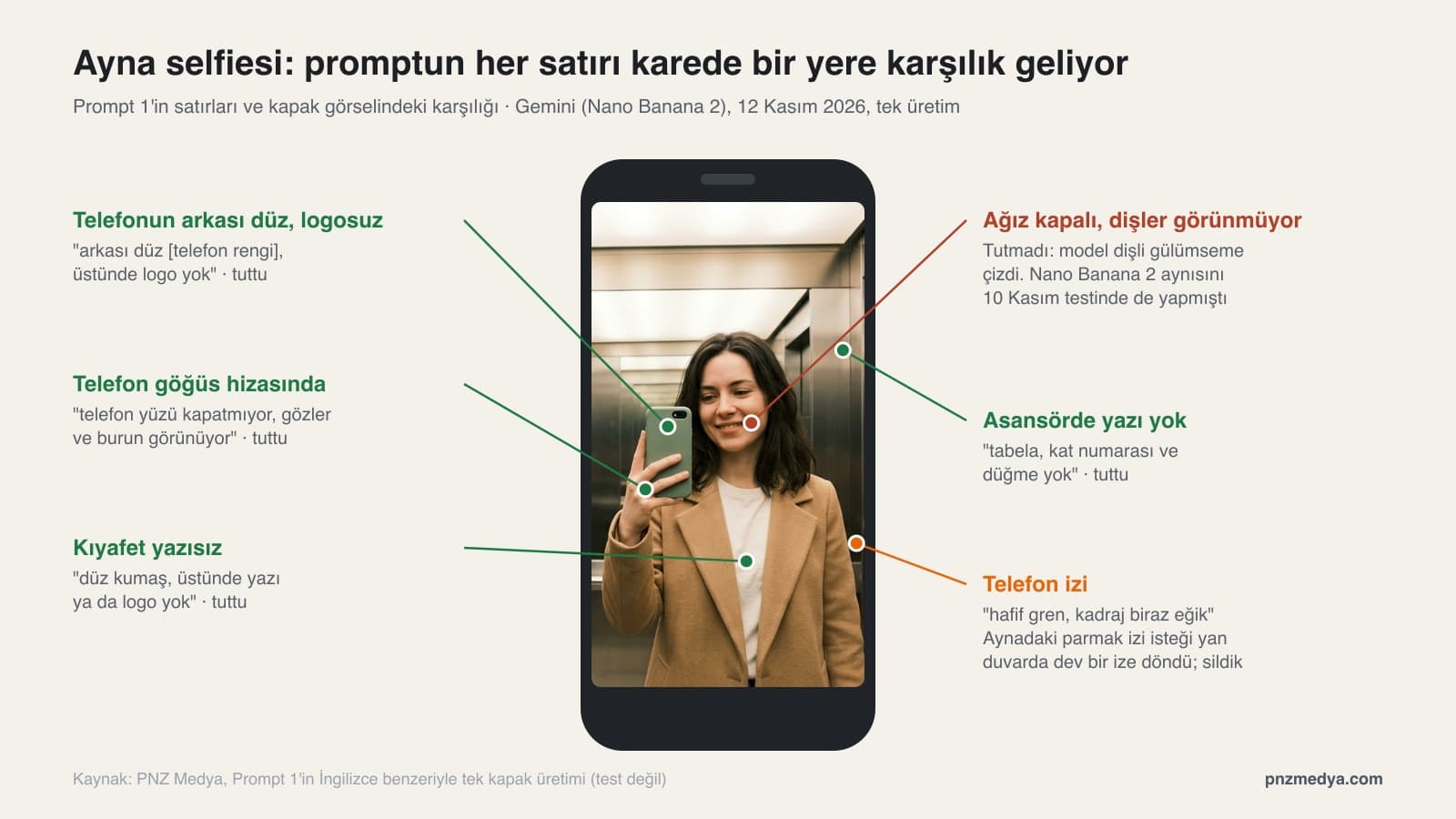
No text, logos, signs or floor numbers anywhere in the image. Create a realistic selfie of the person in the photo I uploaded, taken with a phone in an elevator mirror.
The person faces the mirror and holds the phone in one hand at chest height; the phone does not cover the face, the eyes and nose are visible. The back of the phone is plain [phone color] with no logo on it.
Elevator: brushed steel walls, white light from the ceiling. Only this person is in the frame.
Face as in the photo: [hair color and length], [beard, mustache or glasses, by name if present], skin tone [color]. Do not add moles, glasses or a beard that are not in the photo. Mouth closed, teeth not visible.
Clothing: [top and its color], plain fabric with no text or logo on it.
Make it look shot with a phone camera: slight grain, frame slightly tilted. Aspect ratio vertical 9:16.In a real mirror photo, text on clothing reads backwards. We did not measure whether the model gets this right; the shortest route is to ask for clothes without text. The floor number line comes from November 4: when we asked for the sign to be "blurry", the model drew legible but meaningless text in 4 of 4 images, and with "no sign and no text" it was 0 of 4.
2) Short version: a one-paragraph selfie prompt
Create a realistic selfie of the person in the photo I uploaded, taken with a phone: [place], [light: daylight, evening or flash]. The camera is at arm's length, the phone is not visible. Keep the face, hair and [glasses, beard or headscarf] as in the photo; mouth closed, teeth not visible. The earbuds and watch from the photo are not in this shot. No text or logos in the image. Aspect ratio vertical 9:16.Even in the short version we kept the mouth line. On November 3, with a short prompt that only described the scene, Nano Banana 2 turned a closed mouth into a toothy smile in 5 of 6 images; with a prompt that spelled out the expression it was 0 of 9.
3) Front camera selfie at arm's length
Create a realistic selfie of the person in the photo I uploaded, taken with the front camera from arm's length.
The camera is slightly above the face, and the person looks straight into the camera. One arm reaches out past the edge of the frame; the phone is not visible.
Face as in the photo: [hair], [beard, mustache or glasses], skin tone [color], [location of any mole or mark, from the viewer's side]. Do not add moles, marks or accessories that are not in the photo.
Expression: [slight smile], mouth closed, teeth not visible.
Background: [room or street], slightly blurred. The earbuds, watch and bag from the photo are not in this shot.
Keep the facial proportions natural; the nose and forehead do not get bigger. Aspect ratio vertical 3:4.The last line is there to soften the distortion of short distance; we did not measure whether it works. On November 6, in the arm's-length selfies we generated with AI, the face measured between 0.8% and 4.9% longer than in a straight portrait of the same person.
4) Night flash selfie
Create a realistic selfie of the person in the photo I uploaded, taken outdoors at night with the phone's flash.
The flash lights the face flat and bright, the background is almost dark; there are a few blurry street lamps in the distance. No red eye.
Face as in the photo: [hair], [beard, mustache, glasses or headscarf and its color], skin tone [color]. Do not add moles or accessories that are not in the photo. Mouth closed, teeth not visible.
Clothing: [coat or jacket and its color], no text or logo on it.
No date stamp, film border, signs or text in the image. Add slight grain. Aspect ratio vertical 9:16.A flash shot has an old-photo feel, so we added the stamp line. In the October 30 test of the 80s trend, a prompt asking for a look "as if it came out of an album" put a date stamp on 9 of 30 images and a paper or film border on 13.
5) Selfie in a parked car
Create a realistic selfie of the person in the photo I uploaded, taken with a phone while sitting in the driver's seat of a parked car.
The engine is off, the seat belt is fastened. The light is daylight coming through the side window. The camera is slightly from below, the phone is not visible.
Inside the car: [dark gray fabric seat], only the top edge of the steering wheel is visible. No logo, text or license plate on the steering wheel, dashboard or windows.
Face as in the photo: [hair], [beard, mustache, glasses or headscarf], skin tone [color]. Do not add sunglasses or accessories that are not in the photo. Mouth closed.
Clothing: [top and its color], no text on it. Aspect ratio vertical 9:16.We set the scene in a parked car; do not pick up your phone while driving. The logo line comes from the October 29 3D figure test: with a short prompt that did not forbid text, the model put its own text on 8 of 20 images, and with the line "no text, names or logos" it was 1 of 12.
6) Cafe window seat selfie
Create a realistic selfie of the person in the photo I uploaded, taken with the front camera while sitting by the window in a cafe.
The light comes from a large window; the window is on the left from the viewer's side, and the side of the face toward the window is brighter.
On the table, [coffee or tea] in a white cup; no text or logo on the cup. Blurred chairs in the background, nobody else in the frame.
Face as in the photo: [hair], [beard, mustache, glasses or headscarf], skin tone [color]. Expression: [slight smile], mouth closed.
The earbuds and phone from the photo are not in this shot. Clothing: [top and its color]. Aspect ratio vertical 4:5.We wrote the direction of the light "from the viewer's side". On October 29, when we gave the position of a dog's spots this way, the spot came out in the right place in 6 of 6 images.
7) Vacation selfie in Cappadocia
Create a realistic selfie of the person in the photo I uploaded, taken at sunrise in Cappadocia.
Behind them, fairy chimneys stand in the valley: cream and brown rock towers with pointed tops. 6 colorful hot air balloons in the sky; no text or logos on the balloons.
The person is at the edge of a hill, the camera is at arm's length and slightly above. Only this person is in the frame, no tourists behind.
Face as in the photo: [hair], [beard, mustache, glasses or headscarf and its color], skin tone [color]. Do not add moles or accessories that are not in the photo. Mouth closed.
Clothing: [coat or sweater and its color]. Aspect ratio vertical 9:16.Next to the place name, we described how it looks. On November 10, Nano Banana Pro turned the Süleymaniye Mosque, given by name only, into a different mosque with two minarets. When you write your own place, add its color and shape next to the name too.
8) Outfit selfie in a full-length mirror
Create a full-length mirror selfie of the person in the photo I uploaded, taken with a phone in a full-length mirror at home.
The person faces the mirror and holds the phone slightly below face height; the phone does not cover the face. The back of the phone is plain [phone color], no logo.
Outfit: [top], [bottom], [shoes]; no text, logos or brand names on the clothes.
Face as in the photo: [hair], [beard, mustache, glasses or headscarf], skin tone [color], [location of any mole or mark, from the viewer's side]. Do not add moles or accessories that are not in the photo.
Room: light-colored wall, wooden floor, a potted plant next to the mirror. Only this person is in the frame. Aspect ratio vertical 9:16.In a full-length shot the face gets small and detail is lost. On November 3, full-length images stayed at 0.66 similarity and the moles were erased in 4 of 6 images; a full-length prompt that gave the location of the moles kept them in 4 of 4.
9) Selfie at the laptop
Create a realistic selfie of the person in the photo I uploaded, taken with a phone in the evening at home while sitting at a desk in front of a laptop.
The laptop is open in front of the person; the screen shows only unreadable light-colored lines, no logo or brand. Next to it a solid-colored mug, no text on the mug.
Light: the cool light of the screen and the warm yellow light of a desk lamp behind.
Face as in the photo: [hair], [beard, mustache, glasses or headscarf], skin tone [color]. Expression: [focused, or tired but smiling], mouth closed.
Clothing: [top and its color]. The earbuds and watch from the photo are not in this shot. Aspect ratio vertical 4:5.If you leave the screen blank, there is no telling what the model will put there; asking for unreadable lines keeps the screen full but free of text. If you wear glasses, name them: in the November 10 hug test, Nano Banana 2 Lite erased glasses that were not mentioned once we added a sentence that changed the background.
10) Two-person selfie from two photos
Create a realistic selfie taken together by the people in the two photos I uploaded.
The person from photo 1 holds the phone, their arm reaching out past the left edge of the frame (from the viewer's side); the person from photo 2 is close to their shoulder, faces side by side.
Place: [seaside, at sunset]. Only these two people are in the frame; do not carry over the places or the people in the background from the photos.
Person 1: [hair], [beard, mustache or glasses], [clothing and color]. Person 2: [hair], [glasses or headscarf and its color], [clothing and color]. Do not add moles or accessories that are not in the photos.
Both have their mouths closed, teeth not visible. No text or logos on the clothes. Aspect ratio vertical 4:5.The line "only these two people in the frame" comes from the November 10 hug test: with a short prompt, both models carried over the street and pedestrians from photo 1, and once we added the place and this line, the shot came out clean in both models.
11) ChatGPT's own selfie
If you imagined yourself as a human and took a selfie of yourself with a phone, what would that photo look like? Create it as an image.
Make the image a realistic phone selfie: front camera, arm's length, natural light.
No text, logos or brand names in the image. Aspect ratio vertical 4:5.
After the image, explain in two sentences why you chose this look, this place and this expression.This prompt needs no photo. People search Google for a prompt that gets ChatGPT to take its own selfie; you can send the same text to Gemini as well. Expect a different person on every try.
12) Fixing a shot that came out too smooth (same chat)
This image is too smooth, it looks like it was shot with a professional camera. Redo it with the same person, the same place and the same clothes; change only these:
Make it look shot with a phone's front camera: slight grain, slightly blown highlights in the brightest spot, frame tilted 3 to 4 degrees.
Show pores and natural texture on the skin; do not make it retouched or smooth.
Do not blur the background as much as in a studio photo, keep it a little sharp.
Do not change the face: [hair], [beard, mustache, glasses, moles or headscarf], same expression.Write it in the chat where the image was generated, and do not leave the face line empty. On November 3, the message "you changed my face, fix it" left the similarity score at 0.72; a correction that listed the features one by one raised it to an average of 0.84 across 6 images.
Look at the photo first: a photo of someone else, especially a well-known person, can be a reason for refusal. If the face changed, start a new chat and upload a closer photo with good light. If the shot went wrong along with the scene (extra people, made-up text), ask again with only that one line added; do not change the whole prompt.
Arm's Length Changes the Face: Why Does the Nose Look Bigger in Selfies?
The closer the camera gets to the face, the bigger the part of the face that sticks out (the nose) looks compared with the parts further back (cheeks, ears). Four researchers from Rutgers and Stanford calculated this effect with a model built on average head measurements and published it in JAMA Facial Plastic Surgery in 2018.
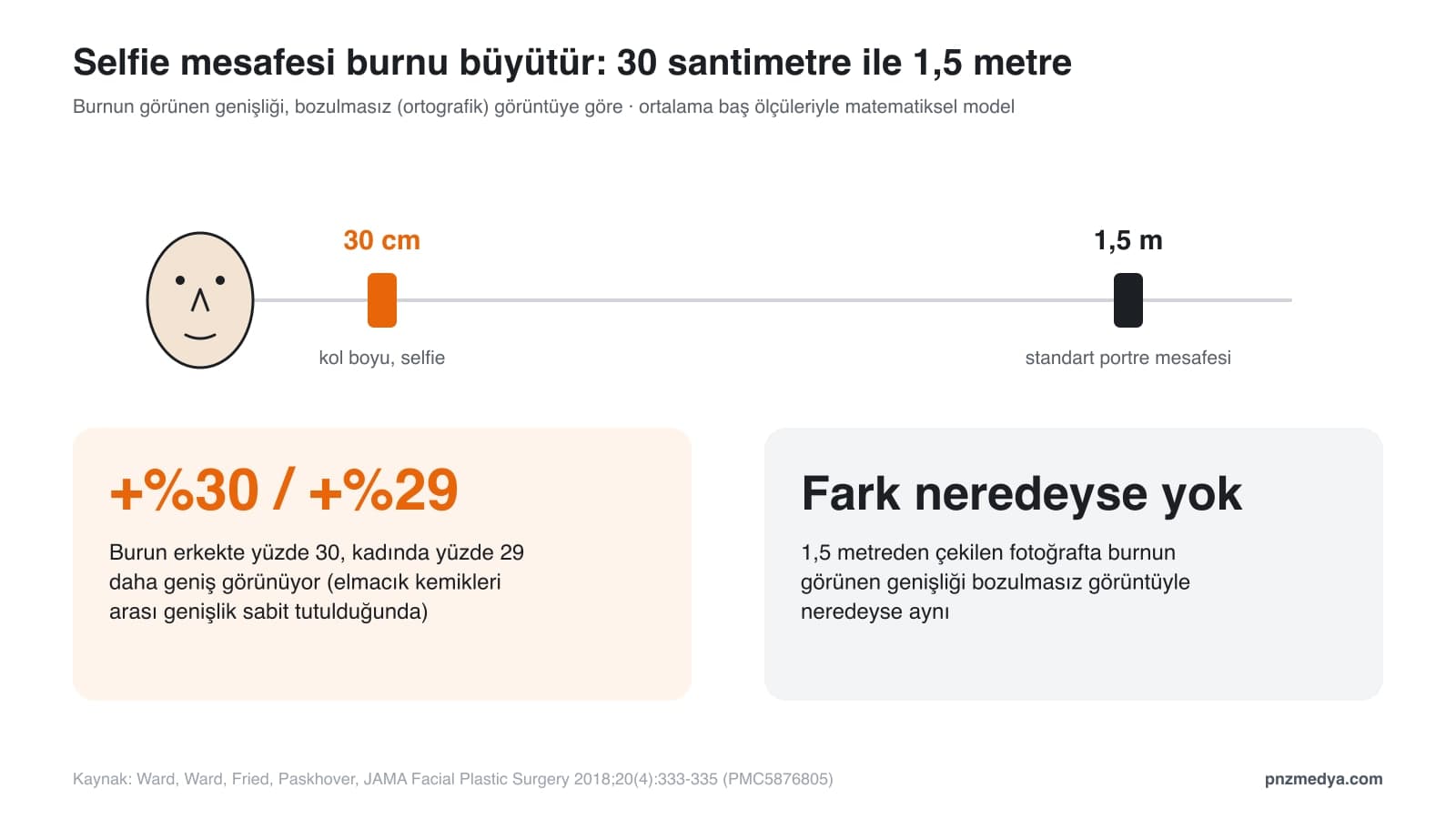
When taken at 12 in away and keeping the bizygomatic breadth constant, selfies increase nasal size by 30% in males and 29% in females compared with an orthographic projection.
According to the same paper, in a photo taken from 1.5 meters (about 5 feet), the standard portrait distance, this difference almost disappears. For a selfie prompt, that means: when you ask for arm's length as in Prompt 3, your face coming out slightly different from your straight portrait is simply how the camera works. If you want a more familiar face, write the camera as "in a friend's hand, two meters away"; then the shot stops being a selfie and turns into a portrait.
Can You Make a Selfie with Free Gemini? Does It Work in ChatGPT?
Yes, you can. According to Google's help page, images download at 1K on an account without a plan and at 2K with a Google AI plan; most requests from accounts without a plan go to Nano Banana 2 Lite. In our November 10 plan comparison, the free model closed the gap with prompts that named the error (both of the two fixes held). So on an account without a plan, pick the detailed prompts over Prompt 2.
In ChatGPT you can paste the same prompts together with your photo; the lines are written in plain language, so they do not depend on the tool. We did not measure ChatGPT results for this article; all the numbers come from Gemini tests run with the original Turkish prompts.
Common Mistakes
- Writing only "make a selfie". If the camera position is not written, the shot can turn into a studio portrait; say in the first line whether it is a mirror, front camera or flash shot.
- Leaving the text on clothing alone. On November 10, half-visible text in the input turned into a meaningless brand name in 8 of 9 images; write "no text or logo on the clothes".
- Uploading a full-length photo. When the face gets small, similarity drops; upload a waist-up photo and let the prompt build the full-length scene.
- Describing the outfit by its name only. On November 11, a short prompt that said "suit" added an unwanted tie to 2 of 2 images; state separately whether the accessory is there or not.
- Writing a place name on its own. Add the color and shape of the building next to the name.
- Writing only "fix it" when correcting. List what came out wrong, one by one (Prompt 12).
Age, Consent and Privacy Law (KVKK) for AI Selfies
To generate images in Gemini you need to be 13 or older, and to edit a photo you upload, 18 or older (Google help page, accessed November 11, 2026). Google adds an invisible SynthID watermark to every image Gemini generates; your AI selfie will carry this mark.
Under KVKK, Turkey's personal data protection law, a photo of a face is personal data. Before you upload a friend's photo for Prompt 10, ask them. We left a celebrity selfie prompt off the list: using someone else's face without permission is both a reason for refusal and a legal risk. If you are going to share an AI selfie as if it were a real memory, the cleanest way is to say in the caption that it was made with AI.
Yes. Upload your photo to Gemini with a Google account and paste the prompt; on an account without a plan the image downloads at 1K, and at 2K with a Google AI plan. The prompts can be used in ChatGPT with the same text.
In the first line, name the mirror and where the phone is: "holds the phone at chest height, the phone does not cover the face". Then ask for the back of the phone without a logo and clothes without text, and list what is on your face by name (Prompts 1 and 8).
You can paste the prompts in this article into ChatGPT together with your photo. Our numbers come from Gemini tests run with the original Turkish prompts; we did not measure results in ChatGPT separately.
The model often draws smooth skin and studio light. Send Prompt 12 in the same chat: ask for slight grain, skin texture, a frame tilted a few degrees and a slightly sharp background, and tell it not to change the face.
This article has no such prompt. Using someone else's face without their permission can get your request refused and infringes on that person's personality rights; use Prompt 10 with your own photo or with a friend who gives permission.
Because the camera is close to the face. According to a 2018 calculation in JAMA Facial Plastic Surgery, a selfie taken from 30 centimeters makes the nose look 30% wider in men and 29% wider in women; at 1.5 meters there is almost no difference.
We had Gemini (Nano Banana 2) draw the elevator shot on the cover in a single attempt, using an English variant of Prompt 1. The back of the phone came out plain with no logo, and there is not a single piece of text in the elevator. Two lines did not hold: even though we wrote "mouth closed, teeth not visible", the woman is smiling with her teeth showing (in the November 3 test, the same line produced no visible teeth in any of 9 images), and the request for "a faint fingerprint on the mirror" turned into a head-sized fingerprint on the side wall; we cleaned that area ourselves. That is why Prompt 1 has no fingerprint line. If teeth show, write "close your mouth, no teeth showing" in the same chat.
Professional Photography Service
A selfie is fine for your friends; your business website, menu or product page needs a real photo shoot. We shoot your product, venue and team photos in the studio or on location and deliver them in web and social media sizes. Let's talk about what you need in a free first meeting.