


Turn a Photo Into a Pixar Character: 12 Prompts and the Car Singing Trend (2026)
12 ready-to-use prompts to turn a photo into a Pixar-style character: a single 3D character, a couple in a car, a family, a cat or dog, a movie poster, a character in a headscarf and the 3D Pixar trend video. Which line keeps your beard, hair and skin tone from drifting, with numbers from our earlier Gemini tests.
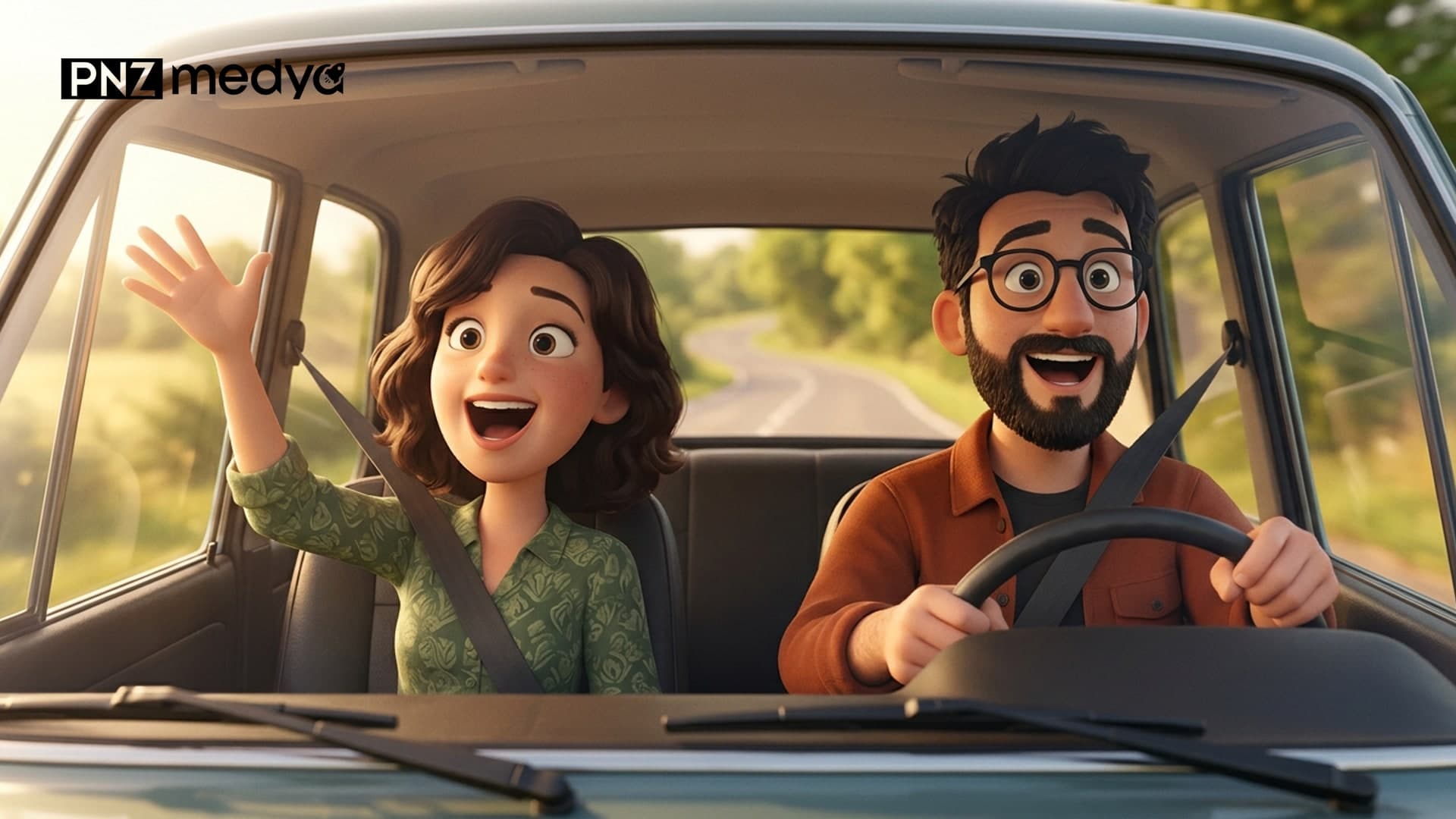
- To turn a photo into a 3D character that looks like Pixar, upload it to ChatGPT or Gemini and write out the style and each feature of your face one by one. Below are 12 prompts you can copy.
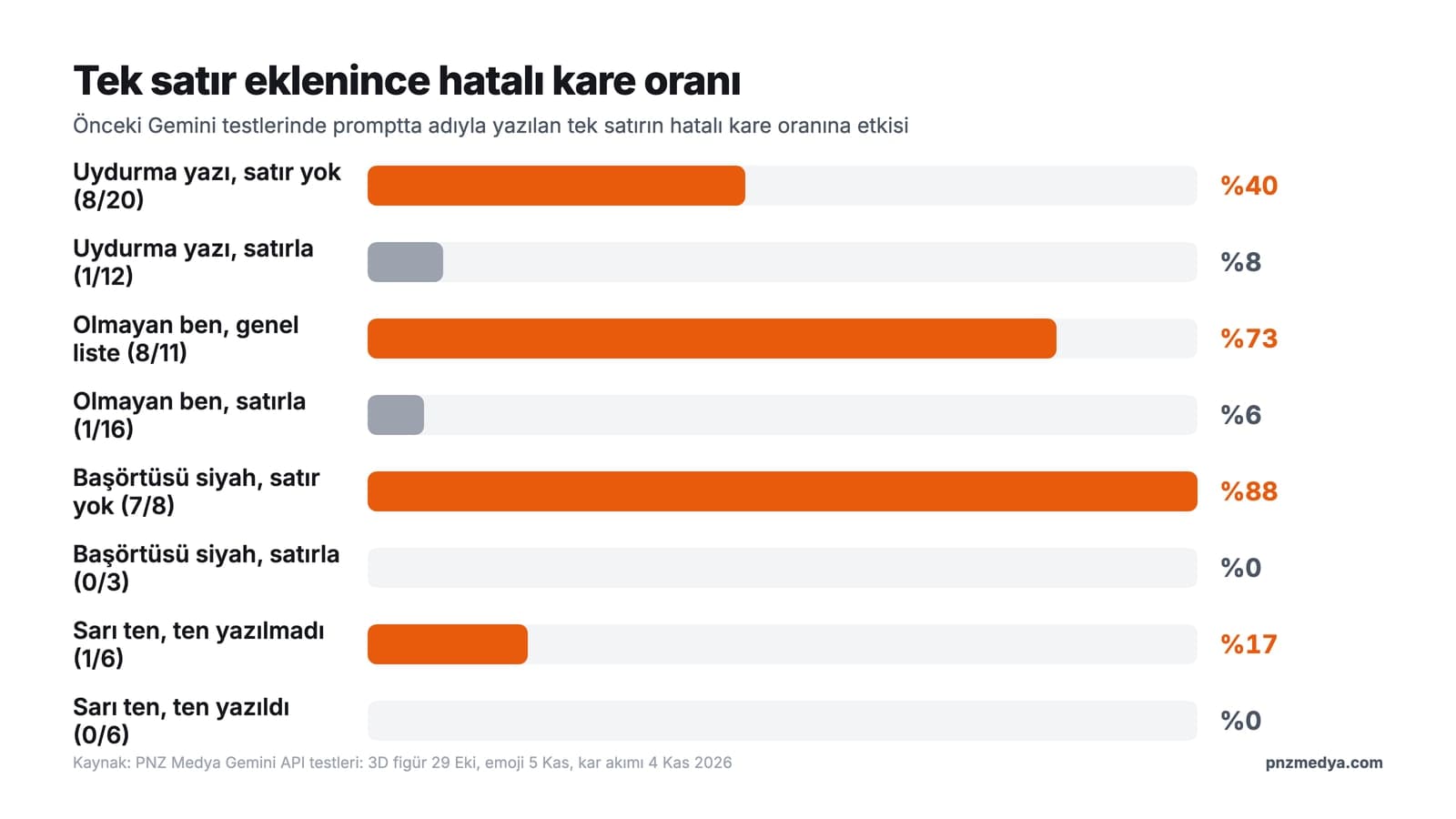
- In our earlier Gemini tests, the things that drifted most during style conversion were beard shape, skin tone, hair length and headscarf color. Each one was fixed once it was named in the prompt; the headscarf turning black dropped from 7 of 8 attempts to 0 of 3.
- With a short prompt the model fills empty surfaces with its own text: in the 3D figure test, 8 of 20 images had a made-up name or text, and with the line "no text, names or logos in the image" it was 1 of 12.
- The video for the singing-in-the-car trend is made in Gemini with Omni; it requires a paid Google AI plan, and the video runs 3 to 10 seconds. If you don't have a plan, make the character image in Gemini and the video with a CapCut template.
- To edit a photo you upload to Gemini, you have to be at least 18. Share the character you make from your child's photo within the family.
Turning a photo into Pixar takes one message in both ChatGPT and Gemini: you upload the photo and ask for the character to look like it came out of a 3D animated film. The hard part is getting the character to look like you. With a short prompt like "Make me a Pixar character," the model picks every detail it doesn't see named in the prompt on its own. In our earlier tests it made the beard fuller, shortened the hair, turned the skin yellow and put made-up text on empty surfaces.
This post has 12 ready-made prompts, from a single character to a couple in a car and from a cat to a movie poster, plus the steps for the singing-in-the-car trend going around Instagram. Under each prompt we explain which line is there and why, with dates and numbers from tests we ran with Gemini's image models in October and November 2026.
We did not measure these 12 prompts as a separate set: our test budget for November ran out, and we don't have an API key to run ChatGPT's image model. The tests we rely on were run in the Gemini API with Nano Banana 2 Lite, Nano Banana 2 and Nano Banana Pro, using AI-generated photos of fictional people: caricature and 3D animation (October 15), 3D figure (October 29, 133 images), 80s trend (October 30, 168 images), face preservation and merging two photos (November 3, 122 and 82 images), snow trend (November 4, 81 images), emoji (November 5, 123 images), hug and plan comparison (November 10). The two characters on the cover are fictional too; we had Gemini draw them from a description, and they were not made from anyone's photo.
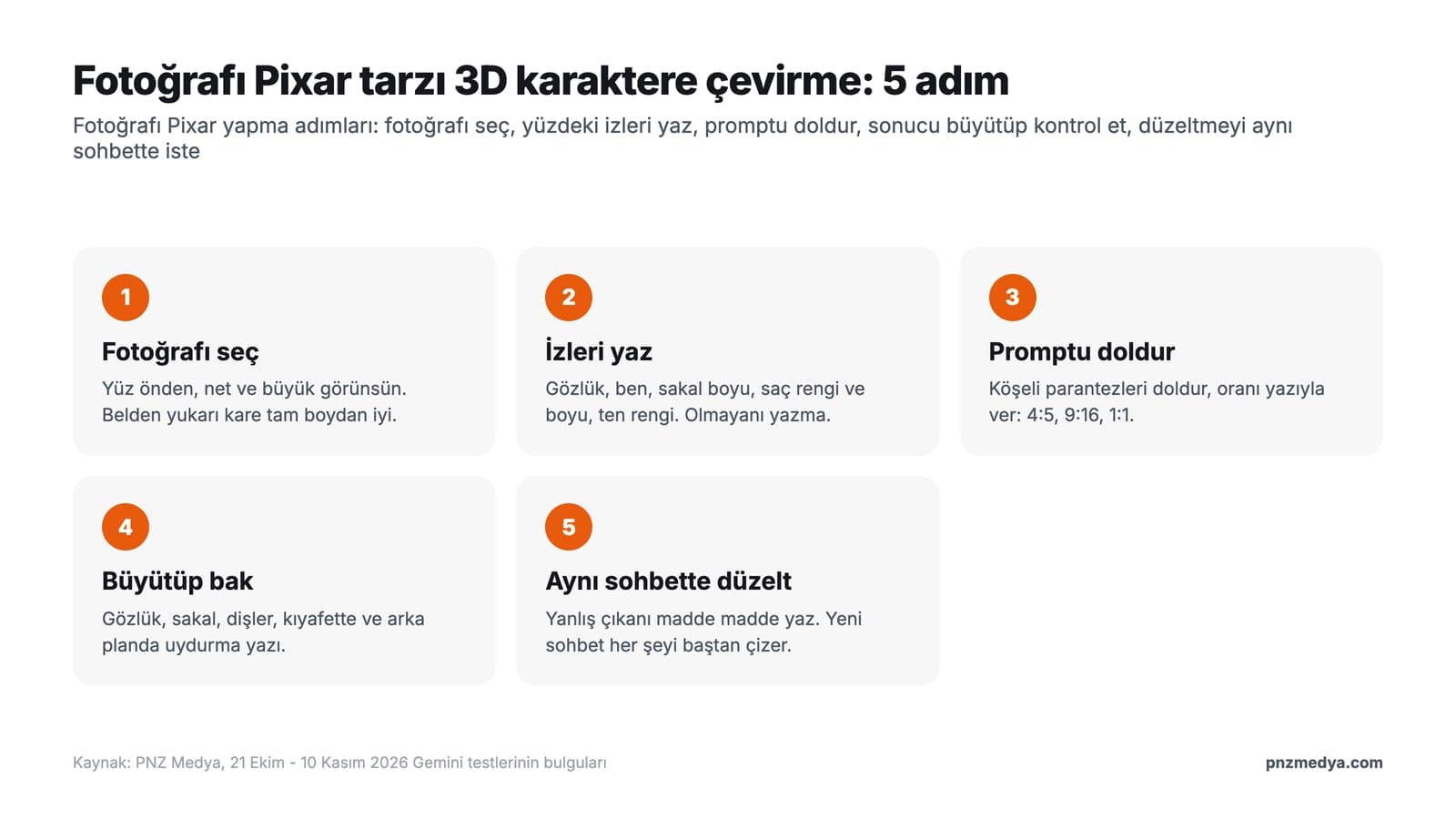
How to Turn a Photo Into Pixar: 5 Steps
- Pick a photo where your face is front-facing, sharp and large. A waist-up shot works better than a full-length one: in our November 3 test, the face took up only 10 to 23% of the frame in full-length shots, and the similarity score dropped from 0.76 in waist-up shots to 0.66.
- List what's on your face: glasses, moles, beard length, hair color and length, skin tone. If you wear a headscarf, write its color and how it's tied. Don't put anything on the list that isn't there.
- Copy a prompt from below, fill in the square brackets and state the aspect ratio in words: portrait 4:5, 9:16 for Reels, 1:1 for a profile picture. If you leave the ratio out, Gemini uses your photo's ratio.
- Zoom in on the result and check the glasses, beard, teeth and any text on the clothing and in the background.
- If something drifted, send Prompt 12 in the same chat. Opening a new chat and asking from scratch makes it redraw the character.
Do You Need to Write "Pixar" in the Prompt?
You don't have to, and writing it is allowed under the rule OpenAI announced. On March 26, 2025, an OpenAI spokesperson told TechCrunch that ChatGPT refuses to copy the style of individual living artists and allows broader studio styles. The Ghibli trend was spreading that week. Pixar is a studio name too.
While ChatGPT refuses to replicate "the style of individual living artists," OpenAI does permit it to replicate "broader studio styles."
In our October 15 caricature test, writing "turn it into Ghibli style" in Gemini and describing the line thickness, color fields and shading gave almost the same image. In the same test, a job title ("in the style of a street caricaturist") brought in the props of that setting: in both of two attempts the image got a frame, a title and a made-up signature, and the ban in the prompt's last line ("do not add text, a signature or a frame") didn't hold. Once we removed the job title and moved the ban to the first line, the single attempt came out with no additions.
That's why the main prompts describe the look instead of naming a studio (soft rounded shapes, slightly large eyes, matte skin) and put the text ban in the first line. We didn't separately measure the word "Pixar" itself in Gemini; for anyone who wants to try it the way people search for it, the short version (Prompt 2) includes the word.
12 Ready-to-Use Pixar Prompts (Copy and Paste)
Fill in the square brackets to match your own photo. If you don't have glasses, a beard or a mole, delete that part; putting something on the list that isn't there can get it added. The prompts were originally written in Turkish, and you can paste these translated versions into ChatGPT or Gemini the same way.
1) Single 3D character (main template)
Redraw the person in the photo I uploaded as a character from a 3D animated film; no text, logo, signature or frame anywhere in the image.
Portrait 4:5, waist up; the character faces the camera head-on.
Style: soft rounded shapes, head and eyes slightly larger than real proportions, matte skin with a light texture, soft studio lighting.
The face should be recognizable from the photo: [list what's on the face one by one, e.g. round black-framed glasses, a mole on the left cheek, thick eyebrows]. Skin tone [medium / fair / dark].
Hair [color], [length, e.g. shoulder length], [texture, e.g. wavy]. Beard and mustache at the same length and shape as in the photo; do not make the beard fuller, do not curl the mustache ends.
Mouth closed, slight smile, teeth not visible.
Clothing in the same color and cut as in the photo, plain fabric. Do not add moles, glasses, headphones or jewelry that aren't in the photo.
Background [e.g. a softly blurred cafe interior]; no one else in the frame.The beard line comes from the 3D test on October 15: when the beard wasn't described it got fuller and the mustache ends curled, while seven of the eight facial features we counted stayed in place. The skin and hair lines come from the mini figure test on October 29. When skin tone wasn't written, Nano Banana Pro drew yellow skin in one of six images; when hair length wasn't written, Lite on the free plan shortened the hair in both of two attempts, and writing "shoulder length, wavy, dark brown" got eight of eight images right.
2) Short version (the viral Pixar prompt)
Turn me in this photo into a 3D animated character that looks like it's from a Pixar film; no text or logo in the image. Portrait 4:5, waist up.
Keep [my hair color and length], [my glasses / beard / mole] and my skin tone the same; mouth closed, teeth not visible.
A plain [color] background instead of the place in the photo; the things in my hands and on my ears are not in this image.This is a three-line version of the one-line texts that circulate on social media as the "Pixar prompt." The last line comes from the November 3 test: a short prompt carried the setting and objects from the input photo into the new image, and a wristwatch moved into the new scene in 19 of 32 images. In the six images where we wrote "hands empty," the watch didn't show up once.
3) Couple in a car (the first frame of the trend)
In the photo I uploaded, two people are sitting in the front seats of a car. Turn both of them into 3D animated film characters in the same spots and the same seating positions; no text, logo, emblem or license plate in the image.
The driver is on the [right / left] from the viewer's side: [hair color and length, glasses, beard, skin tone]. The person next to them: [same description]. If there is a headscarf, keep it in place, color [color], tied the way it is in the photo.
Style: soft rounded shapes, slightly large eyes, matte skin. Both are looking at the camera and smiling, mouths closed; seat belts on.
The car interior is the same color as in the photo; the center of the steering wheel and the dashboard are plain, with no emblem. Daylight comes in through the side window, and outside is a softly blurred road.
Portrait 9:16; only these two people in the frame.The trend video starts from this image. The ratio is 9:16 because Gemini's video takes the ratio of the image you upload. The emblem line comes from our car test on November 2: when the scene changed, Gemini put the brand emblem back on the car. Write who sits where "from the viewer's side"; in the family test on October 16, a relative description like "to their right" came out reversed in both of two attempts.
4) Couple image from two separate photos
I uploaded two photos. Photo 1 is me, photo 2 is [my spouse / my partner]. Draw both of us in the same image as 3D animated film characters; no text or logo in the image.
I'm on the left from the viewer's side, they're on the right; we're standing shoulder to shoulder, both looking at the camera.
My face as in photo 1: [features, hair color and length, skin tone]. Their face as in photo 2: [features, hair color and length, skin tone].
Clothes in the colors from the photos; plain fabric, no text or logo on them.
Setting: [e.g. a seaside road in evening light]. Only the two of us are in the frame. Portrait 4:5.The first sentence says which photo belongs to whom: in the merging test on November 3, a short prompt with no setting written used the first photo's setting in 12 of 12 images. The line "Only the two of us are in the frame" comes from the hug test on November 10; when the background wasn't written, the pedestrians from the first photo also moved into the image. In free Gemini, requests mostly go to Nano Banana 2 Lite, and Google writes that this model isn't designed for multiple reference images. If one of you disappears, use the Prompt 3 template with a single photo of the two of you together.
5) Pixar family from a family photo
There are [4] people in the family photo I uploaded. Turn all of them into 3D animated film characters in the same arrangement; exactly [4] people in the frame, nobody added or removed. No text or logo in the image.
From left to right, from the viewer's side: [person 1: adult / child, hair color and length, glasses, beard or headscarf], [person 2: ...], [person 3: ...], [person 4: ...].
Everyone's clothes in the colors from the photo; the children's height relative to the adults as in the photo.
Style: soft rounded shapes, slightly large eyes, warm, soft light.
Background [e.g. a bright living room]. Landscape 3:2.The head count and the left-to-right order guard against someone being added or swapping places in a crowded image. On November 3, in a prompt where we had a single child drawn, the model added family members and other people on its own in two of three images; once we wrote "only this child is in the frame, no one else," it added no one in three images.
6) Cat or dog character
Turn [my cat / my dog] in the photo I uploaded into a 3D animated film character; no text or names in the image, and the tag on the collar is plain with no writing.
Keep the fur color and markings in place: [e.g. white fur, a brown patch around the left eye from the viewer's side, black tip on the tail]. Eye color [color].
Slightly large, shiny eyes, soft fur texture. Standing on all four legs, wearing no clothes.
Background [e.g. a sunny windowsill]; no other animals or people in the frame. Square 1:1.Write where the markings are from the viewer's side: in the 3D figure test on October 29, with this description the dog's markings were in the right place in six of six images. In the same test, the short prompt "make a 3D figure of my dog" wrote made-up names like "MAX - 2024" and "THE GOOD BOY" on the base and the box. That's what the tag line is for.
7) Your own animated movie poster
Draw the person in the photo I uploaded as the lead character on the poster of a made-up 3D animated film. Portrait 2:3.
The poster has only these two pieces of text, copy them letter for letter: "[MOVIE TITLE]" at the top and "[COMING SOON]" at the bottom. Apart from these, no text, logo, studio name, date or signature.
Character: [facial features, hair color and length, skin tone, glasses or beard]. Mouth closed, a confident smile.
Scene: [e.g. a seaside town at sunset, fishing boats in the background]; the character in the foreground, waist up.
Style: soft rounded shapes, slightly large eyes, warm colors, backlight.Put every piece of text in quotation marks and say "copy exactly"; in the invitation test on October 28, the Turkish letters in six short quoted lines came out right in all 12 attempts (264/264). Don't add a list of letters: in the tattoo test on November 6, a list of special Turkish letters got a letter that wasn't in the name added to the design. Don't have a real movie title or the Pixar logo put on the poster.
8) 3D character with your job
Draw the person in the photo I uploaded as a 3D animated film character at work: [job and scene, e.g. a baker rolling out dough in a bakery]. No signs, labels, text or logos on the counter, the walls or the clothing.
Face: [features]. Hair: [color and length]. Skin: [tone]. Mouth closed, slight smile.
Holding only [a work tool, e.g. a rolling pin]; on the table [2-3 items, e.g. a flour sack and loaves of bread on a tray].
Style: soft rounded shapes, slightly large eyes, warm light. Landscape 3:2, waist up; no one else in the frame.At a workplace, signs and labels are the first text surfaces the model thinks of. In the snow test on November 4, all four images where we asked for "blurry shop signs" came out with a readable made-up sign; when we wrote "no shops, signs, posters or text," it was zero of four. Give the items on the table as a number; if you don't, the model fills the table itself.
9) Pixar character with a headscarf
Turn the person in the photo I uploaded into a 3D animated film character. The headscarf stays in place, color [color], pattern [plain / patterned] and tied the way it is in the photo; not a single strand of hair visible. No text or logo in the image.
Face: [features like a mole, eyebrows, glasses; delete this part if there are none]. Skin tone [tone]. Mouth closed, slight smile.
Clothing in the same color as in the photo, plain fabric.
Style: soft rounded shapes, slightly large eyes, matte skin.
Background [e.g. a balcony with flowers]. Portrait 4:5, waist up.The headscarf line comes from two tests. On October 30, the 80s trend prompt (it asked for "big hair") uncovered the hair of the person wearing a headscarf in six of six images; with the sentence "keep the headscarf in place, not a single strand of hair visible" it was zero of six. In the snow trend on November 4, the prompt mentioned a black scarf, so the headscarf turned black in 7 of 8 attempts; writing the color and how it's tied on a separate line got 3 of 3 right. On November 5, a generic "keep glasses, moles, headscarf the same" list put glasses on a person in a headscarf who wears none, in four of four images.
10) Singing-in-the-car video (Gemini Omni)
Animate the two 3D animated characters in the image I uploaded in an 8-second video. One continuous shot; no scene cuts or camera transitions, the camera is fixed behind the windshield.
Both nod their heads to the beat of the music and open and close their mouths as if singing; the driver holds the steering wheel with one hand, and the person next to them raises one arm in the air.
Faces, hair, clothes and the car interior stay as in the image; no new people, text or logos.
Audio: light road noise and upbeat instrumental music; no talking and no song lyrics.This prompt needs a paid Google AI plan in Gemini; the video is 3 to 10 seconds, and up to 15 seconds on AI Ultra. According to Google's Omni documentation, the model tries to build a video with several shots by default, so for a single scene you have to write "one continuous shot." We left out the song title on purpose: add the song from Instagram's audio library when you upload the Reel. We did not try the video prompt ourselves.
11) Pixar-style profile picture
Draw a profile picture in the style of a 3D animated film from the photo I uploaded. The background is a flat [color, e.g. light turquoise #8FD3D0] all the way to the edges; no pattern, shadow, text, logo or frame.
Square 1:1; head and shoulders centered, with space around the edges.
Face: [features]; hair [color, length, texture]; skin [tone]. Closed-mouth smile, teeth not visible.
Style: soft rounded shapes, slightly large eyes, matte skin, soft front light.In most apps a profile picture shows up in a small circle; with the head centered, the circular crop won't cut off the hair or the chin. Give the background as a color code: in the plan comparison on November 10, when we asked for a T-shirt color by code, the free model came closest to the target (color difference ΔE 4.5, versus 13.8 on Nano Banana 2).
12) Fix-up message (same chat)
In this image, these came out different from the photo; fix only these:
- [e.g. glasses missing: put the round black-framed glasses back]
- [e.g. beard too full: make it short stubble]
- [e.g. hair got shorter: shoulder length, wavy, dark brown]
Keep the rest of the character, the style, the background and the framing the same; do not add text or logos.Send it in the chat where the image was generated and keep only the items that came out wrong. In the realistic portrait test on November 3, the message "you changed my face, fix it" left the similarity score where it was (average 0.72), while a fix that listed the lost features one by one raised it to 0.84. Google writes that the Lite model isn't designed for back-to-back edits either; if it still drifts after two fixes, fill in Prompt 1 from scratch in a new chat.
Look at the photo first: a photo of a well-known person or a child can be a reason for refusal. According to OpenAI's GPT-4o image generation system card, ChatGPT uses a classifier to estimate whether an uploaded photo contains a child. If the prompt names a real movie character, remove the name and describe the character by how they look.
What Drifts in Style Conversion? A Table From Earlier Tests
| What drifts | Test | Without the line | With the line | Line in the prompt |
|---|---|---|---|---|
| Made-up text and names | 3D figure, October 29 | 8 of 20 images | 1 of 12 images | No text, names or logos in the image |
| A mole that isn't there | Emoji, November 5 | 8 of 11 images | 1 of 16 images | Do not add moles ... that aren't in the photo |
| Headscarf color | Snow trend, November 4 | Black in 7 of 8 attempts | 0 of 3 attempts | Color and how it's tied on a separate line |
| Hair showing from the headscarf | 80s trend, October 30 | 6 of 6 images | 0 of 6 images | Headscarf in place, hair not visible |
| Yellow skin (Pro) | Mini figure, October 29 | 1 of 6 images | 0 of 6 images | Skin tone [tone] |
| Toothy smile (Nano Banana 2) | Face preservation, November 3 | 5 of 6 images with the short prompt | 0 of 9 images with the main prompt | Mouth closed, teeth not visible |
| Wristwatch in the new scene | Face preservation, November 3 | 19 of 32 images | 0 of 6 images | Objects not in this image, hands empty |
The numbers in the table come from realistic edits and stylized figures; the same gaps are left open in a 3D character conversion, but we didn't count the prompts in this post separately. Measuring face similarity by machine is also hard on a stylized image: on the October 29 mini figures, OpenCV's SFace score stayed below 0.10, meaning the face recognition model didn't count the cartoonized face as the same person. Check the resemblance by eye, feature by feature; every feature you write in the prompt is also your checklist.
3D Pixar Trend: How to Make the Singing-in-the-Car Video
In the trend going around Instagram Reels, a couple's selfie taken in the front seats of a car turns into animated characters, and the two nod along to a song. According to Dijipedya's September 27, 2026 guide, the trend has no single filter name; on social media it's called the "Pixar trend," and most of the videos come from CapCut templates. Besides couples, friends, siblings, and mothers with their kids are making the same image.
- Choose a photo taken in the car, in daylight, where both faces are front-facing and sharp. No sunglasses or hats covering the face.
- Draw the 9:16 character image with Prompt 3; zoom in to check the glasses, hair and steering wheel.
- If you have a paid Google AI plan, send Prompt 10 in the same chat. Gemini Omni turns the image into a 3 to 10 second video and can extend it by another 10 seconds in the same chat if needed.
- If you don't have a plan, go to the Templates section in CapCut and search for "Pixar car" or "AI Pixar"; upload your own photo or the image from Prompt 3 into the template.
- Add the song from Instagram's audio library when you upload the Reel.
A template is the quicker route if you want the lips to match the song. Gemini Omni generates the video's audio itself, and the mouth movement may not match a song added afterward. We did not generate the video ourselves; we took Omni's length and plan limits from Google's help page, which we read on November 11, 2026.
Can You Make a Pixar-Style Photo With Free Gemini?
For a single character, yes. According to Google's help page, images download at 1K on an account with no plan and at 2K with a Google AI plan; paid plans also get Nano Banana Pro through "Redo with Pro." On an account with no plan, most requests go to Nano Banana 2 Lite. In our plan comparison on November 10, with a prompt that described the face feature by feature, the three models' similarity scores came out nearly identical: 0.765, 0.767 and 0.768.
Two jobs on this list push the free model hard: merging two separate photos (Prompt 4) and back-to-back fixes (Prompt 12). Video (Prompt 10) is available only on a paid plan. We didn't try ChatGPT for this post; the prompts were originally written in Turkish, and you can paste these translated versions into ChatGPT as well.
Common Mistakes
- Writing only "make me a Pixar character." The model draws the beard, hair and skin its own way and may put text on empty surfaces.
- Putting a feature on the list that isn't on your face. Write "keep the mole and glasses the same" and a face with no mole can get one, a face with no glasses can get glasses.
- Putting the text ban at the very end of the prompt. In our caricature test, the ban on the last line didn't hold; move it to the first line.
- Uploading a full-length photo. The smaller the face, the lower the resemblance; get the waist-up image first, then widen it if needed.
- Asking for the sign in the background to be blurry. The model draws a readable made-up sign; write "no signs or text."
- Opening a new chat for a fix. Stay in the same chat and list only what came out wrong, item by item.
Before You Share: Age Limits, Children's Photos and the Pixar Name
To generate images in Gemini you have to be at least 13, and to edit a photo you upload you have to be at least 18 (Google help page, November 11, 2026). The same page asks you not to violate other people's copyright and privacy rights, and the video help page says to upload only photos you have the right to use.
Get permission before uploading someone else's photo; under KVKK, Turkey's data protection law, a photo of a face is personal data. Share your child's character within the family; every image sent to a school group also lands on other families' phones. The Pixar and Disney names and their film characters belong to those companies: don't use your image with the "Pixar" name on a product, a menu or an ad, and don't put a real movie title or logo on the poster.
For the image, yes. Upload the photo to Gemini with a Google account and send Prompt 1; on an account with no plan, the image downloads at 1K. Gemini Omni, which turns the image into a singing video, requires a paid Google AI plan.
"Pixar prompt" is the name for the prompt text going around social media. You upload the photo to a Gemini or ChatGPT chat and paste the text into the same message. In this post, Prompt 2 is the short text and Prompt 1 is the longer version that keeps your face.
On March 26, 2025, OpenAI told TechCrunch that ChatGPT refuses the styles of living artists and allows studio styles. The prompts in this post were originally written in Turkish, and you can paste these translated versions into ChatGPT the same way; we did not test ChatGPT ourselves.
Send Prompt 12 in the same chat and list the features that came out different one by one: glasses, beard length, hair color and length, skin tone. In our November 3 test, a fix that listed features raised similarity from 0.72 to 0.84; just saying "fix it" left it where it was.
Turn a sharp photo of a couple taken in a car into a 9:16 character image with Prompt 3. If you have a paid Google AI plan, turn it into a video in Gemini with Prompt 10; if not, upload the photo to the "Pixar car" template in CapCut. Add the song when you post the Reel.
To edit photos in Gemini, you need to be at least 18. In ChatGPT, a request with a child's photo may be refused; OpenAI writes that it uses a classifier to estimate whether a photo contains a child. Share the result within the family.
When we had the two cover characters drawn, we described the driver as "on the right from the viewer's side": with the camera facing the car from the front, the driver of a left-hand-drive car appears on the right of the frame. In your own photo, write who sits where as the camera sees it, too.
Professional Photography Service
A Pixar-style character is fine for social media; your website, menu or catalog needs a real photo shoot. We plan the shoot and deliver the photos. Let's talk about what you need in a free initial call.