



How to Change Clothes in a Photo with AI: 12 Gemini Prompts
12 ready-to-use prompts for changing clothes with AI: describe the outfit in text, put on clothes from a product photo, use a color code, try three outfits and dress a model. We tested them in Gemini with 28 images; the buttons came out right in every frame, and the old leggings came back once.
- In 8 of 8 edits where we described the new outfit in text, Gemini drew the requested clothes; the man's glasses and the bicycle behind him stayed in place in every frame. The woman's watch was visible in 3 of 4 frames.
- Putting on clothes from a second photo kept the details: the burgundy jacket's 6 gold buttons came out right in 4 of 4 frames, and the daisy dress's 5 buttons and Peter Pan collar in 6 of 6.
- If you don't say the old outfit has to go, it can come back. When we only asked for the dress to be put on, Nano Banana 2 left the black leggings under the dress; with a line saying the leggings must be removed completely, they were gone.
- "Make the T-shirt red" came out burgundy in Lite and bright red in Nano Banana 2. With a color code (#D2452F), Lite got within 4.5 ΔE of the target, hard to tell apart by eye; Nano Banana 2 stayed at 13.8.
- Nano Banana 2 redrew the edges of the background in the woman's photo (22% of pixels changed on the left edge, versus 1.7% in Lite), and with the detailed prompt it put her hands on her hips even though we wrote "keep the arm position the same."
To change the clothes in a photo with AI you need two things: a photo where your outfit is visible from head to toe, and either a written description or a photo of the new outfit. Upload the photo to Gemini or ChatGPT and paste one of the prompts below. If you want to see a jacket from a store on yourself, add the product photo as a second image.
We tested the prompts ourselves on October 22, 2026, using the original Turkish versions; the English prompts below are our translations. With Gemini Pro we generated four fictional inputs: a woman with short black hair and bangs, silver hoop earrings and a black-strap watch on her left wrist, wearing a gray hoodie and black leggings; a man with round glasses in a navy T-shirt and gray sweatpants; a burgundy double-breasted jacket with six gold buttons; and a sage green dress with a daisy print, a Peter Pan collar and five buttons. Then we ran 24 edits on two Gemini models (Nano Banana 2 Lite and Nano Banana 2), counted the buttons one by one, and measured color and background at the pixel level.
How to Change Clothes in a Photo with AI: 5 Steps
- Pick the photo. Standing, facing the camera, arms at your sides is the cleanest; make sure the point where the outfit ends (shoes, hem) is in the frame. In a photo with crossed arms, the model has to invent the sleeves of the new outfit.
- Pick the route. If you'll describe the outfit in words, use Prompts 1 and 2; if you have a product photo, Prompts 3 and 4. To change only the color, use Prompt 5.
- Describe the outfit from top to bottom: top, bottoms, shoes. In our test, any piece we left out, the model took from the input.
- Name the clothes that should go: "remove the gray hoodie, its drawstrings and the black leggings completely". List what should stay too: glasses, watch, earrings, two or three objects in the background.
- Check the result from the bottom up. Most errors showed up at the hem, the shoes and the edges; the face almost never broke.
Not mentioning the old outfit. In the short prompt we only asked for the dress to be put on; Nano Banana 2 left the woman's black leggings under the dress. When we added "remove the black leggings completely, legs bare" to the end of the same prompt, both models removed the leggings.
Outfit Change Prompts: 12 Ready-to-Use Prompts for Gemini and ChatGPT
Fill in the bracketed fields to match your photo and leave the rest as is. When giving directions, saying "right from the viewer's side" works; if you write "watch on my right wrist," the model can't tell whose right you mean. Under each prompt we noted what happened in the test, or that it wasn't tested.
1) Change clothes with a text description (general template)
Change the clothes of the person in the photo I uploaded.
New outfit, top to bottom: [a long camel trench coat], under it [a white turtleneck sweater], on the bottom [dark navy straight-leg jeans], on the feet [brown leather boots].
Clothes to remove: [the gray hoodie and its drawstrings], [the black leggings], [the white sneakers]. No part of them should be visible.
Keep: the face, the hair, [the silver earrings] and [the watch on the left wrist] exactly as they are.
Pose: keep the arms and hands where they are in the photo; do not put the hands in the pockets or on the hips.
Keep the background and framing the same: [yellow wall, green door, potted olive tree].
Realistic photo, vertical.The short prompt (only the meaning of the first two lines) drew the outfit cleanly on both models. With the detailed prompt, Nano Banana 2 put the woman's hands on her hips and the watch disappeared; that's why we added the "do not put the hands in the pockets or on the hips" line afterward, and we didn't test that version. In Lite's four frames, pose and background matched the input.
2) Put a suit on someone
Dress the man in the photo I uploaded in a [navy], [single-button] suit: [white shirt, top button open, no tie], [brown leather shoes].
Clothes to remove: [the navy T-shirt], [the gray sweatpants], [the black sneakers].
Keep the face, beard, hair and [round black-framed glasses] exactly as they are.
Do not change the pose, the arm and hand position or the framing. Keep the [brick wall, yellow bicycle and wall lamp] in the background the same.
The jacket should sit on the shoulders, and the trouser hem should break over the shoes.
Realistic photo, vertical.All four frames worked: glasses, beard, bicycle and lamp in place, shoes brown. The short prompt gave the same result. In this photo the pose was straight and the arms were at his sides, so the model did little more than repaint the clothes. The last line (shoulders and hem) was added after the test.
3) Put on clothes from another photo
Dress the person in the first photo in the [burgundy double-breasted jacket] from the second photo.
Keep the jacket as it is in the second photo: same color, [peak lapels], [six gold buttons (two rows of three)], [two flap pockets and a chest pocket]. Do not add or remove buttons.
The jacket should be buttoned at the front. Keep the [navy T-shirt] underneath; do not change the [gray sweatpants] and [black sneakers].
Keep the face, hair and [glasses] exactly as they are.
Keep the pose, framing and background the same.
Realistic photo, vertical.Upload the person's photo first, then the product photo; the prompt refers to them as "first" and "second." This was the result that surprised us most: even the one-sentence prompt "put the jacket from the second photo on him" carried over the six buttons, the peak lapels and the three pockets correctly on both models. The product photo does the job of a description. The detailed lines didn't change the result in this test, but they help if you don't have a clear product photo.
4) Put on a patterned dress
Dress the woman in the first photo in the dress from the second photo.
Keep the dress as it is in the second photo: [sage green fabric], [small white daisy print], [round white Peter Pan collar], [short puff sleeves], [thin belt with a bow at the waist], [five small white buttons down the front], [knee-length flared skirt].
Clothes to remove: remove [the gray hoodie] and [the black leggings] completely, legs bare under the dress; keep the [white sneakers] on her feet.
The skirt should end at the knee as in the product photo; do not shorten it.
Keep the face, hair, [earrings] and [watch] exactly as they are. Keep the pose, framing and background the same.
Realistic photo, vertical.Print, collar, puff sleeves, bow and five buttons were right in all four frames. Two problems came up. With the short prompt, Nano Banana 2 left the black leggings in. And in all four frames the skirt came out shorter than the knee length in the product photo, ending above the knee (judged by eye); that's why we added the length line, and we didn't test with it.
5) Change only the color of a piece of clothing
Change the color of the [navy T-shirt] worn by the person in the photo I uploaded to [tomato red] ([#D2452F]).
Only this piece should change color: keep its cut, wrinkles, collar and shadows the same.
Do not change the [gray sweatpants], shoes, face, skin tone, lighting or background.
Realistic photo, vertical.The color code changed the result most. With the code-free "make it red" prompt, Lite dyed the T-shirt dark burgundy (RGB 148, 30, 41) and Nano Banana 2 bright red (212, 25, 44). With the code, Lite got within 4.5 ΔE of the target, while Nano Banana 2 stayed at 13.8. In all four frames the difference in the sweatpants area stayed between 4 and 6; that's the noise level left by re-saving the image, so only the T-shirt really changed. You can take the color code from a product page or your phone's color picker.
6) Try three outfits side by side
Show the person in this photo in three separate frames side by side, with the same background and the same pose. Each frame should have a different outfit:
1) [camel trench coat, white sweater, jeans, brown boots]
2) [black leather jacket, striped T-shirt, black trousers, black boots]
3) [burgundy knit cardigan, cream midi skirt, cream ballet flats]
Draw the shoes separately in each frame; do not use the shoes from the input.
Keep the face, hair, [earrings] and [watch] the same in all three frames.
Do not add frame numbers or text. Realistic photo, horizontal.Both models drew the three frames in the right order with the same face and added no text or numbers. In the test we hadn't specified shoes: Nano Banana 2 put the white sneakers from the input on all three outfits, Lite on one. That's why shoes and the sentence "do not use the shoes from the input" went into the outfit lines; we didn't test that version.
7) Put clothes on a model or mannequin (e-commerce)
Show this [dress] on a real [female] model for an e-commerce product photo.
Background: plain [light gray] studio, no other objects and no text.
Model standing facing the camera, arms at her sides, visible [down to below the knee], face simple and natural.
Keep the product exactly as it is: [sage green fabric], [white daisy print], [Peter Pan collar], [puff sleeves], [belt with a bow], [five buttons down the front]. The print, the number of buttons and the skirt length should match the product photo.
Realistic photo, vertical.As input we gave only the flat-lay product photo. Both models kept the five buttons, the collar and the print; Lite added nude sandals to the model's feet, and Nano Banana 2 cropped the frame below the knee. If your product photo doesn't show the back, the model will make up the back view; the same thing happened in the label test in our product photo post. Before using this image as the main photo on a marketplace, check that marketplace's rules.
8) Change the season: winter clothes on a summer photo
Dress the person in the photo I uploaded in winter clothes: [navy wool coat], [gray wool scarf], [dark gray wool trousers], [black leather boots].
Clothes to remove: [short-sleeved T-shirt], [shorts], [sandals]; no bare arms or legs should remain.
Keep the face, hair and [glasses] exactly as they are. Keep the pose and framing the same.
Keep the background the same place, but make the light cold and soft like a winter afternoon; add [a thin layer of snow] on the ground.
Realistic photo, vertical.Not tested. This is the only prompt that also changes the background. We put the light and snow on a separate line so the model doesn't pull the face into a cold tone along with the clothes. In the test, Lite kept the background best.
9) Matching couple outfits
Dress the woman in the first photo and the man in the second photo in matching outfits and show them side by side in the same frame, [in front of a cafe].
Woman: [cream knit sweater], [light blue jeans], [white sneakers].
Man: [cream knit sweater], [dark navy jeans], [white sneakers].
No piece of either person's original clothing should remain.
Keep their faces, hair, [the woman's earrings] and [the man's glasses] exactly as they are.
Woman [on the left from the viewer's side], man on the right; both looking at the camera.
Realistic photo, vertical.Not tested. Our couple prompts that merge two separate photos held up in the maternity shoot test; there too, the person whose clothes we didn't describe came out in their input outfit. That's why we described both people's clothes from top to bottom.
10) Put on a modest hijab outfit
Dress the woman in the photo I uploaded in a modest hijab outfit: [long beige trench coat], under it [a long cream tunic], [cream wide-leg trousers], on her head [a plain tan hijab scarf], on her feet [brown ballet flats].
The scarf should cover all of the hair and the neck and sit neatly around the face.
The arms should be covered down to the wrists. No piece of the original outfit should remain.
Keep the face exactly as it is; do not touch the face shape or eyebrows.
Keep the pose, framing and background the same.
Realistic photo, vertical.Not tested. Going from a photo with visible hair to a headscarf frame, the model has to cover the hair, so we spelled out what the scarf should cover (hair, neck, wrists). With bangs, the bangs may peek out from under the scarf; check the top of the forehead in the output.
11) Outfit ideas based on a photo (text)
Suggest three outfits to wear with the [burgundy double-breasted jacket] in the photo I uploaded.
For each outfit, list a top, bottoms, shoes and one accessory; say in one sentence what setting it suits ([business meeting], [weekend], [dinner]).
Choose colors based on the jacket's color and say which tone of the jacket each one matches.
Do not include brand names or prices.
Then I'll tell you which outfit I like, and I'll ask you to put it on the person in the photo.Text prompt, not tested. The last line is there so you can turn the suggestion into an image in the same chat with Prompt 3 or Prompt 1. The ban on brands and prices keeps the model from listing products that don't exist or prices that are out of date.
12) If the old outfit came back: a fix-up message
In the last image, [black leggings under the dress] are visible. Remove them completely: [bare legs], with [white sneakers] on the feet.
Do not change anything else: keep the dress, face, hair, pose and background as they are in the last image.Not tested. Send it as a second message in the same chat. In our black-and-white photo test, a second correction message cut the leftover color in half but didn't remove it; if the fix doesn't work, it's faster to rerun the first prompt from scratch, naming the clothes that should go.
Use these prompts only on your own photos or on photos of people who gave you permission. If the model refuses an edit, don't push the prompt; try a different photo.
Our Test: Short Prompt or Detailed Prompt?
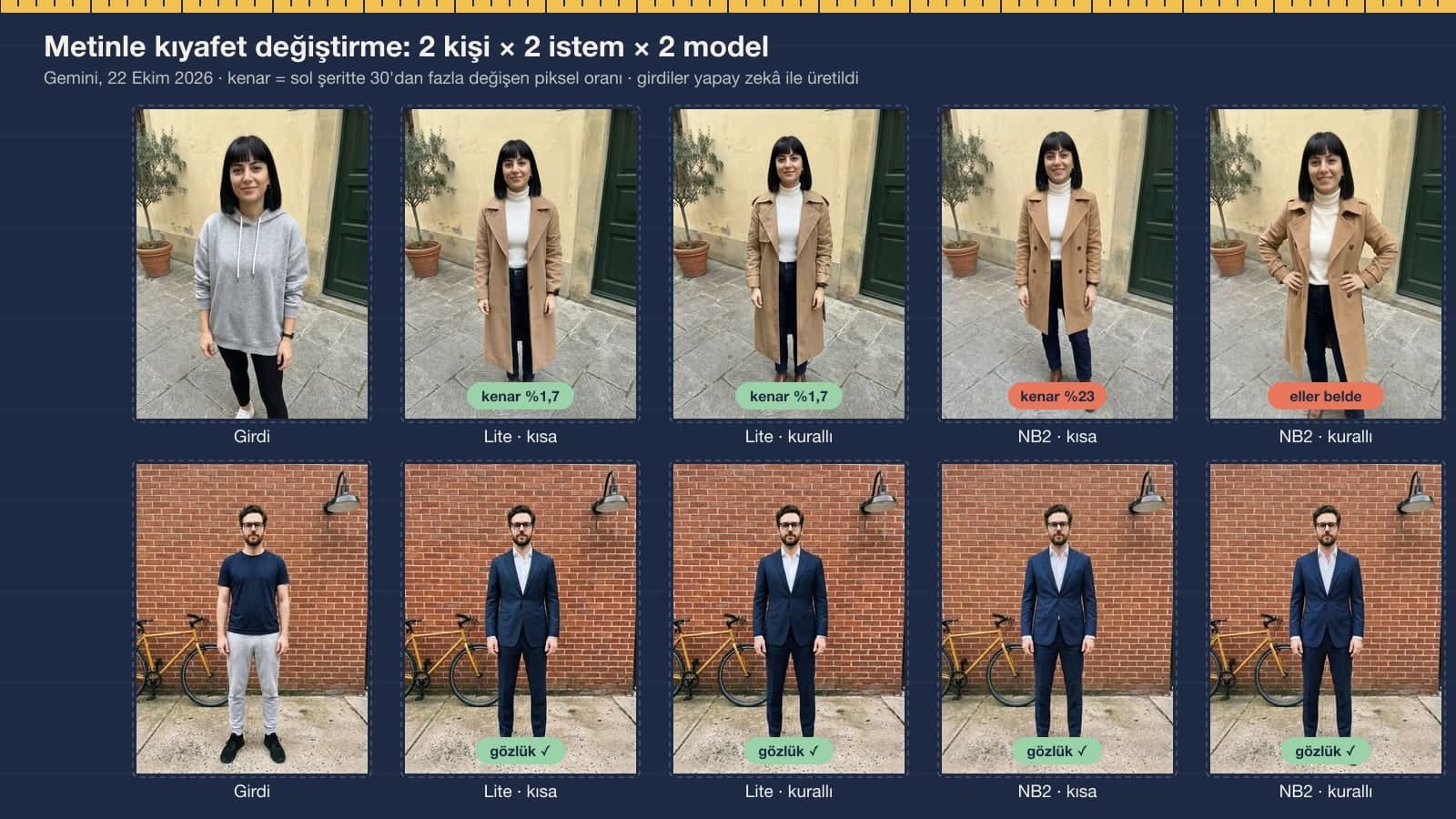
We gave every edit in two forms, both in Turkish. The short prompt was a single sentence, like the prompts shared on social media. In the detailed prompt we named the clothes to remove and listed the details to keep (glasses, watch, earrings) plus three objects in the background. To measure the background, we took a 15% strip from the left and right edges of each output and compared it pixel by pixel with the input.
| What we measured | Lite, short | Lite, detailed | Nano Banana 2, short | Nano Banana 2, detailed |
|---|---|---|---|---|
| Requested outfit drawn (text + try-on) | 4/4 | 4/4 | 4/4 | 4/4 |
| Glasses in place (man, text + try-on + color) | 3/3 | 3/3 | 3/3 | 3/3 |
| Watch visible (woman, text + try-on) | 2/2 | 2/2 | 2/2 | 1/2 |
| Button count correct (jacket 6, dress 5) | 2/2 | 2/2 | 2/2 | 2/2 |
| Input clothing left behind | 0/4 | 0/4 | 1/4 (leggings) | 0/4 |
| Pose broken | 0/4 | 0/4 | 0/4 | 1/4 (hands on hips) |
| Woman, text edit: changed pixels at the edges | 1.7% | 1.7% | 23% | 22% |
| T-shirt color, distance from target (ΔE) | 26 ("red") | 4.5 (with code) | 14.2 ("red") | 13.8 (with code) |
The detailed lines weren't needed to protect the face; the glasses and the watch stayed in place with the short prompt too. The difference showed up in two places: leftover clothing and color. The "remove the leggings completely" sentence removed the leggings, and the color code brought Lite to the target. Nano Banana 2's shift in the woman's photo appeared with both prompts; the door and the planter stayed in place, but the wall and paving stones at the edges were redrawn. In the man's photo, the edge difference stayed under 2% for both models.
Trying On Clothes from a Product Photo: Buttons, Print, Skirt Length

- Jacket: in 4 of 4 frames, six gold buttons in two rows of three, peak lapels, two flap pockets and the chest pocket came out right. In Lite's short-prompt frame, the bottom left button is half hidden under a fold of fabric.
- Dress: in 4 of 4 frames, five buttons, Peter Pan collar, puff sleeves, bow belt and daisy print in place. On the model (Prompt 7) it was 2/2 as well.
- Skirt length: the skirt, knee-length in the product photo, ended above the knee in all four frames. The model reads the fabric length from the product photo, but it gets shorter when scaled to the person's height.
- Leakage: the only error was the black leggings left in with Nano Banana 2's short prompt. Lite drew bare legs with both prompts.
In our birthday test, Gemini counted 16 candles correctly in only one of 8 tries. Here there was no error in button count. The source explains the difference: here the model copied the number from a photo it was given. If you have a detail where the count matters (buttons, stripes, pockets), give the model a photo of it.
Changing Clothing Color: Color Name or Color Code?

A color name is open to interpretation. When we said "red," the two models picked two different reds, and both were far from tomato red. With the color code (#D2452F), Lite's T-shirt measured RGB 203, 69, 51 in the area we sampled; the target is 210, 69, 47. Nano Banana 2 gave a darker tone leaning toward orange (173, 58, 40). The T-shirt's wrinkles and collar seam stayed as in the input in all four frames.
The three-outfits-side-by-side frame was tested with the same two models. Face, earrings and hair were consistent across all three frames. The only flaw was the shoes: when the outfit line didn't list shoes, the model used the ones from the input.
Which Model Runs in Gemini? Free vs. Paid Account
| Account | Model that draws the image | What happened in the clothes test |
|---|---|---|
| No plan (free) | Mostly Nano Banana 2 Lite | Kept the background best, closest to target with the color code (ΔE 4.5), average 10.8 s |
| Paid plan, Flash or Pro setting | Nano Banana 2 | 1 leggings leak, 1 hands on hips, framing shift in the woman's photo; average 16.4 s |
| Paid plan, "Redo with Pro" | Nano Banana Pro | In this round we only used it to generate the inputs |
| API (developer) | All three selectable | 1K image: $0.034 / $0.067 / $0.134 |
According to Google's help page, accounts without a plan have run only on the "Auto" setting since October 9, 2026, and most image requests go to Nano Banana 2 Lite. In this test, the free account's model made fewer mistakes when changing clothes. We didn't test ChatGPT in this round; you can paste the prompts there as well. The test's API cost, inputs included, came to about $1.80.
Before You Share: Whose Photo Is It?
Trying on clothes in your own photo is personal use. Uploading a friend's or a stranger's photo and changing their clothes is another matter: the Generative AI guide published in November 2025 by KVKK, Turkey's data protection authority (p. 57), recommends taking care not to share third parties' data with these systems. Gemini adds an invisible SynthID mark to every image. Saying in your post that you made the outfit image with AI also keeps people from thinking you actually bought the clothes.
Upload a photo where you're visible from head to toe to Gemini or ChatGPT and describe the new outfit from top to bottom. Name the old clothes that should be removed; in our test, leggings we didn't mention stayed under the new dress.
It's the text you send to Gemini with your photo, describing the new outfit, the clothes to remove and the details to keep. Prompts 1-7 were tested in Gemini in their original Turkish versions; across 24 edits, the face and glasses never broke.
Yes. Upload your own photo first, then the product photo of the clothing, and use Prompt 3. In the test, the jacket's six buttons and the dress's five buttons carried over correctly in every frame; the skirt, however, got shorter and ended above the knee.
Yes; you can paste the same prompts into ChatGPT and add the product photo there as a second image too. In this round we tested only Gemini and didn't measure ChatGPT results.
Use Prompt 5 with a color code. "Make it red" gave two different reds on the two models; with the #D2452F code, Lite got within 4.5 ΔE of the target. You can take the code from the product page or your phone's color picker.
Yes, you can do it with a Gemini account without a plan. On that account the image is mostly drawn by Nano Banana 2 Lite, and in the test it kept the background best. Paid plans have higher daily usage limits.
For trying on wedding dresses and suits, the prompts in our wedding photo post are a better fit; if you want to show a product on a white background for a marketplace, our product photo post has pixel measurements for 18 outputs.
Next time, look at the shoes first. In this test the face never broke; most errors were below the knee: leftover leggings, a shorter skirt, and white sneakers put on all three outfits.
Real Photo Shoots for Apparel
AI is a quick start for trying outfits and making social media images. On a sales page, though, fabric texture, color and length should look the way they really are. We shoot your apparel on mannequins, on models and as flat lays, with lighting that gets colors right, and deliver in marketplace sizes. Write to us for a free initial consultation.