



AI Drawing Prompts: Turn a Photo Into a Sketch in ChatGPT and Gemini
12 ready-to-use AI drawing prompts: turn a photo into line art or a pencil sketch, make a one line drawing, turn a child's drawing into a photo, clean up a sketch. We tested them in Gemini with 32 images; the short prompt gave a colored picture in 3 of 4 attempts.
- When we wrote only "Turn this photo into a drawing", Gemini returned a colored, painted picture in three of four attempts. The prompt that named the pen and the paper and ruled out color drew only black lines in all four.
- In the detailed line art, the 8 windows on the mansion's front facade stayed in place and in the same number on both models.
- "Make it a pencil sketch" brought cream, sepia-leaning paper on both models. With the line "graphite gray, no color at all" the paper turned neutral gray and the red geranium was drawn in a dark gray tone.
- For a one line drawing, the short prompt gave 4, 10 and 9 separate pieces; when we described it "as if the pen never left the paper", Lite and Pro drew a single piece and Nano Banana 2 drew two.
- Turning a child's drawing into a photo, Lite kept the five apples but left the dog and the flowers looking like a cartoon. Nano Banana 2 made the whole scene a real photo and raised the apples to 7.
- The model added a signature on its own to 2 of the 15 images made with short prompts; the 15 images whose prompt said "do not add a signature" had none.
The most surprising thing about drawing with AI is what a short prompt gives you. When we uploaded a photo to Gemini and wrote only "Turn this photo into a drawing", three of four attempts came back as a colored, painted picture. A longer prompt that listed the paper, the pen and the things to leave out gave black lines on white paper in all four attempts.
Below are 12 ready-to-use AI drawing prompts: turning a photo into line art and into a pencil sketch, one line drawing, an architectural sketch, an ink and watercolor sketchbook page, turning a child's drawing into a photo, cleaning up a sketch on paper, and a step page for people learning to draw. On October 22, 2026 we tested six of them on three Gemini models with 32 images; we counted line segments, apples and windows, and measured the paper color from the pixels. The tests used the original Turkish prompts, so the short prompts quoted here are our translations. You can paste the prompts into ChatGPT as they are. We did not measure ChatGPT in this round.
How to Draw With AI: 5 Steps
- Pick the job. If a photo you have is going to become a drawing, upload it; if you want a drawing from a blank page, text alone is enough.
- Name the pen: black ink pen, pencil (HB, 4B), felt-tip marker or watercolor. In Gemini, the word "drawing" on its own can also mean a colored picture.
- Describe the paper: "plain white paper all the way to the edges". When we left it out, we got cream or sepia paper, a desk and a pen.
- Write what must be kept, with numbers: how many windows, how many steps, how many apples. Then count them in the output.
- End with the line "do not add a signature or text" and check the corners of the image. The model usually puts the signature in the bottom right, in thin writing.
According to Google's help page, a Gemini account without a plan has run only on the "Auto" setting since October 9, 2026, and Nano Banana 2 Lite handles most of its image requests. On a paid plan Nano Banana 2 draws, and the "Redo with Pro" button hands the job to Nano Banana Pro. The three columns in the test are these three models.
12 Ready-to-Use AI Drawing Prompts (ChatGPT and Gemini)
Replace the parts in square brackets to match your own photo. For prompts that work from a photo, attach the image first, then paste the text. Under each prompt we noted whether it was tested.
1) Turn a photo into line art
Turn this photo into clean line art drawn with a black ink pen.
The image is plain white paper all the way to the edges, with only black lines on it: no gray tones, no shaded fill, no hatching and no color.
Draw every [window, door, step and ornament] from the photo in the same place and in the same number.
Do not add any object, text or signature that is not in the photo.
Keep the framing and perspective the same as in the photo.Tested (mansion and cat, Lite and Nano Banana 2). All four results had zero colored pixels, and the mansion's eight windows stayed in place. For the cat photo we filled the brackets with "the cat's pose, the flowerpot and the window panes".
2) Turn a photo into a pencil sketch
Turn this photo into a realistic pencil sketch drawn with graphite pencils ([HB and 4B]).
The image is white drawing paper all the way to the edges; only graphite gray tones and the white of the paper, no color at all: draw the [red flowers] in a dark gray tone too.
The light comes from [the window]; render the shadows with hatching.
Keep [the cat's pose, the flowerpot and the window] where they are in the photo.
Do not add a signature, text, pencils or a desk.Tested. On both models the paper came out neutral gray. Naming the brightest colored object in the photo (here the red geranium) worked: with the short prompt the flower stayed light gray, almost faded; with this line it was drawn close to its darkness in the input. For portrait pencil sketches, Prompt 6 in our photo-to-cartoon post also lists the marks on the face to keep.
3) One line drawing
Make a minimal drawing done with a single continuous line (one line drawing): [a sitting cat with a coffee cup next to it].
As if the pen never left the paper: the line has one starting end and one finishing end, with no breaks in between, and [the cat and the cup] are joined by the same line.
Thin black line, plain white paper all the way to the edges; no fill, shading, color, text or signature.Tested (Lite, Nano Banana 2, Pro). Good for a tattoo sketch, a wall poster or the corner of an invitation. If you don't spell out that the two objects connect, the cup gets drawn as a separate piece.
4) Turn a building into an architectural sketch
Turn the building in this photo into a quick sketch an architect drew in their sketchbook with a pencil and a fine black felt-tip pen.
Let the horizon line and the perspective guide lines show faintly; main outlines dark, details in thin lines.
Keep [the number and layout of the windows], [the bay window] and [the door] on the front facade as they are in the photo.
Leave the sky and the ground as blank paper; do not add color, dimension numbers, text or a signature.
Landscape, white paper all the way to the edges.Not tested. This version carries the wording of Prompt 1 over to an architect's sketchbook look. We banned dimension numbers because the model may write meter values that aren't real.
5) City drawing in ink and watercolor
Turn this photo into an ink and watercolor city drawing (urban sketch) made in a sketchbook.
First thin black ink lines, then light, transparent watercolor washes on top; let the paint spill over the lines in some places and the white of the paper show through here and there.
Keep the colors close to the photo: [mint green facade], [terracotta tile roof], [gray cobblestones].
Keep the number of [windows and doors] on the building the same; do not add people, cars, text or a signature.
White watercolor paper all the way to the edges.Not tested. If you want a colored drawing, give the colors yourself as this prompt does; the colors the short prompt produced on its own were exactly the photo's.
6) Drawing from a blank page (short version)
Draw [a small bookshop with a bicycle in front of its door] with a black ink pen on white paper.
Lines only; no color, gray fill, text or signature. Square.Not tested. If you have no photo, this is the shortest form that works, in three parts: pen, subject, things to leave out.
7) Turn a child's drawing into a real photo
Turn this child's drawing into a real photo.
Keep everything in the drawing in the same place and in the same number: [sun in the top left corner], [red house in the middle (2 blue windows, 1 brown door)], [tree with 5 red apples to the right of the house], [3 flowers side by side in the bottom left (pink, purple, orange)], [black and white dog to the left of the house].
Make everything look like a real photo, the dog and the flowers included; leave no pieces that look cut out of the drawing and pasted in.
Keep the colors from the drawing. Do not add houses, people, cars, fences or text that are not in the drawing.
[A sunny afternoon], realistic photo.Tested, except for the third line. In the test Lite left the dog and the flowers looking like cartoon stickers in both attempts; that's why we added the third line afterward, and we have not tested the prompt in that form. If the apple count is off, use the second line of Prompt 12.
8) Clean up a sketch on paper
Turn the pencil drawing in this photo into a clean digital drawing that looks scanned.
Pure white background all the way to the edges (RGB 255,255,255): no desk, paper edge, shadow, yellowing or stains left.
Keep the main outlines of the drawing in the same place with dark, crisp black lines; remove the construction lines and eraser marks.
Fix the perspective and keep the [cup] centered the way it sits on the paper; do not add new objects, color or text.Tested. We gave it a sketch shot with a phone on a desk, with one corner in shadow. On both models all four corners rose to 254-255 brightness and the desk disappeared completely. Useful before you send a drawing to print, onto a business card or to a tattoo studio.
9) Step-by-step page for learning to draw
Make a 4-step drawing guide page for someone learning to draw a [cat].
The page is 2 rows x 2 columns, 4 equal squares; put a big number 1, 2, 3, 4 in the top left corner of each square and no other text at all.
Square 1: only a rough skeleton of circles and ovals; square 2: [ear, tail and paw] lines added; square 3: face and contour refined; square 4: clean finished drawing with light hatching.
The same [cat] in every square, same pose, same size; the head and the tail face the same direction in all four squares.
Black pencil lines, white paper.Tested, except for the last part of the fourth line. On Lite's page the tail that curled to the left in squares 1 and 2 switched to the right in square 3, which is why the "face the same direction" addition is there. Nano Banana 2 kept the same pose in all four squares, and both models wrote the numbers correctly.
10) Color your own drawing
Color the drawing I uploaded without touching its lines.
Keep the black lines in the same place and at the same thickness; color goes only between the lines and must not cover them.
Colors: [light blue sky], [terracotta red house], [olive green tree]; flat color, light shading.
Do not change the background, the paper texture or the framing; do not add new objects, text or a signature.Not tested. Listing the colors one by one keeps the model from redrawing the lines from scratch in colors of its own choosing.
11) See the same photo in four drawing styles
Show this photo in four squares, 2 rows x 2 columns, in four different drawing styles:
1) black ink line art, 2) graphite pencil sketch, 3) ink and watercolor, 4) one line drawing.
Keep the subject, framing and perspective the same in all four squares.
No style names, numbers, text or signatures in the squares.
White paper background.Not tested. Use it to see all four in one message before you decide which style you want; then take the prompt for the square you like from above and run it on its own.
12) Fixes: color, signature or extra objects
The last image has [a signature in the bottom right corner and a cream tint on the paper]. Remove the signature, make the paper plain white all the way to the edges, and turn any remaining color to gray.
Keep [exactly 5 apples on the tree] and cover the extra ones with leaves.
Do not change anything else: keep the lines, the framing and the positions of the objects as they are in the last image.Not tested. Writing only the error and what to keep in the second message makes the chat less likely to redraw everything from scratch. In our black and white photo test the second message had not fully removed the leftover color; if color remains, pull saturation down to zero in your phone's photo editor.
If you wrote the name of a famous artist or illustrator, delete the name and describe the style through the pen, the paper and the line weight. If the person in the photo isn't you, the edit request may be refused; we did not use photos of people in the tests for this post.
AI Drawing Test: Short Prompt or Detailed Prompt?
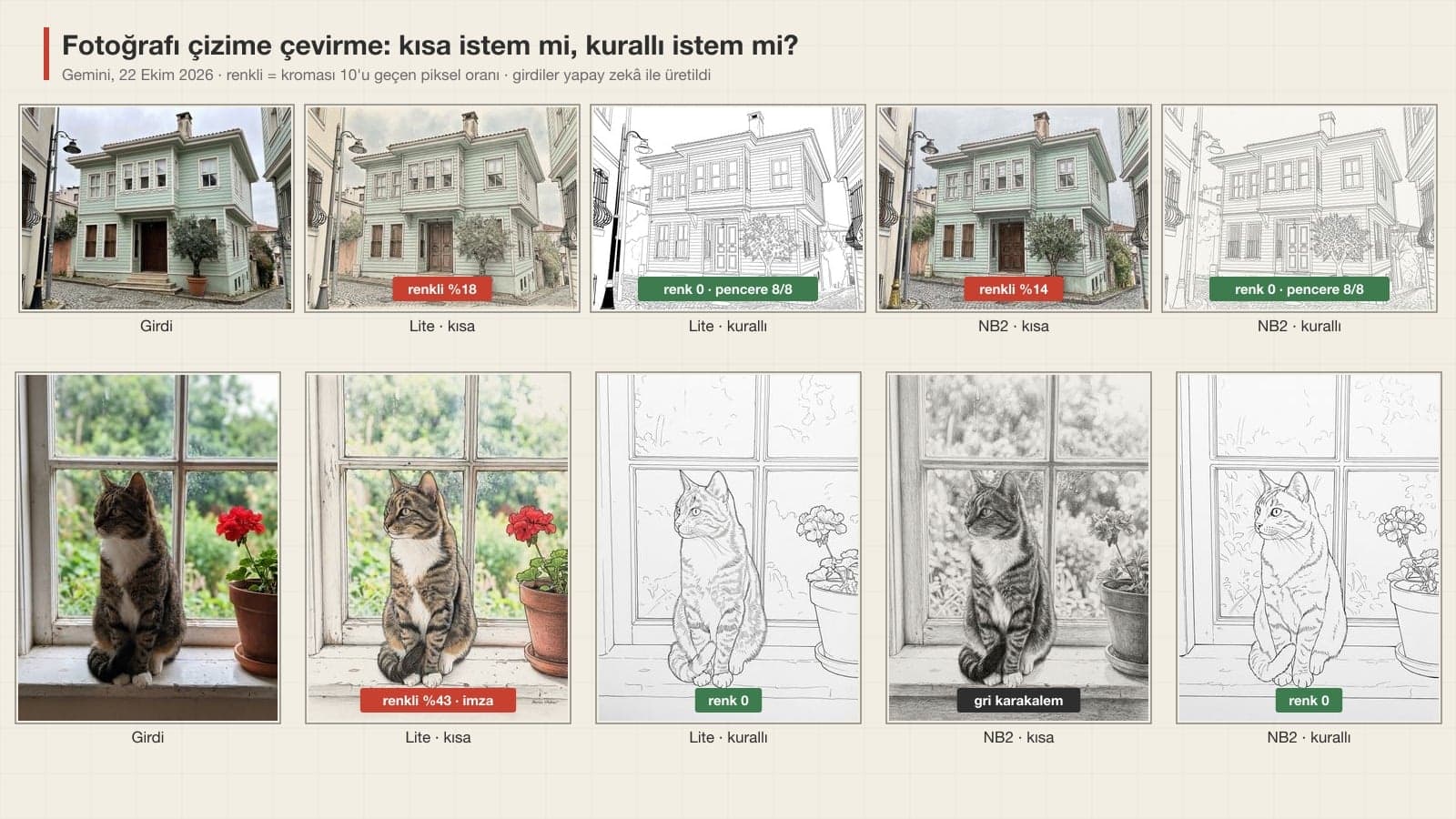
We generated four fictional inputs with Gemini Pro: a mint green, two-story Istanbul mansion with a bay window; a tabby cat sitting at a window with a red geranium next to it; a house, a sun, a tree with five apples and a dog drawn in crayon by a six-year-old; and a sketch of a cup photographed with a phone on a desk, one corner in shadow. We ran each task with a one-sentence short prompt and with the detailed prompt above, on Nano Banana 2 Lite and on Nano Banana 2. For color we measured the share of pixels with chroma above 10, for the paper the brightness of the corners, and we counted windows, apples and line segments.
| What we measured | Lite, short | Lite, detailed | Nano Banana 2, short | Nano Banana 2, detailed |
|---|---|---|---|---|
| Line art: colored pixels (mansion / cat) | 18% / 43% | 0 / 0 | 14% / 0 (gave a gray pencil sketch) | 0 / 0 |
| Mansion front facade: windows (8 in the input) | 8 | 8 | 8 | 8 |
| Pencil sketch: paper chroma (0 = neutral) | 9.8 (sepia) | 0 | 7.9 (sepia) | 0.7 |
| Pencil sketch: brightness of the red geranium (42 in the input) | 75 (faded) | 42 | 62 | 40 |
| Child's drawing: apple count (5 in the input), two attempts | 5 and 5 | 6 and 6 | 8 and about 16 | 7 and 7 |
| Child's drawing: dog or flowers stayed cartoon-like | 2/2 | 2/2 | 2/2 | 0/2 |
| Sketch: corner brightness (255 = pure white) | desk still there | 254-255 | 240-245 | 255 |
We also measured how faithful the lines stayed to the photo: we extracted the strongest edges in the input and laid them over the lines in the drawing. In the detailed drawings, 67-80% of the lines pass within two pixels of an edge in the photo. The ratio is higher on Lite (mansion 76%, cat 80%) and lower on Nano Banana 2 (67% and 76%). Nano Banana 2 added more curves to the garden and the background trees, ones you can't make out in the photo.
Pencil Sketch and One Line Drawing: Measuring Color and Breaks
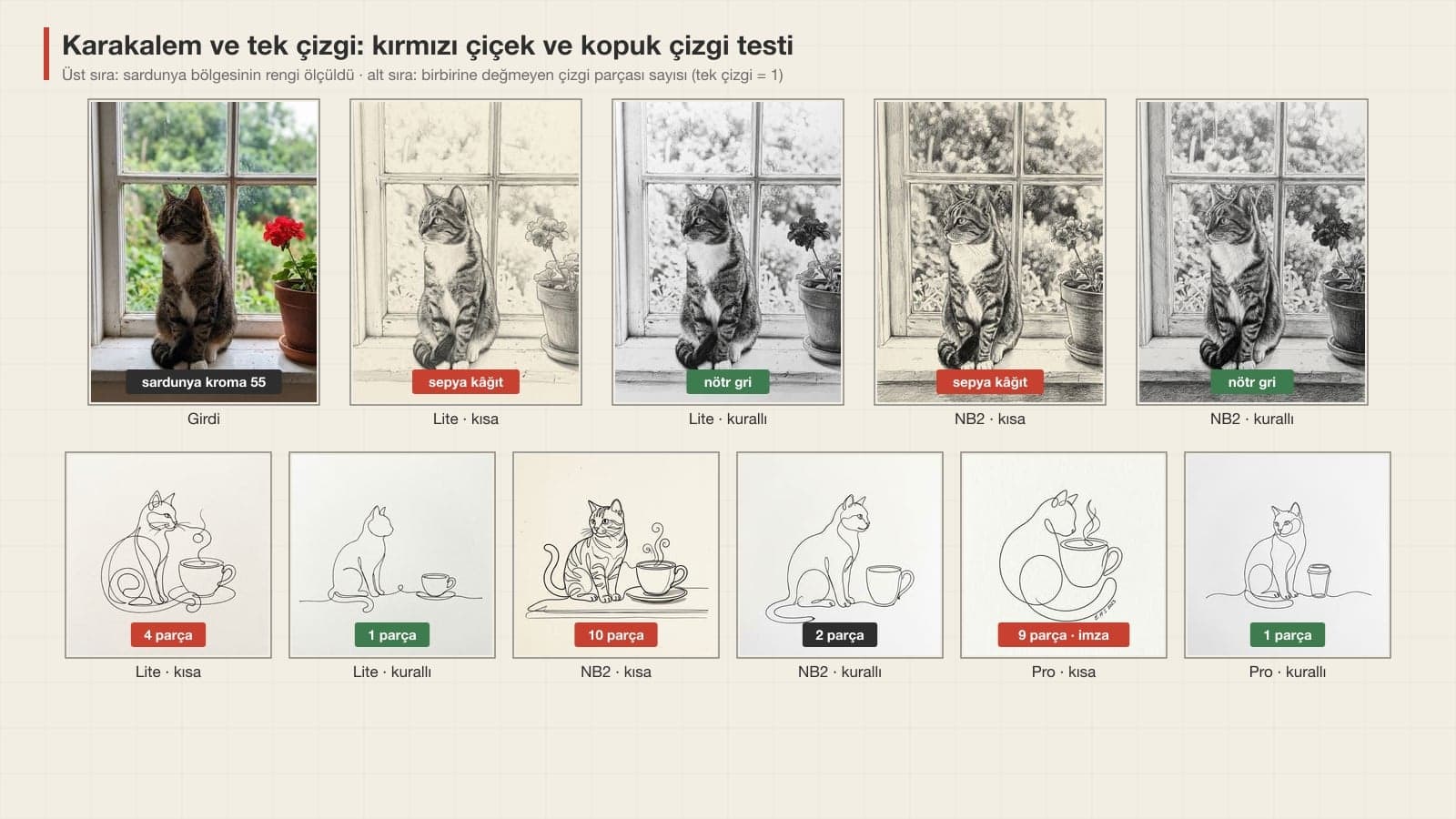
- "Turn this photo into a pencil sketch" gave cream paper on Lite (corner RGB 234, 226, 208) and a dark sepia tone on Nano Banana 2. With the detailed prompt the corner was pure gray on both (Lite 196, 196, 196; Nano Banana 2 117, 116, 115).
- In the detailed pencil sketch Nano Banana 2 shaded the paper dark as well, leaving only 19% of the area white. Lite, with 40% white, gave a lighter result that looks like a sketchbook page.
- For the one line drawing, the short prompt ("make a one line drawing") produced 4 separate pieces on Lite, 10 on Nano Banana 2 and 9 on Pro. Nano Banana 2 drew the cat in detail with striped fur, and Pro put a signature reading "E.H.S 2023" in the bottom right.
- With the detailed prompt, Lite and Pro drew a single piece. On Nano Banana 2 the cup stayed a second piece, separate from the cat.
- The colored cat Lite drew with the short prompt also has an illegible handwritten signature in the bottom right corner. The 15 images from short prompts had 2 signatures; the 15 from detailed prompts had none.
Child's Drawing, Sketch Cleanup and Step Page Results
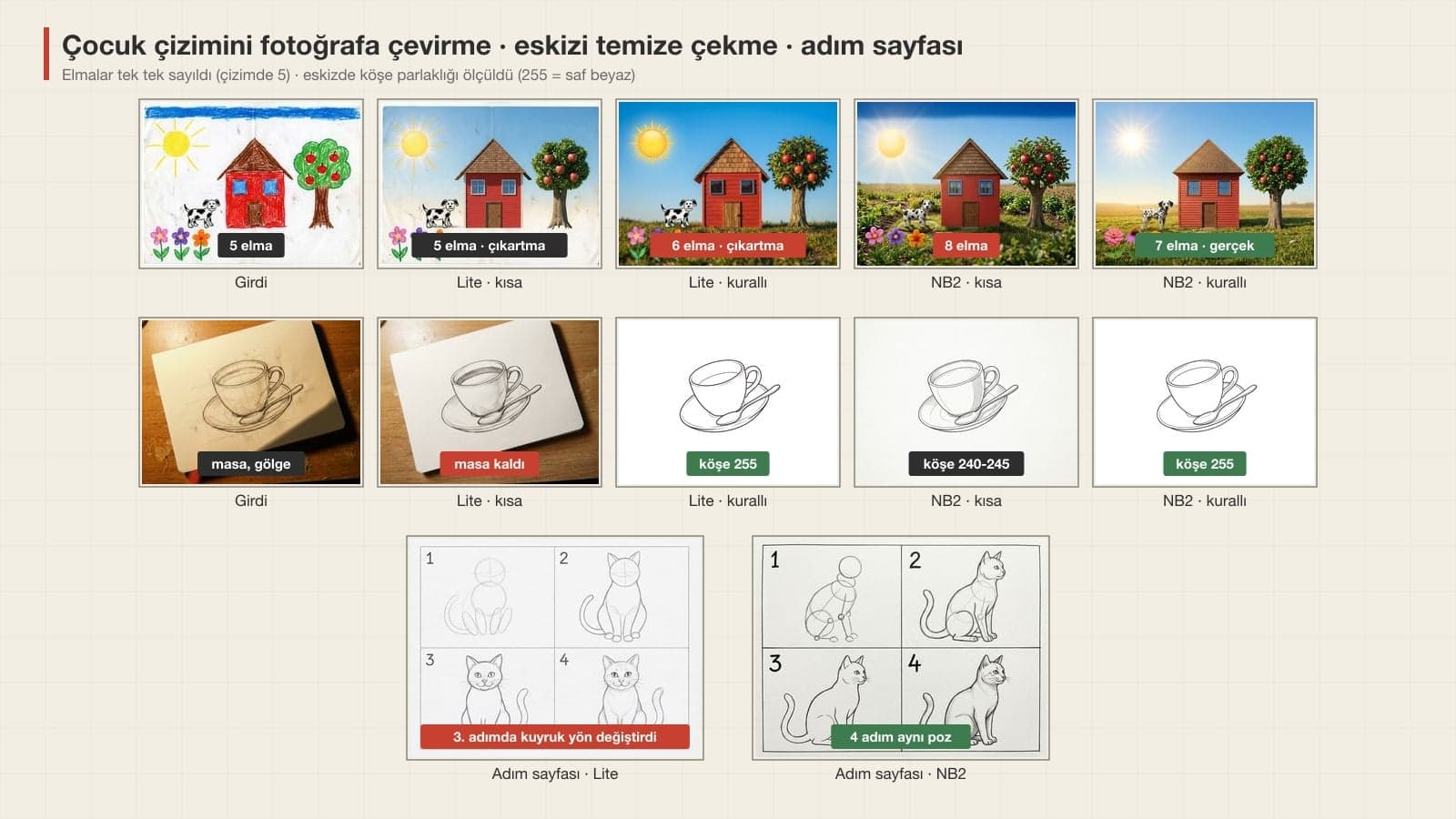
- Sun in the top left, 2 windows and 1 door on the house, 3 flowers in the bottom left: all in place in eight of eight results. Positions and large objects never shifted.
- The two models went in opposite directions on the apple count. With the short prompt Lite worked as if laying a photo texture over the drawing and kept all five; with the detailed prompt it drew 6. Nano Banana 2 redrew the tree from scratch as a real apple tree: 7, 7, 8 and about 16 apples.
- In all four of Lite's results the dog and the flowers stayed like cartoon stickers, so the scene was half photo, half drawing. With the detailed prompt Nano Banana 2 turned the dog into a real Dalmatian and the flowers into real flowers in both attempts.
- For the sketch, the short prompt ("Clean up this drawing and make it digital") left the desk and the shadow on Lite and only lightened the paper a little. Nano Banana 2 removed the desk but left the background at 240-245 gray; with the prompt that states the RGB value, the corners came out 254-255 on Lite and 255 on Nano Banana 2.
In our product photo test, "pure white background" did not reach a full 255 in any of 18 results. For the sketch we also wrote the RGB value, and it held. The difference from a product scene may be that a drawing background has no light or shadow on it; for drawings, adding this value takes one line.
Which Model Draws It, and How Long Does It Take?
| Account | Model that draws the image | What happened in the drawing test |
|---|---|---|
| No plan (free) | Mostly Nano Banana 2 Lite | 6.0 s on average. As clean as Nano Banana 2 in line art and sketch cleanup; a half conversion on the child's drawing, pose drift on the step page |
| Paid plan, Flash or Pro setting | Nano Banana 2 | 13.1 s on average. Turned the child's drawing into a full photo but added apples; same pose in all four squares of the step page |
| Paid plan, "Redo with Pro" | Nano Banana Pro | 13.5 s on average. A single piece in the one line drawing with the detailed prompt; added a signature with the short prompt |
| API (developer) | Any of the three | 1K image: $0.034 / $0.067 / $0.134 |
The test cost about $2.50 in API fees for 37 images, inputs included. You can draw in the Gemini app with a free account too; Google does not publish how many images you get per day.
Drawing Styles: What to Write in the Prompt
In ChatGPT and Gemini, describing a drawing style by its materials gives more predictable results than naming an artist. You can put the phrases below in the first line of your prompt.
| Style | Write in the prompt | What we saw in the test |
|---|---|---|
| Line art | black ink pen, lines only; no gray tones, hatching or color | "drawing" alone gave a colored picture 3 times out of 4 |
| Pencil sketch | pencil HB and 4B, graphite gray, no color at all | leave it out and you get cream or sepia paper |
| One line drawing | the pen never leaves the paper, one starting end and one finishing end | short prompt 4-10 pieces, detailed 1-2 |
| Ink hatching | fineliner, parallel and cross hatching, shadows only with lines | not tested |
| Ink and watercolor | thin ink lines, transparent watercolor on top, white of the paper showing | not tested |
| Architectural sketch | horizon line, perspective guide lines, quick pencil | not tested |
| Like a child's drawing | drawn in crayon by a 6-year-old, shaky lines, color going over the lines | Pro drew the test input in one go from this description |
Common Mistakes
- Writing "turn it into a drawing" without naming a style. Gemini often reads this as "make the photo look like a painting" and keeps the colors.
- Not describing the paper. Things you didn't ask for, like cream paper, the edge of a desk or a pencil, end up in the frame.
- Asking for realism without checking the count. Nano Banana 2 redrew the tree from scratch and put 7 apples on it even though the prompt said "5 apples". If the number matters, count in the output and fix it with Prompt 12.
- Saying only "one line" for a one line drawing. To prevent broken pieces, write the starting and finishing ends and that the objects connect to each other.
- Not stating the direction on a step page. Lite mirrored the cat in square 3, which confuses anyone trying to copy along.
- Sharing without checking the corners. The signature is usually small and in the bottom right; it shows up when you open the image full screen on your phone.
Free Plan, Artist Names and Your Child's Drawing
If you use Gemini without a paid plan, Nano Banana 2 Lite does most of your drawing. In this test Lite matched the paid model's cleanliness in line art, pencil sketches and sketch cleanup; it fell behind at turning a child's drawing into a real photo and on the step page. The tests used the original Turkish prompts, and neither model had trouble understanding them.
You don't need a specific illustrator's name in the prompt. As we explained in our photo-to-cartoon post, OpenAI writes in its GPT-4o image generation system card, dated March 25, 2025, that it added refusals for prompts asking for the style of a living artist. Describing the style with pen and paper doesn't run into that block. Before you upload your child's drawing, crop out their first name, last name and school name. Gemini adds an invisible SynthID watermark to every image, so the photo you share carries the information that it was made with AI.
Upload your photo to Gemini or ChatGPT and paste a prompt that names the pen, the paper and what to leave out (Prompts 1-3). In the test, writing only "turn it into a drawing" gave a colored picture in three of four attempts.
Yes, it works with a free Gemini account. On that account Nano Banana 2 Lite usually draws the image, and in the test its line art was as clean as the paid model's. Google does not publish the daily limit.
Prompt 2. Write the pencil grades (HB, 4B) and the line "graphite gray, no color at all". The short "make it a pencil sketch" prompt gave sepia-tinted paper on both models.
You can paste the prompts in this post into either tool. We measured only in Gemini, using the original Turkish prompts, and we did not compare results in ChatGPT in this round.
It can, but it needs a description. "Make a one line drawing" gave 4-10 separate pieces; with Prompt 3, Lite and Pro drew a single piece and Nano Banana 2 drew two.
Yes, with Prompt 7. The sun, house, windows and flowers stayed in place in eight of eight attempts. On the free model the dog and flowers may stay cartoon-like, and you should check the count of small objects like apples.
No. Gemini and ChatGPT work in the browser and in their phone apps. Canva and Adobe Firefly also have drawing pages; we did not try them in this test.
If you liked the line art, the next step is turning it into a coloring page for kids: in our coloring page post we printed and tested prompts that ask for thick lines and closed shapes. For portraits, the cartoon post has versions that keep the marks on the face.
We generated the mansion, the cat, the child's drawing and the cup sketch in the test with Gemini Pro; all of them are fictional. Your own photo will have different light and framing, so on the first try count the windows, the apples and the signature in the corner yourself.
Logos and Illustrations With a Hand-Drawn Look
AI can turn a cat photo into line art in a few seconds. Your brand's logo, packaging art or menu illustration has to look the same in every print run and belong to you. We redraw it as a vector with a designer and tie it to your brand identity's colors and typeface. Write to us for a free initial consultation.