



AI Family Photo: 12 ChatGPT Prompts and a 5-Person Face Test
We combined five separate portraits into one family photo in Gemini and counted three features on every face: Nano Banana 2 kept 30 of 30 across five people, Pro erased a pair of glasses, and heads tilted sideways in the stacked pose. Here are 12 ready-made prompts for AI family photos and the prompt that keeps heads upright.
- We asked Gemini for one family photo made from five separate portraits: Nano Banana 2 kept 30 of 30 facial features across two runs. Google's documentation lists 4 people for this model.
- With the same prompt, Nano Banana Pro erased the father's glasses in one run (29/30); the paid model did not come out ahead in this test.
- When we wrote 'stacked heads', 3 of 8 heads tilted sideways. In Prompt 3, which says who stands on a stool and who stands on a step, none of the 8 heads tilted.
- The child we placed 'to her right' ended up on the other side in both runs; with 'to her left from the viewer's perspective' he was in the correct spot both times.
- ChatGPT's free plan limits you to 3 file uploads per day. In Prompt 2, where we supplied four portraits as one collage image, 24/24 features survived.
We gave Gemini five separate portraits, asked for a single family photo and counted three features on every face: glasses, a mole on the cheek, pearl earrings, curly hair and so on. Across two runs, all 30 of 30 features stayed in place. Two things went wrong: pose and direction. In the 'stacked heads' pose the heads tilted sideways, and the child we placed 'to her right' moved to the grandmother's other side.
Below are 12 ready-made prompts: a studio family photo, a family photo from a single collage for ChatGPT's free plan, a black and white stacked pose, a large family, adding a loved one who is no longer with us from an old photo, and fixing a single face. These are English versions of our original Turkish prompts, which work unchanged in both ChatGPT and Gemini. We ran the test with the Turkish prompts on October 16, 2026 through the Gemini API; we did not test in ChatGPT.
How to Make an AI Family Photo in 5 Steps
Short answer: upload one photo of each person with the face clear and facing the camera, write a prompt that introduces the photos by number, and describe the pose by saying who stands where.
- Choose the photos. One portrait per person is enough; the face should look toward the camera, with glasses and hair in the frame. A blurry or dark photo also works, but in our test the model added moles to those faces that were not in the photos.
- Open the tool. In Gemini you can upload up to 10 files in a single prompt. ChatGPT's free plan has a limit of 3 files per day; for 4 or more people, first put the portraits into a single collage image (Prompt 2).
- Introduce the photos by number: 'photo 1 is the father, photo 2 is the mother'. In a collage, write 'father top left, mother top right'.
- Describe the pose by placement: who sits, who stands, who is behind whom. For right and left, add 'from the viewer's perspective'.
- Check the result. Count two or three features on each person, one by one. If one face has drifted, do not regenerate the whole photo; fix only that person with Prompt 12.
Writing the name of the pose and stopping there. When we wrote 'stacked heads pose', Gemini tilted three of the eight heads sideways; adding the sentence 'keep the heads upright' raised that to five. When we wrote who was on a chair, who was on a step and who was on a stool, no head tilted.
12 Ready-to-Use Family Photo Prompts (Copy and Paste)
Upload the photos, copy the prompt and fill in the bracketed parts. If you have a different number of people, add or delete lines in the list. Under the prompts we tested, we wrote what came out.
1) Studio family photo: the base template
Create a single family photo of the people in the [4] photos I uploaded. Only these [4] people are in the frame: photo 1 [father], photo 2 [mother], photo 3 [9-year-old son], photo 4 [grandmother].
Keep each person's face, hair, glasses, moles, freckles and age as in their own photo; do not beautify the faces, do not make anyone look younger and do not make the faces look alike. Clothing also stays as in their own photos.
Setting: photo studio with a light gray backdrop, soft front lighting.
Pose: [grandmother seated on a chair at the front center, son standing to her left from the viewer's perspective, father and mother standing at the back]; everyone looks at the camera and smiles naturally.
It should look like it was shot with a real camera, no text in the image. Aspect ratio 4:5.We ran this template twice each with 2, 3, 4 and 5 people: all 84 of 84 features were kept. The tested version said 'to her right', and in both runs the child moved to the grandmother's other side. The 'from the viewer's perspective' wording used here came out correct in both runs of the collage test.
2) For ChatGPT's free plan: a family photo from a single collage
This single image contains [four] separate portraits: [father top left, mother top right, 9-year-old son bottom left, grandmother bottom right]. Create a single family photo of these people; only these [four] people are in the frame.
Keep each person's face, hair, glasses, moles, freckles and age as in their own portrait; do not beautify the faces, do not make anyone look younger and do not make the faces look alike. Clothing also stays as in the portraits.
Setting: [photo studio with a light gray backdrop, soft front lighting].
Pose: [grandmother seated on a chair at the front center, son standing to her left from the viewer's perspective, father and mother standing at the back]; everyone looks at the camera and smiles naturally.
It should look like it was shot with a real camera, no text in the image. Aspect ratio 4:5.You can make the collage in any collage app or in Canva; keep the portraits the same size. In the test we put the four portraits into a 2x2 collage and supplied it as one image: across two runs, 24 of 24 features remained, and the child stood on the correct side both times.
3) Black and white stacked family photo: heads upright
Create a black and white family portrait. The people in the [4] photos I uploaded stand in a single row facing the camera, one behind the other, each one slightly higher than the one in front:
at the very front and lowest, [the grandmother from photo 4] sits on a chair;
right behind her, [the father from photo 1] stands, his head directly above the grandmother's head;
behind him, [the mother from photo 2] stands on a step, her head directly above the father's head;
at the very back, [the son from photo 3] stands on a tall stool, his head directly above the mother's head.
This way the four faces appear stacked in a vertical column; everyone stands upright, heads level, all looking at the camera and smiling.
Keep the faces, glasses, moles and ages as in their own photos; do not beautify the faces.
Plain black backdrop, soft studio light from the side, fine film grain. Only these four people are in the frame; no text, signature or frame. Aspect ratio 2:3.In both runs the order was correct and none of the eight heads tilted. In one run an empty stool also ended up in the frame; if you don't want that, add the line 'the stool and the step are not visible' (we did not test this line).
4) The trending stacked pose with tilted heads
Using the people in the [4] photos I uploaded, create a black and white family portrait in the "stacked heads" pose. The four heads sit in a vertical column, each just above the head below it: at the top [the son from photo 3], below him [the mother from photo 2], below her [the father from photo 1], at the bottom [the grandmother from photo 4].
Everyone looks at the camera and smiles naturally. Keep the faces, glasses, moles and ages as in their own photos; do not beautify the faces.
Plain black backdrop, soft studio light from the side, fine film grain, fully black and white. Only these four people are in the frame; no text, signature or frame. Aspect ratio 2:3.In this version some of the heads tilt sideways (3 of 8 in the test) and the people look as if they are hugging each other. Use this one if you want the cuddled-up look you see on social media, and Prompt 3 if you want a neat column.
5) Classic black and white studio family portrait
Create a classic black and white studio family portrait of the people in the [3] photos I uploaded. Only these [3] people are in the frame: photo 1 [father], photo 2 [mother], photo 3 [6-year-old daughter].
Keep the faces, hair, glasses, moles and ages as in their own photos; do not beautify or smooth the faces.
Pose: [mother and father standing side by side, daughter in front of them in the center]; heads close together, everyone looking at the camera.
Lighting: a single soft light from the left from the viewer's perspective, a light shadow on the other side of the faces. Plain dark gray backdrop, fine film grain, soft contrast.
Clothing [dark, solid colors, no patterns]. No text, signature or frame in the image. Aspect ratio 4:5.6) Large family: 5 people with grandma and grandpa
Create a single family photo of the people in the [5] photos I uploaded. Only these [5] people are in the frame: photo 1 [father], photo 2 [mother], photo 3 [9-year-old son], photo 4 [grandmother], photo 5 [grandfather].
Keep these features exactly as they are: [father: black-framed glasses, salt-and-pepper beard, mole on the cheek; mother: wavy red hair, hoop earrings; grandfather: bald head, white mustache, wire-framed glasses].
Do not beautify the faces, do not make anyone look younger and do not make the faces look alike. Clothing as in their own photos.
Setting: photo studio with a light gray backdrop, soft front lighting.
Pose: [grandmother and grandfather seated on two chairs at the front, son standing between them, father and mother standing at the back]; everyone looks at the camera and smiles naturally. Aspect ratio 4:5.The test version had no feature list, and Nano Banana 2 still kept 30/30. We added the list after the Pro model erased the father's glasses in one run. The likeness limit in Google's documentation is 4 people for Nano Banana 2 and 5 for Pro; we did not test 6 or more people.
7) Adding a loved one who is no longer with us from an old photo
Create a family photo from the [3] photos I uploaded. Photo 1 [mother], photo 2 [her daughter]; photo 3 is an old, black and white, blurry photo of [our grandfather].
Preserve the grandfather's facial features, hair, mustache and age as in photo 3; remove the blur, but do not add moles, wrinkles or marks to his face that are not in the photo.
Clothing: [grandfather wearing a dark gray jacket and a white shirt].
Pose: [grandfather seated on a chair in the center, mother and daughter standing on either side of him, hands on his shoulders]. Setting: [living room at home, daylight coming through the window].
The whole photo is [color / black and white]. Only these three people are in the frame, no text in the image. Aspect ratio 4:5.In our degraded input test, working from a black and white, blurry photo of the grandmother, the model picked the cardigan color on its own (gray and beige in the two runs; the original was lilac) and in one run put a mole on her cheek that was not in the photo. The clothing line and the 'do not add marks' sentence are there for these two deviations; we did not test this version separately.
8) Outdoor family photo
Create a family photo taken outdoors of the people in the [4] photos I uploaded. Only these [4] people are in the frame: photo 1 [father], photo 2 [mother], photo 3 [daughter], photo 4 [son].
Keep the faces, hair, glasses and ages as in their own photos; do not beautify the faces.
Location: [a park in autumn, grass under trees with yellowed leaves]. Time: [one hour before sunset]; the light comes from behind and slightly from the side.
Pose: [mother and father sitting on the grass, children in front of them]; everyone looks at the camera.
Clothing [in cream, beige and brown tones, no patterns]. As if shot with an 85 mm lens, background softly blurred. No text in the image. Aspect ratio 4:5.9) Holiday morning breakfast or New Year's table
Create a family photo taken at home [on a holiday morning] of the people in the [5] photos I uploaded. Only these [5] people are in the frame: photo 1 [...], photo 2 [...], photo 3 [...], photo 4 [...], photo 5 [...].
Keep the faces, hair, glasses and ages as in their own photos.
Scene: [breakfast table; tea glasses, cheese, olives and simit on the table]. Everyone sits on the side of the table facing the camera; nobody has their back to the camera.
Lighting: morning light coming through the window. Clothing [festive holiday outfits, light colors].
No text, banners or decorative lettering in the image. Aspect ratio 4:5.10) Adding a missing person to an existing family photo
Photo 1 is a family photo; photo 2 shows [my sibling], who is not in that shot.
Add the person from photo 2 to photo 1: [standing at the far right from the viewer's perspective, next to my mother].
Keep everyone in photo 1, the background, the lighting and the colors exactly as they are; only add the new person.
The added person's height and head size should be in proportion to the people next to them; light should hit their face from the same direction, and their shadow should fall the same way.
Keep their face, hair, glasses and age as in photo 2; clothing [in the same tones as the people in photo 1, solid color]. Aspect ratio the same as photo 1.11) Oil painting family portrait for the wall
Make an oil painting family portrait of the people in the [4] photos I uploaded. The image is only the painting itself: the canvas fills the frame edge to edge; no frame, wall, signature or text.
People: photo 1 [father], photo 2 [mother], photo 3 [son], photo 4 [our cat].
Keep the faces, hair colors, glasses and ages recognizable as in their own photos.
Pose: [mother and father sitting on a sofa, son standing behind them, the cat on the mother's lap].
Technique: visible brushstrokes, dark brown and olive green background, warm light on the faces from the left. Aspect ratio 4:5.The 'canvas edge to edge' description in the first line comes from our caricature test: when we put the signature ban on the last line, the model added a signature and a frame in both runs; once we described the paper in the first line, it did not.
12) Fixing a single face
Photo 1 is a family photo, photo 2 is a portrait of [the father standing at the back left].
In this family photo, fix only [the father's] face: [add the black rectangular glasses from photo 2, and make the mole on his cheek and his facial features match photo 2].
Keep the other people, poses, clothing, background, lighting and framing in the photo exactly as they are.
Do not beautify the face you fix and do not make it look younger.We used this prompt once on the image where the Pro model had erased the glasses: the glasses and the mole came back, and the other four people, the clothing and the backdrop stayed the same.
You must be at least 18 to generate and edit images in Gemini. In its March 2025 system card, OpenAI wrote that it did not allow editing of photorealistic images of children in ChatGPT; the Images 2.5 card from September 2026 says it runs separate safeguards for minors. In our test, the Gemini API did not refuse any of the 21 requests that included the AI-generated portrait of a 9-year-old child.
Our Test: Do Faces Hold Up as You Add More People?
On October 16, 2026 we generated five portraits with the Gemini API: father, mother, 9-year-old son, grandmother and grandfather. None of them is a real person. We picked three features in each portrait (for example glasses, a beard and a cheek mole on the father; a bun, pearl earrings and a chin mole on the grandmother) and counted them one by one in every result. The main model was gemini-3.1-flash-image; Gemini's help page calls the image model on the free plan Nano Banana 2. We made 28 requests in total, all with the Turkish prompts; each took between 9 and 31 seconds.
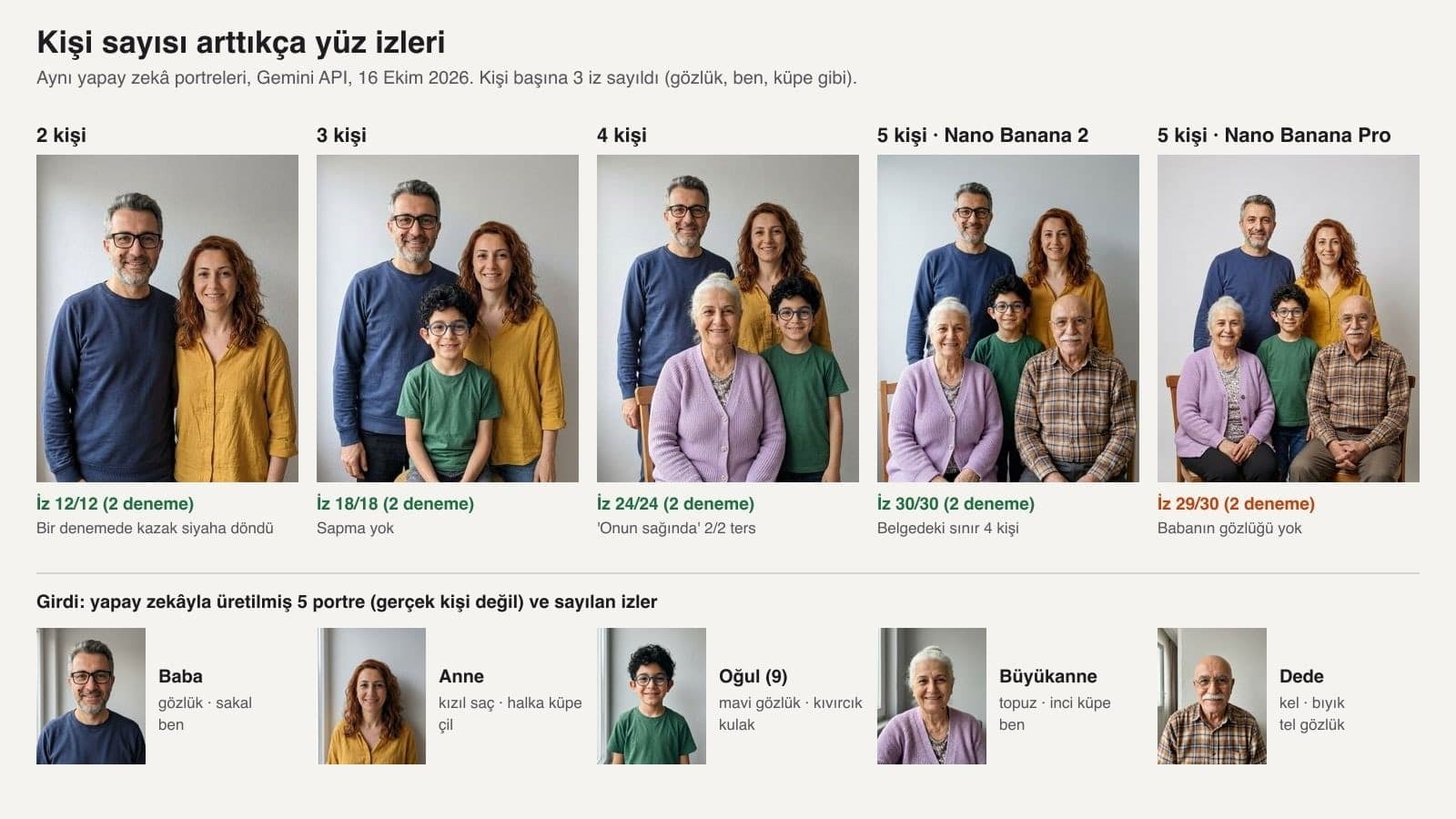
| Run | Model | Features kept | What happened |
|---|---|---|---|
| 2 people, separate photos (2 runs) | Nano Banana 2 | 12/12 | In one run the father's navy sweater turned black |
| 3 people (2 runs) | Nano Banana 2 | 18/18 | No deviations |
| 4 people (2 runs) | Nano Banana 2 | 24/24 | 'To her right' landed on the viewer's right both times |
| 5 people (2 runs) | Nano Banana 2 | 30/30 | No feature loss even above the documented 4-person limit |
| 5 people (2 runs) | Nano Banana Pro | 29/30 | In one run the father's glasses were gone and his face was elongated |
| 4 people (1 run) | Flash-Lite image model | 12/12 | The gray backdrop turned into a fabric curtain |
| 4 people, one-line prompt 'Make a family photo with the people in these photos.' (1 run) | Nano Banana 2 | 12/12 | A living room with bookshelves instead of a studio, everyone touching each other |
| 4 people, single collage image (2 runs) | Nano Banana 2 | 24/24 | 'To her left from the viewer's perspective' correct both times |
| 4 people, 3 photos degraded (2 runs) | Nano Banana 2 | 23/24 | One pearl earring lost, two extra moles, cardigan color guessed |
| Stacked pose, 3 prompts (6 runs) | Nano Banana 2 | Order 6/6 | Tilted heads: 3/8, 5/8, 0/8 |
Of the 162 features counted with clean input, 161 stayed in place; the only loss was with the Pro model. Before you generalize this to your own photos, keep one thing in mind: our input portraits were generated with the same model family, facing the camera, in the same light. In a real family album, the light, angle and resolution differ from photo to photo.
To measure that difference a little, we shrank the father's photo to 130 pixels and compressed it, made the mother's photo dark, and turned the grandmother's photo into a blurry black and white image. In the result, 23 of 24 features remained. The cost showed up elsewhere: the model added moles that were not in the photos to two faces and chose the color of the cardigan in the black and white photo on its own.
How to Make a Black and White Stacked Family Photo
Upload the photos of four people and use Prompt 3: when you write that the person at the front sits on a chair and the people behind stand on a step and a stool, the heads form an upright column. Writing only 'stacked heads pose' tilted three of the eight heads sideways in our test.
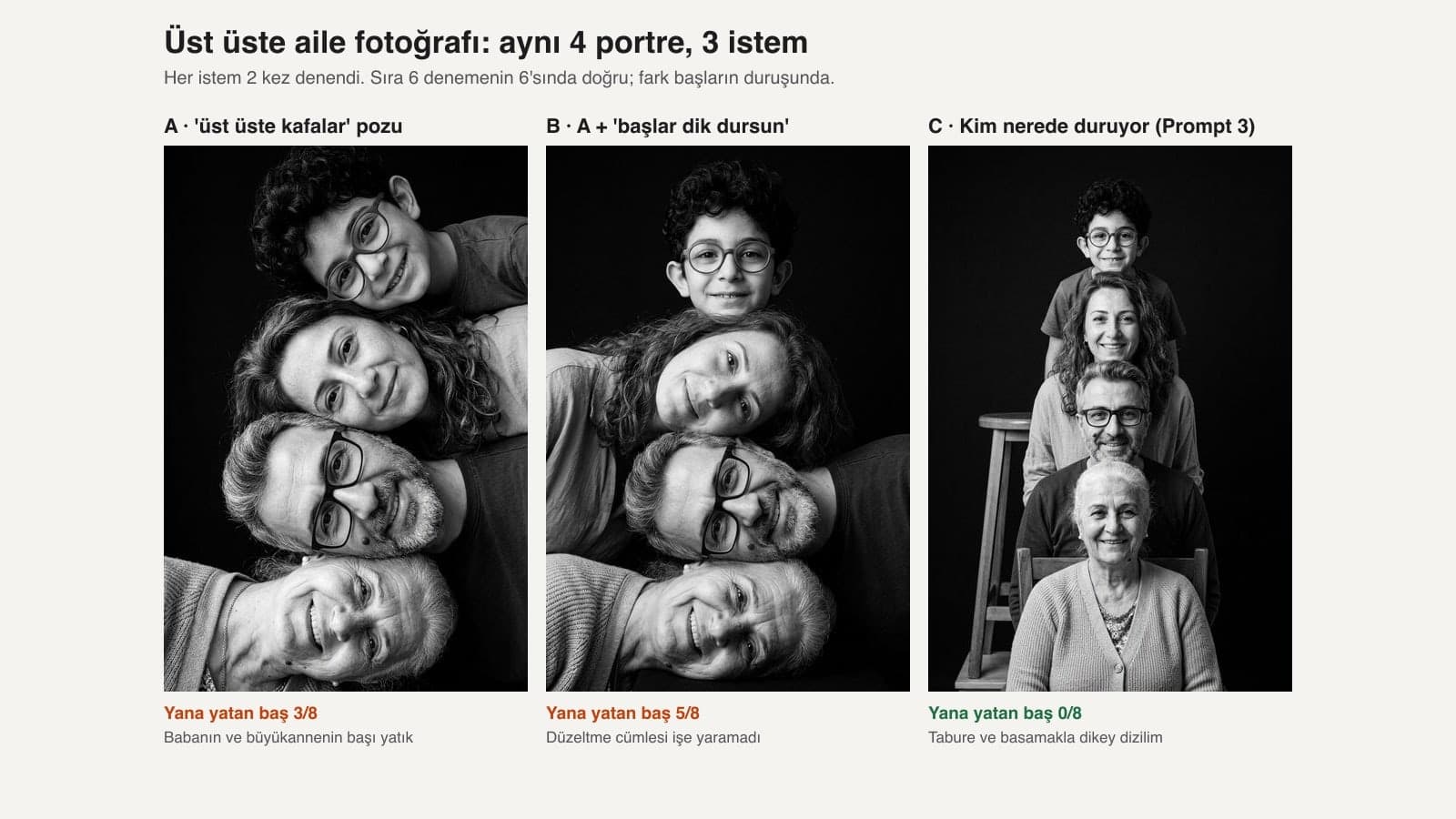
Adding the sentence 'keep the heads upright, nobody tilts their head' made the result worse: tilted heads went from 3 to 5. In our caricature test, too, the signature ban did not work, while describing the paper as 'flat to the edges' did. Here as well, the sentence that worked was the one that described the scene by who stands where.
ChatGPT or Gemini? Limits for Family Photos
We did not run this test in ChatGPT; the ChatGPT rows below come from OpenAI's own pages. OpenAI made ChatGPT Images 2.5, announced on September 8, 2026, available on all plans and wrote that the model preserves the people in reference photos better.
ChatGPT Images 2.5 is better at preserving the subjects in your reference photos.
| Criterion | ChatGPT | Gemini |
|---|---|---|
| Image model | ChatGPT Images 2.5, on all plans | Nano Banana 2 on the free plan; paid Google AI plans also include Nano Banana Pro |
| Photo uploads | No per-message number given; 3 files per day on the free plan, 20 MB per image | Up to 10 files in a single prompt |
| Documented person limit | No published number | Likeness for up to 4 people on Nano Banana 2 and 5 on Pro (API docs, October 9, 2026) |
| Age and children | March 2025 card: photorealistic images of children are not edited; separate safeguards in the 2026 card | 18+ to generate and edit images |
| AI label | C2PA content credentials (readable at openai.com/verify) | SynthID on every image; the visible watermark can be turned off in settings |
On the free plan and for up to four people, Gemini is easier, because you can upload the photos separately in a single prompt. If you're on ChatGPT's free plan, use the collage route in Prompt 2; it takes only one of your three daily files.
Adding a Loved One Who Has Passed Away to a Family Photo
The same approach works when you want to see a loved one who has passed away in the same frame as today's family; Prompt 7 is for this. The old photo is often small, blurry and black and white, so write two things yourself: the color of the clothing and the features you see on the face. Whatever you leave out, the model fills in.
The resulting picture was never actually taken. Google's Generative AI Prohibited Use Policy forbids impersonating a living or deceased person without explicit disclosure, in order to deceive. For a family album this is fine; when you share it on social media, add one sentence saying it was combined with AI.
Common Mistakes
- Introducing the photos as a group ('these people'). Without a number or a collage position, the model decides who sits at the front; our one-line prompt set up a living room instead of a studio.
- Writing the name of the pose and stopping there ('stacked heads', 'pyramid pose'). Write who stands where and on what.
- Just saying right and left. A direction written without 'from the viewer's perspective' came out reversed in both runs.
- Regenerating the whole photo when one face drifts. A new generation can change the other faces too; fix only that person with Prompt 12.
- Leaving out the clothing. In one run a navy sweater turned black, and with the black and white input the model chose the cardigan color.
- Assuming the paid model is safer. In the five-person test, Nano Banana 2 kept 30/30 and Nano Banana Pro 29/30.
Turkey's Data Protection Law (KVKK) and Photos of Children
Article 28/1-a of Law No. 6698, Turkey's personal data protection law (KVKK), excludes from the law the processing of personal data by natural persons 'within the scope of activities relating exclusively to themselves or to family members living in the same household', on condition that the data is not passed to third parties and data security is maintained. That is why it makes sense to ask a relative who lives in a different household before you upload their photo.
KVKK's November 2025 guide on generative AI (p. 57) recommends taking care not to share data belonging to third parties with these systems. The same guide (p. 59) says that photos shared online can be used without permission to create deepfake content, which can make children targets. If you plan to share a family photo with children in it on a public account, take this into account.
Yes. Gemini's free plan runs on Nano Banana 2 and accepts 10 files in a single prompt. ChatGPT Images 2.5 is also available on all plans; since the free plan allows 3 file uploads per day, for 4 or more people supply the portraits as one collage image.
Introduce the photos by number, list the features to keep (glasses, moles, hair), describe the pose by who stands where, and add the sentence 'only these N people are in the frame'. Prompt 1 is the full template.
Use Prompt 3. When you write that the person at the front is seated and the people behind stand on a step and a stool, the heads line up in an upright column; in our test none of the 8 heads tilted. Writing only 'stacked heads' tilted 3 of 8 heads sideways.
The Gemini app takes 10 files in a single prompt. Google's API documentation supports likeness for up to 4 people on Nano Banana 2 and 5 on Nano Banana Pro. In our test Nano Banana 2 kept 30 of 30 features with five people as well; we did not test larger families.
Yes. Upload their old photo together with the other portraits and use Prompt 7. If the photo is black and white, write the clothing color in the prompt yourself; if you don't, the model picks one.
Gemini puts an invisible SynthID mark on every image; ChatGPT images carry C2PA content credentials. Verification tools can read these marks.
If you want to try ID photos, profile pictures or style experiments with the same portraits, the templates in our ChatGPT photo prompts post will help. The lighting and scale details of putting two people in one frame are in the photo combining guide.
Team and Product Photography for Your Business
For a family album, one frame combined with AI is enough. For the team page on your website, your product catalog and photos of your space, you need a real shoot where everyone and every product stands in the same light. We do the shoot in a single session and deliver it in website and social media sizes. Get in touch now and let's set up a free initial consultation.