



How to Turn a Photo Into a Caricature: ChatGPT Prompts, Anime and Pencil Sketch (2026)
We turned the same portrait into a caricature, anime, a pencil sketch and a 3D character with seven prompts in Gemini: the one-line prompt deleted the earring, and the template prompt kept 8 of 8 features but added a signature twice. Here are 12 ready-made prompts for turning a photo into a caricature, plus what the Ghibli name actually changes.
- In our test, the one-line prompt 'Turn this photo into a caricature.' (run in Turkish) kept seven of eight facial features and deleted the earring.
- The five-line caricature prompt kept all eight features, but despite the line 'do not add text, a signature or a frame' it added a frame, a title and a signature in both runs.
- Moving the prohibition to the first line and describing 'plain white paper all the way to the edges' got rid of the additions (1 run).
- Writing 'Ghibli style' and describing the style in drawing terms produced almost the same frame; you don't need the studio name.
- Since March 2025, OpenAI has refused requests for images in the style of a living artist; it allows studio styles.
- Photo editing in Gemini is closed to users under 18; turning someone else's photo into a caricature without permission and sharing it falls outside the household exemption of KVKK, Turkey's data protection law.
To turn a photo into a caricature, upload it to ChatGPT or Gemini and write three things: what to exaggerate, what stays the same, and what else must not appear on the paper. In our test, the prompt that skipped the third one added a title nobody asked for under the caricature, plus a signature reading 'Ali '24'.
Below are 12 ready-made prompts: street caricature, caricature with your job, anime, pencil sketch, 3D animation, watercolor, comic book, couple caricature and profile avatar. We tried seven prompts on the same photo in Gemini (five of them were early versions of the prompts in the list) and counted eight facial features one by one in every result, from the glasses to the earring. We also explain how the ChatGPT caricature trend works and what writing 'Ghibli style' changes.
How to Turn a Photo Into a Caricature in ChatGPT and Gemini: 4 Steps
Short answer: upload a photo where your face is clearly visible, copy one of the prompts below and fill in the square brackets, then put the result next to your photo and count the features.
- Pick the photo: face from the front or slightly to the side, taken in daylight. If the features that identify you (glasses, a mole, hair color) are not visible, the model makes them up.
- Open the tool: in ChatGPT, add the image from the message box; in Gemini, upload the photo. ChatGPT Images is available on all plans, and image editing in Gemini requires you to be 18 or older.
- Paste the prompt and list the features to keep based on your own face. Don't delete this line; in our test, the only prompt that didn't list features lost the earring.
- Compare the result with the photo. If one feature drifted, fix only that one with Prompt 12; writing a new prompt from scratch makes the model redraw the whole face.
Writing the style name and stopping there. A prompt that says 'make a caricature' leaves the setting, the clothes and the face up to the model. Name the two features to exaggerate, and lock the rest with 'keep it close to reality'.
12 Ready-Made Caricature and Anime Prompts (Copy and Paste)
Upload your photo, copy the prompt and fill in the parts in square brackets; delete the line for any field you won't use. We wrote and tested these prompts in Turkish, and the Turkish originals work as they are in both ChatGPT and Gemini; below are our English versions with the same structure. Next to the ones we tested, we noted the result we got.
1) Street caricature: the main template
Draw a caricature of the person in the photo I uploaded. The image should contain only the drawing itself: plain white paper all the way to the edges, with no title, name, signature, date or frame on the paper.
Exaggeration: the head about twice as big relative to the body; exaggerate the two most distinctive features: [e.g. glasses and curly hair]. Keep the rest of the facial features close to reality.
Keep: the shape and color of the glasses, hair color and texture, [permanent features: e.g. white streak at the temple, mole on the cheek, earring], beard and mustache shape, eyebrow thickness, clothing color.
Drawing: black ink lines, watercolor coloring; small body, [holding or next to: e.g. a cup of coffee].In the test it kept all eight features and added nothing to the paper. Its first version said 'in the style of a street caricaturist' and had the prohibition on the last line; that version added a frame, a title and a signature in both runs.
2) Caricature with your job
Draw a caricature showing the person in the photo I uploaded doing their job.
Job and scene: [e.g. accountant; a pile of invoices, a calculator and a cold cup of tea on the desk].
Exaggeration: big head, small body; exaggerate one habit of the job: [e.g. a pencil behind the ear].
Keep: facial features, [your permanent features such as glasses, hair color, beard, mole], clothing color.
Drawing: colorful digital caricature, plain light-colored background. No name, company name, logo or text in the image.This is the version of the trend's 'draw me with my job' request that doesn't use memory. You write the scene, and the model doesn't look at the notes ChatGPT keeps about you.
3) The ChatGPT caricature trend: with memory
Draw a caricature of me and my job based on what you know about me. The photo I uploaded is me.
First, list the details you will put in the drawing as bullet points and wait for my approval.
Keep: facial features, [your permanent features], hair color.
No name, company name, city, screen content or any text that reveals my identity in the image.
Drawing: colorful caricature, big head, white background.The approval step lets you read which details the model will pull from memory into the drawing before it draws anything. If memory has nothing about your work, the scene stays generic; in that case, use Prompt 2.
4) Turn a photo into anime: by description
Turn the photo I uploaded into a frame from a hand-drawn anime film.
Style: thin, soft outlines, flat color areas and two-tone shading; pastel background that looks hand-painted in watercolor; [light: e.g. afternoon light].
Keep: the shape and color of the glasses, hair color and texture, [permanent features], beard shape, eyebrow thickness, clothing color and the layout of the setting.
Do not make the eyes overly large; keep the facial proportions similar to the person in the photo.
Do not add text or subtitles.In the test all eight features stayed. The knit texture of the sweater turned into flat color; if you want to keep the texture, add the line 'show the knit of the sweater'.
5) Ghibli style: short version
Turn this photo into a hand-drawn anime frame in the style of Studio Ghibli. Keep the [features on my face such as glasses, mole, hair color] and the setting the same; do not add text.In the test, the one-sentence 'turn it into Ghibli style' prompt also kept all eight features and produced almost the same frame as Prompt 4. We added only the features line to this short version.
6) Turn a photo into a pencil sketch
Turn the photo I uploaded into a pencil portrait.
Technique: graphite pencil on white drawing paper; shading with fine hatching, individual pencil strokes in the hair and beard; background left as blank paper, with light hatching only at shoulder level.
Keep: facial features and proportions as in the photo; [permanent features such as glasses, mole, earring, white streak], beard and eyebrows.
Do not use color; do not add a signature or text.In the test, all seven features other than color stayed and no signature appeared on the paper. Judging by eye, this was also the result whose facial proportions stayed closest to the input.
7) 3D animated character
Turn the person in the photo I uploaded into a 3D animated movie character.
Style: soft rounded shapes, slightly large head and eyes, warm studio lighting; background [e.g. a blurred cafe].
Keep: the shape and color of the glasses, hair color and texture, [permanent features], eyebrow thickness, clothing color and texture.
Keep the beard and mustache the same length and shape as in the photo; do not curl the mustache tips, do not make the beard fuller.
Do not make the skin look like shiny toy plastic; do not add text or logos.In the first run, the mustache tips curled and the beard got fuller (7/8). We added the fourth line of the prompt because of this drift.
8) Watercolor portrait
Turn the photo I uploaded into a watercolor portrait.
Technique: wet-edged color transitions, visible paper texture, thin pencil lines only around the eyes and mouth; white paper background, with color washes fading out toward the edges.
Keep: facial features, hair color, [permanent features], clothing color.
Make the colors slightly lighter than in the photo; do not add a signature, date or text.9) Comic book panel
Turn the person in the photo I uploaded into a comic book panel.
Style: thick black outlines, flat colors, halftone dots in the shadows; background [e.g. city skyline, sunset].
Keep: facial features, [features such as glasses, hair, beard, mole], clothing color.
Do not add speech bubbles, sound effect text or a title; make it a single panel.10) Couple or family caricature
Draw a caricature of the two people in the photo I uploaded, together.
Person on the left: [e.g. long straight brown hair, freckled cheeks, round earrings].
Person on the right: [e.g. short black hair, thick-framed glasses, goatee].
Exaggeration: both have big heads; exaggerate one feature of each: [e.g. the left one's smile, the right one's glasses].
Scene: [e.g. watching a movie on the couch with popcorn]. No names, dates or text on the paper.With two people, you need to list features person by person; a single 'keep the faces' line leaves it unclear which feature the model assigns to whom. See our separate post for couple photo prompts.
11) Caricature profile picture
Draw a caricature avatar from the photo I uploaded that I will use as my profile picture.
Framing: square (1:1), shoulders up, face centered and large in the frame.
Background: a single color, [e.g. dark navy]; darker than the face.
Keep: [permanent features such as glasses, hair color, beard, mole], facial proportions. Keep the exaggeration light so I am recognizable at a small size.
Do not add text or a frame.LinkedIn allows a caricature as a profile photo, but requires that it looks like you. For framing and readability at small sizes, see the circle test in our profile picture post.
12) Fix: remove added text, bring back a drifted feature
Fix two things in the last drawing and do not change anything else:
1. Remove [e.g. the title text at the bottom, the signature in the corner and the frame]; leave those areas as plain white paper.
2. Bring back [e.g. the small silver hoop earring on the left ear] in the same place and at the same size as in the photo.
Keep the face, hair, colors and line thickness exactly as they are now.With a photo of a real celebrity or a child, the tools may refuse the request or change the face on their own. If this happens with your own photo, open a new chat, upload the photo again and resend Prompt 1 with the features line. Asking for fixes one after another in the same chat shifts the face a little more each round.
Our Test: Same Photo, 7 Prompts, 8 Facial Features
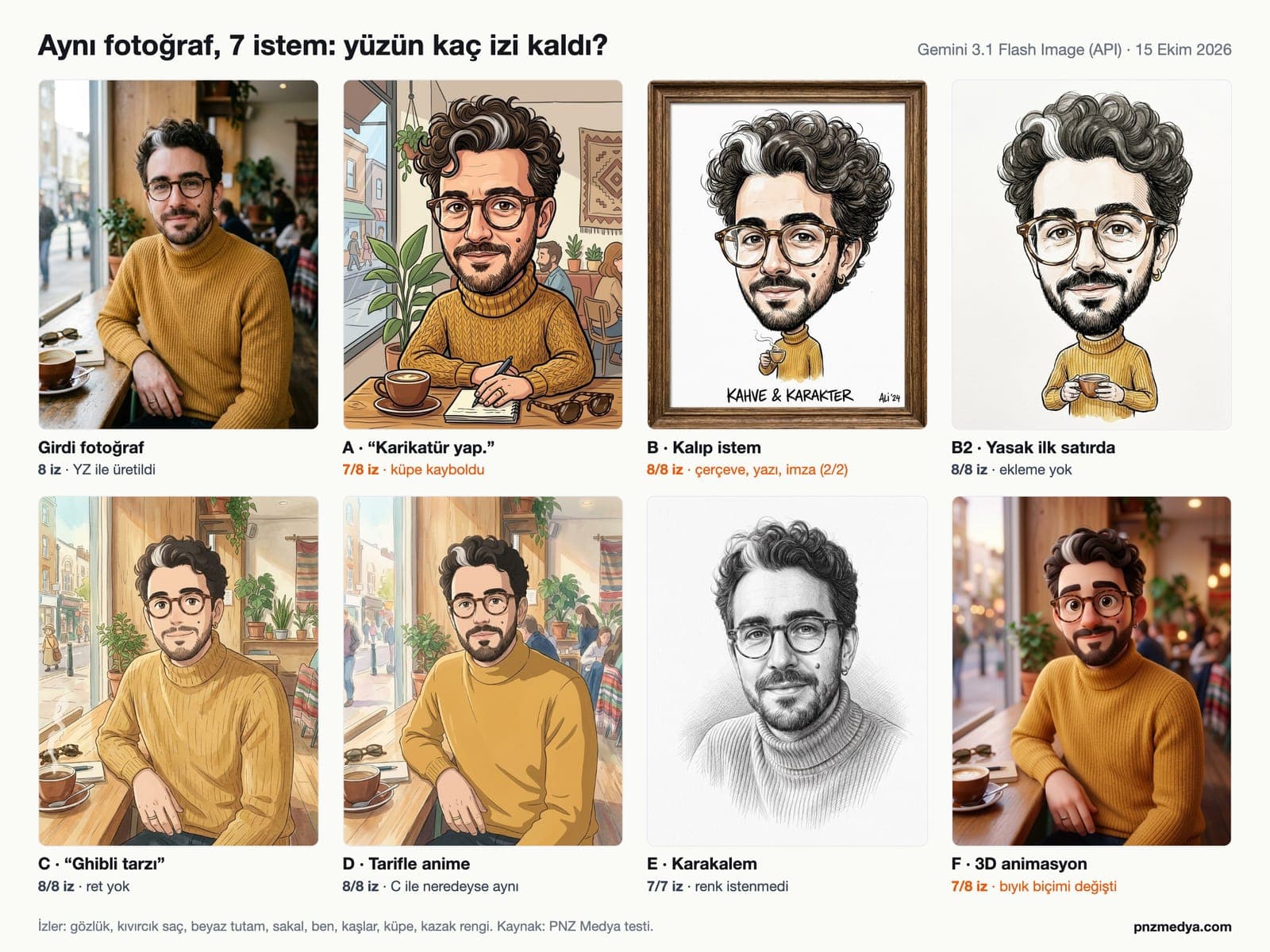
We worked on October 15, 2026 through the Gemini API with the gemini-3.1-flash-image (Nano Banana 2) model, using the original Turkish prompts. The input photo shows a person who does not exist: we generated it with the same model so it would have countable features: round horn-rimmed glasses, curly hair, a white streak at the temple, a short beard, a mole on the cheek, thick eyebrows, a small hoop earring and a mustard turtleneck sweater. We counted these eight features one by one in every result.
| Prompt | Features kept | What happened |
|---|---|---|
| A · 'Turn this photo into a caricature.' | 7/8 | Earring disappeared; cafe scene stayed, a notebook and pen were added to the table; light exaggeration |
| B · Template caricature, prohibition on the last line | 8/8 (2 runs) | Frame, title text and signature added in both runs |
| B2 · Prohibition on the first line, with a positive description | 8/8 | Plain white paper, no additions (Prompt 1) |
| C · 'Turn it into Ghibli style.' | 8/8 | Anime frame with the setting kept; no refusal |
| D · Anime, style described in words | 8/8 | Almost the same frame as C; sweater texture went flat |
| E · Pencil sketch | 7/7 | No color requested; no signature or text appeared |
| F · 3D animation | 7/8 | Mustache tips curled, beard got fuller; eyes got bigger as requested |
B surprised us most. The prompt ended with 'do not add text, a signature or a frame'; in both runs the model added a wooden or line frame, Turkish captions underneath along the lines of 'Coffee & Character' and 'Have a great coffee day!', and a made-up signature in the corner. The phrase 'in the style of a street caricaturist' seems to also call up the framed, signed paper sold at a caricaturist's stand. In B2 we removed this phrase and put the prohibition on the first line as a positive description: 'plain white paper all the way to the edges'. We made both changes together, so we can't tell which one did the job; apply both.
The short prompt (A) gave the model the most freedom: little exaggeration, same scene, one feature missing. The big head and exaggerated feature you expect from a caricature only showed up once we wrote them in. The numbers come from one photo and one model; we did not run the same test in ChatGPT.
Can You Use Ghibli or an Artist's Name in a Prompt?
In the GPT-4o image generation system card published on March 25, 2025, OpenAI acknowledges that when an artist's name is written in the prompt, the model can produce images that resemble some artists' work, and says it added a refusal that kicks in when an image is requested in the style of a living artist. The Ghibli trend spread the same week. According to the company's statement to TechCrunch on March 26, 2025, ChatGPT refuses the styles of individual living artists and allows broader studio styles.
We continue to prevent generations in the style of individual living artists, but we do permit broader studio styles.
In Mashable's test in the same article, ChatGPT refused a request to turn an uploaded selfie into 'Hayao Miyazaki style' animation, citing its content policy; the same prompt worked when it said 'Studio Ghibli' instead. In our Gemini API test, the prompt 'turn it into Hayao Miyazaki style' was not refused and gave a frame very similar to C. The Gemini app may behave differently from the API; we did not test it there.
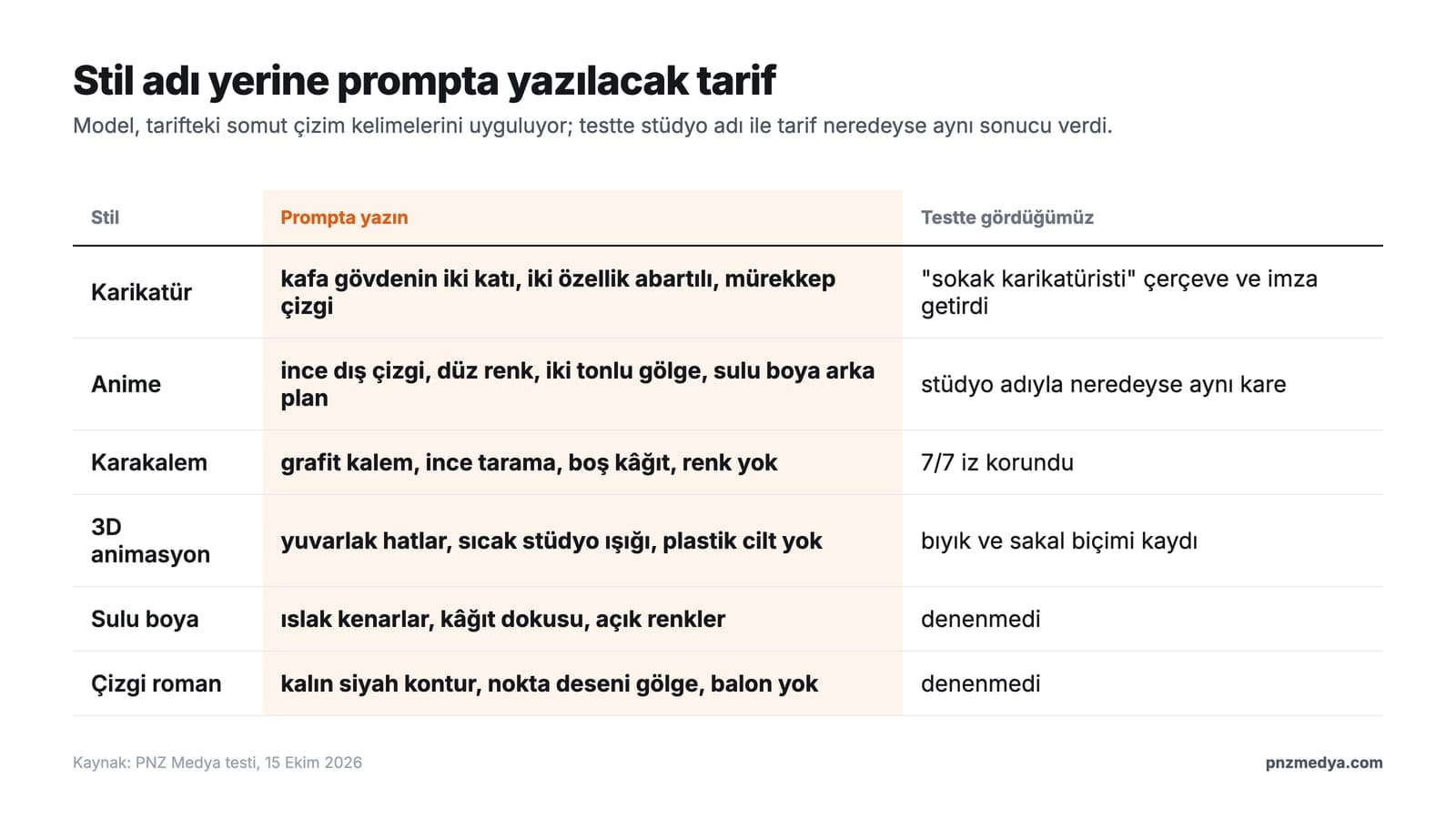
The practical takeaway: you don't need a studio or artist name. Gemini's own help page also recommends describing the image style in the prompt and gives pencil drawing, watercolor painting and caricature drawing as examples. When you spell out the line weight, color areas, number of shading tones and background technique, you get the same look, as with D.
The ChatGPT Caricature Trend: 'Draw Me Based on What You Know About Me'
In the trend that spread in the first week of February 2026, users uploaded their photos and wrote to ChatGPT: 'Create a caricature of me and my job based on everything you know about me'. According to a February 11, 2026 report by Kenya's Citizen Digital, the resulting caricatures looked like the work of street artists at tourist spots, and the same prompt also worked in Gemini.
The 'based on what you know' part draws on ChatGPT's memory. According to OpenAI's memory FAQ, saved memories and referencing chat history can each be turned off in Settings; a temporary chat does not create new memories, and if you choose Unpersonalized before starting, it doesn't use existing memories either. In Gemini, Personal Intelligence, the feature that generates images by looking at your past chats and Google apps, is available only in the US and only to users over 18, according to its help page.
If the model doesn't know anything about you, it fills the scene with a generic office or desk job. Prompt 2, where you write your job and the scene yourself, gives the same result without relying on memory; and in Prompt 3's approval step, the model writes out what it will put in the drawing first.
ChatGPT or Gemini? The Difference for Caricatures
| Criterion | ChatGPT | Gemini |
|---|---|---|
| Image model | ChatGPT Images 2.5, on all plans | Free plan has only Auto since October 9, 2026; paid plans can choose the model |
| Artist name | Living artists' styles refused, studio styles allowed (OpenAI, 2025) | 'Miyazaki style' was not refused in our API test |
| Fixing by selecting an area | With the selection tool, you can paint over just the signature or frame and remove it | By prompt (Prompt 12) |
| People and age rules | Use that impersonates a person without their permission is prohibited | Image editing closed to users under 18 |
| Marking in the file | C2PA metadata | Invisible SynthID watermark and C2PA metadata |
Both follow the original Turkish prompts from this article. ChatGPT's selection tool is the shorter route for removing an unwanted signature like the one in B; OpenAI's help page also notes that the selection is not always precise and that the edit can spill outside the selected area. Because free Gemini users can't choose the model, the same prompt may run on a different model on different days, which makes the features line even more important in Gemini.
Turning Someone Else's Photo Into a Caricature in Turkey
Turning your own photo into a caricature is personal use. When you upload a photo of a friend, a coworker or a celebrity, you are processing someone else's personal data. The exemption in Article 28 of KVKK (Turkey's Personal Data Protection Law) covers only activities concerning the person themselves and family members living in the same household; turning a coworker's photo into a caricature without their permission and sharing it does not fall under this exemption. Google's prohibited use policy also explicitly lists content that violates other people's privacy rights and output that involves harassment or insults.
Photos of children come with two more rules: in Gemini, users under 18 can't edit images; according to OpenAI's system card, ChatGPT uses a classifier to estimate whether each uploaded photo contains a child, so a request with a child's photo may be refused. If you're making a caricature of your child for a birthday invitation, share the result only within the family; every image sent to a school group chat lands on other families' phones too.
Common Mistakes
- In a short prompt without a features list, the small details go first; in the test, it was the earring.
- When 'do not add a signature' sat on the last line, a signature appeared in both runs; write the prohibition on the first line.
- In both runs where we wrote 'in the style of a street caricaturist', a frame and a signature appeared on the paper; describe the style with drawing terms instead of a job title.
- 'Exaggerate a bit' is vague; write 'head twice the size of the body' and name the two features to exaggerate.
- When you ask for five or six fixes in the same chat, the face drifts a little more each round; open a new chat after two fixes.
- In 3D style, spell out the shape of the beard and mustache separately; in the test it was the only feature whose shape changed.
Yes. ChatGPT Images is available on all plans, and Gemini's image generation is also on the free plan; usage limits vary by plan, and on Gemini's free plan the model is picked by Auto.
Upload the photo and write three lines: two features to exaggerate, the features that stay the same (such as glasses, a mole, hair color) and what must not be on the paper (text, signature, frame). Prompt 1 in this article follows this template.
Yes. All seven prompts in our test were run on a Gemini model in their original Turkish, and none was refused; you can paste the prompts from this article into Gemini along with your photo.
No. In our test, 'Ghibli style' and a prompt describing line, color and shading produced almost the same frame. OpenAI refuses living artists' names and allows studio names.
Upload your photo and write 'Draw a caricature of me and my job based on what you know about me'. The result relies on ChatGPT's memory; if memory is off or empty, write your job and the scene yourself (Prompt 2).
Name the feature that went missing and ask for only that one back (Prompt 12). If the face still drifts after two fixes, open a new chat and upload the photo again.
Before you make the caricature, write the eight features in your photo on a piece of paper; that list is the prompt's 'Keep' line. If text or a signature showed up on the paper in the first result, remove it with Prompt 12; if you want a different style, carry the same features list over to Prompt 4, 6 or 7.
Corporate Identity and Logo Design
AI is enough for a personal caricature. Tying your logo, color palette and typography into one visual language that looks the same across every channel is a designer's job. We build your corporate identity, from the logo to the usage guidelines. Get in touch and let's set up a free initial consultation.