



How to Make a Profile Picture with AI: 12 LinkedIn-Ready ChatGPT and Gemini Prompts
We gave the same selfie to Gemini with four prompts: a one-sentence prompt shrank the face from 44% to 37%, while a dark, plain background raised readability in a small circle from 2 to 75. Here are 12 ready-made profile picture prompts for LinkedIn, WhatsApp and your CV, plus LinkedIn's official size requirements.
- A profile picture is judged in a small circle, not on a big screen; LinkedIn recommends that your face take up at least 60% of the frame.
- In our test, the one-sentence prompt 'make a professional profile picture' changed the hairstyle, turned the kitchen into an office and shrank the face from 44% to 37%.
- Writing '60%' in the prompt made the face bigger but did not hit the target: both attempts came out at 48%. Generating a slightly wider shot and adjusting it in LinkedIn's crop screen is more reliable.
- The most readable result in the small circle came from a plain background clearly darker than the face: in a 40-pixel circle, the face-to-edge difference went from 2 to 75.
- LinkedIn allows illustrations and AI-edited photos, but the rule is clear: your profile picture must look like you. That is why every one of the 12 prompts below has an identity line.
A profile picture is judged in a small circle, not on a big screen. LinkedIn's own tips article calls it 'this little round image' and says profiles with a photo get 14 times more views (LinkedIn Talent Blog, August 1, 2024). So when you make a profile picture with AI, what you want is not a beautiful portrait but a face that identifies you even in a 40-pixel circle.
Making a profile picture with AI means uploading your own selfie to ChatGPT or Gemini and, while keeping your face intact, adapting the background, lighting, outfit and framing for LinkedIn, WhatsApp or Instagram. This guide includes 12 ready-made profile picture prompts, a five-result circle test we ran on the same selfie, LinkedIn's official size requirements, and what to watch for with CV photos in Turkey.
How to Make a Profile Picture with AI: 5 Steps in ChatGPT and Gemini
Short answer: upload a photo taken in good light at eye level, write the facial features to keep and the framing you want on separate lines, then check the result in a small circle.
- Choose the source photo: your face should be sharp and facing the camera, and it should show you as you look today; LinkedIn also asks for a photo that shows how you would look if someone met you tomorrow.
- Open the tool: in ChatGPT, attach the image and type your prompt; in Gemini, upload the photo. Image editing in Gemini is not available to users under 18.
- Copy a prompt from below and fill in the square brackets. Never delete the identity line.
- Check the result shrunk down on your phone: is the face centered in the circle, and does the background stand apart from the face?
- Do the final crop on the platform: LinkedIn lets you adjust the photo after uploading, and enlarging the face there is more reliable than regenerating the image.
Writing only 'make it professional'. The model reads that word as permission for a new setting, new hair and new clothes. Write what stays and what changes on separate lines.
12 Ready-to-Use Profile Picture Prompts (Copy and Paste)
Upload your photo, copy the prompt and fill in the bracketed parts; delete the line for any field you want to leave empty. We tested these prompts in their original Turkish, and Gemini followed the framing and color instructions. They work in ChatGPT as well.
1) LinkedIn profile picture: the master template
Create a LinkedIn profile picture of the person in the photo I uploaded.
Identity: keep the facial features, eye shape, [your permanent marks: e.g. mole on the cheek, scar on the eyebrow], the shape of the smile, hair color, [your hairstyle: e.g. bun] and age exactly the same; do not smooth the skin, keep pores and fine lines.
Framing: square (1:1), close-up; face centered, with chin to hairline taking up about 60% of the square's height; only the top of the shoulders visible. Fill the square edge to edge with the photo; do not draw a circle or a frame.
Camera: at eye level, looking straight into the lens.
Lighting: soft front light like window light, no harsh shadows on the face.
Background: plain, mid-tone [color: e.g. grey-blue], no objects at all; clearly darker than the face.
Outfit: [outfit: e.g. plain navy blazer, white open-collar shirt]; no logos or text.
Make it photorealistic; no illustration or filter look.This is the 'final version' from our test; after seeing the model draw the circle itself in one attempt, we added the sentence 'do not draw a circle or a frame'.
2) A short version with identity protection for ChatGPT and Gemini
Make a LinkedIn profile picture from this photo.
Do not change my face, my hairstyle, [your permanent mark] or my age.
Only make the background plain [color], soften the lighting and crop the square so my head and shoulders show.
Do not add a new location, new clothes or filters.3) Matching corporate profile pictures for a team page
This photo needs to match the other profile pictures on our company's team page.
Keep the person's facial features, hair, [permanent marks] and age exactly as they are.
Shared rules: square (1:1); head and shoulders; eyes in the top third of the square; plain [color: e.g. light beige] background; soft window light from the left; outfit [team outfit: e.g. plain dark T-shirt].
As a second image I attached [a previously approved team photo]: match its lighting, background color and framing, not the person.
Do not add logos, text or watermarks.If everyone on the team took their selfie in a different place, this prompt pulls the page together as if it had been shot in one studio; give the first approved photo as the reference every time.
4) A natural profile picture for WhatsApp and Instagram
Create a natural profile picture for WhatsApp and Instagram of the person in the photo I uploaded.
Identity: keep the facial features, eye shape, [permanent marks], smile, hair color and age the same; do not smooth the skin.
Framing: square (1:1), head and upper shoulders; face centered, with chin to top of the hair taking up about half of the square's height; the ears and the edges of the hair should not spill outside the square. Do not draw a circle or a frame.
Lighting: warm light from just before sunset, coming softly from one side of the face.
Background: blurred green trees outdoors, clearly darker than the face.
Outfit: keep the clothes the person is wearing.
Make it look like a real photo taken with a phone; no filters, artificial glow or text.In our test, this prompt gave the most readable result in the small circle: face ratio 57%, face-to-edge difference of 75 at 40 pixels.
5) CV photo prompt
Create a CV photo from this picture for my resume.
Identity: keep the facial features, [permanent marks], hair and age exactly the same; preserve the skin texture.
Framing: square or vertical 4:5; head and shoulders; face centered; at eye level, looking into the lens; mouth closed or a slight smile.
Background: white or very light grey, plain and shadow-free.
Outfit: [outfit suited to the job you are applying for: e.g. plain dark blazer].
Do not add makeup, slim the face or use filters.If an official application asks for a passport or biometric photo, this prompt is not enough; for photos with fixed specifications like these, see our ID photo guide.
6) Men's profile picture prompt (protects beard and hairline)
Create a professional profile picture of the man in the photo I uploaded.
Keep exactly as they are: facial features, the shape and length of the beard and mustache, the hairline including any receding areas, eyebrow shape, [permanent marks] and age. Do not thicken the hair, fill in the beard or sharpen the jawline.
Framing: square (1:1), head and shoulders; face centered in the square.
Lighting: soft side light, with one side of the face slightly in shadow.
Background: plain, dark charcoal.
Outfit: [outfit: e.g. navy polo shirt or a blazer without a tie].
Make it look like a real photo, with no artificial glow.7) Black-and-white portrait for Instagram
Turn the person in this photo into a black-and-white portrait for an Instagram profile.
Keep the facial features, [permanent marks], hair and age the same.
Framing: square, close-up; the face takes up more than half of the square's height.
Lighting: soft light from a single direction, the other side of the face in shadow; background almost black.
Tone: true black-and-white film look, fine grain, high but not harsh contrast; no sepia and no leftover color.8) The safest version: change only the background
Change only the background in this photo.
Do not touch the person at all: the face, hair, clothes, pose, direction of the light on the face and the framing stay exactly the same.
Replace the background with a plain [color] wall; keep the hair edges natural, with no hard cut-outs or halos.
Make the light on the new background come from the same direction as the light on the face.If you open the image in ChatGPT and paint over only the background with the selection tool before sending, the model touches the person less. If you are worried about your face changing, start here.
9) Reducing reflections on glasses
Reduce the reflections on the lenses of the glasses in this profile picture.
Keep the frame and shape of the glasses, the eyes behind the lenses, eye color and eye shape exactly the same.
Do not change anything else: the face, hair, clothes, background, lighting and framing stay the same.10) An illustrated avatar of your own face
Turn the person in this photo into a simple digital illustration to use as a profile picture.
Likeness matters: keep the face shape, hairstyle, [glasses, beard or permanent marks] and skin tone recognizable; do not exaggerate it like a caricature.
Style: [style: e.g. flat-color vector illustration, thin outlines, 4-5 colors].
Framing: square, head and shoulders, face centered; background a single plain color [color].
Do not add text, signatures or watermarks.LinkedIn accepts illustrations and caricatures as long as they look like you; that is why the likeness line is the most important part of this prompt.
11) Expanding the frame of a cropped selfie
The head and shoulders are cut off in this photo. Expand the frame: add space above and on both sides of the person and complete the shoulders naturally.
Keep the face, hair, the visible part of the clothes and the lighting exactly the same; only add the missing parts.
The result should be square (1:1), with the face centered and about half of the square's height.
Continue the background in a simple way that matches the existing background.12) Did my face change? The check prompt
I am giving you two photos: the first is my original photo, the second is a profile picture made with AI.
Compare them only in terms of face and identity: face shape, eye shape and color, eyebrows, nose, lips, [my permanent marks: e.g. mole, scar], hairline and hairstyle, beard and apparent age.
For each item write 'same', 'slightly changed' or 'changed', and describe what changed in one sentence.
At the end, tell me in one sentence: to someone who knows me, does the second photo still look like me?
Do not count differences in clothes, background or lighting.Use this prompt in a new chat; in the chat that generated the photo, the model may rate its own work more favorably than it deserves.
Asking for corrections in the same chat can shift the face a little more with every round. Open a new chat, upload the original photo again and add the feature that changed to the identity line by name: 'my hair is in a bun, do not let it down'. If the model refuses an image with a person in it, state that the photo is of you and that you only want to change the background and lighting.
Our Own Test: Same Selfie, Five Results, in a Small Circle
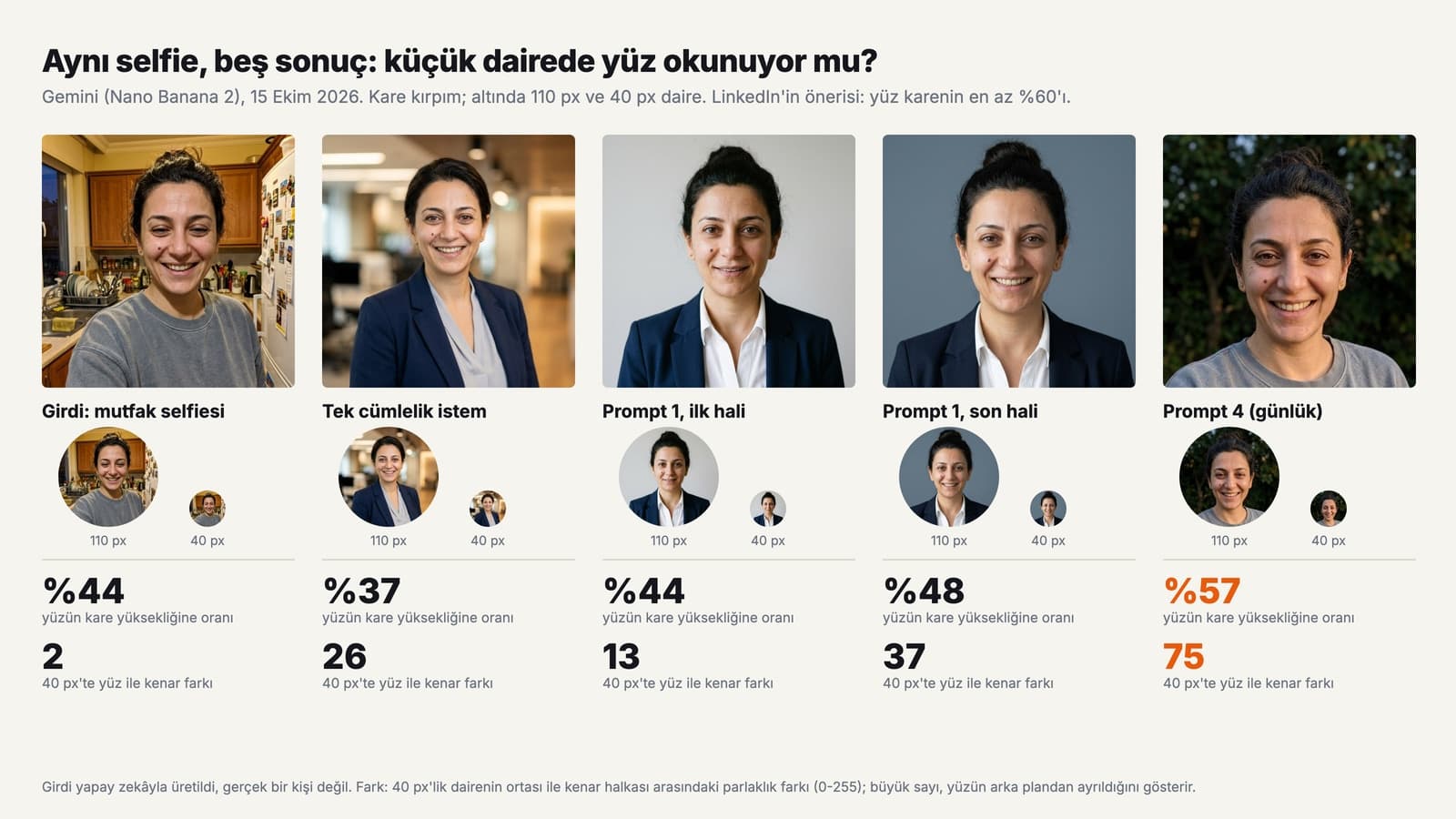
On October 15, 2026, we gave a kitchen selfie we had generated with AI (not a real person) to Gemini's Nano Banana 2 model with four different prompts. We cropped each result to a square, shrank it into 110-pixel and 40-pixel circles, and measured two things: the ratio of face height (chin to hairline) to the height of the square, and the brightness difference (0-255) between the face in the center and the edge ring of the 40-pixel circle. We had Gemini 3.5 Flash mark the face box three times for each image; the measurements varied by at most 1 point.
| Result | Face ratio | 40 px difference | What happened |
|---|---|---|---|
| Input: kitchen selfie | 44% | 2 | Cluttered background; in the small circle the face does not stand apart from the background |
| One sentence: 'Make a professional profile picture for LinkedIn' | 37% | 26 | Bun let down, kitchen turned into an office, face got smaller; mole and earrings stayed |
| Prompt 1, first version (face 'about half', light grey background) | 44% | 13 | Bun and mole stayed; two conflicting lines closed the toothy smile |
| Prompt 1, final version (60%, grey-blue background), 2 attempts | 48% and 48% | 37 and 31 | Face got bigger but did not reach 60%; in one attempt the model drew the circle itself |
| Prompt 4, everyday (dark green background, side light) | 57% | 75 | Most readable small circle; outfit and toothy smile stayed exactly the same |
First finding: the one-sentence prompt gave the model free rein over the scene instead of anchoring the identity. The model read the word 'professional' as an office background, hair worn down and a new blouse; instead of getting bigger, the face shrank from 44% to 37%. Second finding: in the first version of Prompt 1 we had written both 'keep the smile the same' and 'slight natural smile'; the model followed the second line and closed the toothy smile. When a prompt has two conflicting lines, the later one wins.
The third finding is about numbers. We wrote LinkedIn's recommended 60% explicitly in the prompt; in both attempts the face stayed at 48%. The number pushed the model in the right direction but did not get it to the target. In one of those attempts, because of the sentence 'will be cropped into a circle', the model drew a circle with white corners itself; we removed that sentence from the prompts. The fourth finding is about readability in the small circle: the light grey background stayed brighter than the face, so the difference was only 13, while grey-blue raised it to 37 and dark green to 75.
The practical takeaway: do not leave the face ratio to the model. Generate a slightly wider square, ask for a background darker than the face, and do the final crop in LinkedIn's or WhatsApp's own crop screen.
LinkedIn Profile Picture Size and Rules
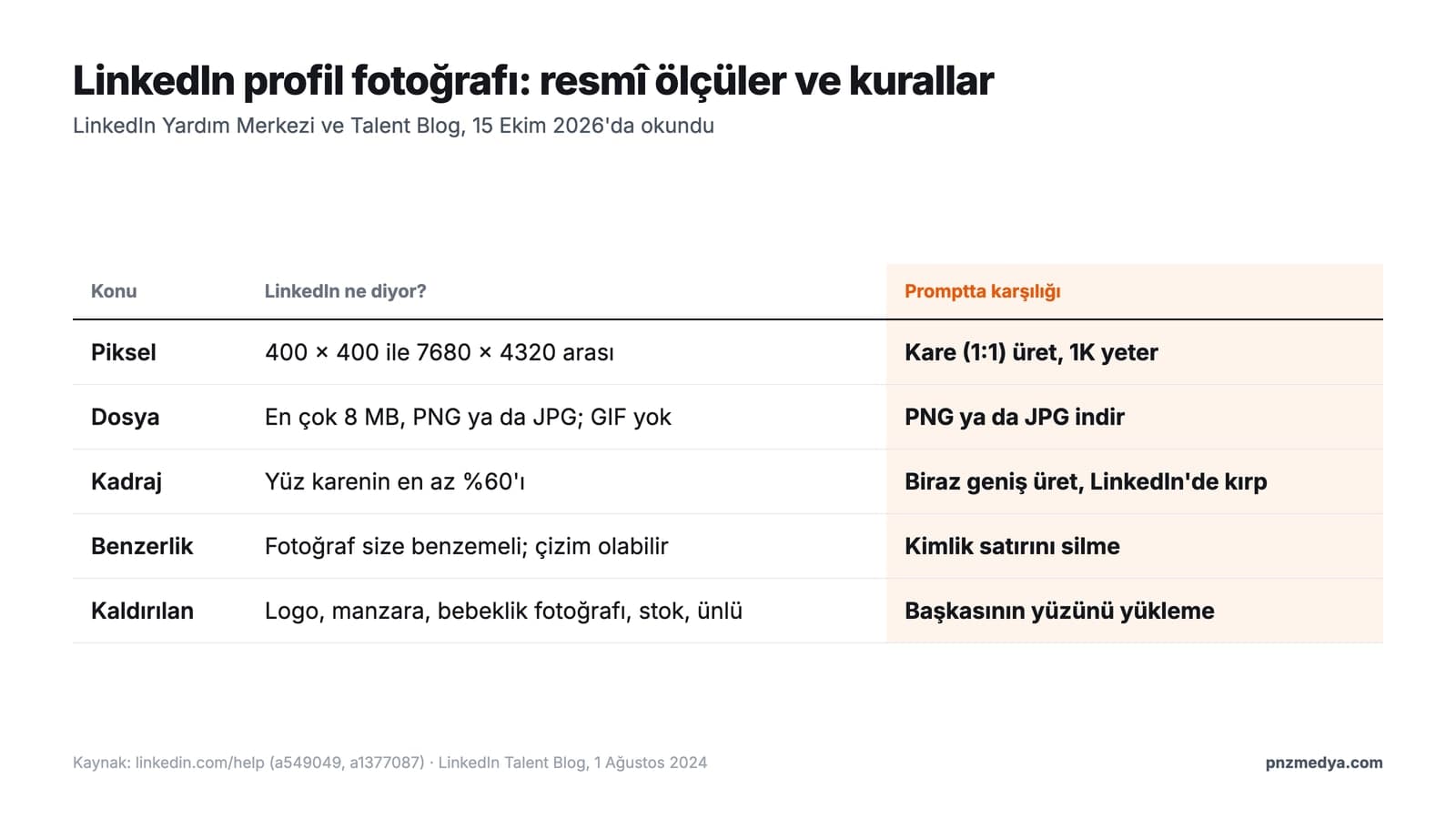
According to the LinkedIn Help Center, a profile photo should be between 400 x 400 and 7680 x 4320 pixels; the file can be up to 8 MB in PNG or JPG format, and GIF is not supported. The same page recommends a photo that does not need much cropping and lets you adjust it after uploading. Gemini downloads images at 1K resolution on the free plan and at 2K with a Google AI plan; both are above LinkedIn's minimum.
On the rules side, LinkedIn's guidelines do not ban AI-edited or drawn photos; the condition is likeness:
You can use an illustration, caricature or other artistic work of yourself, but your profile photo must look like you.
The same guidelines say LinkedIn may remove company logos, emoji, landscapes, animals, words, flags, childhood or baby photos, and images that resemble someone else, such as stock images, celebrity photos and fictional characters. The Professional Community Policies also explicitly prohibit using someone else's image, or an image that does not look like you, as your profile photo.
In a study published on June 20, 2023, LinkedIn's engineering team wrote that it caught 99.6% of faces generated with StyleGAN and wrongly flagged 1% of real profile photos as synthetic. That rate was measured for GAN faces generated from scratch; no rate has been published for a real photo edited with ChatGPT or Gemini.
ChatGPT or Gemini? Differences for Profile Pictures
Both tools edit photos of people and can be used on the free plan; the differences lie in the selection tool, model choice and the markers added to the file.
| Criterion | ChatGPT | Gemini |
|---|---|---|
| Image model | ChatGPT Images 2.5 (on all plans since September 8, 2026) | Free plan: Auto only since October 9, 2026; paid plans can choose the model |
| Editing a selected area | Yes: you can paint over just the background with the selection tool | Through the prompt only |
| People and age rules | Impersonating a person without their consent is prohibited | Image editing unavailable to users under 18 |
| Markers in the file | C2PA metadata | Invisible SynthID watermark and C2PA metadata |
Our recommendation: if you are worried about your face being altered, use the selection tool in ChatGPT to change only the background (Prompt 8). If you are setting up lighting, outfit and framing together, Prompt 1 in Gemini is a good start; on the free plan, send one complete prompt and do not try to pick a model.
6 Techniques for a Stronger Profile Picture
- Ask for a background darker than the face: in our test, the difference in the 40-pixel circle was 13 on light grey, 37 on grey-blue and 75 on dark green.
- Generate a slightly wider square and do the final crop on the platform; the face ratio the model produces does not reach the number you write.
- Name your permanent marks in the identity line: mole, scar, hairstyle, beard. 'Do not change my face' on its own is not enough.
- Do not leave two conflicting requests in a prompt; the model applies the later one.
- Hold your phone at eye level when taking the selfie; fixing a low angle forces the model to touch your facial proportions.
- Use the same photo on every platform; different faces on LinkedIn, WhatsApp and your CV reduce trust.
Common Mistakes
- Adapting someone else's photo for your own profile: LinkedIn explicitly prohibits this.
- Using an old or filtered photo as the source; the new photo should show you as you look today.
- Using a childhood photo, a logo or a landscape as your profile picture; LinkedIn may remove these.
- Asking the model for a circle: ask for a square, the platform crops the circle.
- Asking for corrections over and over in the same chat; each round can shift the face a little more.
- Trying to edit photos in Gemini while under 18; image editing is unavailable to that age group. And never upload a photo of someone else, especially a child.
Profile Pictures in Turkey: CVs, KVKK and Fake Profiles
If you are putting a photo on your CV, Kariyer.net's guide dated March 26, 2025 says 'Avoid selfies or filtered photos' and recommends that 'a plain background in white or light tones will give the best result'. Prompt 5 follows these two rules; even though it starts from a selfie, the result should not look like one.
Editing someone else's photo counts as processing personal data. The exemption in Article 28 of KVKK (Turkey's Personal Data Protection Law) only covers activities related to the person themselves and family members living in the same household; editing and sharing a friend's photo without their consent does not fall under this exemption. Article 136 of the Turkish Penal Code also provides for two to four years in prison for anyone who unlawfully gives, disseminates or obtains another person's personal data. Opening a fake profile in someone else's name can run afoul of both this article and LinkedIn's own rules.
Upload your photo to ChatGPT and send a prompt that lists the facial features to keep, the framing, the lighting and the background on separate lines (Prompt 1). If you only want to change the background, open the image, paint over the background with the selection tool and use Prompt 8.
Yes. In our test, Gemini followed the framing, lighting and background instructions we wrote (in Turkish). The only thing it did not hit exactly was numeric requests like face ratio: when we asked for 60%, the face stayed at 48%.
Yes, as long as it looks like you. LinkedIn allows illustrations, caricatures and other artistic work but requires your profile photo to look like you; someone else's image, stock images and celebrity photos are prohibited.
According to LinkedIn, it should be between 400 x 400 and 7680 x 4320 pixels, at most 8 MB, and in PNG or JPG format. Upload a square photo; LinkedIn recommends that your face take up at least 60% of the frame.
Yes, you can edit photos of people on the free plans of both ChatGPT and Gemini; neither company publishes the free limit as a number. On the free plan, Gemini downloads images at 1K resolution, which is enough for LinkedIn.
Prompt 6 is written for men's profile pictures: it explicitly asks the model to keep the shape and length of the beard, the hairline and any receding areas. Without these lines, models tend to fill in the beard and thicken the hair.
A good profile picture does not need a strong adjective; it needs a good protection list and a dark background. Name your permanent marks, generate a slightly wider square, do the final crop on the platform and check the result in a 40-pixel circle. If you are looking for ready-made prompts to generate photos from scratch, take a look at our ChatGPT photo prompts guide.
Corporate Portrait Photography for Your Team Page and LinkedIn
AI can quickly polish a single profile picture, but getting everyone on your team page, in your press kit and on your LinkedIn company page in the same light and against the same background takes a real photo shoot. We photograph your team's portraits in a single session and deliver them in ready-to-use sizes for your website and LinkedIn. Get in touch today for a free initial consultation.