



Try On Hairstyles and Hair Colors with AI: 12 Gemini and ChatGPT Prompts That Keep Your Face
12 ready-made prompts for AI hairstyle and hair color try-ons: face shape analysis, cuts, a 3x3 catalog and color by dye shade number. We tested them in Gemini with 36 images; 9.1 light blonde turned silver gray in three of four tries.
- With the detailed prompt, face shape analysis gave each of six faces the same label in three of three runs (18/18). It told round, square and long faces apart, and called the same woman "oval" in two photos, one with her hair down and one with it pulled back tightly.
- A short prompt (in Turkish, translated here: "Make my hair a short blunt bob with bangs") changed the face in Nano Banana 2: the woman smiled, and the pixel difference in the eye-to-chin area rose to 6.7. With the prompt that names everything to keep, the difference was 3.2.
- The lightness order of dye numbers held: 4.0, 7.3 and 9.1 went from dark to light in both models. 9.1 (very light ash blonde) looked silver gray in three of four tries; once we described it with "keep it in the blonde family", all four came out blonde.
- Nano Banana 2 barely applied the described 7.3 prompt in two of three tries (hair color difference ΔE 0.5 and 0.6). In every one of Lite's color results, the hair color changed clearly.
- Skin and eyebrows stayed put while the hair color changed: cheek color difference ΔE 1.0-2.5, eyebrow lightness 42-44 (44 in the input).
Ask about your face shape first, then try the cut on your own photo, and leave color for last. We tested this order in Gemini with 36 images and 30 analysis answers. The face shape answer came out the same all three times for the same photo, and the detailed cut prompt kept the face. The real surprise was color: the light ash blonde we asked for as "shade 9.1" turned silver gray in most tries.
Below are 12 ready-made AI hairstyle and hair color try-on prompts: face shape analysis, women's and men's haircut try-ons, 9 styles in one image, bangs, color by dye shade number, light blonde shades, balayage, longer hair, a three-angle view to take to your hairdresser and a description to go with it. The prompts are written to work the same way in ChatGPT, but we tested them only in Gemini, using the original Turkish versions; ChatGPT results aren't in this post.
How to Try On Hairstyles with AI: 4 Steps
- Choose the photo: front-facing, at eye level, in daylight, hair down. For face shape analysis, also take one with your hair pulled back so your forehead and jawline show.
- Ask about your face shape (Prompt 1). Write down the five suggestions in the answer and start your cut try-ons with them.
- Try the cut (Prompts 2-5). Tie the length to a point on your face (chin, earlobe, collarbone) and list what to keep one by one: face, expression, earrings, clothing, wall.
- Try color in a separate message (Prompts 6-8): write the dye shade number and its name together. Look at the result you like from the front, side and back, and take it to your hairdresser along with its description (Prompts 10-11).
According to Google's help page, since October 9, 2026, Gemini accounts without a plan run only on the "Auto" setting, and Nano Banana 2 Lite handles most image requests. On a paid plan, Nano Banana 2 does the drawing. Google sets an age limit of 18 for photo editing. The two columns in our test are Lite and Nano Banana 2.
12 Ready-Made Hairstyle and Hair Color Prompts (ChatGPT and Gemini)
Replace the parts in square brackets with your own details. Add the photo first, then paste the text. Under each prompt we note whether we tested it.
1) Face shape analysis and hairstyle suggestions
Assess the face shape in this photo.
1. First estimate four measurements relative to each other: forehead width, width across the cheekbones, jawline width and face length (from the hairline to the tip of the chin). If hair covers the forehead, ears or cheeks, write "covered by hair, estimate" next to that measurement.
2. Then pick one face shape from this list: oval, round, square, heart, long, diamond. If you're not sure, write the two closest shapes and say which one it's closer to.
3. Suggest 5 hairstyles that suit this face shape. One line each: style name, length (chin, shoulder, collarbone and so on), bangs or no bangs, and why it suits this face.
4. Name 2 styles I should avoid and say why.
The first line of your answer should be only "Face shape: ..."Tested (6 faces, 3 runs each). The label stayed the same in 18 of 18 answers. In one answer the model wrote "about 13 cm" for forehead width; with no ruler in the photo, that number is a guess. That's why step 1 says "relative to each other".
2) Women's hairstyle try-on (cut and bangs)
Cut the hair of the person in the photo into this style: [straight blunt bob at chin length, ends straight and thick, straight bangs ending just above the eyebrows]. Keep the hair color and shine as they are in the photo.
Keep the face, skin, eyebrows, eyes, makeup, expression, [earrings], [clothing], background, lighting and camera angle as they are in the photo. Where the shorter hair leaves open space, show the neck and the background; [keep the ears under the hair].
Keep the framing and aspect ratio the same.Tested. Nano Banana 2 ended the bangs above the eyebrows and kept the face. Lite brought the bangs down to the eyebrows. In both models the earrings ended up hidden under the hair; if you want to see your earrings, change the last bracket to "show the earlobes and earrings".
3) Men's hairstyle try-on (fade and top length)
Cut the hair of the person in the photo into this style: [short fade on the sides and back, blending upward from the bottom, short enough to show skin at ear level; top 5-6 cm, textured hair combed forward and slightly up]. Keep the hair color as it is in the photo.
Keep the face, skin, eyebrows, eyes, expression, beard length and shape, ears, clothing, background, lighting and camera angle as they are in the photo.
Keep the framing and aspect ratio the same.Tested. The fade was applied in four of four results. Naming the beard helped: with the detailed prompt, the share of dark pixels in the beard area stayed around 52%, as in the input, while with the short prompt Nano Banana 2 thinned the beard slightly (48%).
4) See 9 hairstyles in one image
Make a 3x3 grid with the person in this photo: nine equal squares with a thin white line between them. All nine squares show the same face, same expression, same head angle, same hair color, same clothing and same background; only the hairstyle changes.
Order from left to right, top to bottom: [1 chin-length blunt bob, 2 blunt bob with bangs, 3 asymmetric long bob, 4 shoulder-length layered cut, 5 long hair with curtain bangs, 6 very short pixie, 7 long straight hair, 8 wavy lob, 9 high ponytail].
No text or numbers above or inside the squares.Tested. Lite drew all nine styles in order, Nano Banana 2 drew eight (its asymmetric bob looked like a straight long bob). The image is 1024 pixels, so each square is about 330 pixels; regenerate the style you like on its own with Prompt 2.
5) Try on bangs
Add [curtain bangs parted in the middle, falling to the cheekbones] to the hair of the person in the photo. Keep the length, part and color of the rest of the hair as they are in the photo.
Keep the face, eyebrows, eyes, expression, clothing, background and lighting as they are in the photo. The strands of the bangs should have the hair's own color and thickness.
Keep the framing and aspect ratio the same.Not tested. This is the change people try most before committing to bangs; describe the length relative to your eyebrows, eyes or cheekbones.
6) Hair color try-on: by dye shade number
Dye the hair of the person in the photo to shade number [7.3] ([golden dark blonde: medium dark blonde with a golden tone]). Keep the cut, length, part, strand texture and shine of the hair as they are in the photo; same shade from roots to ends.
Keep the face, skin tone, eyebrows, eyelashes, makeup, earrings, clothing, background and lighting as they are in the photo.Tested (with 4.0, 7.3 and 9.1). Write the name next to the number: Lite read the number and the name together, while Nano Banana 2 barely applied 7.3 in two of three tries. If the color comes back unchanged, send the same message once more or try the short version: "Dye my hair shade 7.3." In the test, this short sentence (in its original Turkish) changed the color clearly in both models.
7) Light blonde and ash shades (without turning gray)
Dye the hair of the person in the photo to shade number [9.1]: [very light ash blonde]. A cool-toned blonde that looks light beige wheat blonde in daylight; no orange or golden shimmer. Keep the hair color within the blonde family: no white, silver or gray hair.
Keep the cut, length, part, strand texture and shine of the hair as they are in the photo; same shade from roots to ends.
Keep the face, skin tone, eyebrows, eyelashes, makeup, earrings, clothing, background and lighting as they are in the photo.Tested (twice in each model). With Prompt 6 and only "very light ash blonde" as the description, three of four results looked silver gray. This version describes how the color looks in daylight, and all four results stayed blonde; Nano Banana 2's blonde came out one shade darker.
8) Try balayage or ombre
Give the hair of the person in the photo [balayage]: [the hair's own color down to ear level; from the ears to the ends, gradually lightening to honey blonde, with slightly lighter strands on both sides of the face]. Keep the transition soft, with no sharp color line.
Keep the cut, length and part of the hair as they are in the photo. Keep the face, skin tone, eyebrows, clothing, background and lighting as they are in the photo.Not tested. Stating where the color transition starts with a point on the face (ear, chin, shoulder) keeps the root color intact.
9) Try longer hair
Lengthen the hair of the person in the photo [to chest level]: [straight, ends slightly layered]. Keep the hair color, part and shine as they are in the photo; the new length should have the same strand thickness.
Keep the face, expression, clothing, background and lighting as they are in the photo. The ends of the hair should be visible inside the frame.
Keep the framing and aspect ratio the same.Not tested. Useful before deciding on extensions or on growing your hair out; if the ends fall outside the frame, change the last line to "widen the frame to below the chest".
10) Three angles to show your hairdresser
To show the hairstyle in the last image to my hairdresser, make an image with 1 row x 3 columns: front view on the left, left profile in the middle, back view on the right.
Same person, same hairstyle, same hair color, same clothing and a plain light gray background in all three panels. In the back view, the cut line at the nape and the ends of the hair should be clearly visible.
No text in the panels.Not tested. A single front-facing photo doesn't show the nape or the sides. The model fills those parts in on its own, and your hairdresser should know the image is a guess.
11) A description to read to your hairdresser
I'm going to describe the hairstyle in this image to my hairdresser. Write the following as short bullet points:
- the name of the cut and the name hairdressers commonly know it by
- lengths, relative to points on the face (eyebrow, chin, earlobe, collarbone); don't give centimeters
- where the layers start and where the bangs end
- what daily styling takes (blow-dryer, curling iron, mousse and so on)
My hair type: [straight and fine]. Add 3 questions I can ask my hairdresser about whether this style will hold up in my hair type.Not tested. The no-centimeters rule comes from the Prompt 1 test: the model can estimate centimeters from a photo and writes them down as if they were exact measurements.
12) Fixes: the face changed or the earrings disappeared
In the last image [my face changed: I'm smiling and my features look different]. Bring back the face, the expression and the [earrings] from the first photo I uploaded. Keep the hairstyle and hair color as they are in the last image; don't change the background or the lighting.Not tested. Writing only the error and what to keep in the second message makes the chat less likely to redraw the image from scratch. Google has its own note on Lite: Nano Banana 2 Lite isn't designed for many edits in a row, so if distortion gets worse on the second fix, start a new chat with the first photo.
These prompts are written for your own photo. Gemini sets an age limit of 18 for photo editing, and editing and sharing someone else's face without permission can run into personal data protection rules. We generated all six people in our test with Gemini Pro.
Hairstyle Try-On Test: Short Prompt or Detailed Prompt?
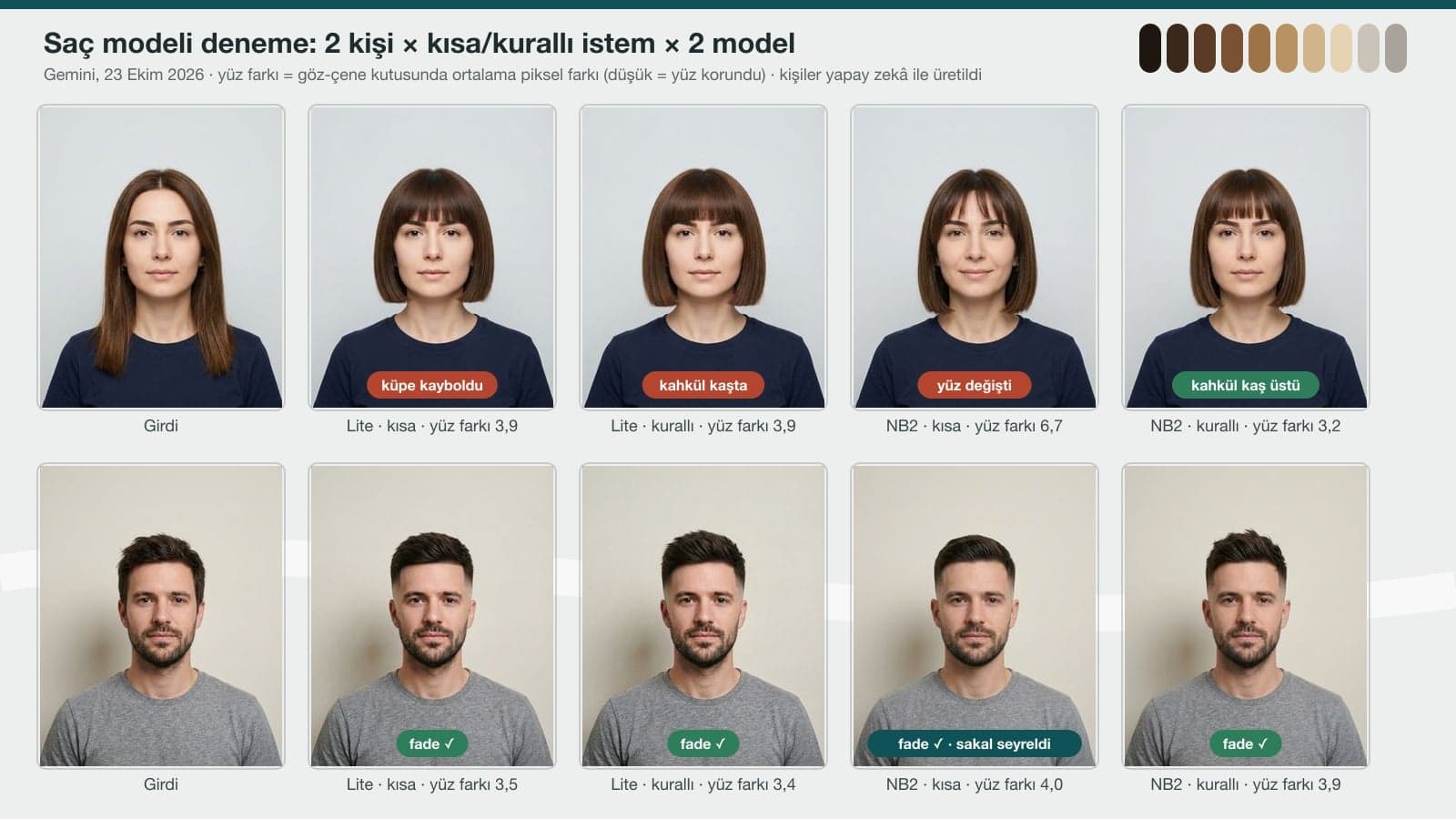
We generated two fictional people with Gemini Pro: a woman with shoulder-length straight brown hair and small gold hoop earrings, and a man with short hair and stubble. All tests used the original Turkish prompts, so the quotes here are our translations. Each of them got a cut from a short prompt ("Make my hair a short blunt bob with bangs", "Give me a fade haircut") and from the test versions of Prompts 2-3. We compared the face with the input pixel by pixel inside a box between the eyes and the chin: a difference of 3-4 is the small drift that comes from redrawing the same face.
| What we measured | Lite, short | Lite, detailed | Nano Banana 2, short | Nano Banana 2, detailed |
|---|---|---|---|---|
| Woman: face difference in the eye-chin box | 3.9 | 3.9 | 6.7 (smiled) | 3.2 |
| Woman: clearly changed face pixels | 0% | 0% | 2.5% | 0% |
| Where the bangs ended | touched the eyebrows | touched the eyebrows | above the eyebrows, sparse | above the eyebrows |
| Earrings visible | no | no | yes | no (ears under the hair) |
| Man: face difference | 3.5 | 3.4 | 4.0 | 3.9 |
| Man: fade applied | yes | yes | yes | yes |
| Man: dark pixels in the beard (input 51.2%) | 52.8% | 52.4% | 47.9% | 51.9% |
The background stayed in place in all four corners (difference 0.2-1.2). Lite keeping the face intact even with the short prompt is good news, because accounts without a plan mostly use Lite. With a short prompt, Nano Banana 2 fills the gaps itself: it kept the bangs sparse, uncovered the earrings and gave the woman a slight smile.
3x3 Catalog and Face Shape Analysis Results
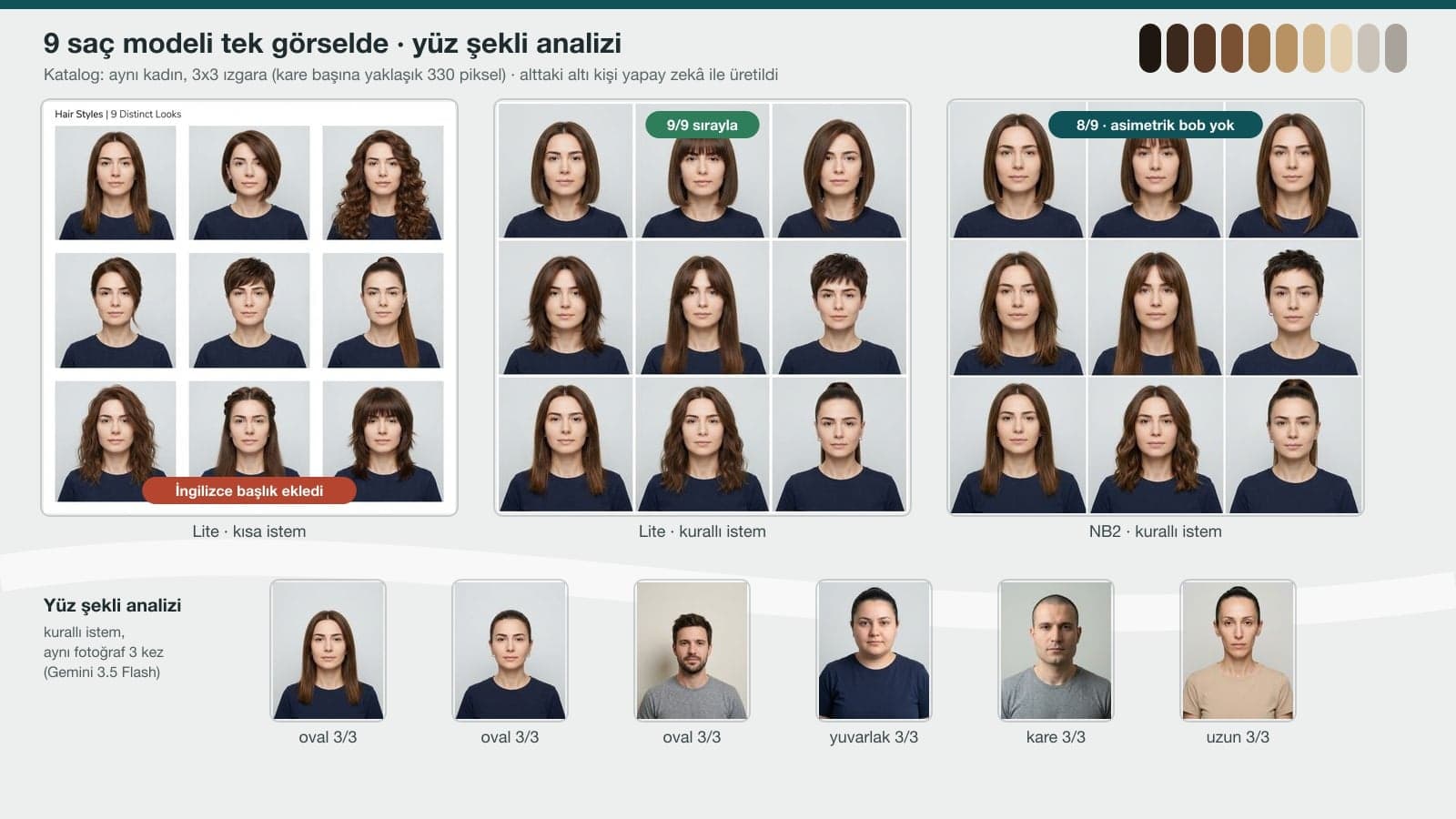
- We ran the face shape analysis through the API with Gemini 3.5 Flash. With the detailed prompt, each of the six faces got the same label in all three runs: oval for three faces, and their own shape for the round, square and long faces we generated. On the round face, one answer added "also close to oval".
- The short prompt ("What's my face shape? Which hairstyle suits me?") gave the man a two-shape answer like "oval-rectangular" in all three runs; the detailed prompt called the same photo "oval" all three times.
- 6 of the short prompt's 12 answers opened with a compliment along the lines of "Your features are quite balanced and symmetrical." This never happened with the detailed prompt, since we set the first line ourselves. The answers (in Turkish) were also shorter: 223-309 words, versus 299-387 with the short prompt.
- The suggestions were consistent too: the man got a quiff, a classic side-part cut and a short textured cut in all three runs, and the woman got a long bob (lob) in all three.
- In the catalog test, the short prompt ("Try 9 different hairstyles on me, make a 3x3 collage") led Lite to write "Hair Styles | 9 Distinct Looks" on top of the image and put an exact copy of the input in the first square. With the short prompt, Nano Banana 2 drew nine different styles with no text.
Hair Color Try-On: What Happens When You Give a Dye Shade Number?
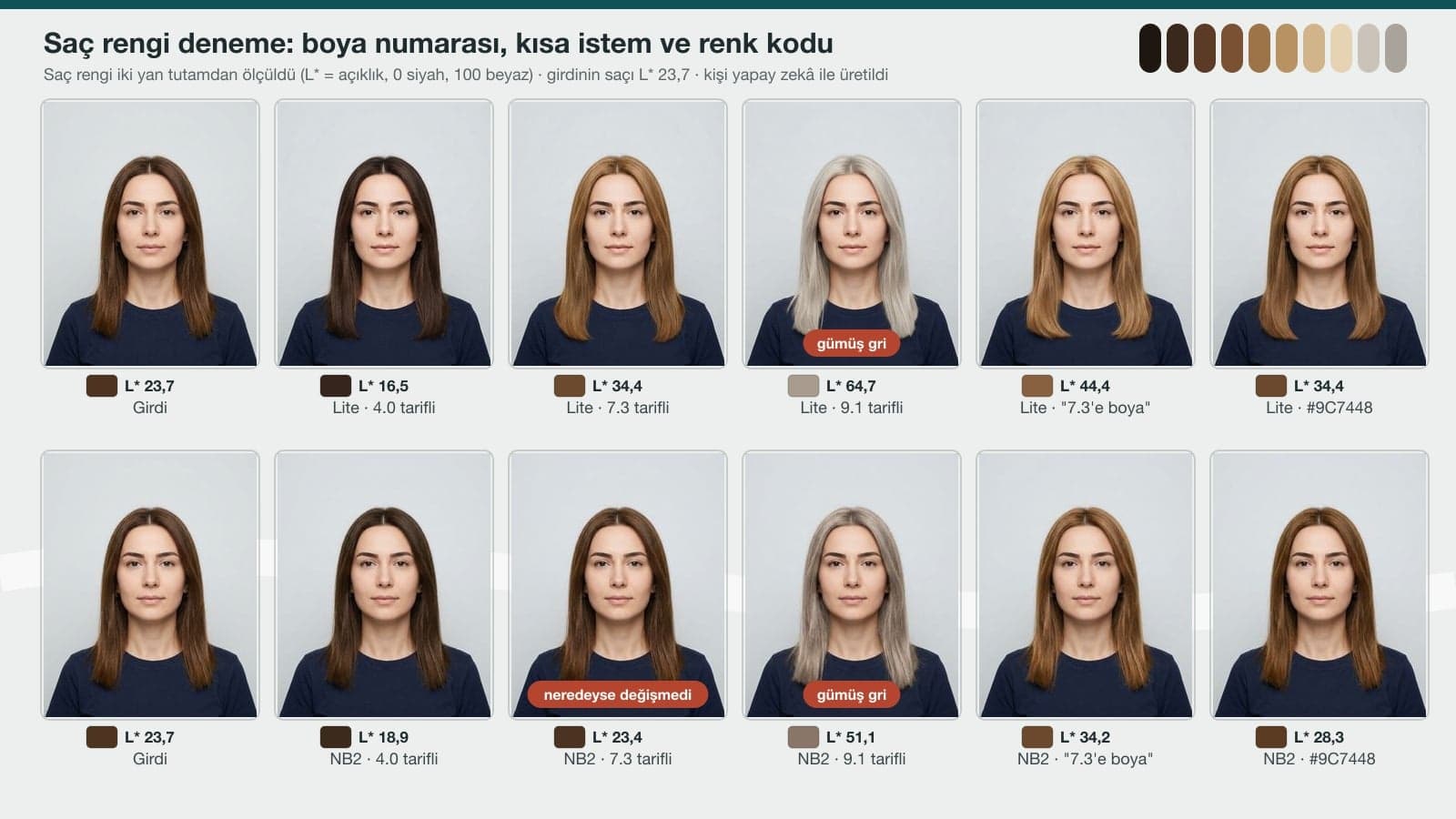
The first digit on a hair dye box is the level. Wella's Turkish page puts it this way (our translation): "Level refers to how light or dark a color is." According to the same page, each brand uses its own numbering, but black is usually level 2 and very light blonde level 10. The digit after the point gives the tone, and the name on the box spells it out: .1 ash, .3 golden. We measured hair color on two side strands. L* is lightness, where 0 is black and 100 is white. The input hair measured 23.7.
| Prompt | Lite: hair L* | Nano Banana 2: hair L* | What we saw |
|---|---|---|---|
| 4.0 (natural medium brown), with description | 16.5 | 18.9 | Darker in both models |
| 7.3 (golden dark blonde), with description | 34.4 | 23.4 / 29.0 / 24.3 (3 tries) | Lite gave golden dark blonde; Nano Banana 2 almost unchanged in two tries (ΔE 0.5 and 0.6) |
| 9.1 (very light ash blonde), with description | 64.7 / 61.5 | 51.1 / 58.8 | 3 of 4 results silver gray; color saturation 9.5-12.8 |
| Prompt 7 (keep it in the blonde family) | 61.1 / 59.1 | 46.0 / 50.6 | 4/4 blonde; saturation 13.7-20.6; Nano Banana 2 one shade darker |
| "Dye my hair shade 7.3." | 44.4 | 34.2 | Lite lightest golden, Nano Banana 2 golden close to copper |
| #9C7448 color code | 34.4 | 28.3 | Lite gave the same color as the described 7.3 |
The color change didn't affect skin or eyebrows: the color difference on the cheek stayed at ΔE 1.0-2.5 across all color results, and eyebrow lightness was 42-44 (44 in the input). Platinum hair next to dark eyebrows can look artificial. Real dye doesn't color the eyebrows either, so if you want a different eyebrow color, ask for it separately.
In our clothing test, a hex color code had brought Lite very close to the target color. On hair it worked less well: the shaded strands pull the average down, and the gap between the code and the requested shade stayed at ΔE 19-25. For hair color, the shade number and name together are enough; for light shades, also describe how the color looks, as in Prompt 7.
App or Gemini? Ways to Try On Hair Color
| Option | What it does | What to know |
|---|---|---|
| Brand try-on tools (Garnier, L'Oréal Paris) | Shows the brand's own shades live through the camera or on an uploaded selfie | Only that brand's colors. The L'Oréal Paris page says live and selfie images aren't stored. |
| Gemini, no plan | Mostly Nano Banana 2 Lite; you can ask for any cut or color | 9.9 s on average. Kept the face even with the short prompt; pulled 9.1 to gray in one of two tries |
| Gemini, paid plan | Nano Banana 2 | 13.6 s on average. Changed the face with the short prompt; with the long color prompt, didn't apply 7.3 in 2 of 3 tries |
| ChatGPT | Upload a photo and use the same prompts | Not tested here |
| API (developers) | Lite / Nano Banana 2 / Pro | 1K image: $0.034 / $0.067 / $0.134. This test cost about $2.30 for 36 images, inputs included |
You can try hairstyles in the Gemini app without a plan too; Google doesn't publish how many images you get per day.
Common Mistakes
- Giving the length of a women's cut only in centimeters. A photo has no scale; a point like "chin length" or "collarbone" ties the length to the face in the photo. For the men's cut we gave the top length in centimeters and it worked.
- Not listing what to keep. With the short prompt, Nano Banana 2 changed the expression, the earrings and the beard density on its own.
- Asking for the cut and the color in the same message. With two changes at once, it's harder to tell what went wrong; do the cut first, then the color.
- Writing only the dye number or only the color name. The number carries the lightness, the name carries the tone; give both.
- Taking a small square from the 3x3 catalog to your hairdresser. Each square is around 330 pixels; generate the style you like on its own and look at it from three angles (Prompt 10).
- Treating the face shape answer as an exact measurement. The analysis is consistent, but the answer depends on the angle and light in the photo; ask with a front-facing photo with your hair pulled back.
Upload a front-facing photo to Gemini or ChatGPT and paste a prompt that names the style and what to keep (Prompts 2-3). In our test, run with the original Turkish prompts, the prompt that gave the length as a point on the face and listed the face, earrings and clothing one by one kept the face in both models.
Yes, you can try it with a Gemini account that has no plan; on that account Nano Banana 2 Lite does most of the drawing. Garnier and L'Oréal Paris also offer free camera try-ons on their sites, though only with their own shades.
It's consistent: with the detailed prompt it gave the same photo the same label all three times (18/18) and told round, square and long faces apart. With the short prompt, two-shape answers ("oval-rectangular") and compliments showed up more often. Use a front-facing photo with your hair pulled back.
Write the length on the sides and at the nape (for example, short enough to show skin at ear level), the top length and the combing direction, and add the beard to the list of things to keep (Prompt 3). When the beard wasn't mentioned, Nano Banana 2 thinned it slightly.
The lightness order holds: 4.0, 7.3 and 9.1 went from dark to light in both models. But 9.1 looked silver gray in most tries, and Nano Banana 2 sometimes didn't apply 7.3 at all. Write the name next to the number and, for light shades, describe how the color looks (Prompts 6-7).
The prompts in this post use the same text for both tools. We tested only in Gemini, with the original Turkish prompts. In ChatGPT you can upload the photo and paste the same text, but we didn't measure the results.
It helps for the front view of the cut. The model fills in the nape and the sides on its own, so bring the three-angle view (Prompt 10) together with the description written in terms of points on the face (Prompt 11). How the color turns out depends on your current hair color and whether you need lightener, and your hairdresser is the one who can tell you that.
Once you've found the cut and the color, if you'd like to try on outfits with the same photo, see the dressing prompts in our clothing change post. General photo prompts for lighting, poses and studio shots are in our ChatGPT photo prompts post.
We generated all six people in the test with Gemini Pro; they're all fictional. Your own photo will differ in lighting, hair type and angle. On the first try, check two things: is your face still your face, and is the hair color the shade you wanted on the strands that catch the light?
Portfolio Photos for Your Hair or Beauty Salon
AI can try on a hairstyle in a few seconds. Your clients, though, want to see the cuts and colors your salon actually does. We shoot before-and-after photos, your salon interior and your team in real light, and get them ready for your website and Google profile. Write to us for a free initial consultation.