


AI Hug Prompt: Make a Hug Photo from Two Photos with Gemini (10 Prompts, 2026)
Use a hug prompt to show two people from two separate photos hugging in one image. We tested a short and a detailed prompt on three Gemini models: setting, people in the background, glasses, arm placement and face similarity. 10 ready prompts for side, front and back hugs and for video.

- For a hug photo in Gemini, add both photos to the same message, then write who is in which photo, where the arms go and what the background is. It works on a free account too.
- In our November 10 test, the one-line prompt "show these two people hugging" set the hug on the street from the first photo, and the passersby behind them came into the new image too. Adding the background and the line "only these two people in the frame" made both disappear.
- Glasses the prompt doesn't name can get deleted: with the corrected short prompt, the free model removed the man's glasses. Name the glasses, the mole, the headscarf.
- Describing where the arms go doesn't hold on every model. With the same text, Nano Banana 2 Lite put the arms where we asked, while Nano Banana 2 moved both arms down to the waist. If it doesn't hold, send a one-sentence fix in the same chat.
A one-line hug prompt in Gemini keeps both people recognizable, but it builds the hug inside the first photo. In our November 10, 2026 test, both the free plan's model and the AI Plus model put the two people on the street of stone buildings from the man's photo; the pedestrians behind them, the parked cars and the phone in the woman's hand came into the new image as well. Adding the background and the line "only these two people in the frame" to the end of the prompt fixed this on both models.
Below are the numbers from this test, the steps for making a hug photo from two photos, and 10 hug prompts you can copy and fill in: side hug, front hug and back hug, two siblings on a bench, an old photo of a loved one you've lost, a family of three, and a hug video.
We ran the original Turkish prompts through the Gemini API with the three image models the app uses: gemini-3.1-flash-lite-image (most requests on the free plan), gemini-3.1-flash-image (AI Plus) and gemini-3-pro-image ("Redo with Pro" on paid plans). As input we used three AI-generated people: a man with glasses and a short beard; a woman with a mole on her cheek and a wireless earbud in her ear; a woman in a headscarf. Four prompts, 9 images in total; each prompt ran once on each model. We measured face similarity with OpenCV's SFace model and counted the glasses, arm placement, earbuds and text on clothing by eye in zoomed-in crops.
How to Make a Hug Photo: 5 Steps in Gemini
- Pick one photo of each person where the face is clear and seen from the front. If you want glasses, a headscarf or a beard to stay the way they look in the photo, use that photo.
- Open Gemini and add both photos to the same message. The prompts start with "photo 1" and "photo 2", so the order you add them matters.
- Paste one of the prompts below and fill in the square brackets: who is in which photo, what is on their faces, where the arms go, the background.
- Check the result in four places: is anyone else in the background, are the glasses and mole still there, are the arms where you want them, did made-up text appear on the clothes.
- If one is off, write a one-sentence fix in the same chat, like Prompt 9. If it still fails on the third try, open a new chat and send the prompt from scratch with the fix written into it.
Test: Short Hug Prompt or Detailed Prompt?
For the first try we used a Turkish sentence close to the version that circulates most on social media: "Create a realistic photo showing these two people hugging each other." Nano Banana 2 Lite and Nano Banana 2 both placed the hug on the street from the first photo; the face detector found 2 more clear faces besides the two people in Lite's image and 1 more in Nano Banana 2's, and a few more people were walking in the background. Nano Banana 2 also put the phone from the woman's own photo in her hand. Because the woman's face turned to the side, her similarity dropped: 0.67 on Lite, 0.70 on Nano Banana 2.
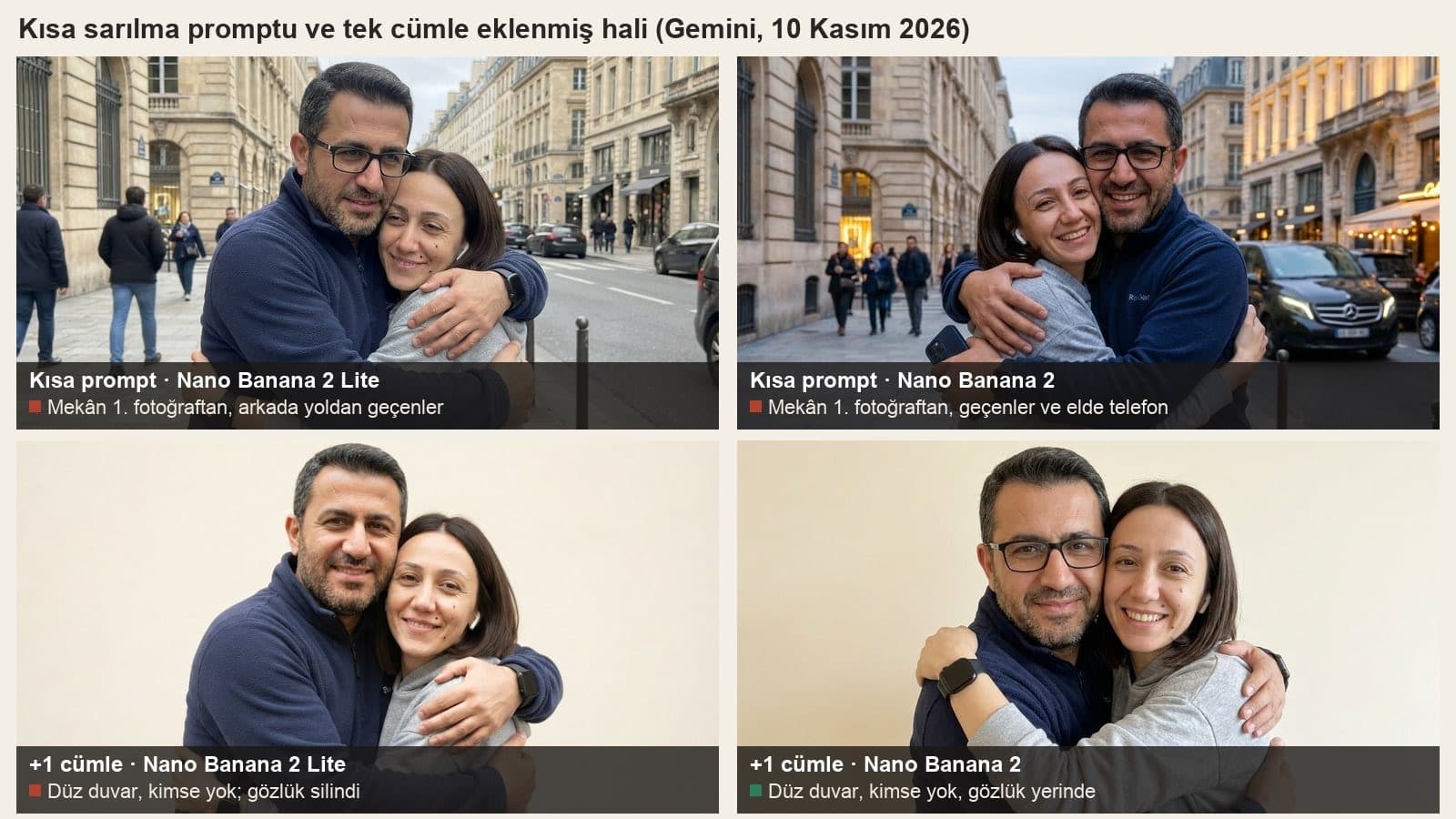
Then we added the background and the line "only these two people in the frame" after the same sentence. Both models drew a plain cream wall, nobody else stayed in the frame, and the phone was gone. This time something else disappeared: Lite deleted the man's black-framed glasses. The prompt never mentioned glasses. In our November 3 childhood photo test, the sentence that removed objects also took the glasses in 2 of 3 images; in prompts that named the glasses, they stayed in 14 of 14 images. That is why every prompt below has a face line.
| Prompt and model | Setting | Other people in frame | Glasses | Similarity man / woman |
|---|---|---|---|---|
| Short · Nano Banana 2 Lite | Street from photo 1 | Yes | Kept | 0.66 / 0.67 |
| Short · Nano Banana 2 | Street from photo 1 | Yes, phone in hand | Kept | 0.82 / 0.70 |
| Short + 1 sentence · Lite | Plain cream wall | No | Deleted | 0.70 / 0.78 |
| Short + 1 sentence · Nano Banana 2 | Plain cream wall | No | Kept | 0.76 / 0.83 |
| Detailed (Prompt 2) · Lite | Autumn park | No | Kept | 0.79 / 0.73 |
| Detailed (Prompt 2) · Nano Banana 2 | Autumn park | No | Kept | 0.85 / 0.81 |
| Detailed (Prompt 2) · Pro | Autumn park | No | Kept | 0.81 / 0.78 |
The similarity column is the SFace cosine score. OpenCV sets the same-person threshold for this model at 0.363; in all 9 images both faces stayed well above it, so nobody turned into someone else. The difference shows up in the level of detail: the prompt that describes the face, clothes and pose raised the man's score from 0.66 to 0.79 on Lite and the woman's from 0.70 to 0.81 on Nano Banana 2. All three images where we wrote "4:5 vertical" came back at 928x1152, and both with "horizontal 3:2" at 1264x848; in the short prompt with no ratio, the model used the input's landscape ratio. One image took 3.9-7.1 seconds on Lite, 8.2-9.7 seconds on Nano Banana 2 and 16.5 seconds on Pro.
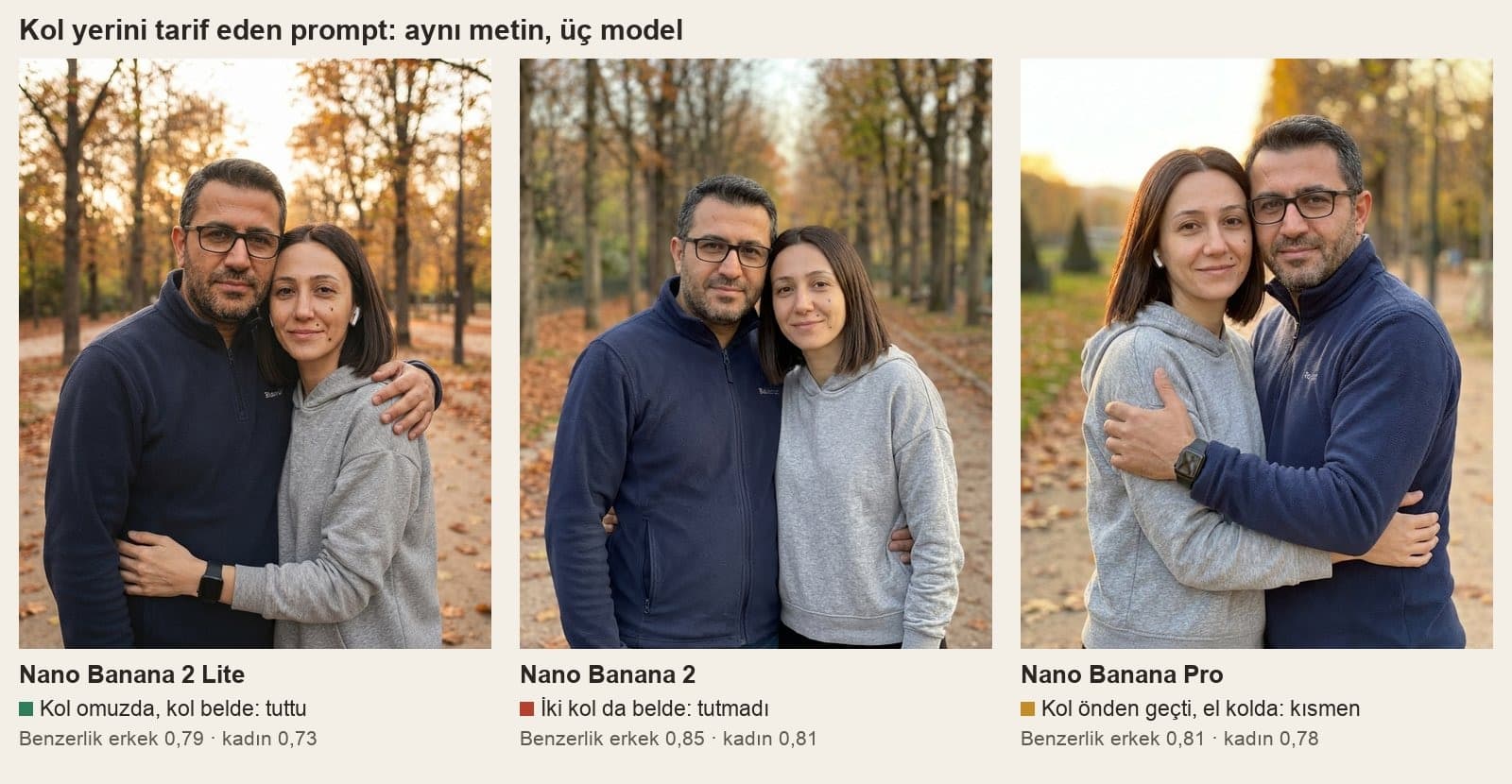
The arm description was the line that held least often. Lite followed "the man's right arm is on the woman's shoulder, the woman's left arm is around the man's waist" exactly. Nano Banana 2 stood the two side by side and moved both arms down to the waist; Pro brought the man's arm across the front and put his hand on the woman's arm. In Prompt 3, which seats the woman in a headscarf and the man on a bench, the headscarf stayed in place in both images and no hair showed; on both models the woman's hand went to the man's shoulder. One error repeated on every model: the man's fleece had text half visible along its bottom edge in the input, and in 8 of 9 images the models wrote it on the chest as an unreadable brand name. The woman's earbud, which the prompt didn't mention, stayed in 6 of 7 images.
Ready-to-Use AI Hug Prompts for Gemini
Fill in the square brackets to match your own photos. Write directions from the viewer's side; when you say "to her right", the model sometimes takes the person's right and sometimes the right of whoever is looking at the photo. You can also use the prompts in ChatGPT by uploading two photos; we only measured Gemini models. Prompts 1, 2 and 3 were tested here in their original Turkish wording; the others are built from lines that held in the test.
1) Short hug prompt (with a background sentence)
Create a realistic photo showing these two people hugging each other.
The background is a plain, light cream wall; do not bring the street, the location, the phone or the people in the background of the photos into the new image. Only these two people are in the frame.
Both faces turn toward the camera and are fully visible.
Keep the faces as they are in the photos: [person 1: black-framed glasses and a short beard] · [person 2: small mole on the left cheek, straight brown shoulder-length hair].The first three lines are almost exactly what we tested: on both models the crowd in the background and the phone disappeared. We added the fourth line; without it, the free model deleted the glasses. If there are no glasses, mole or beard, write only the hair color on that line.
2) Side hug prompt (outdoors, vertical)
I uploaded two photos. Photo 1 shows [a man with glasses and a short beard, wearing a navy fleece]; photo 2 shows [a woman with straight, shoulder-length brown hair and a small mole on her left cheek, wearing a gray hoodie].
Show these two people side by side in the same frame, hugging each other from the side: [the man's] right arm is on [the woman's] shoulder, [the woman's] left arm is around [the man's] waist.
Both faces turn toward the camera and are fully visible, their heads lean slightly against each other, and both are smiling softly.
Keep the facial features, the glasses, the mole, the hair and the beard exactly as they are in the photos; do not add moles, marks or jewelry that are not in the photos.
Keep the clothes the same; remove any text and logos on the clothes, the fabric is plain. No earbuds.
Background: [a late autumn afternoon, a park path under trees that have dropped their leaves], soft natural light. Nobody else.
Like a real photo taken with a phone, 4:5 vertical.This is the text from the test (in Turkish); only the sentence about clothing text and earbuds on the fifth line was added afterwards. On the same day, in our test of whether Gemini is free, this sentence gave a clean result for clothing text and earbuds on the free model in a single try. Saying "do not add text or logos" isn't enough, because the model completes the half-visible text from the input. If the arms aren't where you want them, fix them with Prompt 9.
3) Two siblings on a bench, with headscarf (horizontal)
I uploaded two photos. Photo 1 shows [a woman in a dusty rose headscarf and a beige tunic]; photo 2 shows [a man with glasses and a short beard, wearing a navy fleece].
The headscarf stays in place and her hair is not visible.
They sit side by side on a wooden bench in a park and hug each other from the side like two siblings: [the woman's] right arm is on [the man's] shoulder, [the man's] left arm is on [the woman's] back.
Both faces turn toward the camera and are fully visible, and both are smiling.
Keep the facial features, the glasses, the beard and the color of the headscarf exactly as they are in the photos; do not add moles, marks or jewelry that are not in the photos.
Keep the clothes the same; remove any text and logos on the clothes.
The background is [a summer afternoon, a green park]. Nobody else.
Like a real photo taken with a phone, horizontal 3:2.The headscarf stayed in place on both models and its color did not change; the woman's face similarity came out at 0.79 on Lite and 0.86 on Nano Banana 2. In our November 3 test, the sentence "the headscarf stays in place, her hair is not visible" also kept the headscarf in 22 of 22 images. You can use the same text for a mother and son or a father and daughter; replace "like two siblings" with the relationship.
4) Front hug, both faces visible
I uploaded two photos. Photo 1 shows [person 1: hair, marks on the face, glasses, clothes]; photo 2 shows [person 2: hair, marks on the face, clothes].
They face each other and hug tightly with both arms. Their cheeks touch, both faces turn toward the camera and are fully visible; neither face is buried in a shoulder.
Both have their eyes open and are smiling.
Keep the faces as they are in the photos; do not add moles, marks, glasses or jewelry that are not in the photos.
Keep the clothes the same; remove any text and logos on the clothes. No [watch, phone, earbuds].
Background: [an airport arrivals gate, blurred behind them, nobody there]. Only these two people are in the frame.
Like a real photo, 4:5 vertical.For a reunion or airport shot. We did not measure this text separately; the line "cheeks touch, faces turn toward the camera" targets the biggest loss in the test. With the short prompt, when the woman leaned her head on the man and turned sideways, face similarity dropped to 0.67 and 0.70; in images where both faces turned to the camera, it was between 0.73 and 0.86.
5) Back hug prompt (partner, spouse)
I uploaded two photos. Photo 1 shows [person 1: hair, marks on the face, clothes]; photo 2 shows [person 2: hair, glasses, beard, clothes].
[Person 2] stands behind and hugs [person 1] from behind: both arms around [person 1's] waist, chin on [person 1's] shoulder.
[Person 1] is in front, with hands resting on [person 2's] arms.
Both faces turn toward the camera, eyes open, smiling softly.
Keep the faces as they are in the photos; do not add moles, marks, glasses or jewelry that are not in the photos. Remove any text and logos on the clothes.
Background: [a beach at sunset, the sea behind them]. Nobody else.
Like a real photo, 4:5 vertical.We did not measure this one separately. In a back hug, the face of the person behind can end up hidden behind the head of the person in front; the line that puts the chin on the shoulder is there to bring the two faces side by side. Nano Banana 2 changed the arm placement once in the test, so check the arms in this pose too.
6) Hugging a loved one you've lost (old photo)
I uploaded two photos. Photo 1 is me today: [hair, marks on the face, glasses, clothes]. Photo 2 is an old photo of [my father / my mother]: [age, hair, mustache or glasses, clothes].
The two of us stand side by side [in the garden of our house] and hug each other from the side; both our faces turn toward the camera and we are smiling softly.
Keep [my father's / my mother's] age, face, hair and clothes as they are in the old photo; do not make them look younger or older.
Keep my face as it is in today's photo too.
The whole image is [in color, soft daylight / black and white, with old photo grain].
Only the two of us are in the frame; do not add text, a date or a border.An old photo is usually black and white or faded, and the model picks the color itself: in our November 3 test the input was black and white, and when no color was specified, 21 of 21 images came out in color. So fill in the color line yourself. If the old photo is in an album, make sure the light doesn't glare and the photo lies flat when you shoot it with your phone; a blurry face comes out blurry or changed in the new image too.
7) Hugging someone who lives far away, in one city
I uploaded two photos. Photo 1 shows [person 1: hair, marks on the face, clothes]; photo 2 shows [person 2: hair, glasses, beard, clothes].
They stand side by side [on the Üsküdar waterfront in Istanbul, across from the Maiden's Tower] and hug each other from the side; both faces turn toward the camera.
Behind them is [a white tower on a small island in the middle of the sea], in late afternoon light.
Keep the faces as they are in the photos; do not add moles, marks, glasses or jewelry that are not in the photos. Remove any text and logos on the clothes.
Nobody else is in the frame; do not add text or logos. Horizontal 3:2.For two people who live in different cities. Next to the name of the place, also describe what it looks like: in today's Gemini plan test, Nano Banana Pro saw only the name "Süleymaniye" and drew a different mosque on the shore; with "on the hilltop, with four minarets" added to the prompt, the free model drew the right mosque (one try).
8) Family hug for three
I uploaded three photos. Photo 1 shows [mother: hair or headscarf, marks on the face, clothes]; photo 2 shows [father: glasses, beard, clothes]; photo 3 shows [child: age, hair, clothes].
The three of them stand side by side: [the child] in the middle, with the mother and father hugging the child from both sides. All three faces turn toward the camera and are fully visible.
Keep the faces as they are in the photos; do not add moles, marks, glasses or jewelry that are not in the photos. Remove any text and logos on the clothes.
Background: [the living room at home, in front of the sofa, warm evening light]. Only these three people are in the frame.
Like a real photo, horizontal 3:2.We did not test this text separately. Google's help page says Nano Banana 2 Lite, the free plan's model, is not designed for multiple reference images. In our two-photo tries Lite carried both people over, but with three photos, check every face in the result one by one. If you have a paid plan, you can compare the result with "Redo with Pro".
9) Fix message in the same chat
The arms are not where I want them. [The man's right arm should be on the woman's shoulder, and the woman's left arm around the man's waist.]
Do not touch the faces, the clothes, the background or the lighting; do not change anything else.
Put [the glasses / the mole / the headscarf] back.Write it in the chat where the image was created, and ask for only one or two things at a time. In our October 27 test, editing the same photo four times in a row lowered face similarity in 3 of 4 chains (from 0.88 to 0.68 on Lite). If the face starts to drift after the third fix, open a new chat and send Prompt 2 with the fix written into it.
10) Hug video prompt (Gemini, paid plan)
Turn the [hug photo] I uploaded into a 10-second video.
A single continuous shot, no scene cuts; the camera stays steady and moves in slightly.
The two people first stand side by side, then turn to each other, hug with both arms and, still hugging, smile at the camera.
Keep their faces and clothes as they are in the photo; nobody else in the frame, no text.
Sound: only wind and distant birdsong, no talking.We did not test this prompt; video generation isn't available on the free plan, only on AI Plus and above. Google's Omni documentation says the model builds a video with several shots by default and recommends writing "single continuous shot" and "no scene cuts" for a single scene; the second line follows that advice. In the Gemini app, videos are 10 seconds long and use at most 5 photo references. Instead of giving the two separate photos straight to the video model, make the still image first with Prompt 1 or 2 and check it; that way you see the faces and arms before you move to video.
How to Make a Hug Video
A hug video in Gemini requires a paid Google AI plan, and you must be 18 or older. Upload the hug image and write the video request like Prompt 10; according to Google's page, videos in the app are 10 seconds long and use at most 5 reference photos. The same document says uploading and editing images of some well-known people is not supported. If you want a video with speech, the document lists only English as fully supported; Turkish speech has not been evaluated. If you're looking for a free option, we compared tools that turn photos into video, along with their prices, in our photo animation guide.
By default Omni Flash will try to create a video with a few different shots.
Common Mistakes
- Sending the photos in separate messages. The prompts refer to "photo 1" and "photo 2"; send both photos and the prompt in the same message so it's clear which is which.
- Leaving out the background. In the test, the short prompt set the hug on the street from the first photo on both models and brought the pedestrians along too.
- Not naming the glasses and facial marks. The sentence that cleaned up the background also deleted the glasses on the free model.
- Writing "do not add text" and forgetting the text on the clothes. A label half visible in the input turned into a made-up brand name in 8 of 9 images; write "remove any text and logos on the clothes".
- Editing the same image five or six times. The face drifts a little more with every edit; put all your changes in a single message.
Privacy, Watermarks and Age Limit
Photo editing in Gemini is turned off for accounts under 18. Get permission before you upload someone else's photo. A face photo counts as personal data, and if you put someone into a hug image without their knowledge and share it, it can spread as a real moment among the people who know them. Gemini adds an invisible SynthID watermark and content credentials (C2PA) to every image; in Turkey, users on any plan can turn off the visible watermark in the corner in settings. If you share an image with a loved one you've lost, a note underneath saying it was made with AI keeps the people who knew them from getting the wrong idea.
Add both people's photos to the same message and send a prompt that says who is in which photo, where the arms go and what the background is. In our November 10 test, a one-line prompt carried over the location of the first photo and the people in it; adding the background and the line "only these two people in the frame" fixed that.
Yes. You can make a hug photo with a free Gemini account; the images are mostly drawn by Nano Banana 2 Lite and download at 1K. Hug videos, on the other hand, are on paid Google AI plans (AI Plus and above).
First make the hug image from the two photos, then upload that image to Gemini and describe what happens in the video. For a single scene, add the line "a single continuous shot, no scene cuts"; according to Google's documentation, the model otherwise builds a video with several shots. Video is available on paid plans for users 18 and older.
Yes, you can upload an old photo of them together with your own photo (Prompt 6). Specify whether the image should be in color or black and white; in our November 3 test the input was black and white, and when no color was specified, 21 of 21 images came out in color. If the face in the old photo is blurry, it may change in the result.
When no background is written, the model uses the location from one of the photos you uploaded and can bring the pedestrians there along too. Describe the background in the prompt and write "only these two people in the frame"; in our test, nobody else stayed in the frame on either model.
When the prompt doesn't mention glasses and includes a sentence that removes objects from the photos, the model can treat the glasses as one of those objects. That is why the free model deleted the glasses in our test. Name them, for example "the black-framed glasses stay on".
You can upload two photos to ChatGPT and use the same prompts. The measurements in this article come only from Gemini's three image models, run with the original Turkish prompts; we did not measure how the arm, glasses and background lines hold up in ChatGPT.
If all you have is two photos, try Prompt 1 first; you'll have a result in a minute. If the arms or the setting aren't what you had in mind, move to Prompt 2 and fill in the brackets, then fix the one remaining error with Prompt 9 in the same chat.
Professional Photography Service
A hug image is fine for social media; an engagement, family or corporate shoot needs real photos. We plan the shoot and deliver the photos. Let's talk about what you need in a free first meeting.