


Is Gemini Free? Free Plan vs Google AI Plus vs AI Pro Photo Test (2026)
Is Gemini free, and do you need to pay for photos? We ran the same two prompts on the models used by the free plan, AI Plus and AI Pro: face similarity, moles, expression, made-up text and speed. Plan table (Turkish lira prices from Google's Turkey page), numbers from our 7 earlier tests and 10 prompts that work well on the free plan.
- Making and editing photos in Gemini is free. A free account runs in Auto mode: most requests go to the Flash-Lite model, images go to Nano Banana 2 Lite, and downloads are 1K.
- Google AI Plus is TRY 199.99 a month on Google's Turkey page: Nano Banana 2, 2K downloads, twice the free usage and a "Redo with Pro" button. AI Pro (TRY 869.99) keeps the same photo model and raises the usage limit to 4x.
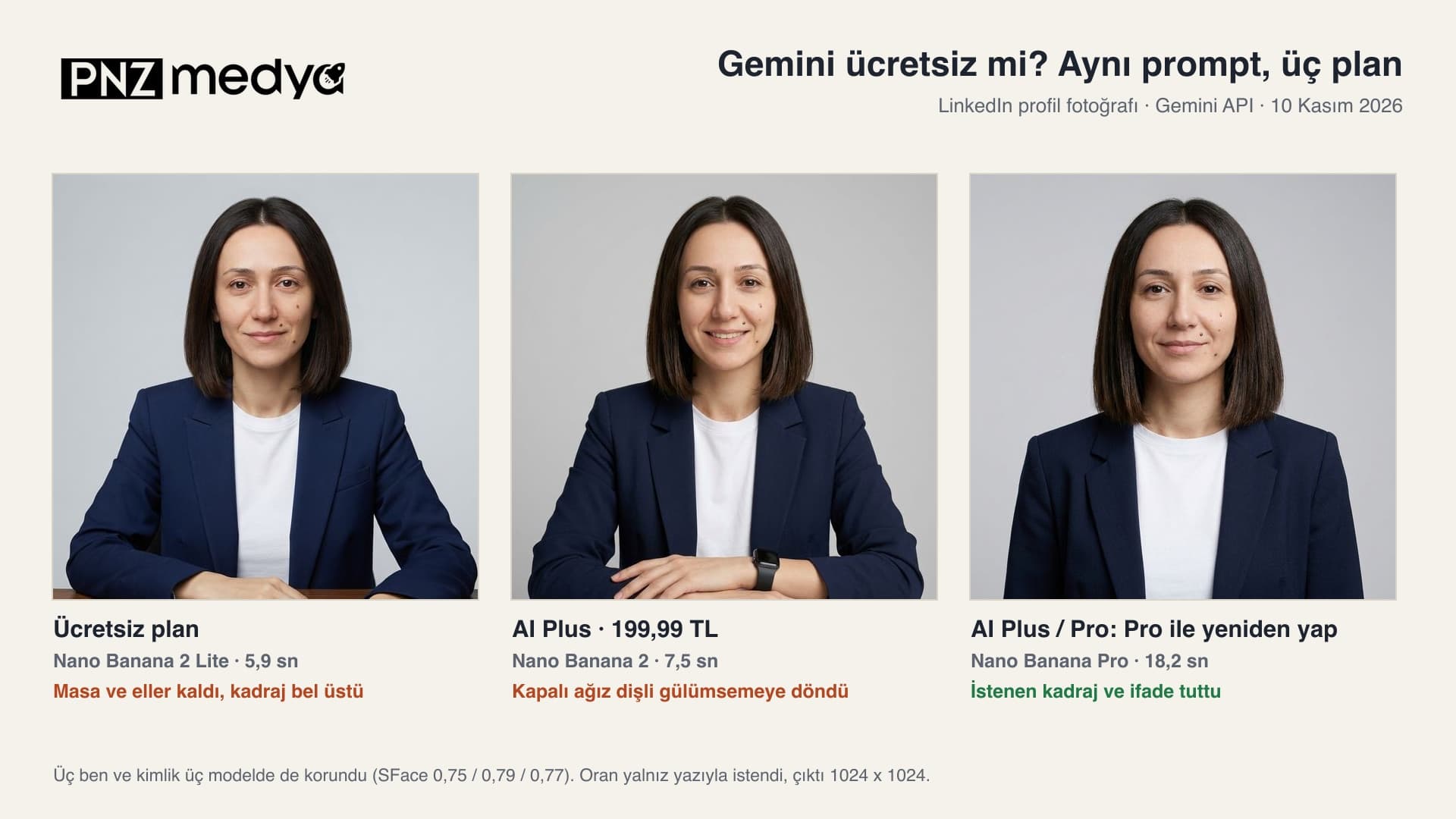
- In our November 10 test with the same profile photo prompt, all three models kept the face and the three moles. Nano Banana Pro gave the image closest to the brief (18.2 s); Nano Banana 2 turned the closed mouth into a toothy smile.
- The free model is weaker with crowds, small text and precise placement: in earlier tests it left someone behind in 5 of 9 attempts when removing people from a crowd, and it garbled a handwritten card in 4 of 5 attempts.
- Describing what you want in the prompt narrows the gap: after we added two lines based on the test, the free model's made-up text and the carried-over headphones disappeared. The 10 prompts below follow that style.
Yes, Gemini is free: anyone who signs in with a Google account can generate images and have an uploaded photo edited. The free plan's limit is on the model side. Since October 9, 2026, free accounts can't pick a model; Gemini routes each request itself, and according to Google's help page most requests go to Flash-Lite, the fastest model. For photos, that means Nano Banana 2 Lite. On AI Plus, images are drawn by Nano Banana 2, and paid plans also get Nano Banana Pro through the "Redo with Pro" button.
To see whether the difference between these three models shows up in photos, on November 10, 2026 we ran the same two prompts on all three: one turns a single photo into a LinkedIn profile picture, the other puts two people from two separate photos in the same frame on the Galata Bridge. Next to the results you'll find per-model numbers from our previous seven tests and 10 ready prompts that cause the fewest problems on the free plan.
We ran the test in the Gemini API with the models the app uses for each plan: gemini-3.1-flash-lite-image (most requests on the free plan), gemini-3.1-flash-image (AI Plus) and gemini-3-pro-image (Redo with Pro). The prompts were the original Turkish ones. As input we used two AI-generated people; each prompt ran once on each model, and the aspect ratio was requested only in the prompt text. Then the two corrected prompts ran once more each, for 8 images in total. We measured face similarity with OpenCV SFace and counted moles and text by eye on enlarged crops. Auto mode in the app can also send some requests to Flash.
Is Gemini Free? Free Plan vs AI Plus vs AI Pro (November 2026)
Google's subscription page for Turkey lists four tiers. The rows that matter for photos are below. Prices are in Turkish lira (TRY) as shown on Google's Turkey page on November 10, 2026; the model rows come from Gemini's help pages.
| Free | Google AI Plus | Google AI Pro | |
|---|---|---|---|
| Monthly price (Google Turkey page) | TRY 0 | TRY 199.99 | TRY 869.99 |
| Chat model | Auto (most requests go to Flash-Lite) | Flash-Lite and Flash | Flash-Lite, Flash and Pro |
| Photo model | Nano Banana 2 Lite (Nano Banana 2 when the request goes to Flash) | Nano Banana 2 | Nano Banana 2 |
| Redo with Pro (Nano Banana Pro) | No | Yes | Yes |
| Download resolution | 1K | 2K | 2K |
| Usage limit | Standard | 2x standard | 4x standard |
| Video generation | No | Yes | Yes |
On the free plan you can't choose the model. Auto sends the request to whichever model it sees fit; if you turn off smart model selection, every answer comes from Flash-Lite. The usage limit isn't published as a number either: since May 17, 2026 it has been calculated by compute, it resets every 5 hours, and there is a weekly cap. Image, video and music generation use up this limit faster than chat. Google Flow gives free accounts limited access to Nano Banana Pro too, while the "Redo with Pro" button in Gemini chat is only on paid plans.
In Turkey, Google gives AI Plus free for the first 12 months to students who are 18 or older and enrolled at a higher education institution (announced August 28, 2026; the offer runs until December 31, 2026). This offer is for Turkey only. You sign up on Google's student page. If you don't cancel before the free period ends, you start being charged TRY 199.99 a month.
Same Prompt Test: Free Plan, AI Plus or Pro?
With the profile photo prompt (the first version of Prompt 1 below), all three models made the requested changes: the headphones came off, a navy blazer and white T-shirt went on, the background turned plain light gray, and the three moles on the right cheek were in place in all three images. The differences were in the details. Nano Banana 2 showed teeth despite the "slight closed-mouth smile" line; in the November 3 test, with a short prompt, it had also turned a closed mouth into a toothy smile in 5 of 6 attempts. Only Nano Banana Pro kept the "from chest level" framing. Lite carried over the desk and hands from the input and framed the shot from the waist up. Face similarity was close for all three: 0.75, 0.79 and 0.77.
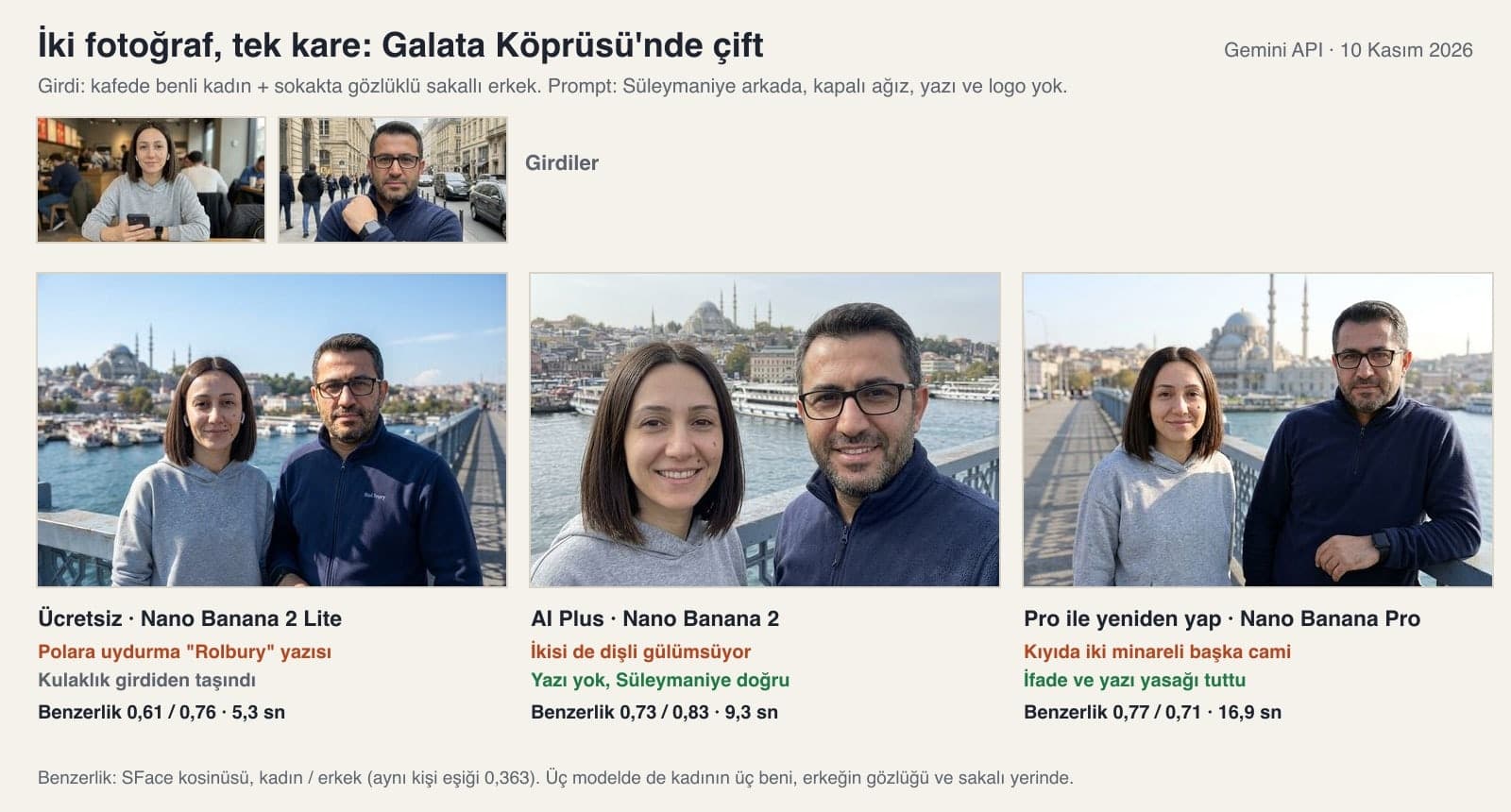
With the two-photo prompt, Google's own warning comes to mind: the help page says Nano Banana 2 Lite isn't designed for multiple reference images. In this attempt Lite brought both people into the frame, kept the woman on the left and put Suleymaniye on the hill. The problem showed up elsewhere. On the man's fleece, where only the top edge of some lettering was visible in the input, it completed the text and invented a brand called "Rolbury" (the prompt said "do not add text or logos"), and it carried the woman's headphones onto the bridge. The woman's face similarity was also lowest here: 0.61. Nano Banana 2 shot the two people up close like a selfie and gave both a toothy smile. Nano Banana Pro kept the expression and the text ban, but drew a mosque with two minarets on the shore instead of Suleymaniye; the shot looks more like the New Mosque in Eminonu.
| Criterion | Free: Nano Banana 2 Lite | AI Plus: Nano Banana 2 | Redo with Pro: Nano Banana Pro |
|---|---|---|---|
| Profile: face similarity (SFace) | 0.75 | 0.79 | 0.77 |
| Profile: closed mouth | Kept | Toothy smile | Kept |
| Profile: chest-level framing | Waist up, desk and hands | Waist up, arms | Kept |
| Couple: similarity woman / man | 0.61 / 0.76 | 0.73 / 0.83 | 0.77 / 0.71 |
| Couple: no text or logos | Made-up text on the fleece | Kept | Kept |
| Couple: Suleymaniye in the background | Kept | Kept | A different mosque |
| Three moles, glasses and beard | In place in both images | In place in both images | In place in both images |
| Time (profile / couple) | 5.9 / 5.3 s | 7.5 / 9.3 s | 18.2 / 16.9 s |
Then we named the errors in the prompt. Adding the lines "no teeth showing" and "no desk, hands or arms in the frame" to the profile prompt got a closed-mouth, chest-level shot from Nano Banana 2, and similarity rose to 0.83. When we added "Remove the text and logos on the clothes, keep the fabric plain. No headphones." and "the Suleymaniye Mosque with four minarets on the hilltop" to the couple prompt, the free model produced a clean image: no text, no headphones, the right mosque, and the woman's similarity went from 0.61 to 0.73. These are single attempts. Still, both errors disappeared once they were named in the prompt. All three models took the aspect ratio from the text: 1024 x 1024 pixels for 1:1, 1264 x 848 for 3:2.
Where Did the Free Model Fall Behind in Our 7 Earlier Tests?
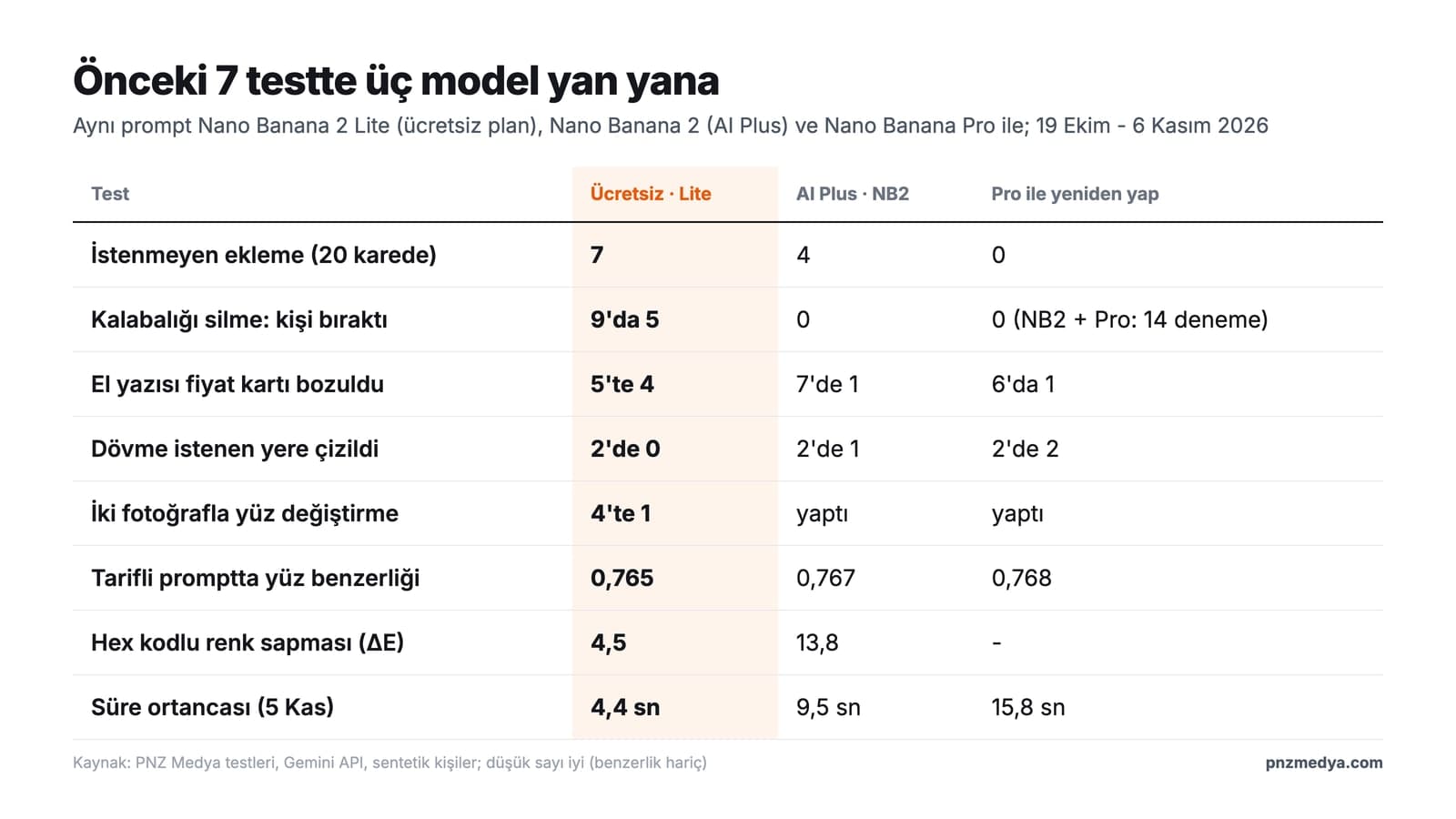
From October 19 to November 6 we ran the same prompts on these three models in seven photo tests. The jobs where the free model falls behind are clear. When removing people from a crowd, it left someone behind in 5 of 9 attempts; Nano Banana 2 and Pro never did in 14 attempts combined. It garbled hard-to-read handwriting in 4 of 5 attempts. It never put a tattoo on the described spot in 2 attempts (Pro: 2 of 2). It transferred a face between two photos in 1 of 4 attempts. In a 20-image set, unwanted added objects came to 7 on Lite, 4 on Nano Banana 2 and 0 on Pro.
It goes the other way too. With a prompt that described the face feature by feature, face similarity was almost identical across the three models (0.765, 0.767, 0.768). When we asked for a T-shirt color by hex code, Lite came closest to the target (color difference ΔE 4.5; 13.8 on Nano Banana 2). In the snow prompt with the line "do not change anything else", Lite was also the model that touched the photo least. For a single-person, single-step, well-described edit, the free plan is enough; with crowds, small text and placement, the paid models make fewer mistakes. On speed, Lite draws an image in 3-6 seconds, Nano Banana 2 in 7-10 and Pro in 15-18 seconds.
10 Ready Prompts That Work Well on Free Gemini (Gemini Photo Prompts)
Fill in the bracketed parts to match your own photo. All of them work on a free account in the Gemini app; our tests used the original Turkish versions. Prompts 1 and 2 were tested in their corrected form in this article's test, and the others are built from lines that held up in earlier tests. Write directions from the viewer's side: when you say "right cheek", the model sometimes reads it as your right and sometimes as the right of someone looking at the photo.
1) LinkedIn profile photo prompt (version corrected in the test)
Make a LinkedIn profile photo of the [woman / man] in this photo.
Keep the face the same: [hair color and length, e.g. dark brown, shoulder-length blunt bob]; [marks on the face, e.g. three small moles on the right cheek, as seen by the viewer]; a slight closed-mouth smile, no teeth showing.
Remove the [headphones / hat].
Outfit: [navy blazer and white T-shirt].
Background: plain light gray studio backdrop, soft front lighting.
Frame from chest level up; no desk, hands or arms in the frame. Looking at the camera.
Do not add moles, marks, glasses or jewelry that are not in the photo; no text or logos.
Make it square (1:1).The corrected version gave a closed mouth and chest-level framing on Nano Banana 2, with a face similarity of 0.83. If you wear glasses, name them, for example "black rectangular glasses stay in place"; in the November 3 test, the glasses were removed in the two prompts that didn't mention them.
2) Prompt to put people from two photos in the same frame
Photograph the [woman] from the first photo and the [man] from the second photo side by side in the same frame, [on the Galata Bridge in Istanbul].
Both are looking at the camera, with the [woman] on the left as seen by the viewer.
[First person]: [hair, marks on the face, expression, outfit]. No glasses.
[Second person]: [glasses, beard, outfit]. No moles on the face.
Remove the text and logos on the clothes, keep the fabric plain. No headphones.
In the background, [the Golden Horn and the Suleymaniye Mosque with four minarets on the hilltop], daylight.
No one else in the frame; do not add text or logos.
Make it horizontal (3:2).On the free model this version came out clean. If you want a specific building in the scene, describe what it looks like next to its name ("on the hilltop, with four minarets"); when Nano Banana Pro saw only the name, it drew a different mosque on the shore.
3) Background change prompt (background only)
In this photo, change only the background: behind the person, [sunrise in Cappadocia, hot air balloons in the sky].
Keep the person, face, hair, outfit, pose and framing exactly as they are.
Do not change anything else; do not add new text, logos or people.
Lighting that matches the new background, soft daylight.In the November 4 snow test, the line "Do not change anything else" cut made-up text from 1 in 6 attempts to 0, and Lite was the model that touched the photo least. This is the safest type of edit on the free plan.
4) Prompt to remove a person from a photo (one person)
Remove the person [on the right, standing in the back, in a blue jacket] (as seen by the viewer) from this photo.
Fill the empty space with [the stone wall and sidewalk behind them].
Do not add anyone; the remaining people keep the same position, face and clothes.In the November 5 test, the prompt that included position, clothing, "keep their positions" and the fill line came out clean in 6 of 6 attempts. On the free plan, don't try to remove a whole crowd in one go; Lite may leave small figures in the distance, so remove people one at a time.
5) Follow-up correction in the same chat
[The two people sitting on the stairs] are still there. Remove only them and fill the empty space with [the stair steps].
Do not touch the rest of the photo, do not add anyone.Send this message in the chat where the image was generated. In the November 5 test it removed the remaining couple in both attempts. On Lite a second message doesn't always work: in the October 26 extension test it failed to remove an added person in 2 of 2 attempts. If that happens, start over in a new chat with Prompt 4.
6) Poster and invitation prompt with exact text
Design a vertical (4:5) birthday poster. Plain [cream] background edge to edge, a [colorful balloon] illustration at the top.
The poster has only these three lines; copy the letters exactly, do not add or change any letter:
"[Happy Birthday Elif]"
"[Saturday, December 14, 3:00 PM]"
"[Kadikoy, Moda Park]"
Do not add any other text, logo or QR code.In the October 19 comparison, with short Turkish text, none of 2,392 letters came out wrong across four models, Lite included. Putting the lines in quotes and saying "do not add any other text" matters: with a short prompt the model makes up details and adds them to the poster, and its QR codes don't scan.
7) Old photo restoration prompt (with text, black and white)
Restore this old photo: clean up the scratches, stains and creases, and sharpen the faces.
Keep the photo black and white, do not add color.
Do not change the shape of the faces, their ages or their expressions; do not make anyone look younger.
The text in the photo is exactly this: "[the text on the sign or in the background]". Do not guess any text you cannot read.
Do not change the framing.In the November 4 test, Nano Banana 2 and Pro wrote quoted text correctly in 4 of 4 attempts; Lite garbled handwriting even when it was quoted. If the text is still wrong on a free account, fix it yourself after the photo is done, or try "Redo with Pro" on a paid plan. The "keep the photo black and white" line is a must: a short "improve the quality" request made Nano Banana 2 colorize the photo.
8) Clothing color change prompt (with a color code)
Change the color of the [T-shirt] in this photo to [#D2452F] (tomato red).
Only the [T-shirt] changes; keep the person, face, background and other clothes the same.
Keep the wrinkles and shadows of the fabric in place.In the October 22 test, "make it red" gave burgundy on Lite (color difference 26); with the hex code the difference dropped to 4.5. You can get the color code from a color picker or a product page.
9) Prompt to turn a photo into a pen drawing
Turn this photo into a drawing made with a black ink pen.
Plain white paper edge to edge; no gray tones, no hatching, no color.
Draw the same number of [windows / people] as in the photo.
Do not add a signature, date or any text.In the October 22 test, a short "turn it into a drawing" request gave a colored picture in 3 of 4 attempts on Lite and Nano Banana 2; with these lines, there was no color and the window count was right in 4 of 4 attempts. With the short prompt, the model signed 2 of 15 images on its own.
10) Prompt to extend a photo vertically for an Instagram story
Make this photo vertical (9:16) for an Instagram story.
Keep the existing photo unchanged in the middle; add [light blue sky] above it and [sand and a seashore] below it.
No people and no text in the new area.In the October 26 test, when the aspect ratio was requested in text, 59 of 59 outputs had the right ratio. With this short layout, Lite kept the original photo in 7 of 7 attempts; with a long prompt full of rules, Lite redrew the scene from scratch in 5 of 11 attempts.
In the November 4 test, 1 of 19 answers from the free model came back as text only, with no image; typing "Generate the image now" in the same chat is enough. If you hit the limit, your allowance resets within 5 hours. Google recommends opening a new chat when the topic changes: a long chat is reread from the start on every request and uses up the limit quickly. Photo editing is turned off for accounts under 18.
Google AI Plus or Pro? Which Plan Is Enough for Whom?
- Free plan: background, clothing, color and style changes on single-person photos, a few images a week. Write the prompt descriptively like the ones above; a 1K download is enough for social media.
- Google AI Plus (TRY 199.99 on Google's Turkey page): for people who make images often, want 2K downloads, remove people from crowds, merge two photos or make images with text on them. The "Redo with Pro" button also starts on this plan.
- Google AI Pro (TRY 869.99): uses the same photo model as Plus. What you get is 4x the usage limit, the Pro chat model and a 1 million token context. Unless you make hundreds of images a day, you don't need to go above Plus for photos alone.
- University students in Turkey: the first year of AI Plus is free (a Turkey-only offer); you can apply until December 31, 2026.
The monthly difference between Plus and Pro is TRY 670. That money buys you more usage and the Pro model in chat; the photo model is the same on both plans.
What Do Google's Docs Say?
The Gemini help page describes Nano Banana 2 Lite as a model built for speed and not designed for multiple reference images or back-to-back edits. The same page lists one more limit: once the daily Nano Banana 2 image quota runs out, Redo with Nano Banana Pro stops working too. The usage limits page gives the plans as ratios: AI Plus is 2x the standard limit, AI Pro 4x, and AI Ultra 5x or 20x Pro. In the feature table on the same page, "Redo with Nano Banana Pro" and video generation are unchecked for free accounts and checked for Plus, Pro and Ultra.
Most prompts will go to Flash-Lite, our fastest model. Prompts that need deeper reasoning may go to Flash or Pro.
Common Mistakes
- Looking for a model menu on a free account. Since October 9, 2026, Auto is the only option on free accounts; the way to get better results is to write a descriptive prompt.
- Typing "make it 4K" or "make it HD". In the November 4 test, these requests gave 1K output in 12 of 12 attempts; your plan sets the download resolution.
- One-line prompts. The model fills in whatever you leave out; in the October 19 test, Lite added unwanted objects to 7 of 20 images.
- Editing the same photo over and over. In the October 27 test, across four back-to-back edits, face similarity dropped in 3 of 4 chains (on Lite, from 0.88 to 0.68). Put all your changes in one message.
- Saying "on his right" or "on her left". Write directions from the viewer's side, or the model may put the person or object on the wrong side.
- Sending every image to "Redo with Pro". Once the daily Nano Banana 2 quota runs out, Redo with Pro stops working too; save the button for images where text and detail matter.
Price, Watermark and Age Limits in Turkey
The prices above are the monthly prices in Turkish lira shown on Google's Turkey page; AI Ultra has two tiers there: TRY 1,479.99 and TRY 8,999.99. The visible watermark is the same on every plan: according to Google's watermark page, the setting is tied to AI Ultra only in India, South Korea and Vietnam, and in Turkey any plan can turn off the visible watermark in Gemini settings. The invisible SynthID watermark and content credentials (C2PA) are added to images on every plan. The age limit is 13 for generating images and 18 for editing photos. Get permission before you upload someone else's photo; a photo of a face counts as personal data.
Yes. With a Google account, chatting, generating images and editing photos in Gemini are free. Free accounts run in Auto mode, and most requests go to the Flash-Lite model. Video generation and "Redo with Pro" are on paid plans.
Yes. On a free account, images are mostly drawn by Nano Banana 2 Lite and downloads are 1K. The number of images per day isn't published; the allowance is calculated by compute and resets every 5 hours.
Plus is enough for photos. On both plans, images are drawn with Nano Banana 2 and "Redo with Pro" is available. What Pro adds is 4x the usage limit and the Pro model in chat; the monthly difference on Google's Turkey page is TRY 670.
Not in Gemini chat: the "Redo with Pro" button is on AI Plus, AI Pro and Ultra. According to Google's subscription page, Google Flow gives free accounts limited access to Nano Banana Pro.
Google doesn't give a number. Since May 17, 2026 the limit has been calculated by compute, it resets every 5 hours and it has a weekly cap. AI Plus gives 2x the standard limit, AI Pro 4x.
In Turkey, university students aged 18 or older can get AI Plus free for the first 12 months; this is a Turkey-only offer and it runs until December 31, 2026. If you don't cancel before the free period ends, you are charged TRY 199.99 a month.
Not on the image side: both Flash and Pro draw photos with Nano Banana 2. The only difference comes on a paid plan, when you switch to Nano Banana Pro with "Redo with Pro" under the image.
Before you switch to a paid plan, try the hardest photo you have (a crowd, or one with text on it) once on a free account with Prompt 4 or 7. If the result holds up, what a subscription gives you is speed and more usage; if it doesn't, compare the same photo with "Redo with Pro" in your first month of Plus.
AI Solutions
If your team uses Gemini or ChatGPT every day, let's set up the right plan, a shared prompt library and the workflow together. We plan the AI setup that fits your work, from image generation to customer messages.