


AI Book Cover Design: 12 Gemini and ChatGPT Prompts and Print Sizes (2026)
12 prompts for AI book cover design: novel, Wattpad, children's book, poetry, back cover, series, a cover from your own photo and one from your own drawing. We worked out whether Gemini's 1K and 2K output is enough for Wattpad, Kindle and a 13.5 x 21 cm print book, and explain why you should never let the model draw the barcode.
- Making a book cover with AI is two jobs: getting Gemini or ChatGPT to draw the cover, and fitting the result to the size it will be printed at. This article covers both.
- Put the title and author name in quotation marks and say "copy exactly, no other text." In our invitation test with the same models (run with Turkish prompts), this method gave 65 cards without a single wrong letter; a short prompt added made-up details to 4 of 6 cards.
- Don't let the model draw the barcode or ISBN. It draws barcodes and QR codes as patterns, and none of them scan. Ask for a plain white area on the back cover and paste the real barcode in later (Prompt 9).
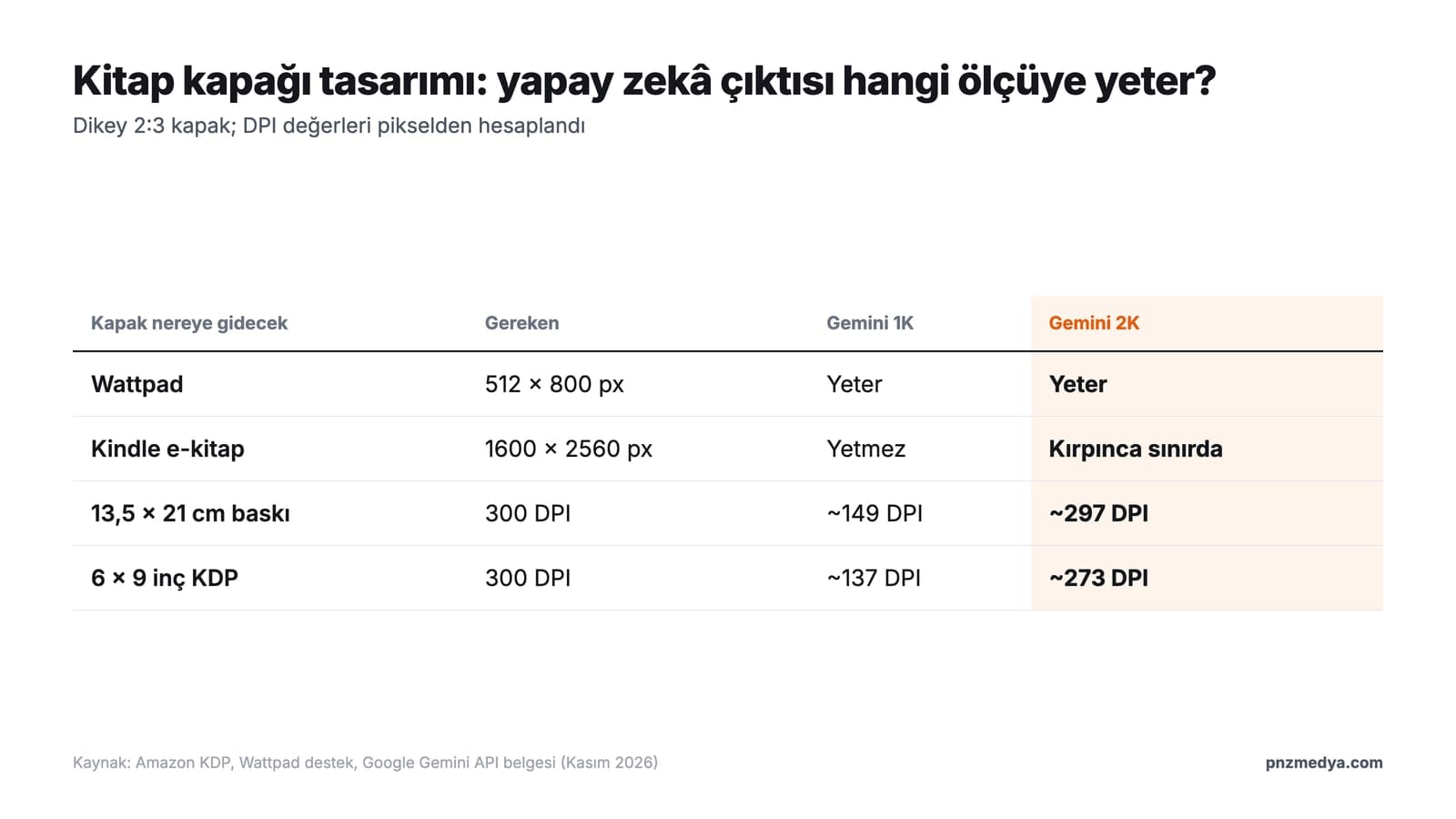
- Gemini's vertical 2:3 output is 848 x 1264 pixels on an account without a plan and 1696 x 2528 pixels on an account with one. Both are enough for Wattpad. On a 13.5 x 21 cm print book, 1K gives about 149 DPI, while 2K gives 297 DPI, very close to 300.
- Amazon KDP asks you to disclose an AI-generated cover when you publish. If AI drew your cover, check the disclosure box.
To design a book cover with AI, tell it three things plainly: the cover runs to all four edges of the image, exactly which lines of text go on the cover (in quotation marks, letter for letter), and that you want no text other than those lines. Then crop the result to the size where the book will be printed or uploaded. Wattpad wants 512 x 800 pixels, Amazon Kindle recommends 1600 x 2560 pixels, and a print book needs 300 DPI.
We built these prompts from the rules that came out of the text-in-image tests we ran over the last three weeks with Gemini's image models (Nano Banana 2 Lite, Nano Banana 2, Nano Banana Pro): invitations, YouTube thumbnails, a 3D figure box, a T-shirt print and a tattoo stencil. Book covers run into the same problems: special letters (Turkish ones, in our tests), unwanted text, a book mockup sitting on a table, and made-up names on surfaces you gave no text for.
The tests we cite were run in the Gemini API with the original Turkish prompts: YouTube thumbnail (October 23, 66 images), invitation (October 28, 71 images), T-shirt print (October 28, 90 images), 3D figure (October 29, 133 images) and tattoo stencil (November 6, 123 images). Sizes come from Amazon KDP help pages, a Wattpad support article and Google's Gemini API image documentation, all read on November 9, 2026. We did not measure this article's cover prompts in a separate cover set; under each prompt you'll find which rule from which test it rests on.
How to Design a Book Cover with AI: 5 Steps
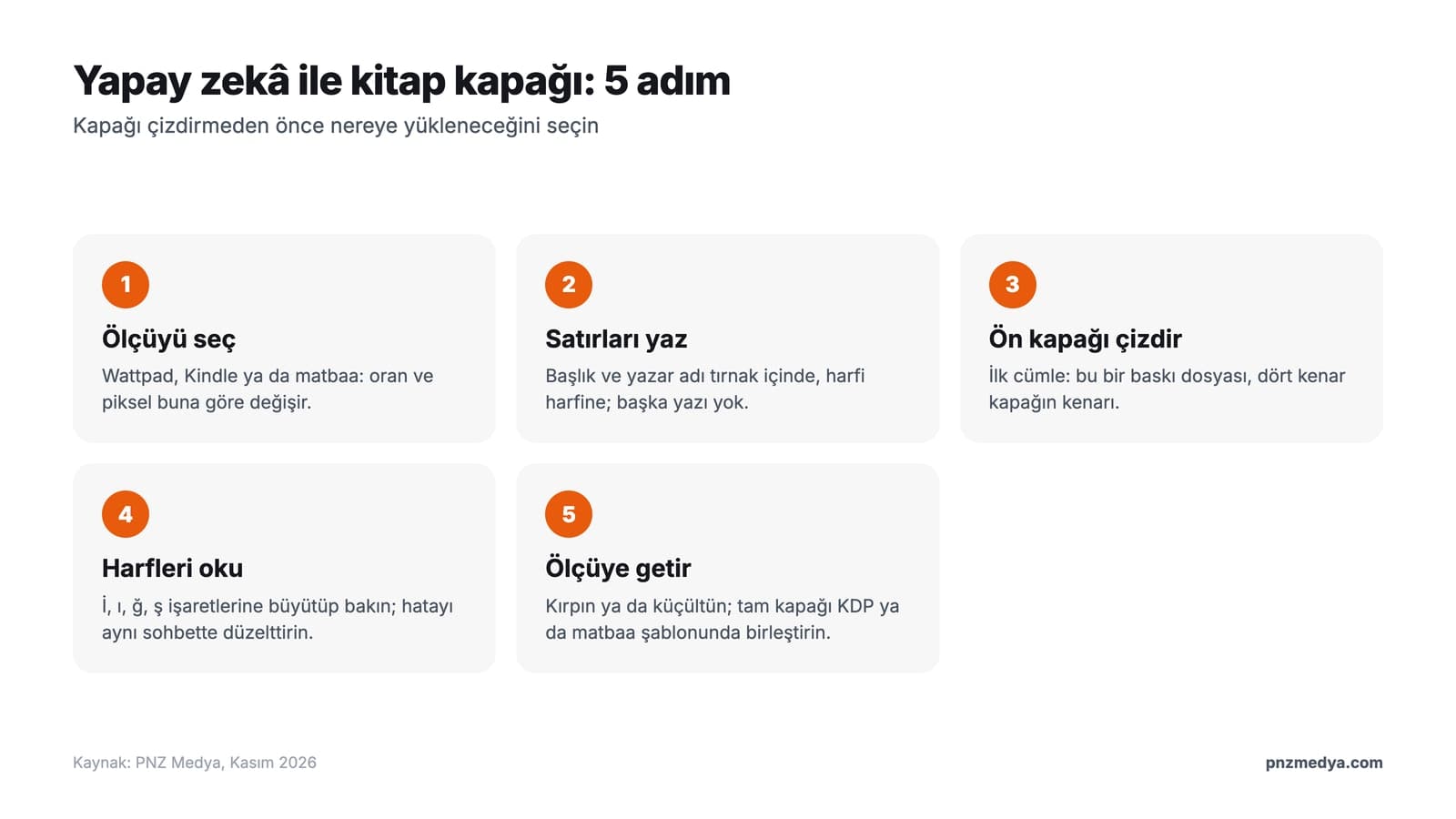
- Choose where the cover is going: Wattpad, a Kindle eBook or a printer. The ratio and pixel count you need depend on it (see the size table below).
- Write out every line that will appear on the cover, letter for letter: title, subtitle if any, author name. Also list everything that should stay off the cover: publisher logo, quote, badge, barcode.
- Generate the front cover with Prompt 1. If you'll add the text yourself in Canva or another program, use Prompt 3.
- Zoom in on the title and read it letter by letter. Check that every dot and accent mark is where it belongs, especially on accented or special letters. If something is wrong, ask for a fix to that one word in the same chat.
- Crop or resize the image to the target size. For a print book, make the front cover with AI and build the full cover (with spine and back cover) in the KDP template or your printer's template.
With a short prompt like "make me a book cover," the model fills every gap on its own. In the invitation test, a one-sentence prompt added made-up details such as a phone number or a neighborhood name to 4 of 6 cards and put all 6 on a table or envelope scene. In the 3D figure test, a name or barcode showed up on the box and base in 8 of 20 attempts, even though we had given no text for them.
12 Ready-to-Use Book Cover Prompts (Gemini and ChatGPT)
Fill in the bracketed parts for your own book and keep the quotation marks. Paste the prompts into Gemini or ChatGPT as they are. Gemini only takes the ratio as text; in our tests (run with the original Turkish prompts), a ratio sentence such as "vertical 2:3" held in 95 of 95 attempts, and writing a pixel size did not change the output size.
1) Novel front cover prompt (detailed)
Draw the front cover of a book. This is a print file: the four edges of the image are the four edges of the cover; no table, hand, book mockup, shadow or backdrop is visible. The image is vertical 2:3.
Book: [genre, e.g. thriller novel].
The cover has a single scene: [scene, e.g. an old lighthouse on the shore on a foggy night, yellow light in its only window].
The cover has only two lines of text. Copy the letters exactly as they appear inside the quotation marks; do not add or change any letters:
In the top third, in large, bold [typeface description, e.g. narrow serif] letters: "[BOOK TITLE]"
A little above the bottom edge, smaller: "[AUTHOR NAME]"
No text other than these two lines: no subtitle, publisher name or logo, quote, award badge, barcode or price.
All text sits at least 5% of the image's size in from the edges.The "This is a print file" sentence keeps the cover from turning into a photo of a book on a table. In the invitation test, 19 of 50 cards still came out as a scene despite the sentence "no table, envelope or mockup." With the print file sentence that describes the four edges, the rate dropped to 2 in 9.
2) Quick book cover prompt (short version)
Draw a vertical 2:3 book front cover; the edges of the image are the edges of the cover, no mockup and no table. Genre: [genre]. Image: [one-sentence scene]. The only text is these two lines, copy them exactly: "[BOOK TITLE]" and "[AUTHOR NAME]". No other text, logo or barcode.3) Text-free cover image prompt (add the title yourself)
Draw the background image for a book cover; I will add the text on top myself. The image is vertical 2:3 and its four edges are the edges of the cover.
Scene: [scene, e.g. a snow-covered mountain village at dusk].
The top third is a natural continuation of the scene: [e.g. a cloudy, dark blue sky], soft and low on detail. The title will go there.
The area near the bottom edge is [e.g. a quiet, snow-covered road]; the author name will go there.
The image has no letters, words, signature or logo; do not draw a solid-color box, frame or separate panel.Don't ask for the text area to be "left blank." In the YouTube thumbnail test, "leave it blank" and "plain background" made the model draw a solid-color box in 7 of 10 images. When we described the same area as a natural continuation of the scene, boxes dropped to 0 in 8.
4) Wattpad cover prompt
Draw a vertical 2:3 cover for my Wattpad story. The cover will look small on a phone: the title should span most of the cover's width, bold and in a single color.
Story: [genre, e.g. a high school love story].
Main character: [age], [hair color and length], [outfit]; face turned toward the viewer, [expression, e.g. a slight smile, mouth closed].
The only text is these two lines, copy them exactly: "[STORY TITLE]" and "[YOUR USERNAME]".
No other text, logo or app icon. The four edges of the image are the edges of the cover; do not draw a phone, screen or book mockup.The words "Wattpad" and "phone" can pull the model toward drawing a screen. In a digital invitation prompt, the sentence "the phone interface will sit on top of this area" made the Lite model draw a phone status bar in 1 of 2 attempts. That's why the last line rules out the phone and the screen separately.
5) Book cover prompt with your own photo
Make the person in the photo I uploaded the main character of a novel cover. The image is vertical 2:3, its four edges are the edges of the cover.
Keep the person the same: hair [color and length, e.g. shoulder-length, dark brown, wavy], [wears glasses / no glasses], on the face [mole, beard or "no visible marks"], expression [e.g. serious, mouth closed]. Do not add moles, marks, glasses or jewelry that are not in the photo.
Framing from the chest up; the face is in the middle third of the cover.
Scene: [scene], light [direction and color, e.g. orange streetlight from the left].
The only text is two lines, copy them exactly: "[BOOK TITLE]" on top, "[AUTHOR NAME]" at the bottom. No other text.In our emoji and face tests, listing facial features one by one did the most to keep the person recognizable. A general list like "keep the glasses, mole and headscarf the same" added a mole to a face without one in 8 of 11 attempts. With the sentence "do not add moles, marks or glasses that are not in the photo," that fell to 1 in 16.
6) Book cover prompt from your own drawing
The photo I uploaded shows a picture I drew on paper. Turn this drawing into a book cover.
Keep the lines, the figures and their positions exactly as they are; do not redraw them. Only clean up the paper texture, the table and the shadow, and color the drawing with [color description, e.g. soft blue and yellow, like watercolor].
The image is vertical 2:3, its four edges are the edges of the cover. The drawing fits in the middle without being cut off; the rest is a flat [color, e.g. #F4EFE6 cream] background.
The only text is "[BOOK TITLE]" on top and "[AUTHOR NAME]" at the bottom, copy them exactly. No other text.In the T-shirt test we had a child's crayon drawing cleaned up with the same sentences: in 6 of 6 attempts the table, the shadow and the paper fold disappeared, and the lines stayed between 0.88 and 0.92 similar to the original (SIFT matching, NCC).
7) Children's book cover prompt
Draw the front cover of a children's book for ages 5-8. The image is square 1:1, its four edges are the edges of the cover.
Character: [animal or child], [colors], [outfit], [one distinctive feature, e.g. left ear folded over].
One scene: [scene, e.g. flying a kite in the garden].
Style: soft watercolor, light colors, no thick black outlines.
The only text is two lines, in rounded, bold letters, copy them exactly: "[BOOK TITLE]" and "[AUTHOR NAME]".
No other text, age label, page number or logo.8) Text-only cover prompt for a poetry book
Draw a front cover for a poetry book made of text only. The image is vertical 2:3, its four edges are the edges of the cover.
The background is a flat [color code, e.g. #1F3A5F navy] all the way to the edges; no texture, shadow or light.
In the center, the title in [color code, e.g. #F2E6C9 cream], in thin serif letters, on two lines. Copy the letters exactly:
"[FIRST LINE OF THE TITLE]"
"[SECOND LINE OF THE TITLE]"
Near the bottom edge, in small letters: "[POET'S NAME]"
No text, ornament, line or symbol other than these lines.Giving the background as a color code and saying "all the way to the edges" kept the background more than 99.5% flat in 9 of 9 graphics in the T-shirt test. With only "flat white background," NB2 drew a card on a gray backdrop in both attempts.
9) Back cover prompt (blank barcode area)
Draw the back cover of my book. I'm uploading the front cover: use the same colors and the same typeface, and do not put the front cover's title or image on the back cover. The image is vertical 2:3, its four edges are the edges of the cover.
The top half holds the blurb: readable, left-aligned, set in from the edges. Copy it exactly:
"[BLURB, 60 words max]"
In the bottom right corner there is a flat white rectangle where I will paste the barcode; it is 35% of the cover's width and completely white inside. Do not draw lines, numbers or code inside it.
No text other than these lines: do not add an ISBN, price, publisher name or web address.Asking for the barcode area as a blank white rectangle comes from the QR finding in the invitation test. Asked to "draw a scannable QR code," the model drew a QR-like pattern in 6 of 6 attempts, and 0 of them scanned. Asking for "a flat white square where I will paste the QR code" gave a clean blank square in 6 of 6. Uploading the front cover carries one risk: in the T-shirt test, old text from an uploaded image leaked into the new text. That's why the first line explicitly keeps the title off the back cover.
10) Book series cover prompt (second book)
Draw the front cover for book [2] of a novel series. This is a print file: the four edges of the image are the edges of the cover, no mockup and no table. The image is vertical 2:3.
The series layout is fixed: title in the top third, centered, large, [typeface description]; author name a little above the bottom edge; background color [color code]; a single scene in the middle of the cover.
This book's scene: [scene].
The only text is these three lines, copy them exactly:
Small, at the very top: "[SERIES NAME] [NUMBER]"
Title: "[THIS BOOK'S TITLE]"
At the bottom edge: "[AUTHOR NAME]"
No other text.Use this prompt in a new chat, without uploading the first cover. In the T-shirt set, when we uploaded the first image and asked for the second text, the old word got mixed into the new text in 3 of 4 attempts (a two-word Turkish title kept the old word from the first image). In a new chat with no image, the same prompt came out right in 6 of 6. What holds a series together is a layout description that stays the same for every book.
11) Book promo image prompt (mockup)
Place the book cover I uploaded on the front of a paperback book standing upright on a wooden table. Do not redraw the image or the text on the cover, do not change any letters; the cover sits on the book exactly as it is.
The book is turned slightly to the left from the viewer. Next to it: [object, e.g. tea in a tulip-shaped glass]. Daylight comes from the left.
No other books, text or logos on the table or in the background. The image is vertical 4:5.Use the mockup when you show the finished cover on Instagram or a sales page. In the T-shirt test, with the sentence "do not redraw," the uploaded graphic held up in 6 of 6 mockups (similarity to the original between 0.947 and 0.970).
12) Cover check prompt
Look at the book cover I uploaded as if it will appear small on a bookstore website and on a phone. Answer these four questions in order:
1) Read the title and the author name letter by letter and write them out. Check every letter, including any accented or special letters the title has, and tell me one by one if any letter is missing a dot or mark or has an extra one.
2) Is there any text, logo, badge, barcode or signature on the cover other than these lines: "[BOOK TITLE]", "[AUTHOR NAME]"?
3) For the title at small size, choose one of these options: readable, hard to read or unreadable, and give your reason in one sentence.
4) Is any text so close to the edge that it could be lost when the cover is trimmed?
Do not make up measurements, pixels or centimeters; do not write about anything you cannot see.The last line stops the model from inventing measurements from the image. In the face shape test, asked to "measure centimeters from the photo," the Flash model said in 8 of 8 attempts that it could not measure precisely, then assumed an average face and wrote numbers anyway. In the prompt with a "do not make up numbers" sentence, none of 162 answers contained a number.
Don't ask for the whole cover again. In the same chat, write: "Fix only the word [WRONG WORD] in the title; the correct spelling is "[CORRECT WORD]". Do not change the rest of the image." In the YouTube thumbnail test, this one-word fix worked in 2 of 2 attempts on Nano Banana 2 and did not work on Lite. If the model refuses to use a real author's name or a well-known person's face, give it your own name and your own photo.
Book Cover Sizes: Is AI Output Good Enough for Print?
At a vertical 2:3 ratio, Gemini produces 848 x 1264 pixels at the 1K setting, 1696 x 2528 at 2K and 3392 x 5056 at 4K (Google Gemini API image documentation). In the Gemini app, download size depends on your plan: according to Google's help page, accounts with a Google AI plan download at 2K and accounts without one at 1K. For ChatGPT's image model, the portrait size OpenAI recommends is 1024 x 1536. We calculated the DPI values in the table from these pixel counts.
| Where the cover goes | Pixels needed | Gemini 1K (848 x 1264) | Gemini 2K (1696 x 2528) | ChatGPT (1024 x 1536) |
|---|---|---|---|---|
| Wattpad cover | 512 x 800 | Enough, crop and scale down | Enough | Enough |
| Kindle eBook (KDP recommendation) | 1600 x 2560 | Not enough | Different ratio: crops to 1580 x 2528, slightly below the recommendation | Not enough |
| 13.5 x 21 cm book, with 3 mm bleed | 1665 x 2551 (300 DPI) | About 149 DPI | About 297 DPI | About 181 DPI |
| 6 x 9 in KDP, with bleed | 1838 x 2775 (300 DPI) | About 137 DPI | About 273 DPI | About 166 DPI |
According to Wattpad's support page, covers display at 512 x 800 pixels by default and get compressed after upload. Wattpad says the loss shows most on flat-colored covers and on dark blue, green and red ones. For a Wattpad cover with a dark single-color background, ask for a light texture or a soft light gradient.
For eBook covers, Amazon KDP recommends a 2560 x 1600 pixel image, a 1.6 ratio, and shows a warning during upload when the cover is smaller. Gemini's 2:3 ratio is 1.5, so you have to crop both sides of the image. KDP also tells you not to upscale or stretch the image; for an eBook, generating at 4K and scaling down is the cleanest route.
For print, KDP wants the front cover, spine and back cover as a single PDF: 3.2 mm (0.125 in) of bleed on the top, bottom and outer edges, text at least 3.2 mm inside the trim line, and images at 300 DPI or more. Spine width is 0.0572 mm per page on white paper and 0.0635 mm on cream paper; a 200-page book on white paper has an 11.4 mm spine, and spine text only prints on books over 79 pages. The full 6 x 9 in cover for the same book is 12.7 x 9.25 in, a 1.37 ratio. Gemini doesn't offer that ratio, so have AI draw the front cover and put the full cover together in the template from KDP's cover calculator.
We require you to inform us of AI-generated content (text, images, or translations) when you publish a new book or make edits to and republish an existing book through KDP. AI-generated images include cover and interior images and artwork.
KDP draws a line on the same page: if you made the image yourself and used AI only to edit it or get ideas, it counts as "AI-assisted" and you don't have to disclose it. Coloring your own drawing with Prompt 6 is close to that case. A cover drawn from scratch with Prompt 1 is AI-generated.
Where Does AI Go Wrong on Book Covers?
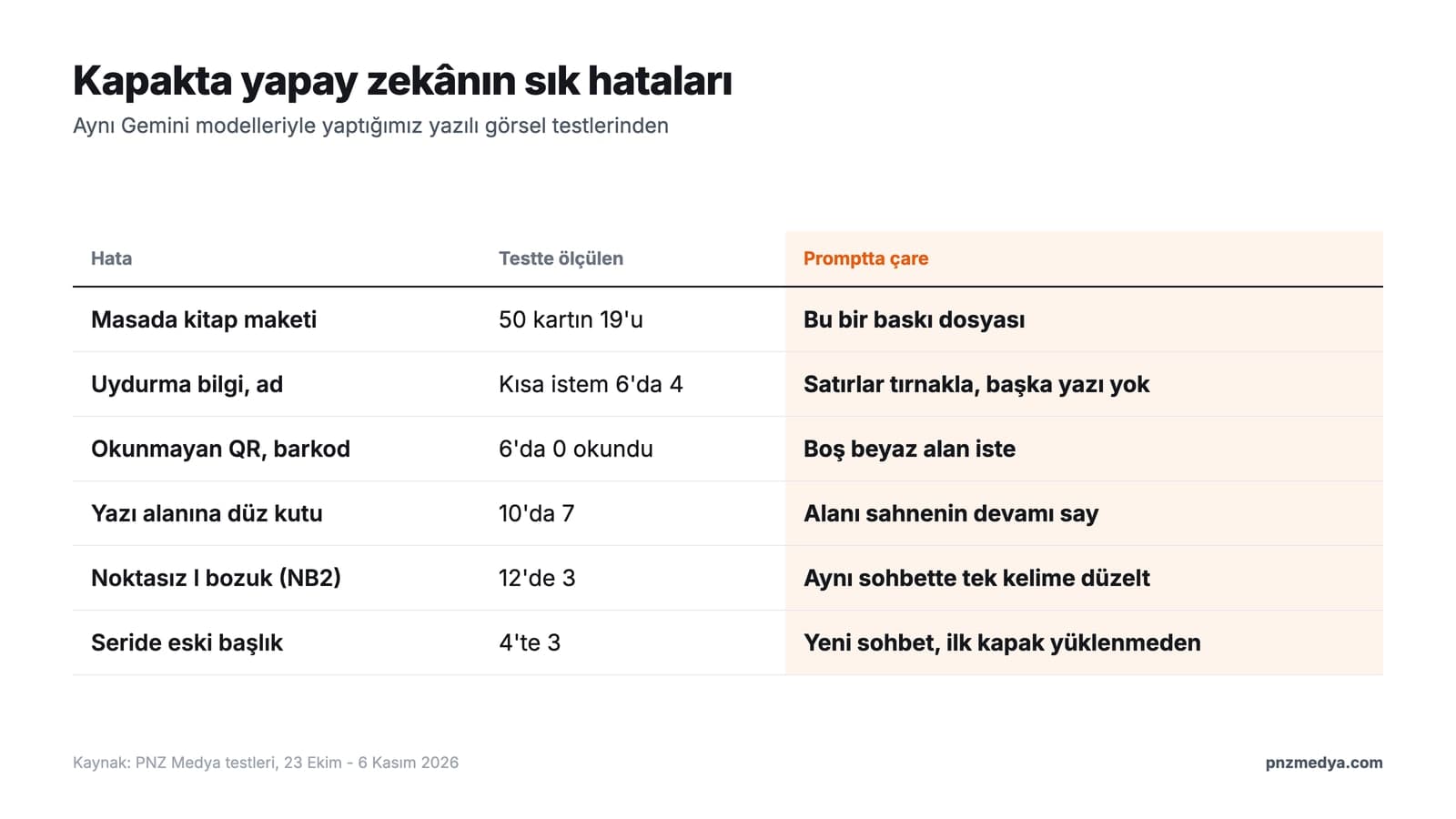
- It draws the cover as a book sitting on a table. Fix: open with "this is a print file, the four edges of the image are the edges of the cover."
- It adds text you never asked for: a subtitle, a publisher, a "bestseller" badge, a barcode. Fix: give the lines in quotation marks and say "no other text."
- It garbles special letters. In the YouTube thumbnail test (Turkish titles), Nano Banana 2 got the Turkish dotless I wrong in 3 of 12 titles, misspelling a Turkish word; Lite, NB2.1 and Pro had no errors across 24 titles. Listing the letters separately doesn't help either: in the tattoo test, a line saying the Turkish special letters should stay in place made the model add an accent mark to a Turkish name that the name doesn't have.
- It draws a solid-color box to make room for text. Fix: describe that area as a continuation of the scene (Prompt 3).
- It draws barcodes and QR codes as patterns that won't scan. Fix: ask for a blank white area and add the real barcode later (Prompt 9).
- On the second cover in a series, it mixes in the old title. Fix: a new chat, no upload of the first cover, the same layout description (Prompt 10).
Which Gemini Model Draws Your Cover?
In the Gemini app, the model that draws the image depends on the mode you pick. According to Google's help page, Flash-Lite mode runs Nano Banana 2 Lite, and Flash and Pro modes run Nano Banana 2; on the Google AI Pro plan you can redraw the image with Nano Banana Pro. We saw two differences in our tests. Lite made no mistakes on Turkish letters, but in the invitation test it was the model most likely to draw the card as a mockup (13 of 16 cards). Nano Banana 2 got the Turkish dotless I wrong, yet it was the one that applied a one-word fix in the same chat. Pick Flash mode for covers, and if a letter comes out wrong, have it fixed in the same chat.
Book Covers in Turkey: ISBN, Barcode and Copyright
In Turkey, ISBNs for printed books are issued by the ISBN Turkey Agency, part of the Ministry of Culture and Tourism's General Directorate of Libraries and Publications, and the barcode on the back cover is generated from that number. So there is no point in having AI draw the barcode: fill the white area from Prompt 9 with the barcode file your publisher or printer gives you. If you work with a printer, ask them about bleed and color settings. KDP recommends CMYK color for print, while AI output comes in RGB; leave the conversion to the printer or to your design program.
If you put someone else's photo on the cover (Prompt 5), get that person's permission; a photo of a face is personal data. Having AI copy a real novel's cover or a well-known illustrator's style by name can also cause copyright trouble. Describe the style in your own words, for example "a dark, snowy, single-color night scene."
Yes. A free Gemini account can make covers too, but it downloads images at 1K (848 x 1264 pixels at vertical 2:3). That's enough for Wattpad; print books and Kindle need 2K or 4K output.
In the first sentence, say that the four edges of the image are the edges of the cover and give the ratio. Then describe a single scene, put the cover lines in quotation marks and say "copy exactly, no other text." Prompt 1 is a ready-made example written in this order.
Yes. The prompts in this article go into ChatGPT unchanged. The portrait size OpenAI recommends for its image model is 1024 x 1536, which works out to about 181 DPI on a 13.5 x 21 cm print cover, so you'd need to upscale it for print.
Wattpad displays covers at 512 x 800 pixels, and Amazon Kindle recommends 1600 x 2560 pixels. For print, the size depends on the book's trim size: a 13.5 x 21 cm book with 3 mm bleed needs a 1665 x 2551 pixel front cover at 300 DPI.
Use Prompt 4: a vertical 2:3 cover, a title big and bold enough to read on a phone, your username and no other text. Crop and scale the result down to 512 x 800 pixels and upload it in Wattpad from the story's cover editing step.
Yes, but Amazon KDP asks you to disclose an AI-generated cover when you publish. If you drew the cover yourself and used AI only for editing, you don't need to disclose it.
Once the cover is done, run Prompt 12 to check it at small size one more time, and zoom in on the title to read it yourself. After the file goes to the printer, there is no way to fix a typo. You can use the same text-in-image rules for invitations and YouTube thumbnails too.
Brand Identity and Graphic Design Services
Book covers, logos, catalogs or packaging: we prepare print-ready files at the size, bleed and color settings your printer asks for. Let's talk about your project in a free initial call.