



AI Invitation Design: 10 Prompts for Engagement, Henna Night and Circumcision Party Invitations (2026)
10 invitation design prompts tested in Gemini: engagement, circumcision party, henna night, birthday, grand opening and invitation wording. We measured 71 images: 65 cards had no wrong letters, yet the short prompt added a fake phone number and address to 4 of 6 cards, and none of the QR codes scanned.
- When we gave Gemini every line of the invitation in quotation marks and in order, none of the 65 cards had a wrong letter; the Turkish letters with cedillas, breves and the dotted and dotless i were in place every time.
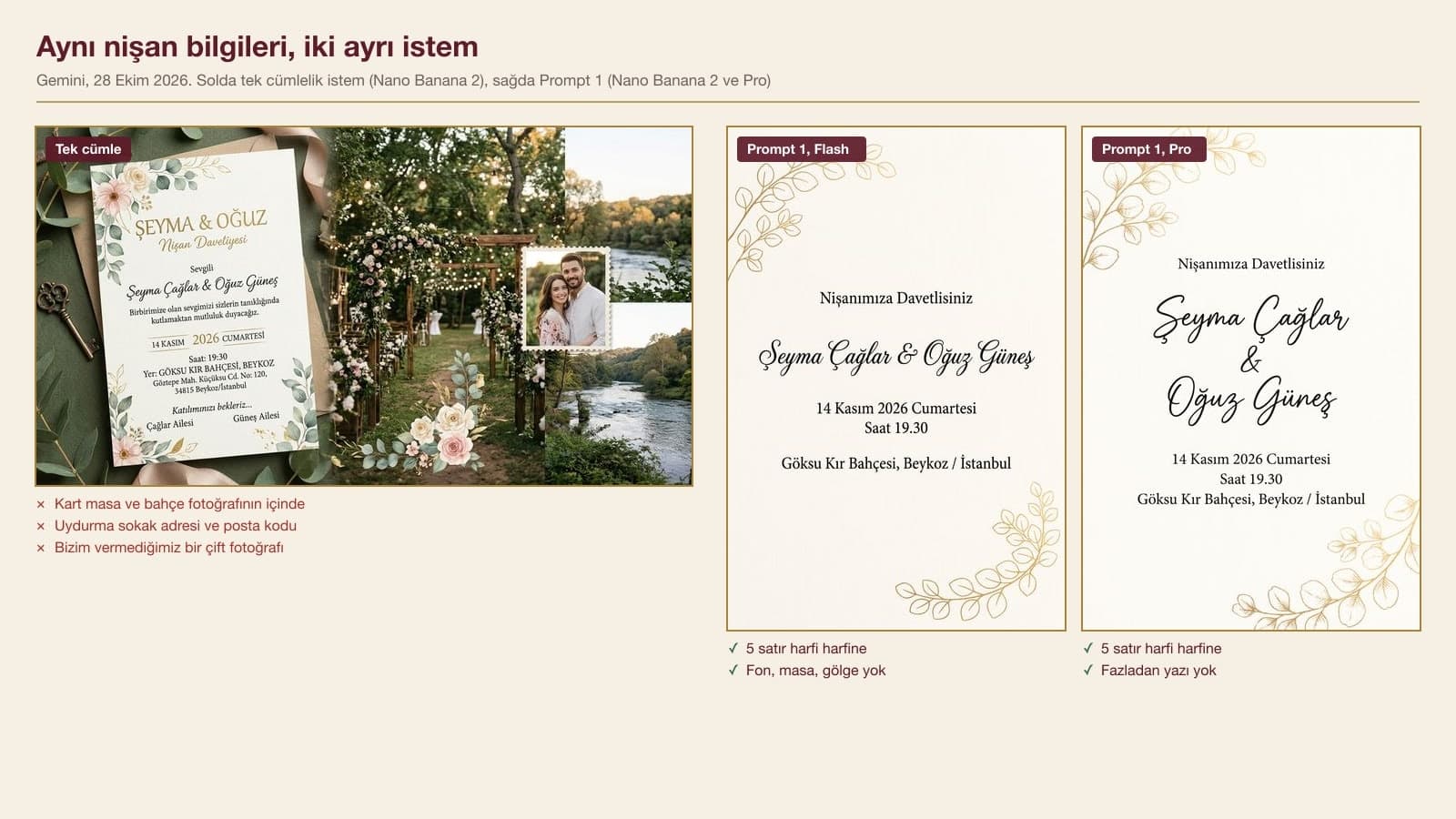
- A one-sentence prompt put the card inside a photo of a table, an envelope or a garden in 6 of 6 tries, and in 4 of them it added a fake RSVP phone number, an address or a photo of a couple.
- The sentence "This is a print file: the four edges of the image are the four edges of the card" cut mockup results from 19 in 50 cards to 2 in 9 cards.
- Gemini cannot draw a scannable QR code: none of the 6 QR codes could be read with a phone. Leave an empty square on the card and paste the real QR code in afterwards.
- If you give the date and venue when asking for invitation wording, the model squeezed them into 27 of 30 sentences; after we said "do not put the date, time or place in the sentences", it was 0 of 30.
When you give Gemini every line of the invitation in quotation marks, in order, and say "no other text", it prints the names, the date and the address letter for letter. On October 28, 2026 we had it draw 65 cards for engagements, circumcision parties, henna nights, birthdays and a shop opening, and we did not see a single wrong letter. The trouble came from somewhere else. With a short prompt, the model placed the card in a photo of a decorated table and invented phone numbers, addresses and even a couple's photo that we never gave it.
We ran every test in the Gemini API with three image models: Nano Banana 2 (Flash in the Gemini app), Nano Banana 2 Lite (Flash-Lite) and Nano Banana Pro. In total we produced 71 images and 15 texts. The names, dates and venues are made up for the examples. We read the text letter by letter by eye, measured the margins with the text recognition boxes in macOS, checked the QR codes with OpenCV's two QR readers and measured the color difference between cards in the Lab color space.
How to Design an Invitation with AI: 5 Steps
- Write the card text on paper first: headline, names, date and day of the week, time, venue. The Invitation Design module (2012) from Turkey's Ministry of National Education (MEB) says the place, time, date and invitation text must always be on an invitation.
- Open Gemini and pick Flash in the model picker. According to Google's help page, images are drawn by Nano Banana 2 when Flash or Pro is selected, and by Nano Banana 2 Lite when Flash-Lite is selected.
- Paste the prompt below that fits your invitation and fill in the square brackets with your own details. Keep the lines in quotation marks.
- Read the card you get letter by letter. If a line is extra or missing, fix it in the same chat with Prompt 10; do not generate the card again from scratch.
- Download it. On the free plan the image downloads at 1K, with a Google AI plan at 2K. If it is going to a print shop, check the size table; if you will send it by phone, use Prompt 3 for a 9:16 digital invitation.
We wrote this in Turkish: "Design an engagement invitation for Seyma Caglar and Oguz Gunes. November 14, 2026, 7:30 p.m., Goksu Kir Bahcesi, Beykoz." All 6 results showed the card inside a photo of a table, an envelope, candles or a garden. 4 of them had information we never gave: "RSVP: 05xx xxx xx xx" twice, a made-up neighborhood name ("Goksu Mahallesi") twice, a street address with a postal code once and a photo of a smiling couple once. In one result, Pro wrote S&G on the seal instead of S&O.
10 Ready-Made Invitation Prompts (Copy and Paste)
Fill in the square brackets with your own details and delete the brackets. Keep the quotation marks: the model prints a line in quotes exactly as written. We tested the original Turkish versions of these prompts in Gemini; you can paste them into ChatGPT too, but we did not measure the results there. Under each prompt we wrote what came out in the test.
1) Engagement invitation prompt (print-ready, no mockup)
Design a vertical 2:3 engagement invitation. This is a print file: the four edges of the image are the four edges of the card. The background is [background, e.g. ivory textured paper] from edge to edge; the paper's edge, a table or backdrop behind it, shadows and any photo shoot setting are not visible, and the design is seen head-on and completely flat. Decoration: [decoration and position, e.g. thin gold foil eucalyptus branches in the top left and bottom right corners].
Write only these five lines on the card, in this order and exactly as written:
1) "You Are Invited to Our Engagement"
2) "[First Last] & [First Last]"
3) "[weekday], [month] [day], [year]"
4) "At [time]"
5) "[venue], [district], [city]"
The names in an elegant script font and as the largest line on the card; the other lines in a simple, readable serif font. Spell every name and word exactly as written, with every accent and dot in place. Apart from these five lines there is no text, number, logo, phone number or word in another language on the card. All text sits at least 8% inside the card edges.In 9 of 9 tries the five lines came out letter for letter, with not one extra word. In the first version we had described the card's frame as "The whole image is the card itself, no mockup"; Flash-Lite still put the card on a gray backdrop with a shadow in 2 of 2 tries. With the "print file" sentence, mockup results dropped to 2 in 9 (1 in Flash-Lite, 1 in Pro). Write the weekday yourself: November 14, 2026 falls on a Saturday, but check it once on a calendar.
2) Circumcision celebration invitation prompt
Design a vertical 2:3 circumcision celebration invitation. The whole image is the card itself: full frame, [background, e.g. dark navy textured paper] all the way to the edges; no table, envelope, hand or mockup. Decoration: a small Ottoman prince's turban drawn in gold lines at the top center of the card, with a few tiny gold stars around it; a thin gold line border along the edges. The decorations have no letter-like flourishes or calligraphy, only lines and stars.
Write only these lines on the card, in this order and exactly as written:
1) "[Child's name]'s Circumcision Celebration"
2) "[invitation sentence, e.g. We would be delighted to have you with us on our son's happy day.]"
3) "[weekday], [month] [day], [year]"
4) "At [time]"
5) "[hall], [district], [city]"
6) "[Mother's name] and [Father's name] [Last name]"
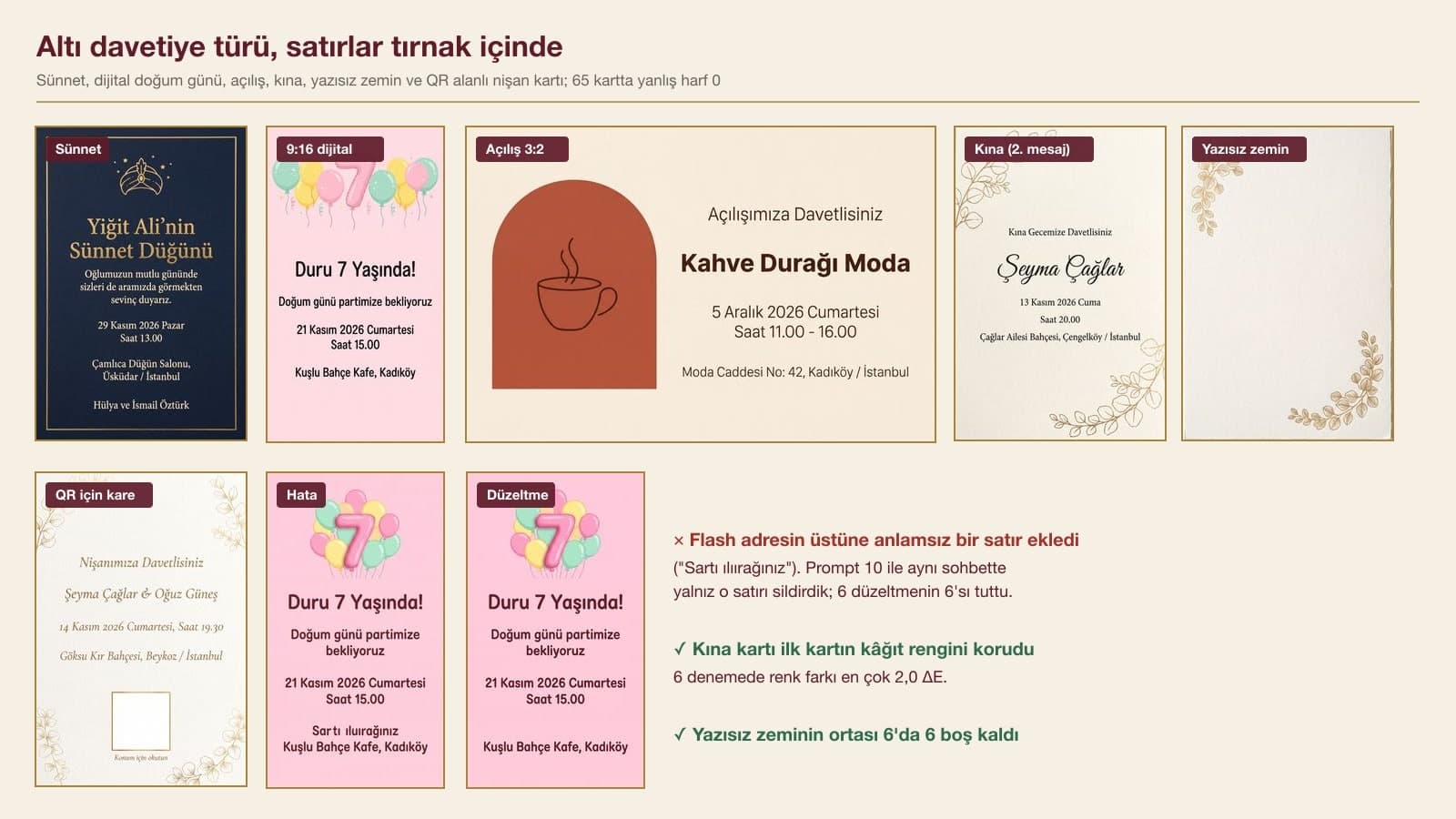
Line 1 is the largest, in a gold serif font; the others in a cream white, readable serif font. Spell every name and word exactly as written. Apart from these six lines there is no text, number or logo on the card. All text sits at least 8% inside the card edges.This six-line card came out right in 6 of 6 tries; every dotted and accented Turkish letter in names like Yigit Ali, Uskudar and Ismail Ozturk was in place. No letter-like ornaments were added around the turban. Flash-Lite and Flash each showed the card on a white background once; if you see this, replace the first sentence with the "print file" sentence from Prompt 1. For a nephew or grandchild, put the name of the person sending the invitation in line 6.
3) Digital birthday invitation prompt for WhatsApp (9:16)
Design a vertical 9:16 digital birthday invitation to be sent by phone over WhatsApp and as an Instagram story. The whole image is the invitation itself: no phone screen, frame or mockup. Background [background color, e.g. light pastel pink], flat all the way to the edges; at the top [decoration, e.g. mint green, yellow and pink balloons, the largest balloon shaped like the number "7"]. A playful but readable rounded font.
Write only these lines on the invitation, in this order and exactly as written:
1) "[Name] Turns [age]!"
2) "Join us for our birthday party"
3) "[weekday], [month] [day], [year]"
4) "At [time]"
5) "[venue], [district]"
Spell every name and word exactly as written. There is no text apart from these lines. Keep all text out of the top and bottom 12% strips of the screen; the phone interface covers those areas.5 of 6 tries came out clean. Once, Flash added a meaningless line of made-up words above the address; once, Flash-Lite drew the phone's clock and battery bar above the card and Android navigation buttons below it. That second error most likely came from the words "phone interface" in the last sentence. In one Pro result the text stayed light pink on the light pink background and was hard to read: naming the text color, such as "dark burgundy", prevents this.
4) Shop opening and corporate invitation prompt
Design a horizontal 3:2 [event, e.g. shop opening] invitation. The whole image is the card itself: full frame, [background, e.g. cream matte paper] all the way to the edges; no table, hand or mockup. Simple and modern: on the left a wide arc shape in [color, e.g. terracotta], with a line drawing of [an object that represents your business, e.g. a coffee cup] inside it; text on the right.
Write only these lines on the card, in this order and exactly as written:
1) "You Are Invited to Our Grand Opening"
2) "[Business name]"
3) "[weekday], [month] [day], [year]"
4) "From [start] to [end]"
5) "[street address], [district], [city]"
Line 2 is the largest, in a bold sans serif; the others in a thin sans serif, [text color, e.g. dark brown]. Spell every name and word exactly as written. There is no text, logo or slogan apart from these lines. All text sits at least 8% inside the card edges."Kahve Duragi Moda" and the address line were written correctly in 6 of 6 tries. Once, Flash printed the "You Are Invited to Our Grand Opening" line twice, and the upper copy sat closer than 8% to the top edge of the card. This prompt was the most prone to the mockup error: Flash-Lite showed the card on a table in 2 of 2 tries, Pro in 1 of 2. If you have a logo, do not have the model draw it; generate the card without a logo and add yours afterwards.
5) Henna night invitation in the same design (invitation set)
Make a [second event, e.g. henna night] invitation in the same design, with the same colors, the same fonts and the same [decoration, e.g. eucalyptus decoration]. The ratio is again vertical 2:3. Write only these lines on the card, in this order and exactly as written: 1) "[headline, e.g. You Are Invited to Our Henna Night]" 2) "[First Last]" 3) "[weekday], [month] [day], [year]" 4) "At [time]" 5) "[venue], [neighborhood], [city]". No text apart from these lines.Write this prompt in the same chat right after the engagement card. Across 6 tries the paper color drifted at most 2.0 units (ΔE) from the first card; side by side, that difference is hard to spot. The font and the branch decoration held too. The only error came from Flash-Lite: once it left the "Seyma Caglar & Oguz Gunes" line from the engagement card untouched, when the henna card should have had only the bride's name. If you ask for the engagement, henna night and wedding cards one after another in the same chat, the set stays consistent.
6) Text-free invitation background prompt (add the text yourself)
Design a vertical 2:3 [event] invitation background that I will add the text to later. The whole image is the card itself: full frame, [background, e.g. ivory textured paper] all the way to the edges; no table, envelope or mockup. Decoration only in two corners: [decoration, e.g. thin gold foil eucalyptus branches in the top left and bottom right corners]. The middle of the card, from 22% to 78% down from the top, is a continuation of the same [background]: same texture, same color; no frame, box, line or label on it. No text, letters or numbers anywhere on the card.Use this one if you want to set the text yourself in Canva or in your phone's photo editor with your own font. 6 of 6 backgrounds came with no text, and the middle area stayed empty in 6 of 6; the model did not draw a box or label in the center. In our earlier tests, when we said "leave the middle empty", it usually drew a flat panel there. Describing the empty area as "a continuation of the same paper" solved that. Flash-Lite and Pro each showed a torn paper edge against a backdrop once.
7) Invitation prompt with a space for a QR code (for the location)
Design a vertical 2:3 [event] invitation. The whole image is the card itself: full frame, [background] all the way to the edges, [decoration] in the corners, no mockup.
Write only these lines on the card:
1) "[headline]"
2) "[names]"
3) "[weekday], [month] [day], [year], at [time]"
4) "[venue], [district], [city]"
At the bottom center of the card, below the last line, put a plain white square where I will paste the QR code: about one fifth of the card's width, with a thin gold border, completely empty and white inside. Under the square, write "Scan for the location" in small type. No other text.In 6 of 6 tries the square came out empty and white, and the "Scan for the location" line under it was correct every time. Once, Pro wrote the address line twice. Get the real QR code from the venue's share link in Google Maps or from any QR generator and paste it into this square; the QR section below explains why we do it this way.
8) Engagement and wedding invitation wording prompt
Write 5 options for the invitation sentence we will put in the middle of our [event, e.g. engagement] invitation. We are [names]. The date, time and place are on separate lines on the card; do not put the date, time or place in the sentences. Each sentence is at most 20 words. Sentences 1 and 2 should be formal, 3 and 4 warm, 5 lightly humorous. Use only the information I gave: do not add new names, poems, poets' names, Quran verses or hadiths. Number the sentences and do not write any explanations.This is a text prompt; we tested the Turkish original in Gemini 3.5 Flash. In the first version we also gave the date and venue: the model added the phrase "on Saturday, November 14, 2026 at 7:30 p.m. at Goksu Kir Bahcesi in Beykoz" to 15 of 15 sentences, and the sentences turned into copies of each other. After we added the line "do not put the date, time or place in the sentences", none of the 15 sentences had the date, and the tones became distinct. One of the humorous options, in our translation: "Oguz was won over, Seyma said 'yes'! We would love for all of you to witness the sweet commotion as the rings go on."
9) Circumcision invitation wording prompt
Write 5 options for the invitation sentence we will put in the middle of our son's circumcision celebration invitation. Our son's name is [child's name], and the invitation is from [mother's and father's first and last names]. The date, time and place are on separate lines on the card; do not put the date, time or place in the sentences. Each sentence is at most 20 words. Sentences 1, 2 and 3 should be traditional and formal, 4 and 5 simple and in everyday language. Use only the information I gave: do not add new names, poems, poets' names, Quran verses or hadiths. Number the sentences and do not write any explanations.Across the 15 sentences from 3 tries, none mentioned the date or place and none went over 20 words. The formal sentences used the set phrases familiar from Turkish invitations, the equivalents of "circumcision gathering", "on the occasion of" and "we take pride". The first, dated version of the same prompt produced two broken sentences (for example, one that ended "...expecting at his circumcision" with its object missing); once the date was out of the sentence, we saw no such error. Paste the sentence you choose into line 2 of Prompt 2.
10) Prompt to fix a wrong line on the invitation
On the card, [describe the problem, e.g. the "You Are Invited to Our Grand Opening" line is written twice]. [What to do, e.g. Delete the extra line at the top]; leave the same [background color] background in its place. Do not touch the other lines, the fonts, the colors or the [decoration].We used this template in the same chat to fix the three line errors from the test: the headline Flash wrote twice, the meaningless line Flash made up and the address Pro repeated. In 6 of 6 tries only the faulty line disappeared, and the other lines stayed the same. On the opening card, Flash re-centered the text slightly; you can accept this small shift instead of generating the card again. Use the same template to fix a wrong letter as well: write the wrong word and the correct one in quotation marks.
How Did the Invitation Prompts Do in Testing? Results from 71 Images
| Prompt | Cards | Lines correct | Mockup or scene | Unwanted additions |
|---|---|---|---|---|
| One sentence (short) | 6 | wrote its own text | 6/6 | 4/6: RSVP phone, address, couple photo |
| Engagement, "no mockup" | 8 | 8/8 | 3/8 | 0 |
| Engagement, "print file" (Prompt 1) | 9 | 9/9 | 2/9 | 0 |
| Circumcision party (Prompt 2) | 6 | 6/6 | 2/6 | 0 |
| Birthday 9:16 (Prompt 3) | 6 | 5/6 | 1/6 (phone interface) | 1 meaningless line |
| Opening 3:2 (Prompt 4) | 6 | 5/6 | 3/6 | 1 repeated line |
| Henna night, second message (Prompt 5) | 6 | 5/6 | 3/6 | 1 old line left in |
| Text-free background (Prompt 6) | 6 | 6/6 text-free | 2/6 | 0 |
| Empty square for QR (Prompt 7) | 6 | 5/6 | 2/6 | 1 repeated line |
| Request for a real QR code | 6 | 6/6 | 3/6 | 4/6 link or English text; QR scanned 0/6 |
We had no problems at the letter level: across the 65 cards with lines we gave in quotation marks (fixes included), we saw no wrong letter, misplaced dot or missing cedilla. The errors were at the line level: extra or missing lines, repeats and inventions. Leaving the QR request aside, this happened 4 times in 53 cards written with the rules. We measured the margins with text recognition boxes: in 38 of the 53 cards all text stayed within the 8% we asked for, in 12 it was between 5% and 8%, and in 3 it was under 5%. For a card going to the printer, regenerate that last group.
Mockups showed up most in Flash-Lite: in 14 of 19 cards, the card appeared on a backdrop, with a shadow or with a torn edge. Flash did it in 3 of 20 cards, Pro in 4 of 20. If you hand a mockup file to a print shop, the table and shadow behind the card get printed too, and the cut has to follow the card's edge.
Can You Put a QR Code on an Invitation?
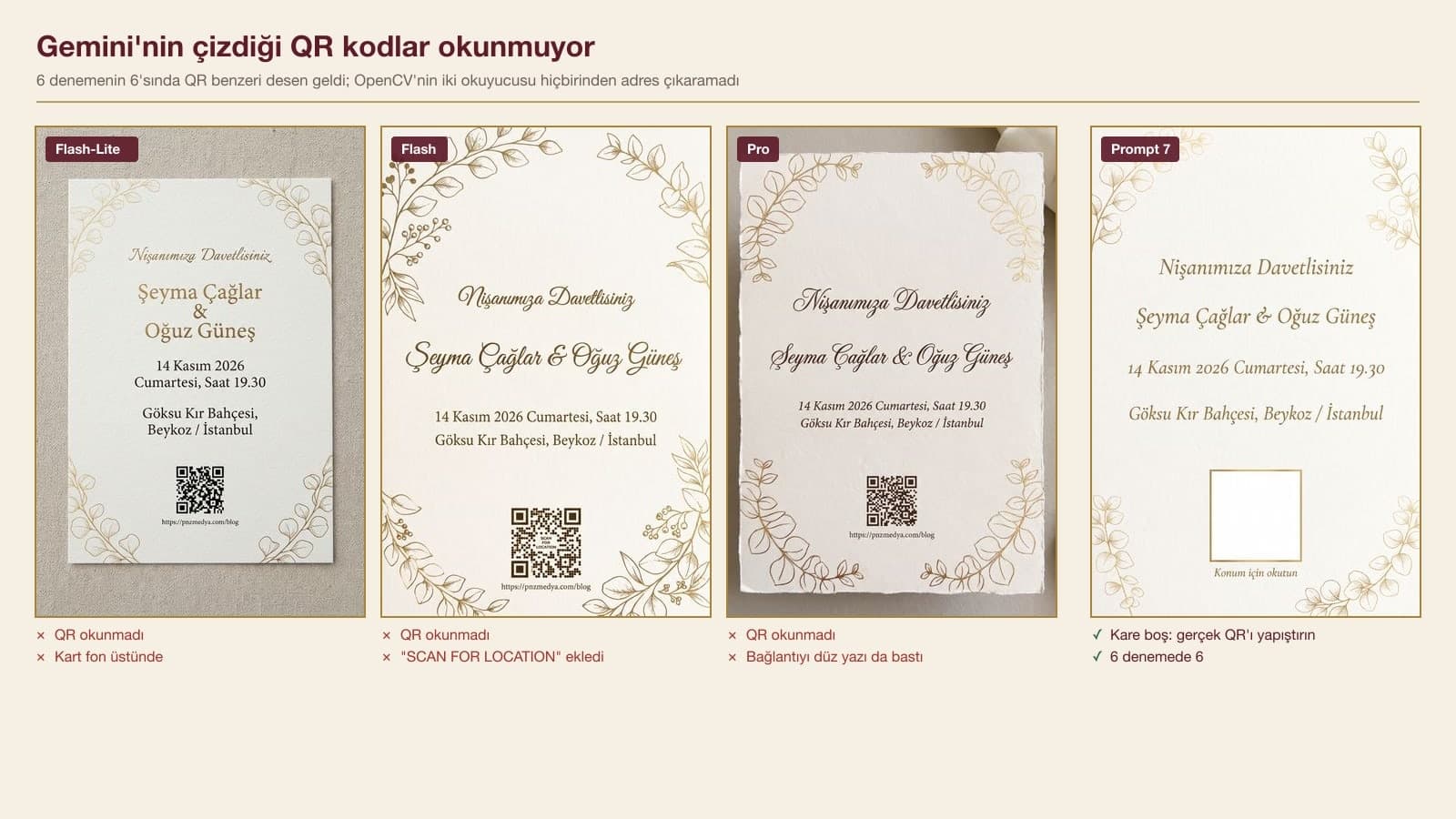
We asked the model to "add a real, scannable QR code, the address is this". In 6 of 6 tries a black and white square that looked like a QR code appeared at the bottom of the card. OpenCV's two separate QR readers could not get an address out of any of them at three different scales, even after converting them to black and white. The pattern imitates the corner markers of a QR code, and the dots inside are random. In 4 results the model also printed the link as plain text under the square, and once Flash added "SCAN FOR LOCATION" in English.
The way to put the location on an invitation is Prompt 7: have the model leave an empty square on the card, create the real QR code from the venue's share link in Google Maps, paste it in and scan it once with your phone before printing. If you want to take the invitation fully digital, with the location, a countdown and RSVP replies collected in one link, that is a job for a web page.
Size and Resolution for a Print-Ready Invitation
| Model and resolution | Pixel size of a 2:3 card | Pixels per inch at an 11.3 x 17 cm print | Where you get it |
|---|---|---|---|
| Flash-Lite, 1K | 848 x 1264 | 190 | Gemini free plan |
| Flash or Pro, 1K | 848 x 1264 | 190 | Gemini free plan (1K download) |
| Flash or Pro, 2K | 1696 x 2528 | 380 | Google AI plan (2K download) |
| Pro, 4K | 3392 x 5056 | 760 | Gemini API |
The MEB Invitation Design module lists the standard fancy envelope sizes as 13x18, 14x20, 16x23, 16x16 and 18x18 cm, and says the invitation should be at least 1 cm narrower and 1 cm shorter than the envelope. A card that fits a 13x18 cm envelope is at most 12x17 cm; a 2:3 image printed 17 cm tall comes out 11.3 cm wide. The pixels per inch column in the table is for that size. The same module advises leaving about 1 cm of bleed on the width and height of the print file: if a decoration runs to the edge, ask your print shop about bleed and, if needed, generate the card with the text kept 8% inside the edges as in Prompt 1.
One note: the cards we fixed with a second message in the Gemini API came back at 1K, even when the first card was 2K, because the resolution was not specified again. In the app, your plan sets the download resolution; check the pixel size after you download the fixed card.
How to Get Gemini to Write Invitation Wording
Have the invitation sentence written in a separate chat and add it to the card last. A one-line prompt like "write engagement invitation wording" returned between 14 and 19 sentences in 3 tries. All three opened a "religious wording" section we did not ask for and put a sample details template under the sentences. Two of these templates had 2024 as the year, and one broke off at "202...". Once we said how many sentences, which tone and which details to use, as in Prompts 8 and 9, the list shrank to 5 sentences, and none of the 30 sentences went over 20 words.
Flash, Flash-Lite or Pro: Which Gemini Model Is Best for Invitations?
| Flash (Nano Banana 2) | Flash-Lite (Nano Banana 2 Lite) | Pro (Nano Banana Pro) | |
|---|---|---|---|
| Line errors (QR request excluded) | 2/18 | 1/17 | 1/18 |
| Mockup or backdrop | 3/20 | 14/19 | 4/20 |
| Median time | 17.5 s | 3.9 s | 30.1 s |
| Highest resolution | 2K in the app | 1K | 2K in the app, 4K in the API |
| How to pick it in the app | Flash | Flash-Lite | "Redo with Pro", paid plan |
Pick Flash for invitations: it wrote the lines correctly, drew the fewest mockups and is available on the free plan. Flash-Lite is fast but put the card inside a photo almost every time; use it for digital invitations or quick trials, and keep it away from print files. Pro drew the sharpest text, can go up to 4K in the API and came without a mockup in 16 of 20 cards; in the app, regenerating with Pro requires a paid plan. According to Google's help page, you must be 18 or older to edit images.
Common Mistakes When Designing Invitations with AI
- Giving all the details in one sentence. The model invents whatever it thinks is missing: in the test, a fake phone number, address or photo got into 4 of 6 cards.
- Leaving the weekday to the model. With the short prompt, the model added "Saturday" on its own to 5 of 6 cards; it was right this time, but write the weekday yourself from a calendar anyway.
- Having the model draw the QR code. None of the 6 tries could be scanned.
- Using the word "phone" in a digital invitation prompt. Flash-Lite once drew a phone interface over the card.
- Generating the whole card again because of one wrong line. Fixing it in the same chat with Prompt 10 worked in 6 of 6 tries and kept the design.
- Not reading the card before printing. We saw no wrong letters, but repeated and invented lines did show up; read the names and the time letter by letter.
Pick Flash in Gemini, paste Prompt 1 from this article and fill in the square brackets with your own details. Keep every line in quotation marks and do not delete the sentence that rules out any other text. In our test, this method produced 65 cards without a wrong letter.
In our October 28, 2026 test, which used the original Turkish prompts, yes, as long as the lines were given in quotation marks: the Turkish letters with cedillas, breves, umlauts and the dotted and dotless i were correct on all 65 cards. The errors showed up at the line level instead: repeated or invented lines. Still read the card letter by letter before printing.
It can draw one, but it does not scan: in 6 tries, none of the 6 QR codes could be read with a phone or with OpenCV. Use Prompt 7 to have it leave an empty square on the card, then create the real QR code from a Google Maps link and paste it in.
Use Prompt 8 or 9: give the number of sentences you want, the tone and the names, and say "do not put the date, time or place in the sentences". Without this line the model added the date and place to 15 of 15 sentences.
Yes, but check the resolution. When a 2:3 card is printed at a size that fits a 13x18 cm envelope (11.3x17 cm), a 1K file gives 190 pixels per inch and a 2K file gives 380. Make sure the card has no backdrop or shadow and the text is away from the edges, and ask your print shop about bleed.
On Gemini's free plan you can generate invitations with Flash and download them at 1K. 2K downloads and regenerating with Pro require a Google AI plan.
Generate your first card twice with Prompt 1 in Flash, put the two results side by side and read the names and the time. Once you have picked the one you like, ask for the henna night or wedding card with Prompt 5 in the same chat; the set comes on the same paper, in the same font.
Make Your Opening Invitation Match Your Brand
If you want your shop opening, launch or corporate event invitation to match your logo, colors and business cards, let's build your corporate identity together. Tell us what you need in a free initial consultation.