



How to Swap Faces in a Photo: 9 Gemini Face Swap Prompts (October 2026 Test)
9 ready-to-use Gemini prompts for swapping faces in a photo: move a face from one photo to another, swap two people's heads, edit without changing the face. We measured it on 74 images: "keep the hair the same" failed in 6 of 8 tries, while naming the hair kept it in place 5 out of 5 times.
- To swap a face in a photo with Gemini, upload two photos and say which one is the face and which one is the target. The face transferred in most of the 69 test images: on a target facing the camera, similarity to the source face reached 0.84.
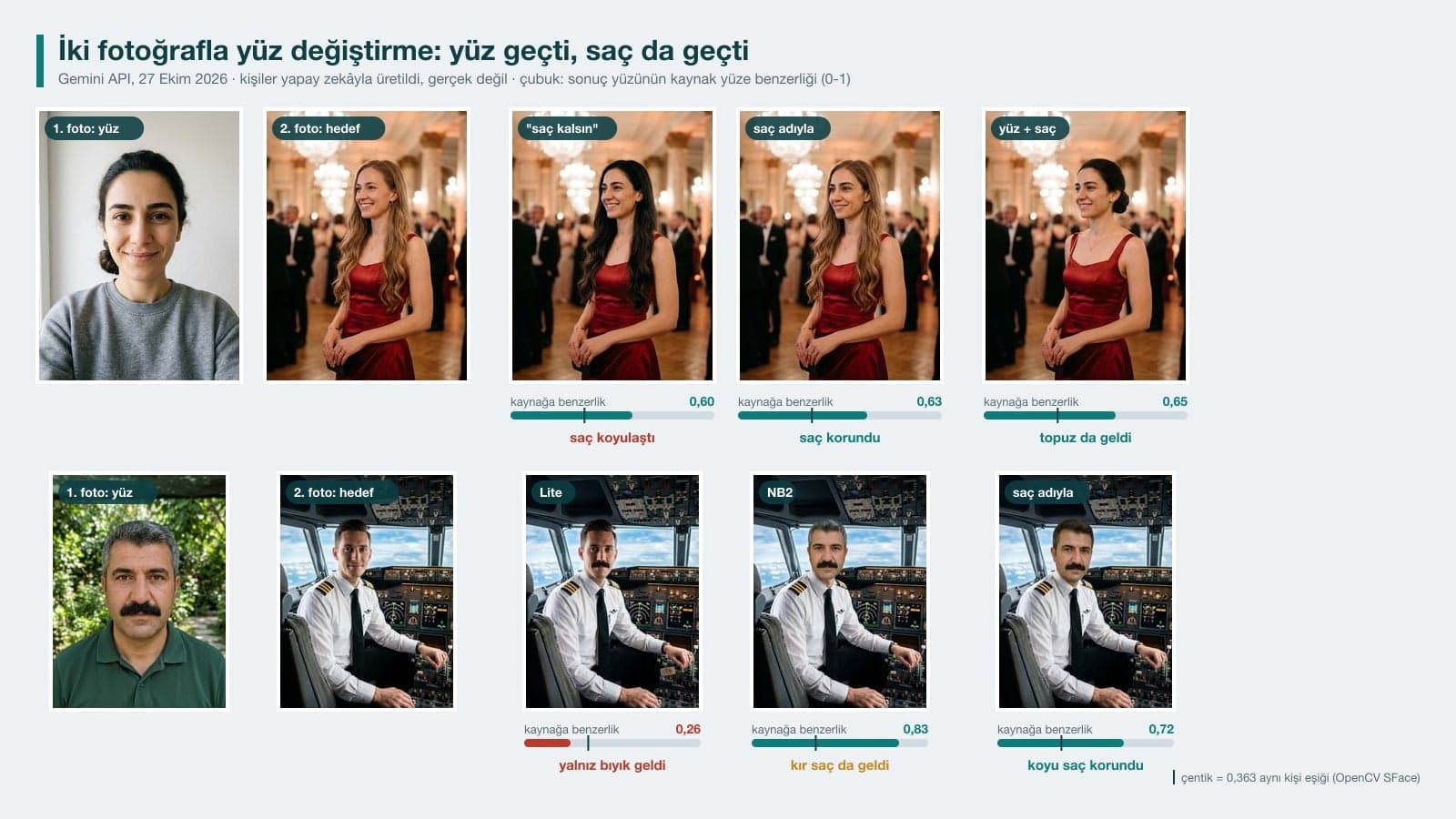
- Hair is the problem. In 6 of the 8 tries where we wrote "keep the hair as in photo 2", the hair turned into the source person's hair; when we named the color and length of the target's hair, it stayed put in 5 out of 5 tries.
- Swapping only the faces of two people in the same photo did not work (Nano Banana 2 blended the two faces). Swapping the heads together with the hair came out clean in 3 out of 3 tries.
- We put a number on the "Gemini keeps changing my face" complaint: after one edit, similarity to the original was 0.78-0.88, and after five edits in a row it dropped as low as 0.68. Put all your changes in one message, or start from the original photo every time.
- Flash-Lite (Nano Banana 2 Lite) failed at two-photo face swaps in 3 of 4 tries; Google also says this model is not designed for multiple reference images.
- Do not use someone else's face without permission. Google's policy prohibits using biometric data without consent and impersonating someone to deceive; KVKK (Turkey's data protection authority) describes the danger of deepfakes as the manipulation of personal data.
To swap a face in a photo with Gemini, upload two photos and tell the model which one is the face source and which one is the target scene: take only the facial features from photo 1, and keep the hair, clothing, pose and background from photo 2. The hard part is the hair. Gemini tends to carry the hair over along with the face; Prompt 1 below fixes this by naming the target's hair, and in our test it left the hair in place in 5 out of 5 tries.
We tested the prompts on October 27, 2026 in the Gemini API with three image models: Nano Banana 2 (Flash in the Gemini app), Nano Banana 2 Lite (Flash-Lite) and Nano Banana Pro. The tests used the original Turkish prompts; the English versions below are our translations. As input we used photos of five people we generated with AI, people who do not exist, and produced 74 images in total. We measured the face in every output against the source face and against the target's old face with SFace, OpenCV's face recognition model: 1 means the exact same face, and the "same person" threshold in OpenCV's sample code is 0.363. We counted hair, added objects and pixel changes outside the face separately. The total API cost was about $6.
How to Swap Faces in a Photo with Gemini: 5 Steps
- Open Gemini and pick Flash in the model picker. According to Google's help page, with Flash or Pro selected the images are drawn by Nano Banana 2, and this model can take multiple reference images. Do not pick Flash-Lite: Nano Banana 2 Lite is not designed for two-photo jobs.
- Upload the photo you want the face from first, then the target photo. The prompt refers to them in that order as "photo 1" and "photo 2". The face photo should be front-facing, sharp and without glasses.
- The face in the target photo should look at the camera. In the test, the front-facing pilot photo reached 0.84 similarity to the source face, while the gala photo with the head turned to the side stayed between 0.58 and 0.78 (average 0.63).
- Paste Prompt 1 below and fill the square brackets with the color and length of the target's hair.
- Put the result next to the target photo: if the hair, skin tone and the transition at the neck look right, download it. If the hair changed, upload the result and send Prompt 5. On a paid plan there is also a "Redo with Pro" option in the More menu under the result.
Writing "keep the hair and clothing the same" and moving on. Despite that sentence, Gemini darkened the target's light brown hair or turned short dark hair gray in 6 of 8 tries: it picks hair that suits the new face on its own. Write the color and length of the hair and say "do not darken it" or "do not turn it gray" explicitly.
9 Ready-to-Use Face Swap Prompts (Copy and Paste)
Fill in the square brackets for your own photo and delete the brackets. We tested the Turkish originals of these prompts in Gemini; you can paste them into ChatGPT too, but we did not measure the results there. Under each prompt we wrote what came out in the test.
1) Two-photo face swap prompt (hair stays on the target)
I uploaded two photos. Photo 1 is only the face source: take this person's facial features (eye shape, eyebrows, nose, lips, jawline, [distinguishing mark, e.g. a mole on the cheek or a mustache]).
Photo 2 is the target scene. Take the hair from photo 2: keep it [color, length and style of the target's hair, e.g. light brown, long and wavy]; do not darken the hair, and do not make its color or length look like the hair in photo 1.
Keep the clothing, pose, head angle, background, lighting and framing as they are in photo 2.
Match the new face to the target's head angle and lighting; the face, neck and ears should have the same skin tone, with no visible seam.
Do not beautify, slim or rejuvenate the face. Do not add anything new or any text to the scene.The hair stayed as it was on the target in 5 out of 5 tries (3 with Nano Banana 2, 2 with Pro). Similarity to the source face was between 0.58 and 0.72, the same level as the prompt where we left the hair open. The average pixel difference outside the face stayed around 3 on a 0-255 scale, so the scene was left alone.
2) One-line quick face swap prompt
Put the face from photo 1 onto the person in photo 2.On the front-facing pilot photo, this single line gave Nano Banana 2 and Pro their highest similarity (0.84 with Nano Banana 2, 0.83 with Pro). The price is the hair: in all 5 results where the face changed, the hair also came from the source person. Pro even carried the source person's bun onto the gala photo. If you do not care about the hair, this is the fastest way.
3) Face and hair swap (head swap) prompt
I uploaded two photos. Give the face and hair of the person in photo 1 ([hair color, length and style, e.g. dark brown, bun at the nape]) to the person in photo 2.
Keep the clothing, pose, head angle, background, lighting and framing of photo 2 the same.
The facial features should be as in photo 1: eye shape, eyebrows, nose, lips, jawline, skin tone and [distinguishing mark].
The face, neck and shoulders should have the same skin tone. Do not beautify or rejuvenate the face. Do not add anything new or any text.Use this prompt if you want to see yourself in a costume or an evening outfit with your own hair. In 2 out of 2 tries the bun came along too, similarity to the source face was 0.63 and 0.65, and the dress and the hall did not change.
4) Prompt to swap the heads of two people in the same photo
Swap the heads of the two people in this photo, hair included: the head of the person on the left from the viewer's point of view [describe the person, e.g. young man with curly black hair and a beard] goes onto the body of the person on the right, and the head of the person on the right [describe the person, e.g. woman with short blonde hair] goes onto the body of the person on the left.
Keep the clothing, poses, hands, background and lighting exactly as they are; the neck and face skin tones should match on each body.
The photo should still show only two people; do not add anything new or any text.For the "face swap trend" with friend photos, this gave the cleanest result: in 3 out of 3 tries both heads moved to the right body, and the new faces had 0.62 to 0.77 similarity to the old face on the other side. Write "left from the viewer's point of view": in our earlier tests, without that phrase the model sometimes read the direction from the person's own left.
5) Prompt to restore the hair color after a face swap
Make the hair of the person in this photo [desired hair, e.g. light brown, long and wavy]; the hair should fall the same way [how the hair falls, e.g. over the front of the shoulders].
Do not touch the face: eye shape, eyebrows, nose, lips, jawline and [distinguishing mark] stay the same.
Keep the clothing, pose, background and lighting the same; do not add anything new.We uploaded a result where the hair had gone darker and sent this prompt. In 2 out of 2 tries the hair went back to light brown; the face's similarity to the source face dropped from 0.60 to 0.57 and 0.56. There is a small loss, and the face is still the same person. If you can, skip this step entirely and name the hair from the start as in Prompt 1.
6) Prompt to change the background and outfit without changing the face
Do not touch the face of the person in this photo: eye shape, eyebrows, nose, lips, jawline, skin tone, [distinguishing mark] and expression stay the same; do not beautify, slim, smooth or rejuvenate the face.
Change only two things: make the background [new background, e.g. sunrise in Cappadocia, fairy chimneys and hot air balloons in the distance], and replace [old clothing] with [new clothing].
Keep the hair, pose, head angle and framing the same; do not add text.This prompt is for people who say "Gemini keeps changing my face". Similarity to the original was 0.82-0.85 with Nano Banana 2 and 0.88 with Flash-Lite. When we wrote the same job as a short request ("Make the background a sunrise in Cappadocia and dress her in a red jacket", sent in Turkish), it stayed at 0.80-0.83 with Nano Banana 2 and 0.80 with Flash-Lite. Pro gave 0.78 with both prompts and, with the short one, moved the bun from the nape to the top of the head.
7) Prompt to make several changes in one message
Do not touch the face of the person in this photo: eye shape, eyebrows, nose, lips, jawline, skin tone, [distinguishing mark] and expression stay the same; do not beautify, slim or rejuvenate the face.
Make these changes together:
1) make the background [new background];
2) replace [old clothing] with [new clothing];
3) add [accessory to add, e.g. a thin silver necklace around the neck];
4) widen the framing to [new framing, e.g. waist up].
Keep the hair and head angle the same; do not add text.We made the same four changes first as four separate messages in a row, then all at once with this prompt. With Pro, the single message kept 0.83 similarity to the original, while the end of the chain stayed at 0.72. With Nano Banana 2 the two approaches were the same on average (0.79). In one Nano Banana 2 chain and in Pro, the biggest drop came at the step where the framing widened and the face got smaller.
8) Prompt to see yourself in another profession (no second photo)
Draw the person in this photo as [profession or role, e.g. an airline pilot], [scene, e.g. sitting in the seat of an airplane cockpit]: [clothing, e.g. white pilot shirt, epaulettes with gold stripes on the shoulders, dark tie]; [background] behind them.
Keep the face as it is in the photo I uploaded: eye shape, nose, [beard or mustache], [hair color], jawline and skin tone stay the same; do not rejuvenate or beautify the face.
Photorealistic, vertical frame, waist up; do not add text.If you do not have a target photo, describe the scene in words. In 3 tries where we put the same man in a cockpit described in text, similarity was 0.71-0.76; when we placed him into a real pilot photo with the two-photo method, it was 0.83. Because the outfit and the scene are redrawn every time, the three results came out with different angles and lighting.
9) Prompt to match the face to the scene lighting (final touch)
Match the face of the person in this photo to the lighting of the scene: the face, neck and ears should have the same skin tone and brightness, and the light should fall from the same direction as [light source, e.g. daylight from a window].
Do not change the facial features: eye shape, nose, [beard or mustache] and jawline stay the same. Do not change anything else.Use this prompt only if you see a clear color difference between the face and the neck. In 2 tries on a result that already matched, the face still looked like the source person, but similarity dropped from 0.83 to 0.67-0.68: while fixing the light, the model also redraws the face a little.
How Did the Face Swap Prompts Do in the Test? Results from 74 Images
| Prompt | Tries | Did the face transfer? | Did the hair stay on the target? |
|---|---|---|---|
| Short (Prompt 2) | 6 (3 models x 2 targets) | 5/6; Flash-Lite barely changed the face on the gala photo | In 0 of the 5 results where the face changed |
| With rules, "keep the hair as in photo 2" | 10 | Nano Banana 2 and Pro 8/8; Flash-Lite 0/2 (once only the mustache, once no change + a watch added) | 2 of 8 |
| Hair named (Prompt 1) | 5 | 5/5, similarity 0.58-0.72 | 5 of 5 |
| Face + hair (Prompt 3) | 2 | 2/2, similarity 0.63-0.65 | The source's bun came along (intended) |
| Group: swap only the faces | 7 | Nano Banana 2 blended the faces; Pro, and Flash-Lite and Nano Banana 2 with the short prompt, left the faces in place | Unchanged |
| Group: swap heads with hair (Prompt 4) | 3 | 3/3, similarity 0.62-0.77 | Hair moved with the head (intended) |
The biggest difference in the table came from how the hair was written. The sentence "keep the hair as in photo 2" was too general, and Gemini chose hair that suited the new face: the long light brown hair in the gala photo turned dark brown in 3 of 4 tries, and the pilot's short dark hair turned into the source man's gray hair in 3 of 4 tries. Once we wrote the color and length of the hair and ruled out the opposite change one by one, the hair stayed in place in 5 out of 5 tries.
The head angle in the target photo also changed the outcome. On the pilot, who faces the camera, the face changed clearly: average similarity of 0.72 to the source face and 0.21 to the old pilot face. On the gala photo, with the head turned to the side, similarity was 0.63 to the source face and 0.48 to the old face, so the result looks like something between the two faces. If you are moving your own photo into another scene, pick a target shot from the front.
How to Swap the Faces of Two People in the Same Photo
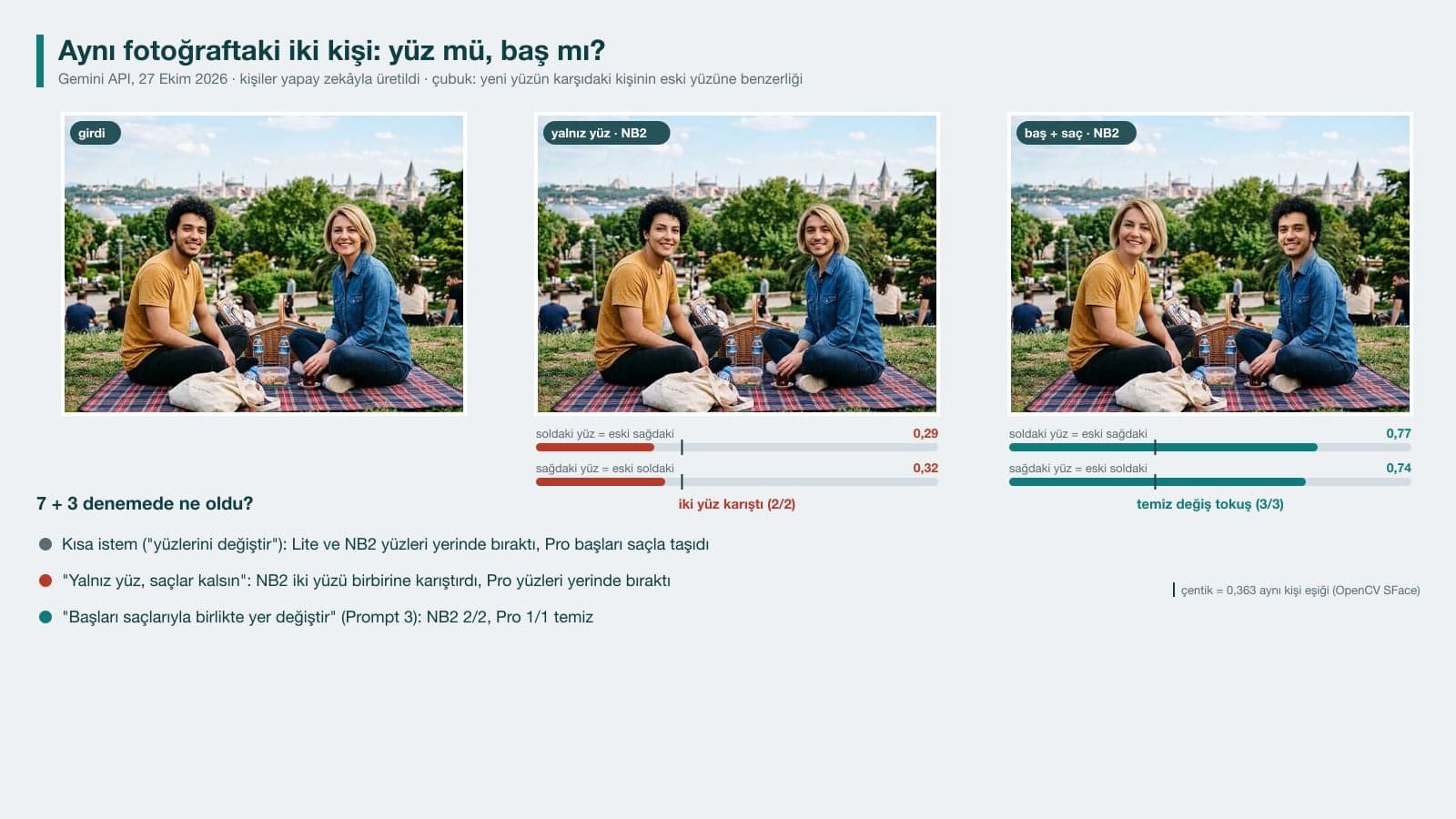
Swapping two people's faces in a single photo turned out harder than the two-photo method. When we said "swap the faces of the two people in this photo", Flash-Lite and Nano Banana 2 left the faces where they were, and Pro moved the heads along with the hair. When we wrote "move only the facial features, keep the hair", Nano Banana 2 blended the two faces together in both tries: the blonde person on the right ended up with a bearded face, yet similarity in both directions was between 0.25 and 0.50. Letting go of the hair and asking it to swap the whole heads (Prompt 4) worked on every model.
Gemini Keeps Changing My Face: Why It Happens and What to Do
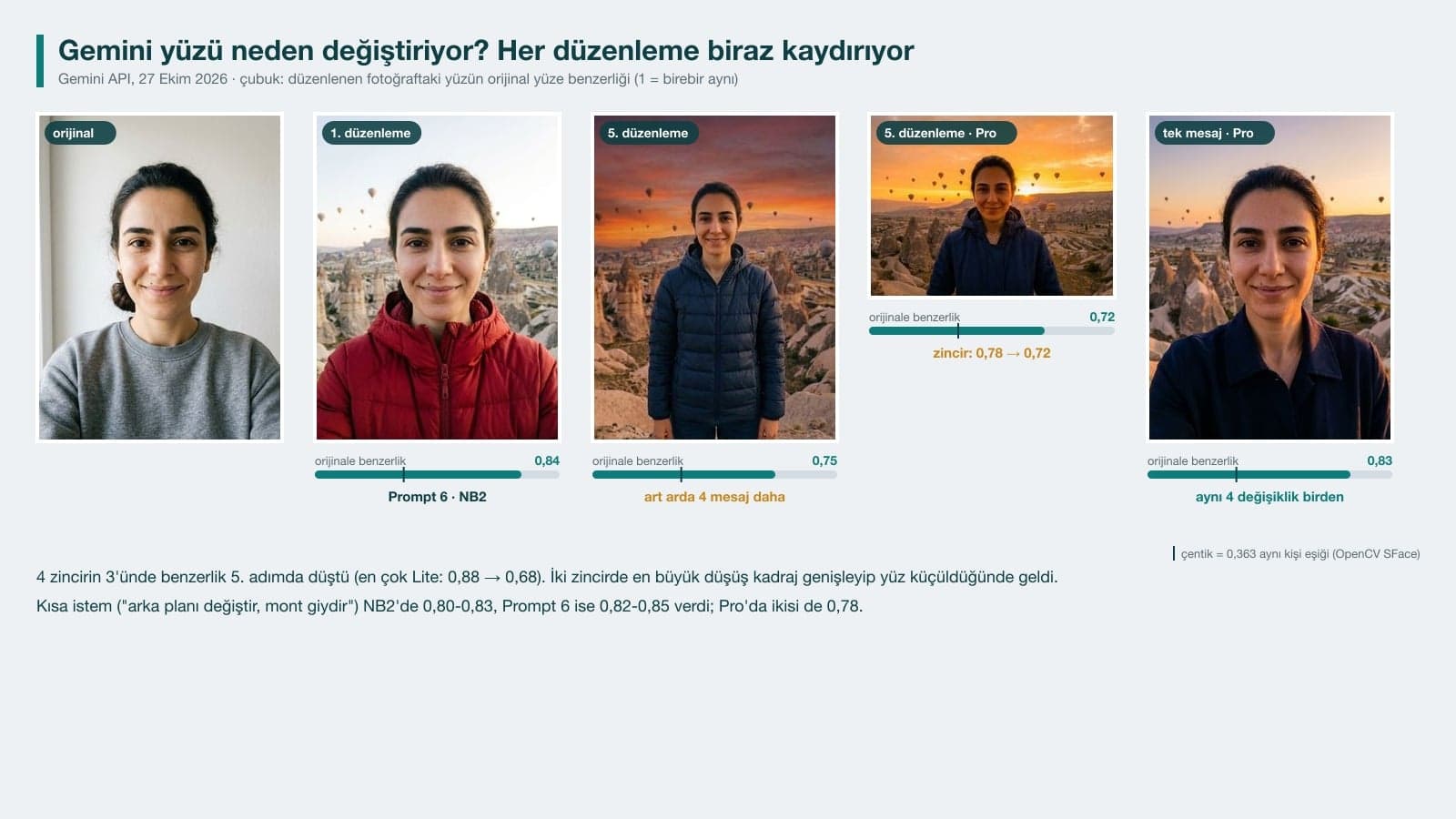
When Gemini edits a photo, it redraws the whole image, so the facial features drift a little with every edit. After a single edit we measured similarity between 0.78 and 0.88: by the SFace threshold that is always the same person, yet you will spot a small difference in your own face right away. In 3 of the 4 chains where we made four more edits in the same chat, similarity dropped, most of all with Flash-Lite (from 0.88 to 0.68). In two chains the biggest drop came at the step where we widened the framing: when the face gets smaller, the model redraws it with less detail.
- Start every new edit by uploading the original photo again; do not edit the previous result.
- Put multiple changes in one message, as in Prompt 7.
- Name the parts of the face that should be kept, and add the sentence "do not beautify, slim or rejuvenate the face".
- If you need to widen the framing, do it last and separately, and keep in mind that the face will get smaller in the photo.
- Open the result next to the original and check the line of the eyes, eyebrows and lips; if something is off, run the same prompt once more.
Flash, Flash-Lite or Pro for Face Swaps?
| Task | Flash (Nano Banana 2) | Flash-Lite (Nano Banana 2 Lite) | Pro (Nano Banana Pro) |
|---|---|---|---|
| Two-photo face swap | Most consistent; 0.83-0.84 on a front-facing target | Worked 1 of 4 times; once added a watch | 0.75-0.83 on a front-facing target |
| Keeping the hair on the target (Prompt 1) | 3/3 | Not tested | 2/2 |
| Swapping two people's heads (Prompt 4) | 2/2 | Not tested | 1/1 |
| Editing while keeping the face (Prompt 6) | 0.82-0.85 | 0.88 | 0.78 |
| API price per image | $0.067 | $0.034 | $0.134 |
Pick Flash for face swaps: Nano Banana 2 handled every two-photo job, and it is on the free plan. Flash-Lite kept the face best in Prompt 6 (0.88), but it drifted the most over repeated edits and could not use two photos together; with the rule-based prompt it put a pocket watch into the scene despite the sentence "do not add anything new or any text". Pro opens with "Redo with Pro" on a paid plan and did not beat Nano Banana 2 at face swaps. Prices are the 1K image prices on the Gemini API page; image generation in the Gemini app has quotas, and according to Google, images download at 1K without an AI plan.
Is It Legal to Swap Faces in Someone Else's Photo?
A deepfake is the use of photos, videos or audio through artificial intelligence techniques to imitate or alter people's faces, movements and voices so that they look real.
Experiments with your own face and your own photos are fine. Once someone else's face is involved, things change: under Turkey's Personal Data Protection Law No. 6698, biometric data is a special category of personal data. Google's Generative AI Prohibited Use Policy (December 17, 2024) prohibits using biometric data without the required consent and impersonating someone to deceive; Gemini's help page also tells you not to violate other people's privacy rights. Get permission from the person whose face you swap, do not use the result as if they were speaking, and say the image was edited when you share it. Every image Gemini generates carries Google's invisible SynthID watermark, and the minimum age for image editing in Gemini is 18.
Common Face Swap Mistakes
- Being vague about the hair: "keep the hair the same" failed in 6 of 8 tries. Write the color and length.
- Uploading the photos in the wrong order: in the prompt, photo 1 is the face and photo 2 is the target, and the upload order has to match.
- Choosing a target with the head turned to the side: the result looks like a mix of the two faces.
- Using Flash-Lite for two-photo jobs: in 3 of 4 tries either the face did not change or only the mustache carried over.
- Editing the same result over and over: by the fifth step, similarity dropped as low as 0.68.
- Asking for only the faces of two people in the same photo: Nano Banana 2 blended the faces; swap the heads with the hair instead.
Pick the Flash model, upload the photo you want the face from first and the target photo second, then send Prompt 1 from this article with the target's hair color filled in. In our test the hair stayed in place in 5 out of 5 tries and similarity to the source face was 0.58-0.72; on a front-facing target it reached 0.84.
Gemini redraws the whole image when it edits, so the facial features drift a little every time. After one edit, similarity to the original was 0.78-0.88; after five edits in the same chat it dropped as low as 0.68. Use Prompt 6, which names each part of the face, put your changes in one message, and start every edit from the original photo.
The model picks hair that suits the new face on its own. In 6 of the 8 tries where we wrote "keep the hair the same", the hair turned into the source person's hair. When we wrote the color, length and style of the target's hair and added "do not darken it" or "do not turn it gray", the hair was kept in 5 out of 5 tries.
Yes. On Gemini's free plan, Nano Banana 2 runs when Flash is selected, and it can do two-photo face swaps. According to Google's help page, images download at 1K resolution without an AI plan, and Nano Banana Pro is on the paid plan. The minimum age for image editing is 18.
Yes, if you swap the heads together with the hair: Prompt 4 moved both heads to the right body in 3 out of 3 tries. When we asked to swap only the faces and keep the hair, Nano Banana 2 blended the two faces and Pro left the faces where they were.
Using it without permission causes problems. Under Turkey's Personal Data Protection Law No. 6698, biometric data is a special category of personal data, and Google's policy prohibits using biometric data without consent and impersonating someone to deceive. Get the person's permission and say the photo was edited when you share it.
Try it first with your own photo: pick a selfie and a target photo shot from the front, run Prompt 1 in Flash with the hair color filled in, and generate the result twice. Look at the line of the eyes and eyebrows and pick whichever of the two looks more like you; that is where most of the differences we measured showed up.
Real Photos That AI Can't Draw
If the faces and details in your team, product and venue photos need to be exactly yours, let's shoot them together in the studio or on location. Book a free initial call for corporate portraits and product photography.