



Create a Signature From Your Name: 10 Gemini Prompts We Tested
10 ready Gemini prompts to create a signature from your name: 6 signature ideas, initials, cleaning up a signature on paper, a practice sheet. We tested them with 69 images: asking for "pure white" gave a white background in 10 of 11, the cedilla of Ş and Ç turned into a "5", and a transparent PNG request painted a checkerboard.
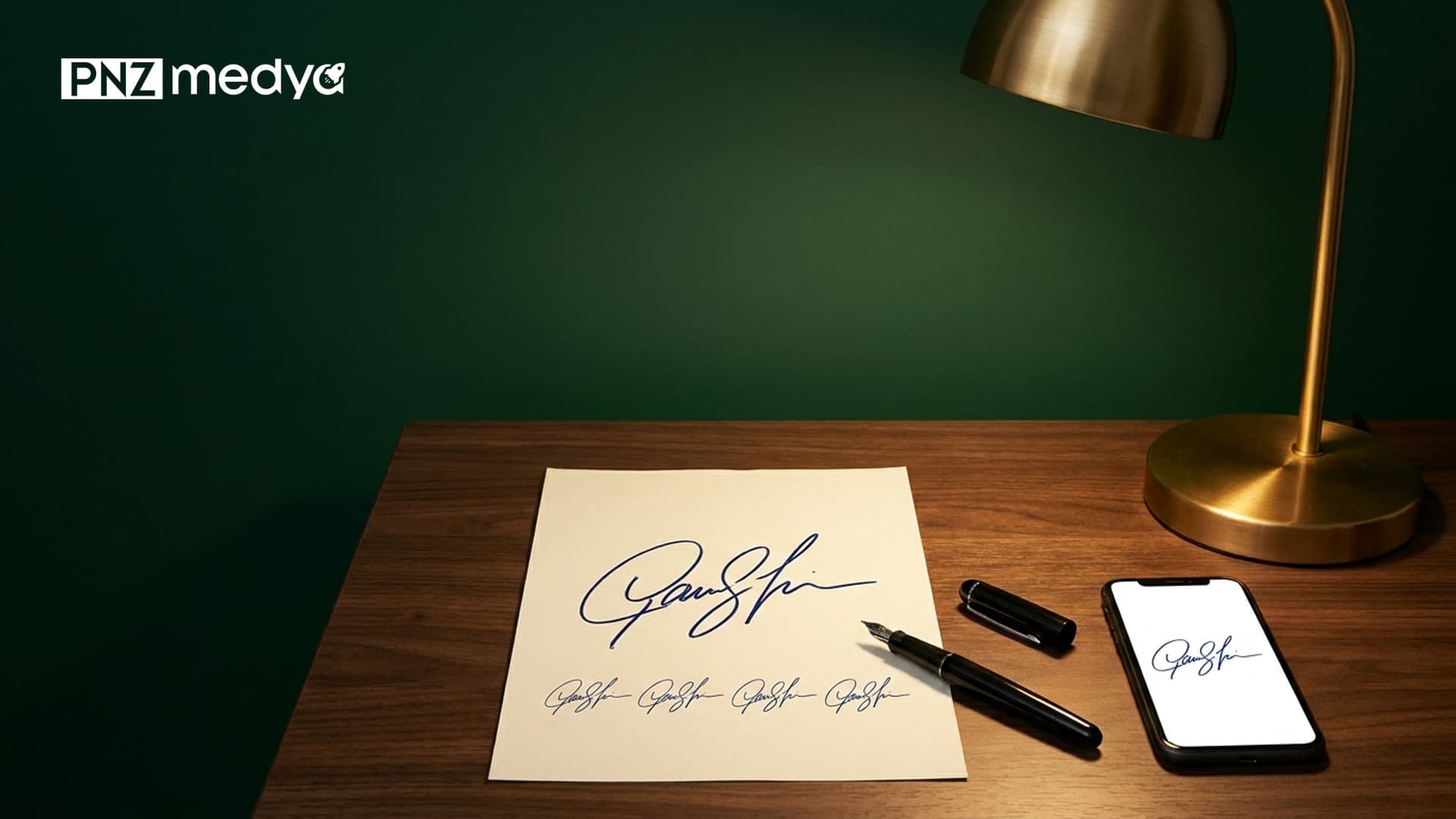
- To create a signature from your name in Gemini, tell it your name, how many options you want, the background and the ink color. Prompt 1 returned exactly 6 signatures in 11 of 11 grids, and the background was pure white in 10 of them.
- A short prompt like "make signature examples for the name Ayse Yilmaz" produced no image at all in 5 of 7 tries on Nano Banana 2, only a text list of names. All 5 short tries that did return an image showed a desk, pen and notebook scene.
- Asking for "plain white paper" gave a white background in none of 6 grids (a photo of gray paper); asking for "pure white (#FFFFFF)" put the pixels above 250 in 10 of 11 grids.
- Nano Banana 2 drew the cedilla on the Ş and Ç in the name Sukru Caglar like the digit "5" in 2 of 3 grids. A one-sentence fix in the same chat worked in 3 of 4 tries.
- When cleaning up a signature from paper, Flash-Lite kept the shape, while Nano Banana 2 redrew the signature in 3 of 3 tries. A "transparent PNG" request made all 3 models paint the checkerboard pattern into the image.
To create a signature from your name, give Gemini your name and describe how the signature should look: how many options, which layout, which background, which ink. Prompt 1 below ran 11 times with the names "Ayse Yilmaz", "Sukru Caglar" and "Irem Ogut" (we spell them in plain letters here; in Turkish they are written with special letters: an S with cedilla, a C with cedilla, a dotted capital I, a g with breve and a dotless i). All 11 runs returned 6 numbered signature options: two full names, two first initial + surname, one set of initials, one quick signature. The real trouble came with the Turkish letters. Gemini sometimes draws the cedilla of Ş and Ç as a separate "5" next to the letter and makes İ look like a J; the prompts include sentences that fix this. If your own name has an accent (é, ñ, ø), check it the same way, because the model was careless with small marks in our test (we only tested Turkish letters).
We tested the prompts on October 27, 2026 in the Gemini API with three image models: Nano Banana 2 (Flash in the app), Nano Banana 2 Lite (Flash-Lite) and Nano Banana Pro. We ran the original Turkish prompts; the wording quoted in this article is our translation. We generated 69 images. For each output we measured the number of signatures, any text and lines nobody asked for, the share of pure white pixels in the background and the ink color; we cropped the letters Ş, Ç, ğ, ü, İ and Ö up close and read them one by one. When we had two signatures written on paper cleaned up, we laid the output strokes over the input strokes and counted how many pixels overlapped. The total cost was about $4.20.
How to Create a Signature With Gemini: 5 Steps
- Open Gemini and pick a model in the model picker. According to Google's help page, with Flash or Pro selected the image is drawn by Nano Banana 2, and with Flash-Lite selected by Nano Banana 2 Lite. In our test Flash did better for signature ideas and Flash-Lite for cleaning up a signature on paper.
- Copy Prompt 1 and replace the square brackets with your name, the letters in your name and your initials. The letter list makes the model less likely to add letters that are not in your name.
- Say that you want an image by using the verb "draw". When we asked it to "make signature examples", Gemini usually returned a text list of names.
- Pick the number you like. If Ş, Ç, ğ or İ came out wrong, send Prompt 7 in the same chat; to change the color, send Prompt 8. The second message did not distort the shape of the signature.
- Turn the signature you picked into a practice sheet with Prompt 6 and practice it by hand on paper. On official documents you will still sign with your own hand; the image on screen is only a model.
Describing the background as "white paper". Gemini reads that as a photo of paper: a shaded, gray page with darker edges. In grids where we wrote "pure white (#FFFFFF) to the edges; no paper texture, shadow or light", the background came out fully white in 10 of 11, which made the signature easier to place in a document.
10 Signature Prompts (Copy and Paste)
Replace the square brackets with your own details and delete the brackets. We tested the original Turkish versions of these prompts in Gemini; you can paste them into ChatGPT as they are, but we did not measure the results there. Under each prompt we wrote what happened in the test.
1) Prompt for 6 signature ideas from your name
My name: [First Last]. Draw 6 different handwritten signature ideas for this name.
Layout: portrait 3:4 image; 2 columns x 3 rows, exactly 6 signatures in total. No lines, frames or boxes between cells; separate the signatures with empty space. Put a small gray number (1-6) in the top left corner of each signature; no other text, label or title anywhere.
Background: pure white (#FFFFFF) to the edges; no paper texture, shadow, light, pen or desk.
Ink: a single dark navy color (#1F2A5A), the thickness of a ballpoint pen.
Letters: the signatures may only use these letters: [the letters of your name, comma-separated, e.g. J, o, h, n]. Make sure [special letters in your name, e.g. the cedilla under ş and the missing dot of a dotless i] are visible.
Variety: 1 and 2 show the full name, readable; 3 and 4 show the first initial + surname; 5 is a set of initials made only from [first letter of first name] and [first letter of surname]; 6 is a short, quickly signed signature with joined letters.
Every signature should look signed by hand; none should look like a computer font.In the test, all 11 of 11 grids returned exactly 6 signatures; once, Nano Banana 2 wrote "Ir" instead of "Irem". The first four signatures from Flash-Lite look like a school handwriting font, so choose Flash for a handwritten look.
2) Prompt for a single signature to put in a document
Draw a single handwritten signature for [First Last]. Landscape 21:9 image.
The signature sits in the center and covers about half the width of the image; the full name is readable and [your special letter, e.g. the cedilla of ş] is visible.
Ink: a single dark navy color (#1F2A5A), one even ballpoint pen stroke.
Background: flat, pure white (#FFFFFF) to the edges; no paper texture, lines, shadow, pen, hand or frame. No text other than the signature.In both models, 100% of the background pixels were pure white. You can make this file transparent in Word or in a background removal tool (explained below).
3) Prompt for initials from your first letters
Draw 4 different sets of initials for [First Last]: only the initials [first letter of first name] and [first letter of surname]; the letters may be joined or interlocked.
The marks on the initials (the dot on İ, the two dots on Ö and Ü, the cedilla on Ş and Ç) must be visible in every set. The letter İ must be a single upright or slightly slanted stroke with a dot on top; no lower curl that makes it look like a J.
Square image; 2 columns x 2 rows, exactly 4 sets of initials, no lines or frames between them.
Background pure white (#FFFFFF) to the edges; black ballpoint pen, one even stroke. No numbers, names, titles or any other text.Without the "must not look like a J" sentence, Nano Banana 2 curled the İ like a J in 4 of 4 sets of initials for Irem Ogut. With the sentence added, İ was a straight stroke with a dot in 8 of 8 sets, and the two dots of Ö were there in all 8.
4) Prompt to turn a signature on paper into a clean digital signature
Turn the signature in this photo into a clean digital signature I can put in a document.
Do not redraw the signature: the shape, length and slant of every stroke and the places where the letters connect must stay as they are in the photo.
Change only these: remove the paper, the grid or ruled lines, the shadow and the light; make the background flat pure white to the edges; make the ink a single dark color (dark navy if the ink is blue, black if it is black).
Fix the angled shot and return the signature level and centered. Do not add any other text, pen, line or element.Sign on white paper, take a photo with your phone, upload it and send this prompt. The background came out pure white in 14 of 14 tries. Flash-Lite kept the shape best; Nano Banana 2 in Flash redrew the signature and deleted the short line at its end. Put the output next to the photo you uploaded and compare them.
5) Prompt to make your own signature more readable
The signature in the photo I uploaded is mine. Draw 3 more readable variations that keep this signature's character ([features to keep, e.g. the slant, the capital M, the way the letters connect]).
1: letters a bit more open, [first name] and [surname] readable separately. 2: the same signature with a short underline at the end. 3: only the initials [first letter of first name] and [first letter of surname] and a short tail.
Landscape 16:9 image; 3 signatures side by side with small gray numbers 1, 2, 3 under them. Background pure white (#FFFFFF) to the edges, black felt-tip pen. No other text, pen, paper edge or desk.With the Mert Demir signature, all 3 of 3 tries returned three numbered variations and kept the slant of the capital M. Nano Banana 2 left the background light gray in one try.
6) Prompt for a signature practice sheet
Make a portrait A4 practice sheet from the signature I uploaded (portrait 3:4 image).
At the very top, the signature itself in dark navy, as I uploaded it.
Below it, 6 rows: on the left of each row a light gray dashed copy of the signature (to trace over with a pen), on the right an empty area of the same width.
At the very bottom, 3 empty rows made only of thin horizontal lines.
Do not change the shape of the signature in any row; every copy must match the signature at the top. No title, description, number or any other text on the page.We uploaded the output of Prompt 2. All 3 of 3 sheets had 6 dashed copies. On both of its sheets, Nano Banana 2 drew the cedilla of ş in the uploaded signature like a "5"; check this letter before you print the sheet.
7) Prompt to fix the marks on Ş, Ç, ğ and İ (second message)
The cedillas under the letters [Ş and Ç] are detached from the letter and look like the digit 5. Fix only these cedillas: each one should be a small tail, the size of a comma, attached to the bottom end of the letter. Keep the rest of the signatures, their positions, the numbers and the background exactly as they are.Send this prompt as a second message in the chat where the signature was drawn. In 3 of 4 tries the cedillas became a small tail attached to the letter, and the other letters and numbers stayed in place. You can use the same pattern for the curve of ğ or the dot on İ.
8) Prompt to change the ink color (second message)
Make the ink [color and code, e.g. black (#000000)]. Keep the shape, thickness and position of the signature and the white background exactly as they are; do not change anything else.In all 3 of 3 tries where we turned the navy signature black, the strokes stayed identical at the pixel level. Official documents may call for blue and forms for black; you can get both this way.
9) Prompt for handwritten signature style ideas (text only)
My name is [First Last]. Suggest 5 signature styles I can sign by hand. Do not generate an image; describe them in text only. Do not write a greeting, praise or an intro sentence; start directly with style 1.
For each style write: which letters stay readable, which letters connect, how many times the pen leaves the paper, when and how the marks on [the special letters in your name, e.g. Ş, ü, Ç and ğ] (cedilla, dot, curve) are made, and how to sign it in 3 steps.
Do not give measurements (centimeters, millimeters). At the end, say in one sentence which style suits someone who signs fast and often, and which suits someone who wants to stay readable on official documents.We tested this on Gemini 3.5 Flash. Without the "do not write a greeting" sentence, both answers opened with a greeting to "Mr. Sukru Caglar" and praise for the name; with the sentence added, both started directly with style 1. All 10 of 10 styles said how many times the pen lifts, and none gave centimeters.
10) Prompt for a name design to hang on the wall
Make a name design to hang on a wall: it says only '[name]', first letter capital, the other letters lowercase.
Flowing, connected calligraphy handwriting; thick downstrokes and thin upstrokes (like a brush pen), a single elegant flourish at the start of the first letter.
Color: dark green (#1E4D3A) ink, background flat cream paper (#F6F0E4) to the edges. Landscape 3:2 image, text centered.
Do not add flowers, leaves, hearts, ornaments, frames or other words; exactly [number of letters] letters: [the letters one by one].We tried it with "Defne". Nano Banana 2 wrote all 5 letters correctly on a flat cream background; Flash-Lite drew the text as a photo of a card hanging on a wall. Use this prompt for a room, a birth or a gift frame.
With short prompts, Nano Banana 2 sometimes wrote "I'm making the signature examples, please wait" (our translation) or a list of names in bold, and stopped without producing an image. Write "Draw these as an image" in the same chat or paste Prompt 1 from the start. With the structured prompts this did not happen even once.
How Did the Signature Prompts Do in the Test? Results From 69 Images
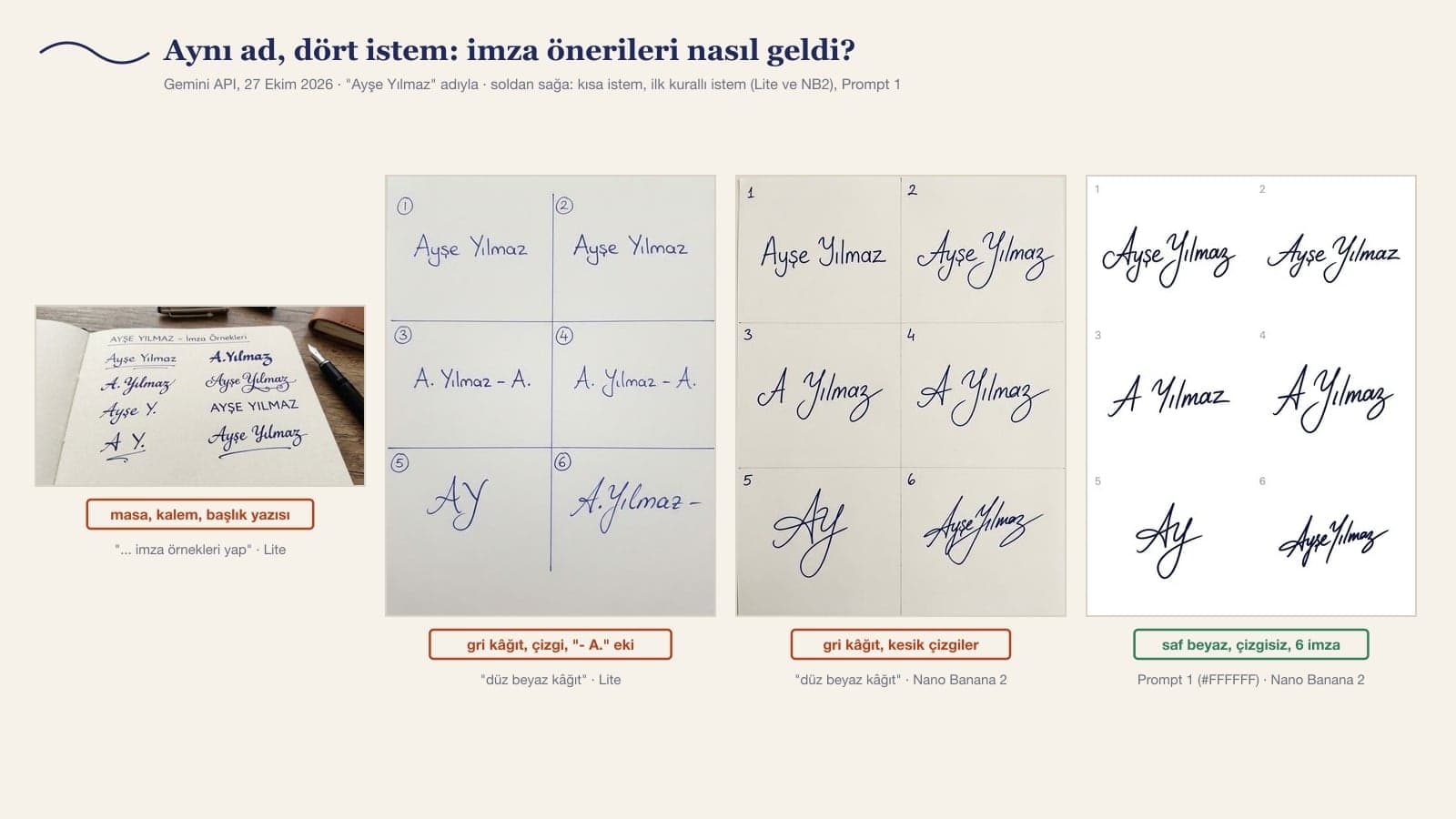
| Prompt | Tries | What came out |
|---|---|---|
| Short: "make signature examples for the name [name]" | 10 | Nano Banana 2 produced no image in 5 of 7 tries; all 5 images that did come back were desk, pen and notebook scenes, 2 of them with a title or label text |
| First structured prompt ("plain white paper") | 6 | 6/6 exactly 6 signatures; 6/6 lines between cells; 0/6 pure white background; Flash-Lite added extra text in 2 grids ("- A.", "Caglar" on the second row) |
| Prompt 1 | 11 | 11/11 exactly 6 signatures; 10/11 pure white; 4/11 faint cell lines (Pro 2/2, Nano Banana 2 2/6, Lite 0/3) |
| Prompt 2 and the "transparent PNG" request | 2 + 3 | Prompt 2: 2/2 pure white. Transparency request: 3/3 JPEG, checkerboard painted into the image |
| Prompt 3 (initials) | 2 + 3 | First prompt: İ like a J in 4/4; with Prompt 3, Nano Banana 2 drew a straight İ in 8/8, Lite still J-like in 3/4 plus an extra "ü" in one set |
| Short cleanup: "Put this signature on a white background" | 8 | 8/8 background stayed gray paper; 3/8 pen still in the image |
| Prompt 4 (cleanup) | 14 | 14/14 pure white; shape kept: Lite 5/6, Pro 2/2, Nano Banana 2 3/6; Nano Banana 2 deleted the short line at the end of the signature in 3/3 |
| Prompts 5, 6, 8 | 9 | Variations 3/3, practice sheet 3/3, color change 3/3 (same shape) |
| Prompt 7 (letter fix) | 4 | 3/4 cedilla attached to the letter |
The biggest difference in the table came from how we described the background. In the 6 grids where we wrote "plain white paper", background brightness was between 193 and 235 (255 is pure white) and the corners were shaded; the model draws as if it had photographed the paper. When we gave a color code and ruled out texture, shadow and light one by one, the background rose to 254-255 in 10 of 11 grids. Cell lines worked the same way. "No frame" was not enough. Once we wrote "no lines between cells; separate the signatures with empty space", Flash-Lite drew no lines at all and Nano Banana 2 left a faint line in two of six.
How Did Gemini Draw Ş, Ç and İ?
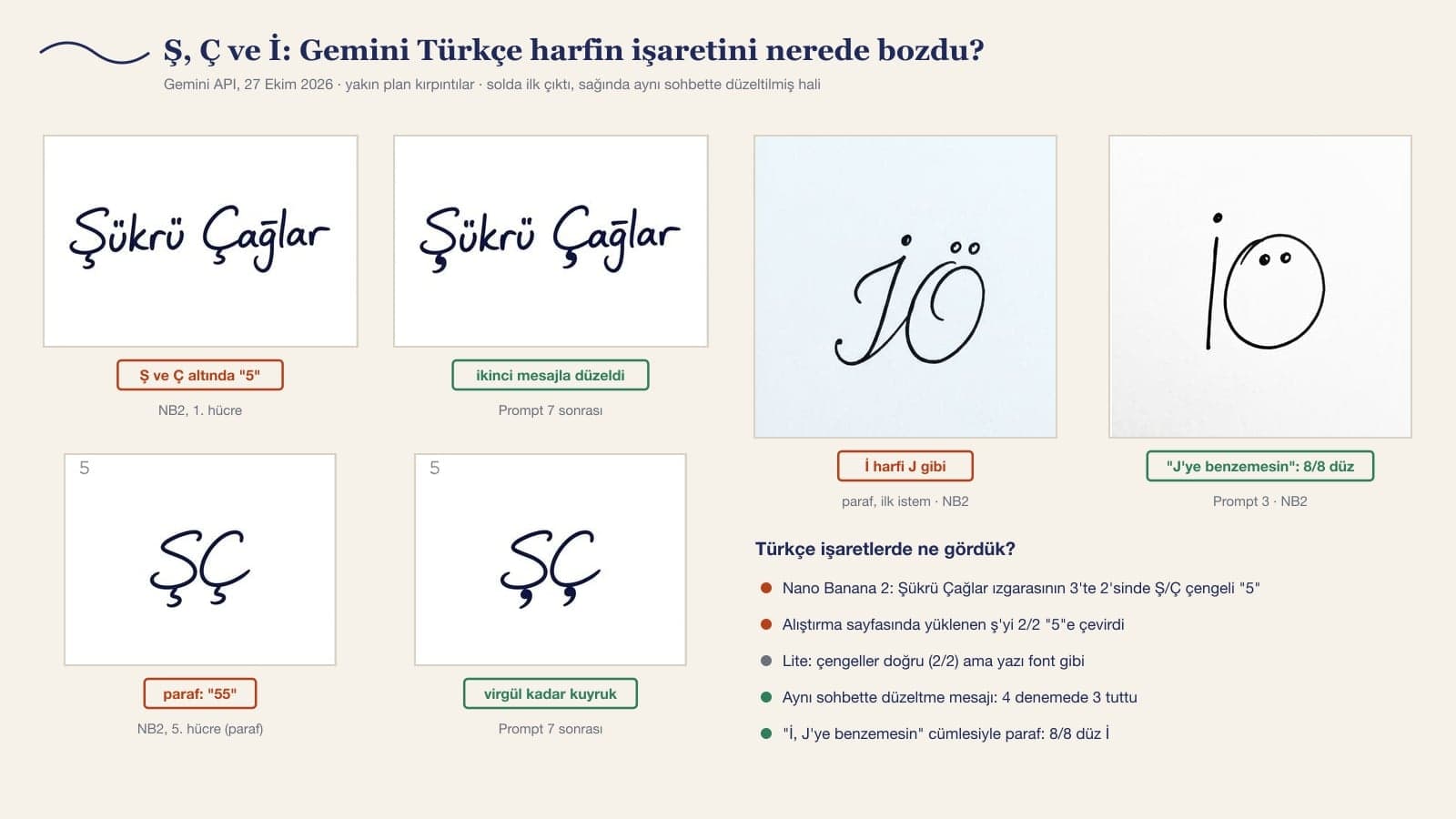
In handwriting, Nano Banana 2 draws the cedilla of Ş and Ç as a "5" that hangs down, detached from the letter. We saw this in 2 of 3 tries on the Sukru Caglar grid; writing "the cedilla should be a small tail attached to the bottom of the letter and should not stand apart like a digit" in the prompt did not prevent it. Pro also put two "5" shapes under Ş and Ç in a set of initials. On the practice sheet, the cedilla was correct in the signature we uploaded, yet Nano Banana 2 turned it into a "5" on both sheets. Flash-Lite drew the cedilla correctly in both grids, but its signatures are flat like school notebook handwriting and resemble a font.
This is where the second message helps. In 3 of 4 tries where we sent Prompt 7 in the same chat, the cedillas became a comma-sized tail stuck under the letter; the other letters, the numbers and the background did not change. For İ the fix is to say it up front: the sentence "the letter İ must be a straight stroke with a dot on top and must not look like a J" worked 8/8 in the initials. The marks on ü, ö and ğ never went missing in any try.
What Changed When Turning a Paper Signature Into a Digital One?
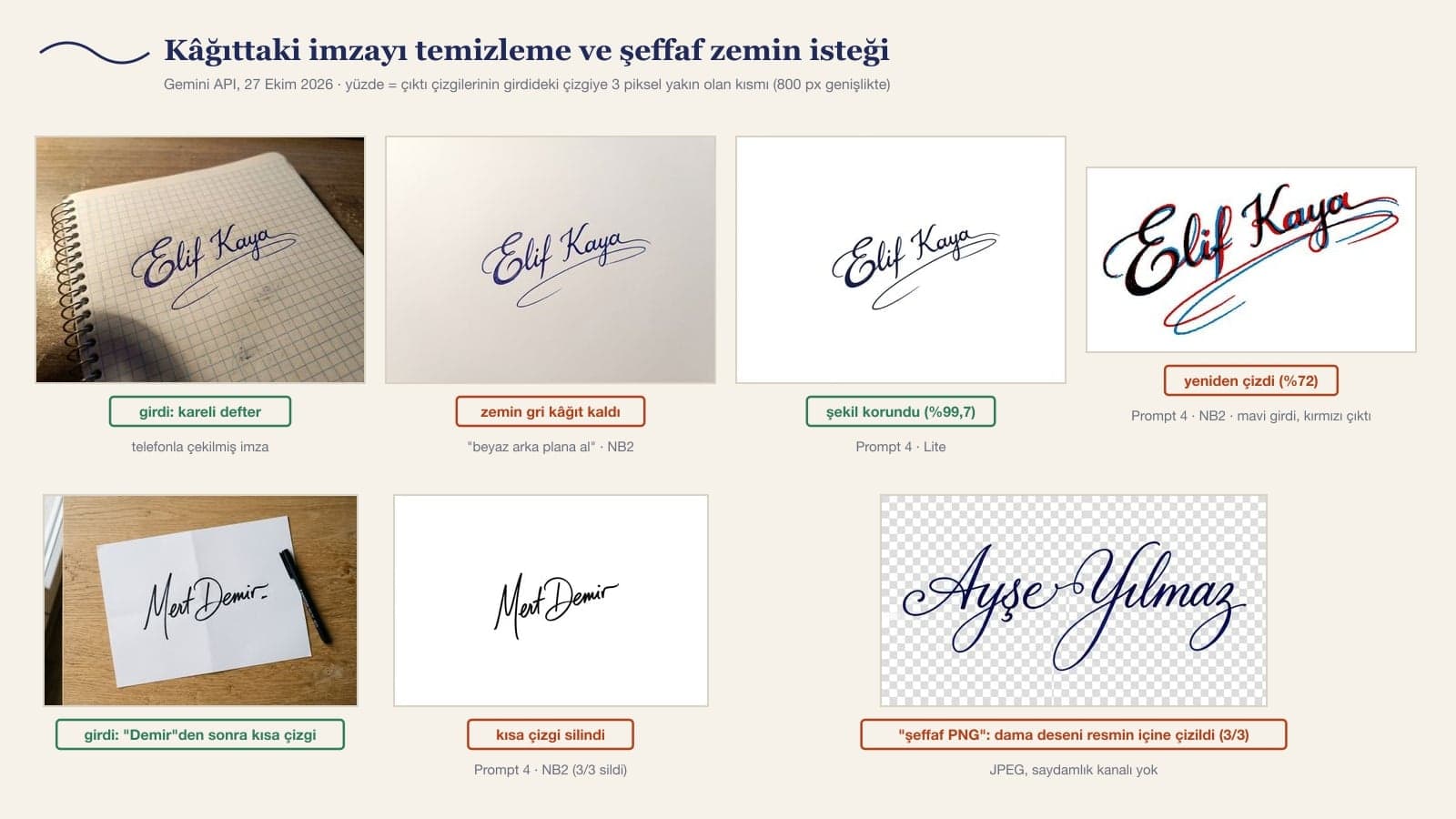
We used two inputs: an "Elif Kaya" signed in blue ballpoint on a grid notebook, with a long curl underneath, and a "Mert Demir" signed in black felt-tip on white A4, with a short line at the end. We aligned the output strokes with the input strokes and measured how much overlapped within 3 pixels at a width of 800 pixels. Flash-Lite kept the grid notebook signature at 99.7% in 2 of 3 tries, Pro at 99.5%. Nano Banana 2 redrew the signature from scratch in all three tries: overlap stayed between 72% and 87%, and in one try it wrote "I couldn't fully carry out your request, I created a digital version of the name" (our translation).
On the A4 signature every model kept the shape, but the short line at the end was deleted by Nano Banana 2 in 3/3, by Pro in 1/1 and by Flash-Lite in 1/3. Gemini can mistake small marks for smudges and clean them away. If you need an exact copy of your signature, your phone's document scanner or a flatbed scanner is safer. Use Gemini when the photo is poorly taken, to remove shadow and paper lines, and compare the result with the input.
How to Make a Signature With a Transparent Background
You cannot get a transparent PNG straight from Gemini. In all 3 tries where we asked for "the background as a transparent PNG" (Flash-Lite, Nano Banana 2, Pro), the file came as a JPEG with no alpha channel, and the gray-and-white checkerboard that image editors show was painted behind the signature as part of the picture. The Gemini API's image generation documentation does not list a transparent background option either (October 27, 2026). Here is the way around it: get the signature on a pure white background with Prompt 2 or Prompt 4, then remove the white afterwards.
- In Word: insert the signature image into the document, choose Picture Format > Color > Set Transparent Color and click the white background. Microsoft's help page says this tool works best on pictures with solid colors, which is why a pure white background matters.
- On your phone or in a browser: background removal tools take out the white background and give you a PNG. We explained how to do it in each tool in our background removal article.
- Leaving the background white is fine too: in a PDF that will be printed on white paper, a pure white background does not show. A signature whose background stayed gray, on the other hand, sits on the page like a box.
Flash, Flash-Lite or Pro for a Signature?
| Task | Flash (Nano Banana 2) | Flash-Lite (Nano Banana 2 Lite) | Pro (Nano Banana Pro) |
|---|---|---|---|
| Signature ideas from your name | Most natural handwriting; Ş and Ç cedilla a "5" in 2 of 3 | Cedilla correct, writing looks like a font | Natural; "5" in the initials, faint cell lines 2/2 |
| Short prompt | 5 of 7 replies with no image | 3/3 images, but a desk scene | Not tested |
| Cleaning up a signature on paper | Redrew it (3/3), deleted the short line | Kept the shape (2/3 on input 1) | Kept the shape, strokes 1.19 times thicker |
| Initials (Prompt 3) | 8/8 straight İ | 3/4 J-like İ | Not tested |
| API price per image | $0.067 | $0.034 | $0.134 |
Two models came out ahead in two separate jobs: Flash for signature ideas and initials, Flash-Lite for cleaning up your signature from paper. Pro did both jobs well, but it runs on a paid plan and made the strokes thicker in one try. Prices are from Google's Gemini API pricing page. In the Gemini app, image generation is available on a free account too; according to Google's help page, you must be 18 or older to generate images, and without a plan images download at 1K.
Is an AI-Generated Signature Legally Valid?
A secure electronic signature has the same legal effect as a handwritten signature.
Under article 4 of the same law, a secure electronic signature is one based on a qualified electronic certificate and created with a device held only by the signer. A signature image pasted into a PDF does not meet this definition, and a signature drawn by Gemini does not replace the one you sign by hand. The prompts in this article are for designing your signature, practicing it and getting a clean image of your own signature. For anything official you need either an e-signature or a signature you sign by hand on paper. Having a signature drawn in someone else's name and using it on a document is forgery, so only give Gemini your own name.
Common Mistakes When Creating a Signature
- Saying "white paper": Gemini draws a photo of paper. Write "pure white (#FFFFFF) to the edges".
- Leaving out the letter list: on the first prompt Flash-Lite added text beyond the name in two grids, and Nano Banana 2 once wrote "Ir".
- Downloading without checking the special marks: look closely at the cedilla of Ş and Ç and the dot on İ, and send Prompt 7 if needed.
- Cleaning up your own signature in Flash: Nano Banana 2 redrew it. Choose Flash-Lite and compare the output with the input.
- Expecting a transparent PNG: the checkerboard comes inside the image. Get the signature on white and remove the white in Word or in a background removal tool.
- Using the on-screen signature right away: practice the one you picked by hand with the practice sheet, because you need to be able to sign it the same way every time.
Give Gemini your name, the letters in it, how many options you want, the background and the ink color; Prompt 1 in this article covers all of these. In the test, all 11 of 11 tries returned 6 numbered signature ideas: full name, first initial + surname, initials and a quick signature.
Yes. Image generation in Gemini is available on a free account too; without a plan, images download at 1K, and you must be 18 or older to generate images. 1K is enough for a signature: the output of Prompt 2 came out 1584 pixels wide.
You can paste the prompts into ChatGPT as they are, but in this test we measured only Gemini, using the original Turkish prompts; we did not test how ChatGPT draws the marks on Turkish letters. Whatever tool you use, look closely at special letters like Ş, Ç and İ.
When the request does not clearly say it is for an image, Nano Banana 2 may answer in text: in 5 of 7 tries where we asked it to "make signature examples", no image came back. Use the verb "draw" in the prompt, or write "draw these as an image" in the same chat.
Gemini does not give you a transparent PNG; when we asked, it painted the checkerboard into the image in all 3 tries. Get the signature on a pure white background, then remove the white in Word with Picture Format > Color > Set Transparent Color or with a background removal tool.
No. Under Turkish Law No. 5070, only a secure electronic signature has the same effect as a handwritten one, and a signature image pasted into a PDF is not one. Use the AI-drawn signature as a model and sign on paper with your own hand.
Initials are a short mark made from the first letters of your first name and surname. On multi-page documents they go in the page margins, and the signature goes on the last page. Prompt 3 draws four sets of initials from your first letters, and it includes the sentence that keeps the letter İ from looking like a J.
As a next step, run Prompt 1 in Flash with your own name, turn the number you like into a practice sheet with Prompt 6 and practice on paper for a week. Once the signature sits well on paper, photograph it and clean it up with Prompt 4 in Flash-Lite. The signature on screen will then have come from your own hand.
A Brand Identity as Consistent as Your Signature
When your signature, email footer, letterhead and business card share the same lettering, the brand looks like it came from a single hand. Let's build your brand identity together, from your logo to your email signature. Write to us for a free initial consultation.