



Photo Collage AI: 12 Gemini Prompts That Keep 9 Photos in Order (2026)
12 ready prompts to make a photo collage with Gemini: 2x2 and 3x3 grids, a 3-photo Instagram story, polaroid, film strip and a birthday collage with text. We tested 49 collages: the rule-based prompt kept photos in upload order, the short prompt added frames and text, and Flash-Lite skipped a photo in 4 of 18 collages.
- To make a collage in Gemini, upload the photos and write the layout, order and aspect ratio: with the rule-based prompt all 9 of the 2x2 collages came back in upload order, and all 27 collages where we stated the ratio in words came out in that ratio.
- The short prompt ("Make a collage from these 4 photos") mixed up the order in 3 of 4 tries; Flash-Lite added a wooden frame, a wooden board and an Instagram screen on its own.
- The model matters: Nano Banana 2, which runs when Flash is selected, skipped a photo in 1 of 19 collages; Lite, under Flash-Lite, in 4 of 18. Do not use Lite for polaroid and free-form layouts.
- Gemini redraws your photos: in a 3x3 collage, the face match for a man whose face stayed small fell to 0.47-0.92, against 0.997 in a collage pasted together from a template.
- The Gemini app accepts up to 10 files per prompt; that is enough for a 3x3 collage, while a 4x4 needs two steps.
To make a collage in Gemini, upload your photos and write which photo goes where. In 4 of the 5 tries where we had nine photos arranged into a 3x3 collage, all nine were in the right cell. In the fifth, the breakfast photo was missing and the bay view appeared twice; when we wrote "photo 5 is missing, photo 4 is there twice" in the same chat, Gemini fixed the collage in both tries. The prompts in this post are written to cut down these errors from the start.
We tested the prompts on October 26, 2026 in the Gemini API with three image models (Nano Banana 2, Nano Banana 2 Lite, Nano Banana Pro), using the original Turkish versions of the prompts. As input we used 9 photos: two portraits, a dinner with three people, a cat, a bay, a breakfast, the balloons over Cappadocia, a street in Alacati and a dog. We generated 49 collages and searched for every photo in every output with template matching: is it there, how many times, is it in the right place, how much has the face changed. Total cost was about $3.4.
How to Make a Photo Collage With Gemini in 5 Steps
- Open Gemini and pick Flash in the model picker. According to Google's help page, Nano Banana 2 draws the image when Flash or Pro is selected, and Nano Banana 2 Lite draws it when Flash-Lite is selected.
- Upload the photos in the order they go in the collage. The first one you upload becomes photo 1, and the prompt refers to the photos by these numbers. You can upload up to 10 files per prompt.
- Copy the prompt below that matches your layout: 2x2, 3x3, stacked story, side by side, polaroid or film strip.
- Fill in the square brackets and state the aspect ratio in words (square 1:1, portrait 4:5, vertical 9:16). If you leave the ratio out, Gemini gives you the output in the size of one of the photos you uploaded.
- Count the result: is every photo there exactly once, and is the order right? If not, send Prompt 11 without opening a new chat.
Typing "make a collage from these photos" and stopping there. In the test, this short prompt put the photos in upload order in only 1 of 4 tries; Lite drew a frame around the collage both times, and for the story request it added an Instagram screen, a profile picture and five lines of text. Once we spelled out the order cell by cell, the 2x2 collages had no errors left.
12 Ready-to-Use Photo Collage Prompts (Copy and Paste)
Copy each prompt once, fill in the bracketed parts for your own photos, and upload the photos in the order the prompt gives. Prompt 10 needs no photos; it draws the collage from scratch. Prompt 12 does not draw an image. It tells you which of your photos to pick and what order the collage should follow.
1) 2x2 square collage prompt
Make a square (1:1) collage from the 4 photos I uploaded.
The layout is a 2x2 grid: photo 1 top left, photo 2 top right, photo 3 bottom left, photo 4 bottom right.
Each photo fills its own square; if it does not fit, crop only from the edges and keep the people and objects in the middle inside the frame.
Keep the inside of each photo exactly as I uploaded it: same faces, same colors, same objects, same lighting.
Between the photos and around the outer edge there is a plain [color, e.g. white] gap of equal width; the collage contains nothing else, no text either.In the test, all four photos were in the right corner in 5 of 5 tries and nothing was added to the collage (Lite 2, Nano Banana 2 2, Pro 1).
2) One-line quick collage prompt
Make a [layout, e.g. 2x2 square] collage from these [number, e.g. 4] photos in the order I uploaded them; do not change anything inside the photos, keep the gaps thin and plain white, and do not add anything else.For anyone who does not want to write a long prompt. The order was right in four of four tries; Nano Banana 2 once pasted the photos together without gaps.
3) 9-photo 3x3 collage prompt
Make a square (1:1) collage using all 9 photos I uploaded.
The layout is a 3x3 grid, 9 equal square cells. Left to right, top to bottom: row 1 has photos 1, 2, 3; row 2 has photos 4, 5, 6; row 3 has photos 7, 8, 9.
Use each photo exactly once; do not skip or repeat any of them.
Each photo fills its own cell; if it does not fit, crop only from the edges.
Keep the inside of each photo exactly as I uploaded it: same faces, same colors, same objects.
Between the cells and around the outer edge there is a plain white gap of equal width; no other elements and no text.All nine photos were in place in four of five tries. In the failed one, Nano Banana 2 skipped the breakfast and put the bay in twice; Prompt 11 fixed it in both tries.
4) 3-photo Instagram story collage prompt
Make a vertical 9:16 Instagram story collage from the 3 photos I uploaded.
Stack the three photos as three equal horizontal strips: photo 1 at the top, photo 2 in the middle, photo 3 at the bottom. Each strip spans the full width of the screen.
If a photo does not fit its strip, crop only from the top and bottom; keep the person's face and the main object inside the strip.
Keep the inside of each photo exactly as I uploaded it: same face, same colors, same objects.
There is a thin plain white line between the strips; no other elements and no text.All four tries came out at 768x1376 pixels, which is 9:16. In one try Lite also placed the woman from the pier into the empty Alacati street at the bottom.
5) Side-by-side 2-photo collage prompt
Put the 2 vertical photos I uploaded side by side and make a vertical 4:5 Instagram post collage.
Photo 1 on the left, photo 2 on the right; both equal width and full height.
If they do not fit, crop only from the edges; keep both faces inside the frame and at the same height.
Keep the inside of each photo exactly as I uploaded it: same faces, same colors.
There is a thin plain white line between them; no other elements and no text.6) 1 large, 4 small collage prompt
Make a square (1:1) collage from the 5 photos I uploaded.
Layout: photo 1 at the top covers the full width and the top half of the collage. The bottom half has 4 equal vertical cells side by side: photos 2, 3, 4 and 5 from left to right.
Use each photo only once; if it does not fit, crop only from the edges and keep faces and the main object in the frame.
Keep the inside of each photo exactly as I uploaded it: same faces, same colors, same objects.
Between the cells and around the outer edge there is a plain white gap of equal width; no other elements and no text.Nano Banana 2 built the layout correctly. Lite skipped the cat and the breakfast in the bottom row and put the dog and the dinner in a second time instead, so pick Flash for this layout.
7) Film strip collage prompt
Make a vertical film strip collage from the 4 photos I uploaded, vertical 9:16.
A black 35 mm film strip runs from top to bottom down the middle of the screen; both edges have rows of white square sprocket holes.
The strip holds 4 frames stacked on top of each other: photos 1, 2, 3 and 4 from top to bottom. All frames are the same size.
Keep the inside of each photo exactly as I uploaded it: same colors, same objects; do not add a filter.
The background on both sides of the strip is plain [color, e.g. off-white]; no text, numbers or logos on the strip or the background.8) Polaroid collage prompt (with a handwritten note)
Make a polaroid collage from the [number, e.g. 6] photos I uploaded.
Scene: a light oak table, shot from above, daylight. Each photo is a white-framed polaroid print with a thick bottom border; the prints are scattered on the table at slight angles and overlap each other's edges a little, but no face or main object in any photo is covered.
Keep the photos inside the polaroids exactly as I uploaded them: same faces, same colors.
On the bottom white border of the first polaroid on the left, this is handwritten in black felt-tip pen: "[note, e.g. Sunny Days 2026]". No other text.The Turkish caption meaning "Sunny Days 2026" came out right in four of four tries, Turkish s-cedilla and u-umlaut included. Only Nano Banana 2 used all six photos (2/2); Lite skipped one photo in each of its two tries.
9) Birthday collage with text prompt
Make a birthday memory collage from the 4 photos I uploaded, square (1:1).
At the top there is a [color, e.g. cream] band covering one fifth of the collage; in the middle of the band, one line in dark burgundy, bold handwritten letters: "[text, e.g. Happy Birthday Elif]". Write the letters exactly like this.
Below the band, a 2x2 grid: photo 1 top left, photo 2 top right, photo 3 bottom left, photo 4 bottom right.
Keep the inside of each photo exactly as I uploaded it: same faces, same colors.
There is a thin cream gap between the photos; no text other than the line in the band, no decorations and no balloons.The Turkish line for "Happy Birthday Elif" was spelled correctly in three of three tries, dotted capital I and soft g included, and the photos were in the right corners all three times.
10) Mood board collage prompt (no photos needed)
Create a mood board collage with a [theme, e.g. autumn] theme.
Layout: 2 rows, 4 columns, 8 equal square cells in total; each cell holds a single photo and no photo is split across two cells.
Top row, left to right: [subject 1], [subject 2], [subject 3], [subject 4].
Bottom row, left to right: [subject 5], [subject 6], [subject 7], [subject 8].
Each subject appears only once. There is a thin [color, e.g. cream] gap between the cells.
Colors: [palette, e.g. mustard, terracotta, brown, cream]. Real photo look. No text and no logos.Our first version said "Pinterest-style irregular grid": only one of three tries came out with exactly 8 squares, Nano Banana 2 drew the chestnut cart and the sweater twice each, and it split the book and the sweater in two with a gap line. Once we wrote out the rows and columns, all three tries gave exactly 8 squares.
11) Prompt to fix a missing or repeated photo
The collage has two errors. Photo [number, e.g. 5] ([what it is, e.g. the breakfast plate]) is missing and photo [number, e.g. 4] ([what it is, e.g. the bay view]) is used twice.
Rebuild the layout: [layout, e.g. row 1: 1, 2, 3; row 2: 4, 5, 6; row 3: 7, 8, 9].
Each photo once. Do not touch the other cells.Send it in the same chat; Gemini can still see the first collage and the photos you uploaded. Nano Banana 2 on the 3x3 and Lite on the story fixed the error in two of two tries.
12) Prompt to pick and order photos for a collage
The [number, e.g. 9] photos I uploaded are [event, e.g. from a summer vacation]. Choose [how many, e.g. 6] of them for a [layout, e.g. 2x3 (2 columns, 3 rows)] collage I will share [where, e.g. on Instagram].
Number the photos in upload order and first describe each one in 5-8 words, so it is clear which number is which photo.
Then list the photos you chose by their place in the collage, like "Top left: 3 (cat)". When placing them, do not put two portraits next to each other, balance the colors, and put the strongest photo top left.
For each photo you leave out, write a one-sentence reason.
At the end, write a prompt in English that builds the collage when I upload the same photos again. In that prompt, do not describe the photos, refer to them only by their new upload-order numbers (like "photo 1 I uploaded"), and say that the inside of the photos must not change.Gemini 3.5 Flash numbered all 9 photos correctly in four of four tries and dropped the dog photo with autumn leaves as "not fitting the summer theme". Before we added the last sentence (the original Turkish prompt asks for the final prompt in Turkish), the collage prompt it wrote switched to English in both tries and described the photos in words. A prompt like that does not use the photos you uploaded. It draws new ones.
Check the model picker first: if Flash-Lite is selected, switch to Flash and send the same prompt again. If a photo is missing or appears twice, send Prompt 11. If Gemini refuses to edit photos with people in them, check your account's age: Google turns off image editing for users under 18.
How the Collage Prompts Did in Testing: Results From 49 Collages
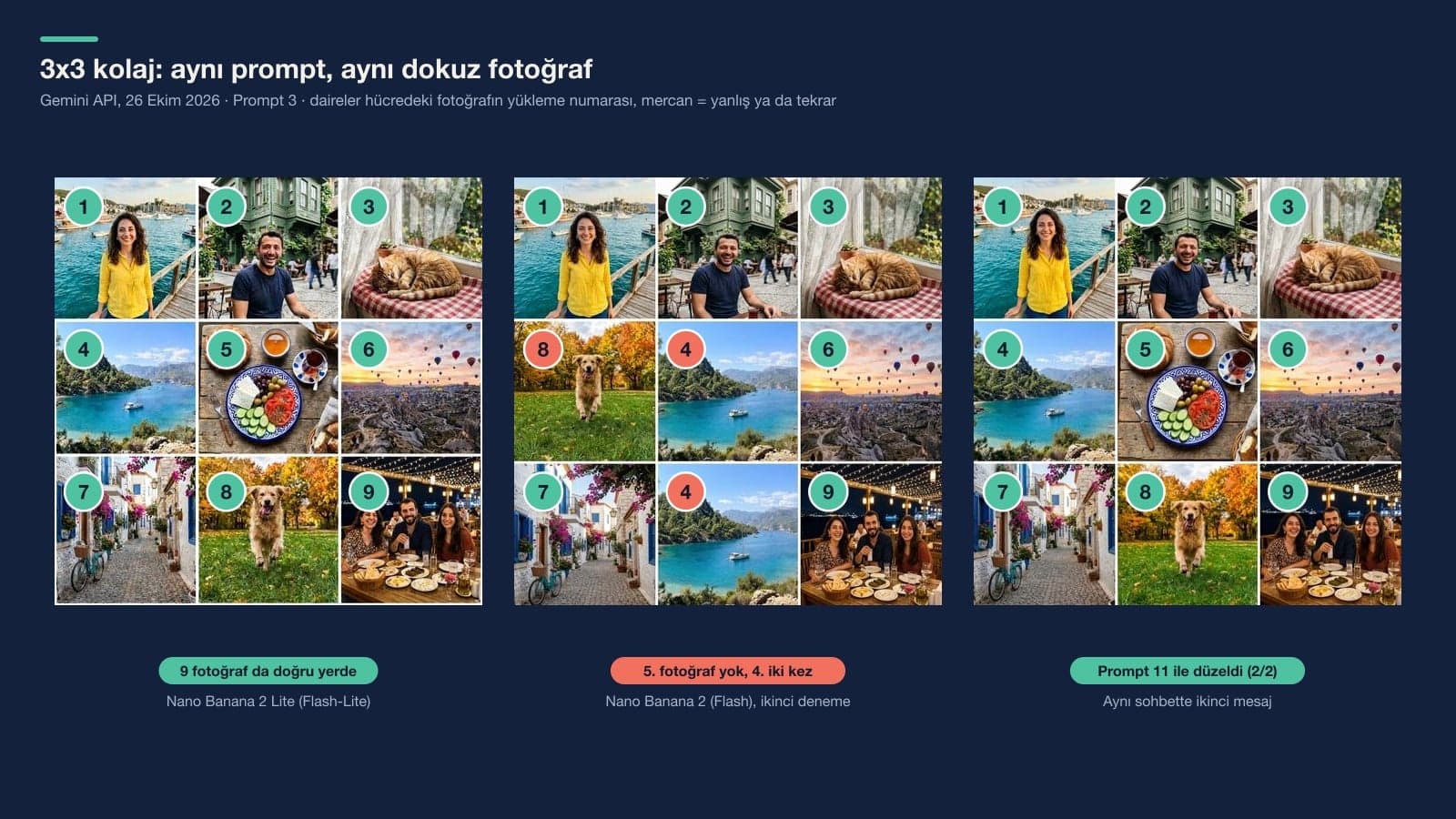
Each row of the table is one collage type. The "Complete and in order" column counts the tries where every uploaded photo appeared once in the collage, in the spot the prompt gave it.
| Collage | Tries | Complete and in order | What happened |
|---|---|---|---|
| 2x2, short prompt | 4 | 1/4 | Order got mixed up in 3 tries; Lite drew a frame around the collage twice |
| 2x2, Prompt 1 and Prompt 2 | 9 | 9/9 | Nothing added; Nano Banana 2 left out the gaps once |
| 3x3, Prompt 3 | 5 | 4/5 | Nano Banana 2 skipped the breakfast and used the bay twice; Prompt 11 fixed it 2/2 |
| 9:16 story, Prompt 4 | 4 | 3/4 | Lite also put the woman into the bottom strip; a message like Prompt 11 fixed it 2/2 |
| 9:16 story, short prompt | 2 | 0/2 | Lite added an Instagram screen and five labels, Nano Banana 2 changed the order |
| Polaroid, Prompt 8 | 4 | 2/4 | Nano Banana 2 2/2; Lite twice skipped one photo and repeated another |
| 1 large 4 small, Prompt 6 | 2 | 1/2 | Lite skipped two photos and used two others a second time |
| Side by side, film strip, birthday (Prompts 5, 7, 9) | 7 | 7/7 | Turkish "Happy Birthday Elif" line letter-perfect 3/3 |
All 27 collages where we stated the ratio in words came back in that ratio: square 1024x1024, 9:16 768x1376, 4:5 928x1152 pixels. With the short prompt and no ratio, Gemini took the size of one of the uploaded photos; the nine-photo short prompt gave landscape collages at 3:2 and 4:3. On an account without a plan the output is 1K, so in a 3x3 collage each photo shrinks to about 330 pixels.
What Did the Short Prompt Add to the Collage?
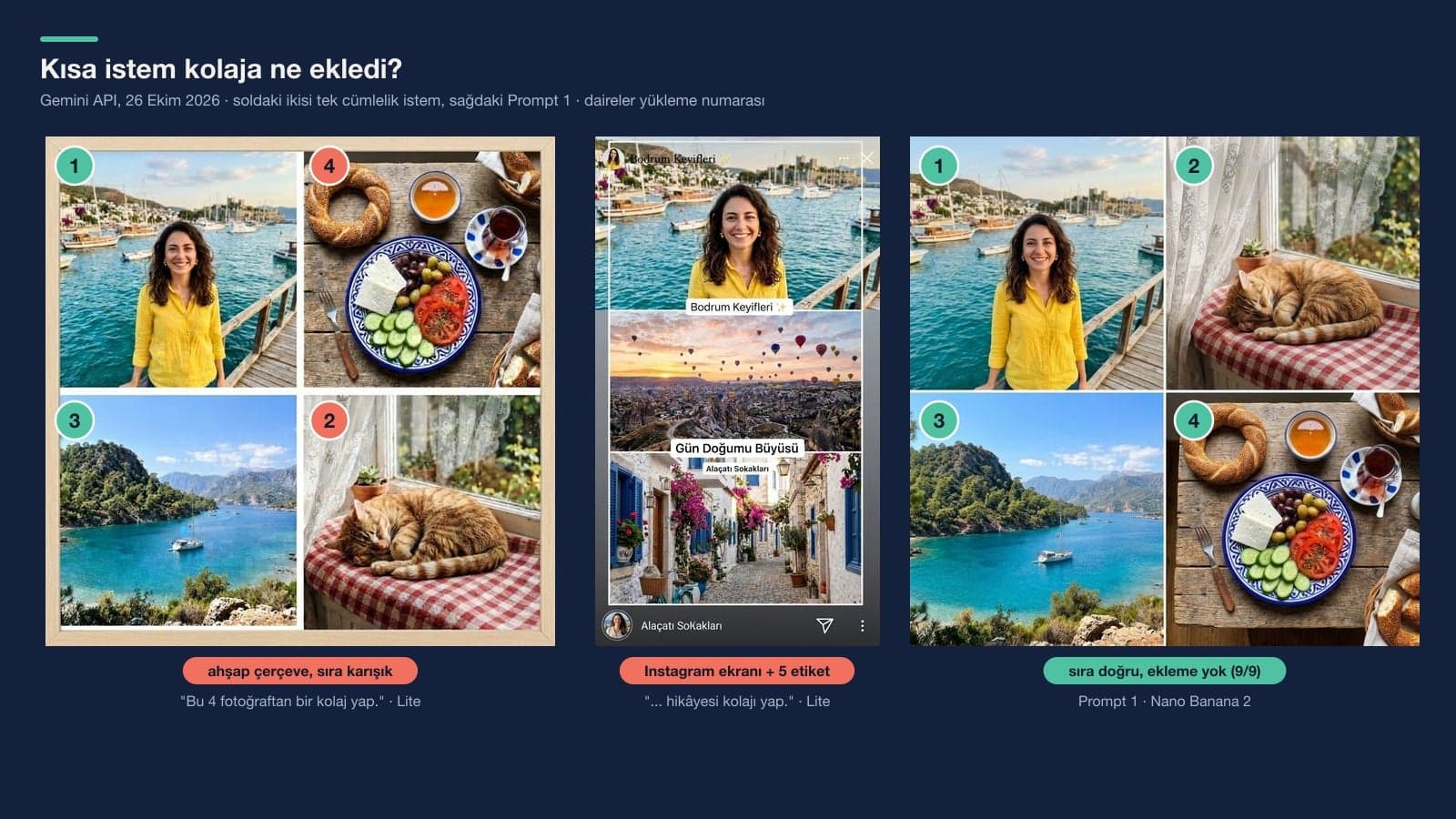
When we asked (in Turkish) to "stack these 3 photos and make an Instagram story collage", Lite drew a story screen: a profile picture and close button at the top, a send icon at the bottom, and labels over the photos. There were Turkish captions meaning "Bodrum Delights" and "Alacati Streets" twice each, plus one meaning "Sunrise Magic". In the bottom label it wrote the Turkish word for "streets" with a capital K in the middle. With the nine-photo short prompt, Lite laid the photos out on a wooden board.
None of this happened with the rule-based prompts. Those prompts have two sentences doing the work: the cell-by-cell order, and "the collage contains nothing else". Describing what is in the collage worked; in our photo expansion test, the rule-based prompt also added nothing across 27 tries.
Does Gemini Change Faces in a Collage?
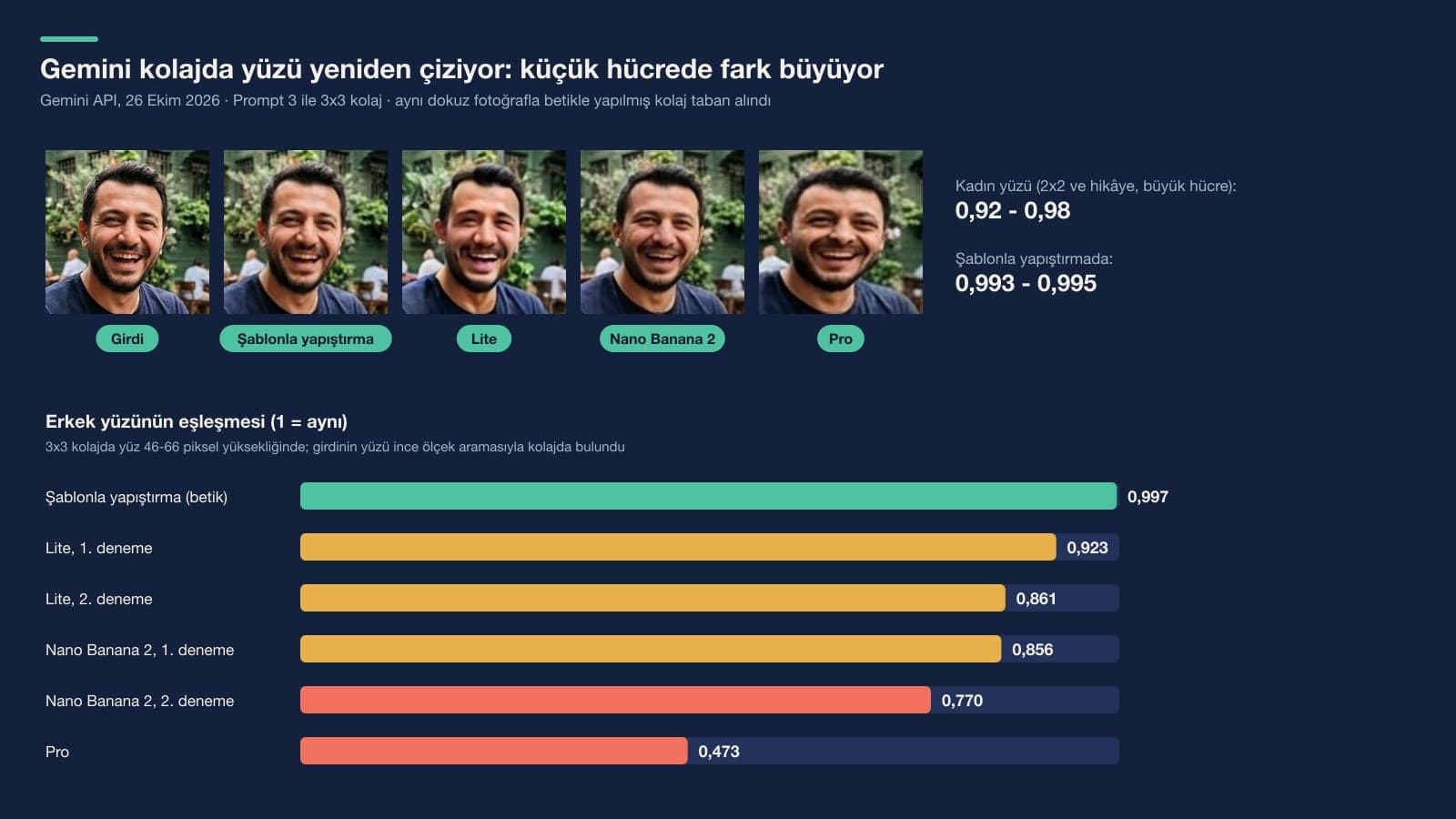
Yes, to some degree. Gemini redraws the collage every time, and the faces are part of that drawing. To measure it, we used a script to paste the same nine photos together pixel for pixel as a comparison collage, then searched for each face in both collages. In the script's collage the face match came out at 0.993-0.997 (1 means identical). In Gemini's collages the woman's face, which was large in the 2x2 and the story, stayed at 0.92-0.98.
The gap grew on small faces. The man's face, which shrank to 46-66 pixels tall in the 3x3 collage, matched at 0.86-0.92 with Lite, 0.77-0.86 with Nano Banana 2 and 0.47 with Pro. In Pro's collage the man wears the same T-shirt in the same cafe, but his face is rounder and his smile is different. If faces matter in a family or friends collage, put the photos with people in a large cell (Prompt 6) or make the collage in a template-based app.
Which Model for Collages: Flash or Flash-Lite?
Pick Flash. Nano Banana 2 skipped a photo in 1 of 19 collages; Lite skipped, merged or repeated a photo in 4 of 18. Lite's errors clustered in free-form layouts such as polaroid, 1 large 4 small and the story. On 2x2 and 3x3 grids, Lite was right in 6 of 6 tries too. Pro had no errors in two tries, but it changed faces the most, and at $0.134 per image it is the most expensive in the API (Nano Banana 2 $0.067, Lite $0.0336).
Optimized for speed; ideal for quick visuals and basic ideas. Not designed for multiple reference images or successive edits.
Google's developer documentation, on the other hand, says the same Lite model can combine up to 14 object images with high fidelity; for Nano Banana 2 that number is 10, for Pro 6. Our test backed the help page: Lite handles a grid, but it loses photos when it has to place them inside a scene.
Gemini, Google Photos or Canva?
| Option | Number of photos | Do the photos change? | When to pick it |
|---|---|---|---|
| Gemini, Flash (Nano Banana 2) | 10 files per prompt in the app | Redraws them; the gap grows on small faces | Polaroid, film strip, collage with text, mood board |
| Gemini, Flash-Lite | Same | Redraws them | Plain 2x2 and 3x3 grids only |
| Google Photos collage | Up to 6 photos | Places them in a template, no redrawing | Family collages where faces must stay the same |
| Template tools like Canva | Depends on the template | Places them in a template, no redrawing | When you want to move text and cells by hand |
Gemini's plus is that it builds the layout from a sentence. Scattering polaroids on a table, drawing a film strip or putting a caption in the header all take manual work in a template tool. The minus is that it touches your photos. For frames that have to stay exactly the same, like a product catalog or your baby's monthly photos, use Create > Collage in Google Photos, then ask Gemini to add the text or decorations afterward.
Making Collages With Gemini: Free Plan, Age Limit and Privacy
You can make collages with a free Gemini account. Without a plan, images download at 1K; with a Google AI plan, at 2K. Instagram scales posts down to 1080 pixels wide, so a 1K square collage is enough for a post, while 2K is better for the sharpness of each photo in a 3x3 collage. Editing photos with people in them is turned off for users under 18.
Every photo you put in a collage gets uploaded to Google, including photos of your friends and of children. Ask the person before you share a collage with someone else's face in it. Every image generated through the API carries Google's invisible SynthID watermark, so it can later be shown that the collage was drawn by AI.
Common Mistakes When Making a Photo Collage
- Uploading the photos in a different order from the one in your prompt. Our prompts work by number: the first upload is photo 1, the second upload is photo 2.
- Leaving out the aspect ratio. Gemini then takes the size of one of the photos, and you get a landscape collage when you expected a square one.
- Trying to upload more than 10 photos in one prompt. For a 4x4, you can make two 2x4 collages separately and have them stacked in a second step; we did not test this route.
- Opening a new chat for a wrong collage. In the same chat, Prompt 11 fixed it in two of two tries; in a new chat you have to upload the photos again.
- Sharing the collage without counting and checking it. In 9 of the 39 collages where we uploaded photos, at least one photo was missing, extra or somewhere other than its upload-order spot.
Upload the photos in their collage order, pick the Flash model and write the layout cell by cell, like "photo 1 top left, photo 2 top right". Write the aspect ratio too (square 1:1, story 9:16). In our test, which used the original Turkish prompts, 2x2 prompts written this way came out right in 9 of 9 tries.
Yes. You can make a collage in Gemini with a free account; without a plan, images download at 1K. The Google Photos collage feature is free too and takes up to 6 photos.
The Gemini app accepts up to 10 files per prompt. In the API the limit is 14 reference images. 9 photos are enough for a 3x3 collage; build larger collages in parts.
You can upload several photos to ChatGPT and use these prompts there too. In this post we only measured Gemini; order and face results may differ in ChatGPT, so count and check the first collage the same way.
Gemini redraws the collage, and small faces are the part that changes most in that redraw. In the test the gap grew on faces that landed in small cells (match 0.47-0.92). Putting faces in a large cell reduces the gap; for an exact collage, use a template-based app.
Upload the three photos and send Prompt 4: three equal horizontal strips, 1, 2, 3 from top to bottom, vertical 9:16 ratio. It gives a 768x1376 pixel output for an Instagram story. For three photos side by side, write "three equal vertical strips, left to right".
Start your first collage with Prompt 1 and count the result: four photos, four corners, only white in between. If that holds, move on to a bigger layout. If you want to add someone else to the collage or put the people from two photos into the same frame, our post on combining photos will help; to turn a vertical collage into a horizontal banner, see our photo expansion post.
Let Us Shoot Your Collage Photos Right From the Start
When Gemini arranges photos into a collage, it redraws faces and textures, and in a product or venue promo customers notice that difference. We shoot product, venue and team photos for your business in ratios that fit collages, Instagram stories and your website. Write to us for a free initial consultation.