


AI Tattoo Design: 12 Gemini and ChatGPT Prompts to Draw It and Try It On Your Arm
12 prompts for designing a tattoo with AI: a stencil on paper, names and Roman numerals, minimal and watercolor, a tattoo from your pet's photo, a try-on on your own arm and a cover-up for an old tattoo. We tested them in Gemini with 123 images and explain why a short request draws an arm instead of paper.
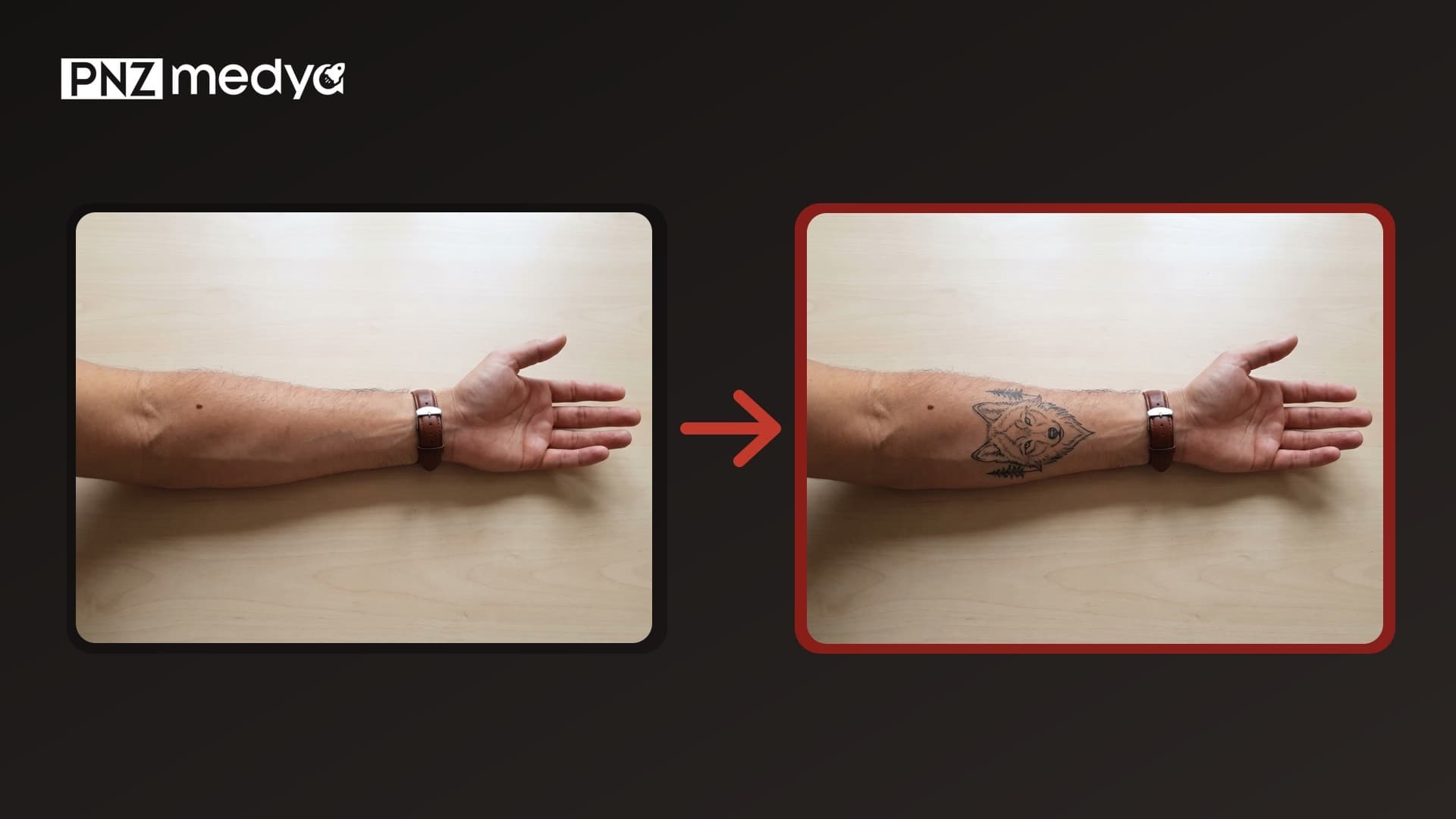
- To design a tattoo, tell Gemini what to draw, the style and the placement, and make "Plain white paper all the way to the edges" your first sentence. The 12 prompts below do this for you: 8 give you a design on paper, 4 let you try it on your own photo.
- A short request won't give you paper: three short Turkish requests like "design a wolf tattoo" returned a photo of a tattooed arm in 8 of 9 tries. Prompts that asked for paper in the first sentence and added "do not draw skin" drew on paper in 30 of 30 tries.
- Design requests that opened with "for the wrist" or "for the inner wrist" drew the wrist itself in 11 of 15 tries. Put the placement in the size sentence.
- We saw no errors converting to Roman numerals: the date 06.11.2026 came out as VI.XI.MMXXVI in 15 of 15 outputs. With special letters, don't write a list of them; the "ğ" (the Turkish g with a breve) in our list turned the name into "Ayşeğül" in one Pro try.
- To move your own design onto your arm, choose Flash or Pro: both kept the lines and the three pines intact in 4 of 4 tries. Flash-Lite added color to the wolf's eye in both of its tries.
- Gemini's files are small: designs came out at 848x1264 pixels, and the arm photo went from 1600 pixels down to 1200. Take the output to your tattoo artist as an idea; the artist draws the actual stencil.
To design a tattoo with Gemini, with or without uploading a photo, write the subject, the style, whether you want color and where on your body it will go. The most common problem is that the model draws a photo of a tattooed arm instead of the design on paper you asked for. When we put "Plain white paper all the way to the edges" in the first sentence of the prompt and added "do not draw skin, an arm or a person", the problem never came up in our test. The 12 prompts below cover a stencil on paper, name and Roman numeral tattoos, minimal and watercolor designs, a tattoo from your pet's photo, seeing the design on your own arm and covering up an old tattoo.
We tested the prompts on four photos: a man's forearm resting on a table, with a leather-strap watch on the wrist and a mole near the elbow; a woman's inner wrist with a gold bracelet; a woman's back with a faded star tattoo on the right shoulder blade; and a tabby cat with an M pattern on its forehead. For every output we checked whether the design was drawn on paper or on skin, whether the text was correct letter by letter, whether the tattoo landed where we asked and whether details like the watch, the mole and the bracelet stayed in place.
123 test images through the Gemini API (the image models that run when you pick Flash-Lite, Flash and Pro in the Gemini app). We tested the prompts in their original Turkish, filling in the brackets as in the examples; every prompt ran at least twice on each model. The people and the cat were generated with AI, no real person is shown. We aligned the arm photos with the uploaded photo and compared the watch, mole and table areas using structural similarity (SSIM); we read the text letter by letter in enlarged crops. ChatGPT was not tested in this round.
How to Design a Tattoo with AI: 5 Steps
- Settle the idea and the placement first: what it will be (a wolf, a name, a date, your pet), in which style (fine line, blackwork, watercolor) and where on your body. The placement sets the proportions of the design: vertical for the forearm, horizontal and small for the wrist.
- Open Gemini and pick Flash or Pro in the model picker. Flash-Lite also worked for designs on paper, but in the arm try-on it got the placement and the colors wrong.
- Copy the right prompt from below and fill in the brackets. Don't delete the paper sentence; it is the first sentence of the prompt.
- Download the design you like and upload it to Prompt 10 together with a photo of your arm or wrist taken in even light. The model shows the design on your skin.
- Take the output and the paper design to your tattoo artist. Talk about size and line weight there, with real measurements.
When we asked (in Turkish) to "design a minimal tattoo for the wrist", the model usually drew the wrist itself: Flash-Lite in 5 of 5 tries, Flash and Pro in 3 of 5. When the same request opened with "Plain white paper all the way to the edges; the whole image is this paper", every output came on paper. Move the placement into a size sentence such as "simple enough to sit at most 3 cm wide on the wrist".
12 Ready-to-Use Tattoo Design Prompts (ChatGPT and Gemini)
The prompts are plain text, and you can paste them into ChatGPT as they are. We tested the original Turkish versions; below are their English versions. Replace the bracketed parts with your own details; the values marked "e.g." are the ones we used in the test. The first seven prompts work without a photo; Prompt 8 and the last four need one. The first eight give you a design on paper, the last four show the tattoo on your own photo.
1) Tattoo design on paper prompt (stencil)
Plain white paper all the way to the edges; the whole image is this paper, no table, paper edge or shadow visible. In the center of the paper, draw a single tattoo design in black ink. Subject: [what it is, e.g. a wolf head with three small pine trees beside it]. Style: [e.g. fine line]. Black lines only; no color, no gray tones, no shading. Do not draw skin, an arm or a person. No signature, text or logo. The design is vertical, proportioned to fit [where, e.g. the inner forearm]. Vertical 2:3 image.All 6 of 6 tries came on paper, and none had skin, text or a signature. In two of Pro's outputs the paper reached the edge of the image; Flash and Flash-Lite sometimes photographed the paper lying on a surface.
2) Short version: one-sentence tattoo design
On plain white paper that reaches the edges, draw a [subject, e.g. wolf] tattoo design in black line, no skin or arm.The short version drew on paper 6 times in 6 tries. Since you don't name a style, the model picks ornate, shaded, heavy designs; if you want fine line, use Prompt 1.
3) Prompt to see one idea in three styles
Draw the same tattoo idea in three different styles side by side: from left to right [e.g. fine line, blackwork, traditional (old school)]. Idea: [e.g. a wolf head]. The three designs are the same size, with space between them, on plain white paper that reaches the edges. Black ink; only the [color style, e.g. traditional] design may use [colors, e.g. red and yellow]. No text, numbers or signatures below, above or beside the designs. Horizontal 3:2 image.Use this one before you decide which style suits you. In 6 of 6 tries the three designs came in the requested order, and no style name or number was written under any of them.
4) Name and date tattoo prompt
Plain white paper all the way to the edges; the whole image is this paper. On it, write a lettering tattoo design in black ink. Lines letter for letter, in this order: “[name]” and below it “[date, e.g. 06.11.2026]”. Copy the letters exactly as they appear inside the quotes; do not add or change any letter. Font: [e.g. thin handwritten script, connected letters]. Do not draw skin, an arm or ornaments; no signature. Horizontal 3:2 image.We tested it with "Ayşegül" and "06.11.2026": in 6 of 6 tries both lines were correct letter by letter, with the hook under the ş (s with a cedilla) and the two dots on the ü in place.
5) Roman numeral date tattoo prompt
Plain white paper all the way to the edges; the whole image is this paper. On it, write in black ink the design of a thin lettering tattoo meant for the wrist. Do not draw skin, a wrist, an arm or a hand. Text letter for letter: “[date in Roman numerals, e.g. VI.XI.MMXXVI]”. Plain, thin, widely spaced serif letters, one line. No other text, ornaments or signature. Horizontal 3:2 image.In the 6 tries where we asked the model to convert the date to Roman numerals itself, all 6 were correct, and the 9 tries where we gave the numerals in quotes had no letter errors either. Giving them in quotes is still the safest choice: fixing a wrong letter after the tattoo is hard.
6) Minimal wrist tattoo prompt
Plain white paper all the way to the edges; the whole image is this paper. In the center, draw a minimal tattoo design in thin black line: [e.g. a wave in a single line with a small sun above it]. Do not draw skin, a wrist or a hand. Simple enough to sit at most [e.g. 3] cm wide [placement, e.g. on the wrist]; few lines, one line weight. No text, signature or shading. Square 1:1 image.The first version opened with "Design a minimal tattoo for the inner wrist" and returned a wrist photo in 4 of 6 tries. This version gave paper in 6 of 6.
7) Watercolor tattoo prompt
Design a colorful tattoo in watercolor style: [e.g. a butterfly]. A thin black outline with [colors, e.g. blue and purple] watercolor splashes bleeding out behind it. Plain white paper all the way to the edges; the splashes must not touch the edge of the paper. No text or signature. Vertical 2:3 image.For a color tattoo, name the colors. All 6 of 6 tries came on paper and used only the two requested colors.
8) Pet photo to tattoo prompt
Make a fine line tattoo design from the [cat / dog] in this photo. Keep the [cat's / dog's] distinctive markings in the drawing: [e.g. the M pattern on its forehead, the white patch on its chest, the small notch at the tip of the ear on the viewer's left]. Black lines only; no shading, no gray tones, no eye color. Do not draw [the object behind it, e.g. the couch] or the background; plain white paper all the way to the edges. Do not add text or a signature. Square 1:1 image.List the markings that set your pet apart from any other tabby, one by one. The test cat's ear notch, chest patch and forehead stripes were in the right place in 6 of 6 drawings.
9) Prompt to see the tattoo on your own arm
Add a tattoo to the arm in this photo. Tattoo: [e.g. a fine line wolf head with three small pine trees beside it], black ink only. Placement: [e.g. the middle of the inner forearm, exactly halfway between the watch and the elbow]; size [relative to something on the arm, e.g. about three times the watch face], long side running along the arm. The tattoo should look healed on the skin: no redness or shine, lines follow the curve of the arm, arm hair passes over the tattoo. Keep the arm, hand, [what is on the arm, e.g. watch, mole, veins], [surface, e.g. table] and lighting exactly as they are; do not add any other tattoo, text or object to the arm. Keep the photo [e.g. horizontal 4:3].Give the size relative to something visible in the photo. The model can't know how many centimeters long the arm in the photo is, but it can see the watch face.
10) Prompt to put your own design on your arm (two images)
The first image is my arm, the second image is my tattoo design. Apply the design from the second image as a tattoo on [placement, e.g. the middle of the inner forearm] in the first image without changing, adding or removing any lines; the white paper must not carry over to the arm, black lines only. Size [e.g. about three times the watch face], long side running along the arm. Keep the arm, hand, [e.g. watch, mole, veins], [e.g. table] and lighting exactly as they are. Keep the photo [e.g. horizontal 4:3].Upload the photo of your arm first, then the design; the first sentence of the prompt tells the model this order. For the design you can use the output of Prompt 1 or a photo of the drawing your tattoo artist gave you.
11) Name tattoo on the wrist try-on prompt
Add a lettering tattoo in thin handwritten script to the inner wrist in this photo. Placement: [e.g. the bare skin between the bracelet and the line where the palm begins]; do not write on the palm or fingers. Text letter for letter: “[name]”; copy the letters exactly as they appear inside the quotes, do not add or change any letter. Black ink only, healed tattoo. Keep [what is on the wrist and hand, e.g. the bracelet, mole, nails], the hand and [surface, e.g. fabric] exactly as they are; do not add any other text. Keep the photo [e.g. horizontal 4:3].Use this prompt with Flash or Pro. Flash-Lite put the text in the middle of the palm despite the "do not write on the palm" sentence.
12) Cover-up tattoo prompt
In this photo there is an old [e.g. star] tattoo [placement, e.g. on the back, on the shoulder blade on the viewer's right]. Add a cover-up tattoo that hides it completely: [e.g. a dark red and black peony, its leaves reaching toward the shoulder]. No corner or line of [the old tattoo, e.g. the star] may show; the new tattoo is larger and darker than the old one. Keep [what is visible, e.g. the tank top, straps, hair], the skin and [e.g. the wall] exactly as they are; do not add tattoos anywhere else on [e.g. the back]. Keep the photo [e.g. vertical 3:4].Describe where the old tattoo is from the viewer's side and ask for the new one to be larger and darker. In 6 of 6 tries no trace of the star was left.
If the model drew an arm instead of paper, write in the same chat: "Do not draw the arm or skin, only plain white paper with the design on it." If the tattoo landed in the wrong place, describe the spot with two points visible in the photo: "exactly halfway between the watch and the elbow". If one letter in the text is wrong, point out only that letter and give the correct spelling again in quotes.
The Test: We Asked for Paper. Where Did the Model Draw?
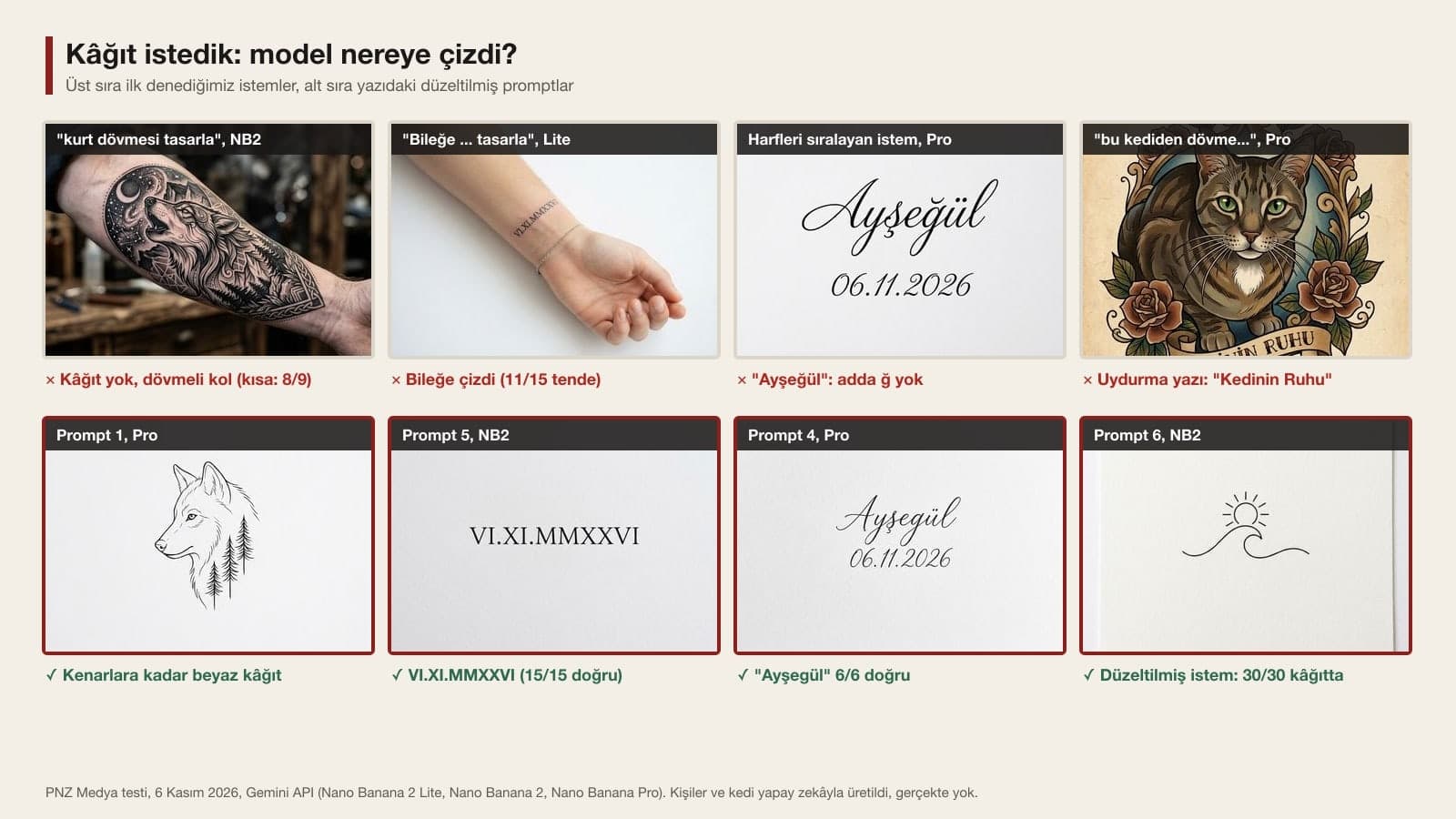
When someone wants a tattoo design, the first sentence that comes to mind is short. Those short requests taught us the most: "design a wolf tattoo", "design a handwritten tattoo that says Ayşegül" and "make a tattoo design from this cat" (all asked in Turkish) returned a photo of a tattooed arm or shoulder instead of paper in 8 of 9 tries. In two outputs of the cat request, the model also added a text banner it made up: one in English, "The Keeper of the Couch", the other in Turkish, meaning "The Cat's Soul".
| How the request was built | Flash-Lite | Flash | Pro | Total (on skin) |
|---|---|---|---|---|
| Short Turkish request (wolf, name, cat) | 3/3 on skin | 3/3 on skin | 2/3 on skin | 8/9 |
| Opening with "For the wrist / inner wrist ... design" (Roman numerals, minimal) | 5/5 on skin | 3/5 on skin | 3/5 on skin | 11/15 |
| Detailed, paper sentence in the middle (stencil, three styles, name, watercolor, cat) | 1/10 on skin | 0/10 | 0/10 | 1/30 |
| Paper in the first sentence + "do not draw skin" (Prompts 1, 2, 4, 5, 6) | 0/10 | 0/10 | 0/10 | 0/30 |
| Short English request ("Design a fine line wolf tattoo...") | 0/1 | 0/1 | 0/1 | 0/3, all three a photo of paper on a table |
What the table tells us: when Gemini sees the word "tattoo", it usually draws the finished tattoo, which means skin. A placement word like "for the wrist" made this tendency stronger. A sentence describing the paper helped even in the middle of the prompt, but the only fully safe setup was asking for paper in the first sentence and explicitly ruling out skin, arms and people. The English request didn't draw on skin; instead, all three outputs were photos of sketch paper lying on a surface, and two had pencils next to it.
Lettering Tattoos: Special Letters and Roman Numerals
The only spelling error in the name tattoos was caused by our own prompt. The first version had a line saying "Turkish letters (ş, ğ, ü) in place with their dots and hooks". The name "Ayşegül" has no ğ (the Turkish g with a breve), but because ğ was in the list, Pro wrote the name as "Ayşeğül" in one of two tries. Prompt 4, which replaces the list with "copy the letters exactly as they appear inside the quotes, do not add or change any letter", was correct in 6 of 6 tries. The spelling was also correct in all 12 tries on the wrist.
The model made no mistakes with Roman numeral dates. The request "write the date 06.11.2026 in Roman numerals" and the request where we gave the date as "VI.XI.MMXXVI" both gave the same result in 15 of 15 outputs. In Turkey, dates are written day.month.year; the model kept that order and did not swap the day and month. If you want the US month.day order, say so explicitly in the prompt.
Trying It On Your Arm: Results from Four Photos
| Try | Flash-Lite | Flash | Pro |
|---|---|---|---|
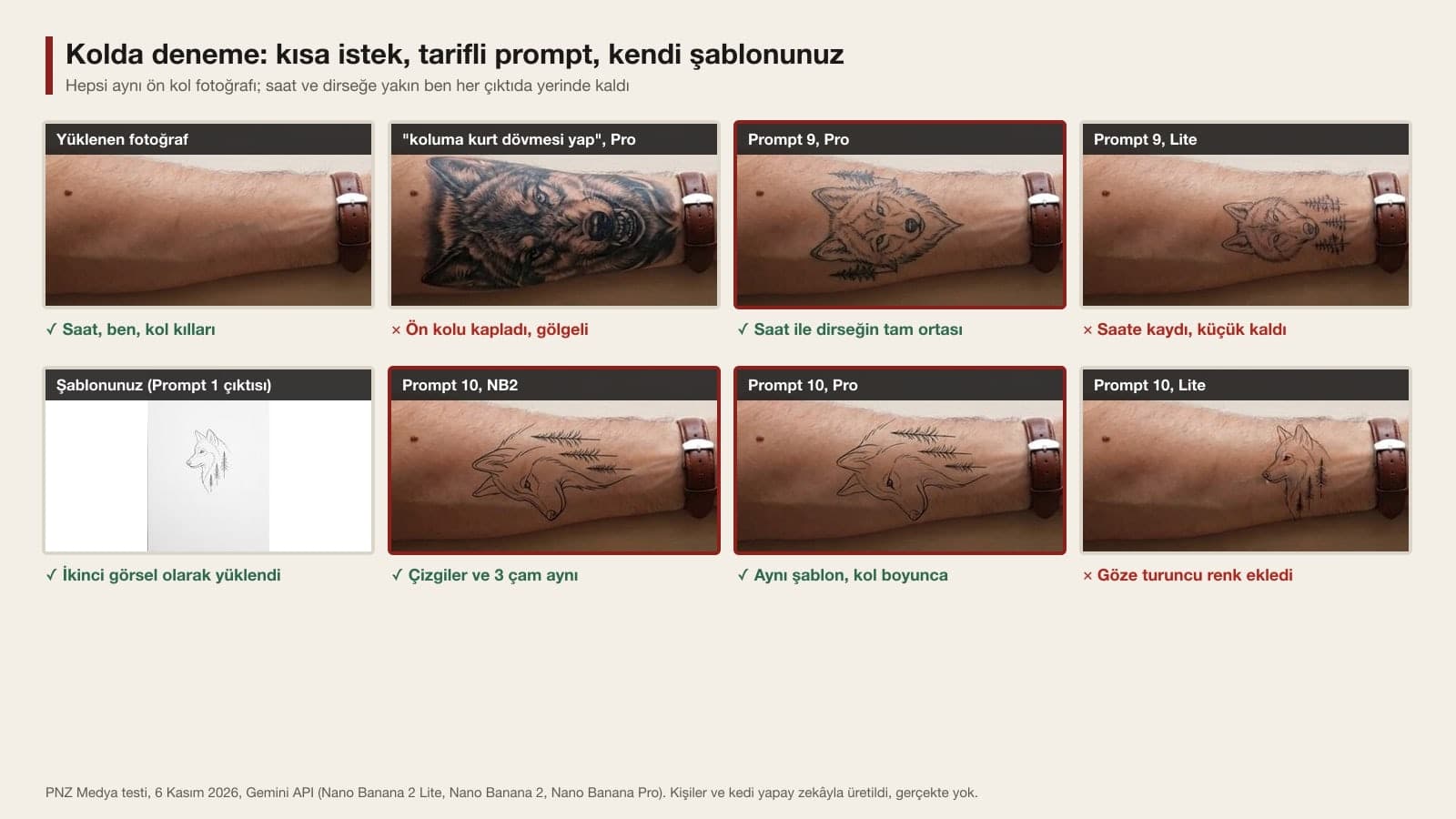
| "put a wolf tattoo on my arm" (short) | Patterned wolf covering half the forearm | Large shaded wolf | Realistic wolf from elbow to watch |
| Prompt 9: placement and size described | 2/2 drifted toward the watch | 1/2 right in the middle | 2/2 right in the middle |
| Prompt 10: move your own stencil | 2/2 added color to the eye (orange, blue) | 2/2 same lines and 3 pines | 2/2 same lines and 3 pines |
| Prompt 11 and its first version: name on the wrist | 4/4 wrote on the palm | 3/4 in the right place (1 ran under the bracelet) | 4/4 in the right place |
| Prompt 12: covering the star | 2/2 no trace of the star | 2/2 no trace of the star | 2/2 no trace of the star |
| "make a tattoo to cover my star tattoo" (short) | The star stayed in the middle of a galaxy | Zoomed in and changed the framing | Covered the star with a dragon |
The arm try-on left the rest of the photo alone. The watch, the mole and the table stayed in place in all 15 arm outputs; similarity to the uploaded photo in the upper table area never dropped below 0.96. The real difference was in the size and style of the tattoo: with the short request, all three models drew a shaded wolf covering most of the forearm. Even though Prompt 9 asked for fine line, one try each from Flash and Pro still gave a shaded, heavy wolf; if you need fine line for sure, make the design on paper first and move it over with Prompt 10. That route gave the most faithful results in the test.
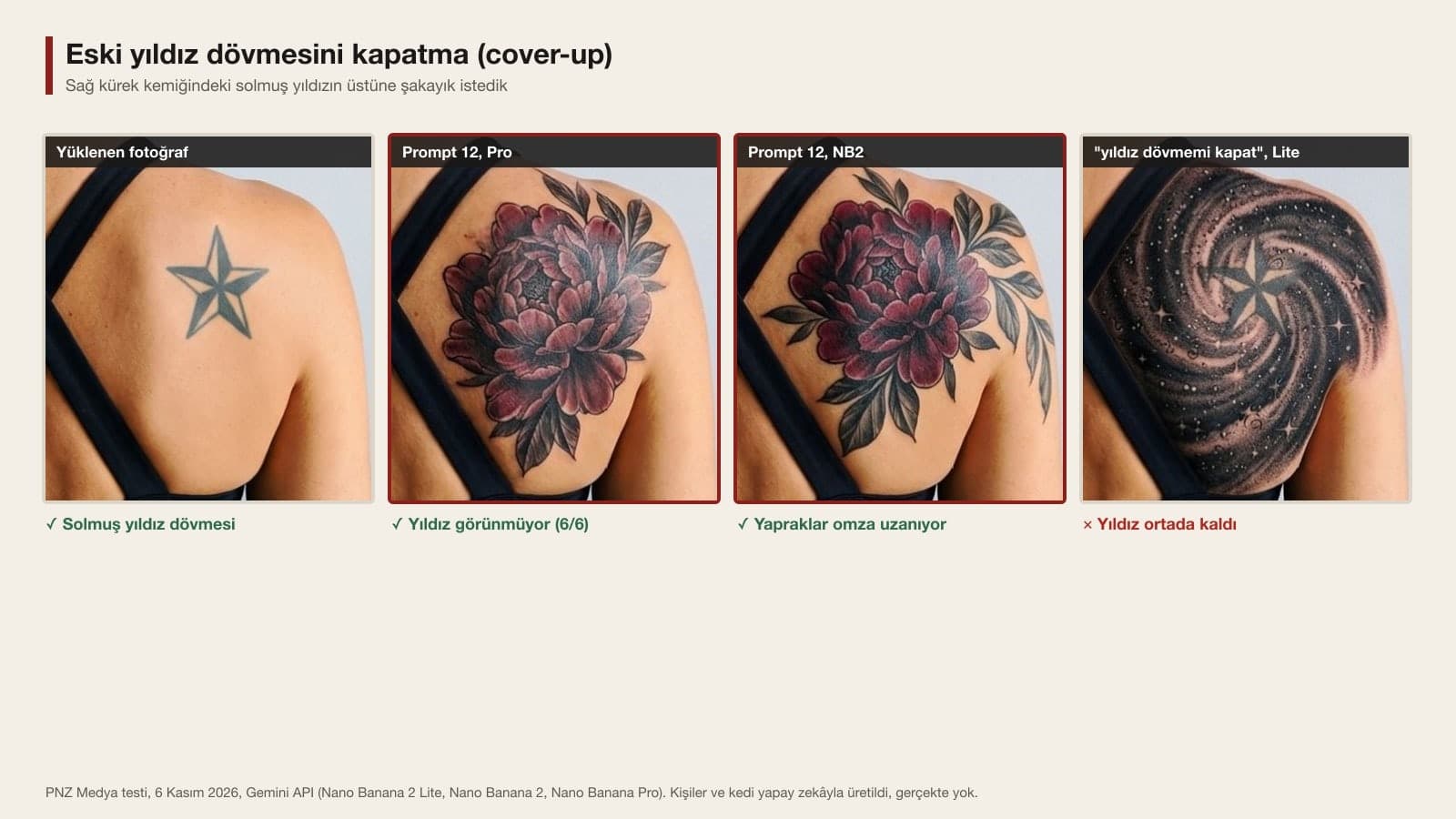
In the cover-up, the sentences "no corner of the star may show" and "the new tattoo is larger and darker than the old one" made the difference. With the short request, Flash-Lite treated the star as part of the new design and left it in the middle of a galaxy. There is a limit you should know about here: the model hides the old tattoo under a new one it draws itself; in a real cover-up, your tattoo artist decides how dark the old ink will stay and what can go over it.
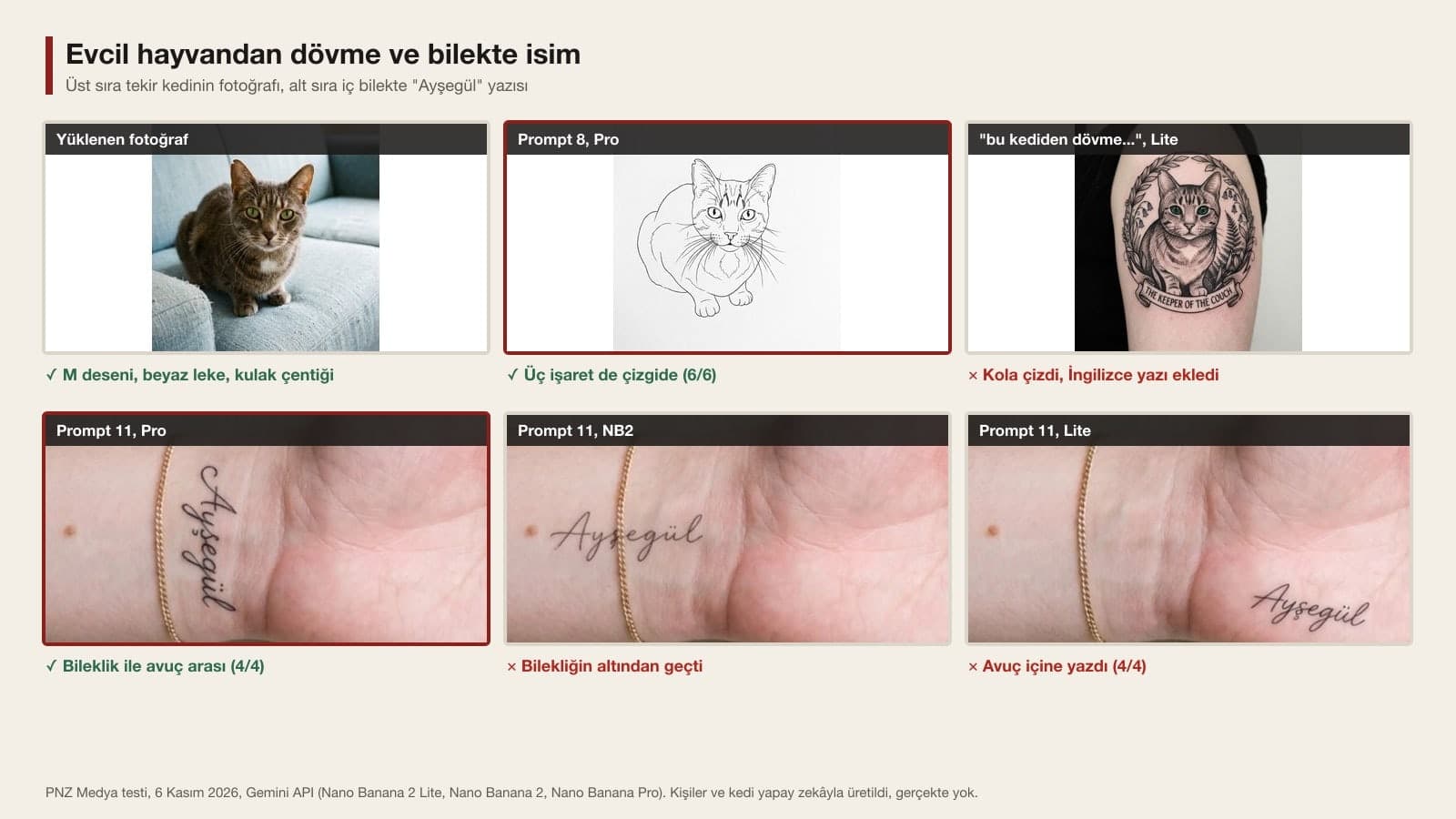
The pet tattoo showed the gap between a detailed and a short request most clearly. Prompt 8 gave a colorless drawing with no couch on white paper reaching the edges in 6 of 6 tries, and it put the ear notch on the correct ear. The short request drew the cat on an arm or shoulder, with its eyes painted green, in two of three tries.
Gemini, Firefly or a Tattoo App?
You can design a tattoo in Gemini with a free account. According to Google's help page, you must be 18 or older to generate and edit images; images download at 1K on an account without a plan and at 2K with a Google AI plan. In the test, designs on paper came out at 848x1264 pixels, while the arm photo we uploaded at 1600x1194 pixels came back at 1200x896 pixels. The median time per image was 3.5 seconds on Flash-Lite, 9.2 on Flash and 14.7 on Pro.
If you have a free account, you get daily free generations to create custom tattoo designs from text prompts across a wide range of styles and themes.
Adobe Firefly's tattoo generator is a page built for this job, and it gives daily free generations with an Adobe account. Canva and the tattoo apps in the app stores also have AI pages; the measurements in this article apply to Gemini only. Gemini's advantage is that it can take your own photo in the same chat and show the tattoo on your skin. Whichever tool you choose for the paper design, the paper and lettering rules here still help.
Common Mistakes
- Writing only "design an X tattoo". In 8 of 9 tries this gave a tattooed arm instead of paper.
- Opening a design request with "for the wrist" or "on my arm". A placement word pushes the model to draw on skin; move the placement into the size sentence.
- Listing special letters. A letter that is in the list but not in the name can end up in the text ("Ayşeğül").
- Giving the size in centimeters for an arm try-on. Use a measure visible in the photo: the watch face, the bracelet, the width of the palm.
- Moving your own stencil with Flash-Lite. It added color to the drawing in both tries; choose Flash or Pro.
- Treating Gemini's output as a print-ready stencil. The file is around 1K, and your tattoo artist knows how thin lines will hold up on skin.
Before You Take It to Your Tattoo Artist
Use the AI output as a reference in your first conversation with the tattoo artist: show the paper design and the try-on on your arm together, and for a lettering tattoo read the letters one by one with the artist once more. When you upload a photo of your arm or back, the image goes to Google's servers; choosing a frame that doesn't show your face is enough of a precaution. If you are turning someone else's photo into a tattoo, for example your partner's handwriting or face, ask them for permission first.
Tell Gemini or ChatGPT the subject, style and placement of the tattoo; make "Plain white paper all the way to the edges" the first sentence and add "do not draw skin, an arm or a person". In our test (run with the original Turkish prompts) this setup gave a design on paper in 30 of 30 tries. Then you can upload the design together with a photo of your own arm to see how it looks on skin.
Yes. On Gemini's free plan you can design a tattoo and try it on your own photo; images download at 1K on an account without a plan, and you must be 18 or older to generate images. Adobe Firefly's tattoo generator also gives daily free generations with an Adobe account.
Upload a photo of your arm taken in even light to Gemini and use Prompt 9: describe the placement with two points visible in the photo (like halfway between the watch and the elbow) and the size with something visible (like three times the watch face). If you already have a design, upload it as the second image with Prompt 10; in the test, Flash and Pro kept the lines unchanged.
The prompts here are plain text with no tool-specific commands, so you can paste them into either tool as they are. In this round we measured only in Gemini, using the original Turkish prompts; in ChatGPT the paper and lettering results may differ, so check on your first try whether the paper sentence was followed.
In the test, 26 of 27 name outputs were correct. The only error came from listing the Turkish special letters in the prompt: Pro turned the name "Ayşegül" into "Ayşeğül", adding a ğ (g with a breve). Give the name in quotes and write "copy the letters exactly as they appear inside the quotes"; don't write a list of letters.
Yes, take it as an idea and a reference. Gemini's file comes at roughly 1K resolution. Your tattoo artist decides how thin lines will hold up on skin, the size and the stencil that goes onto the transfer paper. For a lettering tattoo, read the letters once more with the artist.
If the tattoo you saw on your arm doesn't feel right, try again with the same photo and a different style or placement; what you would spend an hour discussing at the tattoo studio, you can see in Gemini in a few minutes. We measured handwriting and Turkish letters in more detail in our signature post, and print-ready line art in our t-shirt design post.
Let's Build Your Tattoo Studio's Identity Together
From your logo and sign to appointment cards and Instagram templates, let's bring your studio's visual identity together in one consistent line. In a free first call, we'll talk about your work and your clients.