



How to Find a Color Code From an Image: HEX, RGB and RAL From a Photo (12 Prompts)
Ways to find a color code from a photo on Windows, Mac, iPhone and in the browser; how many HEX codes one paint splits into across three real photos, how far light and compression shift the code, where RAL matching stops working, and 12 ready-to-use prompts for ChatGPT and Gemini.
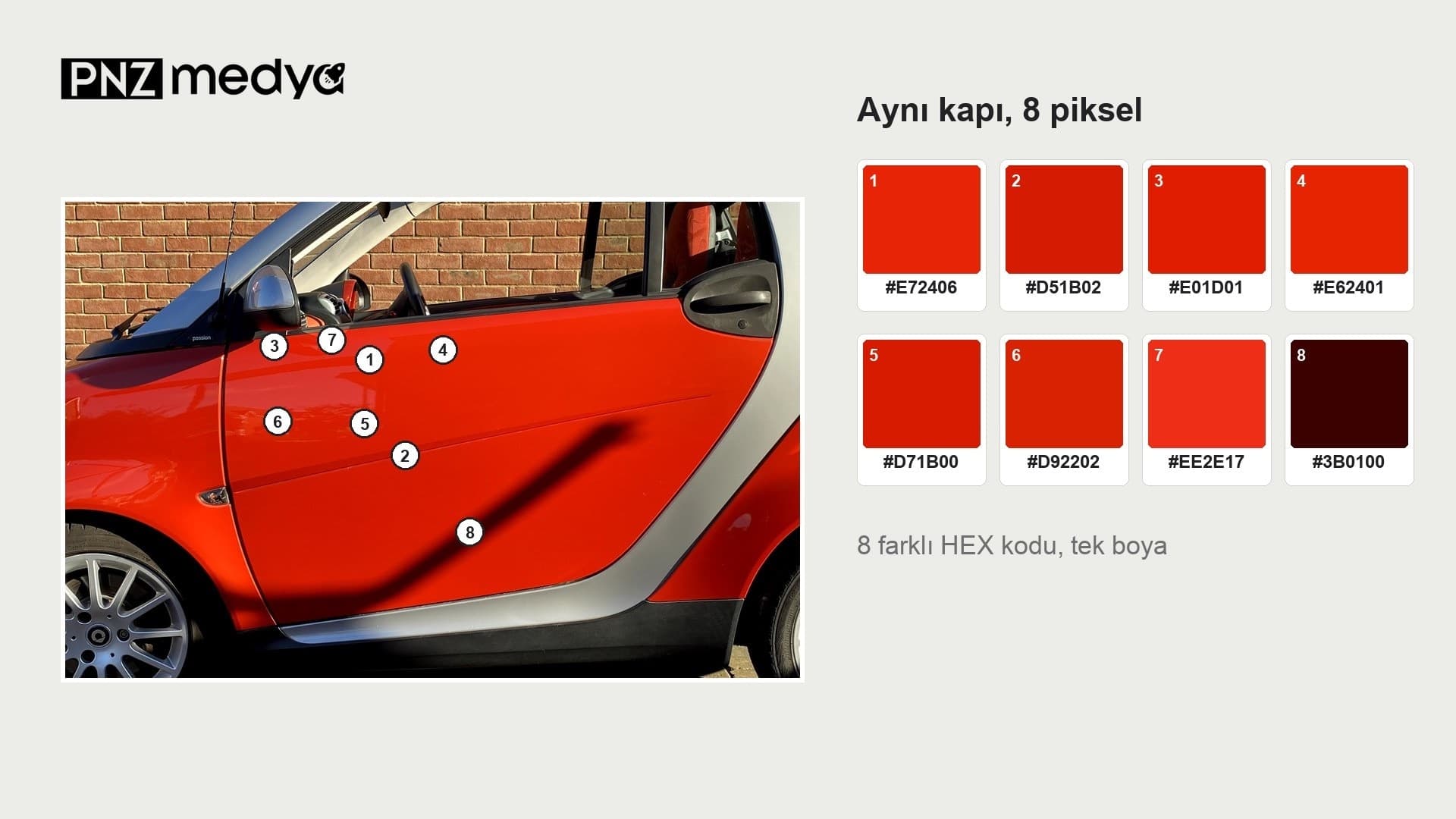
- The fastest way to find a color code from a photo is your computer's eyedropper tool: PowerToys Color Picker (Win+Shift+C) on Windows, Digital Color Meter on Mac. Both copy the HEX or RGB value of the color under the pointer.
- We counted 10,167 different HEX codes in a single lit area of a red car door. Twelve random pixels from the same paint gave 11 separate codes.
- The difference between the same paint's code in shadow and in light (ΔE 34.3) was more than ten times the largest shift caused by downsizing and re-saving the photo (3.1). Take the code from an evenly lit spot.
- A HEX code taken from a photo does not count as a paint or RAL code. Even the closest RAL Classic color to a turquoise door came out noticeably different (ΔE 10.1); take a physical sample to the painter.
- When you ask ChatGPT for a code, tell it to measure with Python, to frame the area it measured, and not to give an estimate if it cannot run code. The 12 prompts below are built on this rule.
Click two different spots on the same wall with an eyedropper and you get two different color codes; both are correct. Every pixel in a photo is recorded slightly differently depending on light, shadow and compression. The real work in finding a color code is picking the right spot and taking the average of that area.
Below you will first find ways to get a code on a computer, a phone and in the browser. Next comes the measurement we did on three real photos: how many different codes one painted surface produces, and how the closest RAL code changes. The last section has 12 ready-to-use prompts for getting ChatGPT and Gemini to measure the code, extract a palette and find matching colors.
The numbers are our own measurements. The material is three photos published on Wikimedia Commons under a CC0 license: a red Smart car (4032 × 3024), a blue door in Ahrenshoop and a turquoise door in Agios Nikolaos. Colors were read pixel by pixel in Python, and differences were calculated with the CIEDE2000 (ΔE 2000) formula. RAL values are the approximate sRGB equivalents from the RAL Classic list on Wikipedia (200 colors, excluding pearlescent ones). This time we did not put the prompts through a scored test in ChatGPT or Gemini; the model capabilities come from OpenAI's and Google's documentation.
How to Find a Color Code From a Photo: 4 Ways on Computer, Phone and Browser
Windows: open Color Picker from Microsoft's free PowerToys suite, press Win+Shift+C and click the spot in the photo. According to Microsoft's documentation, the color is copied to the clipboard in HEX format by default; when you zoom in with the mouse wheel the image freezes, which makes picking a single pixel easier. The tool keeps the last 20 colors in its history.
Mac: open Digital Color Meter in Applications > Utilities and move the pointer over the photo. The window has an Aperture Size slider; according to Apple, if the aperture covers more than one pixel, the average of their values is shown. Opening the slider to a few pixels reduces single-pixel jitter. Shift-Command-C (Color > Copy Color as Text) copies the value as text; the HEX display is chosen from View > Display Values.
iPhone: open the picture in Photos, go to Edit > Markup and tap the color wheel. The eyedropper at the top left of the picker takes a color from the photo, and the Sliders tab shows the HEX value. One detail to watch: this screen writes the code in the Display P3 color space by default; if you want an sRGB code for the web or for print, tap the HEX label and switch to sRGB.
Browser: you can upload the photo from your computer to a picker page such as imagecolorpicker and click on it; most of the tools in search results work this way. If you want a color from a web page, open the developer tools in Chrome with right-click > Inspect; click a color swatch, and the eyedropper in the picker that opens takes a color from any point on the page.
| Device | Tool | How to open it | What you get |
|---|---|---|---|
| Windows 10 and 11 | PowerToys Color Picker | Win+Shift+C | HEX (default), RGB, HSL and any formats you add; last 20 colors |
| Mac | Digital Color Meter | Applications > Utilities | Value in the selected color space; average when the aperture grows; copy with Shift-Command-C |
| iPhone and iPad | Markup color picker | Photos > Edit > Markup > color wheel | Eyedropper; Display P3 or sRGB HEX in the Sliders tab |
| Any computer | Chrome developer tools | Right-click > Inspect > color swatch | Eyedropper on web pages; HEX, RGB, HSL |
| Phone and computer | ChatGPT or Gemini | Upload the photo and write a prompt | Area average, palette, closest RAL, matching colors (have it measure with Python) |
10,000 Codes From One Paint: We Measured Three Photos
In each photo we picked an area covered by a single paint and counted every pixel in it. The lit part of the red car door has 307,086 pixels, and they are spread across 10,167 different HEX codes. The median color of the area is #DB2001. Twelve randomly chosen single pixels landed between ΔE 0.3 and 5.3 away from this median.
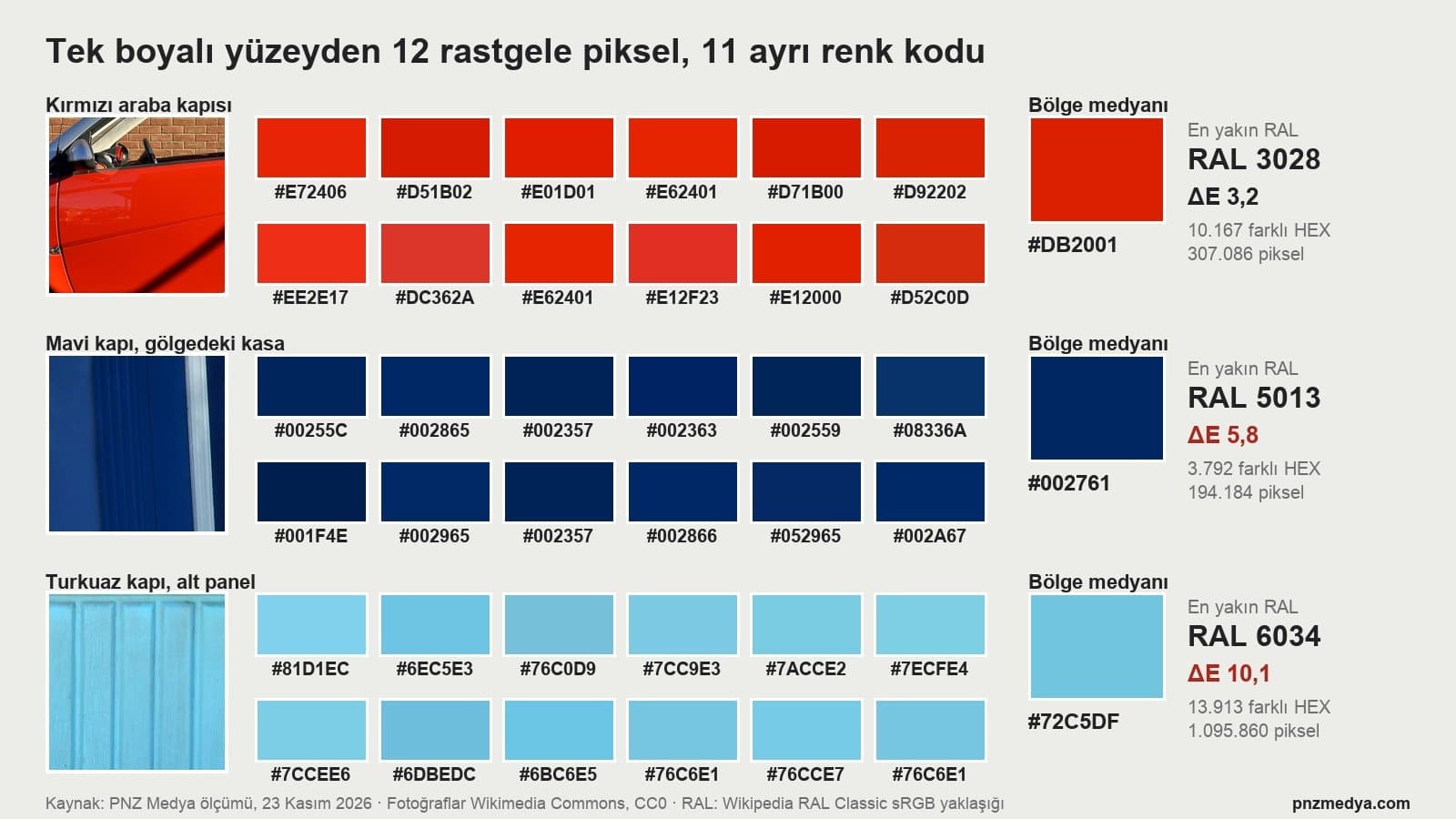
| Surface | Distinct HEX codes | RAL codes the pixels fall into | Closest RAL (ΔE) | Dark vs. light end (ΔE) |
|---|---|---|---|---|
| Red car door, in light (307,086 pixels) | 10,167 | 23 codes (72% RAL 3028, 23% RAL 2002) | RAL 3028 Pure red (3.2) | 11.4 |
| Blue door frame in shadow (194,184 pixels) | 3,792 | 6 codes (83% RAL 5013, 12% RAL 5002) | RAL 5013 Cobalt blue (5.8) | 8.3 |
| Turquoise door, lower panel (1,095,860 pixels) | 13,913 | 4 codes (89% RAL 6034) | RAL 6034 Pastel turquoise (10.1) | 13.5 |
ΔE 2000 expresses the difference between two colors as a single number: 0 means the same color, and the bigger the number, the easier the difference is to see. The last column in the table is the difference between the average of the darkest 5% of pixels in the area and the average of the lightest 5%. On all three surfaces it came out between 8 and 13.5; that is how much the light varies within one flat-painted surface.
How much does it help to open the eyedropper from a single pixel to a 9 × 9 pixel square? A little. On the car door, the farthest single pixel was 5.3 from the median and the farthest 9 × 9 average was 4.3; on the shaded frame, the farthest value dropped from 3.9 to 2.8. Averaging cleans up the noise of individual pixels. The difference created by light stays as it is.
Pick an evenly lit part of the surface, away from both highlights and shadows. Set the eyedropper to a small square of pixels. Take codes from three separate spots on the same surface; if the codes are close to each other, you are in the right place.
Light or Compression: What Actually Changes the Code?
If you got the photo over WhatsApp, you might think the code got corrupted. We measured that too: we downsized the three photos to 1600 pixels, re-saved them at JPEG quality 70 and compared the color of the same 36 points. At 32 of the points the difference stayed below 1.5, and the largest shift was 3.1.
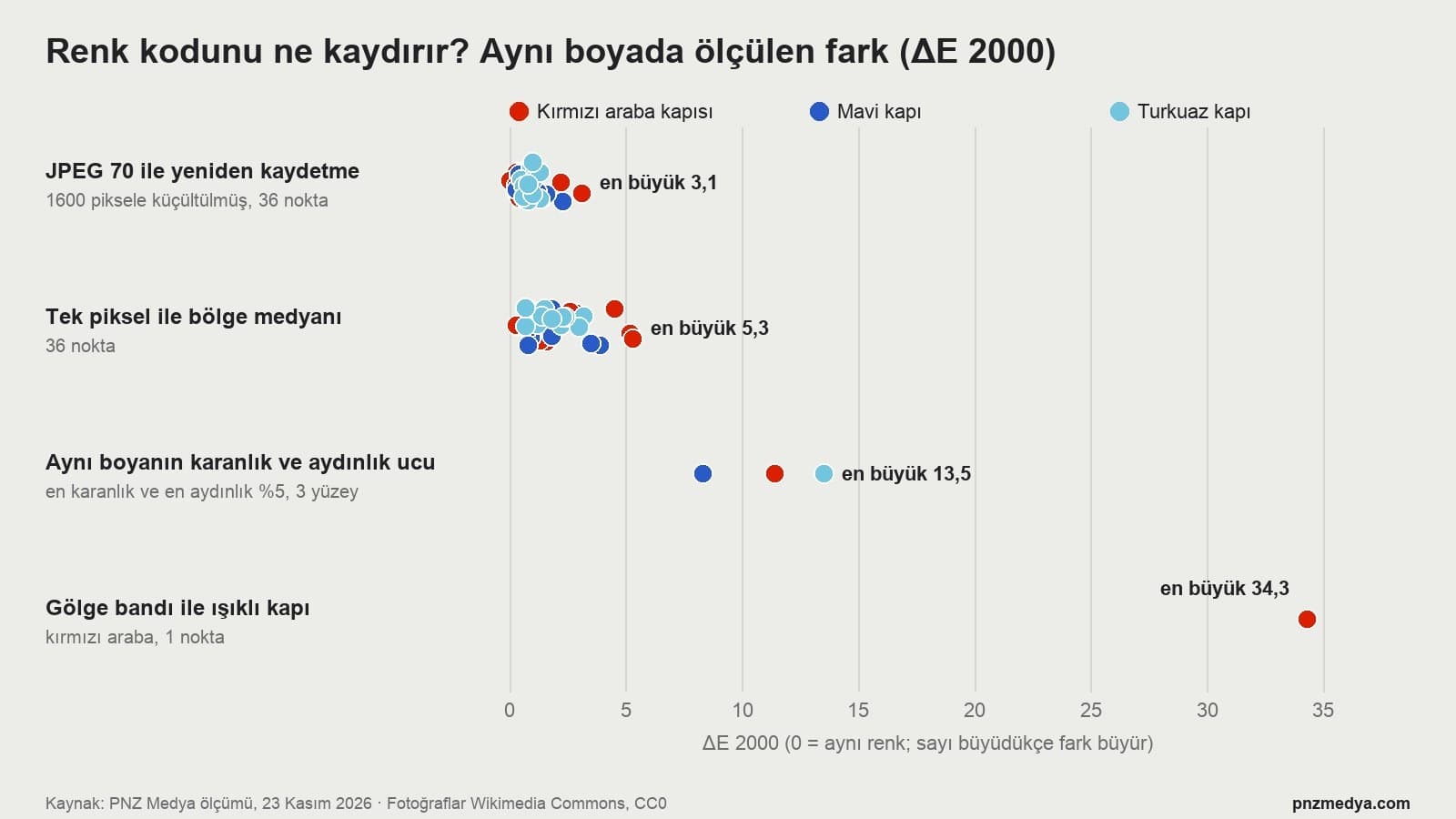
Light has a much bigger effect. A point we took from the thin shadow band falling across the car door came out #3B0100, while the lit median of the door is #DB2001. Same paint, same photo, and the difference is ΔE 34.3. In RAL, the shaded point falls on 3005 Wine red and the lit part on 3028 Pure red. Putting the eyedropper in the wrong place causes an error more than ten times the largest shift we measured from compression.
Find a RAL Code From a Photo: How Reliable Is It?
Behind a search for a RAL code there is usually a code you need to give a painter or a door, window or panel manufacturer. You can match a HEX measured from a photo to the closest color in the RAL Classic list, with two limits.
First, the same surface splits into more than one code. When we matched each pixel in the lit area of the car door to its closest RAL, 23 different codes came out: 72% were 3028 Pure red and 23% were 2002 Vermilion. Second, the closest code can still be far off. The median of the turquoise door is #72C5DF and the closest color on the list is 6034 Pastel turquoise, yet the difference is ΔE 10.1. In that case the right answer is "RAL Classic has no code close to this color", and the paint gets mixed to match.
The visual samples displayed on the screen are not binding because brightness and contrast may vary from screen to screen, and neither are the colours on a printout from a printer. For binding colour samples, always obtain an official RAL Colour fan deck.
In practice it goes like this: a RAL code you find from a photo is a good starting point for your search. Before ordering, hold the painter's fan deck next to the surface, or take a small piece of the surface in and have it measured. The same goes for Pantone; a Pantone match from a photo is an estimate.
A separate note for anyone trying to find a car's color code: the factory paint code cannot be found from a photo. It is printed on the manufacturer's label on the vehicle or in the authorized service record, and where it sits varies by brand. A HEX code measured from a photo is enough to show the car's color on a website or on social media; it is not enough for touch-up paint.
How Do ChatGPT and Gemini Find a Color Code?
A language model can look at a photo and say "this looks like #1E5AC8"; that is a guess. You get the correct value when the model opens the photo with code and reads the pixels. OpenAI's data analysis page says ChatGPT writes and runs Python code for some analysis tasks, and the supported files include images that contain values to analyze. Google's developer documentation also says Gemini 3 Flash can inspect images with Python, but only when it is explicitly asked to use code.
That is why every prompt below has the same three lines: measure with Python, show the area you measured, tell me if you cannot run code. If the model ran code, you will see the code and its output in the response. If there is no code, treat the number as an estimate and check it yourself with an eyedropper.
Color Code Prompts: 12 Ready-to-Use Prompts
Replace the parts in square brackets to fit your own photo. When you describe the area, name something visible, such as "the red door at the bottom left"; if the model measures the wrong spot, correct it in the same chat with prompt 12.
Find the color code of [the red door on the left] in the photo I uploaded.
Do not estimate; open the photo with Python and pick a [20 × 20] pixel square from an evenly lit, shadow-free part of that surface.
Give the median color of the square as HEX, RGB and HSL.
Show the square you picked with a frame on the photo.
Measure two more separate squares on the same surface and write the three results side by side.
If you cannot run code, say so clearly and do not give a number.Measure the color of [the blue door] in this photo with Python: take a small square from a shadow-free spot, write its HEX and RGB code, and show the spot you measured with a frame.Extract the [6] dominant colors of the photo I uploaded with Python, using k-means clustering.
For each color, give the HEX, RGB and its percentage share of the photo in a table, sorted from largest to smallest.
Count colors very close to white or black separately and leave them out of the palette.
Show the palette in an image as side-by-side color squares, with the HEX code under each square.
Finally, also write the palette as CSS variables: --color-1: #...;In the photo I uploaded, [the wall] has both a sunlit part and a shaded part.
With Python, pick two separate areas: one lit, one shaded. Show the areas you picked with frames in different colors.
Give the median color of each area as HEX and RGB.
Calculate the difference between the two colors with CIEDE2000 (ΔE 2000).
Tell me which one is closer to the paint's actual color and explain why in one sentence.Measure the color of [the shutter] in the photo I uploaded with Python, taking the median from a shadow-free area.
Compare this color with the sRGB equivalents of the RAL Classic colors; rank the 3 closest RAL codes by CIEDE2000 difference.
Do not write RAL values from memory; show the list you used for the comparison and its source.
If the difference for the closest code is greater than [5], write "there is no close RAL Classic color".
Add a note at the end that RAL colors on screen are approximate and need to be checked against a fan deck before ordering.I am going to describe the color of [the living room wall] in the photo I uploaded to a painter.
With Python, measure the median color from an evenly lit area; give the HEX, RGB and CIE L*a*b* values.
Show an enlarged crop of the area you measured.
Describe the color in plain everyday English: light or dark, warm or cool, and which color it leans toward.
At the end, add a short note I can give the painter: the color in the photo changes with the light and needs to be matched with a fan deck or a physical sample.Find the codes of the flat color areas in the logo image I uploaded with Python.
Do not count the anti-aliasing pixels along the edges or the background; take the median of each flat area.
Treat colors closer than [2] to each other in ΔE 2000 as a single color.
Give the result as HEX, RGB and approximate CMYK in a table, and write which part of the logo each color belongs to.
Note that the CMYK values are not exact for print and that a proof should be requested from the print shop.In the screenshot I uploaded, measure the colors of [the button text] and [the button background] with Python.
Write the HEX code of both colors and calculate the WCAG contrast ratio.
If the ratio is below 4.5:1 for normal text, say that readability is insufficient.
Keeping the background color, suggest the closest text color that passes the threshold as HEX and write the new ratio.Measure the color of [the sofa] in the photo I uploaded with Python and write its HEX code.
Suggest 5 colors that go with it: 1 complementary, 2 neighboring (analogous) and 2 neutral colors.
For each suggestion, write its HEX code and, in one line, how you calculated it on the color wheel.
Say where each color could be used, such as [wall, curtains, cushions].
Show the colors as side-by-side squares in an image.Create the light and dark shades of this color code: [#DB2001].
Calculate [5] light shades by mixing with white and [5] dark shades by mixing with black, in equal steps.
Give each shade as HEX and RGB in a table, with the base color in the middle.
Draw the shades as a single-row color strip image and write each square's code under it.Compare the two photos I uploaded: the first is [the product photo on the website], the second is [a photo of the product I received].
In each photo, pick a shadow-free area on [the body of the product] and measure the median color with Python; show the spots you picked with frames.
Write the HEX code of both colors and their CIEDE2000 difference.
Explain how much differences in lighting and white balance could affect the result.
Do not give a definitive verdict; instead of "the colors are the same" or "the colors are different", write the measurement and the possible causes.You measured the wrong spot: I want the color of [the wall instead of the door].
Pick the new area from the [top right] part of the photo and show it with a frame again.
Do not delete the previous measurement; write the old and new codes side by side.If the model gave a HEX code without running Python, write in the same chat: "Did you measure this value with code? Show the code you ran and its output." If no code comes back, check the number with an eyedropper. If the model does not frame the spot it measured, it may have measured the wrong object.
Types of Color Codes: HEX, RGB, HSL, RAL
HEX is the six-digit code used on the web and in design programs (#DB2001): the first two digits are red, the next two green, the last two blue. RGB writes the same information as three numbers from 0 to 255 (219, 32, 1). HSL describes a color as hue, saturation and lightness; it is handy when you are looking for a lighter shade of a color. RAL is the paint industry's numbered color system and comes from a physical fan deck; its HEX equivalents are only approximate. Print uses CMYK, and the same HEX prints differently depending on the paper and the machine.
With an eyedropper tool on a computer: PowerToys Color Picker on Windows (Win+Shift+C), Digital Color Meter on Mac. On a phone, use the eyedropper in the iPhone Markup color picker or a color picker page in the browser. You can also upload the photo to ChatGPT and ask it to measure with Python.
Open the image and click with the eyedropper on an evenly lit part of the color; if you can, measure a small square instead of a single pixel. In our measurement, 12 random pixels on the same painted surface gave 11 different codes, so measure three points on the same surface and compare the codes.
Approximately. You can match the HEX you measured to the closest color in the RAL Classic list, but RAL colors on screen are not binding. On a turquoise door, even the closest RAL was noticeably different. Compare it with the painter's fan deck before ordering.
The factory paint code cannot be found from a photo; it is printed on the manufacturer's label on the vehicle or in the authorized service record. A HEX code measured from a photo is enough to show the color on screen; it is not enough for touch-up paint.
When it can run Python, it can read the photo's pixels and calculate the actual value; OpenAI's data analysis page lists images among the supported files. Write "measure with Python, show the spot you measured" in your prompt. If there is no code in the response, the color code it gives is an estimate.
A photo records light, shadow and compression into its pixels. On the car door we measured a ΔE 34.3 difference between the shadow band and the lit part of the same paint; when we re-saved at JPEG quality 70, the difference stayed below 1.5 at 32 of the 36 points.
When you note down the code you found, also write which photo and which spot on the surface it came from. Months later, when you measure the same color again, that is the only way to tell whether the difference between the two codes comes from the light or from the paint fading.
Corporate Identity Design
We document your logo colors with HEX, CMYK and RAL equivalents so they look the same on screen, in print and on signage. Let's look at your current identity in a free initial consultation.