



Gemini Black and White Photo Prompts: The Aerial Couple Trend and a Leftover Color Test
Looking for a Gemini black and white photo prompt? Here are 12 ready prompts, including converting a color photo, the aerial couple trend, and Rembrandt and high-key portraits. We measured 31 images: the model on the paid plans left color on a red sweater in 10 out of 10 runs.
- We gave Gemini a color photo and asked it to "make it black and white." Nano Banana 2 and Nano Banana Pro, which run on the paid plans, left a pinkish-brown tint on the red sweater in 10 out of 10 runs. Nano Banana 2 Lite, which free accounts mostly get, returned full gray in all 3 runs.
- Lines like "keep the tones neutral gray" and "no sepia" did not remove the leftover color. A follow-up message cut the color roughly in half but did not erase it. The reliable fix is to finish the output in your phone's edit screen by dragging saturation all the way to the left.
- Prompts that build the scene in black and white from the start left no color: all 14 images from the aerial couple and studio portrait tests measured as full gray.
- In the aerial couple trend, 6 out of 6 images had both people tilting their heads up to look at the camera while holding hands; glasses, beard, bangs, earrings and mole were kept. Lite added an extra mole and blemishes to the woman's face in both of its images.
- We described the light direction as "from the viewer's left": in 3 of 4 portraits the light came from the correct side, and one Nano Banana 2 image came out reversed.
When Nano Banana 2, the model Gemini uses on paid plans, converted a color photo to black and white, it did not turn the red sweater gray: in five out of five runs a pinkish-brown tint stayed on the fabric. Nano Banana Pro did the same. Nano Banana 2 Lite, which free accounts mostly land on, returned full gray every time.
We measured this in our own test on October 21, 2026: starting from color photos of two fictional people we had generated with AI, we produced 31 images with Gemini's three image models. We tried converting a color photo, the aerial black and white couple trend from Instagram, and studio portrait lighting, and counted the leftover color pixel by pixel in every image. 5 of the 12 prompts below went through this test (we ran them in their original Turkish wording). We couldn't test ChatGPT this round; you can paste the prompts into ChatGPT as they are.
How to Make a Black and White Photo in Gemini: 5 Steps
- Decide what you want. If the photo itself should stay as it is and only the color should go, use Prompt 1. If you want to be placed in a new scene (aerial couple shot, studio portrait), pick one of Prompts 3 to 11; these prompts build the scene in black and white from the start, so no color is left.
- Upload the photo. Pick a shot where the face is seen from the front, without shadows and in good light. For a couple photo, two separate photos of the two people also work; Gemini accepts several files in one request.
- Paste the prompt and fill in the square brackets. List the small marks on the face (mole, glasses, earrings) one by one; every mark we listed in the test was kept.
- Look closely at the clothing and skin in the output. If a red, orange or yellow garment has drifted toward pink or brown, send Prompt 2 as a second message in the same chat.
- Do the final touch on your phone. Open the edit screen in your Photos app and drag saturation all the way to the left; the leftover color disappears completely, and then you can raise the contrast if you like.
Giving Nano Banana 2 a color photo with a short "make it black and white" message. The model paints the photo gray but does not fully kill strong colors; you won't notice on a small screen, but on a large screen and in print the sweater looks pink. If you only want to remove the color, your phone's saturation setting gives the cleanest result; use Gemini when you want to change the scene, the light or the clothing.
Gemini Black and White Photo Prompts: 12 Ready Prompts
Replace the bracketed fields to match your own photo and leave the rest as is. We used "viewer's left" on purpose: if you write "a mole on her left cheek," the model can mix up whether you mean the person's left or yours. The prompts were written for Gemini and tested there in their original Turkish wording; the same text also works in ChatGPT or another image tool.
1) Converting a color photo to black and white
Convert the photo I uploaded to black and white. Only remove the color: keep the face, hair, expression, clothing, [the cup in my hand], background and framing exactly as they are; do not add, remove or retouch anything.
The image must be grayscale: red, green and blue values equal in every pixel; no sepia, brown or blue tint.
Tones: [red sweater] medium-dark gray, skin light gray, white areas bright but with their texture still visible.In the test, the face, mole, earrings and framing stayed in place with all three models. Nano Banana 2 and Pro again left a pink tint on the sweater; finish the result with Prompt 2 or your phone's saturation setting.
2) Removing leftover color (second message in the same chat)
There is still color left in this black and white photo: there is a pinkish-brown tint [on the sweater and the skin]. Convert the image fully to grayscale: red, green and blue values must be equal in every pixel.
Keep the face, hair, clothing, [cup], background and framing exactly the same; do not change anything else.This message brought the color on the sweater down from 11.1 to 4.9 in Nano Banana 2 and from 9.3 to 5.8 in Pro (scale below). The difference was still visible to the eye.
3) Aerial black and white couple: marble lobby (the trend itself)
Show the [woman] from photo 1 and the [man] from photo 2 in the same frame, in a black and white fashion shoot.
Identity: keep [the woman's straight brown hair with bangs, the small mole on her cheek on the viewer's left, her silver hoop earrings] and [the man's round glasses, short beard, the gray hairs on his chin] as in the originals, and add nothing more. Do not mix their faces.
Scene: the camera looks straight down from directly overhead, about 4 meters up. The couple stands side by side on the floor of [a marble hotel lobby]; [the woman on the viewer's left, the man on the right], holding hands. Both tilt their heads up and look directly into the camera.
Clothing: [woman in a long black satin dress], [man in a black suit and white shirt].
Full length from head to shoes, vertical frame. Soft overhead light, defined shadows, real photo texture, fine film grain. Fully black and white, neutral gray tones. No text, no logos, no other people.Holding hands and looking at the camera held in 6 out of 6 runs. None gave a true top-down angle; like the trend photos, they all looked shot from high up and from the front.
4) Aerial couple: walking hand in hand on the street
Show the [woman] from photo 1 and the [man] from photo 2 in a black and white street fashion photo. Keep their faces, hair and marks like [glasses, mole, earrings] as in the originals; do not mix their faces.
Scene: [a wide, empty stone-paved sidewalk in a city center]. The couple walks hand in hand, [the woman on the viewer's left]. The camera looks down from an upper floor of a building, very high up and slightly from the front; both tilt their heads up to look at the camera as they walk.
Clothing: [long black coat and black trousers], [black blazer, black tights, black boots].
Overcast daylight, soft shadows, real photo texture. Vertical frame, shoes in the frame. Fully black and white, neutral gray. No text, no logos, no other people.We did not test this variant; the scene part follows the same structure as Prompt 3.
5) Aerial shot of one person
Take a black and white fashion photo, shot from above, of the person in the photo I uploaded. Keep the face, hair and marks like [mole, glasses, earrings] as in the original, and add nothing more.
Scene: the person stands in the middle of [an empty stair landing with a marble floor], with plenty of empty floor around them. The camera looks straight down from directly overhead, about 4 meters up; the person tilts their head up and looks directly into the camera.
Clothing: [loose-fit black coat].
Soft overhead light, a short shadow on the floor, fine film grain, full-length vertical frame. Fully black and white, neutral gray. No text, no logos, no other people.Not tested. With one person the face is even smaller in the frame, so listing at least one mark (glasses, for example) helps.
6) Studio portrait with Rembrandt lighting
Take a black and white studio portrait of the person in this photo. Keep the face and [round glasses, beard, the gray hairs on the chin] as in the original.
Plain dark gray backdrop, chest-up framing, looking at the camera.
Light: a single key light comes from the viewer's left and slightly above; the half of the face on the viewer's right is in shadow, and on the shadowed cheek there is a small triangle of light under the eye (Rembrandt lighting).
Deep blacks, high contrast, fully black and white, neutral gray tones.In 3 of 4 portraits the light came from the correct side; the lit half of the face was 61 to 100 units brighter than the shadowed half.
7) Bright (high-key) studio portrait
Take a bright (high-key) black and white studio portrait of the person in this photo. Keep the face, [hair with bangs], [the small mole on the cheek on the viewer's left] and [silver hoop earrings] as in the original. Keep the hair length as in the original [at shoulder length].
White backdrop, [plain white T-shirt], chest-up framing, looking at the camera, slight smile.
Soft, shadowless, broad frontal light; most of the image is light gray and white, with the hair and eyes as the only dark areas. Fully black and white, neutral gray tones.In the test, Lite cut the shoulder-length hair into a short blunt bob in both of its images. That is why we added the hair length sentence afterward; we have not tested it with that line.
8) Film noir: a movie still with blind shadows
Show the person in this photo in a 1940s film noir movie still. Keep the face, hair and marks like [glasses, mole] as in the original.
Scene: the person stands by the window in [a dim detective's office], wearing [a dark trench coat and a fedora]. Hard light through the window blinds casts horizontal striped shadows on the face and the wall; the light comes from the viewer's right.
Horizontal frame, chest-up, the person looks slightly to the side of the camera. Deep blacks, bright white stripes of light, fine film grain. Fully black and white, neutral gray. No text, no logos.Not tested. Describing a single light object, such as blind shadows, gives more predictable results than asking for "dramatic lighting."
9) Black and white family portrait
Show the people from the [3] photos I uploaded in the same frame, in a black and white studio family portrait. Keep each person's face, hair and marks as in their own photo; do not mix their faces.
Arrangement (left to right from the viewer's side): [mother], [child], [father]. [The child sits on a stool in front of the mother], the adults stand, everyone looks at the camera.
Clothing: everyone wears [plain black or dark gray, no patterns].
Plain light gray studio backdrop, soft frontal light, waist-up framing. Fully black and white, neutral gray. No text, no logos, no other people.Not tested. In our earlier family test, facial marks held for up to five people; what got lost was the seating and the clothing, so the prompt spells out who sits where.
10) Close-up couple: forehead to forehead
Show the [woman] from photo 1 and the [man] from photo 2 in a black and white close-up couple portrait. Keep both faces, hair and marks like [mole, glasses, beard] as in the originals; do not mix their faces.
Pose: their foreheads rest against each other, eyes closed, smiling slightly. [The woman on the viewer's left].
Framing: shoulders up, horizontal. Plain dark gray backdrop. Soft side light from the viewer's left.
Real photo texture, fine grain. Fully black and white, neutral gray. No text, no logos.Not tested. With the eyes closed, marks like glasses and a mole are the only details that carry identity, which is why they stay in the prompt.
11) Street photo with an analog film look
Show the person in this photo in a black and white street photo, taken while they walk [down a street in Karaköy, Istanbul, in the 1960s]. Keep the face, hair and [marks] as in the original.
Clothing: [dark wool jacket, light-colored shirt].
Camera at eye level, 35 mm lens; the person looks past the camera, with blurred pedestrians and old buildings behind.
Look: ISO 400 black and white film, visible grain, slightly soft corners, no print marks on the frame edges. Fully black and white, neutral gray. No readable text on signs.Not tested. If we don't give the place a concrete city and neighborhood name, the model often draws a generic European street; we saw this in our wedding test.
12) Short version: black and white profile picture
Take a black and white profile picture of the person in this photo: keep the face and marks like [glasses, mole, earrings] the same, looking at the camera, plain dark gray backdrop, soft side light, square shoulders-up framing, fully black and white.Not tested. It is enough for a quick profile shot; if you want to set the light or the clothing, use Prompt 6 or 7.
If Gemini refuses to edit a photo, don't push the prompt; try a different photo. ChatGPT does not edit realistic photos of children at all. If color is left in the output, send Prompt 2 in the same chat. If it still remains, download the photo and drag saturation all the way to the left in your phone's edit screen.
Our Test: Does a Color Photo Really Turn Black and White?
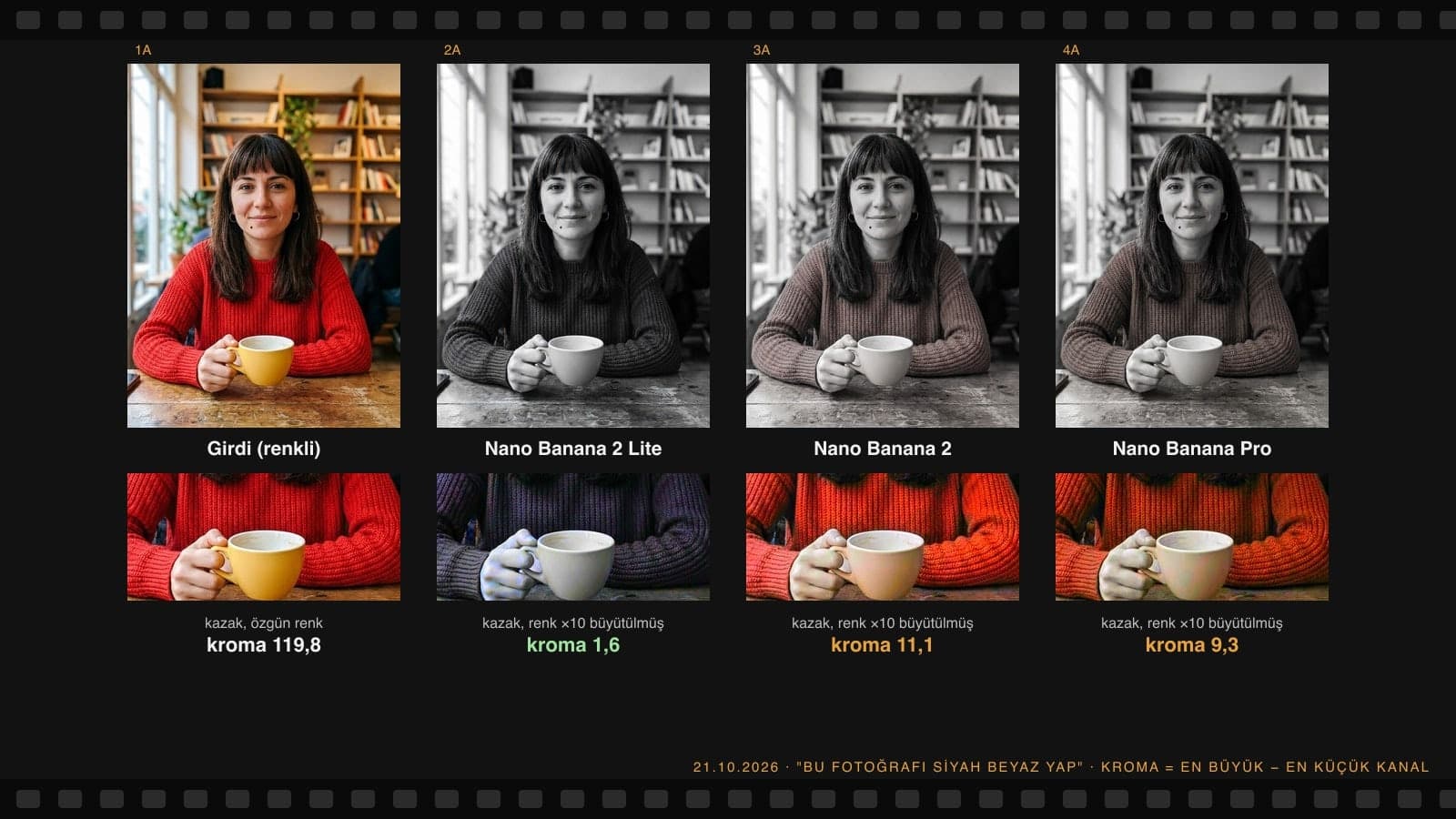
Here is how we measured leftover color: in every pixel we looked at the gap between the largest and smallest color channel (chroma). In a fully gray pixel this gap is 0. On the red sweater in the input photo it averaged 119.8. In outputs that looked "black and white" to our eyes, this number stayed between 2 and 12 depending on the model; anything above 5 shows up on screen as pink or brown.
| What we measured | Nano Banana 2 Lite | Nano Banana 2 | Nano Banana Pro |
|---|---|---|---|
| Color left on the sweater, short prompt (2 runs) | 1.6 and 2.1 | 11.1 and 9.5 | 9.3 and 9.1 |
| Prompt with "neutral gray, no sepia" rules | 2.0 | 9.5 | 12.5 |
| "Grayscale, equal RGB" prompt (2 runs) | not tested | 10.3 and 11.3 | 10.2 and 9.2 |
| Fix with a second message | not needed | 4.9 | 5.8 |
| Came out fully gray (sweater under 3) | 3/3 | 0/6 | 0/6 |
| Face, mole, earrings, framing kept | 3/3 | 6/6 | 6/6 |
| Average time (whole test) | 8.4 s | 13.2 s | 20.2 s |
Lite left no color but drew the tones harsher: the sweater went almost black, and the image's similarity to a gray version of the original stayed at 0.97. With Nano Banana 2 and Pro this similarity was 0.99, so they stayed more faithful to the photo; they just didn't fully kill the color. Writing that we didn't want sepia or a blue tint did not help; in Pro, that sentence pushed the leftover color from 9 to 12.5.
Don't expect a perfect image on the first try. Use the conversational nature of the model to make small changes.
The Black and White Couple Photo Trend: Aerial Shot Test
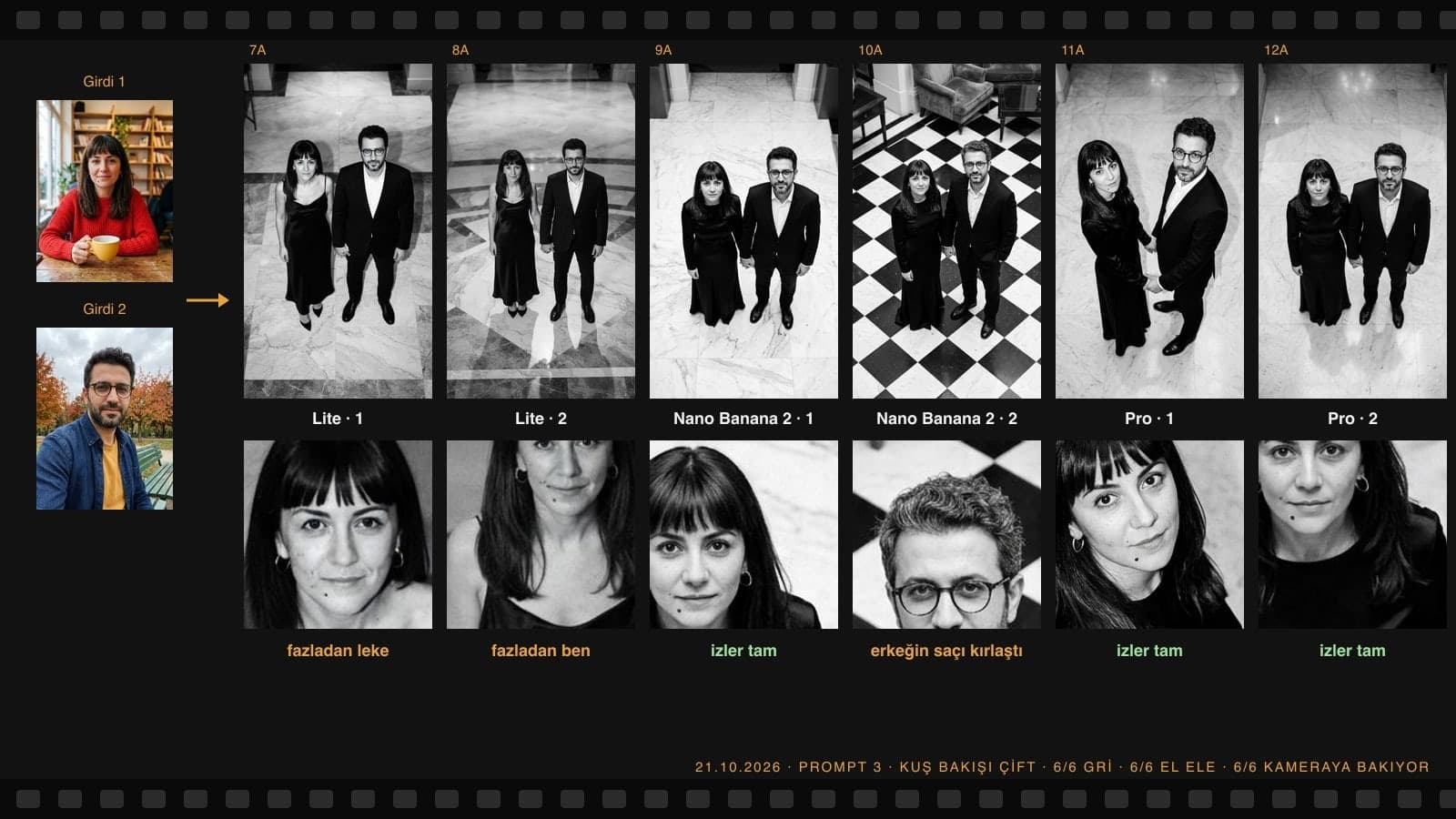
The trend spread on Instagram at the end of September 2026: a couple in elegant black outfits stands on a marble floor, the camera looks down from very high up, and both tilt their heads up to look into the lens. A September 25, 2026 report by the Turkish news site Gündem Sivas describes the trend through this camera angle. We ran separate color photos of two people through Prompt 3 twice on each of the three models.
- Color: 6 out of 6 images measured as full gray (average chroma 0.6 to 0.9). When the scene is built in black and white from the start, no color is left.
- Angle: all 6 looked shot from high up and from the front, and none was a true straight-down view. The trend examples look the same way; at a true top-down angle you couldn't see the faces.
- Pose: in all 6 they hold hands and both look at the camera. In one Nano Banana 2 image the man's other hand was in his pocket.
- Identity: glasses, beard, bangs, hoop earrings and mole were kept 6/6. Lite put an extra mole and blemishes on the woman's face in both of its images; Nano Banana 2 grayed the man's hair in one image.
- Floor: in one image Nano Banana 2 turned the marble lobby into a black and white checkered floor. If that is the floor you want, write it clearly in the prompt.
Did the Lighting Description Hold? Rembrandt and High-Key Portraits
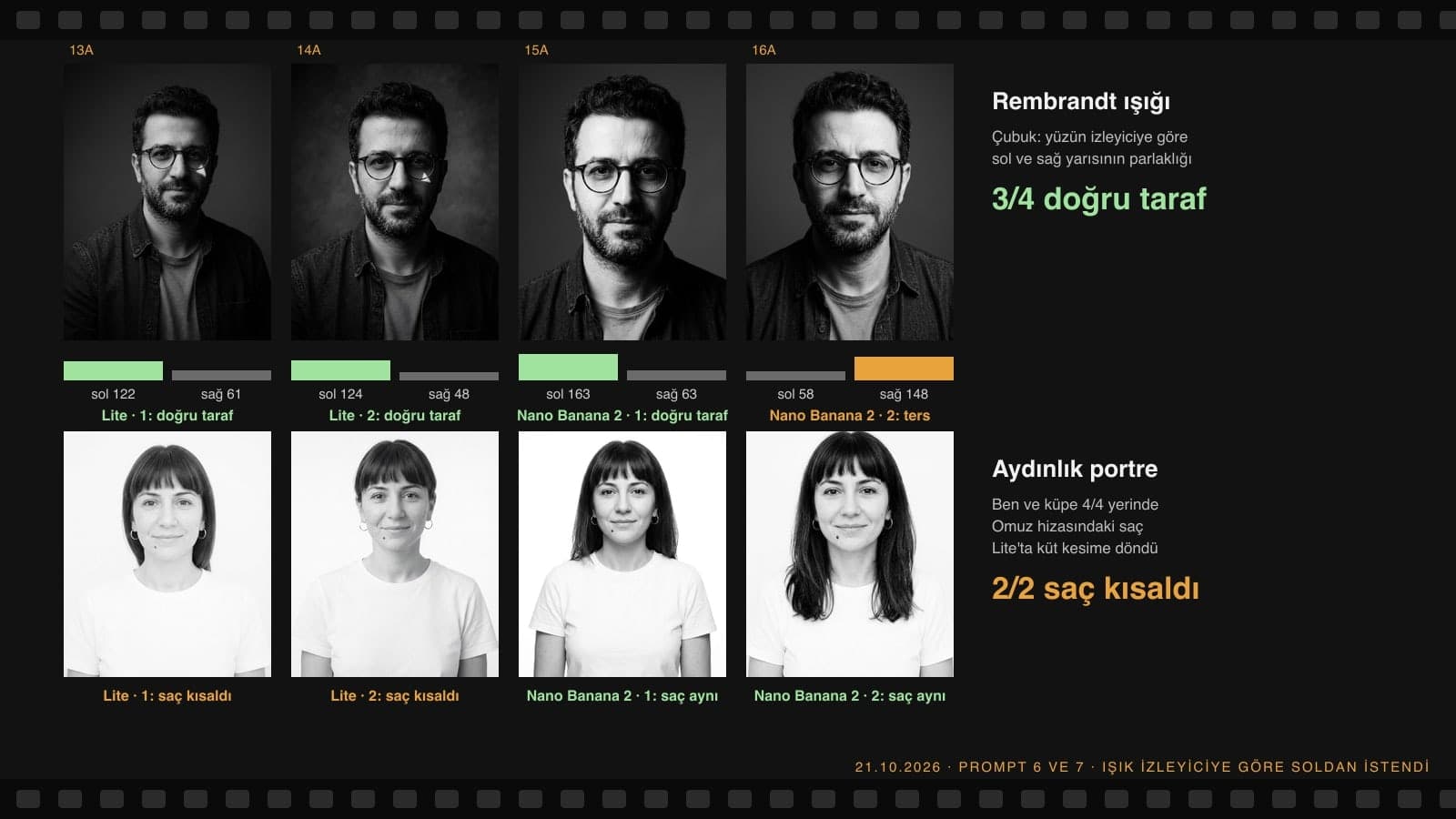
For Rembrandt lighting we wrote which side the light should come from relative to the viewer and measured the average brightness of the two halves of the face. In both Lite images and in one Nano Banana 2 image, the lit half was on the left (a difference of 61 to 100 units); in the other Nano Banana 2 image the light came from the right (a difference of minus 89). Lite's second image also had the small triangle of light under the eye.
In the high-key portrait, all four images came out in light tones; in one Nano Banana 2 image, 47% of the backdrop was pure white. The mole and earrings were in place in all four. In both of its images, Lite turned the shoulder-length hair into a blunt bob ending below the ears; that is why the hair length line was added to Prompt 7.
Which Model Does Gemini Use? Free vs. Paid Accounts
| Account | Model that draws the image | What happened in the black and white test |
|---|---|---|
| No plan (free) | Mostly Nano Banana 2 Lite | Full gray when converting; extra blemishes and moles on the face, shortened hair |
| Paid plan, Flash or Pro setting | Nano Banana 2 | Color stayed on the sweater when converting; full gray in a new scene |
| Paid plan, "Redo with Pro" | Nano Banana Pro | Color stayed when converting; most faithful to marks, slowest |
| API (developer) | All three can be selected | 1K image: $0.034 / $0.067 / $0.134 |
According to Google's help page, since October 9, 2026 accounts without a plan run only on the "Auto" setting, and most requests go to Flash-Lite, with images going to Nano Banana 2 Lite. So when you convert a color photo on a free account, you will most likely get full gray but a somewhat harsh result; on a paid plan you get a more faithful result with a slight color cast. The API cost of the 31 images in this test was about $2.45.
Common Mistakes
- Saying "make it black and white" and checking the result on a small screen. Leftover color shows up in print and on large screens; look closely at the sweater, lips and skin.
- Trying to ban leftover color with "no sepia." In the test, this sentence increased the color in Pro. A second message in the same chat or the saturation slider on your phone gave better results.
- Not listing the marks on the face. In an aerial shot the face is a small part of the frame; if you don't list glasses, mole and earrings, no identifying detail is left.
- Saying "left" and "right." It is unclear whether you mean the person's left or yours; write "from the viewer's side."
- Not checking for blemishes Lite adds. On a free account, zoom in on the face and check for an extra mole or blemish; if there is one, send a second message saying "no other moles or blemishes on the face, keep the skin as in the original."
Using It in Turkey: KVKK and Sharing
Since this is a couple photo trend, you usually upload your partner's photo too. Article 28/1-a of Turkey's data protection law KVKK excludes from the law a person's personal activities that concern themselves or family members living in the same household. Your girlfriend's, boyfriend's or friend's photo may fall outside this scope: the KVKK authority's November 2025 guide on generative AI (p. 57) recommends taking care not to share third parties' data with these systems. Ask before you upload.
Gemini puts an invisible SynthID mark on every image. Presenting the image as a "real shot" misleads people, especially in posts like engagement or wedding announcements; noting in the caption that it was made with AI is enough.
Upload the photo to Gemini and paste Prompt 1. If you only want to remove the color, finish the result on your phone by dragging saturation all the way to the left; on paid plans Gemini can leave a slight color on red and yellow clothing.
Upload two photos showing each person's face from the front and use Prompt 3. Write the camera height, who stands on which side, and that both look at the camera; in our test this pose held in 6 out of 6 runs.
Yes, the same text works in both tools. We tested the original Turkish versions of these prompts in Gemini; we did not test them in ChatGPT this round.
When the model redraws a color photo, it does not fully kill strong colors. In our test, Nano Banana 2 and Pro left a pink tint on the red sweater in 10 out of 10 runs; when the scene was built in black and white from the start, no color was left.
Yes, you can generate images without a plan too; on that account the image is mostly drawn by Nano Banana 2 Lite, which gives full gray when converting. The usage limit is higher on paid plans.
Prompt 9 is written for a family portrait: upload everyone's photo separately and write who stands where from left to right and who is seated. We did not test this prompt; in our family test, facial marks were kept for up to five people.
If you want to colorize a black and white family or couple photo, we have a separate post for the reverse; color couple photo prompts are in our couple post.
If you want to keep the photo itself and only remove its color, you don't need Gemini: your phone's saturation setting gives full gray. Use Gemini for jobs that change the scene, like an aerial couple shot, Rembrandt lighting or film noir; in the test, the 14 images from those prompts had no color left at all.
Black and White Portrait and Couple Photography
An AI-made image is a good start for social media; for weddings, engagements or corporate profiles, we shoot real black and white portraits in the studio and on location. We set the light and tones for black and white from the start and deliver print-ready files. Write to us for a free initial consultation.