



Gemini and ChatGPT Pose Prompts: 12 Prompts to Change the Pose in a Photo
Don't like the pose in your photo? You don't need to reshoot it. We tested 8 poses on two people in Gemini: all 48 identity details (face, glasses, watch and the like) stayed, and the best results came from adding a pose photo you like as a second image. Here are Gemini pose ideas and 12 pose prompts that also work in ChatGPT.
- We tested 8 poses on two different people in Gemini: 40 of 48 pose points held. All 48 identity details, such as glasses, a mole, a scarf, a beard and a watch, stayed in place.
- Writing only the name of the pose got it fully right in 1 of 6 tries. Describing where the hands, feet and head go got 3, and adding a pose photo you like as a second image got 4.
- The blonde hair, leather jacket and red shoes of the woman in the reference photo carried over to our person in none of the 8 tries; the model took only the pose.
- When we asked for the person to sit on a bench or lean on a tree that stood far away, Gemini moved the bench and the tree next to the person. Adding 'do not move it' did not fix this in either of two tries.
- When we asked for pose ideas from a photo of the location, Gemini used no object missing from the photo in any of its 16 suggestions; on the pier, it put the phone at a height with nothing to rest it on in 6 of 8 suggestions.
The quickest way to apply a pose you saved on Pinterest to your own photo is to give that pose photo to Gemini together with your photo. In our October 16, 2026 test, this method got the pose fully right in four of six tries; writing only the pose name managed one in six. If you want Gemini pose ideas, an empty photo of the location is enough (Prompt 5).
Below are 12 ready-made prompts: changing the pose in a photo by describing it, copying the pose from another photo, getting pose ideas for the place you are in, and individual poses like sitting, leaning, walking and looking over the shoulder. Paste them as they are into ChatGPT or Gemini. We ran the tests through the Gemini API with the original Turkish versions of these prompts and did not test them in ChatGPT.
How to Change the Pose in a Photo with AI: 5 Steps
Short answer: upload your photo, list the things to keep one by one (face, glasses, clothes, background) and describe the new pose by where the hands, feet and head are. If the arm movement matters, add a pose photo instead of a description.
- Pick the photo. Both test photos were full-length shots with the shoes in frame. We did not try sitting or squatting poses with a half-length photo.
- Open the tool. In Gemini, upload the photo and type the prompt; the free plan runs Nano Banana 2. ChatGPT's free plan has a limit of 3 file uploads per day, and the reference photo method uses two of them.
- List what to keep: face, hair, glasses, moles, clothes, shoes, background. In the 16 edits we made with this line, all 48 identity details stayed.
- Describe the pose by positions: 'back against the yellow wall, the sole of one foot on the wall, hands in pockets'. For right and left, add 'from the viewer's point of view'.
- The object the pose uses (bench, step, wall) should be right next to the person. If it's farther away, Gemini moves the object to the person; in that case pick a different photo.
Writing the pose name and leaving it at that. With 'show in an over-the-shoulder pose', Gemini cropped the full-length photo to a waist-up portrait in both tries. 'Leaning against the wall pose' looked nothing like the pose we described in either try: in one the woman rested her elbow on a stair railing, in the other the yellow wall turned into a stone wall.
Gemini Pose Ideas: 12 Ready-Made Pose Prompts (Copy and Paste)
Upload your photo, copy the prompt and fill in the bracketed parts to match your photo. Under each prompt we tested, we wrote what came out; we also marked the ones we did not test.
1) Changing the pose in a photo: the base template
Change only the pose of the person in this photo. Keep the face, hair, [glasses, mole], clothes, shoes and background the same; do not add any new objects or people.
New pose: [Arms crossed in front of the chest. Weight on one leg, the other knee slightly bent. Smiling slightly, looking at the camera.]
Keep the lighting and colors the same, and make it look like it was shot with a real camera. No text in the image.All 16 test edits used this template. You can swap the 'New pose' line for one of the poses below; in the first line, list the details from your own photo (beard, watch, earrings and so on).
2) Copying the pose from another photo
Give the person in photo 1 the pose of the person in photo 2: the arms, legs, head and gaze should be positioned as in photo 2.
Keep the face, hair, [glasses, mole], clothes and shoes of the person in photo 1 exactly as they are; take only the pose from the person in photo 2, do not take their hair, face, clothes or [studio] backdrop.
The background is the [street] from photo 1, with the same lighting. Make it look like a real photo, no text in the image.Upload your own photo first, then the pose photo. For the walking and over-the-shoulder poses, four of four tries came out fully right. For leaning against the wall, in both tries the woman stayed away from the wall with her foot in the air: the wall in the reference did not line up with where the wall was in our photo.
3) Pose photo + the spot to touch (wall, bench)
Give the person in photo 1 the pose of the person in photo 2: the arms, legs, head and gaze should be positioned as in photo 2.
Location: the person is standing at the foot of [the yellow wall to the left of the door]; [their back and the sole of their raised foot] rest against this wall.
Keep the face, hair, [glasses, mole], clothes and shoes of the person in photo 1 exactly as they are; take only the pose from the person in photo 2, do not take their hair, face, clothes or [studio] backdrop.
The background is the [street] from photo 1, with the same lighting. Make it look like a real photo, no text in the image.With the 'Location' line added, the woman leaned on the wall and pressed her foot against it in one of two tries, but this time her hands came out of her pockets. Neither try came out fully right. For poses that touch an object, plan on two or three tries.
4) Short version: two photos, three sentences
Give the person in photo 1 the pose from photo 2.
Keep the face, clothes and background of the person in photo 1 the same.
Take only the pose from photo 2, and do not put any text in the image.This is a shortened Prompt 2, and we did not test it separately. If small details like glasses or a mole disappear, go back to Prompt 2.
5) Pose ideas from a photo of the location
I'm going to have a solo photo taken at the place in this photo. Give me [8] pose ideas. For each one: the pose name, which object in the space I'll use, where my arms, legs and head go, and where to put the phone.
Use only objects that are actually visible in the photo; do not suggest anything that is not in the photo.
Put the phone only on a surface visible in the photo (table, bench, windowsill, floor); there is no tripod and nobody to take the photo.
Keep it short.The tested version had no third line. On the pier, Gemini put the phone 'at eye level' or 'at chest level' in 6 of 8 suggestions, with nothing there to rest it on. That's why we added the line; we have not tested the version with it.
6) Pose ideas for you (women or men)
Suggest [6] poses that suit the person in this photo. The person is a [woman / man], and the photo is for [an Instagram post].
For each pose, describe where the arms, hands, legs and head go in one sentence.
Then, for each pose, add a one-line 'New pose:' sentence I can paste into Prompt 1.
Do not suggest poses that don't fit the clothes or the setting in the photo (like squatting in a tight skirt or sitting on wet ground). Keep it short.We did not test this one. Paste the 'New pose:' lines it gives you into the brackets in Prompt 1 and you can see the pose directly on your photo.
7) Sitting pose: step, bench, chair
Change only the pose of the person in this photo. Keep the face, hair, [glasses, mole], clothes, shoes and background the same; do not add any new objects or people.
New pose: Sitting on [the second of the stone steps in front of the door]. Elbows on the knees, hands clasped in front, looking at the camera.
Keep the lighting and colors the same, and make it look like it was shot with a real camera. No text in the image.For the woman, all three pose points held; she just sat on the bottom step instead of the second. For the man, the bench was a few meters behind him, and Gemini pulled it forward and made it bigger.
8) Leaning against a wall or a tree
Change only the pose of the person in this photo. Keep the face, hair, [glasses, mole], clothes, shoes and background the same; do not add any new objects or people.
New pose: Back against [the yellow wall]. The sole of one foot pressed against the wall behind, the other foot on the ground. Both hands in the pockets of [the trench coat], head turned toward the camera.
Keep the lighting and colors the same, and make it look like it was shot with a real camera. No text in the image.This was the weakest pose in the test. On the woman's first try she stood away from the wall with her foot in the air (1 of 3 points); sending the same prompt again got all three points. For the man, the tree trunk moved next to him.
9) Caught mid-stride
Change only the pose of the person in this photo. Keep the face, hair, [glasses, mole], clothes, shoes and background the same; do not add any new objects or people.
New pose: Walking toward the camera on [the sidewalk]: left foot forward, right arm swinging forward. Looking off to the left from the viewer's point of view, away from the camera.
Keep the lighting and colors the same, and make it look like it was shot with a real camera. No text in the image.All three tries showed a step, but the arms stayed at the sides. The woman's gaze went the right way in both tries; the man's turned to the viewer's right. If you want the arms to swing, give a walking photo as a reference with Prompt 2; that way the arm swung in both tries.
10) Looking over the shoulder
Change only the pose of the person in this photo. Keep the face, hair, [glasses, mole], clothes, shoes and background the same; do not add any new objects or people.
New pose: Standing with the back to the camera. Head turned toward the camera over the [right] shoulder, face visible, smiling slightly.
Keep the framing the same, showing the full body from head to toe. Same lighting and colors, like a real photo. No text in the image.With the description, four of four tries came out right. The tested prompt did not include the 'Keep the framing the same' sentence; we added it because asking for the same pose by name alone cropped the frame to waist up.
11) Arms crossed, weight on one leg
Change only the pose of the person in this photo. Keep the face, hair, [beard, watch], clothes, shoes and background the same; do not add any new objects or people.
New pose: Arms crossed in front of the chest. Weight on one leg, the other knee slightly bent. Smiling slightly, looking at the camera.
Keep the lighting and colors the same, and make it look like it was shot with a real camera. No text in the image.All three points held for both people. The squatting pose ('Squatting: knees bent, arms resting on the knees, looking at the camera.') also came out fully right for both.
12) Hand details: watch, glasses, collar
Change only the pose of the person in this photo. Keep the face, hair, [beard, watch], clothes, shoes and background the same; do not add any new objects or people.
New pose: [Looking at the watch on the left wrist: left arm at chest height, right hand on the jacket collar. Head tilted toward the watch.]
Keep the lighting and colors the same, and make it look like it was shot with a real camera. No text in the image.We tried looking at the watch on the man and 'holding the arm of her glasses with her right hand, left hand in her pocket' on the woman. All three points held in both, and the watch stayed on the left wrist.
Send the same prompt once more: the wall-lean pose got 1 of 3 points on the first try and 3 of 3 on the second. If the bench or tree in the background moved, making the prompt longer didn't help; pick a photo where the object is close to the person.
Our Test: 8 Poses, 2 People, 48 Pose Points
On October 16, 2026, we generated two test photos with the Gemini API: a woman standing in front of a yellow wall on a cobblestone street (round glasses, red scarf, a mole on her cheek) and a man standing in a park (beard, denim jacket, a watch on his left wrist). Neither is a real person. For each pose we counted three pose points, and for each person three identity details. The model was gemini-3.1-flash-image; the Gemini help page calls the image model on the free plan Nano Banana 2. In total we made 45 image requests and 2 text requests, and the image requests took between 9 and 32 seconds.
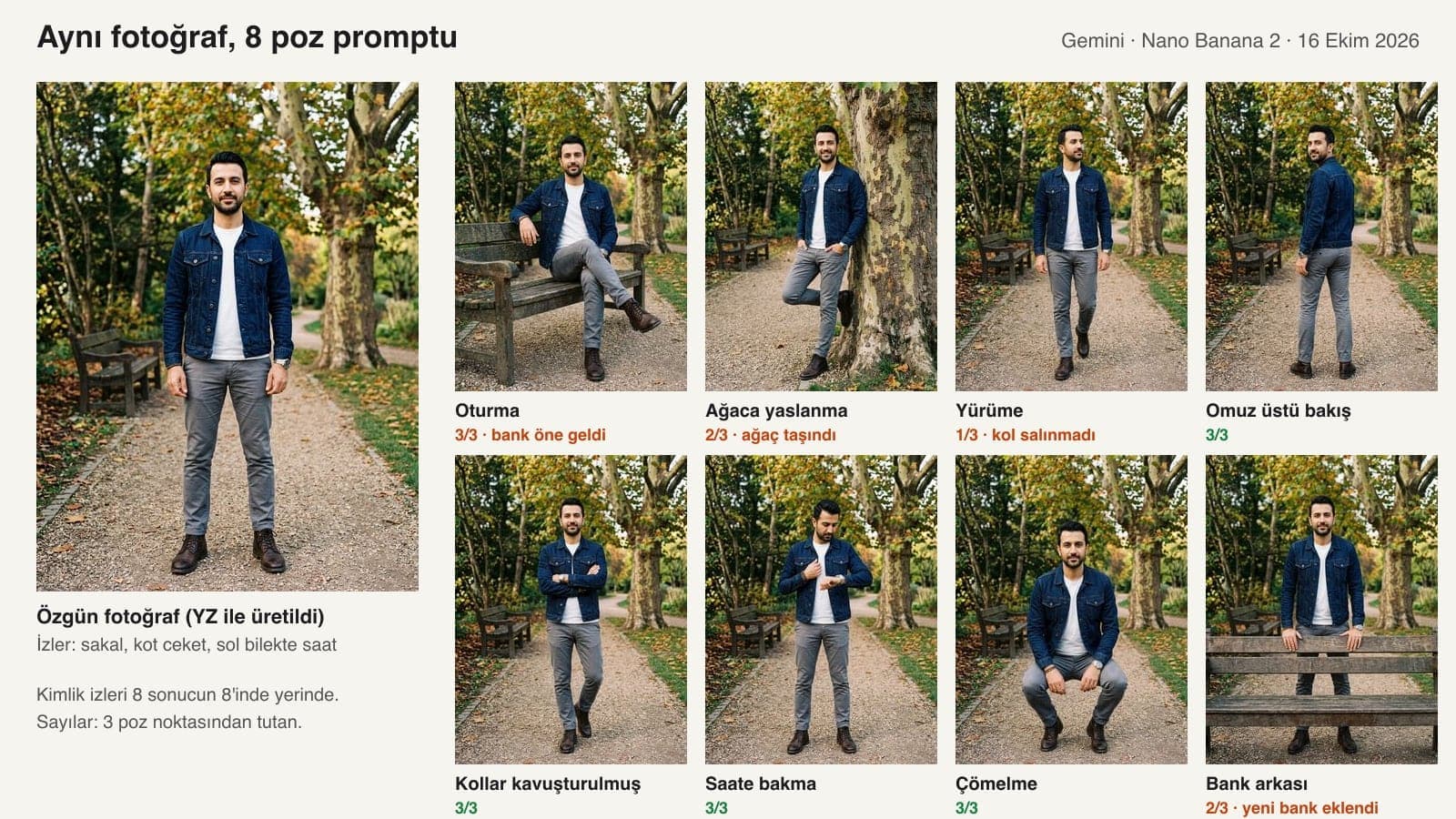
| Pose | Woman (street) | Man (park) | What happened |
|---|---|---|---|
| Sitting | 3/3 | 3/3 | The man's bench was pulled forward and enlarged |
| Leaning on a wall / tree | 1/3 | 2/3 | The woman stood away from the wall; the tree moved next to the man |
| Walking | 2/3 | 1/3 | Arms did not swing for either; the man looked the opposite way |
| Over-the-shoulder look | 3/3 | 3/3 | No drift |
| Arms crossed | 3/3 | 3/3 | No drift |
| Hand detail (glasses / watch) | 3/3 | 3/3 | No drift |
| Squatting | 3/3 | 3/3 | No drift |
| By the door / behind the bench | 2/3 | 2/3 | The woman held the railing instead of the door; a new bench was added in front of the man |
| Total pose points | 20/24 | 20/24 | Identity details: 24/24 and 24/24 |
What broke was the background. In the man's photo, the bench and the tree were a few meters away from him; in the three poses that touched them, Gemini brought the object next to him or drew a new bench. In the woman's photo, the steps, wall and door were right beside her, and the background stayed the same in all eight results.
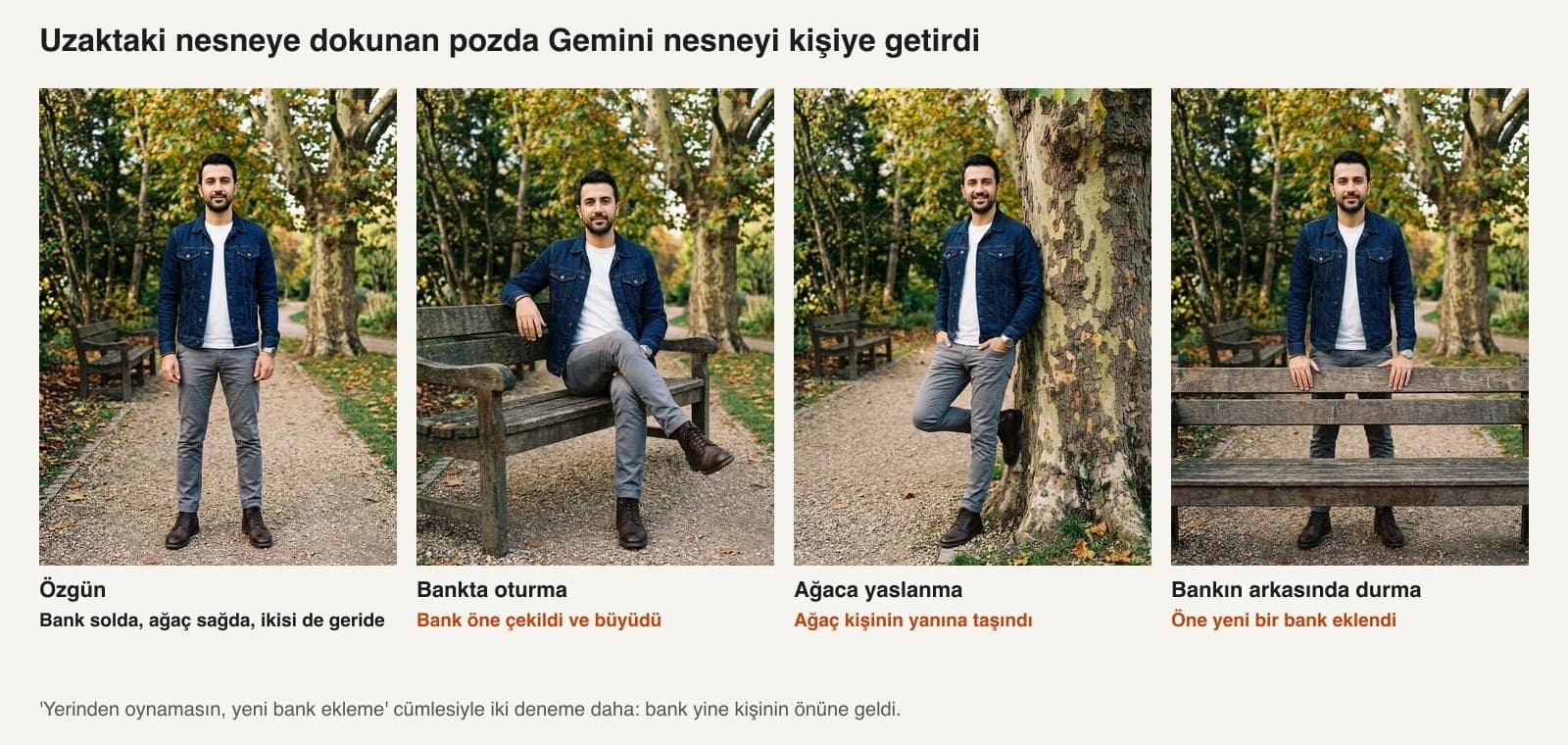
We also tried to fix this through the prompt. We added this (in Turkish): 'Do not move or enlarge the bench and tree in the background, do not add a new bench; the person has walked over to where the bench on the left is and sat down.' In both tries the bench still ended up in front of the person. We did not find a prompt that solved this.
Pose Name, Description or Photo?
On the woman's photo, we asked for three poses three ways, twice each: by name only ('Show the woman in this photo in a leaning-against-the-wall pose.'), with a description as in Prompt 1, and by adding another woman's pose photo as a second image, as in Prompt 2. We generated the reference woman with AI too: platinum blonde hair, leather jacket, red shoes.
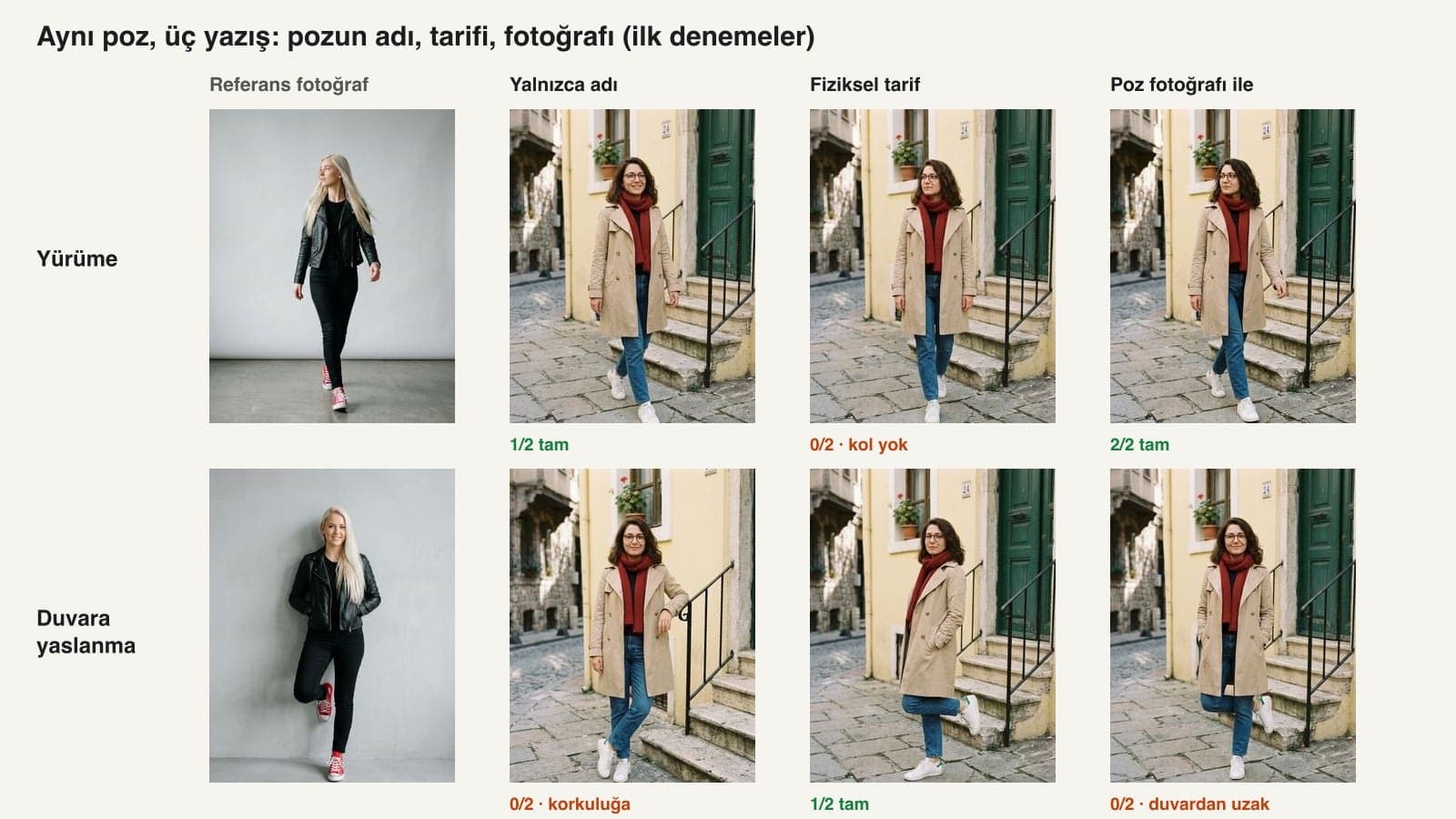
| Method | Leaning on the wall | Walking | Over the shoulder | Fully right |
|---|---|---|---|---|
| Pose name only | 0/2 | 1/2 | 0/2 (cropped to waist up) | 1/6 |
| Physical description (Prompt 1) | 1/2 | 0/2 (arm didn't swing) | 2/2 | 3/6 |
| Pose photo (Prompt 2) | 0/2 (away from the wall) | 2/2 | 2/2 | 4/6 |
| Pose photo + 'Location' line (Prompt 3) | 0/2 | not tested | not tested | 0/2 |
A result we call 'fully right' has every requested pose point, with the framing and background unchanged. The pose photo carried the body shape best; for the pose where the person touches a wall, the description came out ahead. The reference woman's hair, jacket and shoes carried over in none of the 8 tries. We also considered using a photo of a wooden drawing mannequin as the reference, but the mannequin poses we generated did not come out the way we wanted, so we left them out of the test.
Gemini Pose Ideas by Location: What Did It Make Up?
We gave the tested version of Prompt 5 to the gemini-3.5-flash model with two empty location photos: an Istanbul pier with benches and railings, and a cafe corner with a marble table. All 16 suggestions relied on an object actually in the photo (bench, railing, lamppost, windowsill, bookshelf, hanging planter). In the cafe, the phone went on the table, the windowsill or the chair opposite in 8 of 8 suggestions. On the pier, only 2 of 8 suggestions put the phone on a surface (the ground); in the other 6 the phone hung in empty space 'at eye level' or 'at chest level'.
In the cafe answer, it once called the wicker-seat bistro chair a 'Hazerfen chair'. When you follow a suggestion, identify the object by where it sits in the photo.
ChatGPT or Gemini for Changing Poses?
We did not run this test in ChatGPT; the ChatGPT rows below come from OpenAI's own help and announcement pages. The prompts paste into both tools as they are. The difference is the file limit: Prompts 2 and 3, which use a reference photo, need two files.
| Criterion | ChatGPT | Gemini |
|---|---|---|
| Image model | ChatGPT Images 2.5 (September 8, 2026), on all plans | Nano Banana 2 on the free plan; paid Google AI plans also get Nano Banana Pro |
| Photo uploads | 3 files per day on the free plan, 20 MB per image | Up to 10 files in one prompt |
| Reference pose (2 files) | On the free plan, one try per day with one file left over | Does not hit the file limit |
| Age | March 2025 system card: photorealistic photos of children are not edited | 18+ to generate and edit images |
| AI labeling | C2PA content credentials (readable at openai.com/verify) | SynthID on every image; the visible watermark can be turned off in settings |
Common Mistakes
- Asking for the pose by name. 'Leaning against the wall pose' gave two different poses in two tries, and neither was the one we described.
- Leaving out the framing. Asking for the over-the-shoulder pose by name cropped the full-length photo to waist up twice.
- Asking for a pose that touches a distant object. The bench and the tree came next to the person every time; keep the object you'll use for the pose close to the person.
- Expecting arm movement from a description. 'Right arm swinging forward' did not show up in the arm in any of three tries; give a pose photo for the arm.
- Writing right and left from the person's point of view. 'Left from the viewer's point of view' held twice for the woman and flipped once for the man; check the result every time.
Using Someone Else's Photo as a Reference: Privacy and Age
The pose photo you saved from Pinterest or Instagram shows someone else. The Generative AI guide published in November 2025 by KVKK, Turkey's data protection authority (p. 57), recommends taking care not to share third parties' data with these systems. In our test the reference person's face did not carry over to the result, but the photo still gets uploaded to the model. We did not test whether a pose photo with the face cropped out does the same job.
You must be 18 or older to generate and edit images in Gemini. When you share a photo with an AI-changed pose on social media, one sentence saying it was edited with AI answers the 'is this photo real?' question before anyone asks it.
Upload a photo of the place you are in to Gemini and type Prompt 5. In our test, Gemini gave 16 suggestions for two locations, and none of them used an object missing from the photo. For ideas based on your own photo, use Prompt 6.
Yes, the 12 prompts here paste into both tools as they are. We ran the test in Gemini with the original Turkish prompts. Because ChatGPT's free plan has a limit of 3 files per day, you can try the two-photo Prompts 2 and 3 there once a day.
Yes. In 16 edits in Gemini, 40 of 48 pose points held, and all 48 identity details such as face, glasses, mole, beard and watch stayed. The poses it struggled with were leaning against a wall and swinging the arms while walking.
Yes: upload your own photo first, then the pose photo, and type Prompt 2. This method came out fully right in four of six tries, and the reference person's hair or clothes carried over in none of the 8 tries.
It didn't in our test. In the 16 edits where we listed the details to keep (glasses, mole, hair, beard) one by one in the prompt, all 48 details stayed in place. We did not test short prompts that leave those details out.
The bench was a few meters from the person, and the pose called for touching it. In that situation Gemini brought the object to the person; the 'do not move it' sentence didn't help in either of two tries. Pick a photo where the object is close to the person.
Before you take your next photo, grab an empty shot of the location and give it to Prompt 5: you'll know which object to use and where to put the phone before you shoot. If the pose needs fixing afterward, you have Prompt 1 and Prompt 2.
Corporate Photography for Your Business
For your own profile, a pose fixed with AI is enough. A team page, a product catalog or photos of your venue need a real shoot where everyone stands in the same light and in the right pose. We plan the poses with you before the shoot and deliver the photos sized for your website and social media. Get in touch for a free initial consultation.