



How to Make a GIF: Video to GIF and GIF from Photos, 12 ChatGPT Prompts (2026)
Phone methods for turning a video or photos into a GIF, 12 prompts that make a GIF in ChatGPT with Python and fit it under a size limit, file sizes for the same 4 seconds measured at 12 settings, and why a 15 fps GIF ended after 3.6 seconds.
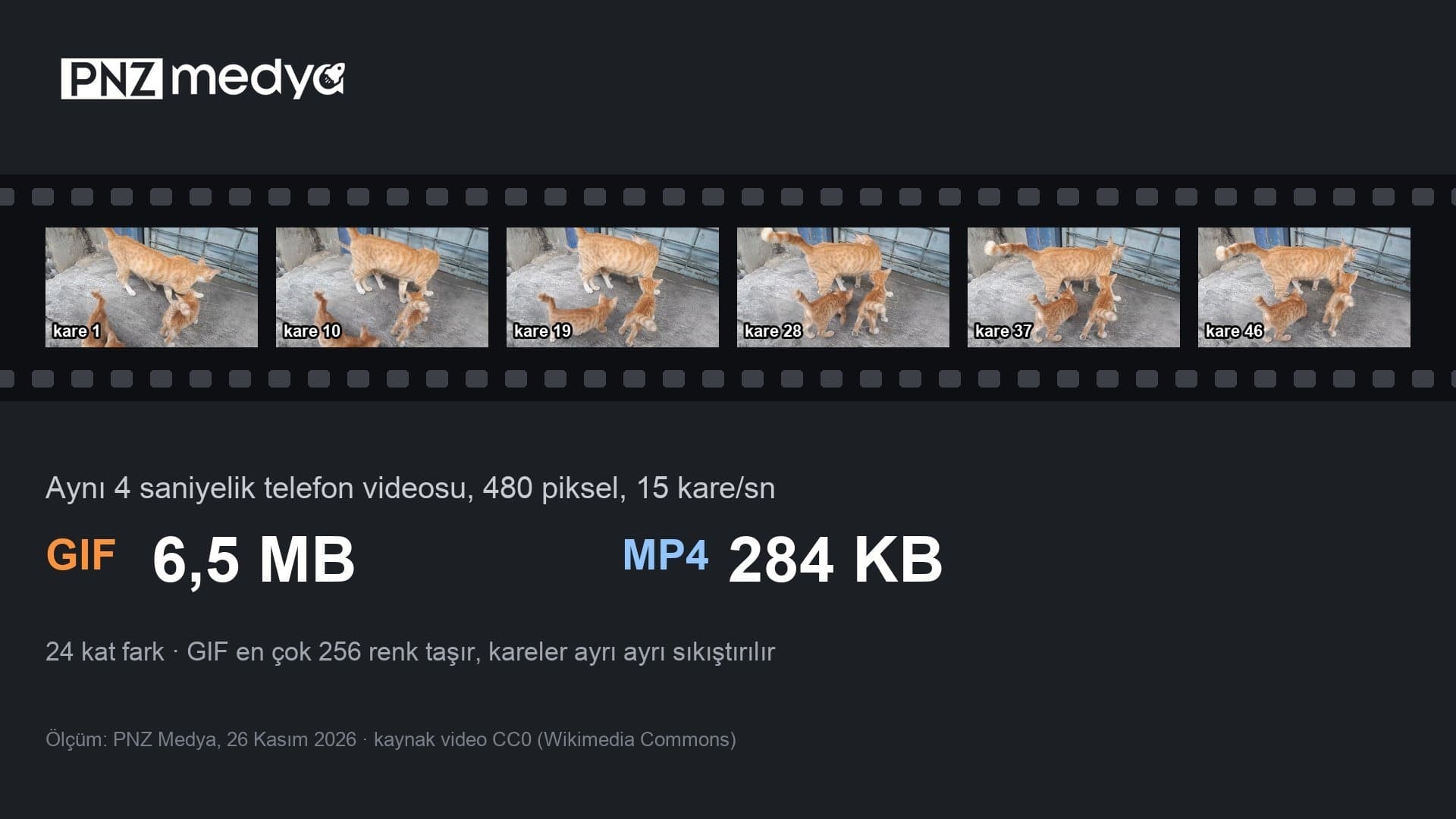
- The fastest way to turn a video into a GIF is on your phone: the GIF button in Samsung Gallery while a video plays, the Make GIF action in iPhone Shortcuts, or sending a video of up to 6 seconds as a GIF in WhatsApp.
- For a GIF from photos, the Animation feature in Google Photos takes 2 to 50 photos; if you want to set the frame duration yourself, use Prompt 1, which does it in ChatGPT with Python.
- In our measurement, a 4-second phone video came to 6.5 MB as a 480-pixel, 15 fps GIF; the same clip as an MP4 was 284 KB. If the place you're posting to accepts video, don't convert it to a GIF.
- Pick a frame rate of 10, 20 or 25: GIF stores frame durations in 1/100-second steps, and a 4-second GIF we saved at 15 fps with Pillow ended after 3.6 seconds.
- Discord's emoji limit is 256 KiB: 2 seconds of camera footage at 128x128 pixels and 10 fps fit in 199 KB with 64 colors, while 3 seconds needed 32 colors.
We turned a 4-second phone video into a 480-pixel-wide GIF and got a 6.5 MB file. The same 4 seconds as an MP4 is 284 KB. That's why half of making a GIF is shrinking the file: choosing between width, frame rate and number of colors.
First come the ways to make a GIF on your phone and on websites. Then 12 ready-made prompts: 9 have ChatGPT use Python to make GIFs from photos, edit a GIF and fit it under a size limit; 2 have it write an ffmpeg command for video to GIF and for MP4; 1 asks Gemini for a short video from a photo. After that, the measurement tables: how much each setting adds to the file.
We did not send new requests to ChatGPT or Gemini for this post, and we did not run the prompts in a chat and measure the results. We ran the Python (Pillow 11.3) and ffmpeg 7.1 steps the prompts ask for on our own computer. The source video is the CC0-licensed "Three orange kittens following their mother" recording on Wikimedia Commons (1920x1080, 30 fps). We converted its first 4 seconds to GIF at 4 widths, 3 frame rates and 5 color counts, compared every frame with the source using SSIM, and added up the frame durations to get each file's real playback time.
How to Make a GIF: 6 Ways on Your Phone, Online and in ChatGPT
Short answer: if the video is on your phone, the phone's built-in tool is enough; for a GIF from photos, use Google Photos or ChatGPT. If you need to fit a size limit, add text or change the speed, use Python or ffmpeg.
| Method | Where | Input | Note |
|---|---|---|---|
| Samsung Gallery and Camera | GIF in the top right while a video plays; Camera settings > Swipe Shutter button to > Create GIF | Video, burst shots, photos in Gallery | Menu names vary by One UI version |
| Google Photos, Animation | In the app, + > Animation; on the web, select photos, then Create new > Animation | 2-50 photos | Speed can't be changed, according to Google's help page |
| iPhone Shortcuts, Make GIF | Search for GIF in Shortcuts and add the Make GIF action | Live Photo, video, burst | The result is saved to Photos |
| Select the video, trim it, tap GIF | Video of up to 6 seconds | No sound, plays on a loop | |
| ezgif.com | Video to GIF page | Video up to 200 MB | The higher the frame rate, the shorter the length you can select |
| ChatGPT, Python | Upload the files to the chat and use Prompts 1-9 | Photos, GIF | Video is not among the supported files; use Prompt 3 to get a command |
Samsung's help page lists two ways: a camera setting that creates a GIF instead of a burst shot when you swipe the shutter, and making a GIF from photos in Gallery. Google Photos' help page describes an animation as a fast-moving GIF made from selected photos and videos, and says the speed can't be changed. WhatsApp's 6-second limit has been the same since 2016; a longer video has to be trimmed with the slider first.
ChatGPT works differently. OpenAI's data analysis help page lists the supported files as spreadsheets, PDFs, text and data files. Video isn't on that list, and the Python environment has no internet access, so it can't download a video from a link. For video to GIF, Prompt 3 therefore has ChatGPT write the command, and you run it on your own computer.
Video to GIF: A Small, Smooth File in 5 Steps
- Take only the seconds you need from the video; GIF size grows in direct proportion to length (in our measurement, 2 seconds came out at about two-thirds the size of 3 seconds).
- Reduce the width: 320-480 pixels is enough for messaging. Going from 480 to 320 took the file from 4.4 MB down to 2.0 MB.
- Choose 10 fps, or 20 or 25 if the motion is very fast. 15 and 24 fps don't fit the GIF's 1/100-second timing step exactly.
- Generate the color palette from the video itself (palettegen in ffmpeg). On camera footage, 64 colors made the file 33% smaller.
- After saving, open the file and check its duration: the frame durations should add up to the length of the video.
Converting the video to a GIF at full resolution. At 1920 pixels wide, even one second takes up tens of MB; in our measurement, 4 seconds at 800 pixels and 10 fps came to 12.1 MB.
12 Ready-Made Prompts for Making GIFs (ChatGPT and Gemini)
Upload the photos or the GIF file to ChatGPT, paste the prompt and replace the square brackets with your own values. The Python prompts ask ChatGPT to process the file with code and leave the image itself alone, so your photos stay exactly as they are.
1) Prompt to make a GIF from photos (main template, ChatGPT)
Make a looping GIF from the [5] photos I uploaded. Do not use the image generation tool and do not redraw the photos; work in Python with Pillow.
Order: [upload order / by file name].
First fix the orientation of each photo with ImageOps.exif_transpose. Resize all of them to [640] pixels wide; do not crop a photo with a different aspect ratio, center it on the same canvas and fill the edges with [white] padding.
Keep each frame on screen for [0.8] seconds and loop back to the start after the last frame (loop=0). Give frame durations as multiples of 10 milliseconds.
After saving, reopen the GIF and tell me: number of frames, duration of each frame, total duration, pixel dimensions, file size (KB).
If the file is larger than [2 MB], reduce the number of colors to 128, save it again and compare the sizes of the two versions.With the same settings we turned 5 frames into a 640-pixel GIF: 919 KB with 256 colors, 580 KB with 64 colors.
2) Short version
Make a looping GIF from these photos in the order I uploaded them. Use Python Pillow and do not redraw the photos.
Width [480] pixels, each frame [1] second. Give me the GIF as a downloadable file and tell me its total duration.3) Video to GIF: a prompt that writes the ffmpeg command
I want to make a GIF from the [video.mp4] file on my computer; I'll run the command myself. I'm on [Windows / macOS].
Take the part of the video between [00:12] and [00:16]. Width [480] pixels, keep the aspect ratio and make the height an even number. Frame rate [10].
Generate the color palette from the video itself (palettegen, stats_mode=diff) and apply it with paletteuse; keep dithering off.
Write a single-line ffmpeg command, then explain what each part of the command does in one sentence each.
If ffmpeg isn't installed, briefly explain how to install it on [Windows / macOS]; do not suggest any other program.You can see what these settings produce in the table below: 480 pixels, 10 fps and 4 seconds came to 4.4 MB and finished in 4.0 seconds.
4) Prompt to fit a GIF under a size limit
The GIF I uploaded has to be smaller than [8 MB]. Using Python Pillow, without redrawing the image, try the following in this order and measure the file size after each attempt:
1) Lower the frame rate to [10] fps (drop frames and lengthen the remaining frames so the total duration stays the same).
2) Set the number of colors to 128, then 64, then 32.
3) If it's still too large, reduce the width by 20% each time.
Stop at the first version that gets under the limit. Show every version you tried in a table: frame rate, colors, width, size (KB), total duration.
If the total duration differs from the original GIF by more than 0.1 seconds, do not use that version.5) Text GIF prompt (text that appears letter by letter)
Make a [480x270] pixel GIF on a [white] background: the following text should appear letter by letter from left to right, then stay fully visible for [1.5] seconds and loop back to the start:
"[We close at 6 PM today]"
Use Python Pillow. Pick a TTF font that contains every character in the text (such as DejaVu Sans); do not use ImageFont.load_default.
First use fontTools to check that every character in the text exists in the font; if any are missing, stop and list them.
Frame rate 10, at most 32 colors, dithering off. Tell me the file size and the total duration.This kind of animation on a plain background came to 60 KB at 480x270 pixels, 4 seconds and 15 fps.
6) Prompt to add text to an existing GIF
Add the following text at the bottom center of every frame of the GIF I uploaded: "[your text]"
Use Python Pillow and do not redraw the GIF. Open the frames one by one (ImageSequence) and keep each frame's duration and the GIF's loop count (loop) exactly as they are.
Make the text white with a [3] pixel black outline; use a font that contains every character of the text (check with fontTools and list any missing ones), and do not use load_default.
After saving, list the number of frames, total duration and file size of the original and the new GIF side by side.7) Boomerang (forward and back) GIF prompt
Make the GIF I uploaded play like a boomerang: the frames play forward first, then backward, then loop back to the start.
On the way back, do not repeat the first and last frames, so there's no jump. Use Python Pillow and keep the frame durations.
Tell me the new number of frames, total duration and file size; if the size goes over [5 MB], reduce the number of colors to 128.8) Editing a GIF: speed up, crop and delete frames
Edit the GIF I uploaded with Python Pillow, and do not redraw the image:
- Speed it up [1.5]x: shorten each frame's duration by that factor, round it to a multiple of 10 milliseconds and do not go below 20 milliseconds.
- Delete the first [3] and the last [2] frames.
- Crop the image by [40 pixels on the left, 40 on the right].
First list the original GIF's number of frames, frame durations and total duration, then do the same for the edited GIF.9) GIF prompt for a Discord emoji
From the GIF I uploaded, make an animated emoji that I'll upload to Discord. The file must not exceed 256 KB (262,144 bytes).
With Python Pillow: crop a square from the [center] of the image, scale it down to 128x128 pixels, keep the first [2] seconds and set the frame rate to 10.
Save it with 64 colors first; if it's over 256 KB, go to 32 colors, and if that's still over, go down to 112x112 pixels. Give me the size of each attempt in bytes.
Do not redraw the image, and do not add text or a border around it.On camera footage at 128 pixels, 2 seconds with 64 colors came to 199 KB and 3 seconds with 32 colors came to 228 KB; both are under the limit.
10) Prompt to convert a GIF to MP4 (for websites and sharing)
I want to convert the [animation.gif] file on my computer to MP4 to use on a website and in messaging; I'll run the command myself.
Use H.264 with the yuv420p pixel format, round the width and height to even numbers, make the file start quickly (+faststart) and leave out audio.
Write a single-line ffmpeg command and explain each part in one sentence.
Then write the HTML video tag that plays this MP4 on a web page like a GIF: automatically, muted and on a loop.11) Turning a photo into a moving GIF: a short video in Gemini
Make a short [4]-second video from the photo I uploaded.
Keep the camera still; only [the hair and the clouds in the background] should move slightly, and nothing else should move.
Keep the person's face, expression and clothing as they are in the photo; do not add any person, text or object that isn't in the photo.
Make the first and last frames of the video very close to each other so no jump shows when it plays on a loop.Convert the resulting MP4 to a GIF with the command from Prompt 3. Detailed photo animation prompts and the differences between tools are in a separate post.
12) Fix prompt for a GIF that's too fast, too large or banded
There's a problem with the GIF you just made: [it plays too fast / the file is too large / the colors are blotchy].
First reopen the GIF and list the number of frames, each frame's duration (milliseconds) and the total duration.
If it plays too fast: the frame durations may have been shortened when they were rounded to multiples of 10 milliseconds; set the frame rate to 10, 20 or 25 and make the total duration match the source.
If the file is too large, follow the order in Prompt 4. If the colors are blotchy, generate one shared palette from all frames and raise the number of colors to 256.
Show what you changed and the new result in a single table.If ChatGPT opens its image generation tool and draws a single picture, write this in the same chat: "Do not generate an image; process the files I uploaded with Python Pillow and give me a .gif file". If no file link appears, add "Save the GIF as a downloadable file".
Why Are GIFs So Large? Measuring the Same 4 Seconds
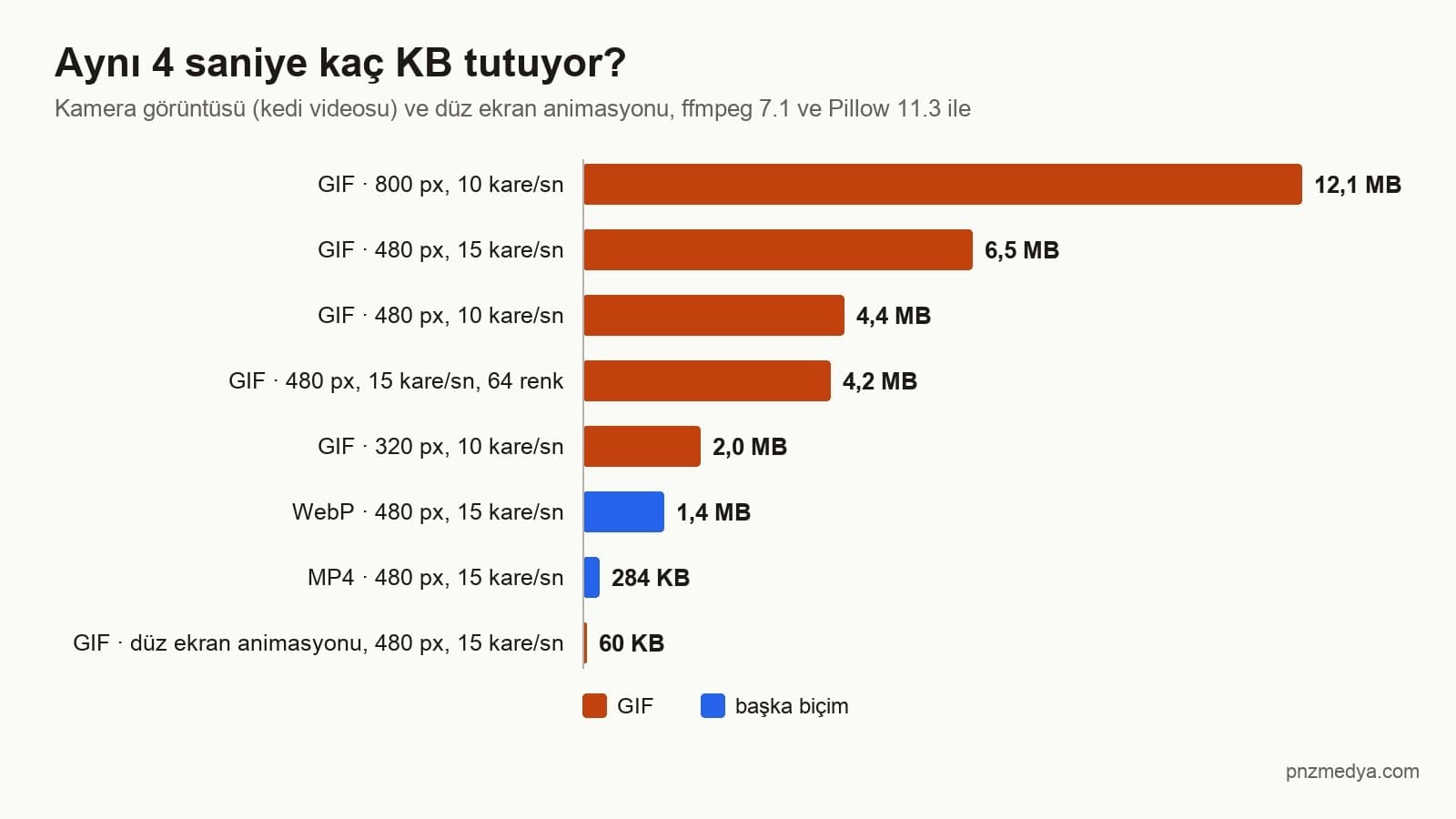
GIF compresses every frame on its own with a palette of at most 256 colors, while MP4 encodes the differences between frames. These are the sizes we measured with ffmpeg on the first 4 seconds of the kitten video:
| Width | 10 fps | 15 fps | 24 fps |
|---|---|---|---|
| 320 pixels | 2.0 MB | 2.9 MB | 4.4 MB |
| 480 pixels | 4.4 MB | 6.5 MB | 10.1 MB |
| 640 pixels | 7.8 MB | 11.6 MB | 18.1 MB |
| 800 pixels | 12.1 MB | 18.0 MB | 28.3 MB |
Size grows almost in direct proportion to the number of frames: going from 10 to 15 fps made the file 1.5 times larger. Doubling the width quadruples the area; going from 320 to 640 made the file 3.9 times larger. The quality difference stayed small: the frames matched the source with an SSIM between 0.966 and 0.979.
The same 480-pixel, 15 fps clip came to 1.4 MB as WebP and 284 KB as MP4 (H.264). If you want motion on your website, a muted, looping MP4 adds far less weight to the page than a GIF (Prompt 10).
What Frame Rate Should a GIF Be? Our 15 fps GIF Ended at 3.6 Seconds
The GIF format stores frame durations in hundredths of a second. At 15 fps one frame should last 66.7 milliseconds, and that value doesn't fit into 10-millisecond steps.
Delay Time - If not 0, this field specifies the number of hundredths (1/100) of a second to wait before continuing with the processing of the Data Stream.
| Frame rate | Saved with Pillow | Saved with ffmpeg | Note |
|---|---|---|---|
| 10 fps | 4.00 s, 40 frames | 4.00 s, 40 frames | Every frame is 100 ms, an exact fit |
| 15 fps | 3.60 s, 60 frames | 4.00 s, 60 frames | Pillow wrote 60 ms for every frame, so the GIF runs 10% fast |
| 24 fps | 3.84 s, 95 frames | 4.00 s, 96 frames | Pillow wrote 40 ms and merged two identical frames |
ffmpeg alternated durations between 60 and 70 milliseconds and kept the total at 4 seconds; Pillow gave every frame the same rounded duration. That's why the prompts ask for a frame rate of 10, 20 or 25: 100, 50 and 40 milliseconds are whole numbers. Prompt 12 catches this error by reopening the GIF and adding up the frame durations.
Number of Colors and Dithering: Which One Makes the File Smaller?
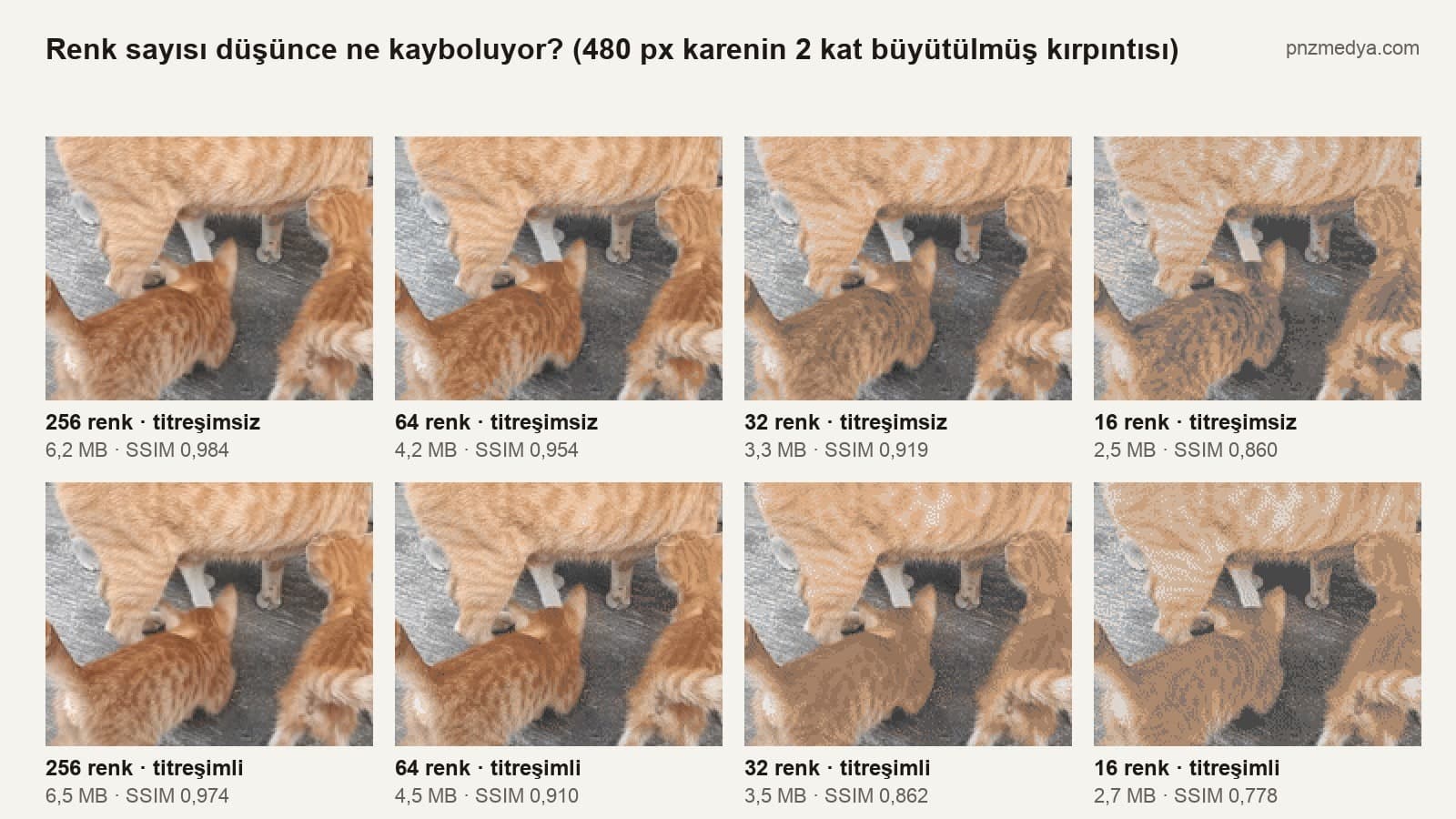
We reduced the number of colors on the 480-pixel, 15 fps clip. Without dithering, 256 colors came to 6.2 MB, 128 colors to 5.1 MB, 64 colors to 4.2 MB, 32 colors to 3.3 MB and 16 colors to 2.5 MB. At 64 colors the frame similarity stayed at 0.954 and the fur still looked smooth to the eye; at 32 and 16 colors the orange tones broke up into flat blotches.
Dithering made the file 5% to 10% larger in every test, and on this camera footage it did not fix the blotches; it added a dotted texture to the surface. With wide gradients like a sky or a soft shadow, it's worth turning dithering on and taking a look. On handheld, textured video we left it off. In Pillow's quantize function, the dither setting made no difference when used without a palette: the two files came out byte for byte identical.
Why Is a GIF from a Screen Recording So Small?
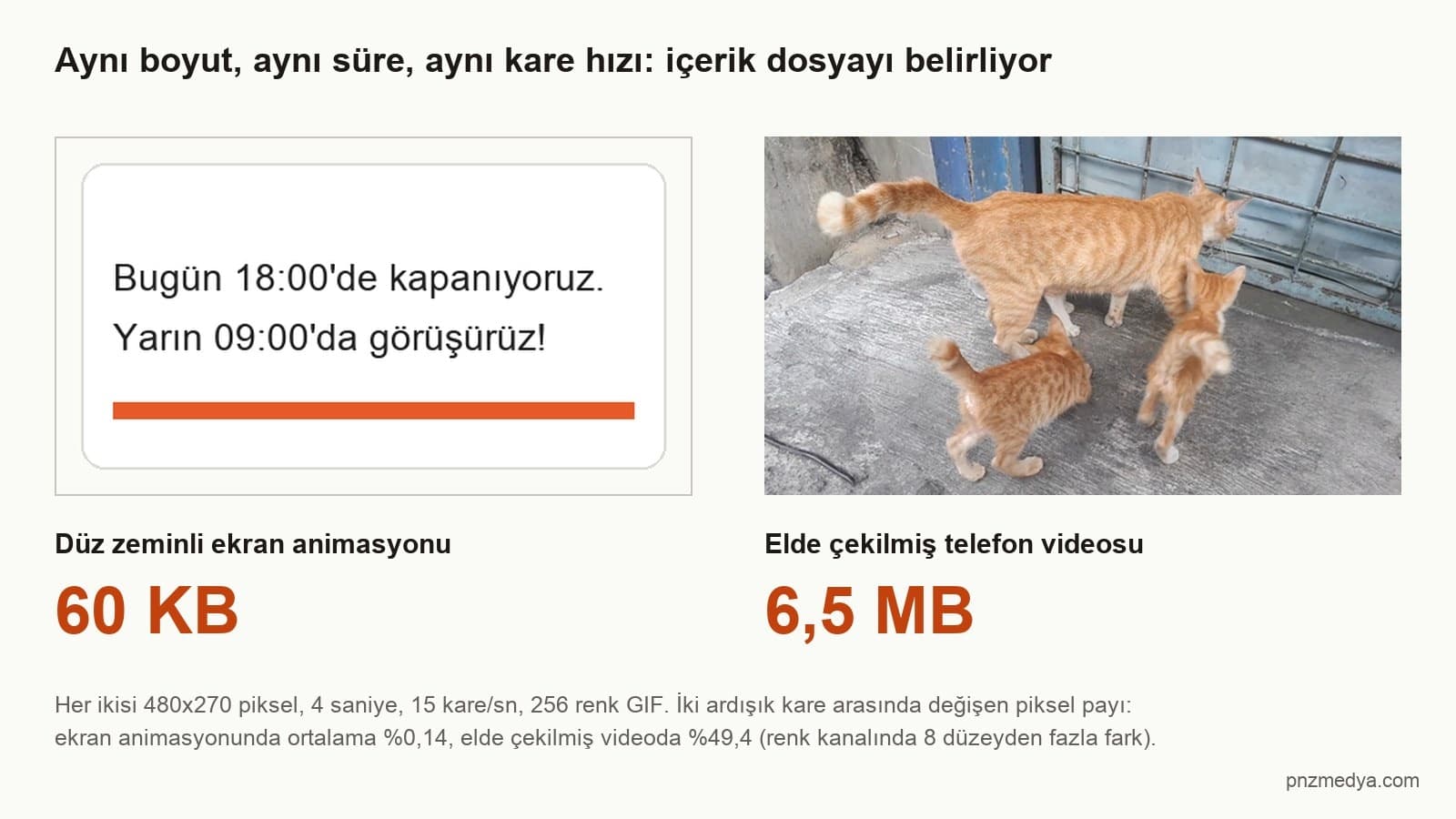
We saved a 4-second animation of text appearing letter by letter on a white background with the same settings as the kitten video: 60 KB against 6.5 MB. Between two consecutive frames, an average of 0.14% of the pixels changed in the screen animation and 49.4% in the handheld video. GIF can rewrite only the rectangle that changed, so screen recordings, logo animations and text GIFs stay small, while a shaky camera forces almost half the screen to be rewritten in every frame.
If you're shooting a GIF with your phone, rest the phone against something: with a steady camera the background stays the same from frame to frame. We did not measure a steady shot separately for this post; what we measured is that file size grows along with the share of pixels that change.
GIF Limits for WhatsApp, Discord and GIPHY
| Platform | Limit | Source |
|---|---|---|
| A video sent as a GIF can be at most 6 seconds | The GIF option in the app (since 2016) | |
| Discord emoji | At most 256 KiB, animated emoji included | Discord developer documentation, Emoji |
| Discord sticker | At most 512 KB, 320x320 pixels; animated format is APNG | Discord Help Center, Stickers |
| GIPHY | Video (Clips) uploads up to 100 MB; for stickers, at least 20% of the first frame must be transparent | GIPHY help pages |
| ezgif.com | Video uploads up to 200 MB | ezgif Video to GIF page |
For a Discord emoji, we cropped a square from the middle of the video and ran 12 tests at 96, 128 and 160 pixels. At 2 seconds, 96 and 128 pixels fit with 64 colors; 160 pixels fit only with 32 colors (237 KB). At 3 seconds, 128 pixels with 64 colors grew to 295 KB and went over the limit, and with 32 colors it dropped to 228 KB.
| Frame size | 2 s, 64 colors | 2 s, 32 colors | 3 s, 64 colors | 3 s, 32 colors |
|---|---|---|---|---|
| 96x96 | 118 KB | 90 KB | 173 KB | 132 KB |
| 128x128 | 199 KB | 156 KB | 295 KB (over) | 228 KB |
| 160x160 | 304 KB (over) | 237 KB | 456 KB (over) | 350 KB (over) |
Common Mistakes
- Converting the whole video to a GIF: even 4 seconds at 480 pixels is 4-10 MB; trim it down to the moment you need.
- Choosing 15 or 24 fps and not checking the duration: a 15 fps GIF made with Pillow played our 4-second clip in 3.6 seconds.
- Trying to solve the size problem by dropping to 16 colors: on camera footage, 16 colors turned the fur into blotches; lower the width and frame rate first.
- Giving ChatGPT a video link: the Python environment has no internet access; trim the video yourself and run the command from Prompt 3.
- Leaving the default font when adding text to a GIF: accented or non-Latin letters can show up as boxes; Prompts 5 and 6 have the font checked first.
- Putting a large GIF on a website: the same 4 seconds is 284 KB as an MP4; use a video tag on your site.
Sharing GIFs in Turkey: Personal Data and Copyright
If a GIF shows someone whose face can be recognized, that footage is personal data under the definition in Article 3 of Turkey's Personal Data Protection Law (KVKK). If a GIF you're posting from a business account shows a customer's or employee's face, get that person's explicit consent first.
Cutting a scene from a TV series or a commercial, turning it into a GIF and using it on a business account infringes the reproduction right that Article 21 of Turkey's Law on Intellectual and Artistic Works (FSEK) reserves for the author. For your brand, the safest source is video or a screen recording you made yourself; for the measurements in this post we also used a CC0-licensed video.
On Samsung, tap GIF in the top right while the video plays in Gallery; on iPhone, use the Make GIF action in Shortcuts; in WhatsApp, trim the video to 6 seconds and tap the GIF option. On a computer, have ChatGPT write the ffmpeg command with Prompt 3 and convert at 480 pixels and 10 fps.
In Google Photos, choose + > Animation and select 2-50 photos. If you want to set the frame duration, order and size yourself, upload the photos to ChatGPT and use Prompt 1; Python puts the photos into a GIF without redrawing them.
It can create a GIF file with Python from photos or a GIF you upload. Video, however, is not listed among the supported files on OpenAI's data analysis page; for video to GIF, have ChatGPT write the command and run it on your own computer.
GIF compresses every frame separately with at most 256 colors. In our measurement, the same 4 seconds came to 6.5 MB as a 480-pixel GIF and 284 KB as an MP4; lowering the width to 320 and the frame rate to 10 brought the file down to 2.0 MB.
Select the video in a chat, use the slider to keep a section of 6 seconds or less, and tap GIF. No sound is sent, and it plays on a loop on the recipient's screen.
In the Shortcuts app, search for GIF and set up a shortcut with the Make GIF action; it makes a GIF from a Live Photo, video or burst and saves it to Photos. For a GIF from photos, Prompt 1 in ChatGPT also works.
Emoji can be at most 256 KiB. In our measurement, 2 seconds of camera footage at 128x128 pixels and 10 fps fit in 199 KB with 64 colors; 3 seconds needed 32 colors.
Your next step depends on where you'll use the GIF: for messaging, 320-480 pixels and 10 fps is enough; for a Discord emoji, 128 pixels and 2 seconds; for a website, an MP4 instead of a GIF. If your photos are large, shrinking them first makes the GIF lighter too.
Web Design Service
If GIFs and large images are slowing your site down, we rebuild the animated content with lightweight video and correctly sized images. In a free initial call, we'll look at how heavy your current pages are together.