
Identify a Font From an Image: WhatTheFont, Font Finders and 12 ChatGPT Prompts
Five ways to identify a font from an image, 12 ready-made prompts for ChatGPT and Gemini, and our measurement across 38 fonts: which letters give a font away, how letter size changes matching, and which font pairs look most alike.
- The fastest way to identify the font in a photo is to crop the text down to a single line and upload it to WhatTheFont, Font Squirrel Matcherator or Adobe Fonts visual search. If the @MyFonts app shows up in your ChatGPT account, you can also upload the image there and ask what the font is.
- Some letters give away far more than others. We overlaid 20 sans serif fonts letter by letter: J, the g with a breve, g, the c with a cedilla and 1 separated the fonts most; T, the dotless i, I and i barely separated them at all.
- Letter size changes the result. With a cap height of 30 pixels, our simple matcher identified the text "Çağla 1957" correctly 100% of the time across 38 fonts, at 12 pixels 64%, at 8 pixels 45%.
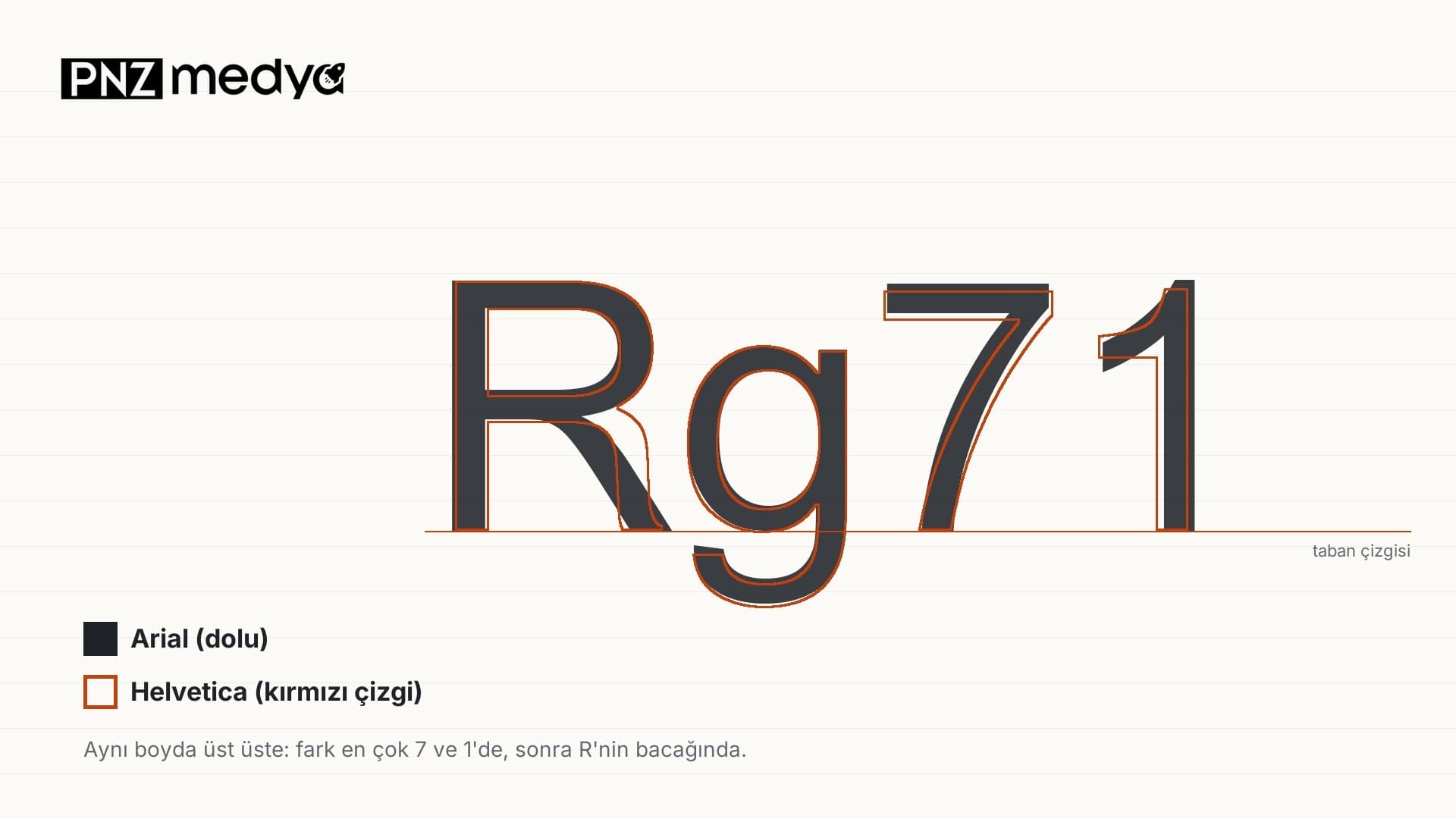
- The digits 7 and 1 separate Arial from Helvetica most; the D, N and H differ so little they are practically identical. Noto Sans and Open Sans were the closest pair we measured.
- The font in a PDF needs no guessing: its name is stored in the file. The Turkish data protection authority's (KVKK) guide on generative AI uses Avenir Next LT Pro, and the Turkish Ministry of Education's (MEB) Turkish-language curriculum uses Barlow.
To find the font of the text in a photo, crop the text so only one line remains and upload it to WhatTheFont, Font Squirrel Matcherator or Adobe Fonts visual search. All three return a list of candidates within seconds. How accurate that list is depends mostly on two things you control: which letters you crop and how many pixels tall they are.
We showed this with our own measurement. Across 38 fonts, we measured which letters give a font away, which pairs look most alike, and how matching breaks down as letters shrink. Below you'll find the five ways first, then 12 prompts you can paste into ChatGPT and Gemini, and at the end how to find the font in a PDF or on a website without guessing.
We used 38 fonts: 28 from Google Fonts (Roboto, Inter, Open Sans, Montserrat, Poppins, Noto Sans, Pacifico and others) and 10 macOS system fonts (Arial, Helvetica, Times New Roman, Georgia, Verdana, Tahoma, Trebuchet MS, Courier New, Impact, Comic Sans MS). We drew every letter in Python with the capital H scaled to the same height, overlaid them on the baseline and measured the area that didn't overlap. For the matching test, we shrank the word, saved it as a JPEG at quality 60, and used a simple template matcher that compares it against clean renderings of all 38 fonts. This matcher is our own script. It does not show the hit rate of WhatTheFont or ChatGPT; it shows the effect of letter size. We did not measure how accurately ChatGPT and Gemini identify fonts for this article.
Identify a Font From an Image: 5 Ways and When Each One Works
| Method | How | What it finds | What to know |
|---|---|---|---|
| WhatTheFont (MyFonts) | Upload the image and click the text; the phone app also works with the camera | The closest matches among more than 400,000 font styles | The text must be horizontal; if you draw the box yourself, keep it around a single line |
| Font Squirrel Matcherator | Upload the image, select the text, type the correct letter under each glyph | Free and paid fonts (powered by Fontspring) | Separate joined letters first; there is a button that rotates 15 degrees |
| Adobe Fonts visual search | Camera icon next to the search bar on the home page, select one line | Lookalikes from the Adobe Fonts library only | Add what you find to Creative Cloud and use it in Adobe apps |
| @MyFonts in ChatGPT | Type @MyFonts in the chat and upload the image | Candidates from the MyFonts catalog | Whether the app appears depends on your plan, region and interface |
| A ChatGPT or Gemini chat | Upload the image and use the prompts below | Font family, distinctive letters, free lookalikes | It can make up names; always check the name on a font site |
On its own page (which we read on November 25, 2026), MyFonts says WhatTheFont uses deep learning to search more than 400,000 font styles and that it also works with connected scripts and with several fonts in the same image. The upload tip is short:
For best results, upload a good quality image, and make sure the text is horizontal. You can draw a manual crop box if you want, but be sure that you only draw it around one line of text.
The same page also offers a shortcut: type @MyFonts in ChatGPT and upload the image. According to OpenAI's help page, apps are called in a chat with @ or from the + menu, and whether an app shows up in your account depends on the app, your plan, your region, the model and the interface you use. If it doesn't show up, carry on in a regular chat with the prompts below.
Prepare the Image Before You Search: Which Letters Give a Font Away?
Across 20 sans serif fonts (Arial, Helvetica, Roboto, Inter, Open Sans, Montserrat, Poppins and 13 more), we overlaid every letter at the same size and measured the area where two fonts don't overlap. 0 means an identical shape, 1 means shapes with no overlap at all. The highest average came out for J (0.56), followed by the g with a breve (0.50), g (0.49), the c with a cedilla and 1 (0.47), and M and the capital C with a cedilla (0.46).
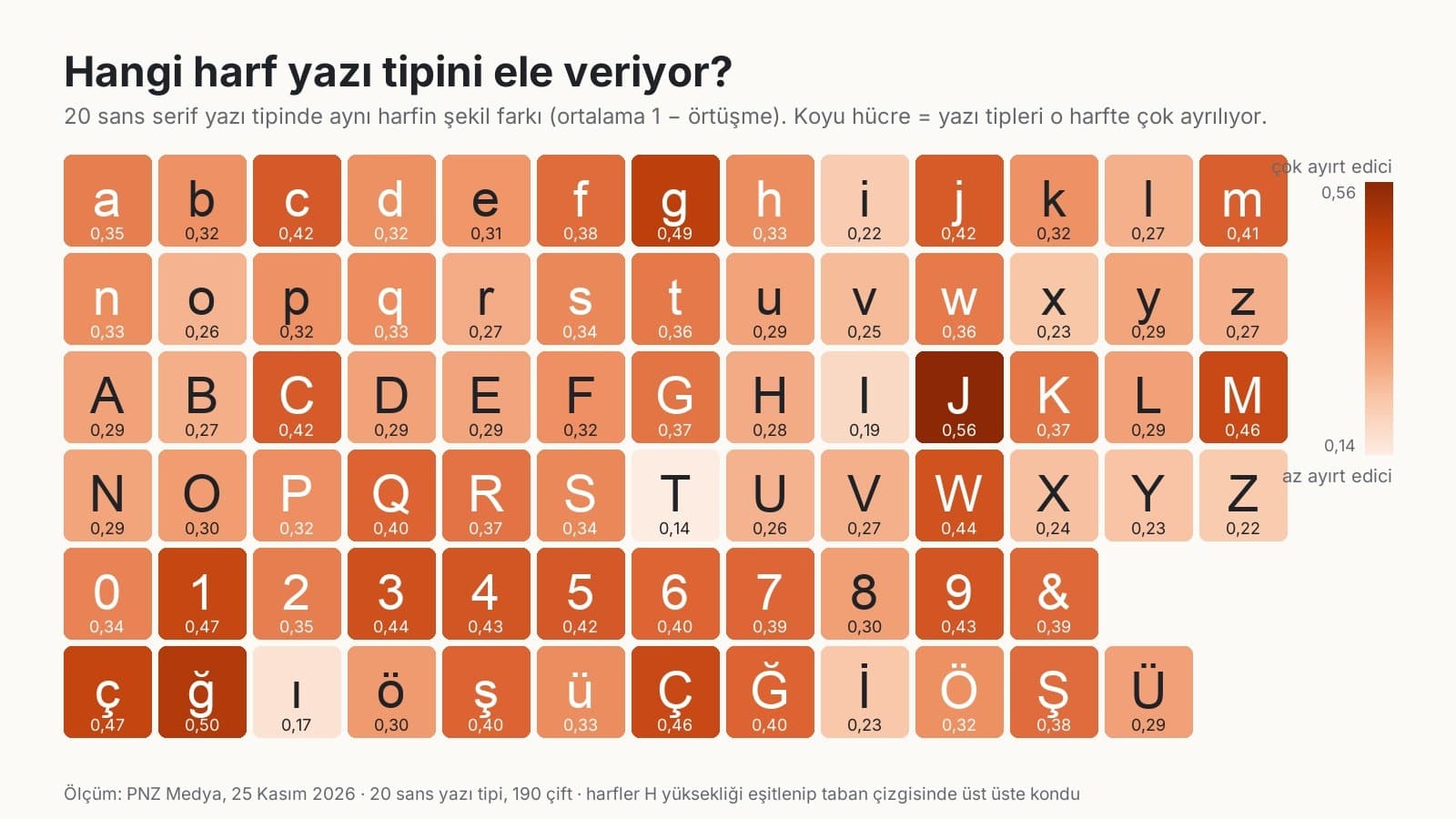
The other end of the scale matters too. The letters that give the fewest clues are T (0.14), the dotless i (0.17), I (0.19), i and Z (0.22). They are made of straight bars, so they look the same in almost every sans serif font. Someone who uploads nothing but an all-caps headline built from these letters will see dozens of near-identical fonts in the candidate list. If the image has g, J, M, R, a, digits, or the Turkish g with a breve or c with a cedilla, include them in the crop. Turkish letters help here: the hook of the c with a cedilla and the breve over the g change noticeably from font to font.
12 Ready-Made Prompts: Identify a Font With ChatGPT and Gemini
Upload the image to the chat, paste the prompt and replace the square brackets with your own details. The prompts are written to work the same way in ChatGPT and Gemini. A chat model has no font database to look names up in; it guesses the font from the image. That's why each prompt asks for more than a name: it also asks for the letter that supports each candidate and for a way to verify it.
1) Identify the font in an image (main template)
Help me identify the font of [the large headline at the top] in the image I uploaded.
1. First read the text letter by letter and write it out for me. If there's a letter you can't read, say so.
2. Identify the font's class: serif, sans serif, slab, script or decorative. Also note its weight and width (e.g. bold, condensed).
3. Give the 3 most likely font candidates. For each candidate, write which letter in the image (e.g. the tail of the g, the leg of the R, the flag of the 1) supports it and which one doesn't fit.
4. If you don't know whether a candidate is free or paid, say "I don't know"; don't make it up.
5. If you aren't certain, say so plainly and suggest I check the image in WhatTheFont or Font Squirrel Matcherator.
Give the answer as a table: candidate, supporting letter, letter that doesn't fit, confidence (high, medium, low).The quickest way to check the candidates is to search for each name on Google Fonts or a font site and type the word from the image in that font. Prompt 4 does this inside the chat.
2) Short version
What font is the text in this image? Give the 3 most likely candidates as a table: candidate, the letter that supports it, the letter that doesn't fit. If you aren't sure, say so; don't invent a font name that doesn't exist.3) Tell two similar fonts apart (Arial or Helvetica?)
I want to find out whether the text in the image is [Arial] or [Helvetica].
List the letters where the two fonts differ and, for each one, write what you see in the image. If that letter isn't in the image, say "not in the image"; don't guess.
Look especially at: [the stroke of the 7, the flag of the 1, the leg of the R, the lower corner of the G, the top of the t].
Finally, tell me in one sentence which one it is and which letter you based your decision on.The letter list in the brackets comes from our Arial vs. Helvetica measurement: the biggest difference is in the 7 (0.39) and the 1 (0.33), then in 5, f and 3. If you're asking about a different pair, take the list from the pair table below.
4) Upload a candidate font and overlay it on the image (ChatGPT, Python)
I uploaded two files: the image with the text and the candidate font file ([Roboto-Regular.ttf]).
Using Python, do the following:
1. Set the word "[the text itself]" from the image in the candidate font, at the same height as the letters in the image.
2. Crop the text in the image, convert it to black and white, and overlay it on the candidate text at the baseline: image in black, candidate as a red outline.
3. Write a table showing, letter by letter, which letters overlap and which ones differ.
4. Let me download the overlay as a PNG.
Do not modify the font file, and do not fix any letters by hand.This comparison is the same method we used in our measurement. Google Fonts lets you download the font file as a TTF; if you don't have the file for a paid font, this step isn't possible, so look at the letters with Prompt 3.
5) Identify the font in a logo
Find the font of the [brand name] text in the logo image I uploaded.
In logos, letters are often modified afterward: spacing gets tightened, a letter gets cut or joined to another. So:
1. Tell me whether the text looks like an existing font or custom lettering, and give your reasoning letter by letter.
2. If it looks like an existing font, give the 3 most likely candidates.
3. Separately list the letters that look different from the candidate font (letters that may have been modified).
4. I'll use this only to pick a similar font and I won't copy the logo; do not redraw the brand name or the logo.6) Identify a handwriting or script font
I want to identify the font of the handwriting-style text in the image: "[the text itself]".
1. Is this a font or actual handwriting? Decide by checking whether the same letter looks identical every time it appears, and tell me which letter you looked at.
2. If it's a font, give 5 similar candidates; for each, say whether the capital letters and the connecting strokes look similar.
3. If you don't know which candidates include accented characters such as é, ñ and ü, say you don't know.If the same letter is exactly identical in two places, it's a font; in real handwriting two "a"s never come out exactly the same. Font Squirrel's tip helps with this type too: if the letters are joined, open up a gap between them in an editor before matching.
7) Find a free lookalike (Google Fonts, accented characters)
The font in the image looks like [Helvetica Neue] or something very close, and it's a paid font. I want lookalikes that are free for commercial use.
1. Suggest 5 similar fonts available on Google Fonts.
2. For each one, write which letters differ from the text in the image (e.g. the leg of the R is straighter, the g is single-story).
3. Remind me to check on the Google Fonts page whether it includes the accented characters I need (such as é, è, ñ, ü); don't make up license details you don't know.
Give the result as a table: font, letters it matches most closely, letters that differ.All 38 of the fonts we measured contained all 12 Turkish letters. That result doesn't carry over to every font: in the measurement for our post on adding text to photos, one of 21 fonts (Homemade Apple) dropped five Turkish letters without leaving a trace.
8) Prepare the image for a font finder site (ChatGPT, Python)
I'm going to upload the line "[text]" from the photo I uploaded to WhatTheFont. Using Python, do this:
1. If the text is tilted, rotate it so it's horizontal; if there's perspective, find the four corners of the text and flatten it.
2. Crop only this line, leaving a margin of half the letter height around it.
3. Convert to black and white: text black, background white. If the background is patterned, try to separate the text from it.
4. If the cap height is under 60 pixels, upscale the image and tell me by what factor.
5. Let me download the result as a PNG. Do not change the shape of the letters, and do not fill in missing letters.Upscaling won't bring back lost detail. In our measurement, the real difference came from the letter size in the photo itself (see the chart below); if you can, take the photo again closer to the text.
9) Identify the font on a website (from the CSS)
Below I've pasted a web page's CSS, or the font information I copied from the browser's "Computed" panel.
[CSS or font-family lines]
1. Tell me which font the page uses for headings and for body text.
2. If the font-family list contains more than one name, explain which one takes over if the first name in the list fails to load.
3. If the code shows whether the font is loaded from Google Fonts, Adobe Fonts or the site's own server, tell me; if it doesn't, don't guess.On a computer you don't have to guess: in Chrome, right-click the text and choose Inspect. The Rendered Fonts line at the bottom of the Computed tab shows the font actually used on screen.
10) Identify the font in a PDF (ChatGPT, Python)
Use Python to list the fonts in the PDF file I uploaded.
1. Read the BaseFont names of the fonts in each page's resources.
2. Separate the six letters and the plus sign at the start of the name (e.g. ABCDEF+): this shows the font is embedded as a subset.
3. Give me a table: font name, how many pages it appears on, whether it's embedded.
4. A scanned (photographed) PDF has no font records; if that's the case, say so and stop.11) Pick a second font that pairs with the one you found
I'm going to use [Montserrat] for headings. Suggest 3 fonts that pair well with it for body text.
For each one, write why it pairs well (letter height, width, character), remind me that I need to check whether it includes the accented characters I need, and tell me at what size it stays readable.
Limit the suggestions to fonts available on Google Fonts. Talk only about the fonts I asked about; don't add other brand names.12) Correct a wrong candidate in the same chat
The [Roboto] you suggested doesn't match the text in the image: in the image [the flag of the 1 is short and straight], and in Roboto it looks different.
Re-rank the candidates with this letter in mind. Add at least 2 new candidates that weren't on the previous list and compare each one on the same letter.A chat model can give you a font name that doesn't exist or wrong license information. Don't use a name until you've searched for it on WhatTheFont, Google Fonts or the font's own page; the quickest check is to type the word from the image in that font with Prompt 4 and overlay the two.
How Big Should the Letters Be? A Matching Test With 38 Fonts
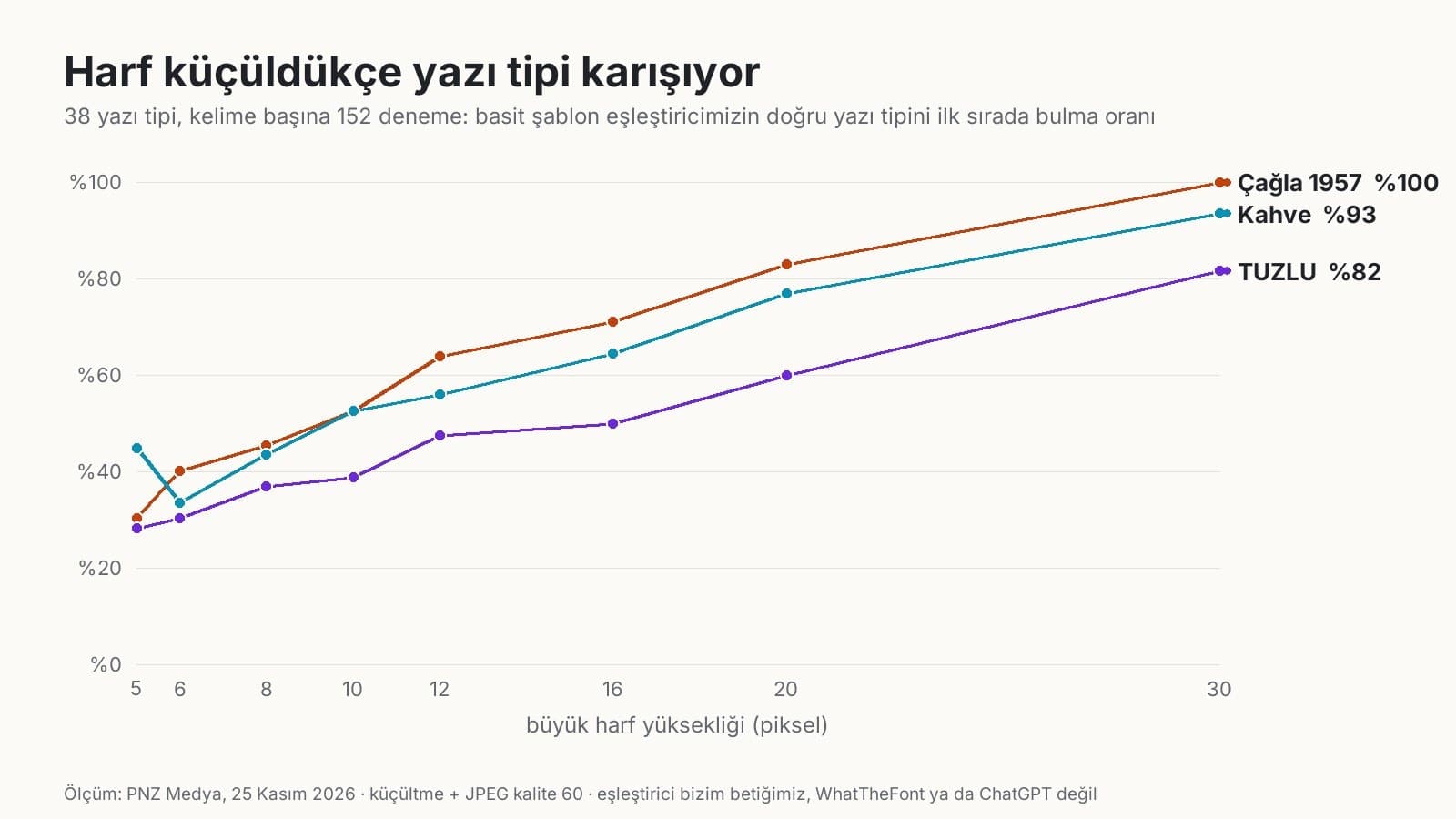
We set three words in 38 fonts: "Çağla 1957", "Kahve" and "TUZLU" (the last two are Turkish for "coffee" and "salty"). We shrank them as if they appeared small in a photo, saved them as JPEGs and checked whether the matcher put the correct font in first place. At each size there are 152 trials per word (38 fonts, four different offsets).
| Cap height | "Çağla 1957" (distinctive letters) | "Kahve" (a word you'd see on a sign) | "TUZLU" (low-clue letters) |
|---|---|---|---|
| 30 pixels | 100% | 93% | 82% |
| 20 pixels | 83% | 77% | 60% |
| 12 pixels | 64% | 56% | 47% |
| 8 pixels | 45% | 43% | 37% |
| 5 pixels | 30% | 45% | 28% |
Two results stood out. First, accuracy rose every time the letters got bigger; at 30 pixels, the word with distinctive letters matched correctly in 152 out of 152 trials. Second, at the same size the word itself changed the result: at 20 pixels "TUZLU" stayed at 60% while "Çağla 1957" reached 83%. At 5 pixels the results are scattered, so treat the small ups and downs there as measurement noise. In practice: shoot the photo close to the text or pick the line with the largest lettering, and make sure your crop includes digits and letters with tails.
Fonts That Look Most Alike: Which Letter Should You Check?
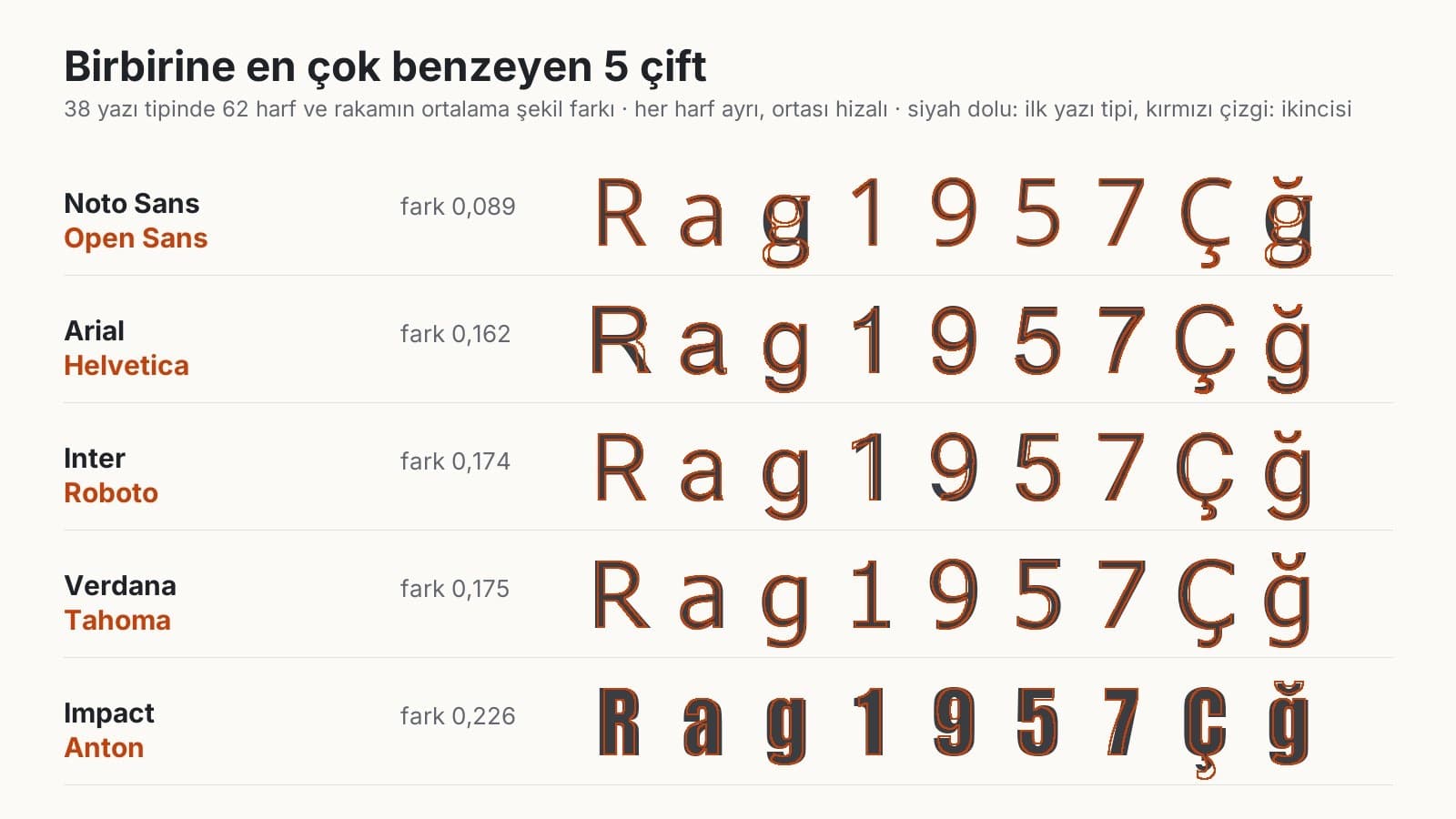
We ranked all 703 pairs among the 38 fonts by their average difference across 62 letters and digits. These pairs often show up side by side in a font finder's candidate list; to tell them apart, look at the letters listed in the table.
| Pair | Average difference | Where they differ most | Nearly identical |
|---|---|---|---|
| Noto Sans / Open Sans | 0.089 | g, g with a breve, I, dotted capital I | J, q, d, z, 8 |
| Arial / Helvetica | 0.162 | 7, 1, G with a breve, 5, f, 3 | D, N, H, M, t |
| Inter / Roboto | 0.174 | 1, 6, 9, Q, Ü, W | I, L, T, z, o |
| Verdana / Tahoma | 0.175 | m, V, K, 4, G with a breve, S | F, 1, I, j, dotted capital I |
| Impact / Anton | 0.226 | J, &, W, C with a cedilla, S with a cedilla, i | E, c, M, o, 0 |
One more extreme case: Georgia and Times New Roman are hard to tell apart by their letters, but very easy to tell apart by their digits. Georgia uses old-style figures (some of them drop below the line); on 7, 3 and 5 the difference between the two fonts came out at 0.89 to 0.91, among the highest values we measured. If the image has digits, check them first.
Identify the Font in a PDF or on a Website: No Guessing Needed
If the text is in a PDF where you can select it, the font's name is stored inside the file. We opened three official Turkish PDFs in Python and listed their embedded fonts:
| Pages | Embedded fonts (most frequent) | |
|---|---|---|
| KVKK (Turkish Personal Data Protection Authority), guide on generative AI and the protection of personal data (November 2025) | 64 | Avenir Next LT Pro, Times New Roman, Arial |
| MEB (Turkish Ministry of National Education), middle school Turkish language curriculum, grades 5-8 (2026) | 247 | Barlow (Light, Medium, Bold, italics) |
| Text of the Turkish Industrial Property Law (mevzuat.gov.tr) | 88 | Times New Roman (regular, bold, italic) |
Six letters in front of the name, such as GVSKDB+, mean the font is embedded as a subset; the real name comes after the plus sign. In Adobe Acrobat Reader, the File > Properties > Fonts tab shows the same list, and Prompt 10 does the same job in ChatGPT. A scanned PDF has no such record, so there too the way to go is matching from the image.
Can You Use the Font You Found? Licensing
Knowing a font's name gives you no right to use it. Fonts like Helvetica and Avenir are sold under paid licenses, and WhatTheFont's results page links to the MyFonts store. Most fonts on Google Fonts are distributed under the SIL Open Font License (OFL), and the official OFL site spells out where you can use them:
You can use them in books, posters, artwork, logos, and on websites, even make 3D objects with the outlines: no acknowledgement is required
Some free fonts use other licenses: Ubuntu, one of the fonts we measured, has its own license, and some fonts on font sites only allow personal use. If you're going to use a font in a logo or in a product you sell, read the license text on the page you downloaded it from.
Common Mistakes
- Uploading the whole image. With several fonts and decorations in one frame, the tool focuses on the wrong line; WhatTheFont itself asks for a single-line box.
- Cropping only an all-caps word made of straight bars. In our measurement T, I, the dotless i and Z gave almost no clues.
- Uploading small text without enlarging it. With our simple matcher, accuracy dropped to 37% to 45% at a letter size of 8 pixels.
- Uploading a tilted or perspective photo without correcting it. Font Squirrel has a rotate button; in ChatGPT, Prompt 8 fixes it.
- Using the name a chat model gives you without checking it. Search for the name on a font site, type the word in that font and compare.
- Assuming the text in a logo is an off-the-shelf font. In logos, letter spacing and some letters are often adjusted by hand.
Crop the text so only one line remains, straighten it if it isn't horizontal, and upload it to WhatTheFont, Font Squirrel Matcherator or Adobe Fonts visual search. Keep distinctive letters in the crop, such as g, J, digits, or the Turkish c with a cedilla and g with a breve; in our measurement T, I and the dotless i gave almost no clues.
Searching for a font on WhatTheFont and Font Squirrel Matcherator costs nothing. The font you find may be paid: WhatTheFont results link to the MyFonts store, and Adobe Fonts shows only fonts from its own library and requires an Adobe account to add them.
It can tell you the font's class and likely candidates. It guesses the name from the image and has no database to check it against, so it can give a wrong name. Prompt 1 also asks for the letter that supports each candidate. If the app shows up in your account, you can type @MyFonts in the chat and send the image to the MyFonts app as well; we did not measure the accuracy of either for this article.
Look at the digits and the letter R. In our measurement, the digits 7 and 1 separated the two fonts most, followed by 5, f and 3; the D, N, H and M differ so little they are practically identical.
It depends on the license. Most fonts on Google Fonts are distributed under the OFL, which allows use in logos, posters and websites without attribution. Fonts like Helvetica and Avenir are paid, and some fonts on font sites are for personal use only.
In a PDF where you can select the text, the font's name is stored in the file. In Adobe Acrobat Reader, check the File > Properties > Fonts tab, or upload the PDF to ChatGPT and use Prompt 10. A scanned PDF has no such record.
If you plan to use the font you found to add text to a photo or to try it in a logo, these two posts will help:
When the font finder returns its results, note the names of the top two candidates, type the same word in both fonts and put them next to the image. In our measurement, the D, N and H of Arial and Helvetica came out almost on top of each other; the decision often comes down to a single digit or the tail of one letter.
Corporate Identity Design
If you don't know the name and license of the font in your logo, a different lookalike shows up every time: on your sign, your website and your social media. We write the font choice, its license and the Turkish character check into your brand guidelines. Let's look at your current logo in a free initial call.