


Hug Your Younger Self: 10 AI Prompts to Merge Childhood Photos (2026)
10 prompts for merging a childhood photo with a current one: hugging your younger self, a Polaroid with no text, a black and white shot and a four-person photo with your partner. We tested them on 82 images; here is the caption the trend prompt invents on the Polaroid and how to get the watch and glasses right.
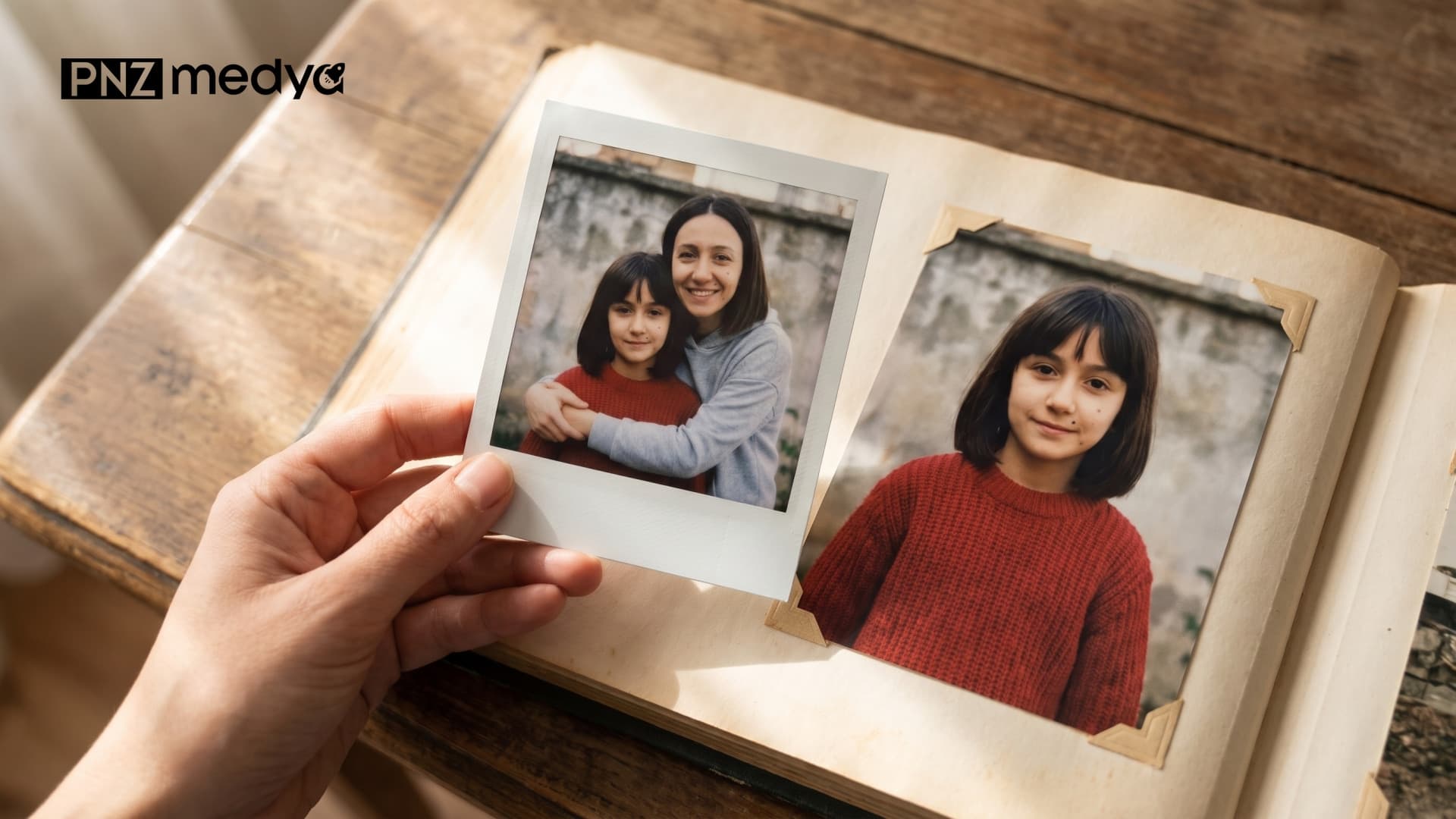
- In Gemini, add both photos to the same message, your current photo first and then your childhood photo; the first sentence of the prompt should say which is which.
- The trend prompt from social media added text and a date under the Polaroid on its own in 8 of 12 tries; with the sentence "bottom strip blank, no text" it added none in 9 tries.
- If you don't mention the watch, phone or headphones in your photo, they carry over to the new image (16 of 18 images). If you wear glasses, mention them too: the sentence that removes objects can take the glasses with it.
- A black and white childhood photo was colorized in 21 of 21 images when no color was given, and Gemini chose the T-shirt color.
- In the app, choose Flash or Pro. According to Google's own help page, Flash-Lite isn't designed for multiple reference images.
The prompt going around Instagram and TikTok is a Turkish one that translates to "My grown-up self is hugging my little self. Make the image Polaroid style, in natural light." In Gemini it keeps both faces recognizable. The trouble shows up somewhere else: in 8 of 12 tries it put text nobody asked for under the Polaroid, such as "Paris, 2024", "SUMMER 2024", "Sene 1995 & 2023". The fix takes two sentences. Say which photo is you today and which is you as a child, and ask for the Polaroid's bottom strip to stay blank. The 10 prompts below are built on those two sentences.
We tested the original Turkish versions of the prompts on November 3, 2026 in the Gemini API with three image models: Nano Banana 2 Lite (Flash-Lite in the app), Nano Banana 2 (when Flash or Pro is selected) and Nano Banana Pro. We used three people: a woman with a mole on her cheek, a man with glasses and a beard, and a woman wearing a headscarf. All of them, and their childhood photos, were generated with AI; they don't exist. We made the man's childhood photo black and white on purpose. Across 82 images we measured face similarity with OpenCV's SFace model and counted text, objects, glasses and color one by one, by eye.
How to Merge a Childhood Photo With a Current One: 5 Steps
- Pick two photos. In the current one, your face should be front-on and sharp. If the childhood photo is in an album, watch out for glare and keep the photo flat when you take a picture of it with your phone.
- Open Gemini and choose Flash or Pro in the model picker. Flash-Lite is fast, but it isn't recommended for handling two photos together.
- Add both photos to the same message: first the current one, then your childhood photo. The order matters because the prompts start with "The first photo" and "the second photo".
- Paste one of the prompts below and fill in the square brackets with your own face and scene.
- Check the result in three places: is there text on the Polaroid or along the edges, is a watch still on your wrist, are your glasses still there. If one of them is wrong, generate again with the same prompt.
Even in short prompts this one sentence made a difference. In the 3 images where the prompt said "The first photo is me today, the second photo is me as a child", the present-day face scored an average similarity of 0.84; with the trend prompt it was 0.69. That is a small number of images, but never skip the sentence.
10 Ready-to-Use Childhood Photo Merge Prompts (Copy and Paste)
Each prompt works in a single message after you upload the two photos. In the square brackets, write only what you really have: a mole, glasses, a beard, a headscarf, braids. If you write in a mole you don't have, Gemini will draw it. Our test used the original Turkish versions of these prompts. You can paste the same text into ChatGPT too, but we did not try ChatGPT in this test.
1) Hugging my younger self: the main prompt
The first photo is me today, the second photo is me as a child. Combine them into a single real photo.
My present self has one knee on the ground and is hugging my younger self with both arms; my younger self is standing and comes up to my shoulder.
We both face the camera, eyes open, lips closed, smiling slightly.
Keep the faces as they are in the photos I uploaded. [Facial details: e.g. We both have the same small mole on the right cheek. / My present self has black-framed glasses and a short beard, my younger self does not.]
Our clothes stay as in our own photos; no [watch, phone, headphones from the photo], nothing else in our hands.
Scene: [a sunny park, afternoon light].
Do not add a frame, text or watermark. 4:5 vertical.In 12 images (three people; two tries on Flash, one each on Pro and Lite) no text appeared at all, the glasses stayed on in 4 of 4 images, and the average similarity of the two faces was 0.78. A watch still showed up in 2 of the 12 images: one on Lite, one on Pro. If you wear a headscarf, add this to the face line: "My present self's headscarf is in place and no hair shows; my younger self's head is uncovered, with two braids." The headscarf stayed in place in all 22 of the woman's images, and no headscarf was ever added to the child.
2) The trend prompt, fixed (Polaroid)
The first photo is me today, the second photo is me as a child.
My grown-up self is hugging my younger self, and we are both looking at the camera.
Make the image Polaroid style, in natural light.
The bottom strip of the Polaroid is blank: do not add text, a date or a signature anywhere.
The [watch, phone and headphones] from the photos are not in the new image. [My glasses stay on.]For anyone who wants the trend look in a short prompt. In 9 images no text or date appeared, and no table or hand showed outside the Polaroid. One warning: we first tested this prompt without the glasses line, and the sentence that removes objects also removed the man's glasses in 2 of 3 images. That is why we added the "My glasses stay on" line in brackets. In prompts that name the glasses explicitly, the glasses stayed in 14 of 14 images.
3) Detailed Polaroid prompt
The first photo is me today, the second photo is me as a child. Combine them into a single real photo.
My present self has one knee on the ground and is hugging my younger self with both arms; my younger self is standing.
We both face the camera, lips closed, smiling slightly.
Keep the faces as they are in the photos I uploaded. [Facial details]
Our clothes stay as in our own photos; no [watch, phone, headphones], nothing else in our hands.
Scene: [a sunny park].
The result is a single Polaroid photo: the white frame reaches all four edges, no background outside it; the bottom strip is blank, no text. Colors slightly faded and warm.Prompt 1 turned into a Polaroid. No text appeared in 9 images. In 2 images, though, the Polaroid sat on a table or in front of a dark background, despite the "no background outside it" sentence. The short Prompt 2 came out cleaner on this point (0/9).
4) Your two selves side by side on a bench
The first photo is me today, the second photo is me as a child. Combine them into a single real photo.
We are sitting side by side on an old wooden bench; my younger self rests their head on my shoulder, and I have one arm around their shoulders.
We both face the camera, eyes open, lips closed, smiling slightly.
Keep the faces as they are in the photos I uploaded. [Facial details]
Our clothes stay as in our own photos; no [watch, phone, headphones], nothing else in our hands.
Scene: [a park in autumn, yellow leaves on the ground].
Do not add a frame, text or watermark. 4:5 vertical.A calmer shot if the hug pose feels like too much. In 3 of 3 images both sat on the same bench and the younger self rested their head on the shoulder.
5) Walking hand in hand
The first photo is me today, the second photo is me as a child. Combine them into a single real photo.
We are walking hand in hand along a seaside path, coming toward the camera; we both look at the camera and smile with our lips closed.
My present self is on the left, my younger self on the right.
Keep the faces as they are in the photos I uploaded. [Facial details]
Our clothes stay as in our own photos; no [watch, phone, headphones].
Warm light just before sunset.
Do not add a frame, text or watermark. 4:5 vertical.The left-right order held in 3 of 3 images and the two stood side by side. The sense of walking was weak: Gemini had both of them standing still and looking at the camera, and the hand-holding wasn't clear in every image. If you want movement, try writing "we are not looking at the camera, we are looking at the path"; we did not measure this.
6) Stepping into your childhood photo
The first photo is me today, the second photo is me as a child.
The scene is exactly the place in the second photo: my present self has stepped into that photo, kneeling on one knee next to my younger self, with one arm around them.
We both look at the camera, lips closed.
Keep the faces as they are in the photos I uploaded. [Facial details]
Our clothes stay as in our own photos; no [watch, phone, headphones], nothing else in our hands.
Light and colors as in the second photo, as if we were both photographed in the same picture.
Do not add a frame, text or watermark. 4:5 vertical.An old garden wall, a balcony, a swing: the setting of the childhood photo was kept in 3 of 3 images, and this prompt gave the highest child similarity in the test (0.90). If your childhood photo is black and white, the light and colors sentence makes the whole image black and white. If you want color, delete that sentence and add the color line from Prompt 7.
7) Black and white childhood photo, new image in color
The first photo is me today, the second photo is me as a child. Combine them into a single real photo.
My present self has one knee on the ground and is hugging my younger self with both arms; my younger self is standing and comes up to my shoulder.
We both face the camera, lips closed, smiling slightly.
Keep the faces as they are in the photos I uploaded. [Facial details]
My younger self's photo is black and white; in the new image they are in color too: [dark brown] hair, [a navy and white striped T-shirt].
Our clothes stay as in our own photos; no [watch], nothing else in our hands.
Scene: [a sunny park, afternoon light].
Do not add a frame, text or watermark. 4:5 vertical.A black and white childhood photo gets colorized even without a color sentence, but Gemini picks the colors: the T-shirt came out gray in one image, brown in another and bright blue striped in a third. If you know the color from your mom or from a note on the back of the album photo, write it in; "navy and white striped" held in 3 of 3 images.
8) Fully black and white image
The first photo is me today, the second photo is me as a child. Combine them into a single real photo.
My present self has one knee on the ground and is hugging my younger self with both arms; my younger self is standing.
We both face the camera, lips closed, smiling slightly.
Keep the faces as they are in the photos I uploaded. [Facial details]
Our clothes stay as in our own photos; no [watch, phone, headphones], nothing else in our hands.
Scene: [a park].
The whole photo is black and white, with fine film grain. Do not add a frame, text or watermark. 4:5 vertical.The version that fits the black and white photo trend. We tested this line on a single image; it came out fully black and white, with the glasses and beard in place. If you're after a black and white couple photo, you can add the same line to the end of Prompt 9.
9) A four-person photo with your partner or spouse
The first photo is me today, the second photo is my childhood, the third photo is [my spouse], the fourth photo is [my spouse's] childhood.
All four of us in a single real photo: [my spouse] and I stand at the back, our own younger selves stand in front of us, our hands on their shoulders; my younger self in front of me, [my spouse's] in front of them. I am on the left, [my spouse] on the right.
Everyone looks at the camera, lips closed, smiling slightly.
Keep the faces as they are in the uploaded photos: [I and my younger self have a mole on the right cheek; my spouse has glasses and a short beard, their younger self has no glasses or beard].
Clothes stay as in their own photos; no [watch, phone, headphones], nothing else in anyone's hands.
Scene: [a park in autumn].
Do not add a frame, text or watermark. 4:5 vertical.Add the four photos to the same message, in order. According to Google's developer documentation, Nano Banana 2 can keep the likeness of 4 people in one image, and Pro 5. In 3 of 3 images everyone stood in the right place, and the similarity of the four faces stayed between 0.72 and 0.90. In one image it turned the spouse's navy fleece bright blue; if clothing color matters, write that in too.
10) If you don't have a childhood photo
Create this person at age [7] as a real family photo taken in [the 1990s].
Same facial features, eye color and eyebrow shape; [facial details: e.g. the same small mole on the right cheek]. The child has no glasses or beard.
Only this child is in the image, nobody else behind or next to them.
The child is standing, looking at the camera, lips closed.
The photo fills the image to the edges, no frame, date stamp or text. 4:5 vertical.If your album isn't at hand, first create your childhood photo with this prompt, then use it as the second photo in Prompt 1. Without the "nobody else" sentence, Flash added other people behind or next to the child in 2 of 3 images, a crowded family in one of them; with the sentence, nobody was added in 3 images. Share this image knowing it isn't your real childhood: the face score between the adult photo and the child version ranged from 0.19 to 0.66.
Instead of typing "fix it" in the same chat, open a new chat, upload the two photos again and add what went missing to the prompt by name: "My glasses stay on", "no watch on my wrist", "the bottom strip of the Polaroid is blank". Gemini sometimes also writes a line like "hope you like it" next to the image; this does not affect the image.
Why Does the Trend Prompt Add Text to the Polaroid?
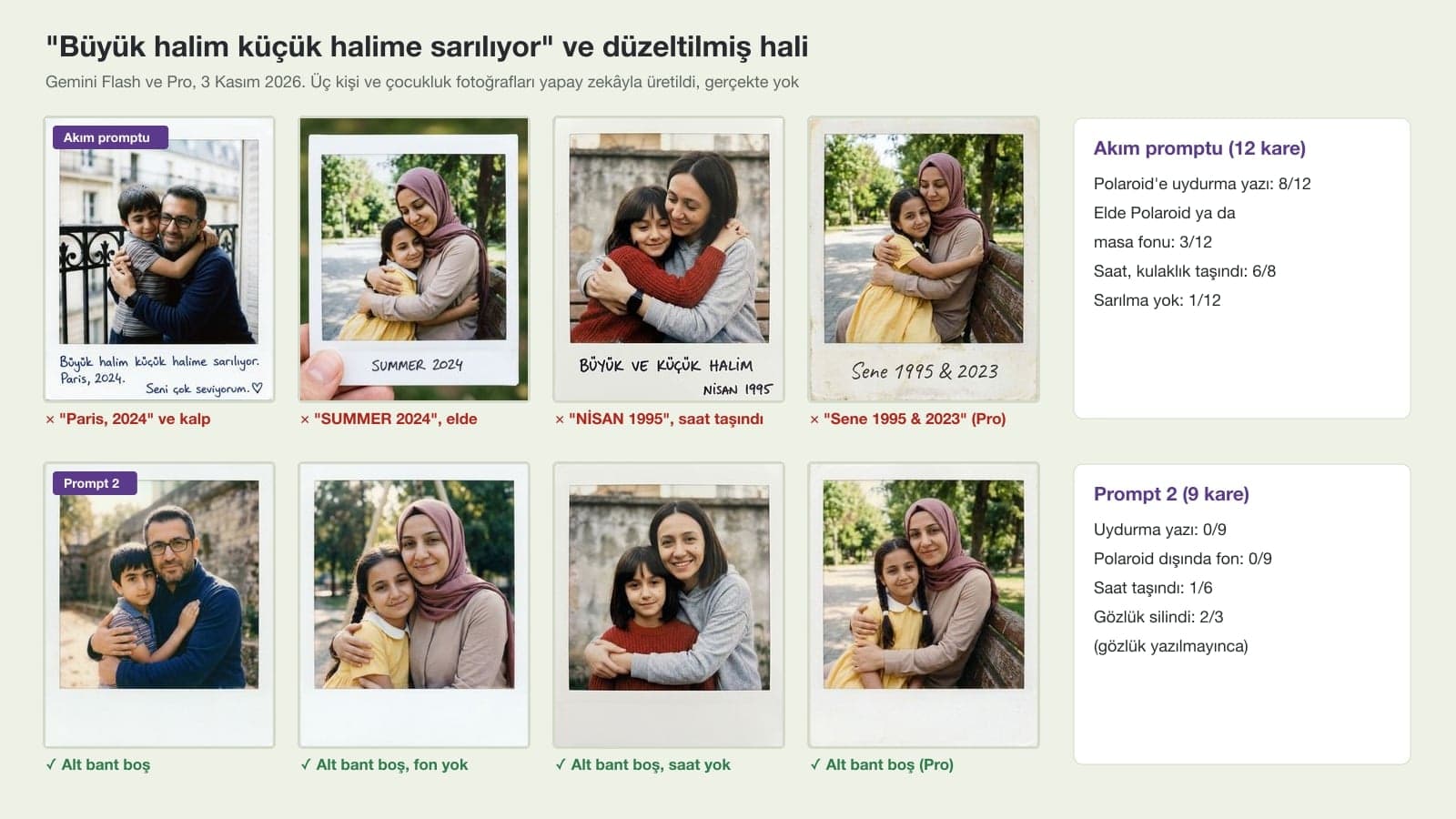
On real Polaroids, most people write a date or a note on the bottom strip, and when Gemini sees "Polaroid style" it draws that too. It makes up the content as well: "Paris, 2024" for a photo taken in Paris, "SUMMER 2024" on the image of the woman in a headscarf. The Pro model didn't escape it either and added text to 2 of 3 images.
| What happened? | Trend prompt (12 images) | Prompt 2 (9 images) |
|---|---|---|
| Made-up text or date on the Polaroid | 8 | 0 |
| Polaroid held in a hand or lying on a table | 3 | 0 |
| Holding the childhood photo instead of a hug | 1 | 0 |
| Watch or headphones carried over (woman and man) | 6/8 | 1/6 |
| Glasses removed (man) | 0/4 | 2/3 |
| Present-day face similarity, average | 0.69 (two versions from news reports, 15 images) | 0.79 |
The glasses row in the table is a lesson. Once Prompt 2 said "no watch, phone or headphones", Gemini counted the glasses as one more object to remove. The trend prompt removed nothing, so it left the glasses alone too. If your prompt removes an object, write what you want to keep on the same line. The second version from the news ("make it slightly blurry with natural light") added no text in 3 images; with so few images we don't treat that as a rule.
How Do You Merge a Black and White Childhood Photo?
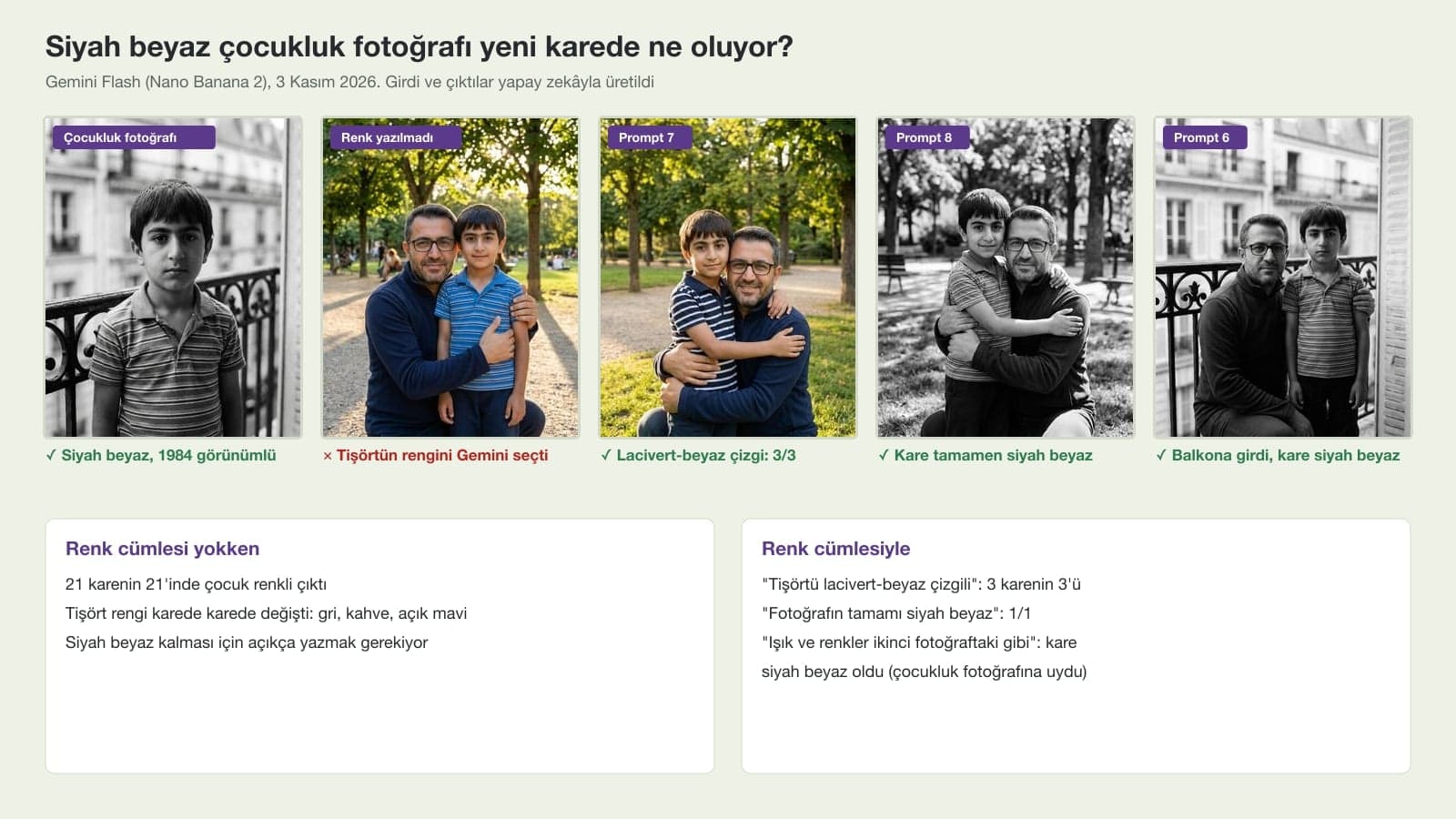
The man's childhood photo was black and white. In 21 of 21 images where the prompt said nothing about color, the child came out in color. So if you want it to stay black and white, you have to say so (Prompt 8). If you want color, give the colors yourself (Prompt 7); otherwise the striped T-shirt turns gray in one image and bright blue in another, with no link to the real color in the album. In Prompt 6, where you step into the setting of the childhood photo, the sentence "light and colors as in the second photo" made the whole image black and white, so don't expect a color result unless you add the color line. If you'd rather colorize an old photo separately first, the prompts in our photo colorization post will help.
What Happens If You Don't Describe the Setting and Objects?
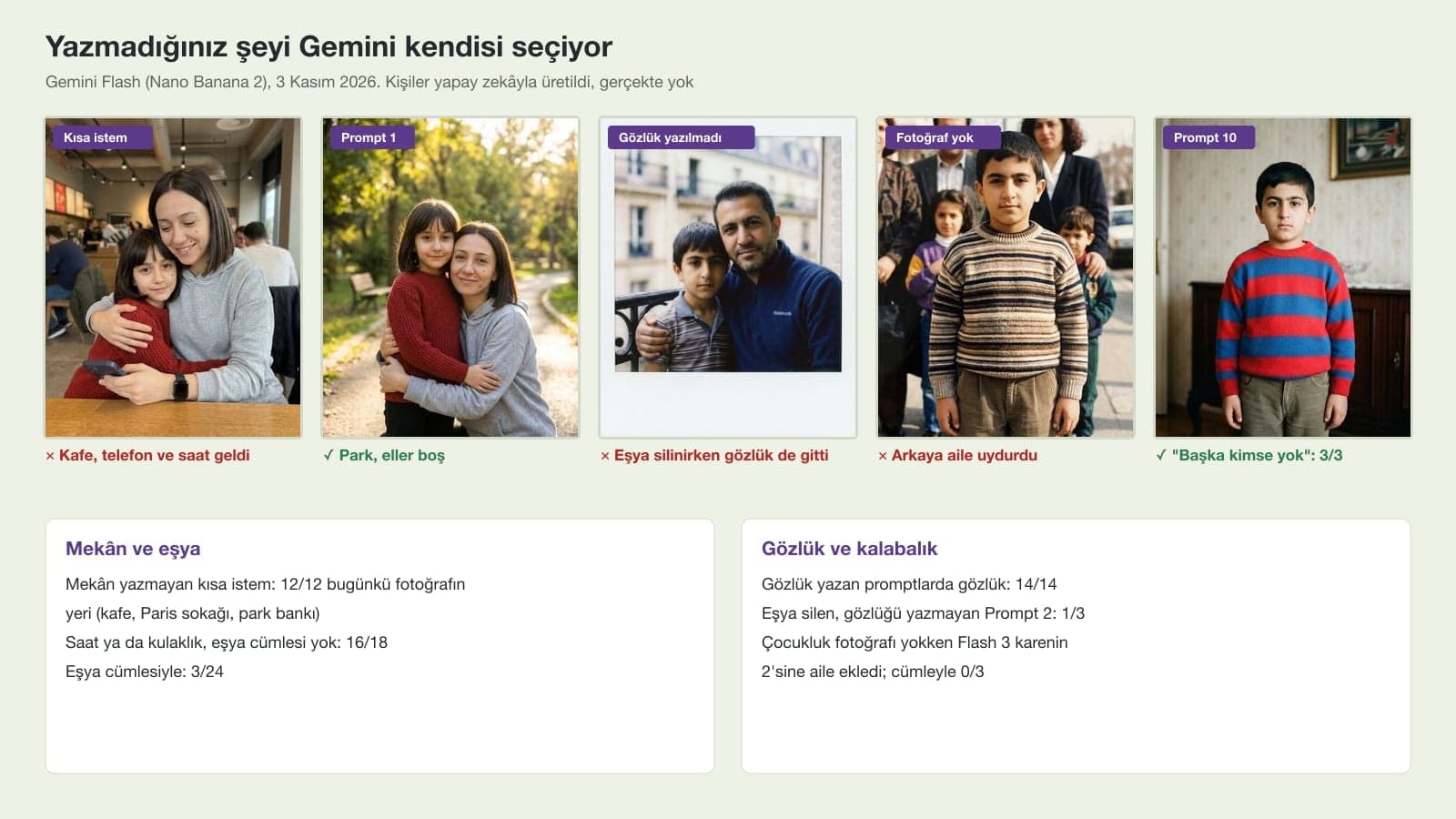
With a short request like "Merge these two photos, let me hug my younger self", Gemini took the setting from the current photo: in 12 of 12 images the woman stayed in the cafe, the man on the street in Paris and the woman in a headscarf on the park bench. If your current photo was taken at a table with your phone, your childhood self sits down at that table too. In 18 images that didn't describe the setting or objects, a watch or headphones moved into the new image 16 times, and in 3 images a phone also stayed in a hand or on the table. In 24 images with the objects sentence, a watch appeared only 3 times.
Moles didn't need a separate line: a mole visible in both photos stayed in place in almost every merged image. The difference showed up in the image generated without a childhood photo. Flash removed the mole from the child version in one try, while Pro and the corrected prompt kept it.
Which Gemini Model: Flash-Lite, Flash or Pro?
This option is used when the Gemini model is set to Flash-Lite. It is optimized for speed. It is ideal for quick images and basic ideas. It isn't designed for multiple image references or for multiple edits.
| In the app | Image model | Median time (API) | Present-day face similarity | Note |
|---|---|---|---|---|
| Flash-Lite | Nano Banana 2 Lite | 6.3 s | 0.68 (9 images) | Brought in a phone and watch with a short prompt |
| Flash or Pro | Nano Banana 2 | 11.9 s | 0.75 (42 images) | Most of the test used this model |
| Redo with Pro | Nano Banana Pro | 18.8 s | 0.76 (10 images) | It also added text with the trend prompt |
The similarity gap between Flash and Pro was about as small as the measurement noise. Lite gave the lowest similarity, and in one try it placed the Polaroid in the middle of the Paris street. According to Google's help page, free users get Nano Banana 2; Redo with Pro requires a Google AI plan. For everything in this post, the free Flash is enough.
Common Mistakes When Merging Childhood Photos
- Uploading the photos in random order. If the prompt says "The first photo is me today", add the current photo first.
- Writing "Polaroid style" without asking for a blank bottom strip. Gemini makes up a date and a note there.
- Not mentioning the watch on your wrist or the headphones in your ears. They carried over to the new image in 16 of 18 images.
- Not mentioning your glasses while removing objects. The glasses can get removed too.
- Leaving the colors of a black and white childhood photo up to Gemini. Your sweater comes out a different color than in the album.
- Trying to merge two photos with Flash-Lite. Google does not recommend this model for multiple reference images.
Google requires you to be at least 18 to edit images in Gemini. If you're making an image with your spouse's, sibling's or friend's childhood photo, ask them first, and show them the result before you share it. Every image Gemini generates carries Google's invisible SynthID watermark.
Choose Flash or Pro in Gemini, add your current photo and then your childhood photo to the same message, and paste Prompt 1. The first sentence of the prompt should say which photo is which, and the last line should say you don't want text or a watermark.
Prompt 1 sets up the hug pose in detail. Prompt 2 is a no-text Polaroid version of the Turkish trend prompt that spread on social media ("My grown-up self is hugging my little self"). Neither produced made-up text in the test.
When you ask for "Polaroid style", Gemini also imitates the handwritten notes on real Polaroids. It happened in 8 of 12 images with the trend prompt; with the sentence "the bottom strip is blank, do not add text, a date or a signature" it didn't happen in any of 9 images.
OpenAI's image model accepts multiple input images, so the same prompts may work in ChatGPT as well. All measurements in this post were done in Gemini only, with the original Turkish prompts; we give no numbers for ChatGPT.
Yes, if you don't give colors: in the test it was colorized in 21 of 21 images, and Gemini chose the colors. Use Prompt 8 to keep it black and white and Prompt 7 for specific colors.
Prompt 10 creates a childhood version from your current photo, and you can use it as the second photo in Prompt 1. The child you get is Gemini's guess and can't stand in for a real childhood photo.
Yes, Prompt 9 puts four photos into one image. In the test, everyone stood behind their own younger self in 3 of 3 images; Nano Banana 2 can keep the likeness of up to 4 people.
Start by filling in the face line in Prompt 1 for yourself once: mole, glasses, beard, headscarf. Then carry that same line over to the bench, hand in hand or Polaroid version. If your childhood photo is black and white, write the colors next to that line too.
Family Photo and Portrait Shoots
If you want a real family photo for the album or a portrait for your website, let's plan the shoot together. In a free initial call we'll talk through the location, the light and the sizes you need.