


Gemini Keeps Changing My Face: What to Do? 7 Prompts and a 122-Image Test (2026)
Gemini changing your face? Here are 7 prompts that keep it the same, plus a fix-it prompt for the same chat. We measured 122 images (using the original Turkish prompts): typing "fix it" didn't work, while a prompt that spells out the expression and moles kept teeth, glasses and moles in place.
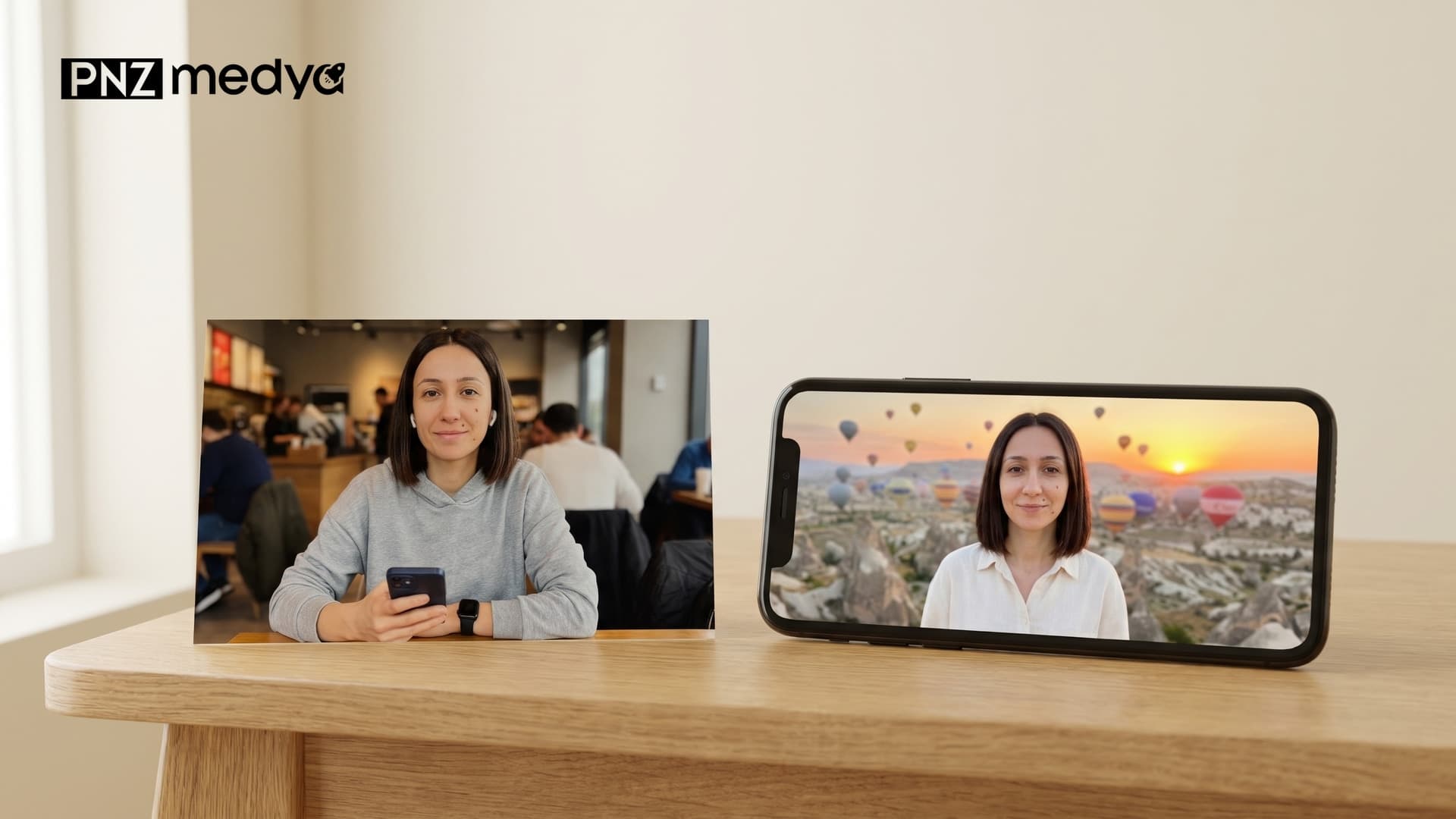
- In all 122 test images, the face was still the person from the input photo according to OpenCV's face recognition score (same-person threshold 0.363, lowest score 0.47). What makes people say "my face changed" is the details: teeth that suddenly show, a mole that disappears, headphones carried into the new scene, a face that shrinks.
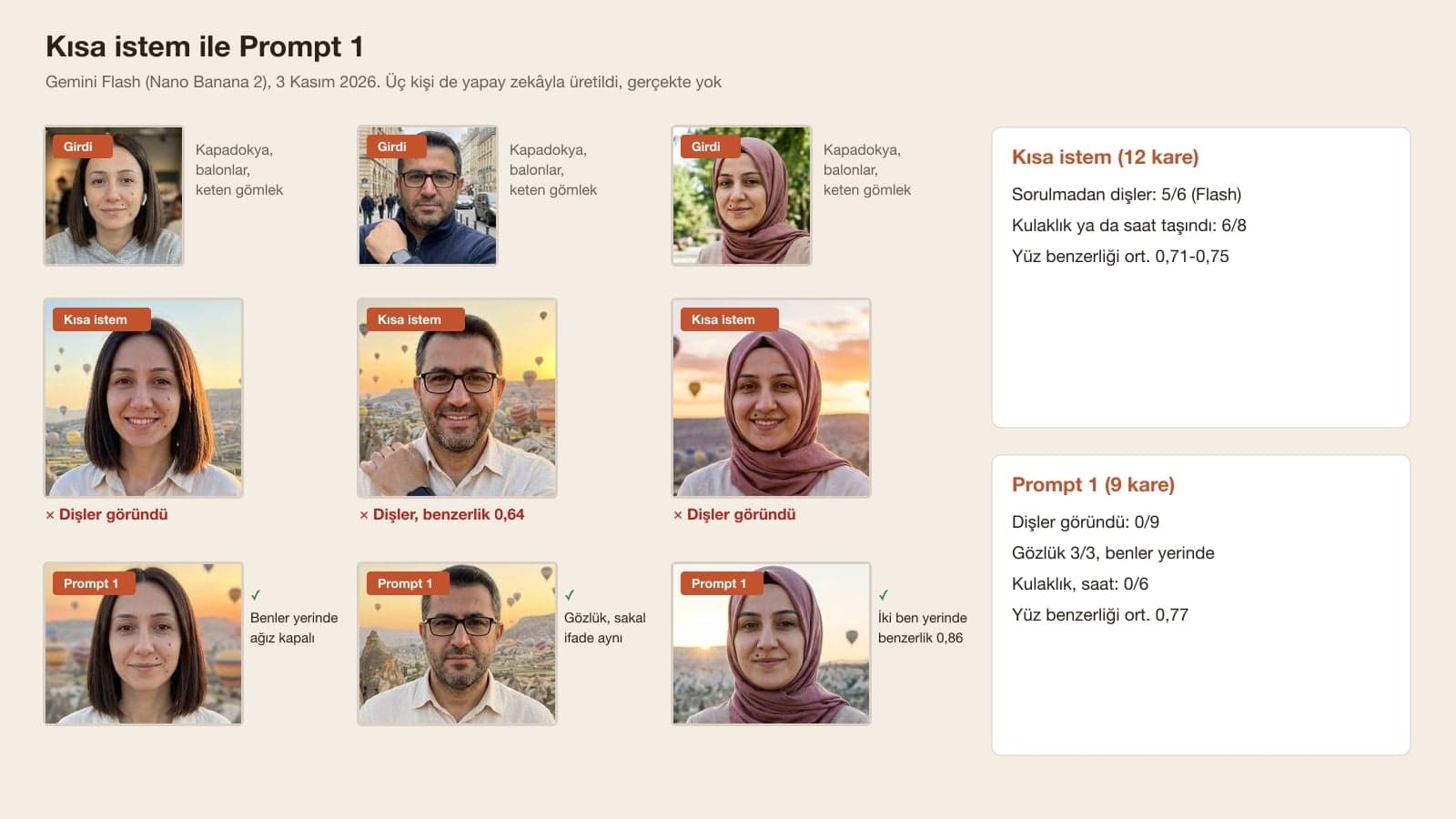
- Expression changed most often. A closed mouth turned into a toothy smile in 31 of 83 frames. With Prompt 1, which spells out the expression, that happened in none of its 9 frames.
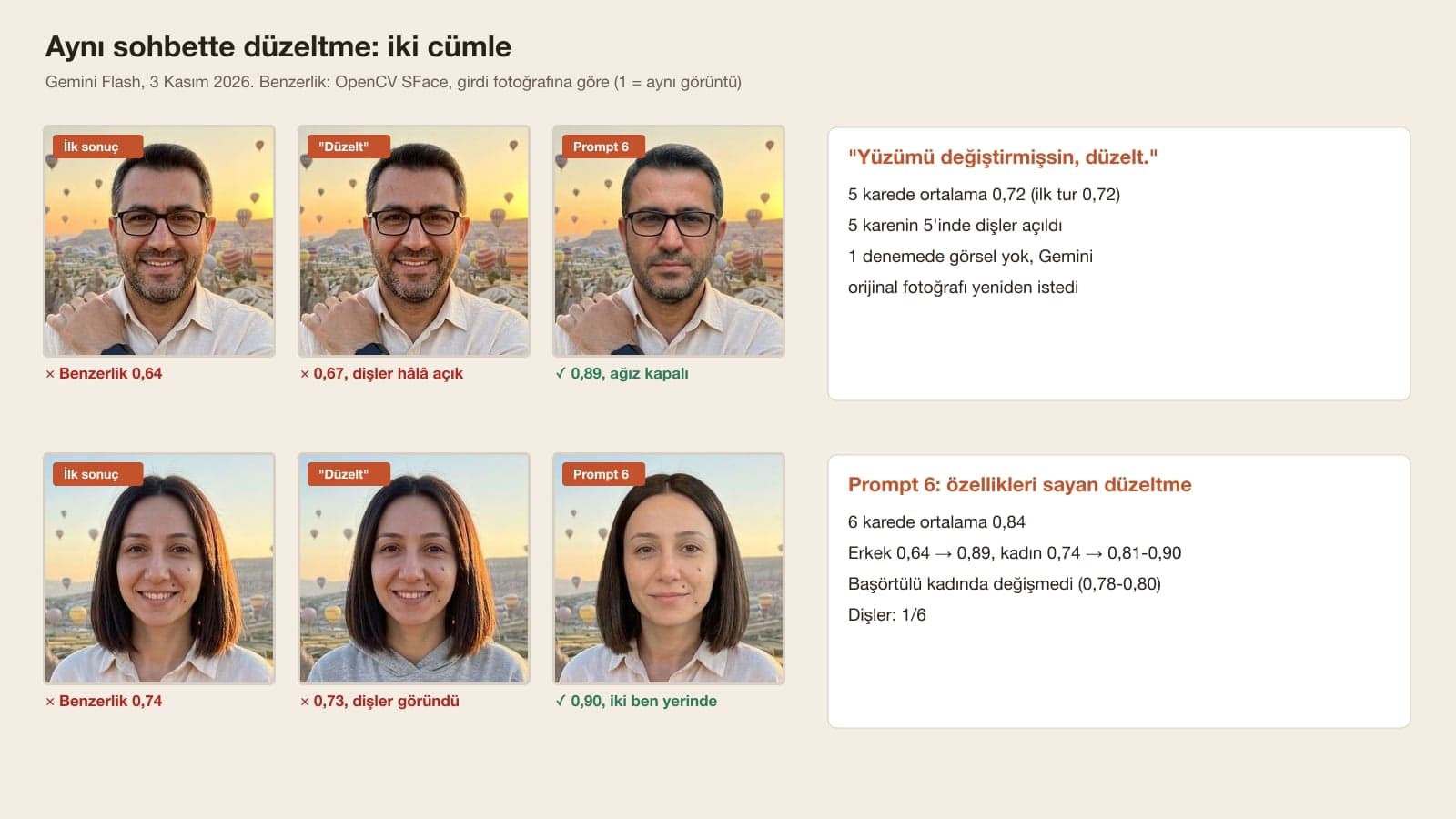
- Typing "You changed my face, fix it" didn't work: similarity stayed at 0.72 across 5 frames, teeth showed in all 5, and in one attempt Gemini asked for the original photo again instead of producing an image. Prompt 6, which lists the features of the face, raised the average to 0.84.
- Putting the identity sentence at the start or the end of the prompt changed nothing (0.76 and 0.78 on Flash). What worked was describing what is actually on the face: glasses, beard, where the mole is, expression, things in the hands.
- A full-body frame dropped similarity from 0.76 to 0.66; in a 1K frame the face is only 75-175 pixels tall. 2K didn't fix this. Describing the moles brought the detail back.
- The model you pick made little difference: with the descriptive prompts, Flash-Lite, Flash and Pro all averaged 0.77. Pro alone didn't protect the face; with the short prompt, the man's face dropped to 0.66 on Pro.
If Gemini changes your face, describe your face in the prompt: your hair, where your moles are, your glasses, your age, and above all your expression ("mouth closed, teeth not showing"). Keep the framing waist-up and say that items in the photo, such as headphones or a watch, won't be in the new frame. In our test Gemini often changed whatever we didn't describe to fit the scene; Prompt 1 below puts all of this in a single message.
We tested the prompts on November 3, 2026 in the Gemini API with three image models: Nano Banana 2 Lite (what the app uses when Flash-Lite is selected), Nano Banana 2 (Flash or Pro selected) and Nano Banana Pro ("Redo with Pro" on a paid plan). As input we used AI-generated photos of three people who don't exist: a woman with moles on her cheek, a man with glasses and a beard, and a woman wearing a headscarf. The scene was the same in every attempt (sunrise in Cappadocia, hot air balloons, a linen shirt); only the prompt changed. All tests used the original Turkish prompts, and the versions in this post are English translations. 124 requests produced 122 images. We measured each face against the input face with OpenCV's SFace model: 1 means an identical image, and the "same person" threshold in OpenCV's sample code is 0.363. We also counted teeth, moles, glasses and items by eye.
Why Does Gemini Change My Face?
When Gemini edits a photo you upload, it generates the whole frame again, and the face is part of that frame. By the numbers the face stays recognizable; what changes is the detail you didn't describe. Google's developer docs give one way to keep a face during an edit:
To ensure critical details (like a face or logo) are preserved during an edit, describe them in great detail along with your edit request.
| What changed? | Short and generic prompts | Prompt 1 (descriptive) |
|---|---|---|
| Closed mouth turned into a toothy smile | 31 of 83 frames | 0 of 9 frames |
| The woman's headphones were carried to Cappadocia | 11 of 32 frames | 0 of 3 frames |
| The man's wristwatch appeared in the new frame | 19 of 32 frames | 0 of 3 frames |
| Glasses removed, moles added that aren't on the face | 2 of 32 frames | 0 of 3 frames |
| Headscarf removed | 0 of 29 frames | 0 of 3 frames |
| Face similarity (SFace average) | 0.66-0.81 | 0.77 |
The last row may surprise you: Prompt 1's similarity score sits in the same band as the other prompts. The details you notice by eye, though, stayed put. What makes a face familiar is often where a mole sits, the frame of the glasses or the shape of a smile; when these were written into the prompt, they didn't change.
7 Ready Prompts for Gemini Photos Without Changing Your Face
Each prompt works in a single message after you upload the photo. Fill the square brackets with your own face and write only what is really there: if you don't have a mole, delete the mole line; if you don't wear glasses, leave glasses out. Give the mole's position from the viewer's side (the right of someone looking at the photo).
1) Trend photo prompt that keeps your face
Show the person in the photo I uploaded [at sunrise in Cappadocia, in front of hot air balloons].
Take the face exactly from this photo; this person has: [hair: length, color, style], [mole or mark and its position, right/left from the viewer's side], [glasses, beard, headscarf if any], [age range].
Expression: [mouth closed, slight smile, teeth not showing].
Framing waist-up, face turned toward the camera, arms at the sides.
Clothing: [cream linen shirt].
The [headphones, watch, phone] from the photo are not in the new scene, hands empty.
Make it look like a natural photo taken with a phone.In 9 frames (three people, two attempts on Flash and one on Pro) the teeth never showed, the glasses were in place in 3 of 3 frames, the headphones and watch didn't carry over into any of the 6 frames, and the arms stayed at the sides. Average similarity was 0.77 (0.70-0.86). Change the scene and outfit and you can use it for every trend.
2) Short version: "Don't change my face"
Show me [at sunrise in Cappadocia in front of hot air balloons], [in a cream linen shirt]. Don't change my face.If you're in a hurry, this one sentence still helps. Without it, the same prompt showed teeth in 5 of 6 frames on Flash; with it, in 1 of 6. Similarity rose from 0.75 to 0.78. It didn't protect items: the man's watch was in the new scene in 2 of 2 frames, the woman's headphones in 1 of 2.
3) Identity paragraph to add at the start of any trend prompt
The face of the person in the photo I uploaded is the identity reference. Keep the facial features, age, skin tone, eyebrows, eyes, nose, lips, hairline, moles and marks exactly as they are; do not beautify, slim, de-age or redraw the face.
Show the person [scene], [outfit], waist-up. Make it look like a natural photo taken with a phone.If you already have a trend prompt, paste the first two sentences at its start. We tested this paragraph at the start and at the end of the prompt separately: 0.76 and 0.78 on Flash, so position made no difference. It doesn't protect the expression either; with the paragraph at the start, teeth showed in 5 of 12 frames. If you don't want a smile, add the "Expression" line from Prompt 1 at the end.
4) Smiling version: changing the expression while keeping the face
The face of the person in the photo I uploaded is the identity reference. Keep the facial features, age, skin tone, eyebrows, eyes, nose, lips, hairline, moles and marks exactly as they are; do not beautify, slim, de-age or redraw the face.
Show the person [scene], [outfit], waist-up; have them smile broadly with their teeth showing. Make it look like a natural photo taken with a phone.For anyone who wants a smiling shot from a serious photo. Teeth showed in 6 of 6 frames, and similarity was 0.76 (0.72-0.80), the same as the version without a smile: changing the expression didn't lower the face recognition score. The man's watch came into the new scene in both of his frames; this prompt has no item line, so add it from Prompt 1 if you need it.
5) Unretouched studio portrait (resume and LinkedIn)
Make a studio portrait from this photo: plain gray background, soft front light, [navy jacket, white shirt].
Take the face exactly from this photo; this person has: [hair: length, color, style], [mole or mark and its position, right/left from the viewer's side], [glasses, beard, headscarf if any], [age range].
Skin texture as in the photo, no makeup.
Expression: [mouth closed, slight smile, teeth not showing].
Framing chest-up, face turned toward the camera.
The [headphones, watch] from the photo are not in the new frame, hands empty.Across 6 frames the glasses were in place in 2 of 2, the headphones never appeared and the teeth didn't show; average similarity was 0.81, among the highest in the test. Our first version had no feature line, only "keep the moles and fine lines". In one of the man's two frames, the glasses were removed and moles that aren't on his face were added. Don't list something that isn't on the face; name what is there.
6) Prompt to fix the face in the same chat
In this last image, fix only the face.
Take the face exactly from the first photo I uploaded; this person has: [hair: length, color, style], [mole or mark and its position, right/left from the viewer's side], [glasses, beard, headscarf if any], [age range].
Expression: [mouth closed, slight smile, teeth not showing].
Keep the clothing, background, lighting and pose as they are in this last image.We took the three short-prompt images where the face drifted most and fixed each one twice in the same chat with this prompt. The average went from 0.72 to 0.84: the man from 0.64 to 0.89, the woman from 0.74 to 0.81 and 0.90. The woman in the headscarf didn't change (0.79 to 0.78 and 0.80). Clothing and balloons stayed in place; teeth showed in one of the 6 frames.
7) Full-body photo prompt
Show the person in the photo I uploaded [at sunrise in Cappadocia, in front of hot air balloons], full body.
Take the face exactly from this photo; this person has: [hair: length, color, style], [mole or mark and its position, right/left from the viewer's side], [glasses, beard, headscarf if any], [age range].
Expression: [mouth closed, slight smile, teeth not showing].
The person is standing facing the camera, arms at the sides.
Clothing: [cream linen shirt, beige pants, brown shoes].
The [headphones, watch, phone] from the photo are not in the new scene, hands empty.
Make it look like a natural photo taken with a phone.The moles were in place in 4 of 4 frames (1K and 2K), the teeth didn't show, and no items carried over. Average similarity was 0.64 (0.52-0.75), the same as full body without a description. When the face is this small, the model draws it with few pixels; if you want a recognizable face, go waist-up.
Fix It in the Same Chat or Start a New One?
The first thing most of us do is type "you changed my face, fix it" in the same chat. We tried this twice on each of the three short-prompt frames and set the results next to Prompt 6 and next to Prompt 1 in a new chat.
| What we typed | Frames | Avg. similarity | Teeth showed | Note |
|---|---|---|---|---|
| First prompt (short) | 3 | 0.72 | 3/3 | The frames being fixed |
| "You changed my face, fix it." | 5 | 0.72 | 5/5 | No image in 1 attempt, asked for the original photo |
| Short fix mentioning moles and expression | 6 | 0.76 | 1/6 | In one of the man's frames, glasses removed and a mole added |
| Prompt 6 (lists the features) | 6 | 0.84 | 1/6 | Man 0.89, woman 0.81-0.90 |
| Prompt 1 in a new chat | 9 | 0.77 | 0/9 | Headphones and watch gone too |
The "fix it" sentence doesn't say what is wrong. In one attempt, instead of drawing an image, Gemini replied (our translation from Turkish): "please share the original photo that I shouldn't change with me again." If you're staying in the same chat, use Prompt 6; if it isn't fixed after two tries, open a new chat, upload the original photo again and start with Prompt 1.
Identity Sentence at the Start or the End? Measuring Prompt Versions
| Prompt | Frames | Avg. similarity | Teeth shown without being asked |
|---|---|---|---|
| Short prompt (Lite, Flash, Pro) | 12 | 0.74 | 6/12 |
| Short prompt + "Don't change my face" (Prompt 2) | 6 | 0.78 | 1/6 |
| Identity paragraph at the start (Prompt 3) | 12 | 0.77 | 5/12 |
| Identity paragraph at the end | 6 | 0.78 | 3/6 |
| Identity paragraph + person-specific description | 12 | 0.76 | 6/12 |
| Prompt 1 (description + expression + items) | 9 | 0.77 | 0/9 |
The similarity column stayed between 0.74 and 0.78; across three people and three models, that gap is no bigger than the variation from one attempt to the next. Some articles recommend putting the identity sentence first, and our test didn't confirm it. The teeth column separated clearly: every version that left out the expression showed teeth in some of its frames, and Prompt 1, which spells out the expression, never did.
Why Does My Face Get Distorted in Full-Body Photos?
In waist-up frames the face took up 21-65% of the frame height, in full body 10-23%. In a 1K frame that means a face 75-175 pixels tall. Across 9 full-body frames without a description, average similarity dropped to 0.66 (0.76 across 63 waist-up frames); in 4 of the 6 frames of the woman and the woman in the headscarf, the moles faded or disappeared.
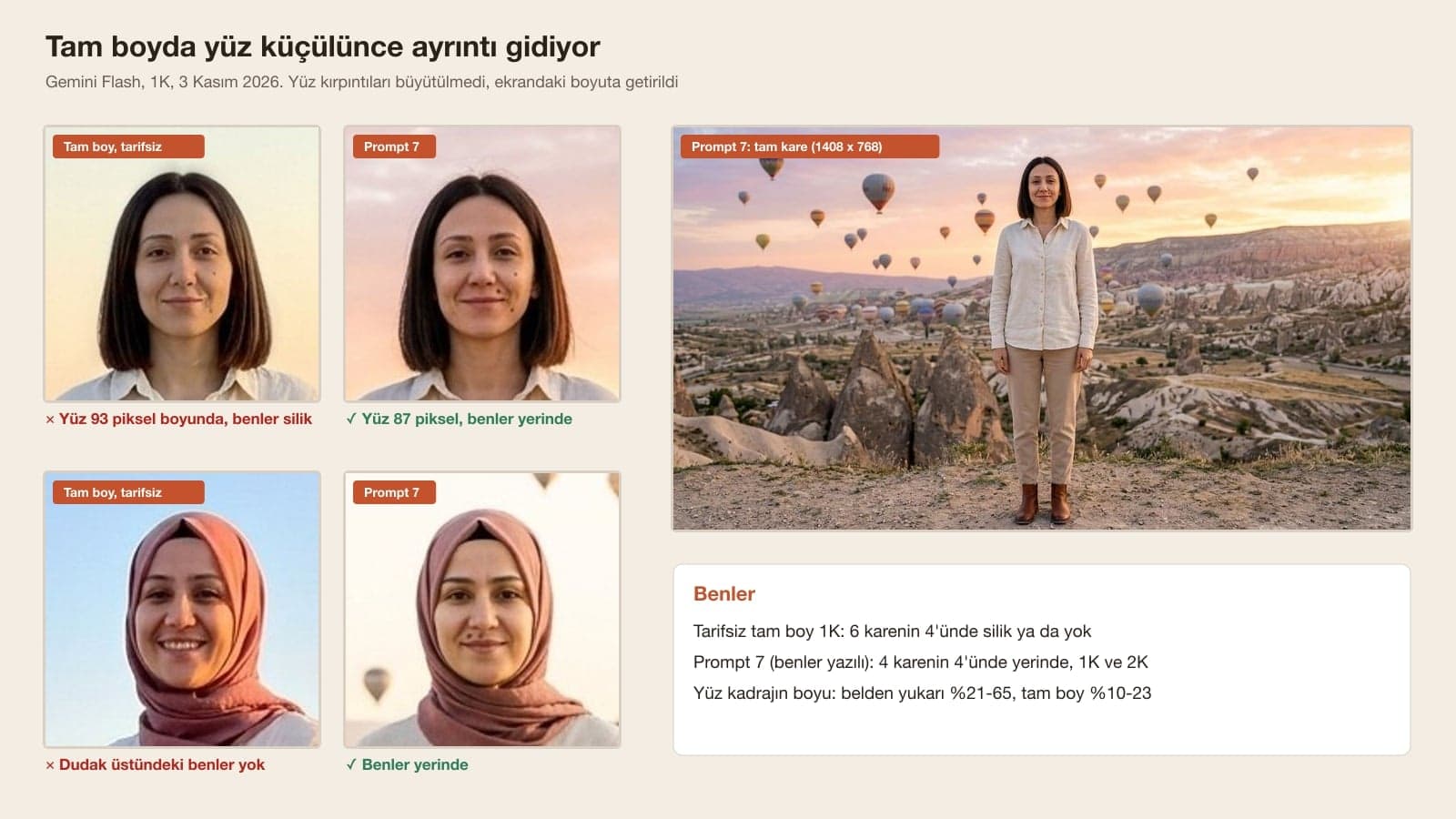
According to Google's help page, images in the Gemini app download at 2K with a Google AI plan and at 1K without one. We tried 2K too: full body without a description scored 0.57 on Flash and 0.66 on Pro. Resolution alone didn't protect the face; in one of Flash's 2K frames the headscarf changed color from dusty rose to beige. Prompt 7, which lists the moles, kept them in place at both 1K and 2K.
How to Make a Photo in Gemini Without Changing Your Face: 5 Steps
- Pick the photo: face from the front, eyes open, no sunglasses or hat. Google asks for the same thing when you set up an avatar: eyes, nose and mouth visible; glasses are fine, but no sunglasses, mask or hat.
- In Gemini, select Flash in the model picker. According to Google's help page, Flash-Lite isn't designed for multiple edits; with the short prompt it gave the lowest average in the test, 0.71.
- Write what is really on your face: hair, mole position (from the viewer's side), glasses, beard, headscarf, age range. Don't write what isn't there.
- Write the expression and the items in hand ("mouth closed, teeth not showing", "the watch from the photo is not in the new scene") and keep the framing waist-up. Prompt 1 has all of these lines.
- If the result drifts, use Prompt 6 in the same chat. If it isn't fixed after two tries, open a new chat and go back to Prompt 1 with the original photo.
Which Gemini Model? Flash-Lite, Flash or Pro
| In the app | Image model | Median time (API) | Short prompt | Descriptive prompts |
|---|---|---|---|---|
| Flash-Lite | Nano Banana 2 Lite | 4.6 s | 0.71 (3 frames) | 0.77 (6 frames) |
| Flash or Pro | Nano Banana 2 | 8.8 s | 0.75 (6 frames) | 0.77 (18 frames) |
| Redo with Pro (paid) | Nano Banana Pro | 17.3 s | 0.73 (3 frames) | 0.77 (9 frames) |
With descriptive prompts the three models ended up in the same place. The gap opened with the short prompt, and even there Pro didn't pull ahead: the man's short-prompt Pro frame was the lowest in that row at 0.66. Save Pro for images with text or very detailed scenes; choosing it to protect the face brought no gain in the test.
Does the Gemini Avatar Feature Keep Your Face?
Google added avatars to the Gemini app: you record your face and voice once, and after that you can refer to yourself in a prompt when creating images with Nano Banana, without uploading a photo. According to the help page, avatars aren't available in the EEA, Switzerland or the UK, only English is supported for now, and you have to be 18 or older. We couldn't test avatars in the API, so they aren't part of this post's measurements.
You have to be 18 or older to edit images in Gemini. Ask your friend or partner before uploading their photo: the biometric data guide from KVKK (Turkey's data protection authority) lists the face among examples of biometric data, and Law No. 6698 treats biometric data as a special category of personal data.
Common Mistakes When Keeping Your Face in Gemini
- Typing "you changed my face, fix it" and hoping. Teeth showed in 5 of 5 frames and similarity didn't move.
- Leaving out the expression. A closed mouth turned into a toothy smile in 31 of 83 frames.
- Listing things that aren't on the face. In two prompts that mentioned moles, Gemini added moles to the bearded man's face and removed his glasses.
- Forgetting the items. The headphones were carried to Cappadocia in 11 of 32 frames, the watch in 19 of 32.
- Asking for full body and expecting a recognizable face. Similarity dropped from 0.76 to 0.66, and the moles faded in 4 of 6 frames.
When Gemini edits a photo you upload, it generates the frame again and can change details you didn't describe to fit the scene. In our 122-image test the face always measured as the person from the input photo; what changed was the expression, moles, glasses and items in hand. Google also recommends describing the face you want kept in detail along with your edit request.
Name what is on your face (hair, moles and where they are, glasses, beard, age), write the expression ("mouth closed, teeth not showing") and keep the framing waist-up. Prompt 1 puts all of this in one message; across 9 frames it never showed teeth and it kept the glasses and moles.
Upload your photo, select Flash and paste Prompt 1 with the square brackets filled in. Change the scene and outfit however you like, and leave the face line and the expression line as they are.
First try Prompt 6 in the same chat: in the test it raised average similarity from 0.72 to 0.84. Just typing "fix it" didn't work. If it isn't fixed after two tries, open a new chat and go back to Prompt 1 with the original photo.
There was no difference in the test: with descriptive prompts, Flash-Lite, Flash and Pro all averaged 0.77 similarity. With the short prompt, Flash-Lite was the lowest at 0.71. Write a descriptive prompt instead of switching models.
In a full-body shot the face shrinks to 75-175 pixels in a 1K frame, and the model draws the detail with few pixels. Similarity dropped from 0.76 to 0.66. Prompt 7, which describes the moles and the expression, kept the details; for a recognizable face, waist-up framing is safer.
Fill in the face line from Prompt 1 once and save it in your phone's notes. Hair, moles, glasses and age stay the same in every trend; when a new trend comes out, you only need to change the scene and outfit.
Real Portraits and Corporate Photos for Your Team
If you want your team to appear on your website and LinkedIn in a real shoot, with their own faces, let's plan a portrait session in the studio or at your office. In a free initial call we'll talk through lighting, backdrop and the image sizes you need.