


Eye Trend Prompts: 9 AI Iris Photo Prompts for Single, Couple and Side-by-Side Eyes (2026)
Eye trend prompts for a macro iris, the couple eye trend, two eyes side by side, an eye strip, initials in the iris, galaxy and wallpaper. We tested 9 prompts (in their original Turkish) with 114 Gemini requests; the short prompt didn't return a black-background iris once in 19 images, and we show how to keep the spot and the ring in place.
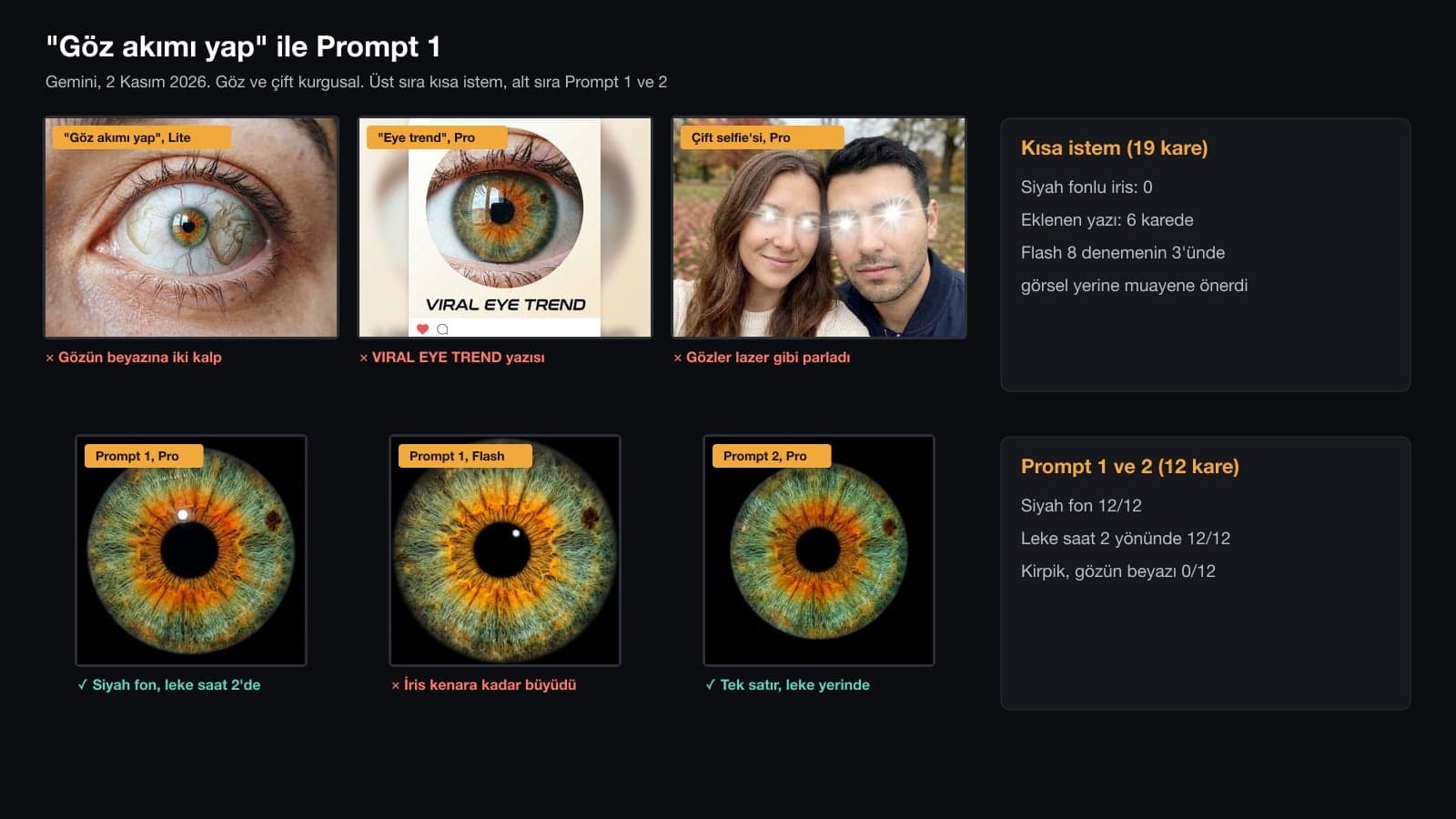
- With only the trend's name as the prompt ("make the eye trend"), Gemini didn't return a black-background iris in any of 19 images: Lite drew two hearts on the white of the eye, and the English prompt added text like "VIRAL EYE TREND" to 5 of 7 images.
- On the short prompt, Flash noticed the small spot in the iris and suggested an eye exam instead of an image in 3 of 8 tries. In 25 Flash requests with the long prompts, this never happened.
- With Prompt 1, 6 of 6 images had a pitch-black background, no eyelashes or white of the eye, and the spot stayed at the 2 o'clock position.
- For the couple eye trend, the prompt circulating on X put the halves on the right sides (6/6) but moved the woman's spot to the other half of the iris in all 6 images. In our version, which states where the spot goes, the spot stayed in the correct half in 6 of 6 images.
- KVKK, Turkey's data protection authority, counts the iris as physiological biometric data in its March 2025 guide. Ask your partner before you upload their eye.
Images going around as the eye trend come in three kinds: a macro photo of a single iris on a black background, one iris made from two partners' irises, and a strip with two people's eyes placed side by side or stacked. CapCut also has a template with the same name; it makes a short video that zooms from a portrait into the iris. If you only type "make the eye trend" into Gemini, you get none of these. The 9 prompts below describe each kind separately.
We tested the prompts on November 2, 2026 in the Gemini API with three image models: Nano Banana 2 Lite (when Flash-Lite is selected in the app), Nano Banana 2 (when Flash or Pro is selected) and Nano Banana Pro on paid plans. As input we used fictional photos we generated with AI: a woman's eye with a green-hazel iris, an orange ring and a single brown spot at the 2 o'clock position; a man's gray-blue eye with a navy outer ring; and a selfie of the same couple taken in a park. We sent 114 requests: 109 returned an image, 3 returned text only and 2 hit a server error. We measured colors with OpenCV from the inner and outer ring of the iris and counted spots and letters by eye.
| What do you want to make? | Prompt | In our test |
|---|---|---|
| Macro iris on a black background | 1, 2 | Spot in place 12/12 |
| Couple eye trend: two irises in one eye | 3 | Halves correct 6/6, line in the middle 0/6 |
| Two irises side by side | 4 | Order, spot and ring 5/5 |
| Two people's eyes in a stacked strip | 5 | Exactly four eyes 5/6 |
| Initials in the iris | 6 | "E" and "M" 6/6, extra symbols 0/6 |
| Forest or galaxy in the pupil | 7, 8 | Spot in place 12/12 |
| Phone wallpaper | 9 | 9:16 ratio 6/6, clock drawn 0/6 |
9 Ready-to-Use Eye Trend Prompts (Copy and Paste)
Each prompt works in a single message after you upload the photo. Fill in the square brackets with your own iris: the ring color and where the spot sits as a clock position (as seen by the viewer). If your eye has no spot, delete that sentence. We wrote and tested these prompts in Turkish, and each one ran at least 5 times; below are English translations.
1) Macro iris photo prompt (black background)
Turn the eye photo I uploaded into a macro iris photo.
Framing: only the iris and the pupil. The iris is centered and fills about 80% of the square frame. No eyelid, eyelashes, eyebrow or white of the eye visible.
Iris: keep the colors, rings and spots exactly as in the photo; do not move the spots, do not add new spots. [There is an orange ring around the pupil and one small brown spot in the green part of the iris at the 2 o'clock position as seen by the viewer.]
The pupil is perfectly round and centered. One small white light reflection on the cornea.
Background: flat black all the way to the edges. No text, logo or watermark.
Aspect ratio 1:1. Like a real photo shot with a 100 mm macro lens; no illustration or 3D render look.This is the core image of the trend. In 6 of 6 images the background came out pitch black, no eyelashes or white of the eye were left, the spot sat at 2 o'clock and the cornea had a single point of light. The iris took up between 72% and 99% of the frame; Flash, in both of its images, enlarged the iris all the way to the edges (93% and 99%). The orange ring came out a little more saturated than in the input.
2) One-line eye trend prompt
Turn the iris of my eye in this photo into a square macro iris photo on a black background, with no eyelashes and no white of the eye showing, keeping the color and spots the same.For when you're in a hurry. The background and the spot held in 6 of 6 images. The difference is in the details: the light reflection disappeared in most images and the iris looked flatter, Pro added a second spot at 9 o'clock in one image, and Lite left a window reflection on top of the iris in one image. If you want to describe your spot precisely, use Prompt 1.
3) Couple eye trend prompt: two irises, one eye
I uploaded two eye photos: the first is my eye, the second is my partner's eye. Make a single macro iris photo from both.
As seen by the viewer, the left half of the iris is the iris from the first photo: [green-hazel, with an orange ring around the pupil]; [the small brown spot from the first iris stays in the left half, at the 10 o'clock position].
The right half is the iris from the second photo: [light gray-blue, with a dark navy ring on its outer edge].
The two halves meet in the middle, from top to bottom, with a natural 2-3 millimeter color blend; no line, light streak or gap in the middle.
One pupil, perfectly round and centered.
No eyelid, eyelashes or white of the eye. Background flat black all the way to the edges; no text or logo. Aspect ratio 1:1, like a real macro photo.The halves were on the correct side in 6 of 6 images, the man's navy outer ring stayed in all 6, and no line ever appeared in the middle. The spot was in the left half in all 6 images; in 4 it sat near 10 o'clock, and one Flash image drew two spots. Our first version said "make the transition in the middle a thin line", and the model split the iris in two with a hard, light-colored line in 6 of 6 images.
4) Two eyes side by side prompt (two irises)
I uploaded two eye photos: the first is my eye, the second is my partner's eye. Make a single macro photo showing the two irises side by side.
Aspect ratio 16:9. On a black background, the two irises are the same size and at the same height, with a gap of half an iris width between them.
As seen by the viewer, the left iris is from the first photo: [green-hazel, orange ring around the pupil, one small brown spot at the 2 o'clock position].
The right iris is from the second photo: [light gray-blue, dark navy ring on its outer edge].
No eyelid, eyelashes or white of the eye. Background flat black all the way to the edges; no text, hearts or logo. Like a real macro photo.For couples who don't want to merge their irises. In 5 of 5 images the order was right, the spot was at 2 o'clock, the navy ring was on the right iris and both irises were the same size. No hearts or text showed up in any image. Flash kept the window reflection in both of its images; the reflection makes the iris look more alive, but if you don't want it, add "no light reflection on the cornea".
5) Two eyes stacked strip prompt (eye strip)
Make a vertical eye strip image from the eyes of the two people in this photo.
Aspect ratio 9:16. The image has exactly two horizontal bands, each taking up half the image, with a thin black line between them. No third band, empty area or scenery.
Top band: the two eyes and eyebrows of the [woman] on the left as seen by the viewer, side by side, a close-up from the eyebrows down to the bridge of the nose.
Bottom band: the two eyes and eyebrows of the [man] on the right, at the same closeness.
Keep the eye colors, the eyebrow shapes and [the scar on the man's eyebrow] as in the photo; do not add makeup, contact lenses or filters.
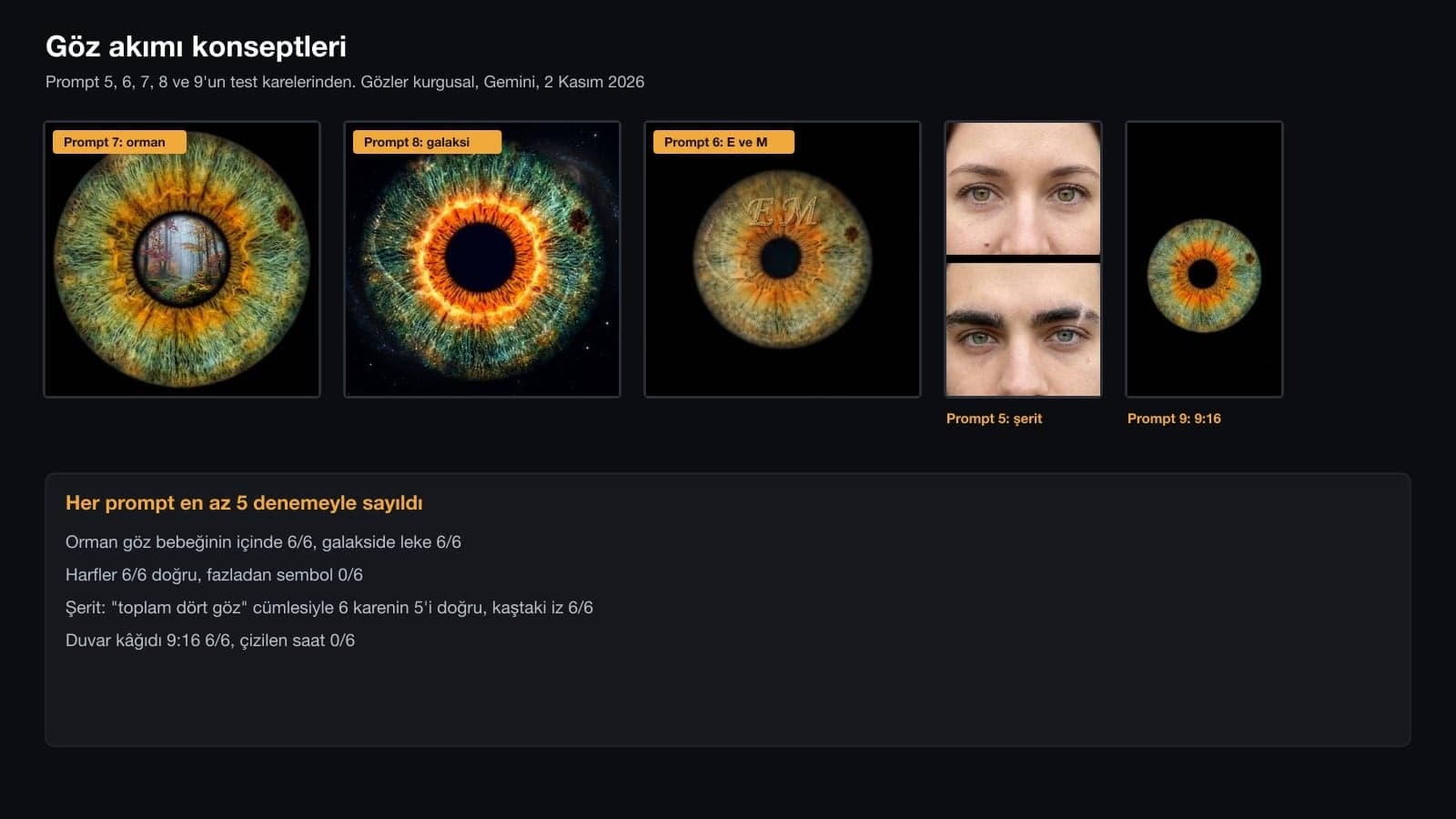
Each person's eyes appear only once; the image has four eyes in total. In both bands the eyes are at the same height and the same size. No text or logo.This is the couple-selfie version of what people search for as the "two eyes side by side trend". The prompt took three rounds. In the first version only 2 of 5 images had two bands; the others got a third eye band, park scenery or an empty skin-colored area. The sentence "exactly two bands" raised this to 4 of 6, but Pro repeated the man's eyes in both of its images. Once we wrote "four eyes in total", 5 of 6 images came out right. The order and the eyebrow scar were correct in 17 of 17 images.
6) Initials in the iris prompt
Make a macro iris photo of the eye I uploaded. Inside the iris, just above the pupil, place two thin gold letters that look as if they were formed from the iris fibers: "[E]" and "[M]".
The letters must be readable. No letters, numbers, hearts or symbols other than these two letters.
Keep the iris color and spots as in the photo. [There is an orange ring around the pupil and one small brown spot at the 2 o'clock position.]
No eyelashes or eyelid; background flat black all the way to the edges. Aspect ratio 1:1.The letters came out right in 6 of 6 images, with no hearts or third letter added. In 5 images the letters sat above the pupil; in one image Flash stamped large letters right on top of the pupil. Putting the letters in quotation marks helps. If you use letters with accents or other marks (such as É, Ñ or Å), zoom in on the result and check the marks.
7) Forest in the pupil prompt
Make a macro photo of the iris of the eye I uploaded and place a small [misty autumn forest] scene inside the black circle of the pupil. The scene stays only inside the pupil and does not spill over onto the iris.
Keep the iris color, rings and spots as in the photo. [There is an orange ring around the pupil and one small brown spot in the green part of the iris at the 2 o'clock position as seen by the viewer.]
No eyelid, eyelashes or white of the eye; background flat black all the way to the edges. No text or logo. Aspect ratio 1:1, like a real macro photo.The forest stayed inside the pupil in 6 of 6 images without spilling onto the iris, and the spot was in place in all 6. In most images the model enlarged the pupil to make room for the scene. Flash added a person walking into the forest in one image; if you want nobody in the scene, write "no people in the scene".
8) Galaxy eye prompt
Turn the iris of the eye I uploaded into a cosmic macro photo.
Keep the iris pattern and colors the same: [there is an orange ring around the pupil and one small brown spot in the green part of the iris at the 2 o'clock position as seen by the viewer.] Add fine stardust and a nebula glow in the green part, and make the orange ring shine like the light of a star.
The pupil is perfectly round, pitch black and centered. No eyelashes or eyelid. Background deep space black all the way to the edges, with a few small stars. No text or logo. Aspect ratio 1:1.The spot stayed in 6 of 6 images and the iris pattern was still recognizable. The orange ring glowed like a ring of fire in 5 images; in one image Lite barely applied the galaxy at all. Pro made the pupil far too large in one image. If you want a different ring color, write your own iris color instead of "orange".
9) Eye wallpaper prompt (9:16)
Make a phone lock screen wallpaper from the iris of the eye I uploaded.
Aspect ratio 9:16, vertical. The iris sits slightly below the vertical center of the screen and covers about 70% of the width.
The top third stays flat black and empty; the clock and notifications will go there.
No eyelashes or eyelid; background flat black all the way to the edges. Keep the iris color and spots as in the photo. [There is an orange ring around the pupil and one small brown spot in the green part of the iris at the 2 o'clock position as seen by the viewer.]
Do not draw any text, clock or logo.The aspect ratio was given only in the text, and 6 of 6 images came out 9:16 (768 x 1376 pixels). No clock or text was drawn in any image. The top third stayed completely empty in 3 images; in the other three, the top edge of the iris spilled into it. Lite gave a dark gray background in one image. If you want the iris to sit below the clock, choose Pro: both of its images had the iris below the center.
In 3 of the 8 tries with the short Turkish prompt ("make the eye trend"), Flash noticed the spot in the iris and did not make an image; its answer was that "a new or changing spot needs an in-person exam". This never happened in the tries where we described the spot in the prompt. If you get that answer, paste Prompt 1 with your spot described into the same chat. If there is a spot in your eye that you only just noticed, show it to an eye doctor.
What Happens When You Type "Make the Eye Trend" into Gemini?
We gave the same woman's eye two short prompts and gave the couple selfie one short prompt. The model doesn't know the trend by name; each time it made up some other eye-themed image.
| Prompt | Images | Black-background iris | Added text | What came back? |
|---|---|---|---|---|
| "Make an eye trend photo with my eye in this photo." (Turkish test prompt, translated) | 6 (+2 text) | 0 | 1 | Two hearts on the white of the eye, tears, an eye-tracking chart |
| "Make the viral eye trend photo from my eye." | 7 (+1 text) | 0 | 5 | VIRAL EYE TREND, LUNAR IRIS, a like counter |
| "Do the eye trend with this photo." (Turkish test prompt, translated; couple selfie) | 6 | 0 | 0 | Glowing or enlarged eyes, no change from Lite |
| Prompt 1 | 6 | 6 | 0 | Spot at 2 o'clock, a single point of light |
The English prompt leaned hardest toward text: 5 of 7 images had a headline, label or social media icon on top. The Turkish prompt kept the framing in most images; it made the iris glow and added tears or an eye-tracking chart. On the couple selfie, Pro put laser-like beams in both people's eyes in one image and blew the eyes up cartoon-style in the other.
The Couple Eye Trend: The Viral Prompt vs. Our Version
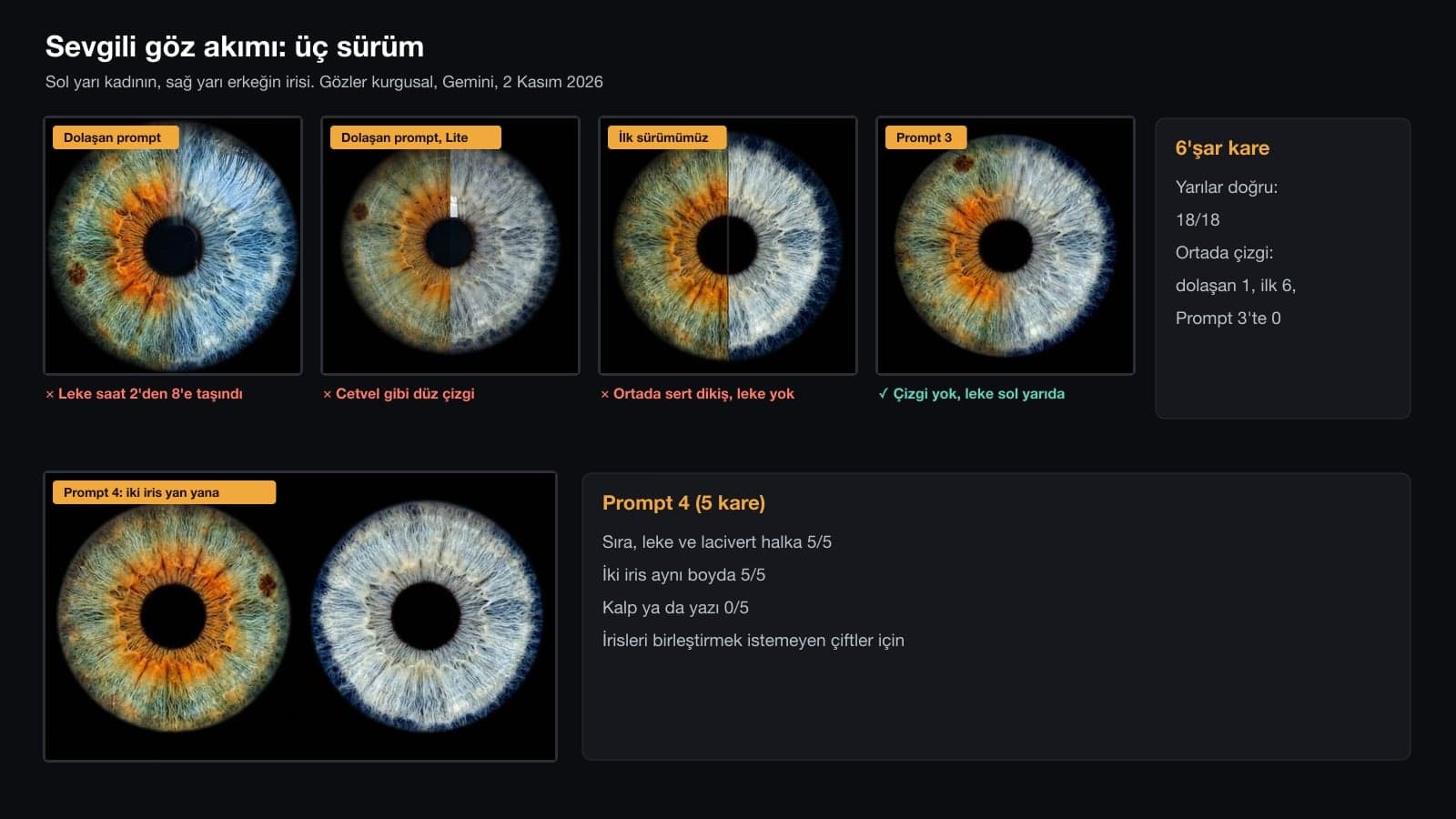
We tested the couple iris prompt shared on X on April 8, 2026 (@kaanakz) word for word with the two eye photos. It put the halves on the correct side in 6 of 6 images, and the blend was soft in 5; in one image Lite split the two halves with a ruler-straight line. But the spot in the woman's iris moved to the left half of the iris, somewhere between 8 and 10 o'clock, in 6 of 6 images. The prompt asks to keep the unique details exactly, yet it never says which half the spot should stay in.
Our first version didn't mention the spot at all, and it disappeared in 4 of 6 images. Calling the transition "a thin line" also left a light-colored seam across the iris. In Prompt 3 we wrote down which half the spot belongs in and its clock position, and described the transition as "a 2-3 millimeter color blend, no line". Lines dropped to 0/6, and the spot was in the requested half in all 6 images.
How to Do the Eye Trend in Gemini: 5 Steps
- Photograph your eye with the phone's rear camera, in window light and without flash; the eye should fill at least half the frame.
- Zoom in and look at your iris: the color of the ring around the pupil and, if you have a spot, its clock position.
- In Gemini, set the model picker to Flash. For the two-photo prompts (3, 4) don't pick Flash-Lite; according to Google's help page, Lite isn't designed for multiple reference images.
- Attach the photo, paste the prompt and fill in the square brackets with your own iris details.
- Zoom in on the result and check the spot and the ring. Fix the one thing that didn't hold with a single sentence in the same chat.
The model redraws your eye from scratch. A spot you don't describe either disappears or moves: with the viral couple prompt it moved in 6 of 6 images, and in our first version, which didn't mention the spot, it disappeared in 4. Describing the ring and the spot in one sentence fixed this.
Is an Iris Photo Biometric Data? KVKK's Guide
Article 6 of Turkey's Personal Data Protection Law No. 6698 treats biometric data as a special category of personal data. KVKK, Turkey's Personal Data Protection Authority, published a guide in March 2025 on what to watch for when processing biometric data (KVKK Publications No. 55), and it names the iris directly:
Biometric data such as a person's fingerprint, retina, palm, face, hand shape and iris make up physiological biometric data (...)
Building on the definition in the EU General Data Protection Regulation, the guide lists two conditions: the distinguishing feature has to be extracted through data processing, and that feature has to serve to identify or verify a person. Uploading a photo of your own eye to a chatbot may not meet this definition on its own. Still, the image you shoot for the trend is a close-up that shows the iris texture millimeter by millimeter. If you are going to use your partner's eye, ask them first.
According to Google's Gemini privacy page, an uploaded image is processed like any other prompt, and Google Lens technology is used to understand its content. If the Keep Activity setting is on, some chats go to human reviewers, and reviewed chats are kept for up to three years even if you delete them from your account. You can turn this setting off or start a temporary chat; according to Google, in both cases chats are still used to respond to you and for safety.
Resolution for Prints and Wallpapers
According to Google's help page, images in the Gemini app download at 2K on an account with a plan and at 1K on an account without one. When we requested Prompt 1 at 4K in the API, Flash and Pro returned 4096 x 4096 pixels; the app doesn't have this option. At 300 DPI, a common value for photo prints, the limits for a square iris image look like this:
| Resolution | Square image | Largest print at 300 DPI | Where |
|---|---|---|---|
| 1K | 1024 x 1024 | 8.7 x 8.7 cm | Gemini without a plan, Flash-Lite |
| 2K | 2048 x 2048 | 17.3 x 17.3 cm | Gemini with a Google AI plan |
| 4K | 4096 x 4096 | 34.7 x 34.7 cm | API only (Flash, Pro) |
For a 50 x 50 cm iris print, a 4K image drops to 208 DPI. For a wall print viewed from a distance that is usually enough; for a small print viewed up close it isn't. The wallpaper came out at 768 x 1376 pixels at 1K.
Which Gemini Model? Flash-Lite, Flash or Pro
| Selected in the app | Image model | Median time | Watch out for |
|---|---|---|---|
| Flash-Lite | Nano Banana 2 Lite | 6.0 s | Drew hearts on the white of the eye with the short prompt, added an extra band to the strip, gray background on one wallpaper |
| Flash or Pro | Nano Banana 2 | 10.7 s | Suggested an eye exam instead of an image in 3 of 8 short-prompt tries, tends to enlarge the iris to the edges |
| Pro, Redo on a paid plan | Nano Banana Pro | 18.1 s | Repeated the man's eyes in the strip; the sentence "four eyes in total" fixed it |
On an account without a plan, images are made with Nano Banana 2 Lite when Flash-Lite is selected and with Nano Banana 2 when Flash or Pro is selected; Nano Banana Pro is available only on Google AI plans, through the redo option. You must be 18 or older to create and edit images. Times were measured in the API.
Tried It, Didn't Work: Your Partner's Reflection in the Eye
We also wrote a prompt that put the man from the couple selfie as a reflection on the cornea of the woman's eye. In the first version the man showed up in 6 of 6 images, but in every one he looked like a small passport photo cut out and pasted on. In the second version we described the reflection as "semi-transparent, bent by the curve of the eye": one image showed nobody, one showed a different person holding a camera, and the other four still looked pasted on. That's why we left it off the list.
Common Mistakes with Eye Trend Prompts
- Treating the trend's name as a prompt. "Make the eye trend" didn't return a black-background iris even once in 19 images.
- Not describing the iris. The spot either disappears or moves to the other side of the iris.
- Asking for a "thin line" in the couple iris. The model draws a hard, light-colored seam; if you don't want a line, write "no line, color blend".
- Not giving the number of eyes in the strip. The model added extra bands and put the same person's eyes in twice.
- Using a short English prompt. 5 of 7 images got a headline or label.
- Uploading your partner's eye photo without asking them. The KVKK guide lists the iris as an example of biometric data.
Take a close-up of your eye in window light, upload it to Gemini, fill in Prompt 1 with your iris color and spot, and paste it. In our test, which used the original Turkish prompt, 6 of 6 images came back as a macro iris on a black background with no eyelashes.
The "eye trend text" people look for is these prompts that you paste into Gemini or ChatGPT. For a single iris use Prompt 1 or 2, for the couple eye trend use Prompt 3, and for two eyes side by side use Prompts 4 and 5.
If the two irises should sit side by side, use Prompt 4 with two eye photos; if the two people's eyes should be stacked in a strip, use Prompt 5 with a couple selfie. Don't delete the sentence "four eyes in total" from Prompt 5; without it the model repeated the eyes.
Yes, it works on a Google account without a plan when Flash is selected; the image downloads at 1K resolution. You must be 18 or older to create and edit images.
The prompts are plain text, so you can paste them into ChatGPT too. Every number in this post was measured in Gemini with the original Turkish prompts; we did not test whether ChatGPT gives the same results.
When the model sees a spot in the iris, it may suggest an exam instead of making an image if the prompt is short; in our test Flash answered this way in 3 of 8 tries. Once we described the spot in the prompt, it never happened.
The video that zooms from a portrait into the iris is made with the eye trend template in CapCut and similar apps. In this post we only tested the photo; you can use the image from Prompt 1 as the last scene of the video.
Start with Prompt 2. If the spot or the ring moved, switch to Prompt 1 and fill in the square brackets; in this test, that sentence is what kept the spot and the ring in place. A single close-up of your eye taken by a window works with all nine prompts in this post.
Macro Product Photography for Optical and Cosmetics Brands
If you sell contact lenses, eyewear or eye makeup, let's plan macro shots that show your product in its true colors. In a free initial call we'll talk through lighting, framing and the sizes your online store needs.