


Image to Prompt Generator: 12 ChatGPT and Gemini Prompts to Get a Prompt From a Photo
How to get a prompt from a photo and use ChatGPT or Gemini as a prompt generator: 12 ready prompts, whether the prompt is stored in 1,684 Gemini image files, how close two runs of the same prompt come, and what a reference image changes.
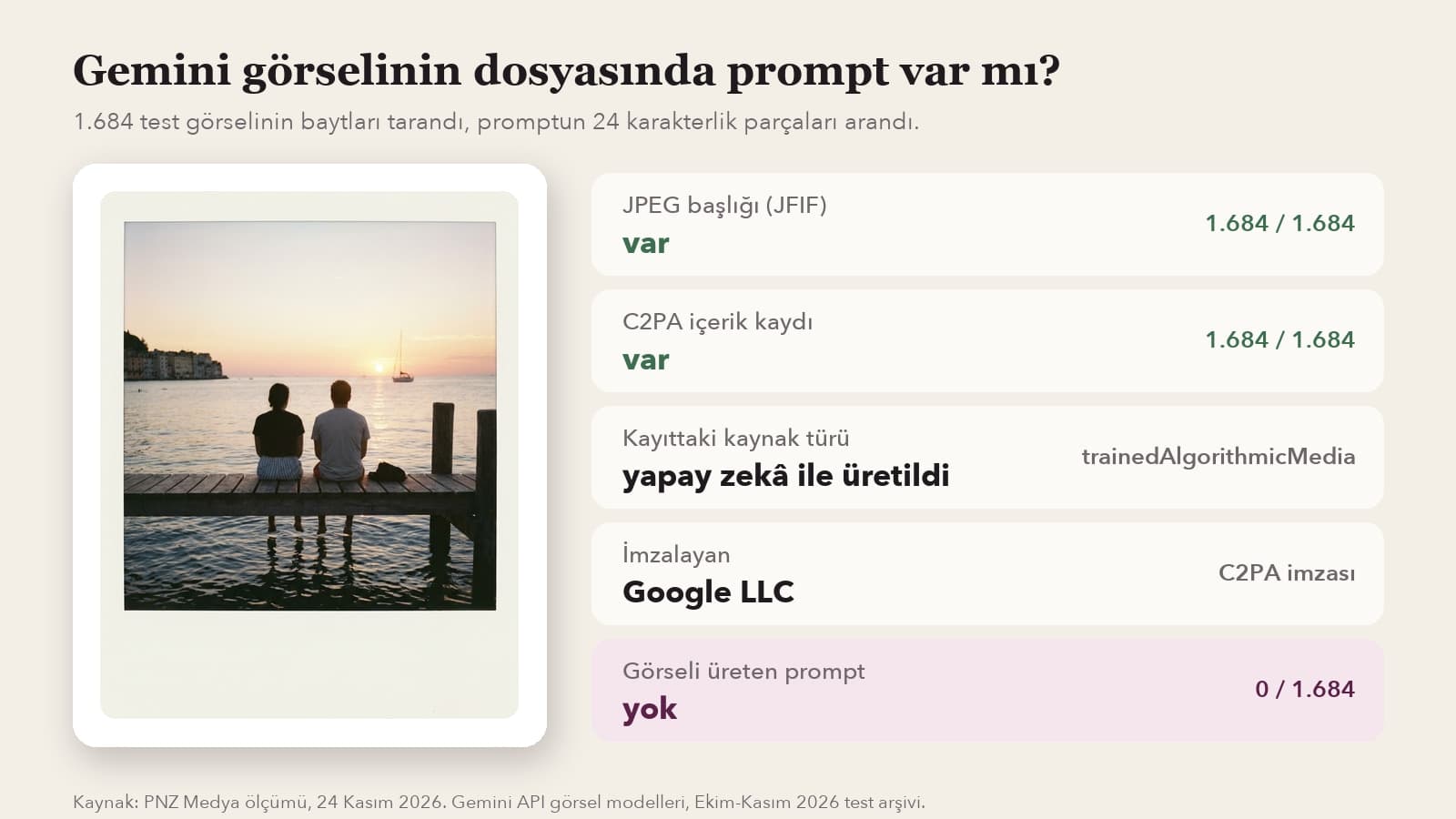
- You can't read the original prompt behind an image from its file. None of the 1,684 test images we generated with Gemini had a prompt in the file; the only record there was a C2PA entry saying the image was AI-generated.
- To get a prompt from a photo, upload it to ChatGPT or Gemini and have it write out the scene, lighting, shot, colors and aspect ratio section by section. What comes back is the model's description. Midjourney says its own Describe tool gives a different suggestion for the same image every time.
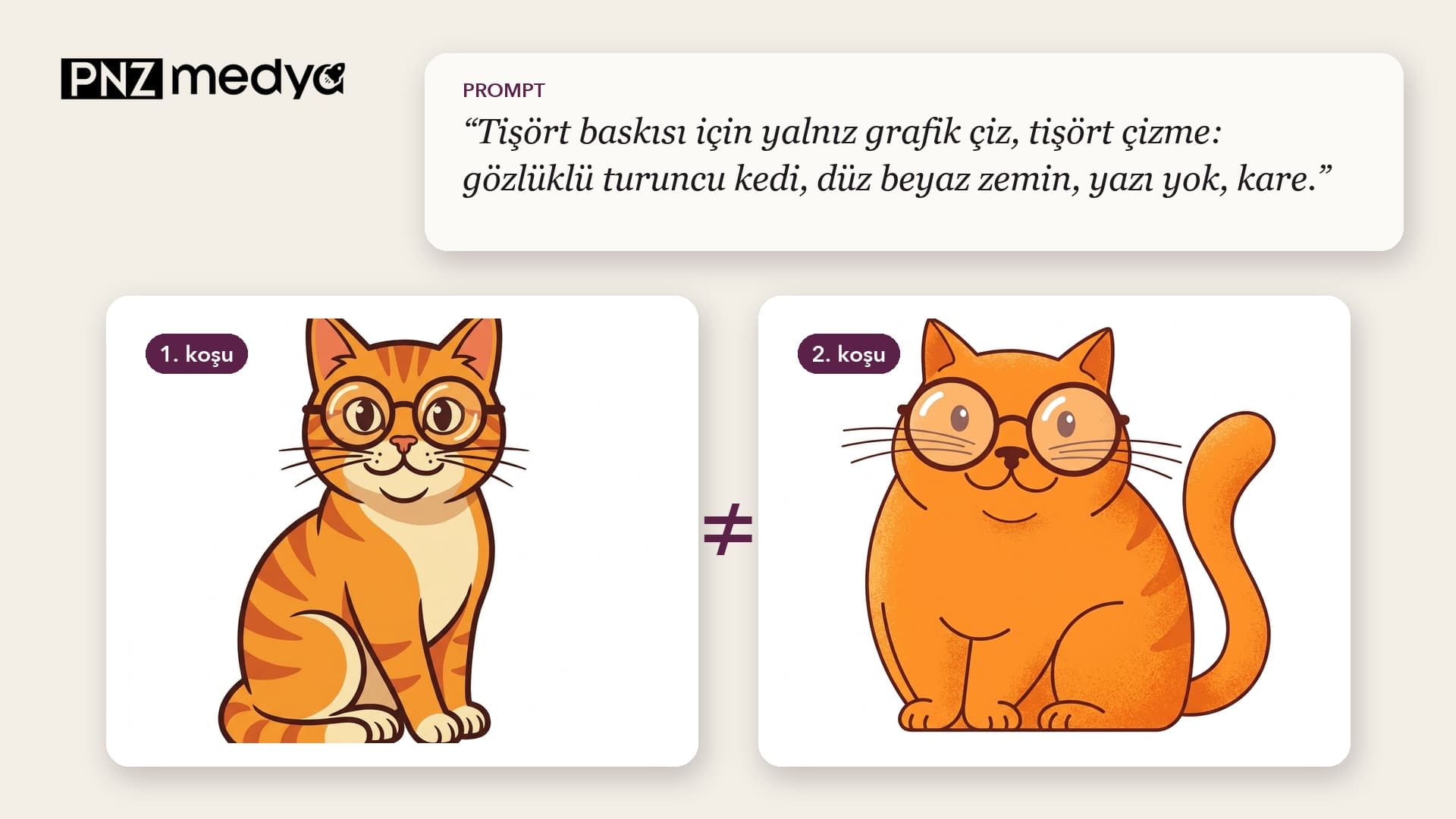
- Running the same prompt twice still didn't give the same image: across 100 text-only pairs the difference was 20 out of 64, compared with 31 between two unrelated images.
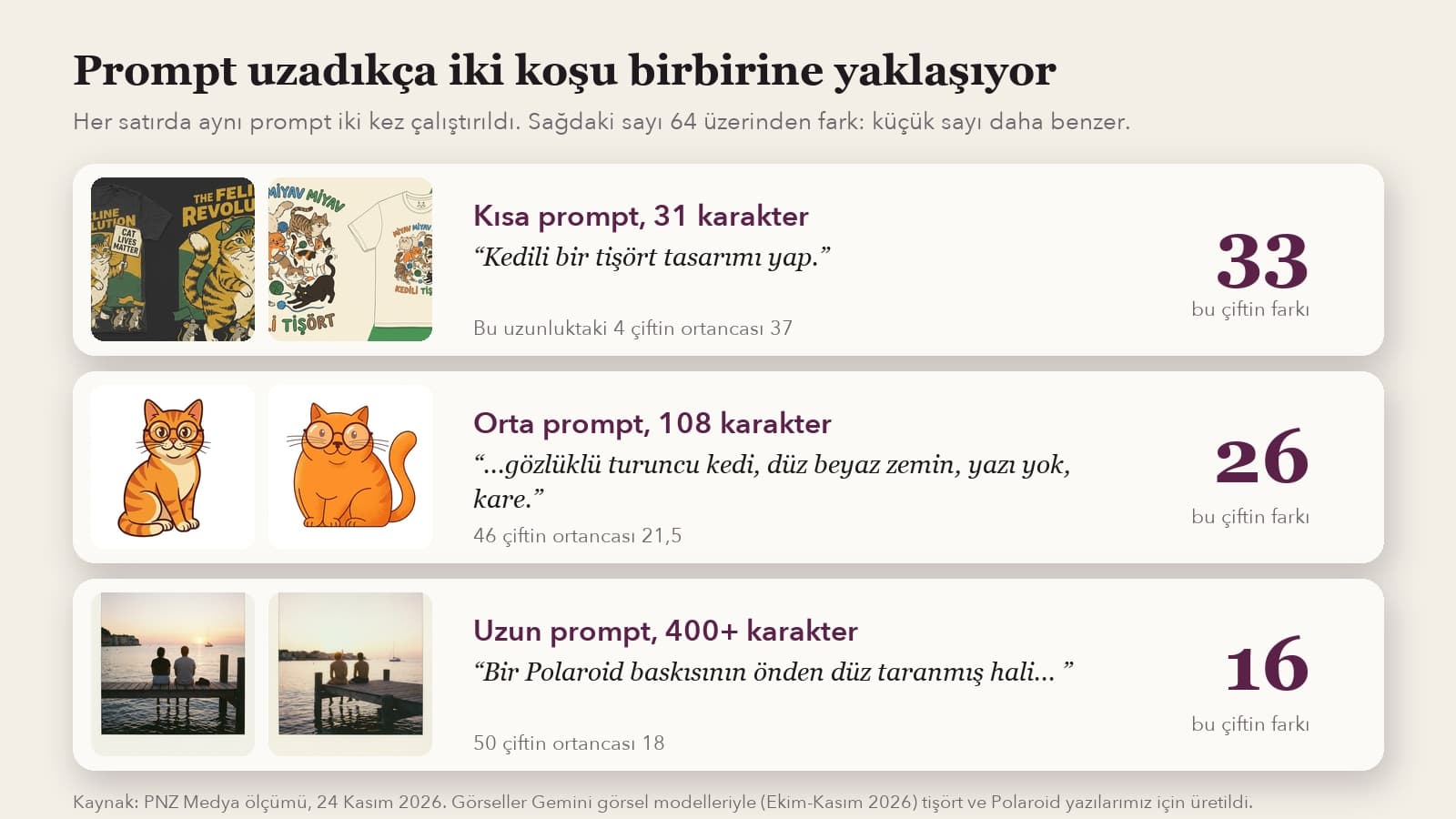
- Longer prompts brought the two runs closer: 37 for prompts under 80 characters (as far apart as two unrelated images), 18 for prompts over 400.
- If you want a near-identical result, upload the image as a reference along with the prompt. On the same job, adding a reference cut the difference from 23 to 7 for a car photo and from 21 to 1 for a tattoo drawing.
- ChatGPT's free plan allows 3 file uploads a day; in Gemini you can attach up to 10 files to one message.
The original prompt behind an image can't be read back from the image file. In October and November 2026 we generated 1,684 images with Gemini for tests in other articles; on November 24 we scanned every file and found prompt text in none of them. Tools people search for as prompt generators, and ChatGPT and Gemini too, do a different job: they look at the image and write a new description detailed enough to recreate it.
Because we had also saved the prompt for every test image, we could measure one more thing: how similar the image is when you run the same prompt a second time, and how prompt length and a reference image change that. The 12 prompts below were written around that measurement. They have the model describe the photo section by section, measure what can be measured (aspect ratio, colors) with Python, then compare the regenerated image with the original and fix the prompt in the same chat.
We did not separately test the 12 prompts in this article in ChatGPT or Gemini. The numbers come from a local measurement of 1,684 images we generated with Turkish prompts between October 16 and November 11, 2026, using three Gemini API image models (Nano Banana 2 Lite, Nano Banana 2, Nano Banana Pro), and on the saved prompt for each one. We measured similarity with dHash, a 64-point image fingerprint: 0 means identical, and the median between two unrelated test images of ours was 31. It's a rough measure. It picks up differences in composition and tone, and it can't tell you whether a face belongs to the same person.
Can You Find the Prompt of a Photo? What's Inside the File
Image files generated by Gemini don't contain the prompt. We searched the bytes of all 1,684 files for 24-character chunks of each prompt and got zero matches. Every file had two things: the standard JPEG JFIF header and a C2PA content record. The C2PA record says Google LLC signed the image and that its source type is AI generation (trainedAlgorithmicMedia). The sentence typed into the model isn't in it.
Stable Diffusion is the exception. The AUTOMATIC1111 interface adds the generation settings to each PNG it creates as a text chunk, and its PNG Info tab reads that text back. If someone sent you a PNG that came out of this interface and was never re-saved, the prompt is most likely inside the file. Screenshots and copies converted to JPEG have no PNG text chunk; Prompt 3 checks this in a few seconds.
Describe is an image-to-text tool that can help guide your creativity, but the suggested prompts won't copy your image exactly. If you use Describe on the same image again and again, Midjourney gives you a different set of suggestions each time.
How to Get a Prompt From a Photo: 5 Steps
- Upload the image. In ChatGPT use the plus button in the chat box; in Gemini use the add file button. ChatGPT accepts up to 20 MB per image, and the free plan allows 3 file uploads a day.
- Have it check the file first (Prompt 3). If the image is a PNG from Stable Diffusion, the original prompt may be inside the file, and then you don't need a description at all.
- Have it write the prompt section by section (Prompt 1): scene, subject and pose, details, lighting, shot, colors, aspect ratio and any text in the image. Ask the model to flag anything it isn't sure about.
- Don't leave the measurable parts to guesswork (Prompt 8). Python calculates the aspect ratio from the pixel dimensions and the dominant colors as HEX codes.
- Generate the image, put it next to the original and have the model fix the prompt in the same chat (Prompt 12). If you need a near-identical result, also attach the original as a reference image.
Typing "write the prompt for this photo" and taking a one-sentence answer. In our measurement, two runs of a prompt under 80 characters were as different from each other as two unrelated images.
Does the Same Prompt Give the Same Image? Results From 581 Pairs
It doesn't. Our test archive has 581 pairs of images generated twice with the same prompt on the same model: 100 from text alone, 481 with a reference photo. Only 3 pairs came out pixel-for-pixel identical, and all three are from an editing job where we said "don't redraw the signature, clean it up exactly as is." For the text-only pairs, the median difference was 20 out of 64; for 199 random pairs from the same folders with different prompts, it was 31.
Prompt length clearly changes the difference. Prompts under 80 characters, like "Make a T-shirt design with a cat.", gave two runs as different as two unrelated images. This group has only 4 pairs, which is a small number. Still, it points the same way as the 46-pair middle group and the 50-pair long group: the longer the prompt, the smaller the difference.
| Prompt length | Pairs | Median difference (out of 64) | Pairs with a difference of 12 or less |
|---|---|---|---|
| Under 80 characters | 4 | 37 | 0 |
| 80 to 400 characters | 46 | 21.5 | 5 |
| Over 400 characters | 50 | 18 | 11 |
| Comparison: two images with different prompts | 199 | 31 | 1 |
A reference image does more work than length. In the four folders where we ran the same job both with text alone and with a reference image, the difference between two runs dropped every time. The Polaroid group has only 4 text-only pairs, and the drop there was small.
| Job | Text only: pairs / difference | Text + reference image: pairs / difference |
|---|---|---|
| Car photo | 9 / 23 | 58 / 7 |
| Tattoo drawing | 33 / 21 | 18 / 1 |
| T-shirt graphic | 23 / 17 | 11 / 6 |
| Polaroid photo | 4 / 16.5 | 45 / 13 |
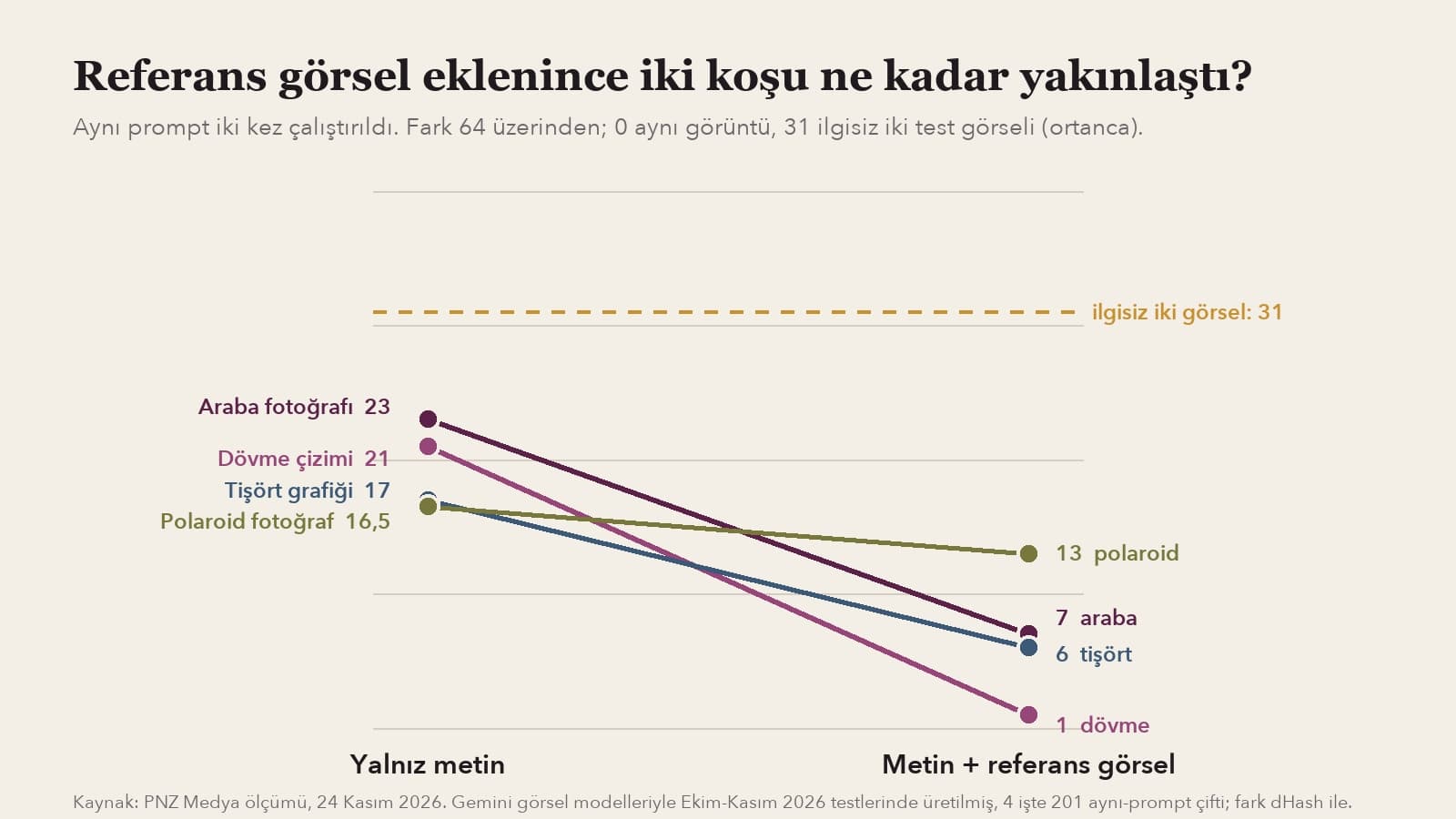
In practice: the prompt you extract is enough to make something "similar" to an image, and it falls short of making "the same" image. If you need the same product, the same person or the same scene to come back, add the original image to the chat too and write the prompt like an editing instruction. According to the Gemini API documentation, Nano Banana models can combine up to 14 reference images in one request.
12 Ready Prompts: Turn ChatGPT and Gemini Into a Prompt Generator
Add the image to the chat and paste the prompt you want. Fill in the bracketed parts with your own details; the rest works as is. The prompts work the same way in ChatGPT and Gemini. Prompt 3 and Prompt 8 run Python, so they go more smoothly in ChatGPT. The English prompts they return work in ChatGPT and Gemini as well as in other tools like Midjourney.
1) Get a prompt from a photo (main template)
Write an image prompt I can use to recreate the attached image. Describe the image; do not guess who the people in it are.
First write the prompt under these headings, 1 to 3 sentences each: Scene, Subject and pose, Details (materials, texture, clothing), Lighting (direction, hardness, time of day), Shot (angle, distance, lens look), Colors, Aspect ratio, Text in the image (word for word, if any).
Mark every detail you're not sure about with (guess).
Then merge these headings into one paragraph and give me the final prompt, ready to copy, in English.
Do not add any object, person or text that isn't in the image.
The tool I'll use the prompt in: [ChatGPT / Gemini / Midjourney].2) Short version: one-paragraph image prompt
Write a one-paragraph prompt that will recreate the attached image.
It must cover the subject, setting, lighting, camera angle, colors and aspect ratio; keep it to 60 to 90 words.
Do not add anything that isn't in the image, and do not guess who the people are.
Give only the prompt, no explanation.Even in the short version we kept the minimum at 60 words: in our measurement, short prompts were what pushed two runs furthest apart.
3) Check the file first: is the prompt inside it?
Before interpreting the attached file as an image, inspect it with Python.
1) If it's a PNG, list all the text chunks inside it; if there is a chunk named 'parameters', 'prompt' or 'workflow', print its content exactly.
2) If it's a JPEG or WebP, list the EXIF and XMP fields; show the description, software and creator tool fields.
3) Does 'c2pa' appear in the file's bytes? Answer yes or no.
Do not fill in a field you can't find with a guess; write 'none'.
At the end, say in one sentence: does this file contain the prompt that generated the image?4) Photorealistic scene template for Gemini (Nano Banana)
I want to recreate the attached photo in Gemini. Using Google's photorealistic scene template, write a single prompt in English:
A photorealistic [shot type] of [subject] in [setting]. [Lighting]. Shot from a [camera angle] with a [lens type]. [Aspect ratio].
Fill in the brackets yourself by looking at the photo; do not go outside the template.
Do not write a list of keywords; write full sentences.
Below it, add two details in the photo you're not sure about.5) Labeled sections for ChatGPT image generation
I'm going to recreate the attached image in ChatGPT. Write the prompt in four labeled sections:
Scene: setting, time, environment.
Subject: main object or person, pose, gaze direction, position in the frame.
Details: materials, texture, color, lighting.
Constraints: aspect ratio and colors to keep, things not to add.
If there's text in the image, give it word for word in quotes and spell any unusual word letter by letter.
If the image looks like a real photo, say so explicitly; add camera and lens details only as hints for the look.6) JSON prompt from an image
Turn the attached image into an image prompt in JSON format. Return only valid JSON, with no explanation before or after it.
Fields: "scene", "subject", "pose", "details" (array), "lighting", "camera", "colors" (estimated HEX, array), "aspect_ratio", "style", "text" (null if there's no text in the image), "avoid" (array), "final_prompt" (a single paragraph in English that combines all these fields).
Add " (guess)" to the end of the value of any field you're not sure about.7) Stable Diffusion style tags and negative prompt
Write a Stable Diffusion style prompt for the attached image.
Positive prompt: comma-separated English tags, in this order: subject, setting, lighting, shot, style, color. No more than 40 tags.
Negative prompt: things that aren't in this image and that the model tends to add (text, watermark, extra fingers, blur and the like), no more than 15 tags.
Write the aspect ratio you recommend separately.
Do not make up artist names; if a signature is readable in the image, just say 'signature present'.8) Write a prompt by measuring aspect ratio and colors (Python)
Measure the attached image with Python, then write an image prompt using the measurements.
Measure: width and height (pixels) and the nearest standard ratio (such as 1:1, 4:5, 3:2, 16:9, 9:16); the HEX codes of the 5 most dominant colors using k-means and each one's share of the image; average brightness (0-255).
Show the measurement table.
Then write the prompt: use the ratio and the 5 colors exactly as measured, and add the lighting and subject description by looking at the image.
Do not replace a measured value with one you estimated by eye.9) Keep the style, change the subject
I want to use the style of the attached image for a different subject.
First describe only the style: color palette, lighting, texture, drawing or photography technique, composition, mood. Do not mention the subject.
Then write a single prompt that combines this style description with this new subject: [new subject, e.g. a small bookshop with its door open on a rainy evening].
Do not use the people, logos or text from the image in the new prompt.10) From idea to prompt: a prompt generator that asks questions
Help me write an image prompt. Here's my idea: [rough idea, e.g. a winter menu cover for my cafe].
Before writing the prompt, ask me no more than 4 short questions: where the image will be used, what aspect ratio, photo or illustration, and whether there will be text in the image.
After my answers, give two versions: a prompt for [ChatGPT / Gemini] written in full sentences, and a short version of the same content of no more than 40 words.
If there will be text in the image, give it in quotes.11) Video prompt from a photo
I'm going to turn the attached photo into a [length, e.g. 8]-second video. Write a video prompt that will animate the photo without changing it.
Include: the scene seen in the first frame (the photo itself), the one thing that moves and how it moves, the camera movement (static, slow push-in or sideways slide), ambient sound.
The video should be a single shot with no scene transitions; state this explicitly in the prompt.
The people's faces, hair and clothing must not change.12) Compare and fix (in the same chat)
I'm attaching the image I generated with the prompt you just wrote. The first image is the original, the second is the new result.
Compare them and list the differences in order of importance: composition, subject and pose, lighting, color, detail, text.
For each difference, say what you'll change in the prompt, then give the full corrected prompt.
Leave the parts that match the original as they are in the prompt.
If the difference is large, suggest this on the last line: add the original image as a reference and regenerate with this prompt.If there's a face in the image, the model may refuse to say who the person is, or it may guess a name. Either way, write this in the same chat: "I'm not asking who this person is, don't give a name; just describe the scene, pose, clothing and lighting."
Which Prompt Generator? ChatGPT, Gemini and Midjourney Describe
| Tool | How you give it the image | What comes back | Known limit |
|---|---|---|---|
| ChatGPT | Upload it to the chat | A prompt in whatever format you ask for; measurement and file reading with Python | 20 MB per image, 3 files a day on the free plan (OpenAI help page) |
| Gemini | Add file button | A prompt in whatever format you ask for; generation with Nano Banana in the same chat | Up to 10 files per message (Google help page) |
| Midjourney Describe | Drag the image into the Imagine bar, or /describe on Discord | 4 prompt suggestions, different on each try | The suggested prompt won't copy the image exactly (Midjourney) |
| AUTOMATIC1111, PNG Info | Drop the PNG into the tab | The actual generation settings written to the file, prompt included | Only for PNGs from this interface that haven't been re-saved |
| Image to prompt websites | Upload in the browser | A single description | You hand the image over to a third-party site |
If the image came from an AI tool, check the file first with PNG Info or Prompt 3; the real prompt may turn up there. If the photo is a real shot or was downloaded from social media, your only option is to have a description written. For that, ChatGPT or Gemini is more flexible than one-click sites, because you get the result in the format you want and can fix it in the same chat.
What Sections Does a Good Image Prompt Have?
OpenAI's image prompting guide recommends organizing complex requests into labeled sections: scene, subject, details and constraints. Google's Gemini image documentation gives this template for a photorealistic scene: shot type, subject, setting, lighting, camera angle and lens. When you get a prompt from a photo, some of these sections can be measured and some can only be guessed.
| Section | How you get it from the photo | Note |
|---|---|---|
| Scene and setting | The model describes what it sees | Usually comes out right |
| Subject and pose | The model describes what it sees | Don't have it write a person's name |
| Light direction and time of day | Guessed from the shadows | Have it marked (guess) in the prompt |
| Camera angle and lens | Guessed from the look | OpenAI treats camera details as hints for the look |
| Aspect ratio | Calculated from pixel dimensions | Exact with Prompt 8 |
| Dominant colors | HEX codes with Python | Exact with Prompt 8 |
| Text in the image | Read and written in quotes | Letters can get mixed up in small text, so check it |
Think of camera specs as a hint for the look; they don't guarantee an exact physical simulation.
Common Mistakes
- Asking for a one-sentence prompt. In our measurement, prompts under 80 characters gave two runs as different as two unrelated images.
- Taking the extracted prompt for the original prompt. The model is describing the image; ask about the same image a second time and you may get different text.
- Leaving aspect ratio and colors to the model's eye. Both can be measured from the file, and Prompt 8 shows the measurement in a table.
- Wanting the same image and giving only text. On the same job, adding a reference image lowered the difference between two runs in four out of four jobs.
- Looking for a prompt in a screenshot. The PNG text chunk exists only in the original file; screenshots and JPEG copies don't have it.
- Asking for the fix in a new chat. When the original and the new image are in the same chat, the model can point out the differences by looking at both (Prompt 12).
Other People's Photos, Faces and Copyright
The photo you upload to get a prompt goes to the tool's servers. If it shows someone else's face, license plate or address, don't upload it without that person's permission; faces and license plates are personal data. In both ChatGPT and Gemini you can turn off, in the settings, whether your chat history is used to train the model.
Recreating a photographer's or illustrator's work with a prompt comes close to adapting that work, however much the description is your own. Under Article 21 of Turkey's Law No. 5846 on Intellectual and Artistic Works, the right to benefit from a work by adapting it belongs only to its author. That's why Prompt 9 separates style from subject: you take the color, lighting and technique and put in your own subject, without using the people, logos or text in the image.
If the image is a PNG from Stable Diffusion's AUTOMATIC1111 interface and hasn't been re-saved, the prompt is written inside the file, and the PNG Info tab or Prompt 3 in this article reads it. Gemini images don't carry the prompt in the file: we found it in none of the 1,684 Gemini images we measured. In that case you upload the image to ChatGPT or Gemini and have it write a new prompt with Prompt 1.
You can upload an image and have a prompt written on the free plans of ChatGPT and Gemini. ChatGPT's free plan allows 3 file uploads a day. Gemini accepts up to 10 files in one message; Google says Gemini's file limits are higher on paid plans.
Upload the photo in Gemini with the add file button and paste Prompt 4. The prompt has Gemini fill in Google's own photorealistic scene template (shot type, subject, setting, lighting, camera angle, lens). In the same chat, say "generate the image with this prompt" and you'll see the result from Nano Banana right away.
Because even the original prompt doesn't give the same image on a second run. In our measurement, 100 pairs generated from text alone with the same prompt had a difference of 20 out of 64. To get closer, make the prompt longer (for prompts over 400 characters the difference dropped to 18) and add the original image as a reference.
Upload the image and use Prompt 6. The model fills in the scene, subject, pose, details, lighting, camera, colors, aspect ratio, style, text and avoid fields, and at the end gives a final_prompt field in English that combines them all. OpenAI's image guide also counts JSON-like structure as a valid prompt format.
It depends on the tool. AUTOMATIC1111 writes the prompt into a text chunk in the PNG. Gemini images don't contain the prompt; the file only has a C2PA record, and that record says the image was signed by Google and generated with AI.
Don't generate once with the prompt you extracted and stop there. Compare the original and the new image in the same chat with Prompt 12; on the second round the lighting and aspect ratio usually fall into place. If you're looking for ready-made image prompts, our posts on ChatGPT photo prompts and Gemini photo prompts have lists sorted by topic.
Product and Corporate Photography
An image made from a prompt changes a little on every try. If the same product has to look the same in every shot of your catalog, menu or website, a real photo shoot gets you there faster. Let's talk through what you need for product and venue photography in a free initial call.