



How to Make a Free QR Code That Never Expires: Logo, Wi-Fi and 12 Prompts (2026)
Ways to make a QR code with no sign-up and no expiration, the difference between static and dynamic codes, how big a logo can get based on 544 scan attempts, which reader stumbled on colored and inverted codes, and 12 ready prompts that make ChatGPT generate a QR code in Python and scan it back.
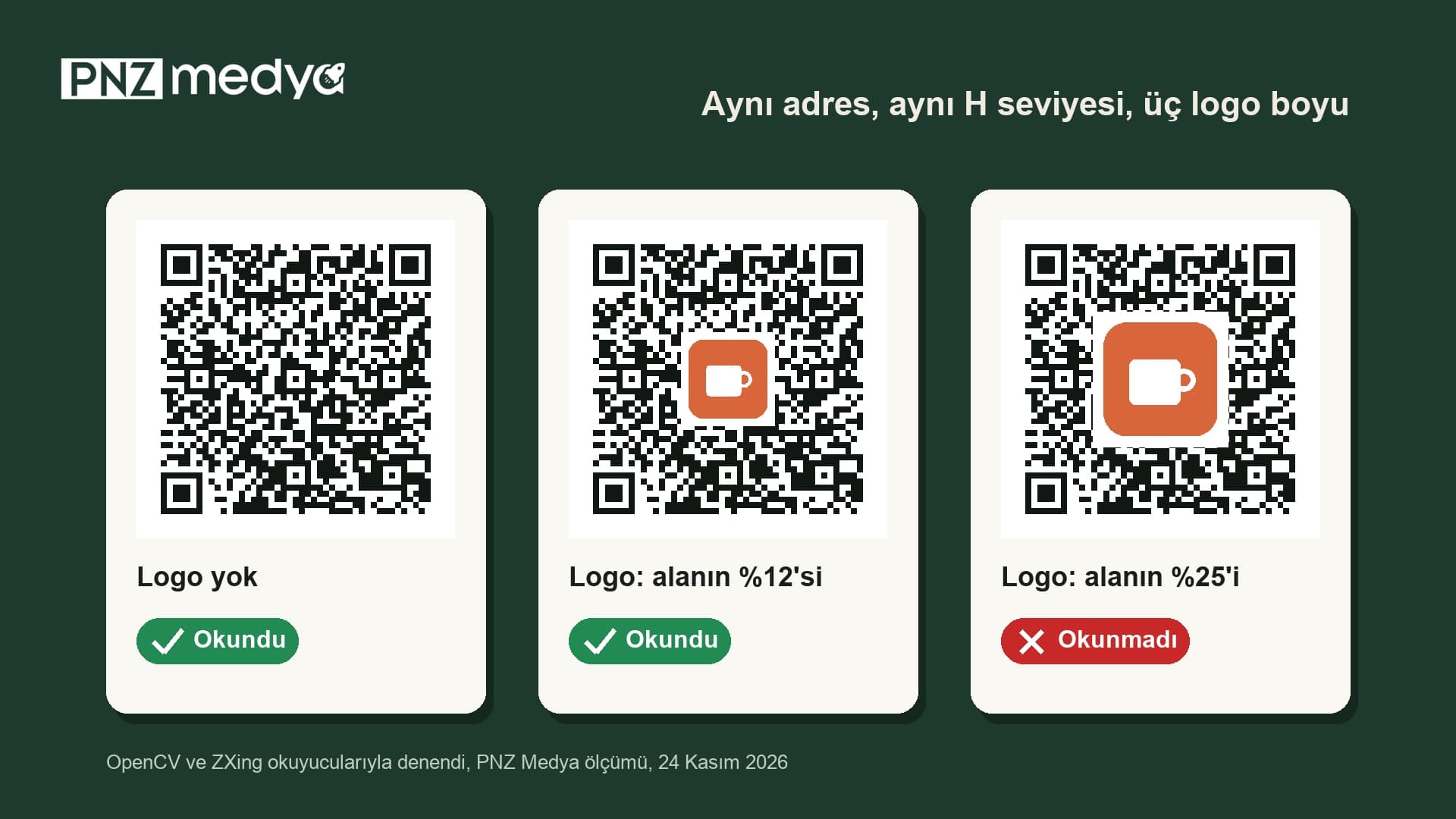
- A QR code that never expires is a static code: the URL is written into the code itself, so no sign-up or subscription is needed. Chrome's Create QR Code option on desktop and ChatGPT's Python tool both give you this kind of code.
- A dynamic code carries the QR site's own short link and may stop working when your plan ends. QR TIGER says on its own page that its free plan gives 3 dynamic codes, each limited to 500 scans.
- For a QR code with a logo, choose error correction level H and keep the logo to 15% of the QR area. With a 63-character URL at level H, the logo scanned in 17 of 17 attempts up to 16%, in 3 at 20%, and in none at 25%.
- Inverted QR codes (a light code on a dark background) depended on the reader: OpenCV read none of 17 attempts, ZXing read them all. A dark code on a light background is the lowest-risk choice.
- Gemini's image models draw a QR code as a pattern: in our October 28, 2026 test, none of the 6 QR codes we asked for would scan. The prompts here generate the code with Python and scan it back.
You don't need to sign up anywhere to make a QR code that never expires. Chrome's share menu, or a prompt of a few lines in ChatGPT, produces a static QR code that writes the URL straight into the code; that code keeps working as long as the paper you print it on holds up. Most QR sites that ask you to sign up give you a dynamic code instead: the person scanning goes to the site's short link first, and that redirect can stop when the subscription ends.
Below you'll first find five ways to make a QR code and which of them never expire. Then we use our own measurements to show how big a logo can be, which colors cause trouble, and how the code gets denser as its content grows. At the end come 12 ready prompts for ChatGPT: links, logo codes, Wi-Fi, business cards, WhatsApp, menus, bulk labels, and reading a suspicious code without opening it.
The numbers come from our own measurements. We generated the QR codes with the qrcode 8.2 library in Python and scanned them with two separate readers (OpenCV 5.1 QRCodeDetector and the C++ port of ZXing). We tested each code in three forms: the flat file, a simulated phone photo taken at an angle and blurred (8 attempts), and a simulated small image shot from a distance (8 attempts). A simulation may not match a real camera, so test with your own phone before printing. We did not run a scored test of the prompts in ChatGPT and Gemini this time; the model capabilities come from OpenAI's and Google's documentation, and the Gemini image model's QR attempt comes from our October 28, 2026 test.
How to Make a QR Code: 5 Ways on Your Phone and in the Browser
Chrome on desktop: Open the page you want a code for, then from the More menu at the top right choose Cast, save, and share > Create QR Code. According to Google's help page, the window that opens lets you copy the link, save the code with Download, or scan it with another device's camera. The code carries only that page's URL; the help page doesn't mention any color or logo settings in this window.
Wi-Fi on Android: Go to Settings > Network & internet > Internet, tap the network you're connected to, then tap Share. The phone shows a QR code on screen; when a guest scans it, they join the network without typing the password. You can take a screenshot and print it, but the code goes out of date the day you change the network password.
| Method | Where | Inside the code | Expires | Logo and color |
|---|---|---|---|---|
| Chrome: Create QR Code | Chrome on desktop, More menu | URL of the open page | Never (static) | No settings |
| Android: Wi-Fi Share | Settings > Network & internet > Internet | Network name and password | Until the password changes | No settings |
| ChatGPT + Python | Chat, the prompts in this article | Whatever you give it: URL, Wi-Fi, vCard | Never (static) | Yes, with a scan check |
| QR site, static code | Browser, mostly no sign-up | Your URL | Never | Depends on the site |
| QR site, dynamic code | Browser, with sign-up | The site's short link | Depends on the plan | Usually yes |
QR Codes That Never Expire: Static vs Dynamic
In a static QR code, the URL, Wi-Fi password or contact details are written into the black and white squares themselves. The phone gets the information the moment it reads the code, with nobody's server in between. The trade-off: once the code is printed, you can't change its content. If your menu's URL changes, you print a new code.
A dynamic code holds the QR site's own short link in its squares, and the site redirects that link to your URL. You can change the destination later and see how many times it was scanned. QR TIGER's own page says this type relies on a hosting plan, and that the code may stop working if the link is deactivated or the plan expires. According to the same page, the site's free plan gives 3 dynamic codes, each limited to 500 scans.
To tell which kind you have, scan it with your phone and look at the URL that appears on screen before it opens. If you see your own domain or Wi-Fi details, the code is static. If you see the QR site's name or a short link you don't recognize, it's dynamic and you depend on that site.
Before printing the menu, business card or packaging, print the code at its real size on a sheet of paper and scan it with two different phones. Read the full URL that opens: if an extra letter, a space or an old campaign parameter is left at the end, this is the only stage where you'll catch it.
QR Code with a Logo: How Big Can the Logo Be?
You can put a logo in the middle of a QR code because of its error correction margin. DENSO WAVE, the company that developed the code, defines four levels: L can restore about 7% of the data, M 15%, Q 25% and H 30%. The reader treats the squares covered by a logo as erased and rebuilds them using this margin. The higher the level, the denser the code: our 63-character URL came out at 33 x 33 modules at L and 45 x 45 at H.
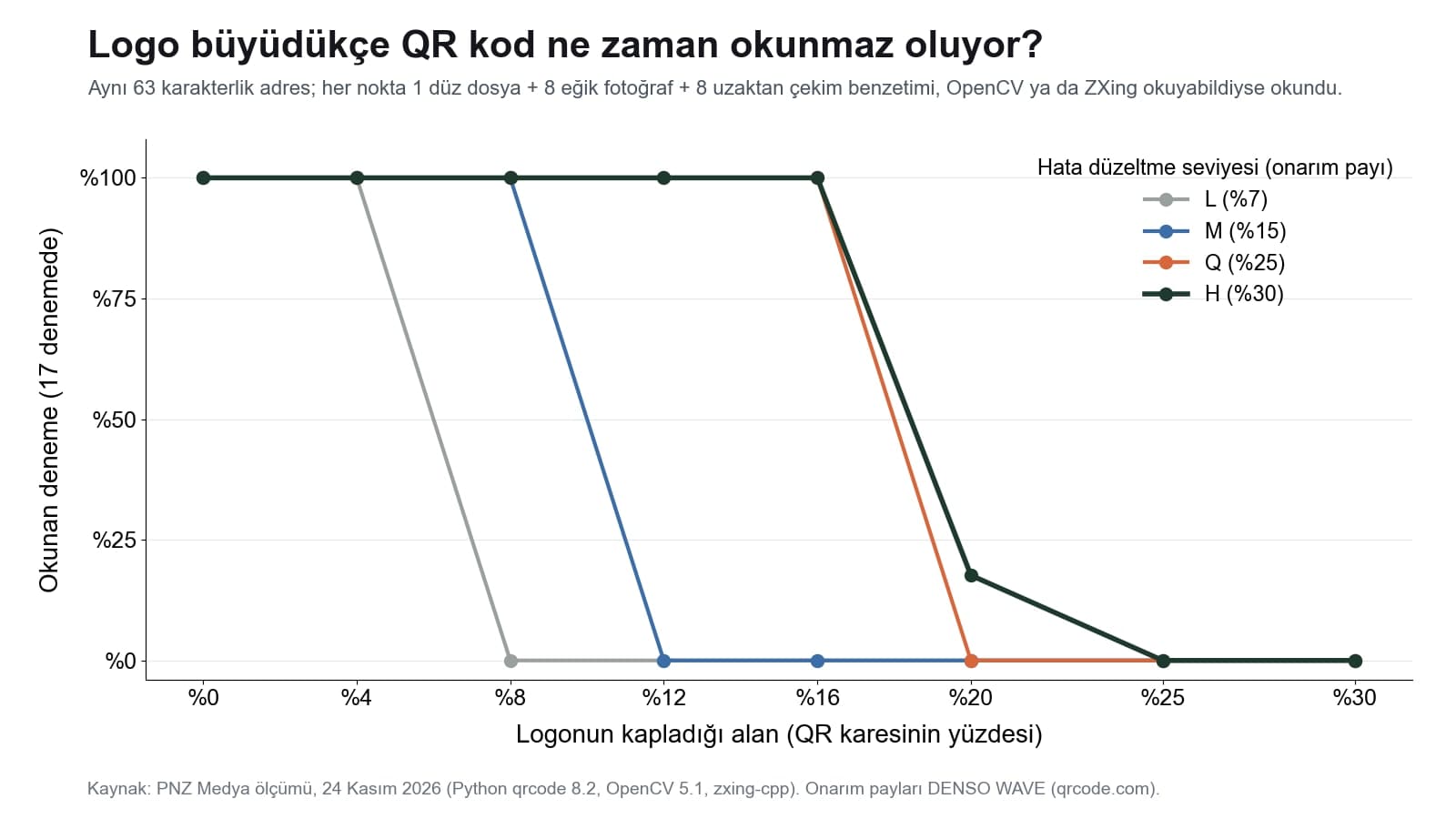
Level by level, the result looks like this. At L, all 17 attempts scanned when the logo covered 4% of the area, and none did at 8%. At M the limit falls between 8% and 12%, at Q between 16% and 20%. At H, 17/17 scanned up to 16%, 3/17 at 20%, and zero at 25%. With a logo, we never reached the nominal 30% repair margin. One explanation: repair works on 8-bit codewords, and covering even a single square at the edge of the logo makes the whole codeword that square belongs to count as damaged.
| URL length | Level M | Level Q | Level H |
|---|---|---|---|
| 20 characters (https://pnzmedya.com) | 9% | 10% | 16% |
| 63 characters (this article's Turkish URL) | 10% | 17% | 19% |
| 142 characters (URL with UTM tags) | 10% | 20% | 24% |
This table comes from a separate, finer sweep: we grew the logo in 1% steps and at each step scanned the flat file and 4 angled photo simulations; each number is the largest share at which all five scanned. That's why the chart shows 16% and this table shows 19%: the chart moves in steps of four percentage points. The limit came sooner with the short URL; less data means fewer repair codewords that can sit under the logo. Rule of thumb: choose H and keep the logo, including its white frame, to at most 15% of the QR area. For a square logo, that means the logo's side is about 38% of the QR square's side. Don't let the logo spill onto the three large corner squares or into the blank margin around the code.
QR Code users should be careful not to damage the code by overlaying a drawing on it or placing a design on top of it. If the code is damaged, its error correction function comes into play, and even a small missing or stained area can make it impossible to read or slow reading down.
Colored QR Codes: Which Color Pairs Scan?
We generated the same URL at level M in ten color pairs and scanned each one 17 times. The table shows seven of them; the other three (burgundy/cream, orange/white and dark gray/light gray) scanned 15 to 16 times in OpenCV and 17 times in ZXing. The two readers, the kind phone cameras use, had little trouble with colored codes. The real difference showed up with inverted colors: when we put a light code on a dark background, OpenCV couldn't read any of the 17 attempts, while ZXing read them all. Since you can't know which reader the app on your phone uses, inverted colors are a gamble.
| Code / background | Contrast ratio | OpenCV (17 attempts) | ZXing (17 attempts) |
|---|---|---|---|
| Black / white | 21 | 15 | 17 |
| Navy / white | 14.2 | 15 | 17 |
| Red / white | 4.9 | 16 | 17 |
| Light gray / white | 2.6 | 16 | 17 |
| Yellow / white | 1.6 | 14 | 17 |
| White / black (inverted) | 21 | 0 | 17 |
| White / navy (inverted) | 14.2 | 0 | 17 |
Yellow and light gray codes scanning in this table doesn't mean they will scan in print. Our simulation doesn't account for ink, paper glare or dim light. DENSO WAVE also says readers that use red light can't read a red code on a white background, and some store and warehouse scanners are of this type. The manufacturer recommends a black code on a white background. If you want to use a brand color, keep the code dark and the background light, and test before printing.
What You Put in a QR Code Changes Its Size
The more characters a QR code carries, the more modules (small squares) it's made of. If the space on paper stays the same, each module gets smaller and the phone has to read the code from closer up. DENSO WAVE also asks for a blank margin 4 modules wide on all four sides of the code; if that margin is cut off, the reader can't find where the code ends.
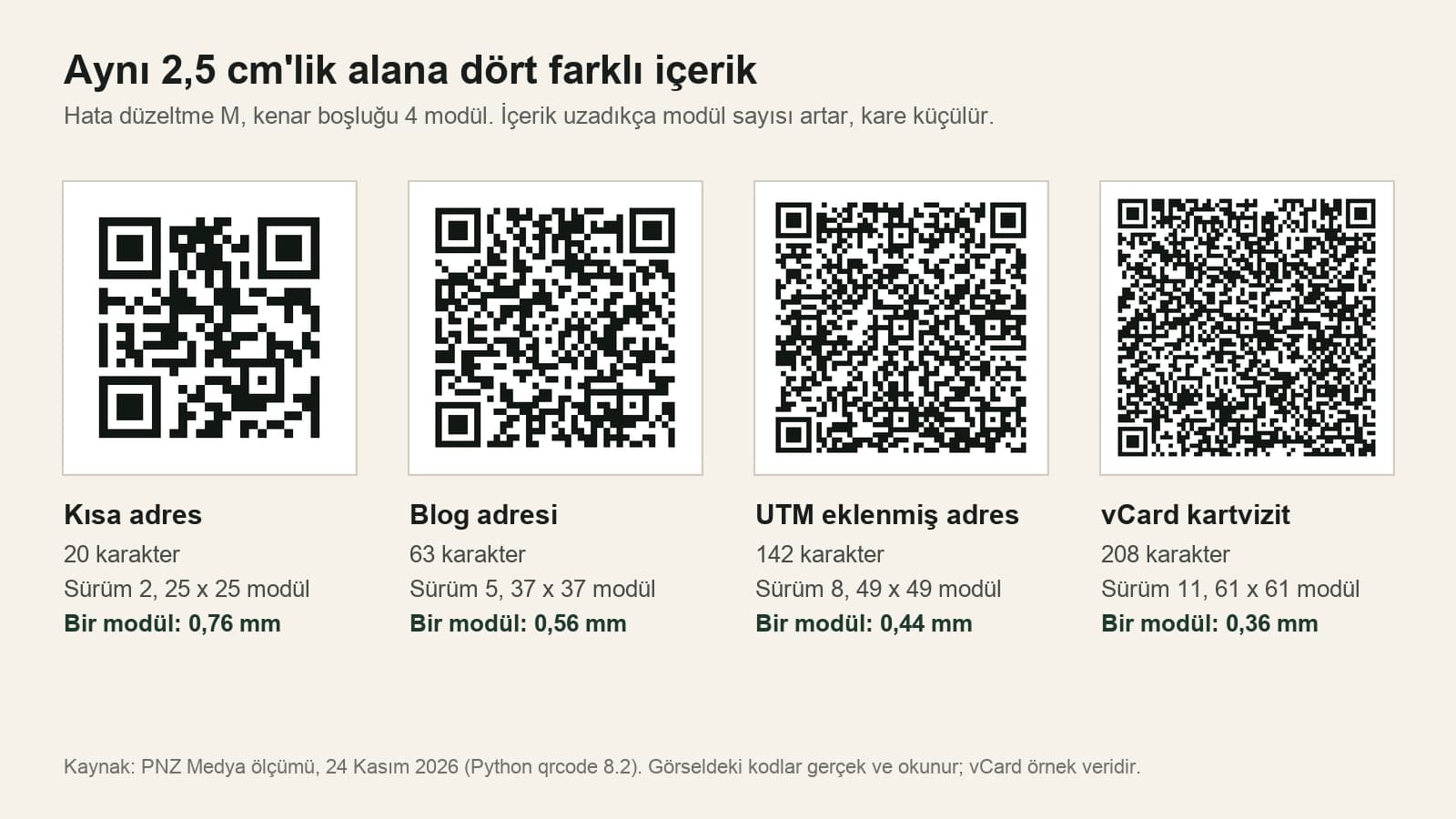
| Content | Characters | Level M (version, modules) | Level H (version, modules) | Module at 2.5 cm (M) |
|---|---|---|---|---|
| Location (geo:) | 19 | 2, 25 x 25 | 3, 29 x 29 | 0.76 mm |
| Short URL | 20 | 2, 25 x 25 | 3, 29 x 29 | 0.76 mm |
| Wi-Fi | 44 | 4, 33 x 33 | 5, 37 x 37 | 0.61 mm |
| Blog URL | 63 | 5, 37 x 37 | 7, 45 x 45 | 0.56 mm |
| WhatsApp message | 102 | 6, 41 x 41 | 10, 57 x 57 | 0.51 mm |
| URL with UTM tags | 142 | 8, 49 x 49 | 12, 65 x 65 | 0.44 mm |
| vCard business card | 208 | 11, 61 x 61 | 15, 77 x 77 | 0.36 mm |
That's why a business card QR squeezed into a corner of the card causes trouble, and adding a long campaign parameter to a menu QR has the same effect. Putting your PDF menu inside the QR code isn't possible: DENSO WAVE gives a practical limit of around 271 bytes for codes meant to be read by a phone camera (version 10, level L). You put the menu, catalog or video at a URL and encode that URL in the QR code.
QR Codes with ChatGPT and Gemini: The Image Model Draws, Python Generates
When you tell an AI to "make a QR code", one of two things can happen. An image model draws a picture: in our October 28, 2026 invitation test, we asked Gemini's image models for a scannable QR code carrying a URL; all 6 images came back with a QR-like pattern, none of them scanned, and in 4 the link was printed as plain text next to the code. The model imitates what a code looks like.
A chat that can run Python produces a real code. According to OpenAI's help page, ChatGPT runs Python code in a Jupyter environment during data analysis, and that environment can't make external web requests, so the model can't check that your URL opens. You have to. The qrcode library shows up in package lists users have shared (a snapshot dated March 2026); OpenAI has no official list. The libraries listed in Google's Gemini API code execution docs don't include qrcode but do include opencv-python, and a code we generated with OpenCV's QRCodeEncoder scanned in both readers. That's why the prompts include a fallback line.
QR Code Prompts: 12 Ready-to-Use Prompts
Replace the bracketed parts with your own details. The last lines of every prompt do the same job: generate the code, scan the file back and show you the decoded text. Compare that text with what you typed, character for character, and don't use a code that doesn't scan or doesn't match.
Create a QR code for the URL [https://example.com/menu].
Don't draw an image; generate it in Python with the qrcode library. If qrcode isn't available, use OpenCV's QRCodeEncoder.
Use error correction level M, leave a 4-module white quiet zone on all four sides, black code on a white background.
Give me a PNG of at least 1000 pixels and an SVG file.
Read the PNG you generated back with OpenCV's QRCodeDetector and write out the decoded text. If the text isn't identical, character for character, to the URL I gave you, don't give me the file.
If you can't run code, say so clearly and don't give me a QR image.Generate a QR code for [https://example.com] with Python (qrcode, level M, 4-module quiet zone). Give it to me as a PNG, then read it with OpenCV and show the decoded text.Create a QR code for [https://example.com] with the logo I uploaded placed in the center.
Use Python, and set the error correction level to H.
The logo, together with the white margin around it, should cover at most 15 percent of the QR square's area; leave a white margin 1 module wide around the logo.
Don't touch the three large squares in the corners or the 4-module quiet zone around the edge.
Read the result with OpenCV. If it doesn't scan, shrink the logo by 10 percent and try again; give me the first version that scans and tell me what share of the area the logo covers.
Give me a 1500-pixel PNG and an SVG.Create a QR code for our guest Wi-Fi network. Network name: [Cafe_Guest], password: [password], security: [WPA].
Build the text in the format WIFI:T:WPA;S:networkname;P:password;;. If the network name or password contains any of the characters \ ; , " :, put a backslash in front of it.
Generate it in Python with level Q and a 4-module quiet zone.
Read the code back and show the decoded text so I can check the password.
Also give me a print-ready A6 PDF with only "Wi-Fi: [Cafe_Guest]" written under the code. Don't print the password on the card in plain text.Prepare a vCard 3.0 text with the details below and turn it into a QR code:
Full name: [First Last]
Company: [Company]
Job title: [Job Title]
Phone: [+1 555 010 0100]
Email: [[email protected]]
Website: [https://company.com]
Encode the text as UTF-8 so accented letters don't get garbled.
Generate it in Python at level M; give me a PNG and an SVG.
Read the QR code with OpenCV and show the decoded vCard text line by line.
Tell me how many modules the code has and how many millimeters one module will be when it's printed at 2.5 cm.Make a QR code for our business location. The share link I copied from Google Maps: [link].
Don't look up the address yourself and don't guess coordinates; use only the link I gave you.
Generate it in Python with level M and a 4-module quiet zone, and give me a PNG.
Read the code back and compare the decoded link with the one I gave you.I want a QR code that lets customers message me on WhatsApp with a prefilled message when they scan it.
Number: [1 555 010 0100]
Prefilled message: [Hi, I'd like to order from table 12]
Write the number with the country code and no spaces; don't put +, 00 or 0 in front, and don't use parentheses or dashes.
URL-encode the message (including any accented letters) and build the link https://wa.me/number?text=message.
Also show me the link as plain text.
Generate it in Python at level M, read it back and compare the decoded link.Our restaurant menu is at this address: [menu link].
Prepare a QR code for this link to place on the tables: level Q, 4-module quiet zone.
Give me a print-ready 10 x 10 cm PDF with the text "Scan for the menu" and [business name] under the QR code.
Read the code back and show that the decoded text matches the link I gave you.
Don't try to put the menu file itself inside the QR code; encode only the link.The Excel file I uploaded has [product name] and [link] columns.
Generate a separate QR code for each row (Python, level M, 4-module quiet zone). Name each file after the product, and replace accented letters in the file names with plain ones.
Give me all of them in a single ZIP file.
Also prepare a label PDF that fits 3 columns x 8 rows on an A4 page, with the product name under each QR code.
Read each code back right after generating it. Show the rows that didn't scan or whose link cell is empty in a separate list.Prepare a QR code for [https://example.com] that will go to the printer. Print size: [3 x 3 cm], with the 4-module quiet zone included in that size.
Use error correction level M.
Calculate how many modules it comes out to and how many millimeters one module is. If a module drops below [0.5 mm], warn me and suggest that I shorten the URL.
Give me SVG and PDF (vector) for the printer, plus a 300 dpi PNG.
Read the PNG back and show the decoded text.Make a QR code for [https://example.com] in our brand colors: code color [#1E3A2F], background color [#FAF8F2].
Keep the dark color on the code and the light color on the background; don't swap the colors.
Calculate the WCAG contrast ratio of the two colors and write it down.
Generate it in Python at level Q. Read the color PNG with OpenCV, then convert it to grayscale, read it once more, and write both results.
Give me a PNG and an SVG.Read the QR code in the photo I uploaded, but don't open the link inside it.
Use OpenCV QRCodeDetector in Python; if you can't read it, enlarge the image, convert it to grayscale and try once more.
Write the decoded text exactly as it is. If it's a link, show the domain on a separate line and check these: is it a URL shortener, is there a lookalike-letter trick in the domain, does the address start with http?
If the code doesn't scan, don't guess; say it couldn't be read.If the model shows a QR image but doesn't write a scan result, type this in the same chat: "Did you generate this code with Python? Show me the code you ran and the scan output." If no code comes back, don't use that image: most likely the image model drew it. If you'd rather not type your Wi-Fi password into the chat, use the code on Android's Share screen.
How to Scan a QR Code (and Spot a Fake One)
On iPhone, open the Camera app, frame the code in Photo mode and tap the link that appears at the bottom of the screen. You can also add the Code Scanner button to Control Center and scan from there; Apple suggests turning on the flashlight in low light. Read the URL before you tap the link: that line shows you what the code actually says.
In Istanbul in October 2023, stickers with the ISPARK logo (ISPARK runs the city's municipal parking) were left on parked cars, reading "Scan the QR code to pay your parking debt." Turkey's Center for Combating Disinformation, part of the Presidential Communications Directorate, announced that the stickers were fake, that ISPARK had no such practice, and that people who scanned the code were sent to a payment screen asking for their card details. Don't enter card details on a page opened from a code you find on the street; pay through the organization's own app.
If your business will take payments by QR code, don't generate the code yourself; get it from your bank or payment provider. Under a regulation published in 2020 by the Central Bank of the Republic of Turkey (TCMB), QR codes for payment services in Turkey are generated to the TR Karekod standard. As Is Bankasi explains it, the payer scans the code from the TR Karekod payment menu in their mobile banking app. The prompts in this article do not generate payment codes.
In Chrome on desktop, open the page, go to More > Cast, save, and share > Create QR Code and click Download. If you need a logo, Wi-Fi or a business card, give ChatGPT one of the prompts in this article, have it generate the code with Python, and check the scan result.
Make a static code: the URL is written into the code, it isn't tied to any site and it never expires. Chrome's Create QR Code option and codes generated with Python are static. Dynamic codes from sites that require sign-up may stop working when the plan ends.
It will if the logo is small and the error correction level is high. In our measurements at level H, the logo scanned in 17 of 17 attempts up to 16% of the area and not at all at 25%. Choose H and keep the logo to 15% of the area.
Yes, when it uses its Python tool: it generates the code with a library, gives it to you as a file and can scan it back. A QR code drawn by an image model doesn't scan; none of the 6 QR codes we asked Gemini's image models for would scan. That's why the prompt has the line "Don't draw an image; generate it in Python".
On Android, go to Settings > Network & internet > Internet, tap the network and then Share, and the phone shows the code. For a printed card, turn the network name and password into a QR code in the format WIFI:T:WPA;S:networkname;P:password;;. Prompt 4 does this.
On iPhone, open the Camera, frame the code and tap the link at the bottom, or use the Code Scanner button in Control Center. Read the URL shown on screen before opening it; if it leads to a payment page you don't recognize, don't open it.
For a menu or label, make the last test this: print the code at its real size, put it on the table, and scan it with two different phones from the eye level of someone sitting down, about an arm's length away. If even one of them hesitates, shrink the logo or shorten the URL and generate the code again; the table above shows which one frees up more room.
Web Design Services
If the menu, catalog or contact page a QR code opens loads slowly on a phone, the person who scanned it leaves. We design pages that live on your own domain and load fast on mobile; in a free initial call we can look at your current page together.