



Nano Banana Pro vs Nano Banana 2: Same 10 Prompts Tested (2026)
Nano Banana Pro or Nano Banana 2? We ran the same 10 prompts twice on four Gemini image models. None of them misspelled the Turkish text, but across 20 images Lite drifted from the prompt 7 times, Nano Banana 2 4 times and Pro 0 times. Speed, pricing and the tested prompts.
- We ran the same 10 prompts twice each on Nano Banana 2 Lite, Nano Banana 2, Nano Banana 2.1 and Nano Banana Pro (84 images, October 19, 2026). None of the four models made a letter error in Turkish text: all 2,392 characters on the poster, menu and infographic were correct.
- The difference showed up in additions that weren't in the prompt. In 20 images, Lite went outside the instructions 7 times, Nano Banana 2 4 times and Nano Banana 2.1 3 times (an extra comb, a cup, leaves, a repeated line). We counted none in Pro's 20 images.
- Pro is the most expensive and the slowest model: $0.134 per 1K image in the API, 16.7 seconds median. Nano Banana 2 is $0.067 and 9.9 seconds; 2.1 drifted less at half that price ($0.034).
- In the Gemini app, accounts without a plan can't pick a model; most requests go to Flash-Lite, and images to Nano Banana 2 Lite. Nano Banana Pro is only available on paid plans, through the "Redo with Pro" button while the Pro model is selected.
- Choose Pro for work that has to come out right on the first try, like logos and posters with long text. Nano Banana 2 is enough for photo experiments and everyday work; in most images you can't tell the two apart by eye.
For most jobs, Nano Banana 2 is enough. You need Pro for logos and text designs that have to be right in a single try. We saw this by running the same 10 prompts twice on four models: a product photo, a cat, flowers, a logo, a poster, a menu, an infographic, 7 apples, Galata and an edit.
We ran the test on October 19, 2026 through the Gemini API at 1K resolution. We timed every image, noted Google's per-image price and counted every detail that went outside the prompt. We read the text in the images letter by letter at full resolution.
Nano Banana Pro vs Nano Banana 2: The Short Answer
| Nano Banana 2 Lite | Nano Banana 2 | Nano Banana 2.1 | Nano Banana Pro | |
|---|---|---|---|---|
| API ID | gemini-3.1-flash-lite-image | gemini-3.1-flash-image | gemini-nano-banana-2.1 | gemini-3-pro-image |
| Price per 1K image | $0.034 | $0.067 | $0.034 | $0.134 |
| Highest resolution | 1K | 4K ($0.151) | 4K ($0.113) | 4K ($0.24) |
| Median time (our test) | 3.3 s | 9.9 s | 15.5 s | 16.7 s |
| Off-prompt additions (20 images) | 7 | 4 | 3 | 0 |
| Turkish letter errors (6 text images) | 0 | 0 | 0 | 0 |
| In the Gemini app | Most requests on accounts without a plan | When Flash or Pro is selected | Not named on the help page | "Redo with Pro" on paid plans |
Prices come from Google's Gemini API pricing page, October 2026. The app subscription has no per-image charge, but it has usage limits. We measured times by sending eight requests at once, so one request at a time may come back a little faster. Nano Banana 2.1 being slow surprised us: Google presents it as having Flash speed, yet in our measurement it came in 5.6 seconds behind Nano Banana 2.
The premium choice for the most complex visual tasks, offering the highest level of world knowledge, advanced localization, accurate brand consistency, and precision creative control.
Which Nano Banana Runs in the Gemini App?
In the app, the image model depends on which text model Gemini is running at that moment. According to Google's help page, the Flash-Lite setting uses Nano Banana 2 Lite, and the Flash or Pro setting uses Nano Banana 2. Since October 9, 2026, accounts without a plan only get the "Auto" setting, and Google writes that most of those requests go to Flash-Lite. So an image on a free account is most likely drawn by the model that drifted the most in our test.
- If you have a Google AI Plus, Pro or Ultra plan, pick Pro in the model selector.
- Ask for the image as usual; the first result comes from Nano Banana 2.
- Open the More menu at the bottom right of the image and tap "Redo with Pro". The same prompt gets redrawn with Nano Banana Pro.
Accounts without a plan download images at 1K, accounts with a plan at 2K. If Nano Banana 2's daily quota is used up, Redo with Pro doesn't open either. Generating images eats up more of the usage limit; the limit resets every 5 hours, and AI Plus gets 2 times the standard limit, AI Pro 4 times. For now, Nano Banana 2.1 only exists by name in the API.
How We Ran the Test
We took four of the prompts from Entrobase's prompt library (soap, flowers, cat, barber logo) and wrote the other six ourselves. Every prompt ran twice on every model with the same aspect ratio. In the editing test, each model edited its own first soap photo. We wrote down the criteria before looking at any image:
- Letters: on the poster, menu and infographic, does the text in the image match the requested text letter for letter?
- Additions: is there an object, text, line or recognizable person that isn't in the prompt? If one image had several, we counted it once.
- Count and place: are the 7 apples right, are Galata Tower and the bridge recognizable?
- Editing: did the requested object change, and how many of the remaining pixels moved?
- Time and cost: response time and Google's per-image price.
Test Results: 10 Prompts, 80 Images
| Prompt | Lite | Nano Banana 2 | 2.1 | Pro |
|---|---|---|---|---|
| Product photo (soap) | 2/2 | 2/2 | 2/2 | 2/2 |
| Flower bouquet | 1/2 (cup) | 2/2 | 1/2 (fallen petal) | 2/2 |
| Cat | 2/2 | 2/2 | 2/2 (lying down) | 2/2 (lying down) |
| Barber logo | 1/2 (two combs) | 1/2 (broken razor) | 2/2 | 2/2 |
| Turkish poster | 2/2 | 1/2 (paper on a wall) | 2/2 | 2/2 |
| Menu board | 1/2 (quotation marks) | 2/2 | 1/2 (dotted lines) | 2/2 |
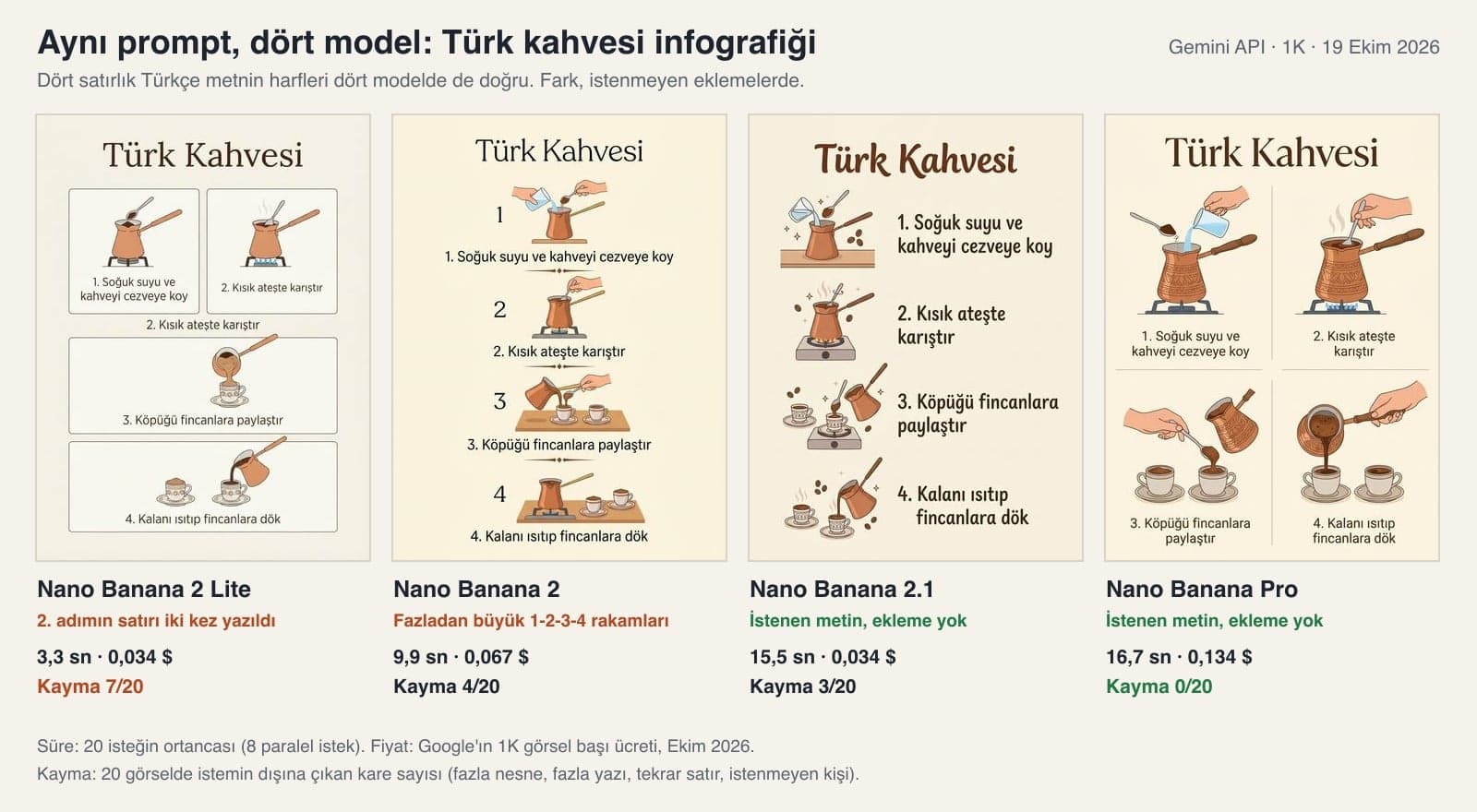
| Coffee infographic | 1/2 (repeated line) | 1/2 (extra numbers) | 2/2 | 2/2 |
| 7 apples | 1/2 (leaf) | 2/2 | 2/2 | 2/2 |
| Galata | 0/2 (pedestrians) | 1/2 (pedestrians) | 1/2 (pedestrians) | 2/2 |
| Editing | 2/2 | 2/2 | 2/2 | 2/2 |
| Total clean images | 13/20 | 16/20 | 17/20 | 20/20 |
The number in the table is how many images stayed within the prompt. We didn't count the lying cat as drift: the original Turkish prompt says "oturuyor" (sitting), and in Turkish a cat sitting in a lying position fits that word too. The three text prompts, all with Turkish text, produced no letter errors: each model wrote 598 characters in total across 6 text images, and 78 of them were Turkish letters with a cedilla, breve or dot. In yesterday's wedding invitation test, all 264 letters came out right as well, so you can trust Nano Banana models with short Turkish text.
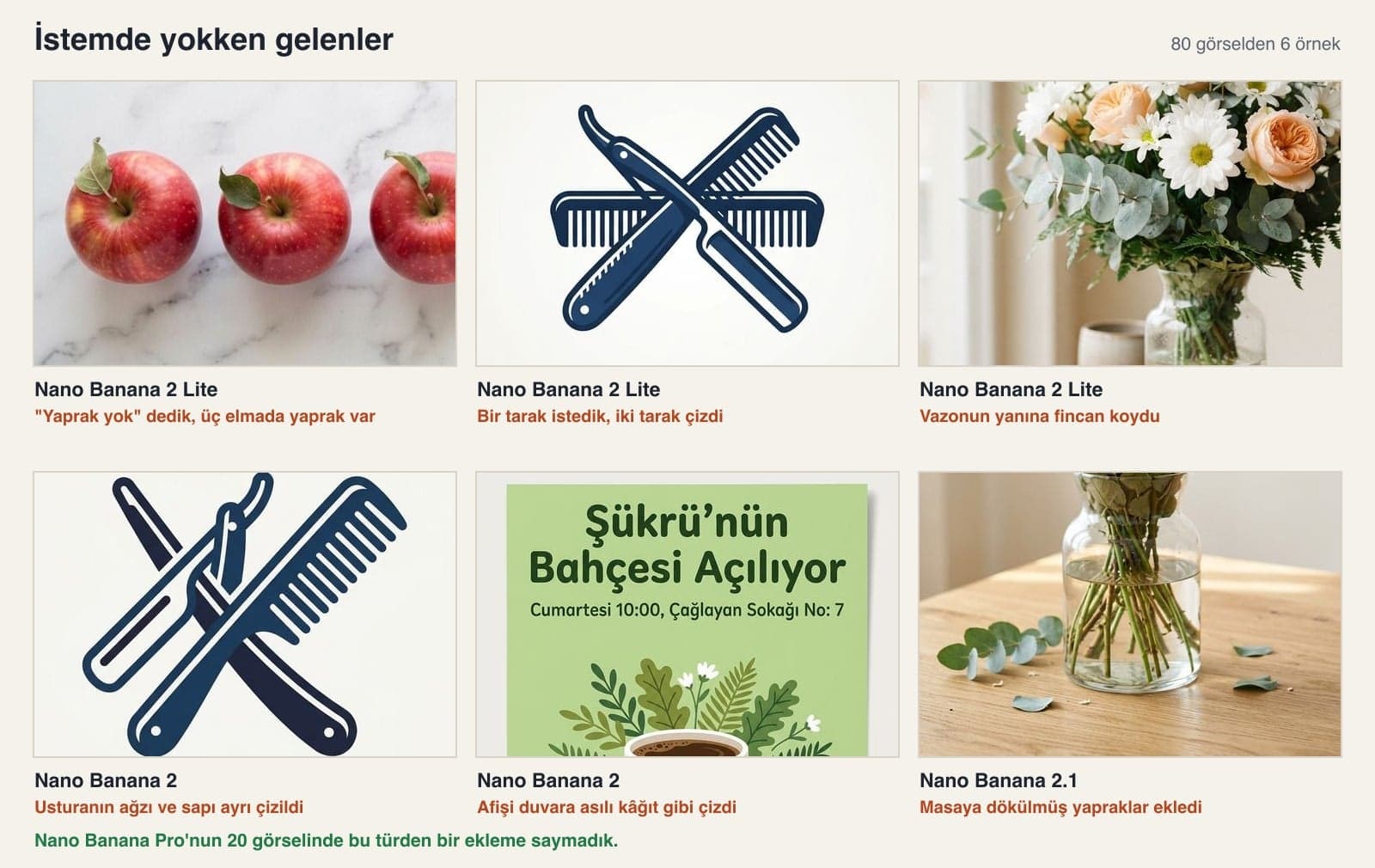
The drifts piled up in the cheaper models. Lite put leaves on the apples where we had said "no leaves", and a second comb on the logo where we had asked for one. Nano Banana 2's mistakes were more on the drawing side: on one logo the razor's blade came apart from its handle, and one poster came back as a photo of a sheet of paper hung on a wall when we had asked for a flat design. In Galata, only Pro met the "people too far away to make out" condition in both images.
Comparison with the Entrobase Library Examples
Four of the prompts we tested sit in Entrobase's prompt library with an example output. We build Entrobase; in the test we also put its published example images next to the same prompt. We didn't generate these examples and didn't time them: the images on the library pages were made with the EntroGen Flash model, one image per prompt.
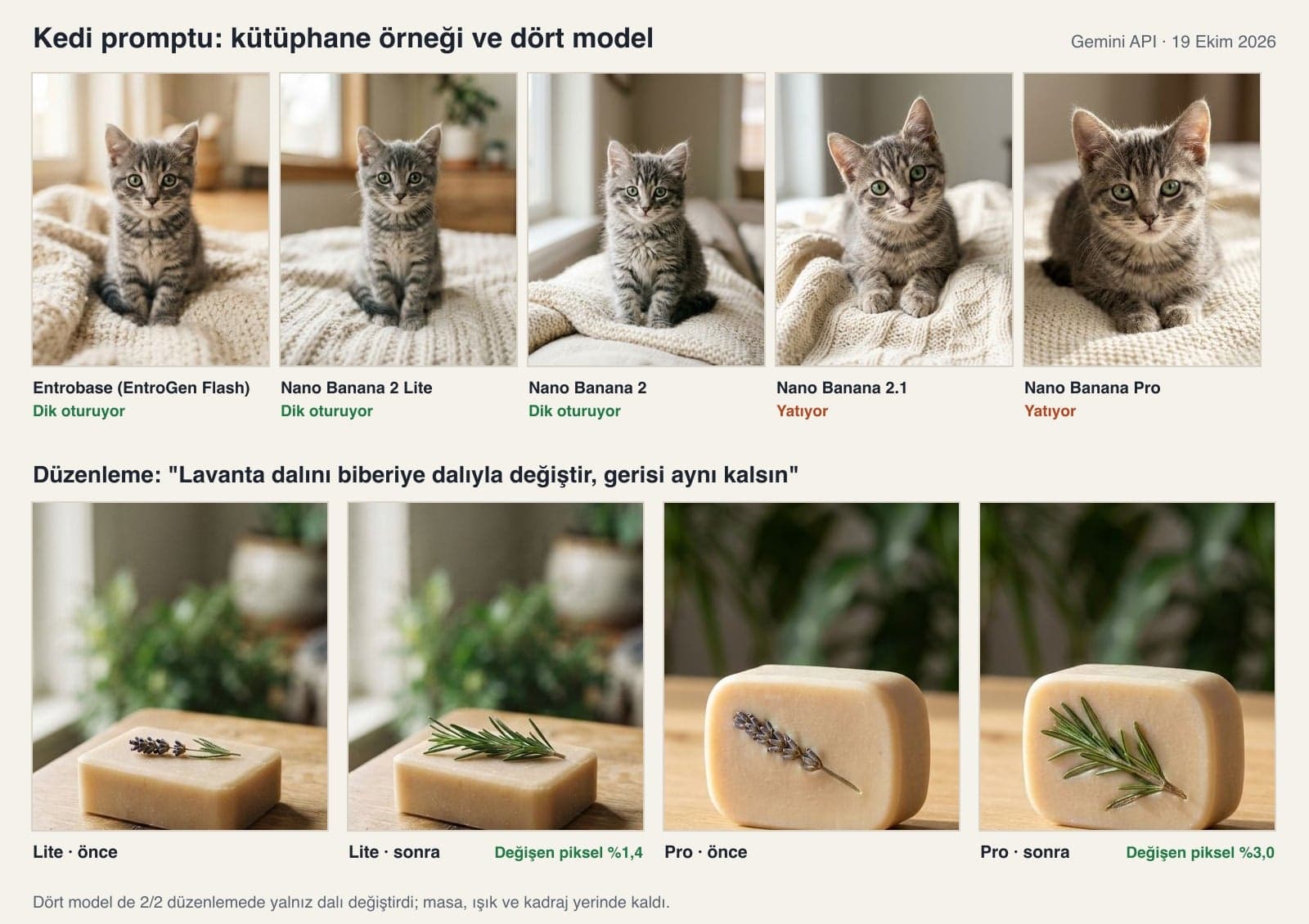
The cat, flower and logo examples match the prompt: an upright tabby kitten, three kinds of flowers and a glass vase with water, one razor and one comb. The soap is where it falls short: the prompt asks for 4:5, but the library image stayed square (1024 × 1024). Entrobase's free plan includes 10 image credits a month, and in its image model list you can pick Nano Banana Pro next to EntroGen Flash. You can also run these prompts there with their fillable fields.
10 Tested Prompts for Nano Banana Pro and Nano Banana 2
The prompts below are English versions of the Turkish prompts we used in the test. Replace the bracketed parts with your own product, text or color; in the test, these parts were written without brackets. Under each prompt you'll find how it did on the four models.
1) Product photo (lavender soap)
[Lavender olive oil soap]: a handmade, unbranded bar of soap; slightly rounded edges, a smooth matte surface, a single [dried lavender sprig] on top.
Setting: [a light oak wooden table, blurred green plants in the background].
Lighting: soft morning window light from the left, a short, soft shadow falling to the right.
Camera: from 30 degrees above, 85 mm lens feel, shallow depth of field; the front face of the soap sharp and crisp, the background softly blurred.
Style: editorial magazine product photo, natural and calm.
Color palette: warm cream, light sand and [#8a7bb8] as the accent color.
Composition: the soap sits in the lower middle third, the upper half stays a flat, plain, text-free empty area (text will be added later). Aspect ratio [4:5].In the test, all 8 images had a single sprig and no text on the surface. 2.1 in one image and Pro in two shot the soap more from the front; Lite and Nano Banana 2 held the 30-degree angle in all four images.
2) Flower bouquet photo
A realistic photo of a flower bouquet; the flowers look fresh, lively and crisp, and the image has no text or labels at all.
Flowers: [white daisies, peach roses and eucalyptus branches].
Presentation: [a bouquet standing in a clear glass vase, with the water and stems visible].
Setting: a light oak table, a blurred off-white wall in the background.
Lighting: soft daylight from the left, a thin highlight on the petal edges, a soft shadow falling to the right.
Camera: slightly above eye level, 85 mm, shallow depth of field; the front flowers and the leaf veins sharp, the background softly blurred.
Style: editorial flower photography, natural colors and a very light film grain.
Composition: the bouquet in the center of the frame, filling about two thirds of the height, with airy space above and on the sides. Aspect ratio 4:5.The three kinds of flowers and the glass vase with visible water appeared in 8/8 images. Lite put a cup next to the vase in one image, and 2.1 added a fallen petal on the table in one image.
3) Cat photo (with the upright sitting fix)
A realistic photo of a cute cat: no text at all, a single frame.
Subject: [a gray striped tabby kitten with big green eyes].
Scene: the cat sits upright on [a cream knitted blanket]: front paws straight and side by side, chest forward, tail next to its paws; it looks straight into the camera with a curious, calm expression. The background is plain and softly blurred.
Lighting: natural light from the side, fine highlights in the fur, a small catchlight in the eyes.
Camera: at the cat's eye level, 85 mm lens feel, shallow depth of field; eyes and whiskers sharp and crisp, individual hairs visible.
Style: natural, warm pet photography, realistic colors and fine fur texture.
Composition: the cat in the center of the frame, its eyes on the upper third line, plain and airy space around it. Aspect ratio 4:5.The original prompt in the library only says "sitting". As written, 2.1 and Pro had the cat lying down in 4 out of 4 images. Once we added the front paws sentence, the same two models gave an upright cat in 4/4; that is the version above.
4) Logo (barber emblem, no text)
Logo idea for a [barber shop]: a single symbol with no text.
Subject: [a classic open straight razor and a comb, crossed]; drawn simply with bold, clean, balanced lines.
Setting: a flat, smooth, single-color off-white background.
Lighting: flat, even studio light; depth comes only from the difference between two color tones.
View: straight-on, two-dimensional, no perspective.
Style: a flat vector emblem with bold fills that uses negative space cleverly.
Color palette: the symbol in [#1e3a5f] and one darker shade of it, an off-white background.
Composition: the symbol exactly in the center, covering about half of the image, with wide and equal empty space on every side; the image has no text, letters or numbers at all, only the symbol. Aspect ratio 1:1.Pro and 2.1 drew one razor and one comb in all four images. Lite added a second comb in one image and darkened the background, which we had asked to be flat, toward the edges; Nano Banana 2 separated the razor's blade from its handle in one image.
5) Poster with text (tested in Turkish)
A poster for [the opening of a neighborhood cafe], vertical layout. At the top, in large bold letters, exactly this headline: "[Sukru's Garden Is Opening]". Below it, a smaller line: "[Saturday 10:00, 7 Caglayan Street]". At the very bottom, a single line: "[First coffee is on us]".
Do not add or drop any letters in the text; write accented and special letters correctly.
Image: [a white coffee cup among green leaves], a flat light green background, simple flat illustration.
No text, logo or numbers other than these three lines. Aspect ratio 3:4.In the test, the poster text was Turkish, and its 67 letters and digits were correct in all 8 images. 2.1 and Pro each turned the headline into capitals in one image and kept the dot on the Turkish capital I.
6) Menu board (6 lines, with prices)
A menu board on the wall of a [breakfast restaurant]: white chalk lettering on a blackboard, shot straight on, with a dark wooden frame around it. Headline at the top: "[Today's Breakfast]". Below it, exactly these six lines one under another, each with its price on the right:
[Full breakfast spread 450 TL]
[Menemen 180 TL]
[Eggs with sucuk 210 TL]
[Cheese gozleme 160 TL]
[Simit and tea 90 TL]
[Fresh orange juice 120 TL]
The lines are aligned and legible; do not add or remove any lines and do not change the prices. No text, logo or decorative lettering other than the headline and these six lines. Aspect ratio 4:5.In the test the menu was in Turkish, and all six lines and six prices came out right in 8/8 images. Lite put the headline in quotation marks in one image, and 2.1 drew dotted lines along the rows in one image.
7) Step-by-step infographic
[How to make Turkish coffee]: a simple four-step infographic. Light cream background, a small flat illustration for each step and exactly this text under it:
[1. Put the cold water and coffee in the cezve]
[2. Stir over low heat]
[3. Share the foam between the cups]
[4. Heat the rest and pour it into the cups]
Use [a long-handled copper cezve and a small coffee cup with a saucer] in the illustrations. Put "[Turkish Coffee]" at the very top as the title. No other text. Aspect ratio 3:4.The letters of the Turkish text were correct in 8/8 images, and the cezve was long-handled and copper in every one. Lite wrote step 2 twice in one image; Nano Banana 2 placed large 1-2-3-4 numbers next to the text in one image.
8) Counting test (7 apples)
A photo of a white marble countertop shot from directly above, at exactly 90 degrees. There are exactly [7 apples] on the counter: [3 red apples side by side on the left, 4 green apples side by side on the right]. The apples do not touch each other and each one is fully visible.
No other fruit, objects, leaves or text. Soft, even daylight. Aspect ratio 16:9.All four models gave 3 red and 4 green apples in 8/8 images. Lite added a stem leaf to all three red apples in one image.
9) Real place (Galata at sunset)
A postcard photo taken [in Istanbul at sunset], [looking toward the Golden Horn from the Eminonu side: Galata Bridge and the water of the Golden Horn in front, Galata Tower and the old buildings around it on the hillside behind].
The sky in orange and purple tones. People too far away to make out.
No text, signs or watermarks anywhere in the image. Realistic photo, 35 mm lens feel. Aspect ratio 3:2.The tower, the bridge and the Golden Horn were recognizable in all 8 images; Lite also drew the tram on the bridge. Pro met the people condition in both of its images. Two of Lite's images and one each from Nano Banana 2 and 2.1 had recognizable pedestrians on the bridge or in the foreground.
10) Editing (swap a single object)
In this photo, replace only [the lavender sprig on top of the soap with a fresh rosemary sprig]. Keep the soap, table, background, light, shadow, colors and framing exactly as they are; do not add or remove anything else.Each model edited its own soap photo. In 8 out of 8 edits, only the sprig changed; the share of changed pixels ranged from 1.1% to 3.0%.
Don't make the prohibition longer; describe what you want in physical terms. Writing "front paws straight and side by side" where the prompt had said "sitting" brought the lying cats down from 4/4 to 0/4. If an extra object shows up, say "remove only this, keep everything else the same" in the same chat; in the editing test that request worked 8/8.
Which One Should You Choose, and When?
- Logos, packaging, posters with text, menus: Nano Banana Pro. In our test, none of its 20 images had an off-prompt detail, and generating a logo again from scratch costs more than two Pro images.
- Product photos, animals, flowers, location tests: Nano Banana 2. In most images you can't see the difference, and it takes close to half the time.
- High image volumes through the API: Nano Banana 2.1. It drifted less than Nano Banana 2 at half the price, and Google also recommends 2.1 for new projects. It was slow in our test, so if speed matters, measure it on your own work.
- Quick idea drafts, small previews: Nano Banana 2 Lite. It arrives in 3 seconds, but check the output for extra objects before you use it; it only goes up to 1K.
- Combining several product or people photos: Nano Banana 2 and 2.1 take up to 10 object and 4 character images, Pro takes 6 object, 5 character and 3 style images. Lite wasn't designed for character consistency.
Pricing, Billing and Watermarks
API prices are in US dollars and apply to 1K images; at 2K, Nano Banana 2 costs $0.101, 2.1 costs $0.050 and Pro stays at $0.134. The API cost of the 84 images in this test came to about $5.70. In the app there is no per-image charge; you pay your Google AI plan's monthly fee and work within its usage limit.
Every image the four models produce carries Google's SynthID watermark, which you can't see. If you're putting a product image on a marketplace or in an ad, open the generated image side by side with a real photo of the product: on the same soap prompt, the four models drew four different soap shapes.
In our test, Pro didn't go outside the prompt in any of its 20 images, while Nano Banana 2 did in four. Neither made errors with Turkish letters. Pro costs twice as much and is about 7 seconds slower. Use Pro for logos and text designs; Nano Banana 2 is enough for photo experiments.
Not in the Gemini app. Pro opens on Google AI Plus, Pro or Ultra plans through the "Redo with Pro" button while the Pro model is selected. The API has no free tier for it; it costs $0.134 per 1K image.
It's an update built on Gemini 3.6 Flash, and Google published its model card on October 6, 2026. In the API it costs $0.034 per 1K image, half of Nano Banana 2's price. In our test it drifted 3 times in 20 images (Nano Banana 2: 4), but its median time was longer at 15.5 seconds.
Accounts without a plan only run on the Auto setting, and Google writes that most of those requests go to Flash-Lite. On Flash-Lite, images are drawn by Nano Banana 2 Lite. That was the model that drifted the most in our test: 7 times in 20 images.
Yes. On the Turkish poster, menu and infographic, all 598 characters were correct. When it turned the headline into capitals, it also kept the dot on the Turkish capital I. In the same test, Nano Banana 2, 2.1 and Lite made no letter errors either.
No. The 10 prompts in this post (we tested the original Turkish versions) worked unchanged on all four models. The difference is that Pro goes outside the prompt less often. With a cheaper model, describe what you want in physical terms, for example "front paws straight and side by side".
Generate your next image twice: first with Nano Banana 2, then with the same prompt on Pro. If you can't see a difference, stay with Nano Banana 2. If there's text or a logo, zoom into the final image and read it letter by letter. In our test the letters were right, and the extra comb slipped past us at first glance.
Let's Connect Image Generation to Your Workflow
Instead of requesting product photos, menus or campaign visuals by hand every time, we connect the Gemini API to your own dashboard or e-commerce platform. We test which model is enough for which job using your own images and work out the cost up front. Get in touch today for a free initial consultation.