



How to Make AI Wedding Photos: Wedding Dress, Invitation and 12 Prompts
Two portraits are enough for an AI wedding photo. In Gemini we tried 4 scenes with the same two faces, 4 models and 12 invitations: all 264 Turkish letters on the invitations came out right, but when we left out the location, the model moved the wedding to New York. Here are 12 ready prompts, including wedding dress try-on and the invitation.
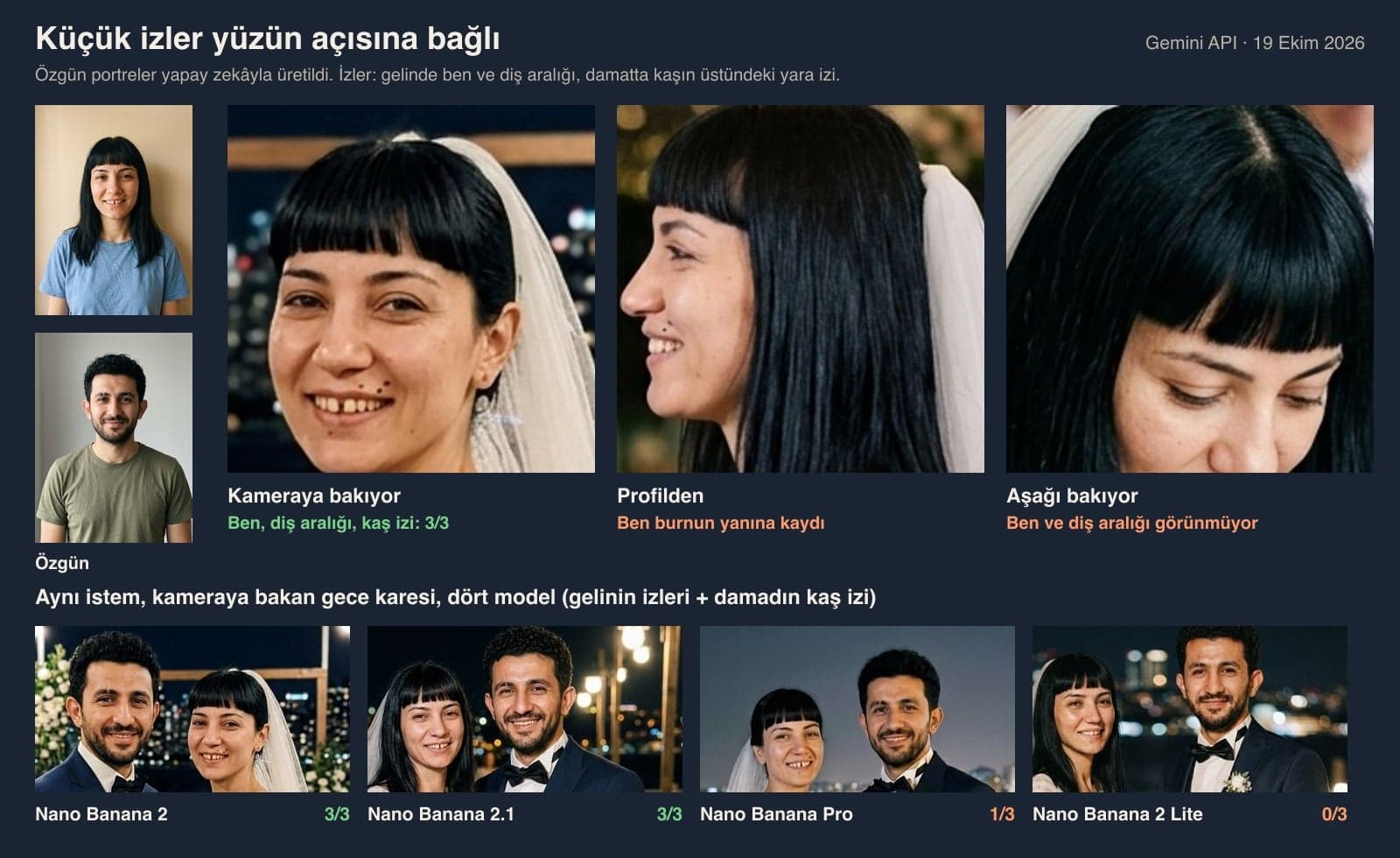
- One front-facing portrait each of the groom and the bride is enough for an AI wedding photo. In Gemini we made 8 wedding frames from two portraits; hair, beard and bangs stayed in place 24/24, and the 4 wedding dress details we described held 32/32.
- In Nano Banana 2, small marks like a mole, an eyebrow scar and a tooth gap held in frames where the face was turned to the camera (6/6). In one profile frame the bride's mole slid to nose level and looked like an earring.
- We generated the invitation 12 times across 4 models: all 264 Turkish letters were correct. Nano Banana 2 added an unwanted quotation mark or slash to all three of its cards; Nano Banana 2.1, Pro and Lite did not.
- If you don't name the location, the model moves the wedding abroad: 'seaside, city lights' gave skyscrapers that looked like New York. With 'Istanbul Bosphorus, lit suspension bridge', both tries showed the Bosphorus.
- If you don't describe the marriage register, meaningless letters and an emblem get printed on the page (2/2). With the line 'plain white page, two signature lines', the page stayed clean in both tries.
- Since October 9, 2026, Gemini accounts without a plan have model selection set to 'Auto', and most requests go to Flash-Lite; in Flash-Lite, images are drawn by Nano Banana 2 Lite. In our test this model kept none of the small marks in the frame facing the camera (0/3).
We had AI make the wedding photos in three separate requests: first the couple's photo, then the hands with wedding rings, last the invitation. Each did well in its own test. The weak spots were the angle of the face, where the venue was, and small details the model added on its own.
Below are 12 ready prompts for a wedding photo from two portraits, putting a wedding dress on a single photo, the first dance, the ceremony table, a night shoot on the Bosphorus, a wedding ring close-up and the invitation. We wrote and tested the prompts in Turkish; these are English translations you can paste into Gemini or ChatGPT as they are. We ran the test on October 19, 2026 with the Gemini API, using the original Turkish prompts and two fictional people we generated with AI. We did not test in ChatGPT.
How to Make AI Wedding Photos: 5 Steps
Short answer: upload one photo of each person with the face front-on and clear, describe the wedding dress and the groom's suit piece by piece, write the location by name, and ask for both of them to look at the camera in at least one frame.
- Pick the photos. One portrait each of the groom and the bride is enough; the face should be front-on and in daylight, with hair and glasses inside the frame.
- Open the tool. In Gemini you can upload up to 10 files in a single prompt. ChatGPT's free plan has a limit of 3 files per day; two portraits fit within it.
- Use numbers to say who is who: 'the man in photo 1 is the groom, the woman in photo 2 is the bride'. List the marks to keep by name: mole, bangs, beard, scar.
- Describe the outfits and the venue. For the dress: sleeves, neckline, skirt and veil; for the groom: color, shirt, bow tie or tie. Add a city or region name to the venue.
- Check the result up close. Count two or three marks on each face one by one, and look at the hands and rings. If there is text, read it letter by letter.
Leaving the location vague. When we wrote 'countryside wedding, olive trees', Gemini drew a stone house and cypress trees like rural Italy in one of two tries. 'Seaside, city lights' gave skyscrapers resembling New York. Write the name of the city, neighborhood or region.
Gemini Wedding Photo Prompts: 12 Ready-to-Use Prompts (Copy and Paste)
Upload the photos, copy the prompt and fill in the bracketed parts with your own details. Under each prompt we tested we wrote what came out, and under the ones we didn't test we say so.
1) Wedding photo from two separate photos: the main template
Create a realistic wedding photo of the people in the two photos I uploaded. The man in photo 1 is the groom, the woman in photo 2 is the bride.
Identity: keep both people's faces, hair, skin tone and facial proportions as in the photos. Groom: [short curly black hair, short beard, small scar above his eyebrow]. Bride: [straight black hair with blunt bangs, mole above her lip]. These marks should be as visible as in the original, no more.
Wedding dress: [long lace sleeves, V-neck, A-line skirt flaring from the waist, tulle veil falling from the back of the head down her back].
Groom's suit: [navy suit, white shirt, black bow tie, small white flower on the lapel].
Scene: [a wedding hall in Istanbul], both looking at the camera and smiling naturally.
Photo: like a wedding photographer's shot, natural skin texture, no text or watermark.We ran this template twice with each of four scenes. All four dress details were there in all 8 frames. On the groom's suit, the only miss was the first dance, where the boutonniere was hidden under the bride's arm. One frame had a vest we didn't ask for; if you don't want one, add 'no vest'.
2) Wedding dress try-on: a bridal photo from a single photo
Put a wedding dress on the woman in the photo I uploaded. Keep her face, hair, [the mole above her lip], skin tone and body proportions as in the photo; do not beautify or slim her face, and do not add makeup.
Wedding dress: [long lace sleeves, V-neck, A-line skirt flaring from the waist, tulle veil falling from the back of the head down her back].
Framing: from the knees up, looking at the camera with a slight smile; her face and the top of the dress should be sharp.
Setting: [a bridal shop fitting with a light cream backdrop], soft daylight. Like a real photo, no text or watermark.In both tries the bangs, mole and tooth gap stayed in place (6/6), and the dress matched the description. We adapted the same template for the groom as 'put a groom's suit on the man' and tried it twice: the curly hair and beard stayed, and the eyebrow scar disappeared in one of the two tries.
3) Trying three wedding dress styles side by side
Show the woman in the photo I uploaded in three different wedding dresses in three side-by-side frames (one image, three equal columns). In all three frames keep her face, hair and [the mole above her lip] as in the photo; pose and lighting stay the same in all three, only the dress changes.
Column 1: [strapless, no straps, plain satin, princess cut with a full skirt].
Column 2: [long lace sleeves, boat neck, mermaid cut].
Column 3: [thin straps, chiffon, straight long skirt with no tiers, no veil].
Setting: light cream studio backdrop. Like a real photo; no text, numbers or watermark in the frames.Use this to see the styles on yourself before you choose a dress. Both tries returned three columns, and the face stayed the same in all six frames. Four of the six dresses matched the description: in one try, thin straps were added to the strapless dress and the straight skirt came out tiered. That is why the prompt says 'no straps' and 'no tiers'; we did not retest this version.
4) Wedding photo from a single couple photo
Redraw the couple in the photo I uploaded in wedding attire. The man [on the viewer's left] is the groom, the woman [on the right] is the bride.
Keep both people's faces, hair, skin tone, height difference and the way they stand together as in the photo; do not beautify them or make them look younger.
Wedding dress: [plain satin, boat neck, veil]. Groom's suit: [dark gray suit, white shirt, gray tie].
Background: [sunrise in Cappadocia, hot air balloons in the distance].
Like a real wedding photo, no text or watermark.If you only have one photo of the two of you, this template is enough. We did not test this prompt. We wrote the direction as 'on the viewer's left' because in our family photo test the phrase 'to their right' came out reversed in both tries.
5) First dance in a wedding hall
Create a first dance photo in a wedding hall of the people in the two photos I uploaded. Photo 1 is the groom, photo 2 is the bride; keep their faces, hair and marks such as [mole, bangs, beard] as in the photos.
Wedding dress: [long lace sleeves, V-neck, A-line, tulle veil]. Groom's suit: [navy suit, black bow tie, boutonniere].
Scene: [a wedding hall in Izmir], warm yellow lights and blurred guests behind them; they look at each other, the groom's hand on the bride's waist, the bride's face turned three-quarters toward the camera.
Like a wedding photographer's shot, no text or watermark.The tested version said 'they look at each other', and both frames came out in profile. At that angle the mole and eyebrow scar are not visible, and in one frame the mole slid next to the nose. That is why we added the line 'face turned three-quarters toward the camera'.
6) Countryside wedding: an olive grove on the Aegean
Create a countryside wedding photo of the people in the two photos I uploaded. Photo 1 is the groom, photo 2 is the bride; keep their faces and [marks] as in the photos.
Outfits: [description of the wedding dress and the groom's suit].
Scene: [an olive grove on the Aegean coast, near Ayvalik], sunset; they walk side by side, the bride holds her bouquet, both look at the camera. A stone village house and long tables behind them.
Natural light, like a wedding photographer's shot, no text or watermark.The tested version had no place name, and in one of Nano Banana 2's two tries and in Lite, the background looked like rural Italy. We measured the effect of the place name line in the Bosphorus test (Prompt 8) and did not test this version separately.
7) Ceremony table: keep the register blank
Create a photo at the wedding ceremony table of the people in the two photos I uploaded. Photo 1 is the groom, photo 2 is the bride; keep their faces and [marks] as in the photos.
Outfits: [description of the wedding dress and the groom's suit].
Scene: [a municipal wedding hall], they sit side by side at the table, the bride signs the register, the groom smiles at her. The register page is plain white with only two thin signature lines on it; no printed text, emblem or seal on the page.
Like a wedding photographer's shot, no text or watermark.In the two tries where we did not describe the register, unreadable letters and an emblem were printed on the page. With the line describing the page, it stayed blank in both tries, apart from small gray smudges under the signature lines.
8) Night wedding photo on the Bosphorus
Create a wedding photo taken at night of the people in the two photos I uploaded. Photo 1 is the groom, photo 2 is the bride; keep their faces and [marks] as in the photos.
Outfits: [description of the wedding dress and the groom's suit].
Scene: night, a stone quay on the shore of the Bosphorus in Istanbul; behind them, the house lights of the opposite shore spread over the hills and a lit suspension bridge. The groom holds the bride's hand, both look at the camera.
Like a wedding photographer's shot, natural skin texture, no text or watermark.Both tries showed the Bosphorus and the suspension bridge. The frames that kept the small marks best were also these camera-facing night frames: the mole, tooth gap and eyebrow scar were in place in both tries (6/6).
9) Wedding rings and hands: close-up
Realistic wedding photo, close-up: the bride's left hand rests on top of the groom's left hand, with the backs of both hands facing the camera. Each hand has five fingers.
The wedding rings are on the ring finger of the left hand, that is, the finger right next to the little finger; no rings on any other finger. [Bride's ring: thin gold band and a solitaire].
Show the bride's [lace] sleeve and the groom's [navy jacket] sleeve, with a blurred bouquet in the background. No text, letters or watermark.We tried the short version ('hands on top of each other, both wearing wedding rings') and this version four times each. In all eight frames the ring was on the ring finger, and we saw no broken fingers. The difference showed up elsewhere: in the short version, two of the four frames had something we didn't ask for (a pearl bracelet instead of lace on one sleeve, the letter 'H' on a cufflink), while the long version had no error of this kind.
10) Wedding invitation: with text
Design a wedding invitation card and show it as a realistic photo taken from above: [thick cream paper, a thin gold line along the edges and an olive branch decoration], the card lies on a wooden table.
The card should carry only the following text, letter for letter, with exactly these characters and in this line layout:
[Susan and Mark Miller and Linda and James Carter]
joyfully invite you
to the wedding of their children
[Emily & Ryan]
[Saturday, June 12, 2027 · 7:00 PM]
[Rosewood Garden Venue, Charleston]
Do not add any other text, letters or numbers.In our test we used the original Turkish version, with Turkish names and a Turkish venue. It produced 12 cards across four models, and every Turkish letter came out right. Before you print the card, still read the date, time and venue name letter by letter; details are in the invitation section below.
11) Invitation background: add the text yourself
Design a text-free background for a wedding invitation: [cream paper texture, watercolor olive branches along the edges and a thin gold frame].
The middle of the card is plain, empty paper all the way to the edges; leave a wide area in the center for text. The image has no letters, numbers, monogram or marks of any kind.
Flat, front-on view; no shadow and no table, only the card. Aspect ratio [5:7].If you plan to add long text, an address or a QR code, leave the background to AI and the text to a program like Canva or Word. We did not test this prompt; the phrase 'plain paper all the way to the edges' was the line that stopped unwanted additions in our cartoon test.
12) Editing an existing wedding photo
In this wedding photo, change only the following: [remove the two guests looking at the camera in the background and fill their place with the hall's wall], [clean the stain on the right sleeve of the wedding dress].
Keep the bride's and groom's faces, hair, outfits, the lighting, colors and framing exactly as they are; do not beautify or slim the faces.
Do not change the photo's resolution or aspect ratio.Use this to fix one thing in a real wedding photo you already have. We did not test this prompt. If you need to remove more than one person or object from the background, the prompts in our post on removing objects from photos go into more detail.
In Gemini, image editing is turned off for accounts under 18, so a prompt with an uploaded photo may not work. If a face shifted, don't regenerate the whole photo: in the same chat, add the original portrait again and type 'make only the bride's face match this photo, do not change anything else'.
Our Test: Same Two Faces, 4 Scenes, 4 Models
We generated two fictional people with the Gemini API. The groom has curly hair, a short beard and a vertical scar above his eyebrow; the bride has blunt bangs, a mole above her lip and a gap between her front teeth. With the same two portraits, we ran the four scenes of Prompt 1 (original Turkish version) twice each in Nano Banana 2 and once each in Nano Banana 2.1, Pro and 2 Lite. We made 49 image requests in total.
| Test | Model | Result | What happened |
|---|---|---|---|
| 4 scenes, two tries each | Nano Banana 2 | Major marks 24/24, dress 32/32, groom's suit 31/32 | Unwanted vest in one frame, boutonniere not visible in the first dance |
| Night frame facing the camera (2) | Nano Banana 2 | Small marks 6/6 | Mole, tooth gap and eyebrow scar in place |
| Profile and downward-looking frames (4) | Nano Banana 2 | Most small marks not visible | In one frame the mole slid next to the nose and looks like an earring |
| 4 scenes, one try each | Nano Banana 2.1 | Small marks in the night frame 3/3 | Ceremony hall and seaside look like venues in Turkey |
| 4 scenes, one try each | Nano Banana Pro | Small marks in the night frame 1/3 | Tooth gap stayed, mole and eyebrow scar not visible |
| 4 scenes, one try each | Nano Banana 2 Lite | Small marks in the night frame 0/3 | Vest in two frames, countryside wedding looks like rural Italy |
The major marks (hair, beard, bangs) never disappeared in any of the four models. The differences were in the small marks and the location. According to Google's help page, most requests from Gemini accounts without a plan go to Flash-Lite; in Flash-Lite, images are drawn by Nano Banana 2 Lite, and this model kept none of the small marks in our test. If a face shifts on the free plan, fix that person in a separate message.
AI Wedding Invitation: Does the Text Come Out Right?
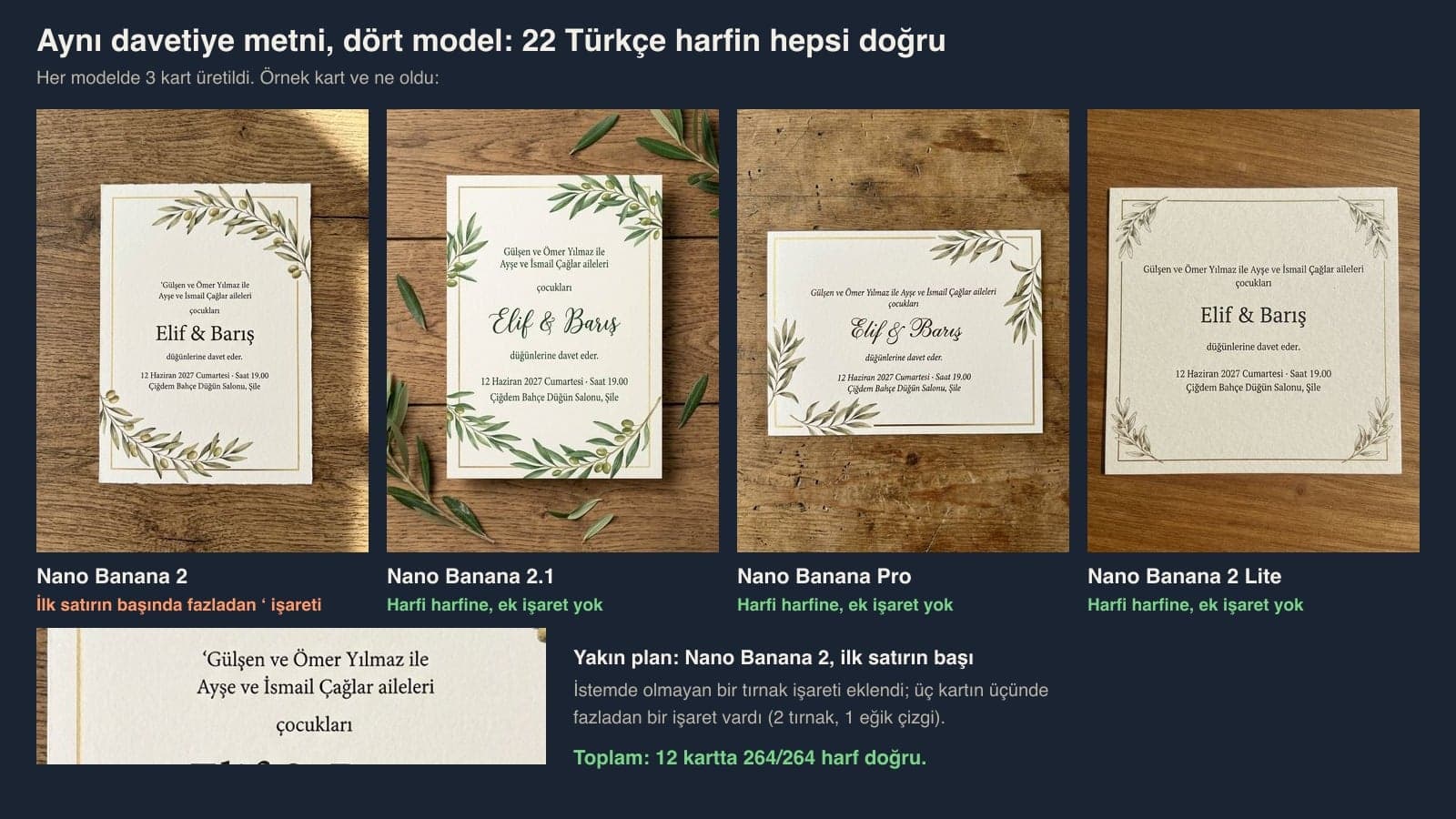
Yes, for short text. The six lines of our Turkish test text (the original Prompt 10) contained 22 Turkish-specific letters such as ş, ğ and ı. We made three cards per model, and across 12 cards all 264 of those letters came out right. The problem was extra marks.
| Model | Turkish letters | Extra marks | Line layout |
|---|---|---|---|
| Nano Banana 2 (3 cards) | 66/66 | On 3 of 3 cards: 2 quotation marks, 1 slash | Two lines merged on one card |
| Nano Banana 2.1 (3 cards) | 66/66 | None | Correct |
| Nano Banana Pro (3 cards) | 66/66 | None | Correct |
| Nano Banana 2 Lite (3 cards) | 66/66 | None | Correct |
Google's own Nano Banana 2.1 model card says small text and long paragraphs are still weak. Our text was six short lines. If you plan to add an address, a map note or an RSVP line, it is safer to get a text-free background with Prompt 11 and write the text yourself.
Place Name and Blank Page: What Two Lines Changed
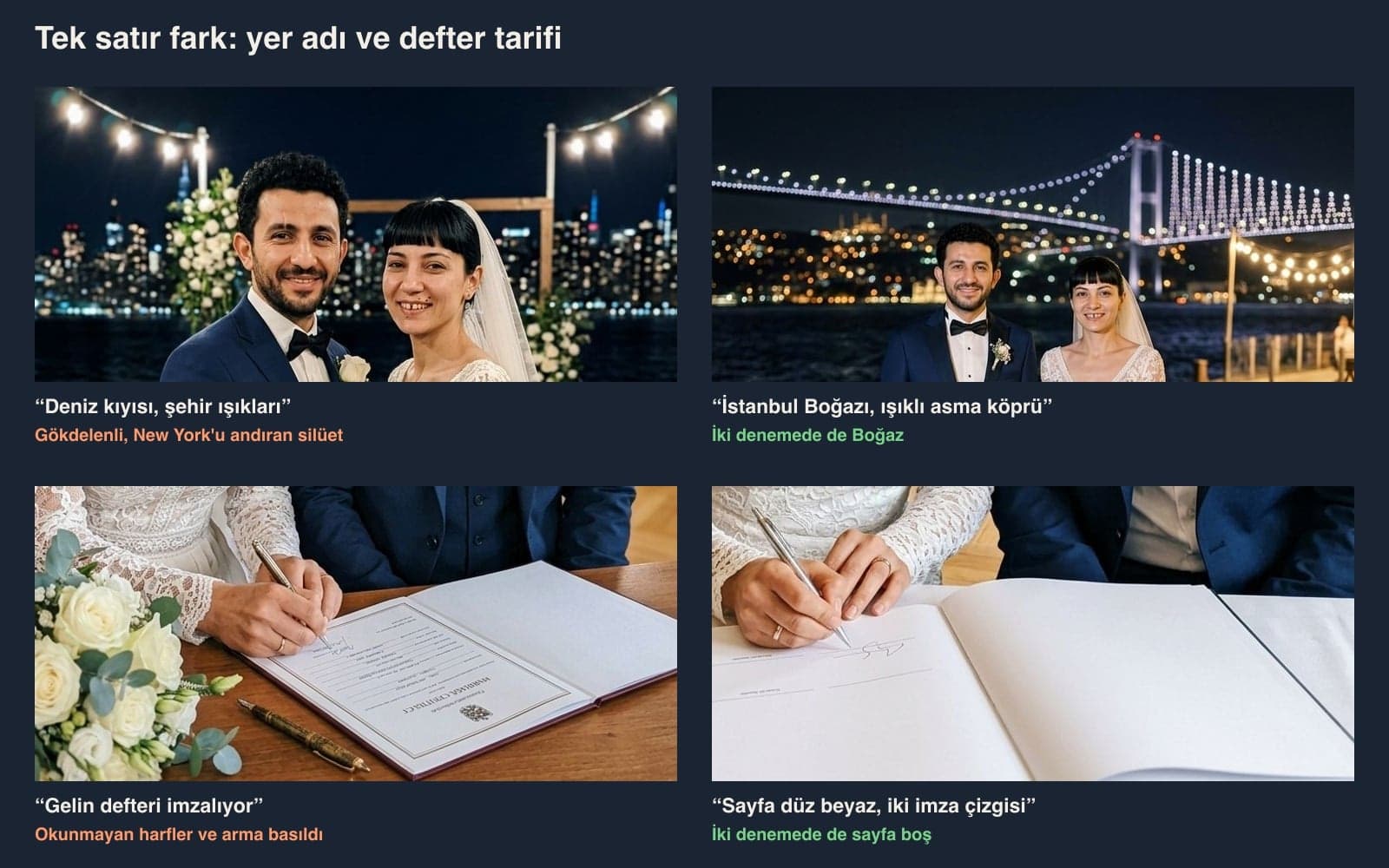
The vague 'seaside, city lights' prompt gave a skyline full of skyscrapers in one of two tries. When we wrote 'Istanbul Bosphorus, house lights on the opposite shore, lit suspension bridge' for the same scene, both tries showed the Bosphorus. The marriage register went the same way: with no description, the model filled the page like a fake official document, and with the description it left the page blank.
ChatGPT or Gemini? Limits for Wedding Photos
Character consistency is not always perfect between input images and generated output image.
| Criterion | ChatGPT | Gemini |
|---|---|---|
| Image model | ChatGPT Images 2.5 on all plans | Without a plan, 'Auto': most requests go to Flash-Lite (Nano Banana 2 Lite); Nano Banana 2 in Flash and Pro; Nano Banana Pro in Pro mode with a paid plan |
| Photo upload | 3 files per day on the free plan, 20 MB per image | Up to 10 files in a single prompt |
| Age | March 2025 system card: photorealistic photos of children are not edited | 18 or older to edit images |
| AI label | C2PA content credentials | SynthID watermark |
For two portraits and an invitation, either one is enough. Gemini downloads images at 2K with a plan and at 1K without one; once the daily quota runs out you can't generate new images, and Google does not publish what that quota is. Nano Banana 2.1's model card lists the Gemini app among its distribution channels, yet on October 19, 2026, the Gemini help page still named Nano Banana 2, 2 Lite and Pro.
Common Mistakes
- Showing the face only in profile. A romantic gazing shot looks nice, but the mole and scar disappear at that angle; put at least one frame facing the camera in the album.
- Asking for the dress in one word. Write 'a beautiful wedding dress' and the model picks one on its own. When we described sleeves, neckline, skirt and veil separately, 32 of 32 details held in our test.
- Leaving the location vague. If you don't write a city or region name, the hall and the view end up looking like another country.
- Having the long invitation text written into the image too. Short lines came out right; for the address and notes, use a text-free background.
- Not describing documents and the register. An undescribed marriage register gets fake text and an emblem printed on it.
- Approving the result on a small screen. Zoom in and check the hands, rings and letters one by one.
KVKK: Guest Photos and Sharing
Article 28/1-a of KVKK, Turkey's personal data protection law, keeps a person's personal activities concerning themselves or family members living in the same household outside the law's scope; your own wedding album comes close to this. Things change when guests appear in a real wedding photo: the KVKK authority's November 2025 guide on generative AI (p. 57) recommends taking care not to share third parties' data with these systems. You can crop the guests out before uploading.
If you share the image on social media, add a sentence saying it was made with AI. Gemini adds a SynthID watermark to every image and ChatGPT adds C2PA content credentials; neither is visible to the eye.
Yes, both tools let you do it on the free plan. In a Gemini account without a plan, most requests go to Nano Banana 2 Lite, which kept the fewest small marks in our test. ChatGPT's free plan lets you upload 3 files per day, and two portraits fit within that limit.
Introduce the photos by number, list the marks to keep by name, describe the wedding dress piece by piece (sleeves, neckline, skirt, veil) and write the location with a city name. Prompt 1 is the full template.
It is a prompt that puts a wedding dress on the person in a single photo; copy Prompt 2 and change the dress description. In our test the bangs, mole and tooth gap stayed in place in both tries.
Yes; Prompt 10 works the same way in ChatGPT. We tested the invitation with the original Turkish prompt in four Gemini models, and all 264 Turkish letters came out right. We did not run this test in ChatGPT.
Usually because of the angle. In our test, small marks held 6/6 in frames facing the camera and disappeared in profile frames. Write that you are both looking at the camera in one frame, and fix the person whose face shifted in a separate message.
Yes. Upload your real wedding photo, use Prompt 12 to list only what you want to change, and write that everything else should 'stay exactly as it is'. If guests are in the photo, keep in mind that you are uploading their photos too.
Two portraits, a wedding dress described piece by piece and a scene with a place name: in our test, these three gave the good frames. You can have the short invitation text written into the image. Still, zoom in on the long text and on the final frame that goes into the album, and read them with your own eyes.
Web Design for Wedding Venues and Bridal Shops
Couples look for the venue, the dress and the photographer online first. A site with real photos of your venue, capacity and date information, a booking form and a WhatsApp link turns the couples who find you in search into customers. We build the site to load fast on mobile and show up in local Google searches. Get in touch today for a free initial consultation.