



YouTube Thumbnail and Banner Prompts: 12 Gemini Prompts and a Size Test
12 Gemini prompts and the official sizes for a YouTube thumbnail, banner and profile picture. We tested them on 66 images: the short prompt added a person to 8 of 8 thumbnails, and free Gemini's banner fell below the 2048x1152 minimum.
- A video thumbnail should be 16:9 and at least 640 pixels wide; YouTube recommends 3840x2160 pixels. When you upload from a phone, the file limit is 2 MB. A banner needs at least 2048x1152 pixels, the text has to fit inside the 1235x338 pixel area in the middle, and the file can be up to 6 MB.
- Without a paid plan, Gemini downloads images at 1K resolution; at 16:9 that is 1376x768 pixels. That's enough for a thumbnail, but for a banner it falls below YouTube's 2048x1152 minimum.
- The short prompt ("Make a YouTube thumbnail with ... written on it") put a person on the thumbnail in 8 out of 8 attempts, and in 4 of them it added a subtitle or icon we never asked for.
- Nano Banana 2 broke a Turkish letter in 3 of 12 thumbnails (KİŞLİK instead of KIŞLIK, YOĞRULIR instead of YOĞRULUR). Lite, 2.1 and Pro made no letter errors across 24 thumbnails. A correction sent as a second message in the same chat worked 2/2 times on Nano Banana 2.
- When we said "leave the bottom-right corner empty", the models drew a flat-colored box there in 7 of 10 attempts. In the final prompt we described the corner as "a natural continuation of the photo", and no box appeared in 8 attempts.
A YouTube thumbnail, the small image people see before they click a video, should be 16:9 and at least 640 pixels wide; YouTube recommends 3840x2160 pixels. A channel banner needs at least 2048x1152 pixels, and for the text to show up on phones it has to fit inside the 1235x338 pixel band in the middle. Gemini can draw both. The problems show up in the dimensions and in the Turkish text on the thumbnail.
We tested this on October 23, 2026 in the Gemini API with four models and 66 images: two thumbnails with Turkish titles, a banner and profile picture for a gardening channel, a thumbnail made from a video frame, and the second episode of the same series. The tests used the original Turkish versions of the prompts. Six of the 12 prompts below went through this test, and we mark the ones we didn't try. You can use the prompts the same way in ChatGPT, but we did not test ChatGPT for this article.
YouTube Thumbnail Size: Thumbnail, Banner and Profile Picture
We took the sizes from YouTube's Turkish help pages (October 23, 2026). The last column is the file Gemini gives you at the same ratio: 1K on a free account, 2K with a Google AI plan.
| Image | Size YouTube asks for | File limit | What Gemini gives you |
|---|---|---|---|
| Video thumbnail | 16:9; recommended 3840x2160, at least 640 pixels wide | 2 MB from a phone, 50 MB from a computer; JPG or PNG | 1K: 1376x768 (575 KB-1.1 MB in the test) |
| Shorts thumbnail | 9:16; recommended 2160x3840, at least 640 pixels tall | Same as the video thumbnail | 1K: 768x1376 |
| Channel banner | At least 2048x1152 (16:9), recommended 2560x1440; safe area for text and logo 1235x338 | 6 MB | 1K: 1376x768 (not enough); 2K: 2752x1536 (2.7-4.1 MB in the test) |
| Profile picture | Square; displayed at 98x98 pixels | 15 MB; JPG, GIF, BMP or PNG (no animated GIFs) | 1024x1024 |
| Video watermark | Square, at least 150x150 pixels | 1 MB | 1024x1024 |
According to Google's help page, Gemini draws images with Nano Banana 2 Lite when Flash-Lite is selected and with Nano Banana 2 when Flash or Pro is selected; Nano Banana Pro is only available with a Google AI plan. Without a plan, images download at 1K; with a plan, at 2K. Nano Banana 2.1, which we used in the test, is only in the Gemini API for now.
Your custom thumbnail should be as large as possible. This image is also used as the preview image in the embedded player.
How to Make a YouTube Thumbnail with Gemini: 5 Steps
- Pick the thumbnail text: 2-5 words, a promise that doesn't repeat the video title. If nothing comes to mind, Prompt 10 gives you eight ideas.
- If you have a good frame from the video, use Prompt 2; if not, use Prompt 1. Write the thumbnail text in quotes and in capital letters.
- Zoom in on the result and read the text letter by letter, watching accents, apostrophes and letters that look alike. If there's a mistake, send Prompt 5 in the same chat.
- Download the image and open it at small size on your phone. The video length label goes in the bottom-right corner, so no text should be left there (Prompt 11 lists this check).
- In YouTube Studio, open the video details and upload the image in the thumbnail field. Custom thumbnails require a verified account; for now, Shorts thumbnails can only be added from a computer.
A short prompt that starts with "Make a YouTube thumbnail" puts a smiling person on it. In our test that happened 8 out of 8 times. If you want to use your own face, use Prompt 3; if you want a thumbnail without people, add "No faces" or "No people" to the scene.
12 Ready-to-Use YouTube Thumbnail and Banner Prompts (Gemini and ChatGPT)
Fill in the bracketed parts for your own video and leave the rest as it is. Each line that looks long fixed a problem we hit in the test: an added person, a second line of text, a corner box, an image split in two.
1) Video thumbnail
Create a 16:9 YouTube video thumbnail.
Scene: [what the video is about, e.g. two hands kneading a spiced bulgur mix on a tray, close-up, warm kitchen light]. [No faces / No people].
The image is one continuous photo from edge to edge: no vertical cut, separate panel, blurred strip, box or frame.
Text: only this text, letter for letter and in capital letters: "[THUMBNAIL TEXT, 5 WORDS MAX]" Keep every apostrophe, accent and special character exactly as written. Do not add any other text, logo, watermark, number or icon.
Layout: text on the left half, two lines max, a bold and simple typeface, capital letters; light-colored letters with a thin dark outline and a soft shadow. Place the text over a calm part of the scene on the left (background in shadow, naturally blurred by depth of field). Main subject on the right half.
No text or important object in the bottom-right corner, because the video length label will sit there; that corner is a natural continuation of the photo too.This is the final version from the test. Across four models and two titles, the 8 thumbnails had no letter errors, no extra text and no corner box. Lite still split the image in two in both attempts: a blurred panel on the left, the photo on the right.
2) Thumbnail from your own video frame
This photo is a frame from my video. Turn it into a 16:9 YouTube thumbnail.
Do not change the frame itself: [what's in the frame, e.g. hands, dough, countertop], the lighting and the framing stay the same; do not redraw it, zoom in or change the colors.
Only add text on top, letter for letter and in capital letters: "[THUMBNAIL TEXT]" Keep apostrophes, accents and special characters exactly as written. Do not add any other text.
Text in the [top-left] area, two lines max, bold and simple typeface, white letters with a thin dark outline. Do not put text in the bottom-right corner.Frame preservation test: with this prompt, Nano Banana 2 did not change any pixels outside the text. With the short prompt ("Make a thumbnail from this frame"), the same model changed 6% of the frame, added a red strip and moved a colon to the start of the bottom line.
3) Thumbnail with your face
The first image is a photo of me, the second is a frame from my video. Use them to make a 16:9 YouTube thumbnail.
Keep me as I am in the first photo: facial features, skin tone, hair, [glasses / beard / earrings] and clothes stay the same; do not beautify my face or change my age.
Place me in the right third of the image, visible from the chest up. My expression is [slightly surprised / smiling / serious], looking at the camera.
The background is the scene from the second image, slightly blurred.
On the left half, add only this text, letter for letter and in capital letters: "[THUMBNAIL TEXT]" Keep apostrophes, accents and special characters exactly as written. Do not add arrows, emoji, a logo or any other text.
Keep my face and the text out of the bottom-right corner.We did not test this prompt. The rules that keep a person intact come from our earlier face tests: name each thing to keep, and give the expression in a single word.
4) Next episode in a series (same template)
This thumbnail is episode [1] of a series. Using the same template, make the thumbnail for episode [2].
Keep the same: text position, line layout, letter size, typeface, letter color and outline, lighting and color tone, the calm area in the bottom-right corner.
Change: the text, letter for letter, to "[NEW THUMBNAIL TEXT]"; the main object in the scene to [new object].
Do not add any other text, numbers or logo.We gave the episode 1 thumbnail as input and ran it 4 times. The left edge of the text stayed in the same place in all 4 attempts (difference under 0.2%), and the line height barely changed. Here the short prompt was enough too: with "Do the same for rose pruning", Nano Banana 2 built the same template. With the short prompt, 2.1 added a gloved hand to the scene.
5) Fixing a wrong letter in the text
The word [MISSPELLED WORD] in the text is spelled wrong. Fix it: [the correct spelling letter by letter, e.g. G, A, R, D, E, N].
Do not change the rest of the image, the position, size or color of the text, or the other words.On the two thumbnails Nano Banana 2 got wrong, this message produced the correct KIŞLIK both times; 2.1 fixed it as well. Lite returned almost the same image and the error stayed. If Lite doesn't fix it, switch the model to Flash in Gemini and send the message again.
6) YouTube banner (channel art)
Create a 16:9 YouTube channel banner (channel art). On phones, YouTube will crop this image down to the narrow band in the middle.
Put all text in the horizontal band at the exact center of the image: the band is the middle 60% of the width and the middle 29% of the height. The text must not touch the edges of the band and should fill at most 80% of it.
Outside the band there is only background: [channel topic, e.g. autumn garden, dark soil, scattered yellow leaves]; no text, numbers, icons or faces there.
Text, letter for letter: top line "[Channel Name]" (large, bold), bottom line "[short slogan or upload day]" (smaller). Keep apostrophes, accents, special characters and upper and lowercase exactly as written. Do not add dimensions, ratios, a logo, a watermark or any other text.
The image is not a mockup or a screen frame; it is the banner itself. Keep the area behind the text simple, with the letters clearly standing out from the background.The 60% and 29% figures are the share of a 2048x1152 image taken up by YouTube's 1235x338 pixel safe area. With this prompt, the text stayed inside the band in 3 of 4 models; on Nano Banana 2 it touched the edge. Pro turned the channel name into capitals, so we added "keep upper and lowercase exactly as written" after the test; we did not test that addition separately.
7) Text-free background for a banner
Create only the background image for a 16:9 YouTube channel banner; I will add the text myself later.
Subject and colors: [channel topic, main color].
Keep the horizontal band in the middle of the image (the middle 60% of the width, the middle 29% of the height) simple and low in detail, because the text will go there.
Place the main objects to the right and left of the band. Nothing important along the top and bottom edges, because some screens will crop them.
No text, letters, numbers, logo, watermark or mockup frame.Use this one if you plan to add the text yourself in an editor like Canva. We did not test this prompt; the band description is the same as in Prompt 6.
8) YouTube profile picture (channel icon)
Create a 1:1 YouTube profile picture. YouTube will show it inside a circle and very small (98 pixels).
A single simple icon: [one object that says what the channel is about, e.g. a small hand trowel with a green sprout coming out of it]. Flat, single-color [color] background.
Place the icon in the center without touching the edges, filling about 60% of the width; leave only the flat background color in the four corners, because the circle crop will cut the corners off.
No text, letters, numbers, thin lines or small details; bold, clear shapes.The short prompt ("Make a profile picture for the Bahcede Bir Gun channel", a Turkish name meaning "A Day in the Garden") wrote the channel name inside the image on both models. Shrunk to 98 pixels, that text could not be read by the text recognition tool (it came out as "Bahcede Bx G"). With this prompt, both models gave a square with a single icon and no text.
9) Shorts thumbnail (9:16)
Create a 9:16 vertical YouTube Shorts thumbnail.
Scene: [subject]; main object in the center of the image.
Text: only "[THUMBNAIL TEXT, 4 WORDS MAX]", letter for letter, in capital letters, in the top third of the image and centered. Keep apostrophes, accents and special characters exactly as written.
No text or important object in the bottom fifth or along the right edge; when people watch Shorts on a phone, the title and buttons sit there.
The image is one continuous photo; no boxes, panels, frames, logo or other text.Not tested. For vertical videos, YouTube shows its own 4:5 frame in place of your custom thumbnail on the home page and in the subscriptions feed; your thumbnail appears in places like watch history.
10) Thumbnail text ideas
I'm looking for short text to put on the thumbnail of one of my YouTube videos.
What the video is about: [1-2 sentences]. Video title: [title].
Suggest 8 thumbnail texts. Rules: each one is 4 words max; it must not promise anything that isn't in the video; it must not repeat the title, it should add something to it; no exclamation marks or emoji; correct spelling and grammar.
Next to each suggestion, write one sentence on why it could work. At the end, pick the two that are easiest to read when shown small on a phone.This is a text prompt and it doesn't draw an image. Not tested; put the text you choose inside the quotes in Prompt 1.
11) Checking the thumbnail at small size
This image is my YouTube video thumbnail. Look at how it appears at small size, about 170 pixels wide.
Check the following in order and mark each one "pass" or "fix":
1. Read the text letter by letter and write it out exactly. Is any letter, accent, apostrophe or special character wrong?
2. Is there a second piece of text, a logo or a watermark I didn't ask for?
3. Is there text or a face in the bottom-right corner (where the length label will go)?
4. Is the color contrast between the text and the background enough to read it at small size?
5. Does the image look split in two (vertical cut, separate panel)?
Do not give a score. For everything that needs fixing, write a one-sentence fix prompt.In the test we went through this list by eye and with a text recognition tool; we did not try having Gemini do it. Read the text letter by letter yourself anyway.
12) Video watermark (subscribe icon)
Create a 1:1 YouTube video watermark. YouTube will show it very small in the corner of the video, and viewers can click it to subscribe to the channel.
A single simple icon: [a simpler version of the icon in the profile picture]. Flat, single-color [color] background.
Place the icon in the center, filling about 70% of the width.
No text, letters, thin lines, shadows or small details.Not tested. For a watermark, YouTube asks for a square image of at least 150x150 pixels and under 1 MB; in the test, the square profile pictures from the Gemini API were 300-940 KB, which is under that limit.
Before you generate again, fix it in the same chat: write the wrong word and its correct spelling letter by letter (Prompt 5). If an extra subtitle appeared, write "Keep only [main text], delete the small text below it, do not change anything else". We did not test this second sentence.
Short Prompt or Rule-Based Prompt? Thumbnail Test Results
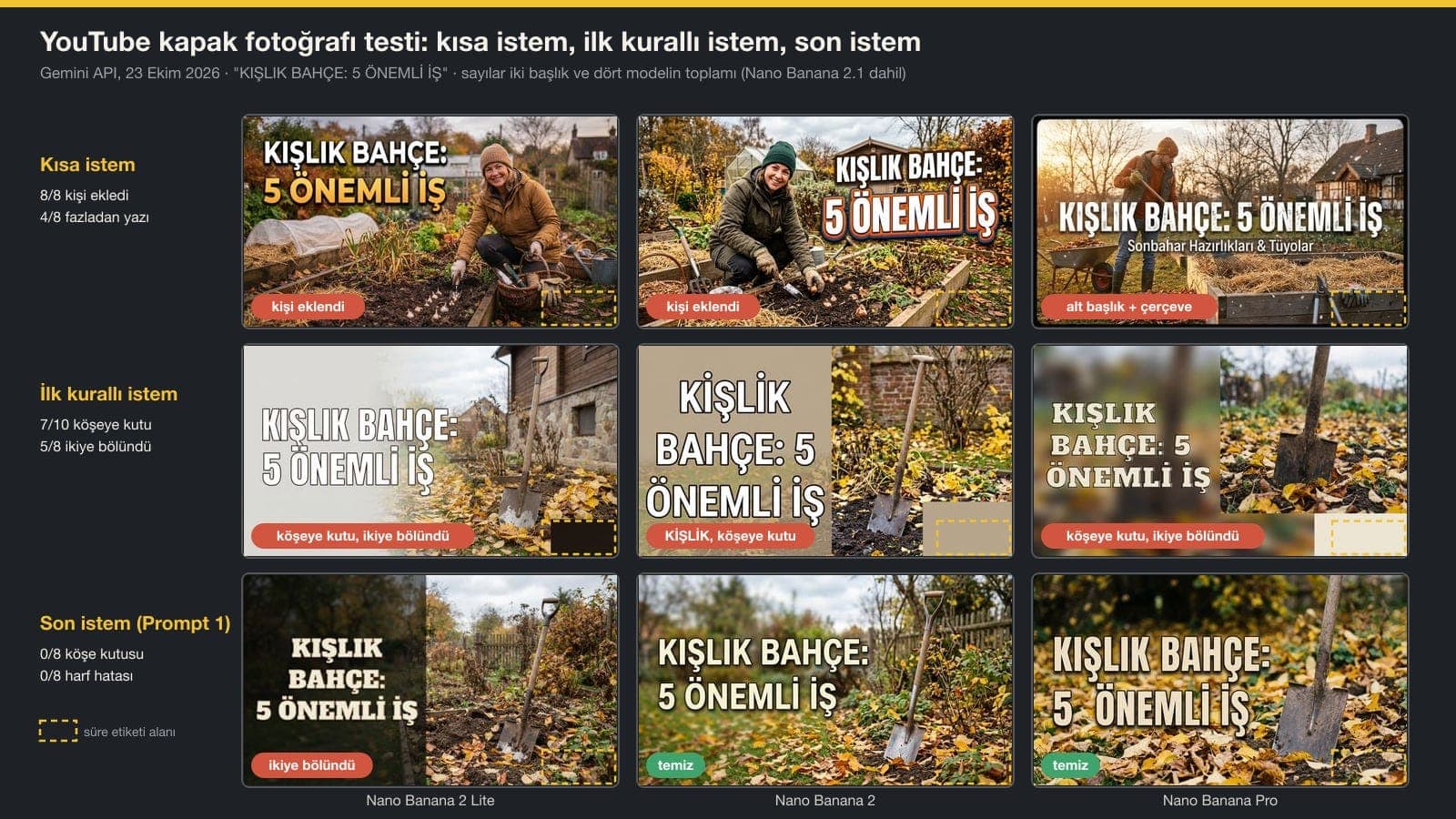
We tested four models with three prompts on two Turkish titles: one meaning "How do you knead cig kofte?", which ends in the word YOĞRULUR, and one meaning "Winter garden: 5 important jobs", which starts with the word KIŞLIK. To measure readability, we shrank each thumbnail to 168 pixels wide and ran it through the macOS text recognition tool; that is close to the smallest size a thumbnail is shown at.
| What we measured | Short prompt | First rule-based prompt | Final prompt (Prompt 1) |
|---|---|---|---|
| Added a person to the thumbnail | 8/8 | 0/8 | 0/8 |
| Unwanted text or icon | 4/8 | 0/8 | 0/8 |
| Turkish letter error | 1/8 | 1/10 | 0/8 |
| Flat-colored box in the bottom-right corner | 0/8 | 7/10 | 0/8 |
| Image split in two | 0/8 | 5/8 | 3/8 |
| Read without errors at 168 pixels | 2/8 | 5/8 | 7/8 |
The models took the sentence "make the bottom-right corner a flat, empty background" from the first rule-based prompt literally: they put a beige, black or cream rectangle in the corner. "Keep the area behind the text simple" also split the image into a flat panel and a photo. In the final version we described the corner and the area behind the text as places inside the photo; the box disappeared completely, while the split remained in Lite.
Turkish Letter Test: Why Did KIŞLIK Become KİŞLİK?
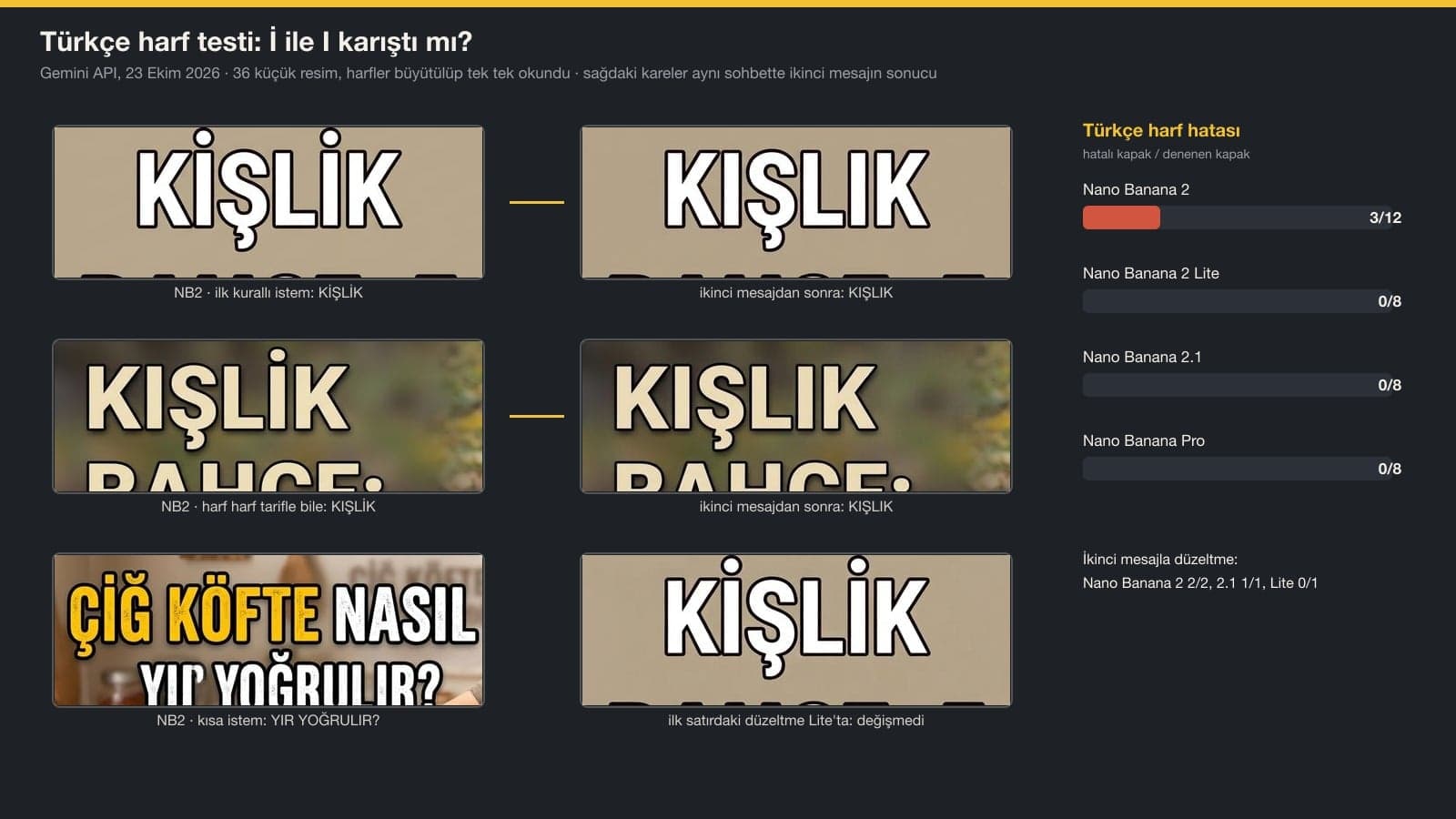
We zoomed in on the text of each of the 36 thumbnails and read it letter by letter. All three errors came from Nano Banana 2: 3 of its 12 thumbnails. In two of them a dotless I turned into a dotted I (KİŞLİK once, and once a version where only the second I got a dot). In the third, from the short prompt, a stray fragment (YIR) slipped into the bottom line and YOĞRULUR became YOĞRULIR. Lite, 2.1 and Pro had no letter errors across their 24 thumbnails.
Spelling the word out letter by letter in the prompt ("K, dotless I, S with a cedilla, L, dotless I, K") did not prevent the error: with the same description, one of three attempts still came out with the second I dotted. What worked was waiting until we saw the error and then asking, in the same chat, to fix only that word. If your word has a dotless I (as in ILIK, SIRA or ALTIN), zoom in and read the text every time.
YouTube Banner Test: Does the Text Get Cut Off on Phones?
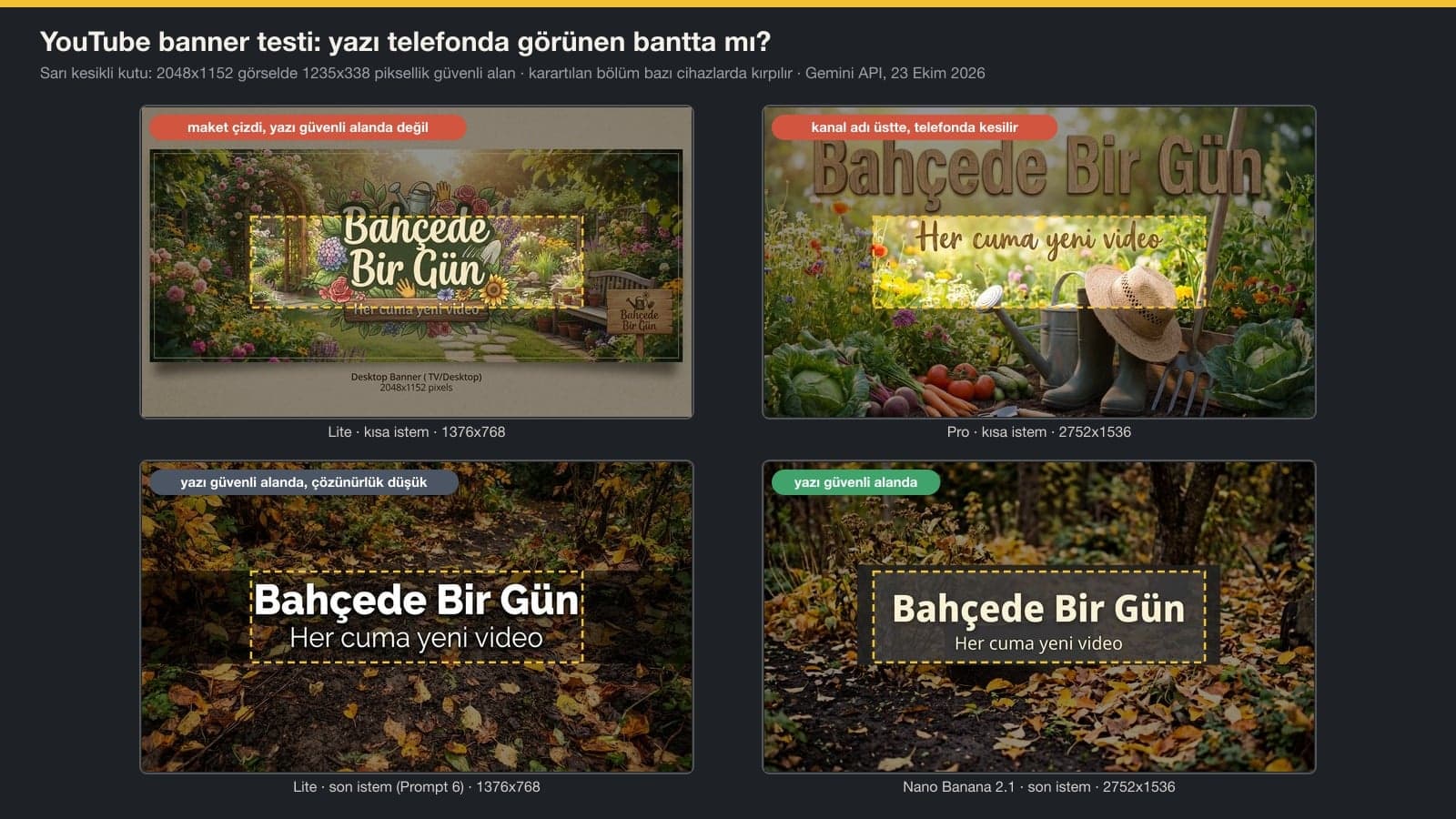
| Model | Resolution and file size | Short prompt | Final prompt (Prompt 6) |
|---|---|---|---|
| Nano Banana 2 Lite | 1376x768, 0.9-1.2 MB | Drew a mockup and wrote "Desktop Banner 2048x1152 pixels" under it | Text in the safe area, resolution below the minimum |
| Nano Banana 2 | 2752x1536 (2K), 3.1-4.1 MB | Channel name at the top, added a person | Channel name touched the edge |
| Nano Banana 2.1 (API) | 2752x1536 (2K), 2.7-3.3 MB | First line above the safe area | Text in the safe area |
| Nano Banana Pro | 2752x1536 (2K), 2.8-3.5 MB | Channel name at the top | Text in the safe area, name turned into capitals |
With the short prompt, none of the four models put all of the text inside the safe area; the channel name usually ended up in the top third of the image. Phones show only the middle band of the banner, so that means the name gets cut off. With the prompt that describes the band in percentages, the text stayed inside the band in 3 of 4 attempts.
Free Gemini's 1K output is 1376x768 pixels, which is below the 2048x1152 minimum YouTube asks for a banner. If you download at 2K with a Google AI plan, you get 2752x1536, and it stays under the 6 MB limit. If you don't have a plan, YouTube's own help page suggests resizing the image with Preview on a Mac or Microsoft Photos on Windows. Upscaling adds no detail, though on a banner with large, simple text the difference is hard to spot.
Profile Picture, Series Thumbnail and Video Frame Results
Profile picture: on both models, the short prompt wrote the channel name inside the circle, and at 98 pixels that text could not be read. With Prompt 8, which describes the icon and the corners, both models gave a square with no text; on Nano Banana 2 the corners were the flat background color, and Lite left the bottom corners white (the part the circle crop cuts off anyway).
Series thumbnail and video frame: with episode 1 as input, all four attempts kept the text in the same place. When adding text to a video frame, Lite and Nano Banana 2 with the rule-based prompt left the rest of the frame untouched (clearly changed pixels under 0.3%). Generation times: Lite about 4 seconds, Nano Banana 2 about 10, Pro about 16; 2.1 took 17-34 seconds.
Common Mistakes
- Making the thumbnail text long. Even the 5-word title in the test broke into two or three lines, and three lines are hard to read at 168 pixels wide.
- Putting the channel name at the top of the banner. Phones show only the middle band, so a name at the top gets cut off.
- Trying to upload free Gemini's 1K banner as it is. 1376x768 is below YouTube's 2048x1152 minimum.
- Downloading without reading the text. On Nano Banana 2, 3 of 12 thumbnails had a broken letter, and most errors were on the dotless I.
- Saying "leave the corner empty" or "keep the background simple". The model draws that as a flat box or panel; describe the corner as part of the photo.
- Putting the channel name on the profile picture. It can't be read in a 98 pixel circle; a single icon looks better.
Before You Upload: Verification, Daily Limit and AI Disclosure
To upload custom thumbnails, your YouTube account has to be verified; you do this on YouTube's verification page. YouTube also limits how many custom thumbnails you can upload in a day. If you get a warning that you've reached the daily custom thumbnail limit, you have to wait 24 hours.
YouTube asks you to disclose, at upload, content that looks realistic and was made or meaningfully altered with AI; unrealistic content and minor edits need no action. The rule was written for video content. Thumbnails also have to follow the Community Guidelines: a thumbnail with nudity, hate speech, violence or harmful content can be rejected, and the channel can get a strike.
16:9 and at least 640 pixels wide; YouTube recommends 3840x2160 pixels. The file shouldn't go over 2 MB when you upload from a phone or 50 MB when you upload from a computer.
A banner should be at least 2048x1152 pixels (16:9), and the recommended size is 2560x1440. Text and logo should sit inside the 1235x338 pixel area in the middle; the file can be up to 6 MB.
Yes. A free account downloads images at 1K (1376x768 at 16:9), which is enough for a thumbnail. In our test, which used the original Turkish prompts and Turkish thumbnail text, Lite, 2.1 and Pro got the Turkish letters right; Nano Banana 2 broke a letter in 3 of 12 thumbnails.
Paste Prompt 1 into the Gemini app, or Prompt 2 along with a video frame, download the image and upload it to the video's thumbnail field in YouTube Studio. The limit for phone uploads is 2 MB; Gemini's 1K thumbnails never went over 1.2 MB in the test.
The most common reason is an unverified account. The upload also fails if the file is over 2 MB on a phone or if you've hit the daily custom thumbnail limit; for the limit, you have to wait 24 hours.
In our test, which used Turkish thumbnail text, the errors came from Nano Banana 2 and most of them were on the dotless I (KİŞLİK instead of KIŞLIK). Spelling the word out letter by letter didn't prevent it; asking it to fix only the wrong word in the same chat worked in both attempts.
For now, a Shorts thumbnail can only be added in YouTube Studio on a computer, and the account has to be verified. The ratio is 9:16; on the home page, YouTube may show its own 4:5 frame for vertical videos.
Settle on a logo, colors and a typeface for your channel once and keep them the same on the banner, profile picture and thumbnails; that is less work than writing a new prompt from scratch for every video. If you want to make your profile picture from a simple logo, see our logo prompts. For poster work, where the text placement is similar to a thumbnail, see the poster guide.
Brand Identity and Visual Style for Your YouTube Channel
You can make a thumbnail in Gemini for every video. People recognize a channel when the same logo, colors and typeface show up everywhere. We design your logo, color palette, banner, profile picture and thumbnail template together. Write to us for a free initial consultation.