



How to Make an AI Polaroid Photo: 10 Gemini Prompts We Tested (2026)
10 polaroid photo prompts tested in Gemini: the hug trend, a shot with your younger self, a handwritten note, Instax and vintage polaroids. Across 116 images, the trend's English prompt brought a frame 12 times out of 12 and 6 made-up dates; our edge sentence cut prints landing on a table to 1 in 28.
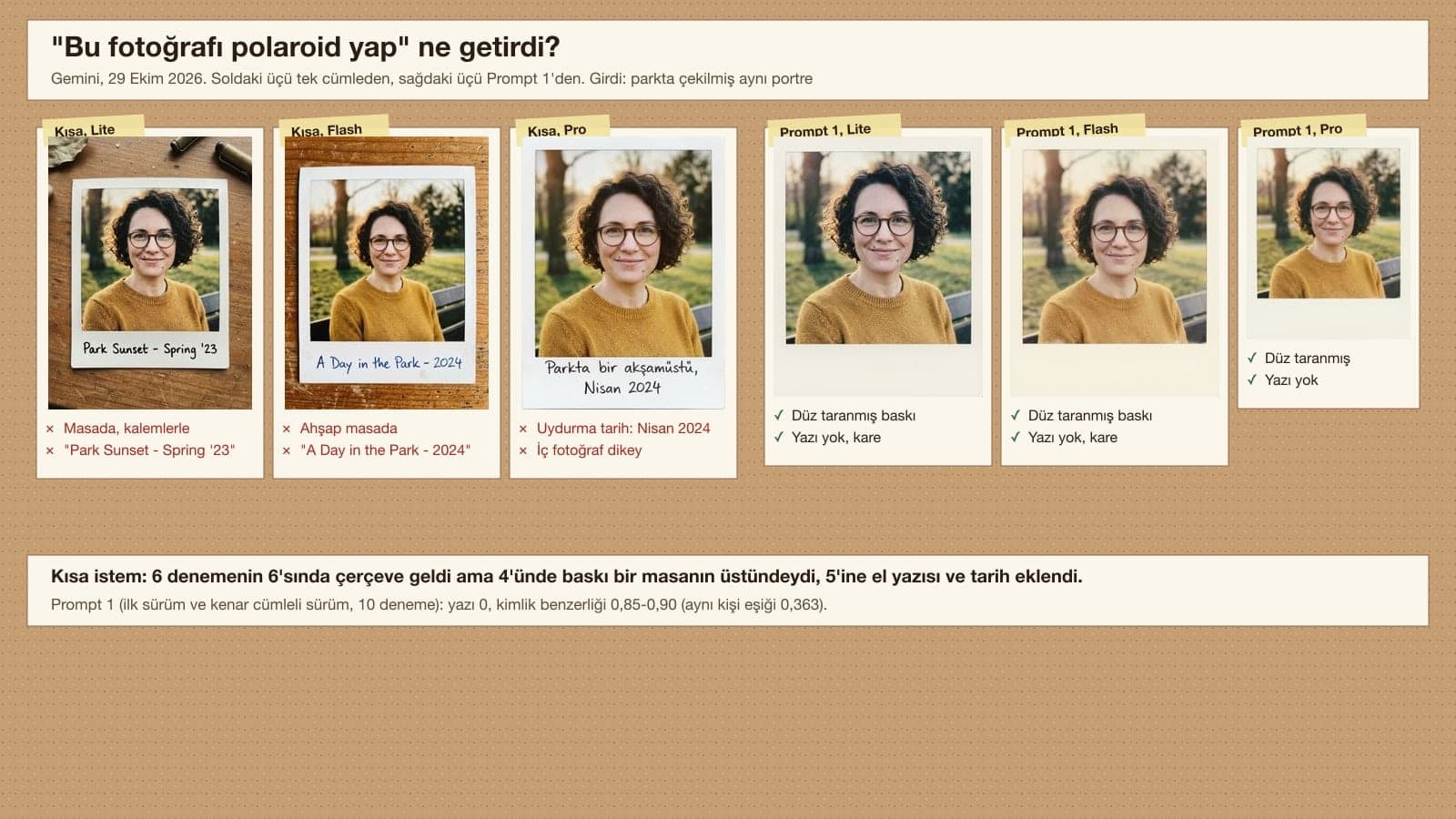
- When we asked Gemini (in Turkish) to "make this photo a polaroid", it drew a frame in 6 out of 6 tests, but it put the print on a table in 4 of them and added a note or date we never wrote to 5.
- The most shared English hug prompt in the trend does not ask for a frame; the English version and its Turkish translation still brought a frame in 12 out of 12 tests and added a date stamp or note to 6.
- The sentence "the frame extends to all four edges of the image" cut prints landing on a table or background from 6 in 36 tests to 1 in 28.
- In the handwritten note, Flash and Pro put a flat line instead of a curved breve over the Turkish letter g with a breve in 10 of 13 tests. A correction sent as a second message in the same chat worked 4 out of 4 times and left the photo untouched.
- The Polaroid 600 and i-Type print is 88.5 x 107.5 mm. Gemini's 4:5 output gives 266 DPI at that size at 1K and 533 DPI at 2K; 2K is enough for printing on a home printer.
The most shared English polaroid prompt in the trend never mentions a white frame. Gemini still drew it as a framed print in 12 out of 12 tests and added a date we never wrote to half of them: "AUG 14, 2024", "SUMMER 2024", an "OCT '23" stamp in the corner. For a clean polaroid photo you have to describe the frame, the four edges and the text one by one. The 10 prompts below do that.
We ran the tests on October 29, 2026 in the Gemini API with three image models: Nano Banana 2 Lite (Flash-Lite in the app), Nano Banana 2 (Flash) and Nano Banana Pro. Our own prompts ran in their original Turkish wording. As input we used three fictional people we generated with AI: a woman with glasses in a park, a bearded man in a cafe, and a girl drawn to look like the same woman at age 7. Across 116 images we measured whether the print came back as a flat scan, unwanted text, where the people stood, face similarity (OpenCV SFace), the Turkish letters on the bottom border and the Instax ratio. Median generation time was 5.5 seconds on Lite, 9.8 on Flash and 17.9 on Pro.
How to Make a Polaroid Photo with AI: 5 Steps
- Pick a sharp photo: the face should take up more than a third of the frame, and details you want kept, such as glasses or a mole, should be visible. For a hug shot, two separate photos of the two people are enough.
- Open Gemini and upload the photo. If you are using two photos, choose Flash in the model picker; according to Google's help page, the Flash-Lite setting is not designed for multiple reference images.
- Paste one of the prompts below and fill in the square brackets. Do not delete the sentence "the frame extends to all four edges of the image": it keeps the print from landing on a table.
- Check the bottom border of the result. If you did not ask for a note, there should be no text there; if you did, zoom in and read the letters one by one.
- If a letter or detail is wrong, fix only that in the same chat with Prompt 6. Download the result you like: you get 2K resolution with a Google AI plan and 1K without one.
With a one-sentence prompt, Gemini often shows the polaroid inside a photo: a wooden table, pens, a cup off to one side. It also wrote English notes and made-up dates on the bottom border, such as "Park Sunset - Spring '23" and "A Day in the Park - 2024". If the image you want to share is the print itself, ask for exactly that, and ask for no text.
10 Ready-to-Use Polaroid Photo Prompts (Copy and Paste)
Fill in the square brackets with your own details and delete the brackets. Name the details you want kept (glasses, mole, hairstyle, clothing color): anything you leave out may change. We tested the original Turkish versions of these prompts in Gemini; you can paste them into ChatGPT too, but we did not measure the results there.
1) Prompt to turn a photo into a Polaroid print
Turn the photo I uploaded into a Polaroid print.
The result is a flat, front-on scan of the Polaroid print: the cream-white frame extends to all four edges of the image; no background, table or empty space is visible outside the frame.
Frame color #F4F1EA; the top and both side borders are thin and equal, the bottom border is about four times as thick as a side border. The photo inside is a perfect square.
Keep the person's [details to keep, e.g. face, hair, glasses, mole and sweater] exactly as they are; change only color and texture: slightly faded colors, a warm tone, fine film grain.
No text on the frame. Portrait 4:5.Counting the first version, 10 out of 10 tests returned a framed print with no text. In the first version, two results left a thin white strip outside the print; after we added the edge sentence, the frame reached the canvas edge in 4 out of 4 tests. Face similarity came out at 0.85-0.90 (the SFace same-person threshold is 0.363). The inner photo was close to square every time, though never exactly square (width/height 0.92-0.96).
2) Quick version: a one-line polaroid prompt
Turn this photo into a flat scan of a Polaroid print: cream frame out to all four edges of the image, thick bottom border, square photo inside; same face, hair and clothes; no text; portrait 4:5.4 of 6 tests came out clean. Flash once put the print on a light-colored table and wrote "SX-70 FILM" in the corner of the frame, and Lite once left a thin border outside the frame. If you are not in a hurry, Prompt 1 is safer.
3) Polaroid hug prompt (two photos, the trend itself)
Show the two people from the two photos side by side in a single Polaroid shot, hugging shoulder to shoulder: [person 1, e.g. the woman] from the first photo on the left from the viewer's point of view, [person 2, e.g. the man] from the second photo on the right.
Keep [person 1's details, e.g. the woman's curly hair, round glasses, the mole on her cheek and her mustard sweater] and [person 2's details, e.g. the man's beard and green jacket] as they are in the photos I uploaded.
Lighting: direct camera flash in a dark room; faces bright in the center, getting darker toward the corners; a plain white sheer curtain behind them. Slight motion blur and film grain.
The result is a flat, front-on scan of the Polaroid print: the cream-white frame extends to all four edges of the image; no background, table or empty space is visible outside the frame. Thick bottom border, the photo inside is a perfect square. No text on the frame. Portrait 4:5.Counting the first version, the people stayed in the right positions in 14 out of 14 tests, and no result got any text. Before the edge sentence, Lite put both of its prints on a gray background; with the sentence, a black background showed up only once in 8 tests. Face similarity in the two-person shot is lower than in the single-person conversion: 0.55-0.73 for the woman, 0.49-0.71 for the man.
4) Prompt for hugging your younger self
The adult [person, e.g. the woman] from the first photo kneels down and hugs the little [child, e.g. girl] from the second photo; both look at the camera. The adult is on the left from the viewer's point of view, the child on the right.
Keep the child [age, e.g. 7] years old and the same height as in the second photo: [child's details, e.g. curly hair, kids' glasses, the mole on her cheek, a yellow floral dress]. The adult looks as in the first photo: [adult's details, e.g. curly hair, round glasses, mole, mustard sweater].
Lighting: direct camera flash in a dark room, a plain white sheer curtain behind them, light film grain.
The result is a flat, front-on scan of the Polaroid print: the cream-white frame extends to all four edges of the image; no background, table or empty space is visible outside the frame. Thick bottom border, the photo inside is a perfect square. No text on the frame. Portrait 4:5.If you scanned your childhood photo or took a picture of an old print, crop and straighten it first. In 10 of 10 tests the child stayed the same age and kept the glasses, and nobody was aged up. The child's face similarity measured 0.54-0.70; the age gap and the flash lighting pull this number a little below the single-person conversion.
5) Prompt to add a handwritten note to the bottom border
Turn the photo I uploaded into a Polaroid print; the result is a flat, front-on scan of the print: the cream-white frame extends to all four edges of the image; no background, table or empty space is visible outside the frame.
Frame cream white #F4F1EA, thick bottom border, the photo inside is a perfect square. Keep the person's [details to keep, e.g. face, hair, glasses and sweater] exactly as they are.
In the middle of the bottom border, in handwriting with a blue ballpoint pen, write only this line: "[note, e.g. Lisbon, August 2026]"
Letters: [the line spelled letter by letter, plus the exact mark of any accented letter, e.g. L-i-s-b-o-n, A-u-g-u-s-t; a breve is a small curve opening upward]. Do not add any other text, date stamp or signature. Portrait 4:5.Across three versions, 16 out of 16 tests returned the line in the right order with no extra words; the s with a cedilla and the dotless i were always correct. The trouble came with the g with a breve, which we cover in its own section below. If your note has accented or special letters, zoom in on the result and read it, and use Prompt 6 if needed.
6) Prompt to fix a wrong letter in a second message
In the text at the bottom, the letter [letter, e.g. the g with a breve] in the word [word, e.g. the month name] is wrong: [what you see, e.g. there is a flat line above it]. Change it to [correct shape, e.g. a small curved breve opening upward (U-shaped)]; do not touch the photo, the frame or the other letters.Send this prompt in the chat where the faulty image came back, right after it. On the four Flash and Pro results with a flat line, all 4 came back with a correct breve. We compared each fixed image with the old one pixel by pixel: the average difference in the photo area stayed at 2.5 on a 0-255 scale, and no pixel changed by more than 40.
7) Instax Mini style photo prompt
Turn the photo I uploaded into an Instax Mini print; the result is a flat, front-on scan of the print (the four edges are the edges of the print, no background).
Instax Mini size: the print is a 54 x 86 mm vertical rectangle, the photo inside is 46 x 62 mm vertical. Thin side borders, the bottom border clearly thicker than the top. Frame plain white #FFFFFF.
Keep the person's [details to keep, e.g. face, hair, glasses and sweater] exactly as they are; vivid colors, a slightly cool tone, fine grain.
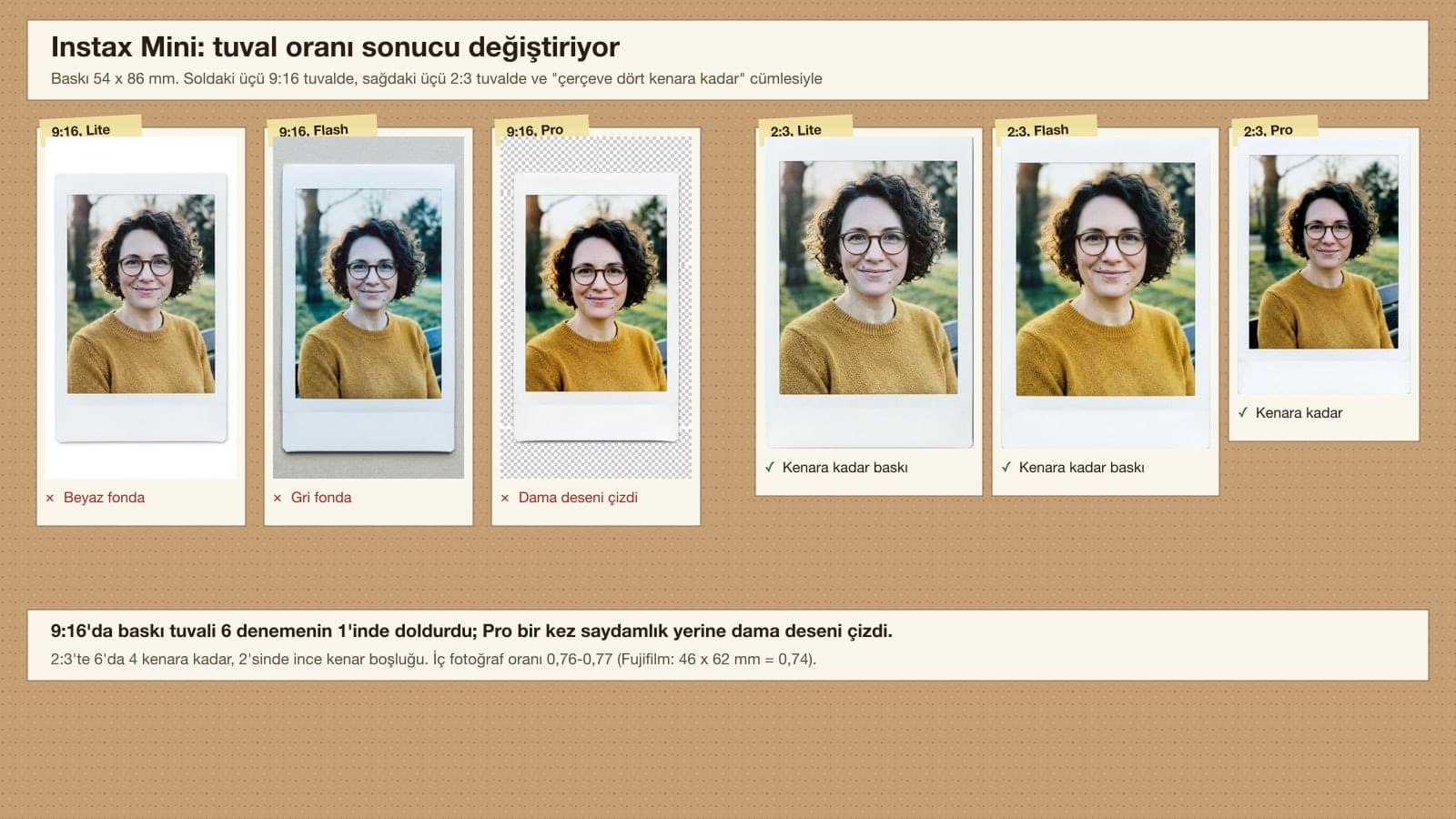
No text on the frame. The white frame extends to all four edges of the image; no background or empty space is visible outside the frame. Portrait 2:3.In the first round we asked for a 9:16 canvas, and the print filled the canvas in only 1 of 6 tests. The Instax Mini ratio (54/86 = 0.63) sits between 9:16 and 2:3; with 2:3 and the edge sentence, 4 of 6 results reached the edges and the other two left a thin gap. The inner photo measured 0.76-0.77, close to the 46 x 62 mm (0.74) Fujifilm lists.
8) Aged, vintage polaroid prompt
Turn the photo I uploaded into an aged Polaroid print from [era, e.g. the 1980s]; the result is a flat, front-on scan of the print: the frame extends to all four edges of the image, with no background or empty space visible outside it.
The frame is ivory that has yellowed over time; thick bottom border, the photo inside is a perfect square. The photo has faded colors, a tone leaning toward orange, slight darkening toward the edges, fine scratches.
Keep the person's [details to keep, e.g. face, hair, glasses and sweater] exactly as they are, and do not change their age.
Do not add text, a date stamp or a signature. Portrait 4:5.In 10 of 10 tests the person's age and glasses stayed the same, and no date stamp appeared. Pro showed the yellowing with stains and fine scratches on the frame; Lite and Flash mostly just shifted the color toward orange.
9) Polaroid on a table prompt
Show the photo I uploaded as a Polaroid print lying on [surface, e.g. a light oak table].
The print is turned slightly to the right and fully in frame; next to it are [objects, e.g. a cup of coffee and a dried eucalyptus branch]. Soft daylight from a window, a light shadow under the print.
The photo inside the print is identical to the photo I uploaded: do not change the person's [details to keep, e.g. face, hair, glasses and sweater], do not crop it, only fit it into the square.
No text on the print or the table. Landscape 4:3.For the "polaroid on a table" look people share on Instagram. 6 of 6 tests brought the table, the cup and the branch, with no text. Lite showed the whole photo in two results; Flash and Pro cropped the photo to a horizontal frame in 3 of 4 results and the face got smaller (similarity 0.63-0.82). If you want the whole photo visible, pick Flash-Lite.
10) Text-only polaroid scene prompt (no photo)
A flat, front-on scan of a Polaroid print: the cream-white frame extends to all four edges of the image; no background, table or empty space is visible outside the frame. Frame color #F4F1EA, thick bottom border, the photo inside is a perfect square.
Photo: [scene, e.g. a summer evening in a seaside town, two friends sitting on a pier with their feet dangling over the water, shot from behind; the sun setting on the horizon, a single sailboat].
[Light and color, e.g. no flash, warm evening light, faded colors, film grain, slight blur].
No text on the frame. Portrait 4:5.For an invented memory shot without uploading a face. Counting the first version, 10 of 10 tests showed two people from behind, on the pier, with a single sailboat. Without the edge sentence, Lite put both of its prints on a background; with it, Lite once drew the frame thicker than needed.
Run the same prompt once more in a new chat and check that the sentence "the cream-white frame extends to all four edges of the image" is in the prompt. In our test the model that dropped the print onto a background was mostly Flash-Lite (5 in 12 tests); with the edge sentence, Lite went down to 1 in 13.
Polaroid Photo Test: What Came Out of 116 Images?
| Prompt | Images | Wanted result | Problem |
|---|---|---|---|
| Short: "make this photo a polaroid" (in Turkish) | 6 | 0/6 clean prints | 4 on a table, 1 on top of a photo; 5 made-up notes or dates |
| Trend prompt, English | 6 | Hug and curtain 6/6 | Unrequested frame 6/6; 3 made-up dates or notes |
| Trend prompt, Turkish translation | 6 | Hug 6/6 | 3 made-up texts, 2 black frames, 1 hand, 1 position swap |
| Prompt 1, two versions | 10 | 10/10 prints with no text | 2 thin edge strips in the first version |
| Prompt 2, one line | 6 | 4/6 | 1 on a table with "SX-70 FILM" text, 1 edge gap |
| Prompt 3, two versions | 14 | Position 14/14, text 0 | Lite without the edge sentence 2/2 on a background; with it 1 in 8 |
| Prompt 4, two versions | 10 | Child same age 10/10 | 1 on a background without the edge sentence |
| Prompt 5, three versions | 16 | Line order 16/16 | Breve on the g correct in 3 of 13 on Flash and Pro |
| Prompt 6, second message | 4 | 4/4 correct breve on the g | None |
| Prompt 7, 9:16 and 2:3 | 12 | 4/6 out to the edges at 2:3 | At 9:16: 5 background or gap, 1 checkerboard pattern |
| Prompt 8, Prompt 9, Prompt 10 | 26 | Text 0/26 | On the table, Flash and Pro cropped 3/4 |
Two notes the table leaves out: the models drew a frame with every prompt, so the word "polaroid" alone brings the frame. The trouble is where the frame sits and what gets written under it. Face similarity was 0.78-0.94 across 64 single-person results and 0.35-0.75 across 26 two-person results. The only result below the threshold was the man in one Lite run of Prompt 3 without the edge sentence (0.35).
Polaroid Trend Prompt: Why Does the Hug Shot Go Wrong?
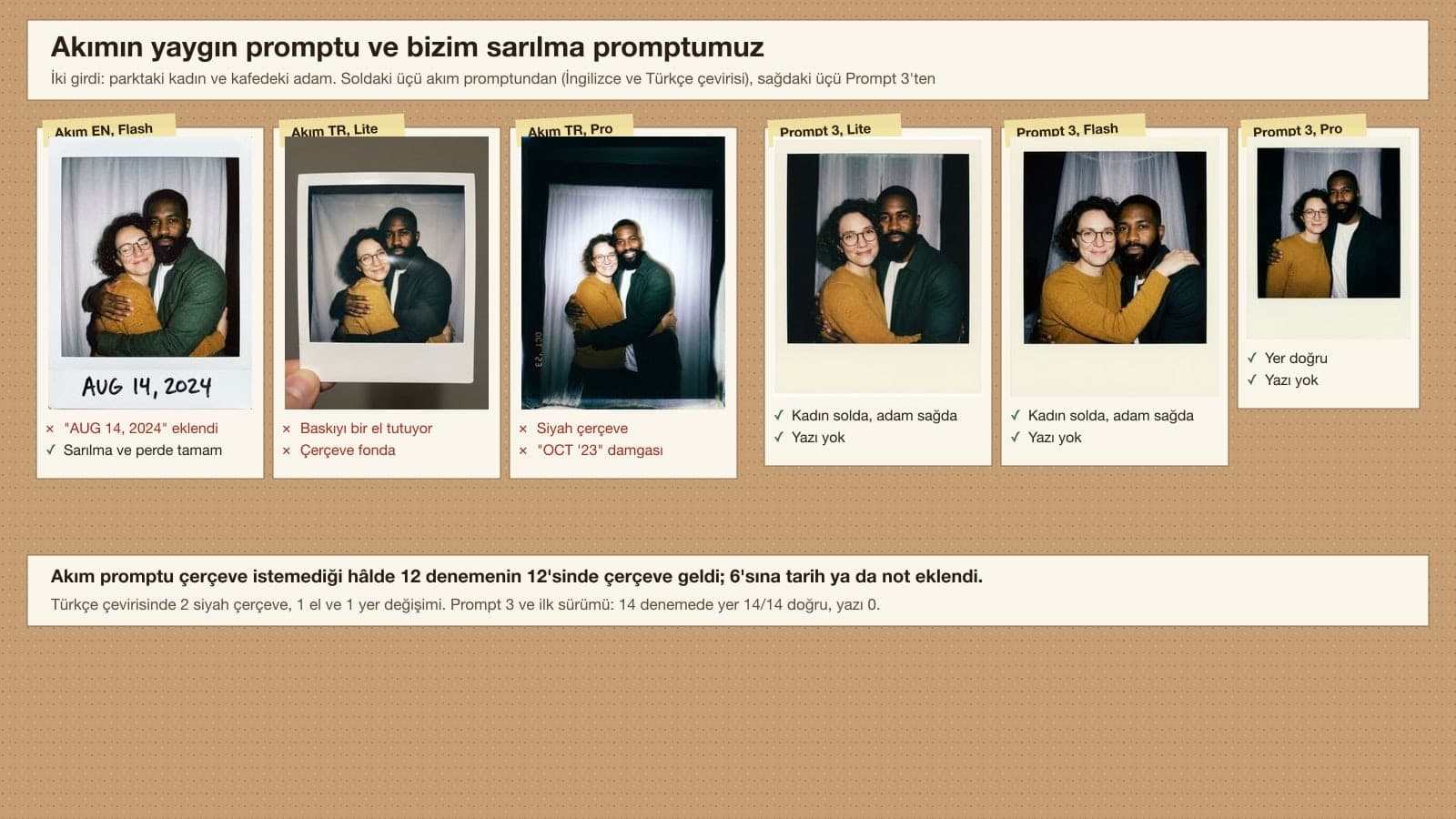
Take a photo taken with a Polaroid camera with both people hugging each other. The photo should have a slight blur and a consistent light source, like a flash from a dark room, scattered throughout the photo. Don't change the faces. Change the background behind the two people to a white curtain.
This prompt describes the hug, the flash and the white curtain well; in 12 of 12 tests the two people were hugging with a curtain behind them. What it leaves out is the print itself: the frame color, whether it reaches the edges, who stands on the left and whether there is any text. Gemini fills these gaps on its own. With the Turkish translation it picked a black frame twice, once drew a photo of a hand holding the print, and once moved the man to the left. Prompt 3 keeps the same scene and makes these four decisions explicitly.
Turkish Letters in a Polaroid Caption: the Breve Problem
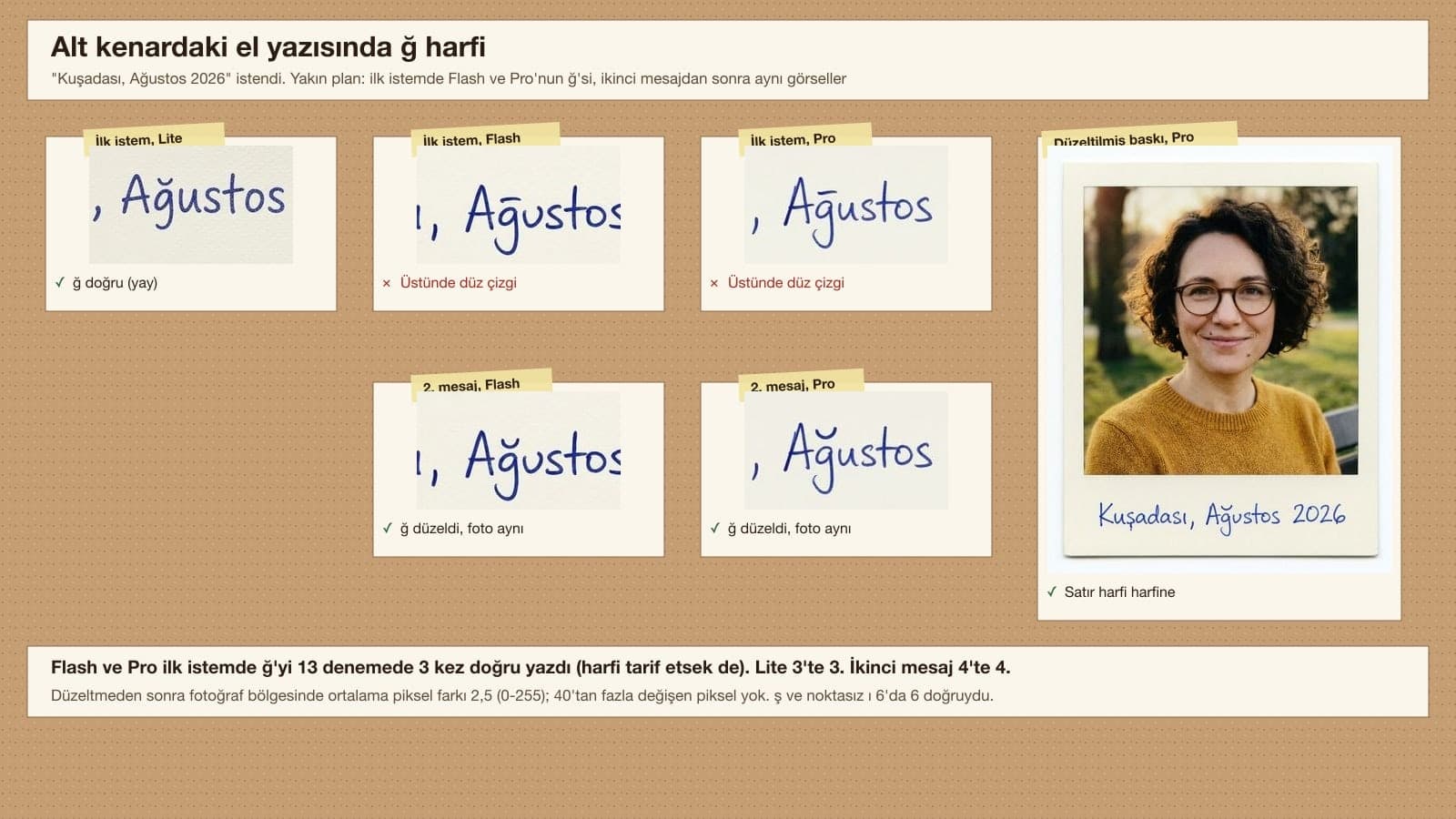
We asked for the note "Kusadasi, Agustos 2026" (Kusadasi, August 2026). Written correctly in Turkish, it has an s with a cedilla, a dotless i, and a g with a small curved breve on top. Flash and Pro put a flat line over the g instead of the short curved breve; that looks like ḡ (g with a macron), which does not exist in Turkish and is easy to miss at small sizes. Describing the letter in the prompt did little for these two models: 3 correct in 13 tests across three versions. Lite drew the correct curve in 3 out of 3 tests. The quickest fix is to send Prompt 6 in the same chat once you get the result: 4 out of 4 were corrected and the photo was left alone.
Polaroid Photo Size and Print Resolution
According to Polaroid's help page, the SX-70, 600 and i-Type print is 10.752 x 8.847 cm and the image area is 7.894 x 7.680 cm, so it is not a perfect square. Fujifilm lists the Instax Mini as 54 x 86 mm (image 46 x 62 mm) and the Instax Wide as 108 x 86 mm (image 99 x 62 mm). We picked the closest of Gemini's preset ratios and divided the official pixel table by the print width:
| Official size | Gemini ratio (1K pixels) | DPI at 1K | DPI at 2K | |
|---|---|---|---|---|
| Polaroid 600, i-Type, SX-70 | 88.5 x 107.5 mm | 4:5 (928 x 1,152) | 266 | 533 |
| Polaroid Go | 53.9 x 66.6 mm | 4:5 (928 x 1,152) | 437 | 875 |
| Instax Mini | 54 x 86 mm | 2:3 (848 x 1,264) | 373 | 747 |
| Instax Wide | 108 x 86 mm | 5:4 (1,152 x 928) | 271 | 542 |
The usual target for photo prints is 300 DPI. At the Polaroid 600 and Instax Wide sizes, 1K falls a little short of that and 2K is more than double. The Gemini app offers 2K downloads with a Google AI plan and 1K without one. Since the ratios do not match the print exactly (4:5 = 0.80, Polaroid 600 = 0.82), expect a few millimeters to be trimmed from the edge before printing.
Which Gemini Model? Lite, Flash or Pro
| Model (setting in the app) | Median time | Did well in our test | Had trouble in our test |
|---|---|---|---|
| Nano Banana 2 Lite (Flash-Lite) | 5.5 s | Breve on the g in the note (3/3), whole photo on the table (2/2) | Putting the print on a background without the edge sentence (5 in 12) |
| Nano Banana 2 (Flash) | 9.8 s | Flat print with the edge sentence, two-photo shot | Flat line on the g; cropping on the table; "SX-70 FILM" text once |
| Nano Banana Pro (Pro, paid) | 17.9 s | Print reaching the edges (0 in 12 on a background without the edge sentence), aging texture | Flat line on the g; checkerboard pattern on 9:16 Instax |
According to Google's help page, the Flash-Lite setting runs Nano Banana 2 Lite, and the Flash and Pro settings run Nano Banana 2; Nano Banana Pro is used on a paid plan when you regenerate an image in the Pro setting. The same page says this about Lite (our translation): "Not designed for multiple image references or multiple edits." In our test Lite kept faces recognizable in the two-photo shots too, but for hug and childhood shots you will need fewer retries if you pick Flash.
Common Polaroid Photo Mistakes
- With a one-sentence "make it a polaroid" request, the print gets placed on a table and an English note with a made-up date is written on the bottom border.
- If you do not say the frame reaches the edges, Flash-Lite in particular puts the print in the middle of a gray, white or black background.
- When the two people's positions are not written down, Gemini decides on its own who stands on the left; write "on the left from the viewer's point of view".
- When we asked for the Instax look on a 9:16 canvas, the print did not fit the canvas and a background or checkerboard pattern was left at the edges. Choose 2:3.
- If you share without zooming in on the note, you will miss a flat line sitting where a curved mark belongs; read the letters one by one.
- Regenerating from scratch to fix a wrong letter can bring back the same mistake: on Flash and Pro, the g still had a flat line instead of a breve in 10 of 13 tests. The second message changed only the letter in the same image.
Polaroids with Celebrities, Other People's Photos and Privacy
One branch of the trend is showing yourself hugging a celebrity. Google's Generative AI Prohibited Use Policy has a clear clause on this; if you share a celebrity shot as a joke, say it was made with AI.
Impersonating an individual (living or dead) without explicit disclosure, in order to deceive
Get permission before you upload someone else's photo: a face photo is personal data, and the same policy prohibits using personal or biometric data without the required consent. You must be 18 or older to generate and edit images in Gemini. Every generated image carries Google's invisible SynthID watermark; do not present the shot as a real snapshot of a memory.
Open Gemini, upload your photo and paste Prompt 1 from this post: cream frame out to all four edges of the image, thick bottom border, square photo inside, no text. In our test with the original Turkish prompt, 10 out of 10 came back as a flat print with no text.
The English prompt going around in the trend shows two people hugging, lit by flash in front of a white curtain, but it does not describe the frame or the text; half of our tests got a made-up date. If you want text to copy, Prompt 3 gives the same scene with no date and with each person's position fixed.
Upload two separate photos in the same message, choose the Flash model and fill in Prompt 3 with each person's details. For a shot with your younger self, upload your childhood photo as the second image and use Prompt 4.
According to Polaroid's figures, the 600, i-Type and SX-70 print is 10.75 x 8.85 cm, with an image area of 7.89 x 7.68 cm. The Polaroid Go is 6.66 x 5.39 cm. The Fujifilm Instax Mini is 8.6 x 5.4 cm, with an image area of 6.2 x 4.6 cm.
In the Gemini app you can generate images and download them at 1K without a Google AI plan; with a plan you get 2K. Nano Banana Pro is only on paid plans. A 1K image works out to 266 DPI at Polaroid 600 size, which is enough for sharing on screen.
Technically you can ask for one, but Google's policy prohibits impersonating a person without explicit disclosure. If you share it, say the image was made with AI; in our tests we used only fictional people.
If you want to line polaroid shots up together or take a family photo in the same warm tone, the prompts in these two posts work with the same describe-every-detail approach.
Do one last check before sharing: is there text you did not want on the bottom border, is the right person on the left, are the glasses and the mole still there? If you are printing, download at 2K and remember that a few millimeters will be trimmed from the edges. A test print on a home printer shows faded tones you cannot see on screen.
Let's Bring Polaroid-Style Shots to Your Brand's Account
If you are planning a Polaroid-style post series on Instagram for your cafe, boutique or event venue, we can put together the shoot plan, the visual layout and the posting calendar with you. In a free first call, we will review your account.