



How to Design a T-Shirt with AI: 10 Print-Ready Prompts and a DPI Table (2026)
10 t-shirt design prompts tested in Gemini: white and black shirt graphics, slogans, photo to print, a child's drawing, mockups, patterns and team sets. Across 92 images, a short request drew a t-shirt and a made-up slogan 6 times out of 6, while the rule-based prompt gave a print-ready graphic 9 times out of 9. We also cover the DPI table.
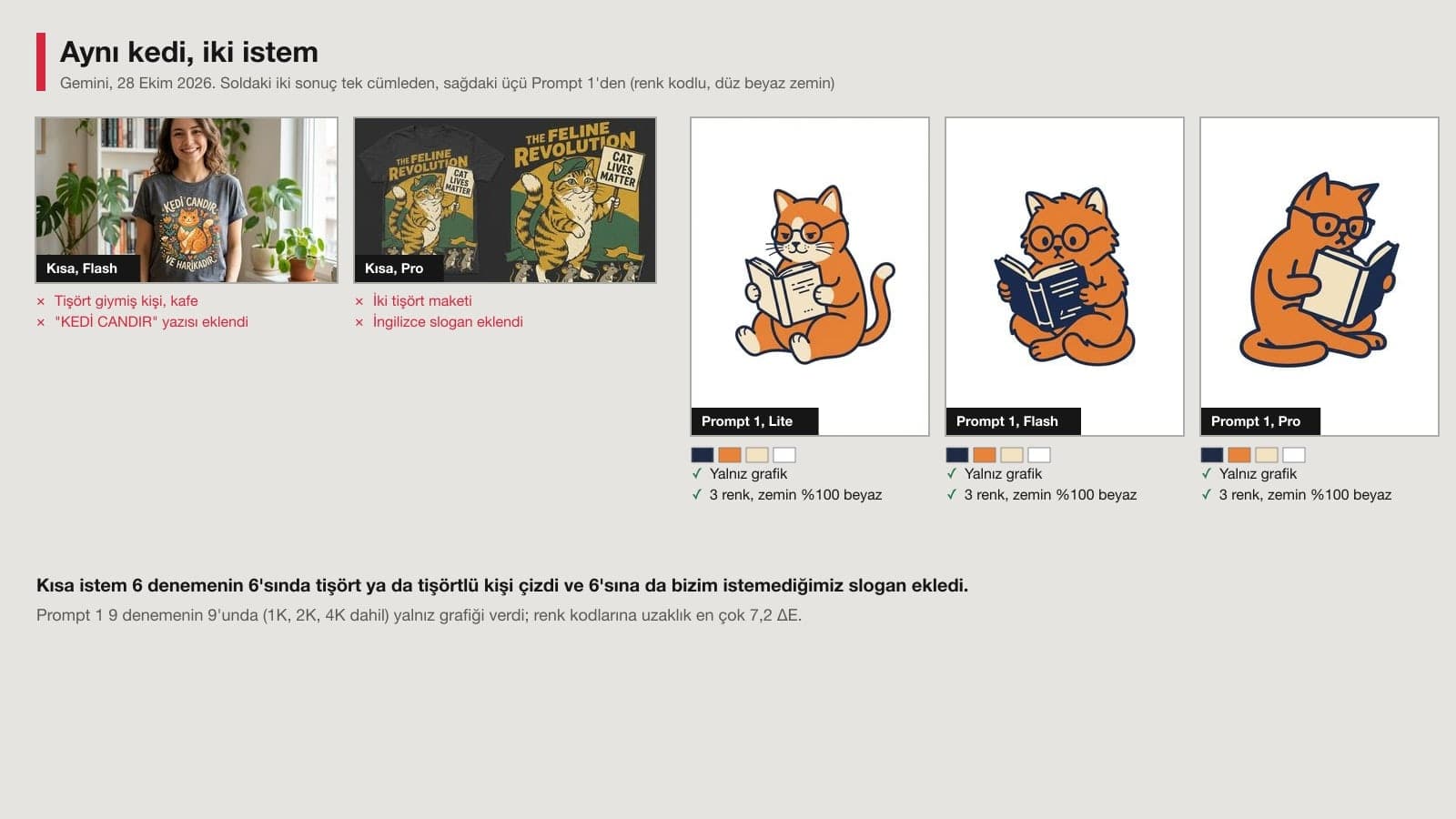
- Prompt 1, which uses hex color codes and asks for a "flat #FFFFFF background all the way to the edges," returned only the print graphic in 9 out of 9 tries: 99.5-100% of the background was pure white, and the color count was the requested 3.
- A one-line request like "Kedili bir tisort tasarimi yap" ("make a t-shirt design with a cat") drew a person wearing a t-shirt or a t-shirt mockup in 6 out of 6 tries, and all 6 added a slogan we never asked for.
- The slogan "CAY OLMADAN / ISE BASLAMAM" ("no work before tea"), given in quotation marks, came out letter for letter in 6 out of 6 tries. The C with a cedilla, the S with a cedilla and the capital I with a dot were all in place.
- When we asked for the second line of a team shirt ("GELININ EKIBI", "the bride's team") with the first image still at hand, the model wrote "GELIN EKIBI" in 9 of 12 tries. In a new chat with no image it was right 6 out of 6.
- The Gemini app downloads at 1K without a plan and at 2K with a Google AI plan. On a 30 cm wide chest print, 2K works out to roughly 152 DPI; Printful recommends at least 150 DPI for DTG.
When you design a t-shirt with AI, ask Gemini for the print graphic only: a flat #FFFFFF background all the way to the edges, colors as hex codes, no t-shirt and no text. You can see how it sits on a shirt later with a separate prompt. On October 28, 2026 we used this setup to generate 92 images and 4 slogan lists for a cat illustration, a mountain badge, a Turkish slogan, a dog photo, a child's drawing, a lemon pattern and a bachelorette party set, and we measured every one.
We ran the tests in the Gemini API with three image models: Nano Banana 2 Lite (Flash-Lite in the app), Nano Banana 2 (Flash) and Nano Banana Pro. Median generation time was 4.9 seconds on Lite, 10.6 on Flash and 17.2 on Pro. Here is what we measured: how much of the background stayed pure white or black, the number of colors and their distance from the requested color code (ΔE), the letters in the slogan, the distinguishing marks from the photo, how closely the print on the mockup matched the first graphic (OpenCV SIFT), and whether the pattern joined up with the opposite edge. The dog photo and the child's drawing are sample inputs, also generated with AI.
How to Design a T-Shirt with AI: 6 Steps
- Pick the shirt color and the print method first. For a white or light shirt you'll ask for a graphic on a white background, for a black shirt a graphic on a black background. Ask your print shop whether they will print it DTG, DTF or screen print: the number of colors and the resolution depend on it.
- Open Gemini, choose Flash in the model menu if it's there (on an account without a plan, the app runs most requests on Flash-Lite) and paste Prompt 1 below. Change the subject, style and color codes in the square brackets to fit your design.
- If there is text, give each line in quotation marks and on its own line (Prompt 4). Read it letter by letter before you print.
- Download the graphic you like and see it on a t-shirt mockup with Prompt 7. The mockup is for your product page and for sign-off; the print shop gets the graphic file itself.
- Remove the flat background and save a transparent PNG. Gemini doesn't produce transparent backgrounds: in our October 27 signature test, asking for a "transparent PNG" gave a drawn gray-and-white checkerboard in all three tries.
- Work out the DPI from your print width (table below) and ask the print shop for a single test print.
When we typed "Kedili bir tisort tasarimi yap." ("Make a t-shirt design with a cat."), Lite and Flash drew a woman wearing a t-shirt in a cafe in four out of four results. The shirts carried slogans we never wrote, like "PATI SEVERLER" ("paw lovers") and "KEDI CANDIR VE HARIKADIR" ("cats are sweethearts and they're wonderful"). Pro gave two t-shirt mockups and wrote "THE FELINE REVOLUTION" in English on one of them. All six came out landscape 16:9, and none of them was a file you could send to a printer.
10 Ready-Made T-Shirt Design Prompts (Copy and Paste)
Fill in the square brackets with your own details and delete the brackets. Write colors as hex codes; if you don't know a code, search Google for "color picker" and copy it from there. We tested the original Turkish versions of these prompts in Gemini. You can paste them into ChatGPT as well, but the results below are for Gemini only.
1) Print-ready graphic prompt for a white t-shirt
Draw only the graphic for a t-shirt print; do not draw a t-shirt, mannequin, hanger or fabric.
Background: flat #FFFFFF white all the way to the edges; no texture, shadow or lighting.
Subject: [subject, e.g. an orange cat wearing glasses, reading a book].
Style: [style, e.g. flat vector illustration with bold outlines]; at most [number of colors, e.g. 3] flat colors: [colors and codes, e.g. navy #1F2A44, orange #E8833A, cream #F3E3C3]. No gradients, shadows or texture.
Composition: graphic centered, wide empty margins on all four sides; vertical 3:4 image.
No text, signature or watermark in the image.Across the three models, at 1K, 2K and 4K, 9 out of 9 tries were the graphic alone. The edge strip of the background stayed 99.5-100% pure white, the k-means measurement found 3 colors in all 9, and the colors were at most 7.2 ΔE away from the codes we gave. In two results the cat had been seated in an armchair, with a lamp and a stack of books added beside it. To keep out objects you don't want, write "no other objects" on the Subject line.
2) Quick version: one-line t-shirt graphic prompt
Draw only the graphic for a t-shirt print, do not draw a t-shirt: [subject, e.g. an orange cat wearing glasses]; flat #FFFFFF background all the way to the edges, no shadow; no text; square.In the first version we only wrote "flat white background" for the background, and Flash drew the graphic like a sticker card sitting on a gray backdrop in both of its results. Once we wrote "flat #FFFFFF all the way to the edges," no card appeared in 5 tries, though one Flash result had a thin gray frame line along the edge. The one-liner gave its cleanest result on Lite.
3) Graphic prompt for a black t-shirt
Draw the graphic to be printed on a black t-shirt; do not draw a t-shirt, mannequin or fabric.
Background: flat #000000 black all the way to all four edges; no frame, white border strip, texture, shadow or lighting.
Subject: [subject, e.g. a mountain silhouette and pine trees in moonlight, inside a round badge].
Colors: only [light colors and codes, e.g. white #FFFFFF and mustard yellow #E3B23C]. The black background stays as the fabric color; the dark areas inside the graphic must be the same flat black.
Style: badge with thick lines and flat colors; no gradients, shadows or texture.
Graphic centered, wide margins at the edges, square 1:1. No text, signature or watermark.Flash gave a clean badge, black all the way to the edges, in 3 out of 3 tries. Pro ran into trouble in 2 out of 5: in the first version it put a white frame around the badge, and after we added "no frame" it still drew the badge on top of a black t-shirt once. For dark-background graphics, pick Flash.
4) Slogan t-shirt prompt with text
Design a text-based graphic for a t-shirt print; do not draw a t-shirt, only the graphic.
Background: flat #FFFFFF all the way to the edges; no texture or shadow.
The text, letter for letter, and only these two lines:
Line 1: "[line 1, e.g. NO TEA,]"
Line 2: "[line 2, e.g. NO WORK]"
Between the two lines, place a small drawing of [drawing, e.g. a slim tulip-shaped tea glass].
Letters: bold, retro capitals with rounded corners. Keep any accents or dots on letters clear.
Colors: only [two colors that stand out from the shirt color, with codes, e.g. burgundy #7A1E2B and cream #F2E6D0]; no gradients.
Do not add any other text, date or signature. Square 1:1.In 6 out of 6 tries both lines came out letter for letter, with no extra words. In one try Flash wrote the second line in cream, and the line almost vanished on the white background: if the design goes on a white shirt, use light colors for decoration only. The "only two colors" request held in 1 of the 6 tries; in the others, the inside and the shadow of the tea glass became a third and a fourth color. In screen printing every color means a separate screen, so count the colors before you print.
5) Photo to t-shirt print prompt (pets)
Turn the [animal, e.g. dog] in the photo I uploaded into a t-shirt print.
Keep the [animal]'s distinguishing features exactly as they are: [markings, e.g. the ear on the left side of the photo is brown, the ear on the right side is white, a large white patch on the chest, a red collar].
Style: [style, e.g. pop art drawing with thick black outlines and 3 flat colors]; no gradients or photo texture.
Remove the background completely: flat #FFFFFF all the way to the edges; no grass, fence, shadow or lighting.
Only the head and chest; centered, wide margins at the edges, vertical 3:4.
Do not add text, do not draw a t-shirt.Describing the markings as "on the left side of the photo" prevents left/right mix-ups: the ear colors were on the correct side in 5 of 6 tries. Details are in the photo section below. To edit photos in the Gemini app you have to be at least 18 (Gemini Help Center).
6) Cleanup prompt for printing a child's drawing on a t-shirt
Clean up the child's drawing in the photo I uploaded for a t-shirt print.
Do not redraw the drawing: keep the lines, shapes, colors and [medium, e.g. crayon] texture exactly as they are; do not add or remove any element.
Remove only these: the table, the edges of the paper, shadows, paper texture and yellowing.
Background flat #FFFFFF all the way to the edges; drawing centered, with margins at the edges.
Do not add text, do not draw a t-shirt. Vertical 3:4.We tried it with a crayon picture shot at an angle on a phone, with a fold mark and a shadow on it. In 6 out of 6 tries the table, the shadow and the crease were removed, while the house, the sun, the two stick figures and the flowers stayed where they were.
7) T-shirt mockup prompt
Place the graphic I uploaded as a print on the front chest of a [shirt color, e.g. white] t-shirt.
Do not redraw the graphic: keep its colors, lines and proportions exactly; do not add text or elements to the graphic.
The print sits in the middle of the chest, a little below the collar seam; its width is about one third of the shirt body.
T-shirt: plain [shirt color] cotton, short sleeves, on a wooden hanger, front view; the fabric wrinkles should follow the print slightly.
Background: plain light gray wall; no other objects, labels, brands or text.
Vertical 4:5 product photo, soft daylight.We uploaded the Flash output of Prompt 1. In 6 out of 6 tries the cat matched the first graphic: after we aligned the mockup to the graphic, SIFT found 189-220 shared points, and grayscale similarity (NCC) was between 0.947 and 0.970. The print covered 26-30% of the image width. When we only asked to "show this design on a t-shirt," the model chose the shirt color itself: one came out navy, one orange, and the orange cat was hard to make out on the orange fabric.
8) All-over pattern prompt for the whole t-shirt
Draw a continuous, tileable repeating pattern to print over the entire t-shirt (all-over print).
Pattern: [elements, e.g. small lemons, green leaves and white flowers]; background flat [background color and code, e.g. light blue #BFD9EA].
The left edge of the image must join the right edge exactly, and the top edge the bottom edge: any element cut off at one edge continues on the opposite edge.
Spread the elements evenly; no large empty areas and no single central element.
Square 1:1, flat colors, no shadows; do not draw text, a frame or a t-shirt.All 4 patterns from Flash and Pro joined up when tiled side by side and top to bottom. The difference between an edge column and the opposite edge was on the same level as a 5-pixel step inside the pattern (8-17% of rows versus 7-17%); for two unrelated columns the figure was 24-39%. Pro spaced the lemons out, while Flash packed them tightly with plenty of leaves.
9) Team and bachelorette party t-shirt prompt
Run this prompt in a new chat for each shirt in the set, changing only the text lines.

Design a text graphic for a [event, e.g. bachelorette party] t-shirt; do not draw a t-shirt, only the graphic.
Background: flat #FFFFFF all the way to the edges; no texture or shadow.
The text, letter for letter, and only these lines:
Line 1: "[line 1, e.g. BRIDE'S]"
Line 2: "[line 2, e.g. SQUAD]"
Above the text, a small drawing of [drawing, e.g. a diamond ring].
Text: bold serif capitals; keep any accents or dots on letters clear, and do not let a letter look like a different letter.
Color: only [two colors and codes, e.g. powder pink #E8B4B8 and gold #C9A227]; no gradients.
Do not add any other text, date or name. Square 1:1.The first line is a note for you; delete it before pasting the prompt into Gemini. We show why a new chat is needed in the set section below.
10) T-shirt slogan idea prompt (text)
Write 20 English slogans for a t-shirt print on the theme of [topic, e.g. office workers who love tea at work].
Rules: each slogan at most [word limit, e.g. 3] words; wordplay or idioms are allowed; no slang, profanity, brand names or quotes from famous people; no two slogans may start with the same word.
Format: numbered list, slogans only; do not write explanations.We ran the original Turkish prompt three times in Gemini 3.5 Flash: all 60 slogans had 3 words or fewer, and no two started with the same word. Four slogans repeated word for word across two separate lists (such as "Kafein degil cay", roughly "tea over caffeine", and "Ofisin cay uzmani", "the office tea expert"). When you ask for a second list, write "different from the previous ones." The short version ("Write t-shirt slogans for office workers who love tea.") returned 26 slogans: 21 were longer than three words, and three mixed in English, like "Powered by Cay" (cay = tea).
Run the same prompt once more in a new chat with Flash. In our test, unwanted shirts and frames appeared only with Pro, on the black background; Flash was clean 3 out of 3 with the same prompt. If letters are missing from the text, don't try to fix it with a second message. See the set section below.
T-Shirt Design Test: What Came Out of 92 Images?
| Prompt | Images | Desired result | Problem |
|---|---|---|---|
| Short: "Kedili bir tisort tasarimi yap" ("make a t-shirt design with a cat") | 6 | 0/6 | 6/6 a shirt or a person in a shirt, 6/6 unwanted slogan |
| Prompt 1, white background (1K, 2K, 4K) | 9 | 9/9 graphic only, 3 colors | Armchair and lamp added in 2 results |
| Prompt 2, one line (two versions) | 11 | 9/11 pure white background | First version: Flash 2/2 gray card |
| Prompt 3, black background | 7 | 5/7 | Pro: 1 white frame, 1 t-shirt drawing |
| Prompt 4, slogan | 6 | 6/6 letter for letter | 1 cream line vanished on white |
| Prompt 5, dog photo | 6 | 5/6 markings correct | Flash 2/2 full body, 1 fur color changed |
| Prompt 6, child's drawing | 6 | 6/6 clean background | Flash left gray paper in 1/6 |
| Prompt 7, mockup | 6 | 6/6 graphic preserved | 0 |
Two jobs that aren't in the table: all 4 patterns from Prompt 8 joined up without a visible seam, and the set test for Prompt 9 took 22 images and gets its own section below. When the aspect ratio was written into the prompt, 3:4, 1:1 and 4:5 all held (e.g. 896 x 1,200 pixels at 1K). We didn't give a ratio in the short request, so all six came out landscape.
Turning a Photo or a Child's Drawing into a T-Shirt Print
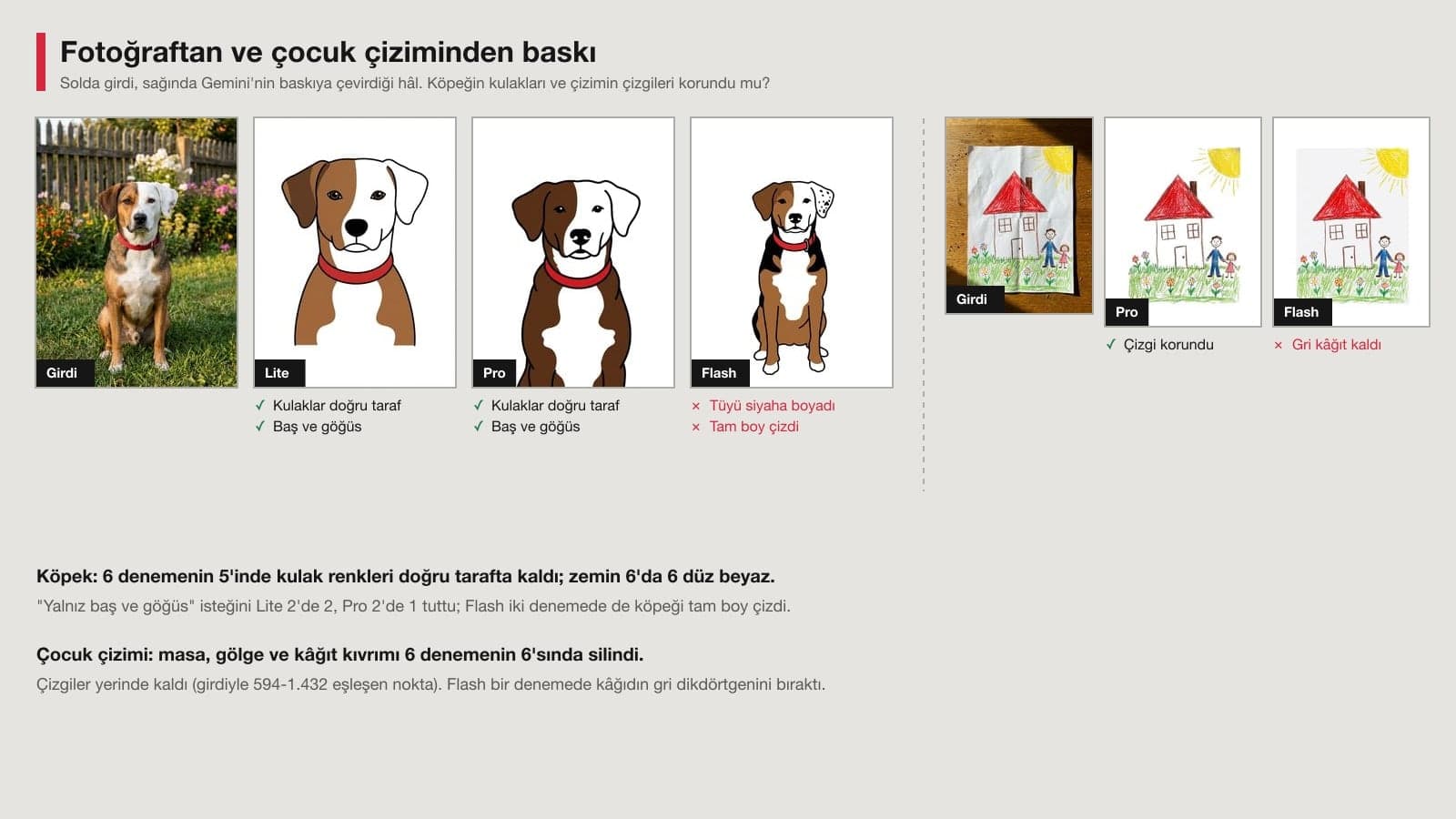
The dog's ear on the left side of the photo was brown and the one on the right was white; it had a white patch on its chest and a red collar around its neck. The ears were on the correct side in 5 of 6 tries, and the collar was red 6 out of 6. One Flash result turned the dog's fur into three colors (black, brown and white) and put spots on the white ear. Lite followed the "only the head and chest" request 2 out of 2 times, Pro 1 out of 2; Flash drew the full body in both tries.
With the child's drawing, the real question was whether the lines would survive. When we aligned the cleaned image with the input, between 594 and 1,432 points matched, and the grayscale similarity of the lines came out at 0.88-0.92: the model fixed the picture without redrawing it. When we asked briefly, "Bu kopegi tisort baskisi yap" ("make this dog a t-shirt print"), both results showed the dog on a t-shirt worn by a man, and one wrote "EN IYI ARKADAS" ("best friend") underneath.
Why Does the Second Line Go Wrong on Team T-Shirts?
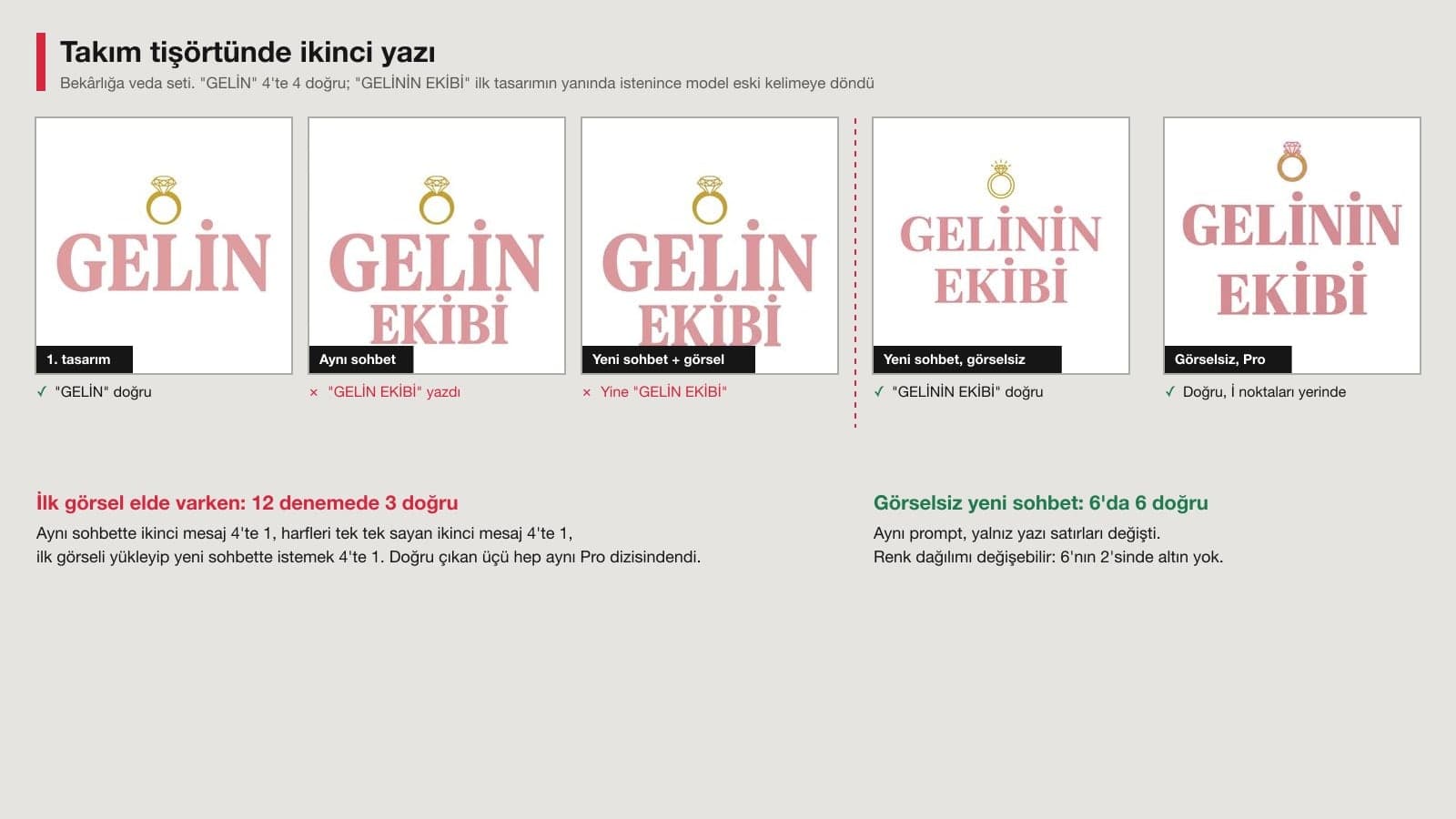
The first graphic, reading "GELIN" ("bride"), was correct in 4 out of 4 tries. Then we asked for "GELININ EKIBI" ("the bride's team") for the second shirt in the set. As a second message in the same chat, the model kept "GELIN" and added "EKIBI" underneath in 3 of 4 tries. A second message that counted out the letters one by one ("7 letters: G-E-L-I-N-I-N") was also wrong 3 times out of 4. Uploading the first graphic and asking in a new chat didn't change the outcome either: again, 3 out of 4 read "GELIN EKIBI".
When we ran the same prompt in a new chat without uploading an image, changing only the text lines, "GELININ EKIBI" came out in 6 out of 6 tries, and every capital I had its dot in place. Keep the set together with the same prompt, the same color codes and the same lettering description, and don't upload the first image as a reference. The price you pay: in 2 of the 6 results the gold color wasn't used at all, so check the color balance on every shirt.
Print Resolution: How Many DPI Is a Gemini Image?
According to the Gemini Help Center, images generated in the app download at 2K with a Google AI plan and at 1K without one. In the API you can also choose 4K. We generated the same 3:4 graphic at all three sizes and divided it across two common chest print widths:
| Gemini output | Pixels (3:4) | On a 25 cm print | On a 30 cm print | Where to get it |
|---|---|---|---|---|
| 1K | 896 x 1,200 | 91 DPI | 76 DPI | App, no plan |
| 2K | 1,792 x 2,400 | 182 DPI | 152 DPI | App, with a Google AI plan |
| 4K | 3,584 x 4,800 | 364 DPI | 303 DPI | API (Flash and Pro in the test) |
Printful's help page recommends at least 150 DPI for DTG printing and 300 DPI for DTFlex, and it points to 300 DPI for fine lines and small text. The same page says a transparent background needs PNG and that semi-transparent edges should be avoided in DTG and DTF printing. That is why a 1K file from an account without a plan isn't enough for a large chest print. On a 9 cm pocket logo, though, 1K comes to about 250 DPI. In the color measurement the 4K outputs also stayed at 3 colors, so the larger size didn't spoil the colors.
Which Gemini Model: Lite, Flash or Pro?
| Model (setting in the app) | Median time | What it did well in the test | Where it had trouble in the test |
|---|---|---|---|
| Nano Banana 2 Lite (Flash-Lite) | 4.9 s | One-line prompt, head-and-chest crop of the dog (2/2) | Put a hood on the cat in the first one-line version |
| Nano Banana 2 (Flash) | 10.6 s | Black background (3/3), pattern, slogan | Drew the dog full body (2/2), changed one fur color |
| Nano Banana Pro | 17.2 s | Dog's ears and collar (2/2), set text | 2 problems in 5 tries on a black background |
On an account without a plan, the app usually decides which Gemini model to use. According to the help page, the Flash-Lite setting runs Nano Banana 2 Lite, the Flash and Pro settings run Nano Banana 2, and the Pro model needs a Google AI plan. Most of the good results in our test came from Lite and Flash, so a Pro plan didn't look necessary for this job.
Common T-Shirt Design Mistakes
- Asking for "a t-shirt design": the model draws the shirt and the person wearing it, and your file never shows up.
- Leaving the background as plain "white": Flash produced a sticker card on a gray backdrop. Write "flat #FFFFFF all the way to the edges."
- Choosing cream or light yellow text for a white shirt: the cream line in our test was hard to read even on screen.
- Asking for the second shirt in a set with the first image at hand: in 9 of 12 tries the text went back to the old word.
- Sending a 1K file to a 30 cm print: it comes to about 76 DPI, and the edges print jagged.
- Sending the mockup image to the print shop: a mockup carries fabric shadows and folds, and the print file is the graphic itself.
T-Shirt Printing in Turkey: Brands, Logos and Selling
When you send your own design to a local print shop or a printing website, most of them accept DTF and DTG orders with your file; ask about the file size and DPI before you order. If you plan to sell, don't put another brand's logo, its name or a mark that resembles it on the shirt. Turkey's Industrial Property Law No. 6769 gives the trademark owner the right to stop this kind of use. In our translation:
Where the sign is used in the course of trade, the following may be prohibited under the second paragraph: a) affixing the sign to the goods or their packaging.
Well-known cartoon characters and team crests that you have AI draw for you carry the same risk, which is why the prompts in this article ask you to describe the subject yourself. Material that belongs to you, like a photo of your pet or your child's drawing, is the safest place to start.
Open Gemini (choose Flash if you can) and paste Prompt 1 from this article: graphic only, a flat #FFFFFF background all the way to the edges, colors as hex codes, no t-shirt and no text. In our test this setup gave a print-ready graphic in 9 out of 9 tries. Then remove the background and save the file as a PNG.
You can generate images in Gemini on an account without a plan, but downloads are limited to 1K. A 1K graphic comes to about 76 DPI on a 30 cm chest print; on a small 9 cm pocket print it reaches about 250 DPI, which is enough.
When the lines are given in quotation marks, yes. We tested with the original Turkish prompt, and the Turkish slogan "CAY OLMADAN / ISE BASLAMAM" came out letter for letter in 6 out of 6 tries. The errors showed up in the second design, where the model went back to the text of the first image, so ask for each piece of text in a new chat.
No. When you ask for a transparent background, it draws a checkerboard pattern. Ask for the graphic on a flat white or black background, then remove the background with a background removal tool and save it as a PNG.
If the design has no other brand's logo or name and no well-known character, there is no trademark obstacle to selling it. Under Article 7 of Turkey's Law No. 6769, putting a registered mark on goods offered for sale can be prohibited.
You can paste the prompts into ChatGPT too; the text, background and color rules work the same way there. The numbers in this article were measured only on Gemini's three image models, and we didn't test ChatGPT.
If you want to turn the same graphic into a sticker or you're looking for a logo for your t-shirt, the prompts in these two articles use the same flat background setup.
Do one last pass before you print: read the graphic letter by letter at 100% zoom on screen, count the colors, remove the background and look at it once on a light and once on a dark t-shirt mockup. Ask the print shop for a single test print. A cream line that reads fine on screen can disappear into the fabric, and the test print is the only place you'll see it.
Sell Your T-Shirt Designs in Your Own Store
If you want to sell your designs without paying marketplace commissions, let's build your e-commerce site together, with product variants (size, color), print previews and a payment system. In a free first call, we'll talk through how your products are set up.