


How to Do the AI Snow Trend: 9 Gemini Snow Photo Prompts
9 Gemini prompts for the AI snow trend: a three-panel snow collage, adding snow to a photo, snow in Galata, a snowman and a snow globe. We tested them on 81 images and show how the trend prompt changes glasses, age and headscarf color, plus the lines that prevent it.
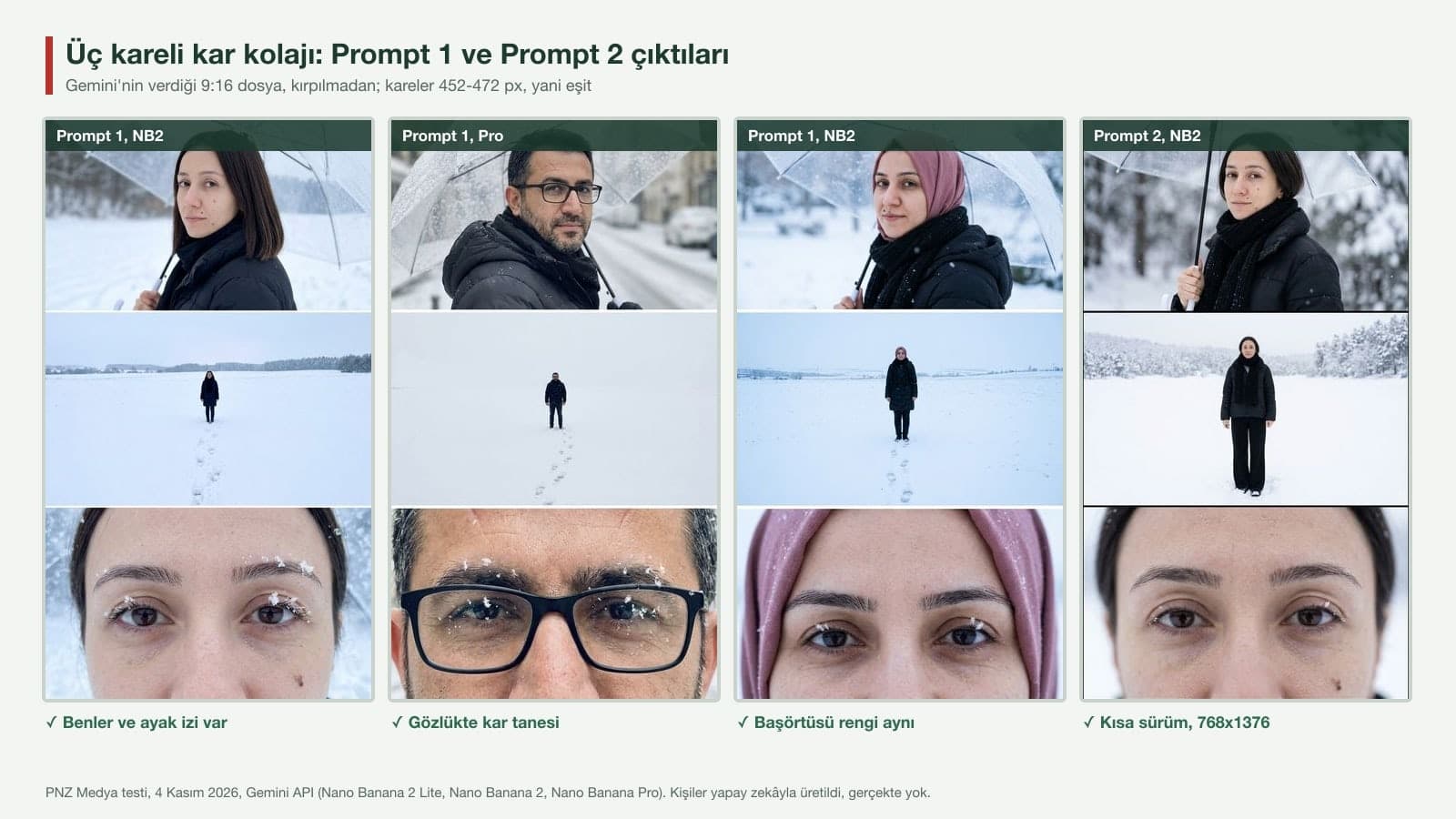
- The three-panel snow prompts gave an equal-panel 9:16 collage in 39 of 39 runs in Gemini; the trend prompt's "2160×3840, 4K" did not make the file bigger, and all 39 files came out at 768x1376 pixels (1K).
- The trend prompt (in English or Turkish) removed the glasses on the man in 3 of 7 runs and turned the dusty rose headscarf black in 7 of 8 runs. The cause is in the prompt's own lines: "a young figure" and "black scarf".
- Prompt 1, which names the glasses, age and headscarf, kept the glasses 3/3 and the headscarf color 3/3; average face similarity rose from 0.634 to 0.730.
- The claim that English prompts give better results did not hold up in our test: across the same nine runs, the literal Turkish translation of the trend prompt scored 0.668 similarity, slightly better than the original English (0.634).
- If you want snow on the photo itself, "Add falling snow to this photo" on its own is risky: NB2 removed the pedestrians in the background and printed a made-up logo on a fleece jacket. Adding the line "Do not change anything else" raised average structural similarity from 0.661 to 0.783.
The English snow trend prompt going around social media starts with "Create a vertical frame" and asks for three equal horizontal panels at 2160×3840 pixels, 4K quality. In Gemini it gets the panel layout right: all 24 collages we made with the trend prompt and its versions came back as three equal panels stacked on top of each other, with a portrait holding a clear umbrella, a full-body shot in a snowy field and a close-up of the eyes. The problem shows up in the face. Because the prompt describes the person as "a young figure," Pro turned our test subject, a man in his 40s with glasses and a beard, into a young man with no glasses and no beard in one run; the "black scarf" line also dyed the headscarf black.
The 9 prompts below were written to close those two gaps, and we measured every one of them. We used three test subjects: a woman with a blunt bob and two moles on her cheek, a man with rectangular glasses and a salt-and-pepper beard, and a woman in a dusty rose headscarf. We ran the trend prompt word for word, its Turkish translation and our own versions with the same photos, then counted panel count, panel height, face similarity, glasses, headscarf color and any text added to the scene, one by one.
81 test images in the Gemini API (the image models that run when you pick Flash-Lite, Flash and Pro in the Gemini app). As in the app, we set the aspect ratio through the prompt text alone. We measured face similarity with SFace and the structure of the snow-edited photos with SSIM aligned to the input; we counted glasses, moles, headscarves and text by eye on enlarged crops. The test subjects were generated with AI and do not exist in real life. Every test was run with the Turkish versions of the prompts; the English prompts in this post are our translations.
How to Do the AI Snow Trend in 5 Steps
- Pick a photo where your face is clear and seen from the front. If you wear glasses, use a photo with them on; the trend prompt can delete glasses that are in the photo, and it never adds glasses that aren't.
- Open Gemini and pick Flash or Pro in the model picker. Flash-Lite returns a result in 5 seconds, but it had the lowest face similarity of the three models.
- Upload the photo and paste one of the prompts below. In the square brackets, write what is actually on your face: glasses, beard, moles and where they are, headscarf.
- Download the result at full size. According to Google's help page, downloads are 1K on an account without a plan and 2K with a Google AI plan; in our test each of the three panels stayed around 768x455 pixels.
- If you are posting vertically to Instagram or TikTok, do not crop the file: 9:16 is the same ratio as Stories and Reels.
If you wear a headscarf, add "The headscarf is in place in every panel, with the same color and tying as in the photo" after the first sentence of the prompt. In 9 of the 10 collages without this line the headscarf turned black; in all 3 collages with it, the color stayed the same.
9 Ready-to-Use Snow Trend Prompts (Copy and Paste)
Each prompt works in a single message after you upload one photo; Prompt 9 needs two photos. Fill in the bracketed parts for yourself and delete the brackets. The headscarf line is only for photos with a headscarf; otherwise, remove that line completely.
1) Three-panel snow trend: the main prompt
Make a three-panel vertical snow collage of the person in the photo I uploaded. The image is 9:16 vertical; three equal horizontal strips stacked on top of each other, with a thin white line between them.
Take the face exactly from this photo, no beautifying and no making them look younger; this person has: [hair color and length, glasses, beard, moles and where they are, age range].
[The headscarf is in place in every panel, with the same color and tying as in the photo; a beanie or hood does not replace it.]
Calm expression, mouth closed, no teeth showing.
Outfit: black puffer jacket and black scarf. The [earphones, watch, phone] from the photo do not appear in the new scene.
Panel 1: chest-up portrait; holding a clear umbrella, turning their head slightly over the shoulder to look at the camera; blurred snow behind.
Panel 2: wide shot; standing alone in a wide, flat, snow-covered field, with their own footprints behind them.
Panel 3: a close-up of only the eyes and eyebrows, with a few snowflakes on the eyelashes.
Cool colors, mostly white. No text, signature or date in the panels.All 9 collages came with three equal panels and footprints. Glasses 3/3, beard 3/3 and headscarf color 3/3 stayed in place; average face similarity in the portrait panel was 0.730, the highest in the test. We narrowed the third panel to "only the eyes and eyebrows" on purpose: in close-ups that showed the whole face, Pro lengthened the woman's chin-length hair to below her shoulders in 4 of 5 runs.
2) The trend prompt, shortened and fixed
Make a snow collage of the person in the photo I uploaded: 9:16 vertical, three horizontal panels of equal size stacked on top of each other.
Keep their age, facial features, hair length and the [glasses, beard, moles] in the photo exactly as they are; do not make the face younger and do not beautify it. [The headscarf keeps the color and tying from the photo in every panel.] Calm expression, mouth closed.
Outfit: black puffer jacket, wide-leg black pants and a black scarf; everything is covered in white snow, cool colors.
Panel 1, portrait: holding a clear umbrella, head turned slightly, looking at the camera, blurred snow behind.
Panel 2, full body: standing alone in a wide snowy field.
Panel 3, close-up: eyes and eyebrows in soft snow light.
No text in the panels.Same look as the trend, except it says "keep their age exactly as it is" where the trend says "young figure". On NB2 and Pro, age stayed the same in 6 of 6 collages, and the man's glasses were in every panel on both models; average similarity was 0.709. We had left the headscarf line out of this prompt in the first round; in both headscarf runs the headscarf came out black, which is why we took the line from Prompt 1.
3) Add snow to my photo: short and safe
Add falling snow to this photo. Do not change anything else: keep the people, clothes and framing the same, and do not add any new text or logo.For anyone who wants to put their own photo into winter without turning it into a collage. In 6 runs no made-up text appeared, and the pedestrians and vehicles in the background stayed where they were. Lite changed the scene the least (0.92-0.94), while Pro covered trees and ground with the most snow.
4) Turn a summer photo into winter
Keep this photo exactly as it is and change only the season to winter. The person's face, pose, hands, clothes and every object and person in the photo stay in place; the framing, angle and direction of the light do not change.
Add large, slowly falling snowflakes. Cover the ground, [benches, car roofs] and branches with 3-4 cm of fresh snow; replace the green leaves on the trees with bare, snowy branches.
A few snowflakes on the person's shoulders and head. The sky is light gray, like an overcast winter day. Do not add any new text or signs.To turn a photo taken in a park in summer into a believable winter day, you have to change the leaves too; Prompt 3 leaves them green. The face stayed recognizable in all 6 runs (similarity 0.89-0.93). One warning: with this prompt Pro removed the pedestrians from the man's photo and added an empty bench, so for a crowded photo, pick Flash or Flash-Lite.
5) Snowy Istanbul: tea in Galata
Show the person in the photo I uploaded in Istanbul while it is snowing, on the cobblestone slope that leads up to Galata Tower. The tower is in the back and in the center, its stone body and conical roof covered in snow.
Only old stone and wooden houses line both sides of the slope; no shops, signs, posters or text.
Face exactly from this photo; this person has: [hair color and length, glasses, beard, moles and where they are, age range]. [Headscarf in the same color and tying as in the photo.] Expression: mouth closed, slight smile. Framing: waist up.
Outfit: [dark navy wool coat and gray scarf]. The [watch, earphones] from the photo do not appear in the new scene. Holding tea in a tulip-shaped glass, with visible steam.
A natural photo taken with a phone.In the first version we had written "shop signs are unreadable, blurred", and all 4 images came with readable made-up signs (meaningless names like "TÜRK KATIMMACI"). This version describes the street with no shops, and none of its 4 images had text; the tower was recognizable in every one by its conical roof.
6) Mini me inside a snow globe
Show the person in the photo I uploaded as a miniature figure inside a glass snow globe on a tabletop. Inside the globe is a snowy pine tree; the person stands next to the tree, wearing a [red] jacket.
The figure's face should look like the person in this photo: [hair color and length, glasses, beard, moles and where they are, age range]. [Headscarf in the same color as in the photo.]
The globe is filled with water, with snowflakes drifting inside. The base of the globe is dark wood, plain, with no text or plaque on it.
Blurred background, a room with warm light. A close-up like a product photo.For a New Year card or a profile picture. In all 4 images the base had no text and the red jacket was there. Because the figure is small, face similarity dropped (0.41-0.75); if being recognizable matters to you, add a sentence that turns the figure's face toward the camera.
7) Putting a scarf on a snowman
Show the person in the photo I uploaded in a snow-covered garden next to a snowman about their own height; the person is wrapping a red scarf around the snowman's neck.
The snowman is made of three snowballs; its eyes are two pieces of coal, its nose is a carrot, its arms are two thin sticks, its mouth is made of small stones; there is nothing else on its face.
The person's face is taken exactly from this photo and turned halfway toward the camera; this person has: [hair color and length, glasses, beard, moles and where they are, age range]. Expression: smiling, mouth closed.
[No beanie or hat on their head, their hair is visible. / Headscarf in place as in the photo.] Outfit: [green puffer jacket]. The [watch] from the photo does not appear in the new scene.
Light snow is falling. Natural photo, knees up.We described the snowman piece by piece, and in all 4 images the coal eyes, carrot nose, stone mouth and stick arms came out exactly like that. Headscarf 2/2 and glasses 2/2 stayed in place. Of the two sentences in square brackets, keep the one that fits you. With the Turkish version of the trend prompt, NB2 put a beanie on the woman's head on its own; if you want your hair to show, write "no beanie".
8) Foggy window, hot drink
Show the person in the photo I uploaded indoors, in front of a large fogged-up window; heavy snow is falling outside and snowy rooftops are visible. The person holds a white mug with both hands, with steam rising from the mug.
Face exactly from this photo; this person has: [hair color and length, glasses, beard, moles and where they are, age range]. [Glasses on, lenses clear and eyes visible.] Calm expression, mouth closed.
Outfit: beige turtleneck sweater. The [earphones, watch, phone] from the photo do not appear in the new scene.
Light: cool daylight from the window and warm yellow light from the room. A natural photo taken with a phone, waist up.A snow photo without going outside. For the person with glasses, we added the "lenses clear" sentence so the lenses would not fog up along with the window. In all 4 images the eyes were visible, and the glasses were in place 2/2.
9) Snowball fight with your partner
Show the [woman] from photo 1 and the [man] from photo 2 together, having a snowball fight in a snowy park. The [woman] is holding a snowball and laughing, the [man] has raised his arm to protect himself; both have their faces turned halfway toward the camera.
The [woman's] face exactly from photo 1: [features]. The [man's] face exactly from photo 2: [features].
[The woman is wearing a burgundy puffer jacket and a cream scarf, the man a navy wool coat.] The [earphones, watch, phone] from the photos do not appear in the new scene. Nobody else in the frame.
Light snow is falling. A natural photo taken with a phone, knees up.Add the two photos to the same message, one after the other. In all 4 runs both people were there and nobody was in the background. Face similarity stayed at 0.53-0.71 on Pro and Flash and 0.49-0.55 on Lite; for a two-person image, pick Flash or Pro.
Instead of typing "fix it" in the same chat, open a new chat, upload the photo again and add the missing thing by name: "black rectangular glasses on in every panel", "dusty rose headscarf". In our earlier face preservation test, a one-word "fix it" command made the person show their teeth in 5 of 5 runs.
Why Does the Snow Trend Prompt Remove Glasses and Headscarves?
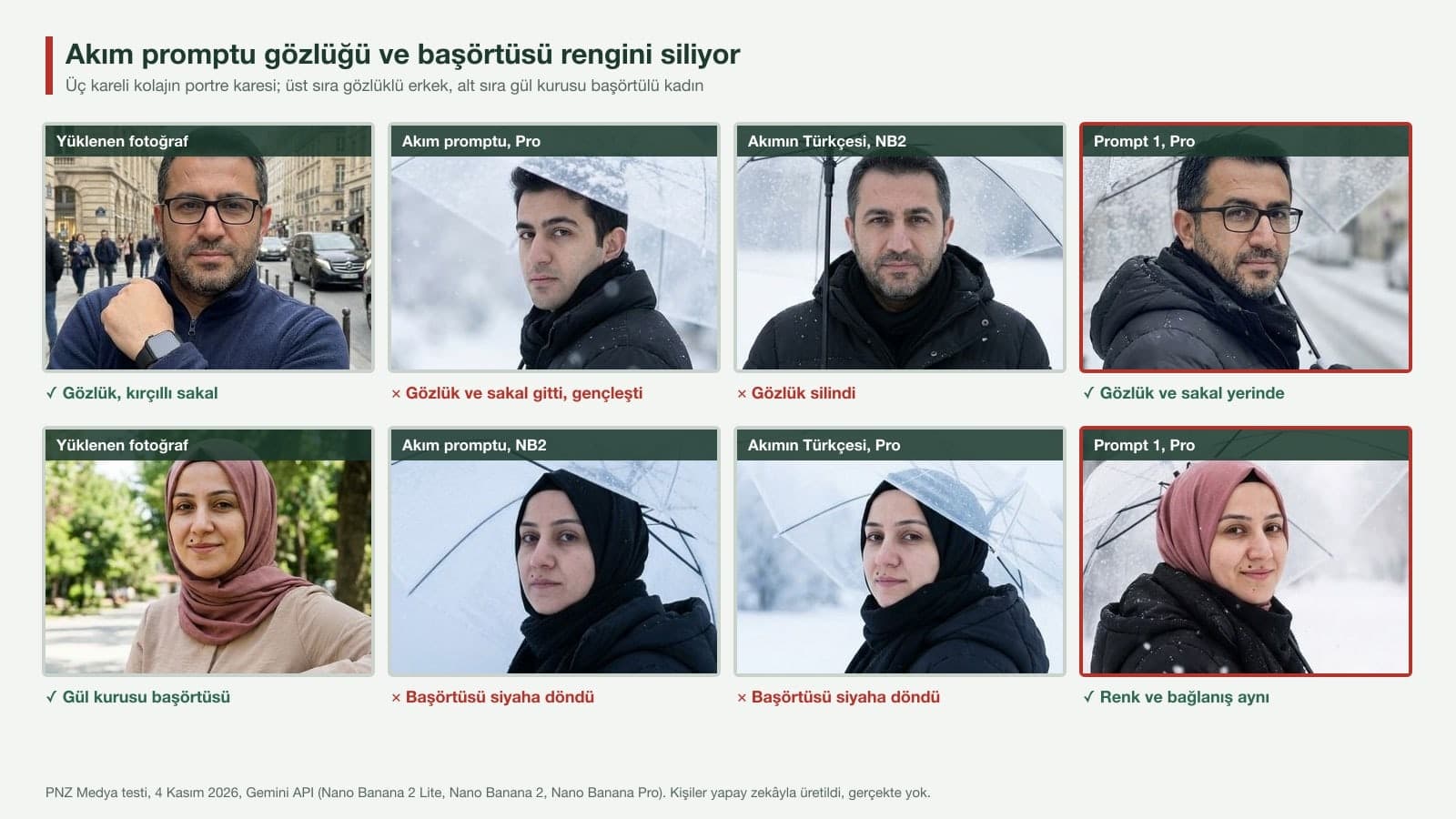
The trend prompt builds the person from the photo and from its own description at the same time: it tells the model to use the face, hair and body from the reference, then right after that adds "a young figure" with a calm gaze and a "black scarf". When the two conflict, the model usually goes with the prompt's words. The headscarf made this very clear: with the black jacket and black scarf description, the headscarf merged with the scarf into a single black wrap.
| What happened? | Trend prompt, EN and TR (24 collages) | Prompt 1 | Prompt 2 |
|---|---|---|---|
| Three equal panels, 9:16 | 24/24 | 9/9 | 6/6 |
| Glasses in place in every panel | 4/8 | 3/3 | 2/2 |
| Headscarf color kept | 1/8 | 3/3 | 0/2 (without the line) |
| Face similarity in the portrait panel (avg.) | 0.651 | 0.730 | 0.709 |
| Age clearly dropped on Pro | 1/12 | 0/3 | 0/3 |
The de-aging does not happen every time: when we ran the same English prompt on Pro a second time, the man came back with his glasses and beard. We removed the word "young" and tried again; the portrait panel was fixed, but the glasses dropped off again in the close-up panel. The only reliable way to keep the glasses was to name them for every panel. With Prompts 1 and 2, the glasses were in every panel in 5 of 5 collages.
Is an English Prompt Better for the Snow Trend?
One of the news stories about the trend says English prompts give more accurate results than Turkish ones (Tekirdag Bakis, November 10, 2025). We checked with the same three people and the same three models: average face similarity in the portrait panels was 0.634 with the English trend prompt and 0.668 with its literal Turkish translation. The panel layout was right 9/9 in both. Since both languages contain "young" and "black scarf", both broke the glasses and the headscarf. The prompt works in Turkish as well; just remember to write down what is on your face.
How to Add Snow to a Photo
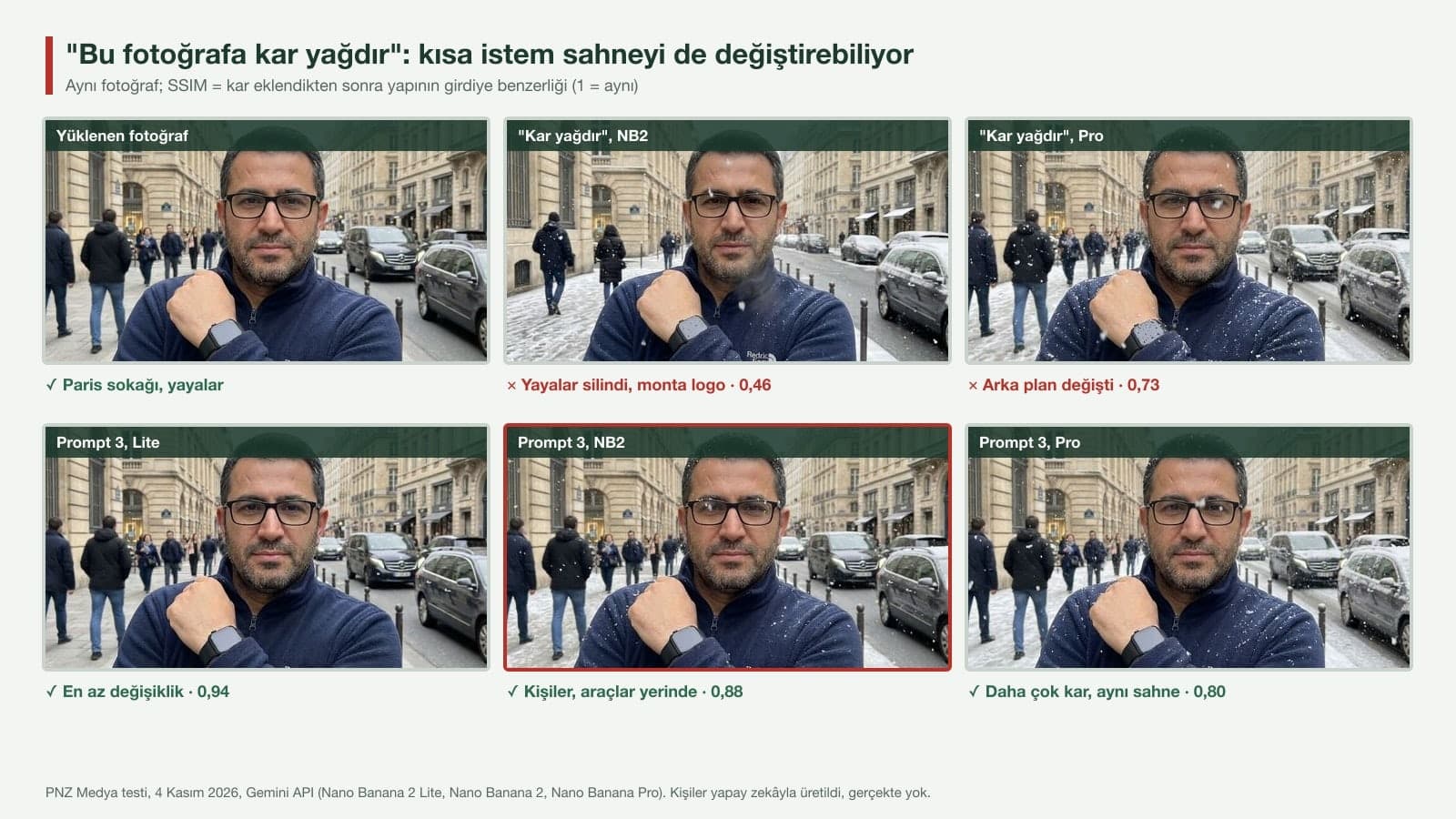
The other side of the trend is adding falling snow to an existing photo without building a collage. When you type "Add falling snow to this photo," Gemini adds snow but also redraws the scene: NB2 removed most of the pedestrians on a Paris street and printed a made-up brand name reading "Redric Face" on the chest of a fleece jacket. When we added "do not change anything else, do not add text or a logo" to the end of the same prompt, none of the 6 outputs had text, and average aligned SSIM rose from 0.661 to 0.783. The face held up in every snow-adding run, with similarity between 0.87 and 0.93; each time something broke, it was the background.
Does Writing 2160×3840 and 4K Help?
No. The trend prompt asks for "2160×3840 pixels, 4K quality"; all 39 collages came out at 768x1376 pixels. That is the 1K size for the 9:16 ratio in Google's developer documentation. In the same table, 9:16 is 1536x2752 pixels at 2K and 3072x5504 pixels at 4K, so 2160×3840 is not even a size Gemini can produce. The ratio, on the other hand, came from the prompt text: our inputs were landscape photos and, as in the app, we sent no aspect ratio setting, yet the word "vertical" still made all 39 collages 9:16. For a larger file you need a plan in the app: according to the help page, downloads are 1K without a plan and 2K with a Google AI plan.
By default, the model matches the output image size to that of your input image, or otherwise generates 1:1 squares.
Which Gemini Model? Flash-Lite, Flash or Pro
| In the app | Image model | Median time (API) | Prompt 1 face similarity | Note |
|---|---|---|---|---|
| Flash-Lite | Nano Banana 2 Lite | 4.7 s | 0.695 | Changed the scene least when adding snow; weakest on the couple image |
| Flash or Pro (no plan) | Nano Banana 2 | 9.2 s | 0.730 | Removed the glasses with the Turkish version of the trend prompt |
| Pro (Google AI plan, regenerate) | Nano Banana Pro | 17.9 s | 0.765 | Highest similarity; lengthened the hair in the close-up |
According to Google's help page, Nano Banana 2 Lite runs when Flash-Lite is selected and Nano Banana 2 runs when Flash or Pro is selected; Nano Banana Pro is only available on a Google AI plan, when you regenerate an image you created. For the snow trend on an account without a plan, Flash is enough. Pro adds 0.035 in face similarity; in exchange it is twice as slow, and it was the only model that de-aged the person with the trend prompt.
Common Snow Trend Mistakes
- Pasting the trend prompt as it is. The "young figure" and "black scarf" lines can change your glasses, beard and headscarf color.
- Writing "4K" or "2160×3840" in the prompt and expecting a big file. Your plan and download setting decide the size.
- Asking for the whole face in the close-up panel. Pro lengthened the hair in this panel; saying "only the eyes and eyebrows" prevented it.
- Asking for a street with shops, like Galata or Kadikoy. The model writes made-up text on the signs, so describe a street with no shops.
- Typing a short "add snow" on a crowded photo. People in the background can disappear, and a logo can show up on clothing.
- Not describing the head in a winter scene. In our test the model once added a beanie on its own; if you want your hair to show, write "no beanie".
Doing the Snow Trend in Turkey
For people in cities where it does not snow, this is the appeal of the trend: a photo taken in Izmir or Antalya can look like Uludag or Erzurum. You can write the place name in the prompt; the models recognized Galata Tower and drew it with its conical roof in 8 of 8 images. For users who wear a headscarf, the most important line is the one that fixes the headscarf's color and tying; in our test, the only run that kept the color without this line was Lite with the Turkish trend prompt. Get permission before uploading someone else's photo: Google requires you to be 18 or older for image editing, and under Turkey's data protection law (KVKK) a face image is personal data.
Pick Flash or Pro in Gemini, upload a photo where your face is clear and paste the three-panel snow prompt. In the square brackets, write what is on your face, such as glasses, a beard, moles or a headscarf. In our test this version gave three equal panels in 9 of 9 runs.
The prompt going around is an English text that starts with "Create a vertical frame": it asks for three panels made of a portrait with a clear umbrella, a full-body shot in a snowy field and a close-up of the eyes. It gets the panel layout right, but its "young figure" and "black scarf" lines can change the glasses on your face and the color of your headscarf. The fixed version is Prompt 2 above.
Yes. On a free Gemini account, Nano Banana 2 runs when Flash is selected, and the collage downloads at 1K (768x1376 pixels). A Google AI plan raises downloads to 2K and unlocks regenerating with Pro.
No. In our test, the Turkish version of the same trend prompt gave slightly higher face similarity than the English one (0.668 vs. 0.634). What decided the result was whether you wrote what is on your face into the prompt.
Write: "Add falling snow to this photo. Do not change anything else: keep the people, clothes and framing the same, and do not add any new text or logo." Saying only "add snow" removed people in the background in some runs and added a made-up logo to clothing.
The trend prompt describes the person as a "young figure" and never mentions glasses; on Flash and Pro in particular, the glasses can drop off in the close-up panel. Name the glasses for every panel: "wearing black rectangular-frame glasses". In our test, the glasses were in every panel in 5 of 5 collages that had this line.
It does, but you need to write the headscarf color. With the trend prompt, the headscarf merged with the black scarf and turned black in 7 of 8 runs. Prompt 1, which has the line "The headscarf is in place in every panel, with the same color and tying as in the photo", kept the color 3/3.
Start by filling in the face line from Prompt 1 for yourself once and saving it somewhere. When you paste that same line into the Galata, snowman or window version, all your winter images come out with the same face, and it will help again at the end of December when you move on to New Year photos.
Instagram Content and Ads for Your Winter Campaign
Let's plan winter and New Year Instagram content and Meta ads for your business together. In a free initial call, we'll talk through your target audience, budget and timeline.