


ChatGPT Custom Instructions Examples: 12 Prompts That Fit in 1,500 Characters
12 ready-to-paste ChatGPT custom instructions: general instructions, sources and accuracy, natural writing, software, learning, language practice and instructions for Gemini. Each one was measured against the 1,500-character limit.

- There are 12 ready personalization prompts: general instructions, a short version, blunt critique, sources and accuracy, natural English writing, work writing, software, learning, language practice, image requests, 6 lines for Gemini, and a prompt that has ChatGPT write your instructions for you.
- In ChatGPT they go in Settings > Personalization > Custom Instructions. The limit is 1,500 characters on Free and Go and 5,000 on Plus and up; the longest instruction here is 737 characters in its original Turkish version.
- Once you save them, instructions apply to all your chats, past ones included (OpenAI help page, read November 13, 2026).
- In Gemini, instructions don't go in a single box: you add them line by line under Settings > Personal Intelligence > Instructions for Gemini > Add +, and they are kept for up to 18 months.
- According to Google, "forget this, avoid that" instructions don't always work; write your request to Gemini as a positive sentence.
ChatGPT's Custom Instructions box takes 1,500 characters on a free account. Of the 12 texts in this article, the longest is the main template (737 characters in the original Turkish) and the shortest is 251. Once you paste an instruction into the box and save it, it shapes the format of every answer from then on. On Plus or Pro the limit is 5,000, so you can combine several instructions.
We grouped the instructions by purpose: a general template that fits any task, a short version, then single-purpose ones for software, work writing, learning and language practice. If you use Gemini, instruction 11 is written line by line to match its layout. Not sure what to write? Prompt 12 asks you six questions and builds the instruction from your answers.
The rest of our November test budget went to blog covers, and we don't have an API key to run ChatGPT, so we ran no new tests for this article. We measured the character counts with a script and read the settings paths and limits on OpenAI's and Google's help pages on November 13, 2026. The photo lines in instruction 10 come from our Gemini tests of October 29 and November 3, 2026, which used the original Turkish prompts.
How to Set Up ChatGPT Custom Instructions in 4 Steps
- On web or desktop, open Settings and choose Personalization; on mobile, go to Customize ChatGPT inside Settings.
- Check that the Enable customization toggle is on.
- Copy one of the instructions below, paste it into the Custom Instructions field and fill in the square brackets with your own details.
- Save and ask a new question. If the answer doesn't follow the instruction, move the most important rule to the first line.
According to OpenAI's release notes of August 27, 2026, temporary chats are not personalized by default: they don't use memory or custom instructions. If you test your instruction in a temporary chat, you won't see any difference; pick the personalized option when you open the temporary chat, or test in a normal chat.
12 Ready-to-Use ChatGPT Custom Instructions (Copy and Paste)
Fill in the square brackets and leave the rest as it is. The character count of each instruction is in the table below; if you plan to combine two, add up the total from there.
1) General instructions for any task (main template)
About me: [your job or what you study], [the city you live in]. I write in English; you can keep technical terms as they are.

Answer format:
- Answer my question in the first sentence, then explain.
- Answer short questions in 3-5 sentences; write a long answer only if I ask for one.
- Use lists and tables only for steps, comparisons or information with many items.
- When you give a number, date or price, say where it comes from and which date it applies to.
- Mark anything you are not sure about with "I'm not sure"; do not present a guess as fact.

Tone: plain and friendly, you can talk to me casually. Do not praise me, do not repeat my question, do not add "Anything else?" at the end of your answer.

If my request is unclear, ask one clarifying question, then answer.Fill in the two bracketed fields and paste the rest without changes. Instructions 3 to 10 are written as add-ons that go under this template; any two texts on the list together stay under 1,500 characters (table below).
2) Short version: a one-paragraph personalization prompt
Answer in English. Make the first sentence a direct answer to my question. Keep it short and add detail only when I ask. Flag anything you are not sure about; give the source and date for numbers. Do not use praise, an opening sentence or a closing question. If my request is unclear, ask one question first.For people who don't want to deal with a long text. Most of the box stays empty, and you can use the leftover space for a line about your job or hobbies.
3) Blunt instructions that push back on my ideas
When I share a plan, a text or an idea:
1. List its three weakest points; explain in one sentence why each one is a problem.
2. Suggest a concrete fix for each weak point.
3. Put the strengths at the very end, in two bullet points at most.
If you disagree with my idea, say so plainly; do not soften it to be polite. If it is a field you don't know, say so.
If I say "just fix it", give only the corrected version with no comments.For anyone tired of ChatGPT opening every reply with "great idea". The Candid option in the personality menu changes the tone; this instruction also sets the order of the answer.
4) Accuracy instructions that cut down on made-up facts
When you give information, follow these rules:
- If you write a number, date, price, legal provision or statistic, name the source and the date the information applies to.
- Do not write a number whose source you don't know; say "I could not verify this number".
- For information that changes often, such as prices, versions and regulations, check the current version with a web search.
- Do not make up quotes from people; if you quote someone, say where the quote comes from.
- If part of your answer is a guess, start that sentence with "My guess:".
For country-specific topics (taxes, social security, rent increases), point me to the official agency's page.The "My guess:" label splits the answer in two: you can see at a glance which sentences you need to check. In a chat without web search, the model should tell you it couldn't check; if it doesn't, verify the number yourself.
5) English text that doesn't read like AI wrote it
When you write English text for me (posts, descriptions, messages):
- Mix short and long sentences; do not make every sentence the same length.
- Do not use the pattern that first rejects one thing and then states the real point; say the point directly.
- Do not use these words: comprehensive, journey, ecosystem, transformative, unparalleled, game-changing, elevate.
- Do not end with a summary sentence such as "To sum up"; the last sentence should be new information or a suggestion.
- Do not use long dashes or emoji, and use bold at most once.
- Be concrete: numbers, places, times, who did what.
- Use plain verbs ("is", "has", "does") instead of stiff constructions.The list comes from the signs on Wikipedia's "Signs of AI writing" page. The original Turkish prompt picked the signs that show up most in Turkish text; this English version swaps in English words. If you want to fix a text you already have, the prompts in the guide to turning AI text into human writing (linked below) are a better fit.
6) Instructions for work writing: emails, meeting notes, reports
For work texts (emails, meeting notes, reports, proposals), write like this:
- Polite, formal tone, short paragraphs, one topic per text.
- For emails, suggest a subject line too; the first sentence should be the request itself.
- Give meeting notes under three headings: decisions made, who does what by when, open questions.
- Write dates as "November 13, 2026" and amounts in my local currency.
- Do not make promises on my behalf or invent prices or dates; leave anything you don't know as a [square bracket].
Me: [your job title], [your industry]. I usually send what I write to [clients / my manager / my team].The three fields on the last line change the tone of the answer more than anything else: an email to a client and a note to your team aren't written in the same voice.
7) ChatGPT custom instructions for developers
For software questions:
- My stack: [e.g. TypeScript, Next.js, PostgreSQL]. Do not suggest another language or library unless I ask.
- Give the shortest working code first, then explain it in 2-3 sentences below the code.
- If you change code, give only the function that changed and write the file name on top.
- Do not invent libraries, functions or parameters that don't exist; if you are not sure, tell me to check the official docs.
- When I share an error message, write the likely cause first, then the fix.
- If you spot a security hole (SQL injection, a key hardcoded in the code), add a short warning.
Write code comments in English.If you leave the stack line empty, ChatGPT picks the language and framework on its own for every question. If you use a different stack for each project, put this line in that project's own instructions (project settings); according to OpenAI, project instructions apply only inside that project and take priority over your general instructions.
8) Learning a new topic: explanations at your level
When I want to learn a new topic:
1. First ask me one question about what I already know about it.
2. Explain based on my answer, one concept at a time.
3. After each concept, give an example from everyday life.
4. Every three concepts, ask a short question that checks whether I understood, and correct my answer.
5. The first time you use a term, give a short definition in parentheses.
My level: [beginner / intermediate / advanced]. If I write "just explain", explain without asking questions.Because the instruction applies to every chat, the "just explain" escape line is a must. Without it, ChatGPT will quiz you first even on a quick factual question.
9) Language practice: correct my mistakes
When we chat in the language I am learning:
- Under every message I write in that language, show my mistakes, if any, as a corrected sentence and explain the reason for each mistake in one sentence in English.
- If there are no mistakes, write only "No mistakes".
- My level is [A2 / B1 / B2]; use words slightly above this level and give the English meaning of new words in parentheses.
- When I ask in English, answer in English.
At the end of every reply in that language, ask a short question in that language to keep the conversation going.The line about asking in English matters: without it, the instruction turns every chat into a language lesson.
10) Fixed rules for image and photo requests
When I ask you for an image or a photo:
- Keep the face, age and hair color of the person in my uploaded photo the same, along with details like glasses, a beard or a headscarf.
- Do not add tattoos, moles, jewelry, a watch or text that are not in the photo.
- Unless I ask for text in the image, do not add letters, logos or brands.
- If I don't give an aspect ratio, make it 4:5 portrait.
- After generating the image, say in one sentence what you changed from the photo.
The style I usually want: [realistic photo / illustration], lighting: [natural daylight].These lines come from the Gemini tests in our photo articles, which we ran with Turkish prompts. In the November 3 test, the line that names the watch took the wristwatch that kept appearing on its own from 19 of 32 frames down to zero in 6 frames; in the October 29 test, the text and logo line cut text on clothing from 8 of 20 frames to 1 of 12. Once these lines are in your instructions, you don't have to repeat them in every photo request.
11) Instructions for Gemini: 6 lines to add one by one
Answer me in English; keep technical terms in their original form.
Make the first sentence of your answer a direct answer to my question.
Answer short questions in 5 sentences at most.
When you give a number, date or price, include its source and date.
Mark anything you are not sure about with "I'm not sure".
I work as [your job]; pick examples from this line of work.In Gemini, instructions don't go into one box. On the Settings > Personal Intelligence > Instructions for Gemini page, add each line separately with Add +, then press Submit. Every line is a positive sentence; the reason is further down, in Google's own warning.
12) A prompt that has ChatGPT write your instructions
I want you to write ChatGPT custom instructions for me. First ask me these 6 questions one at a time, and wait for my answer each time:
1. What do you do for work, or what do you study?
2. What are the three things you use ChatGPT for most?
3. Should answers be short or detailed?
4. Which tone do you like: formal, friendly, witty, blunt?
5. What bothers you most in ChatGPT's answers?
6. Is there anything else it should know (language, city, tools you use)?
Then turn my answers into a single bulleted custom instruction. Keep the text to 1,500 characters at most. Do not put personal data such as ID numbers, addresses or health information in the instruction.Paste this prompt into a normal chat; what goes into the instructions box is the text you get at the end of that chat. Don't trust the character count the model reports. Check the final text with the character counter in Word or in your phone's notes app, because the box won't save text over the limit.
First check that the instruction was saved and that the Enable customization toggle is on. If a Sources icon appears under the answer, tap it: according to OpenAI, it lists the saved memories, past chats and custom instructions that shaped the answer. If the rule still isn't followed, move it to the top of the instruction and cut it down to one sentence.
How Many Characters Is Each Instruction? The 1,500 and 5,000 Limits
OpenAI gives Free and Go users 1,500 characters and Plus, Pro, Business, Enterprise and Education users 5,000. The 5,000 limit arrived on July 15, 2026; until then everyone was capped at 1,500. Combine the main template (Prompt 1, 737 characters) with the accuracy instruction (Prompt 4) and you get 1,273 characters, which fits on a free account. Add the blunt critique instruction (Prompt 3) on top and it climbs to 1,671 characters; that trio can only be saved on Plus and higher plans.
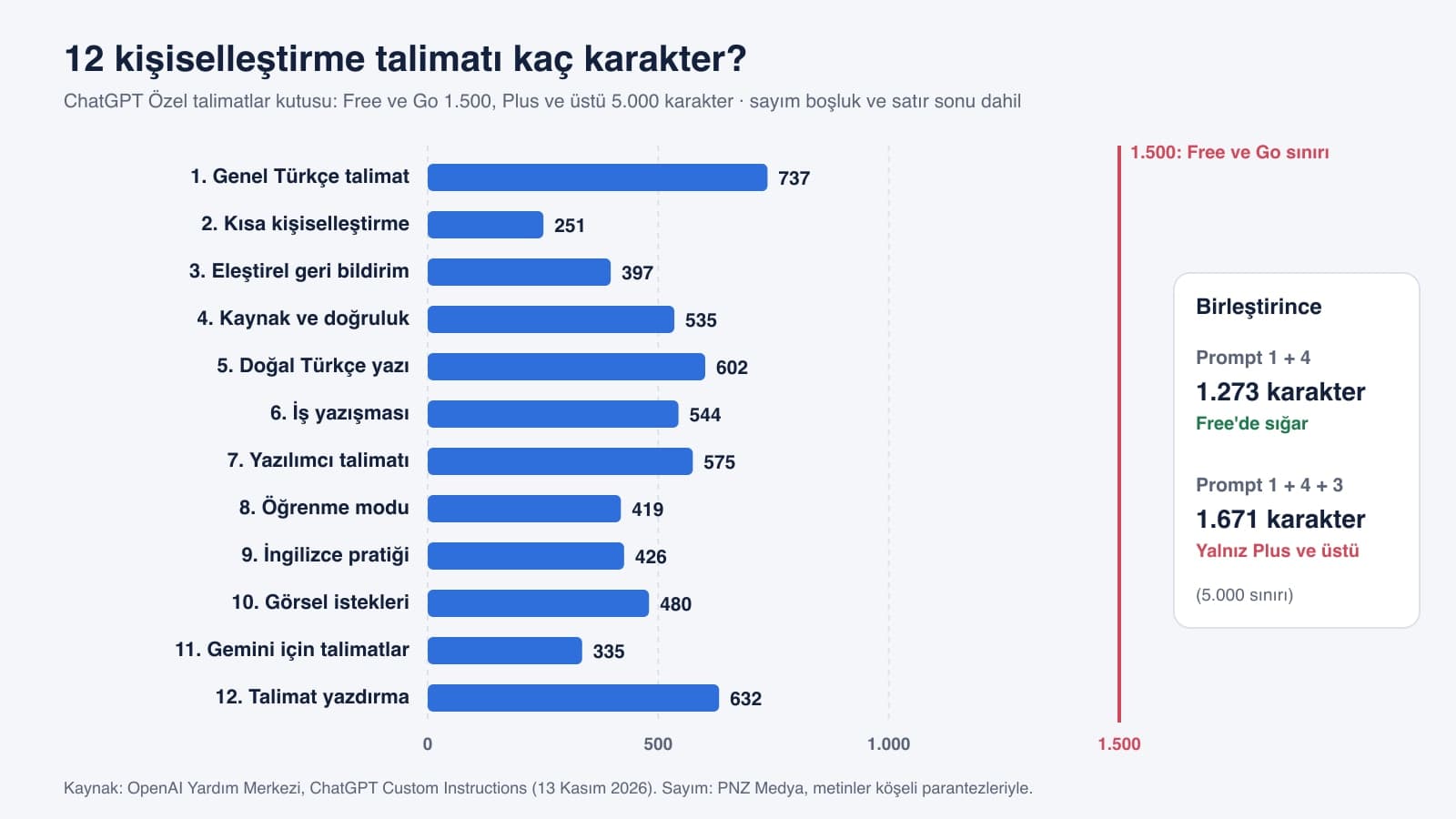
| Prompt | Instruction | Characters | Fits the free plan (1,500) |
|---|---|---|---|
| 1 | General instructions | 737 | Fits |
| 2 | Short personalization | 251 | Fits |
| 3 | Critical feedback | 397 | Fits |
| 4 | Sources and accuracy | 535 | Fits |
| 5 | Natural English writing | 602 | Fits |
| 6 | Work writing | 544 | Fits |
| 7 | Developer instructions | 575 | Fits |
| 8 | Learning mode | 419 | Fits |
| 9 | Language practice | 426 | Fits |
| 10 | Image requests | 480 | Fits |
| 11 | Instructions for Gemini | 335 | Line by line in Gemini |
| 12 | Instruction builder | 632 | Pasted into a chat |
The count includes spaces and line breaks, because the box counts them too. These numbers are for the original Turkish texts; the English versions above run a little longer, but any two of them together still fit in 1,500. If you need to shorten an instruction, delete the explanation sentences first and keep the rules: "Answer short questions in 3-5 sentences" is clear without a reason. When you combine instructions, leave a blank line between them; that line also counts as a character.
Free and Go users can save up to 1,500 characters in custom instructions. Plus, Pro, Enterprise, Business, and Education users can save up to 5,000 characters.
Gemini Personalization: Where Do Instructions Go?
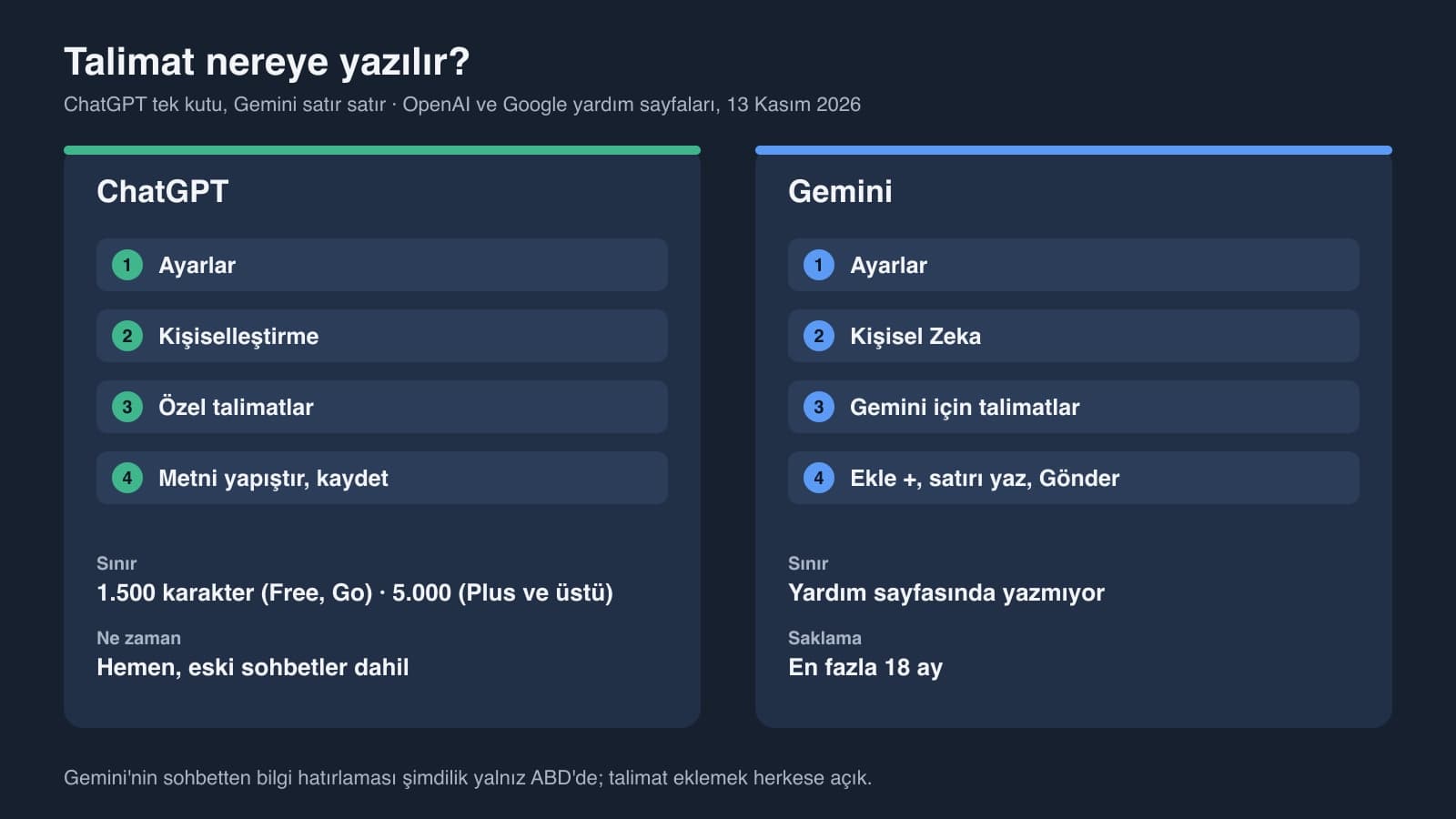
| ChatGPT | Gemini | |
|---|---|---|
| Where | Settings > Personalization > Custom Instructions | Settings > Personal Intelligence > Instructions for Gemini |
| Layout | One box, one text | Each instruction on its own line (Add +) |
| Limit | 1,500 characters (Free, Go), 5,000 (Plus and up) | No limit stated on the help page |
| Who can use it | All plans, on web, desktop, iOS and Android | Anyone can add instructions; a personal Google account is required |
| When it applies | Right away, past chats included | Remembered in new chats too |
| Storage | Until you delete it; within 30 days if the account is deleted | Up to 18 months, then you add it again |
Gemini also has a memory feature: if you say "remember that I'm vegetarian" in a chat, it saves that. According to Google's page, this feature is only available for now in the US, to users 18 and older who have a Google AI plan. Adding instructions is open to everyone, so you can add instruction 11 from outside the US as well.
Google adds a warning on the same page: instructions asking Gemini to forget a topic or stay away from one don't always fully work, and if you never want a topic brought up, you need to delete those chats from Gemini Apps Activity. That is why we wrote all six lines of instruction 11 as sentences that say what to do.
ChatGPT Personality or Custom Instructions?
ChatGPT's Personalization page also offers preset personalities. OpenAI's help page lists seven: Default, Cynical, Efficient, Friendly, Professional, Quirky and Candid. The Nerdy option was removed on March 17, 2026, and people who had picked it were moved to Default.
Since December 19, 2025, the same page has had four more settings: warmth, enthusiasm, headers and lists, and the number of emoji, each of which you can turn up or down. The personality and these settings change the tone. Rules that decide what goes into the answer (cite sources, give the answer first, write code in this stack) can only come from custom instructions. The two work together: you can use the Efficient personality and Prompt 4 at the same time, for example.
Common Mistakes
- Filling the instructions with personal details. ID numbers, addresses, salary or health information have no place there; ChatGPT carries that information into every chat.
- Writing rules that contradict each other. If "keep answers short" and "explain every topic in detail" sit in the same instruction, the model picks one of them, and there's no telling which.
- Putting a one-off request in the instructions. A rule for one project, written into your general instructions, also gets applied in unrelated chats; that rule belongs in the project's own instructions.
- Leaving out the escape lines. The "just explain" line in the learning instruction and the "When I ask in English, answer in English" line in the language practice instruction keep each one from spilling into every chat.
- Writing the instructions once and forgetting about them. When your job or the tools you use change, update the first line.
Privacy: What Not to Put in Your Instructions
OpenAI says it also uses custom instruction data to improve model performance; you can turn off the use of your content for this in settings. Your instructions are not shown to people who open a chat link you share, and they are included in the ChatGPT data export. When you change your instructions, the earlier version stays in the history of old chats; to remove it completely, you have to delete those chats as well.
Under KVKK (Turkey's data protection law), the rule is simple: don't put other people's information (a client's name, an employee's phone number) in your instructions. To see what memory keeps about you, ask in a normal chat: "What do you remember about me? List it point by point." OpenAI's memory page also suggests asking ChatGPT what it remembers. You can correct a wrong item in the same chat or delete it under Settings > Personalization > Memory.
On web and desktop, in Settings > Personalization > Custom Instructions; on mobile, in Settings > Customize ChatGPT. The Enable customization toggle has to be on. Saved instructions apply right away to all your chats, past ones included.
Up to 1,500 on the Free and Go plans, and up to 5,000 on Plus, Pro, Business, Enterprise and Education. Spaces and line breaks count. The 5,000-character limit arrived on July 15, 2026.
Yes. According to OpenAI, custom instructions are available on all plans, on web, desktop, iOS and Android. The limit on a free account is 1,500 characters, and all 12 instructions in this article fit within it.
On gemini.google.com, open Settings > Personal Intelligence > Instructions for Gemini, enter each instruction as a separate line with Add +, and press Submit. Instructions are kept for up to 18 months. Gemini's feature that remembers details from your chats is only available in the US for now; adding instructions is open to everyone.
You write custom instructions yourself, and they apply to every answer. Memory is information ChatGPT picks up from your chats on its own or that you ask it to remember; the model decides which of it to use. Both live under Settings > Personalization.
Check that the Enable customization toggle is on and that you're not in a temporary chat; temporary chats don't use your instructions by default. Then move the ignored rule to the top of the instructions, cut it down to one sentence and look for rules that contradict it.
After you save your instructions, ask the same question in two places: a normal chat and a non-personalized temporary chat. The temporary chat doesn't use your instructions, so the gap between the two answers shows what your instructions changed. If there's no gap, the instructions are too general. Put a single rule you can measure with a number on the first line, such as "keep the answer to 5 sentences or fewer", and try again.
AI Integration and Chatbot Development Service
Writing instructions for your own ChatGPT takes a few minutes. For an assistant that answers your customers, we set up its instructions, its knowledge sources and its connection to your website or WhatsApp line around your business, then test it.