


How to Use Gemini Storybook: 12 Prompts for Illustrated Kids' Books (2026)
12 ready-to-use prompts for making a 10-12 page illustrated storybook with Gemini Storybook: bedtime story, your child's drawing, a pet, starting preschool, learning Spanish and a coloring book. How to open it from the Gems list, when to type "Create a storybook about", and how to download it as a PDF, all checked against Google's help page.
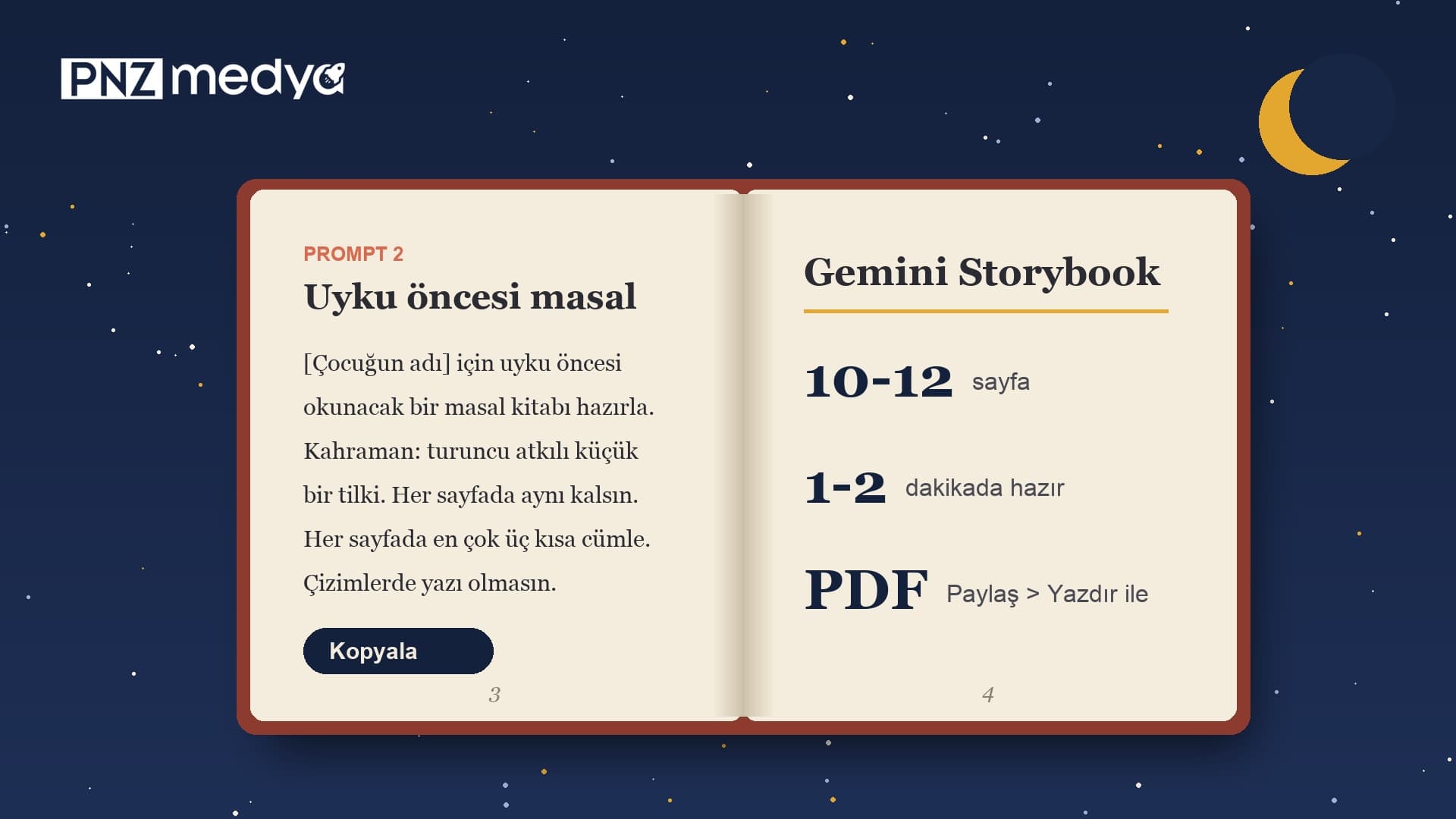
- Gemini Storybook turns a single request into a 10-12 page illustrated storybook that can be read aloud; it takes 1-2 minutes to make (Google help page).
- The easiest way in is to open Storybook from the Gems list on the left. If you start from a regular chat, begin with "Create a storybook about ..." (Google requires the word "storybook" in English on that route).
- Storybook works in every language Gemini supports. Google says narration works only in some languages and doesn't publish the list; if there is no Listen button, narration isn't available in your language.
- To download the book, open the print dialog from Share > Print and choose "Save as PDF". Google has no button for exporting it as a video.
- The feature is open to users 18 and older. Read the privacy section before uploading your child's photo; in our earlier tests, a face turned into an illustration looked very little like the person in the photo.
- The 12 prompts below are ready for a bedtime story, your child's drawing, a pet, starting preschool, a new sibling, learning a language and a coloring book; you only fill in the square brackets.
The quickest way to open Gemini Storybook is to click Storybook in the Gems list on the left side of Gemini. If you start from a new chat, begin your message with "Create a storybook about", because Google's help page requires the word "storybook" in English on that route. Within 1-2 minutes of sending your request you get a 10-12 page book with a separate illustration on every page; it opens in the panel on the right, reads aloud with the Listen button, and can be printed or shared with a link.
Your first message decides how good the book turns out. The 12 prompts below come with a description that keeps the hero the same on every page, sentence length matched to the reader's age, an illustration style and a "no text in the illustrations" line. First we cover setup and the limits Google sets, then the prompts, and at the end, downloading as a PDF and what to watch for when you upload a child's photo.
Storybook exists only in the Gemini app, and the Gemini API we test with doesn't have it; we didn't run a new test for this post. Limits and menu names come from Google's Storybook help page (Turkish and English versions), the product page and the August 5, 2025 launch post. The way the prompts are built rests on lessons from our tests with Gemini's image models in October and November 2026: describe the character by colors and objects, and ask for no text in the illustrations. The face similarity numbers come from 614 older test images we re-measured on November 17; we did not measure Storybook itself.
What Is Gemini Storybook and What Does It Make?
Storybook is a ready-made Gem inside the Gemini app. You type a topic or upload a photo, drawing or PDF; Gemini writes the text, creates an illustration for each page and opens the book page by page in the panel on the right. According to Google's launch post, it works in more than 45 languages and in styles such as pixel art, comics, claymation, a knitted look and coloring book. Google says it is open to all Gemini users who are 18 or older; the help page lists no subscription requirement.
| Topic | What Google says | Source |
|---|---|---|
| Age | Users under 18 can't use it for now | Help page 16434396 |
| Page count | Usually 10-12 pages (10 pages on the product page) | Help page, product page |
| Time to make | 1-2 minutes | Help page |
| Editing the text | You can't edit the text on a page by hand; you ask in the chat and Gemini makes a new version, redrawing every image | Product page FAQ |
| Going back to an older version | Previous Version and Next Version buttons at the top | Help page (English) |
| Language | Every language Gemini supports; narration only in some | Product page FAQ, launch post |
| Sharing | Public g.co/gemini/share link; Workspace work and school accounts can't share | Help page, Workspace announcement (August 2025) |
| Download and print | Share > Print; Save as PDF in the print dialog | Help page |
Here is where language stands: Storybook can write the story in any language Gemini supports, but Google doesn't say which languages narration covers. If a Listen button appears at the top when the book opens, narration works in your language; the icon next to the button lets you change the voice. If there is no button, there's no way to listen to the book, and you'll read it aloud yourself.
How to Use Gemini Storybook in 5 Steps
- Sign in with your personal Google account at gemini.google.com or in the Gemini app. A school or work account can make a book but can't share it.
- Click Storybook in the Gems section on the left. If it isn't there, open the full list of Gems and look for it. Direct address: gemini.google.com/gem/storybook.
- Copy the prompt below that fits your situation and fill in the square brackets. If you're using a photo or your child's drawing, attach it to the same message with the plus (Add files) icon.
- Send it and wait 1-2 minutes. The book opens in the panel on the right; turn pages from the bottom right corner and press Listen to hear it read aloud.
- Type what you don't like in the box on the left (Prompt 12). Gemini makes a new version; the old one comes back with the Previous Version button. When you're done, copy the link from the Share menu or get a PDF with Print.
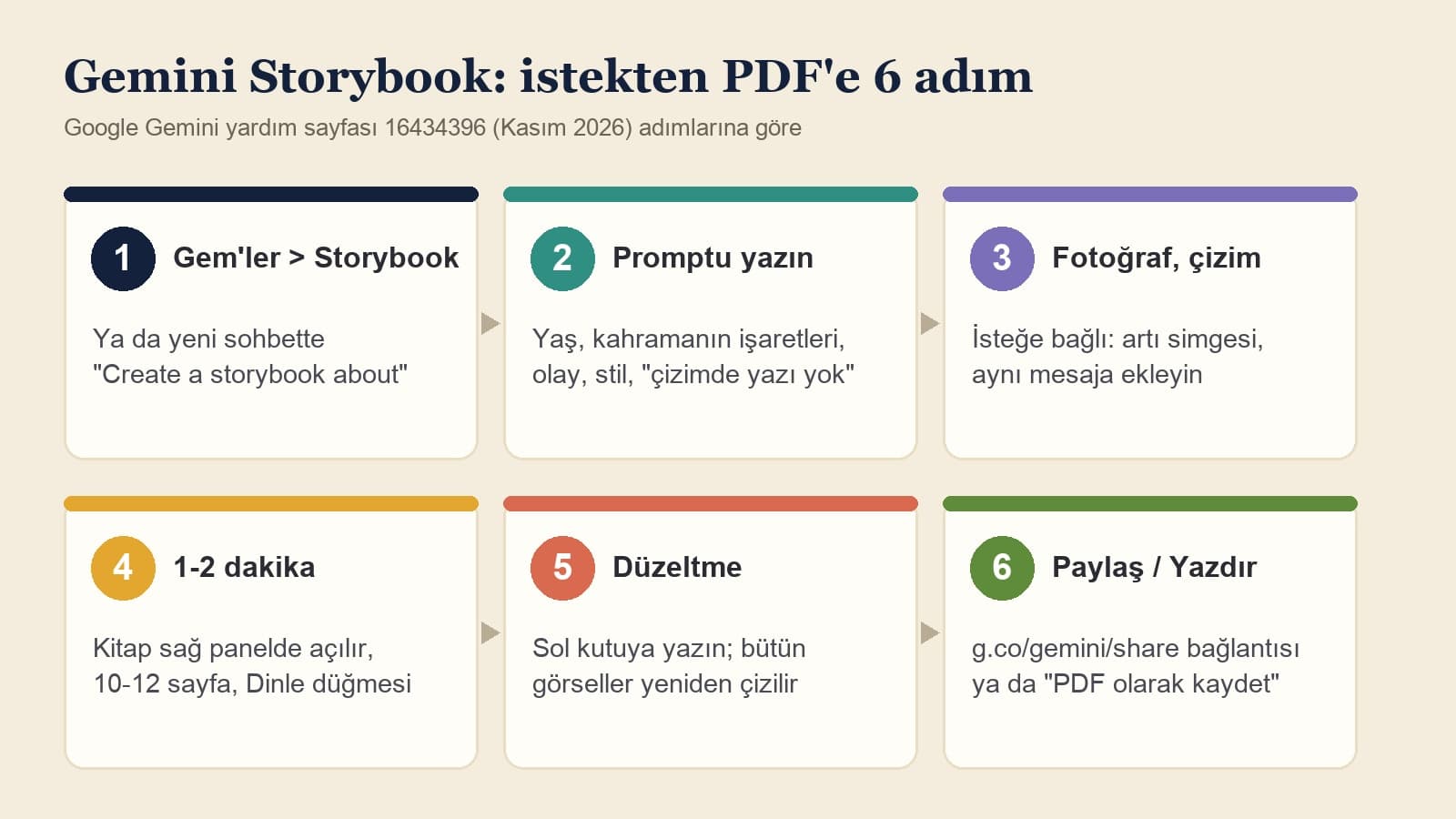
To start a storybook through a text prompt, “storybook” must be entered in English.
If you want a book from a regular chat without opening the Storybook Gem, start your message with "Create a storybook about" and write the rest as usual (Prompt 1). This rule is on Google's English help page; the Turkish version of the same page doesn't show the note. If you start inside the Gem, there is no such requirement.
12 Ready-to-Use Gemini Storybook Prompts (Copy and Paste)
Every prompt except Prompt 1 is meant to be typed inside the Storybook Gem. Replace the square brackets with your own details and delete the brackets. Each prompt describes the hero once and says "the same on every page": in a ten-page book, the character changing from page to page is the most common complaint, and the more concrete the description (colors, objects, clothes), the less it drifts.
1) A book from a new chat in one message
Create a storybook about [hero's name], a [age]-year-old [child / rabbit / robot], and [their adventure: searching for a balloon that flew away in the wind].
Write the story in English, using short sentences a [reader's age]-year-old child can understand.
The hero should look the same on every page: [description: orange scarf, blue overalls, curly black hair].
Make the illustrations [style: watercolor / pastels / bold-line comic].
No text, signs or letters inside the illustrations.Quick start: opens a book from a regular chat without hunting for the Storybook Gem. Keep the opening words exactly as written, since Google requires the word "storybook" here.
2) Bedtime story
Make a bedtime storybook for [child's name]. [Child's name] is [age] years old and loves [favorite thing: dinosaurs / trains].
Hero: [description: a little fox with an orange scarf]. Keep this description the same on every page.
Plot: [short plot: putting a star that fell from the sky back in its place].
No fights, no scary monsters, no lost parents and no sad ending.
Use at most three short sentences per page. On the last page, the hero gets into bed and falls asleep.
Illustrations in soft watercolor, mostly night blue; no text in the illustrations.For a calm book to read in the evening. It rules out scary scenes from the start.
3) A story from your child's drawing
My [son / daughter] [name], age [age], drew this picture. Make the [what: purple dragon and the house next to it] in the picture the hero of the story.
Keep the character's color, shape and the details of the drawing ([details: three legs, green wings]) on every page; do not fix or prettify the drawing.
Keep the illustration style close to the child's picture: crayon, thick lines, white paper.
Write the story in English, in short sentences suited to a [age]-year-old.
On the last page, the hero thanks [name], who drew the picture.Adapted from Google's launch example. Attach the drawing to the same message.
4) Your child as the hero, from a photo
The child in the photo I uploaded is the hero of this book. Their name is [name], and they are [age] years old.
Make them recognizable in the illustrations by these markers, and keep the markers the same on every page: [hair: short, curly, brown], [glasses: round red frames / no glasses], [clothes: yellow raincoat, blue rubber boots].
Leave the photo's background, other people and any text out of the book.
Topic: [adventure: finding the cat that got lost in the garden].
Story in English with short sentences; illustrations in a warm-colored cartoon style, no text in the illustrations.Read the privacy section before uploading a photo. Once a face becomes a drawing, it looks only a little like the child; what makes them recognizable is hair, glasses and clothes.
5) Your pet's adventure
Our [dog / cat] in the photo is called [name]. Looks: [color and markings: white, black left ear, red collar]. These markings stay the same on every page.
Write a storybook about [adventure: making new friends while looking for the ball they lost in the park].
[Name] can talk but should walk on four legs and wear no clothes.
Story in English, 10 pages; illustrations in [style: pastels], no text in the illustrations.For a dog, cat or bird. You decide how human the animal gets.
6) A book about starting preschool
[Name] starts preschool [when: in two weeks] and feels nervous about [worry: being apart from mom]. Make a storybook that walks through a day at preschool.
The hero is [animal: a little elephant]. The day goes in order: saying goodbye, play, lunch, nap, [who: mom / dad] comes to pick them up.
The hero says they feel nervous, and the teacher listens and sits next to them; nobody tells them "don't cry."
On the last page, the hero is curious about the next day.
English, short sentences suited to a [age]-year-old; illustrations in soft colors.To prepare for something new. The story shows the order of the day without brushing off the fear.
7) A new baby is coming
[Name] is [age] years old and will soon have a baby [sister / brother]. Write a storybook about this; make the main character [favorite animal: an elephant].
Don't hide the changes a baby brings: mom is tired, the baby cries often, playtime gets shorter.
Give the older sibling small jobs: singing a lullaby, bringing a diaper, showing the baby pictures.
The hero says they feel jealous, and dad hugs them and plays a game with just them.
English, 10 pages, warm-colored watercolor; no text in the illustrations.Builds on Google's example about an elephant who learns to be kind to a younger sibling.
8) A book that teaches a topic
Make a storybook that explains [topic: how water evaporates and becomes clouds and rain / the solar system] to a [age]-year-old child.
Guide character: [character: a curious water droplet].
Put only one fact on each page. Do not write any number, date or measurement you are not sure of; explain things simply but correctly.
On the last page, add three short questions the adult reading the book can ask the child.
English; illustrations in [style: colored paper cutouts], no text or labels in the illustrations.Based on the launch post's example of explaining the solar system to a 5-year-old. It stops made-up numbers.
9) A family memory book from vacation photos
The [number] photos I uploaded are from our vacation in [place]; I uploaded them in the order they were taken. Turn them into a memory book for our family.
People and their markers: [mom: blue hat], [dad: short beard], [child: 6 years old, two braids]. They should look the same on every page.
Do not add places, people or events that aren't in the photos; base every page on one photo.
Tell it in English with a light, funny tone; on the last page, tell our favorite moment of the trip: [moment].
Illustrations in [style: watercolor / comic], no text in the illustrations.Upload several photos in the same message. It stops Gemini from adding places that weren't there.
10) A book for a child learning Spanish
Make a beginner-level storybook for a [age]-year-old child who is learning Spanish.
Write the story in Spanish; at most two short sentences per page, and only the present tense.
On each page, give one new word with its English meaning in parentheses, for example: manzana (apple).
Topic: [topic: a cat's Sunday].
Objects in the illustrations should be big and easy to pick out one by one; no text in the illustrations.From the language-learning example on Google's product page. The text is in Spanish, and each new word comes with its English meaning.
11) Coloring storybook
Make a coloring storybook about [topic: animals under the sea] that a [age]-year-old child can color in.
Illustrations with thick black outlines, empty and white inside; do not use gray tones, shading or color.
One large figure per page, with few small details.
Story in English, one sentence per page.
We will print the book and color it; no text in the illustrations.The coloring book style listed in the launch post. For printing and coloring.
12) Fix-up message (same chat)
Redo the book and fix the following:
1) The hero looks different on pages [page numbers]. Every page should show these markers: [markers: yellow raincoat, short curly brown hair, red glasses].
2) The illustration on page [page] has made-up text in it; no illustration should contain text.
3) The sentences are long; use at most three short sentences per page.
Keep the order of events and the ending the same; do not change the illustration style.Type it in the box on the left once the book is open. Every fix redraws all the images; a version you liked comes back with Previous Version.
If Gemini wrote a plain text story instead of a book, check whether you are inside the Storybook Gem; if you aren't, start the message again with "Create a storybook about". If the hero changes from page to page, send Prompt 12 and list the markers one by one with colors and object names. If Gemini refuses a request (a real celebrity, violence, a scary scene and so on), take that part out and send it again; retrying redraws the whole book from scratch.
What Makes a Good Storybook Prompt?
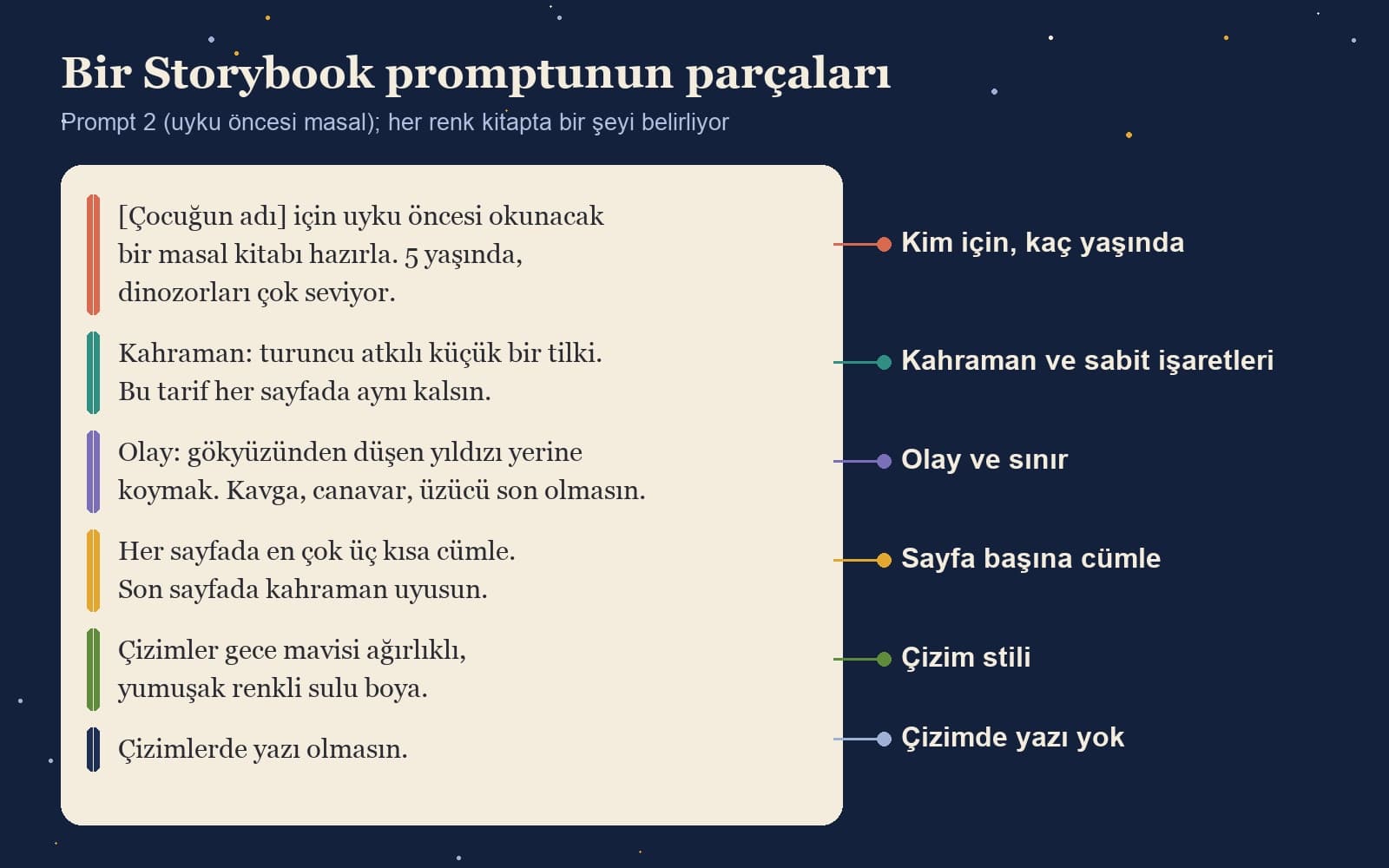
- Who it's for and how old: age sets sentence length and word choice. "Age 5" and "age 9" produce different books.
- The hero and fixed markers: hair, colors, clothes, objects. The words "the same on every page" go at the end of this line.
- Plot and limits: what happens and what doesn't. This is where you rule out scary scenes in a bedtime story or made-up numbers in a learning book.
- Sentences per page: give a number such as "at most three short sentences"; without one, pages can come out crowded.
- Illustration style: watercolor, pastels, crayon, comic, coloring book. The launch post also lists pixel art, clay and a knitted look.
- No text in the illustrations: image models can put signs and labels inside a drawing; in our tests, Turkish letters with cedillas and breves often broke in that text, and accented letters can break the same way.
The last point comes from our earlier tests. Even with no text requested, Gemini's image models wrote a made-up name on the base or box of a 3D figure in 8 of 20 attempts; the version where we spelled out the box text letter for letter in the prompt wrote only the requested text in 9 of 9 attempts. Storybook puts the text in the page's text area; if you want no text inside the illustrations, you have to say so.
Turning Your Child's Photo into a Character: How Close Is the Likeness?
Don't expect a book that turns a photo into the hero to look exactly like your child. On November 17 we re-measured 614 older Gemini test images with a face recognition model (SFace): similarity stays high while the image stays photo-realistic and drops as it turns into a drawing. Median similarity was 0.83 for studio portraits, 0.45 for 3D collectible figures and 0.09 for emoji and cartoon faces; only 4 of 107 emoji images passed the "same person" threshold. We didn't measure Storybook, but in an illustrated book, expect the face to move the same way.
That is why Prompt 4 leans on markers: hair shape and color, glasses, a favorite raincoat. Children recognize themselves by their clothes and their things. If you'd rather not upload a photo, describing the same markers in words is enough; the book is still "their" book, and their face never goes to any server.
How to Download a Gemini Storybook: PDF, Printing and Sharing
To get the book as a file, choose Print from the Share icon at the top. Your browser opens the print dialog; pick "Save as PDF" in place of a printer and the book downloads to your computer as a PDF. If the dialog doesn't open, your browser is blocking pop-ups; allow them for gemini.google.com. For a printed book, send it straight to a printer from the same dialog or take the PDF to a print shop.
To share, copy the g.co/gemini/share link from the Share menu. The link is public: the person you send it to, and anyone they forward it to, can see the book. Workspace work and school accounts can't share books; they can open a book shared from a personal account but can't ask for changes (Google Workspace announcement, August 2025).
Google has no button in Storybook for downloading the book as a video; the help page lists only the link, printing and PDF. The "Storybook video exporter" type browser extensions and the sites called geministorybook that show up in search are not Google's. Before installing an extension, check who made it and which sites it wants access to.
Common Mistakes in Storybook Prompts
- Giving the hero only a name. "A boy named Sam" gets a different Sam on every page; write down hair, colors and clothes.
- Leaving out the age. Without an age, the sentences aren't matched to the child who will hear the book.
- Asking for fixes in a new chat. Fixes go in the left box of the chat where the book is open; a new chat makes a different book from scratch.
- Not locking everything else while fixing one thing. Every fix redraws all the images; unless you say "keep the order of events, the ending and the illustration style the same," pages you liked can change too.
- Not checking the facts in a learning book. Gemini can make up numbers and dates; read through the facts once before you read the book to your child.
- Uploading a crowded family photo with no description. If you don't say who is who, Gemini can mix people up; describe each person by a marker, as in Prompt 9.
Child Photos, Privacy and the 18+ Age Limit
Only users 18 and older can open Storybook; an adult makes the book for the child. Before you upload your child's photo, know two points from Gemini's privacy page: if Gemini Apps Activity is on, chats and uploaded files are stored in your account, and some chats can be read by Google's human reviewers. For that reason, Google advises against entering anything in a chat that you wouldn't want a reviewer to see, and a child's photo falls into that category.
Our advice is simple: in place of a photo that shows the face, use a picture your child drew (Prompt 3) or markers written out in words (the hair and clothes line in Prompt 4). If you do upload a photo, skip any shot that shows a school logo, a name tag, a house number or a license plate, and send the share link only to family. Don't upload another child's photo without their parents' permission.
A ready-made Gem in the Gemini app. When you type a topic or upload a photo or drawing, it makes a 10-12 page storybook with an illustration on every page that can be read aloud. The book opens in the panel on the right; you can print it, save it as a PDF or share it with a link.
On gemini.google.com, open Storybook from the Gems list on the left, type what kind of book you want and send it. The book opens 1-2 minutes later. If you start from a regular chat, begin your message with "Create a storybook about".
Google says Storybook works in every language Gemini supports. Narration is available only in some languages, and Google doesn't publish the list. If you see a Listen button at the top of the book, narration works in your language too.
Choose Print from the Share icon at the top of the book, then pick "Save as PDF" as the destination in the print dialog. The book downloads as a PDF. Google has no option to download it as a video.
Google says Storybook is open to all Gemini users aged 18 and over; the help page lists no subscription requirement. All you need is to sign in to Gemini with a personal account.
You can't edit the text on a page by hand. In the chat where the book is open, type what should change in the box on the left (Prompt 12). Gemini makes a new version and redraws every image; you can go back to the old version with the Previous Version button.
You don't have to. In an illustrated style, the face looks only a little like the photo anyway; describing your child's hair, glasses and clothes in words, or uploading a picture they drew, gives a similar result and keeps their face off the server. If you do upload a photo, make sure no name, school logo or address is visible.
Read the book through once yourself before you read it to your child: check that the hero stays the same from page to page, that the illustrations have no made-up text and that the facts in a learning book are correct. Save the version you like as a PDF right away; every later fix redraws all the illustrations. If you want to design the cover separately, our book cover prompts are ready too.
A Story Tool Built on Your Own Characters
For your preschool, publishing house or education brand, we build an AI tool that knows your characters and writing rules and creates illustrated stories. Let's talk about what you want to make in a free initial call.