


Talking Cockroach AI Video: 12 Gemini Prompts (2026)
12 ready-to-use prompts for the talking cockroach trend: a cockroach watching a soccer match, one running late for work, one caught at the fridge, and a street interview. Using Google's help pages, we cover Gemini vs. Flow, how many videos 50 free credits get you and how much dialogue fits in 8 seconds.
- A cockroach video is a short skit with sound starring cockroaches that act like people; in June 2026 the trend moved from X, Instagram and TikTok into the news, and searches for "cockroach video" in Turkey reached 6,600 a month in October (Google Keyword Planner).
- Video in the Gemini app requires a Google AI plan and an age of 18 or older; videos run 3-10 seconds, 15 seconds on AI Ultra (Google help page).
- The free route is Google Flow: 50 credits every day. With Omni 1.2 Flash, 720p costs 3 credits per second, so an 8-second video costs 24 credits; the same video at 360p costs 8.
- There are 12 prompts: a cockroach watching a soccer match, a cockroach running late for work, a midnight fridge raid, a street interview, a scene built from a photo of your own kitchen, and a message that fixes a broken video.
- In an 8-second video, the line should take no more than 5 seconds when read out loud; leave the first two seconds for the scene and the last second and a half for the reaction.
- TikTok requires a label on realistic-looking AI video; unlabeled videos can be removed or have their reach restricted.
Sign in to Flow with a free Google account and you get 50 credits a day, and an 8-second, 720p cockroach video uses 24 of them. That means two tries for today. So finish the prompt before you generate: the cockroach's color and outfit, a single location, one line in quotes, and what happens in which second.
Below are 12 cockroach video prompts that already carry these four parts. First choose where you'll make the video (the Gemini app or Flow), then copy a prompt and fill in the square brackets. Halfway through the post we've charted how many videos the free credits cover and how much dialogue fits in 8 seconds.
We did not test video generation for this article. The length, plan, age limit and credit figures come from Google's Gemini and Flow help pages, which we read on November 18, 2026. The prompts follow rules that held up in our image tests: pin the character down with a color and an object, never ask for on-screen text, and list fixes one by one in the same chat.
What Is the Talking Cockroach Video Trend and Where Did It Start?
A cockroach video is an 8 to 15 second AI-generated skit of cockroaches standing on two legs and talking like people. According to a June 26, 2026 report in the Turkish newspaper Kocatepe, the videos use "humanoid cockroach" characters to joke about soccer fandom, social media addiction, sleeplessness and the rush to get to work, and they spread on X, Instagram and TikTok.
According to the same report, creators add calls like "Write a prompt, find out how we made it" to their videos. In Keyword Planner, the Turkish search for "bug video" got 1,300 searches in Turkey in August and 3,600 in October; the Turkish term for "cockroach video" went from 1,300 to 6,600 over the same months. There's also a silent kind: the cinematic footage of thousands of insects streaming across a forest floor that appeared in news stories in July. Both kinds are on the list.
Where to Make a Cockroach Video: Gemini App or Flow?
Short answer: if you have a Google AI subscription, the Gemini app is the easiest; if you don't, use Google Flow. Gemini's help page requires a Google AI plan for video on personal accounts, while Flow gives you 50 credits a day even without a subscription. Both use the Gemini Omni model, which Google presents as the replacement for Veo in the Gemini app.
| Topic | Gemini app | Google Flow |
|---|---|---|
| Who can use it | Personal account with a Google AI plan or an eligible Workspace license; not available to anyone under 18 | Anyone with a Google account; accounts without a subscription get 50 credits a day |
| Length | 3-10 seconds; up to 15 seconds on AI Ultra | 3-10 seconds without a subscription; 3-15 seconds on Plus, Pro and Ultra |
| Cost | Included in the subscription; the help page gives no limit on the number of videos | Omni 1.2 Flash: 1 credit per second at 360p, 3 credits per second at 720p |
| Aspect ratio | Text prompts default to landscape; change it before generating | Two ratios, chosen in settings |
| References | 1 video and up to 5 images | Image references (Ingredients) available; frames to video on the web only |
| Time limits | None listed on the help page | Accounts without a subscription may be unable to generate video between 14:00-17:00 UTC (17:00-20:00 in Turkey) |
Sources: Gemini Apps Help Center "Generate videos with Gemini Apps" and the Google Flow Help pages "Manage your Google Flow credits" and "Learn about Google Flow models", November 18, 2026. The Veo 3.1 Fast, Veo 3.1 Quality and Omni Flash 1.1 models in Flow shut down on December 5, 2026; if you're starting a new project, pick Omni Flash 1.2.
How to Make a Cockroach Video in 6 Steps
- Pick the tool: with a subscription, go to gemini.google.com and choose Create video in the left menu; without one, open Flow at labs.google.
- Set the aspect ratio to vertical. Gemini makes text-to-video in landscape, so choose 9:16 before you generate anything for TikTok or Reels.
- If your idea isn't clear yet, have Gemini write the scene with Prompt 1 below; if it is, copy one of Prompts 2 through 11.
- Fill in the square brackets. Read the line out loud; if it runs past 5 seconds, shorten it.
- Generate and watch with the sound on. If the line got cut off or text appeared on screen, fix it in the same chat with Prompt 12.
- Download: in Gemini, tap the Share icon under the video and choose Download video. Turn on the platform's AI label when you post.
In 8 seconds a cockroach does one thing, says one sentence and reacts once. A prompt that asks for a chase, a line and a laugh all at once usually cuts the line off halfway. Make the second event its own video and join the two end to end.
12 Ready-to-Use Cockroach Video Prompts (Copy and Paste)
Every prompt follows the same order: format and length, character description, setting, second-by-second action, the line in quotes, sound, and at the very end "no on-screen text". Fill in the square brackets and paste the rest unchanged. If you carry the character description over word for word from one video to the next, the same cockroach appears throughout the series.
1) Have Gemini write a cockroach video prompt for you
You are a short video scriptwriter. Write me a single scene prompt for an 8-second, vertical AI video with sound.
Idea: [your idea: a cockroach running late for work is trying to catch the bus]
Rules:
- Describe the character by color, clothing and one prop; refer to it by the same name in every sentence.
- One location, one event, at most two characters.
- The line is in English, in quotes, at most 12 words; say who speaks it.
- Give the seconds: 0-2 opening, 2-6 the line, 6-8 reaction.
- Do not ask for on-screen text, subtitles or logos.
Give me the prompt in two versions: first a full version with the line in quotes, then a shorter version.Why ask for two versions: you can try the full and the short version separately and see which one gives you a better result.
2) Cockroach watching a soccer match prompt
Create a vertical (9:16), 8-second, realistic video with sound.
Character: a human-sized cockroach standing on two legs; shiny dark brown shell, two long antennae, a [color: red and white] striped soccer jersey.
Setting: evening, a small living room, an old brown armchair, tea in a small tulip-shaped glass on the coffee table. The TV screen is not visible in the frame.
Action: seconds 0-2, the cockroach sits in the armchair, waiting tensely. At second 2 a goal is heard, it leaps up, antennae trembling. Seconds 3-6, it turns to the camera and shouts. Seconds 6-8, it drops back into the armchair, laughing.
Line (in English, excited male voice): "[line: I told you, this is our year!]"
Sound: stadium roar in the background, a short laugh after the line.
No on-screen text, score, subtitles or logos.Don't ask for a team name, crest or sponsor on the jersey; the model will make up a logo or imitate a real brand. The color is enough.
3) Cockroach running late for work prompt
Create a vertical (9:16), 8-second, realistic video with sound.
Character: a cockroach standing on two legs like a human; dark brown shell, long antennae, a white shirt and a loosely knotted navy tie.
Setting: morning, a messy bedroom, pale light coming through the curtain, an old-style alarm clock ringing on the nightstand.
Action: seconds 0-2, the cockroach pokes its antennae out from under the comforter. Seconds 2-5, it looks at the clock and jumps out of bed, one arm in its shirt. Seconds 5-8, it runs for the door and turns to the camera.
Line (in English, panicked male voice): "[line: Missed the bus again, there goes my taxi money!]"
Sound: the alarm bell, then hurried footsteps.
No on-screen text, clock digits, subtitles or logos.4) Cockroach caught at the fridge at night prompt
Create a vertical (9:16), 8-second, cinematic video with sound.
Character: a human-sized cockroach standing on two legs; dark brown shell, plaid pajamas, slippers on its feet.
Setting: night, a dark kitchen; the only light comes from inside the open fridge.
Action: seconds 0-3, the cockroach stands in front of the fridge holding a slice of watermelon, eating quietly. At second 3 the kitchen light turns on and the cockroach freezes. Seconds 4-7, it slowly turns to the camera and whispers. Seconds 7-8, its antennae droop.
Line (in English, whispering, guilty male voice): "[line: I only got up for a glass of water.]"
Sound: the hum of the fridge motor, the click of the light switch.
No on-screen text, subtitles or logos.5) Cockroach glued to its phone prompt
Create a vertical (9:16), 8-second, realistic video with sound.
Character: a cockroach standing on two legs; light brown shell, a gray hooded sweatshirt, a smartphone held in both hands. The phone screen does not face the camera.
Setting: night, a bedroom; the only light is the blue glow of the phone screen on its face.
Action: seconds 0-3, the cockroach sits on the edge of the bed, looking at the phone and scrolling with its thumb. Seconds 3-6, it talks without looking up. Seconds 6-8, it scrolls again, antennae leaning toward the screen.
Line (in English, tired, monotone voice): "[line: One more video, then I'm going to sleep. For real.]"
Sound: soft notification sounds, a dog barking in the distance.
No text, app names, subtitles or logos on the screen or on the phone.6) Street interview: two cockroaches, one microphone
Create a vertical (9:16), 10-second, documentary-style video with sound.
Character 1 (reporter): a cockroach standing on two legs; dark brown shell, beige trench coat, holding a plain black microphone with no writing on it.
Character 2 (passerby): a shorter, light brown cockroach; knit beanie, holding bread in a mesh bag.
Setting: daytime, a quiet neighborhood street, a corner store window in the background; no readable text on the window or the signs.
Action: seconds 0-3, the reporter holds out the microphone and asks a question. Seconds 3-8, the passerby answers, looking at the camera. Seconds 8-10, the reporter nods.
Reporter's line (in English, formal male voice): "[question: What do you think about the price hikes?]"
Passerby's line (in English, exasperated female voice): "[answer: Even crumbs got expensive, what else can I say?]"
Sound: street noise, an engine in the distance.
No on-screen text, lower thirds, subtitles or logos.Ask for 10 seconds when two characters speak. Google says Omni 1.2 Flash, announced on November 5, 2026, adds multi-speaker support and clearer lip sync; even so, keep the two lines to 15 words combined.
7) Short version: cockroach news anchor
Vertical (9:16), 8-second video with sound: a human-sized cockroach news anchor in a suit, sitting at a desk in a news studio, looks at the camera and says in a serious voice, in English: "[line: Breaking news, the kitchen is being fumigated.]" Behind it, an empty studio with blue lights. No on-screen text, lower thirds or logos.This one-paragraph version is for testing ideas fast. When you like a result, move it into the long template and lock the character in.
8) Cockroach cooking show prompt
Create a vertical (9:16), 8-second video with warm lighting and sound.
Character: a cockroach standing on two legs; dark brown shell, a white chef's apron, a white chef's hat on its head.
Setting: daytime, a small home kitchen, a wooden counter with a bowl of flour and a single egg on it.
Action: seconds 0-2, the cockroach looks at the camera and waves. Seconds 2-6, it talks while cracking the egg into the bowl. Seconds 6-8, it touches the flour and winks.
Line (in English, cheerful female voice): "[line: Today I'll show you how to bake a pie out of crumbs.]"
Sound: soft kitchen sounds, a short cheerful tune.
No on-screen text, recipe title, subtitles or logos.9) Roommate argument prompt
Create a vertical (9:16), 10-second, realistic video with sound.
Character 1: a dark brown cockroach with long antennae standing on two legs, green cardigan.
Character 2: a smaller, light brown cockroach, yellow T-shirt.
Setting: evening, a cramped student apartment living room, a folded mattress against the wall.
Action: seconds 0-4, character 1 crosses its arms and talks. Seconds 4-8, character 2 shrugs and answers. Seconds 8-10, both turn to the camera and go quiet.
Character 1's line (in English, annoyed male voice): "[line: So I'm paying the rent again this month?]"
Character 2's line (in English, indifferent male voice): "[answer: But I'm the one who found the kitchen.]"
Sound: the ticking of a wall clock.
No on-screen text, subtitles or logos.10) Silent cinematic bug video
Create a vertical (9:16), 8-second, cinematic and realistic video.
Visual: macro shot, thousands of small, shiny brown insects moving in a single stream across a mossy forest floor.
Camera: an inch or two above the ground, slowly sliding right with the stream; it rises slightly in the last two seconds.
Light: soft early-morning sun falling through the leaves.
Sound: no dialogue; the rustling of the insects, birdsong in the distance.
No on-screen text, subtitles or logos.With no dialogue there's no lip sync to worry about, which makes this the safest prompt for a free 360p test.
11) Cockroach video from a photo of your own kitchen
Use the kitchen in the photo I uploaded as the setting: keep the cabinets, counter, colors and light as they are in the photo; do not add any objects that are not in the photo.
Create a vertical (9:16), 8-second, realistic video with sound.
Character: a palm-sized cockroach standing on two legs on the counter; dark brown shell, a tiny [color: orange] apron.
Action: seconds 0-2, the cockroach walks along the counter. Seconds 2-6, it turns to the camera and talks. Seconds 6-8, it puts its hands on its hips and waits.
Line (in English, sarcastic female voice): "[line: Does nobody in this house ever do the dishes?]"
No on-screen text, subtitles or logos.Keep people, family photos, addresses and door numbers out of the photo. You can add up to 5 images in the Gemini app; in Flow, frames to video is only available in the web version.
12) Prompt to fix a broken video
Generate the video again with the same scene, and fix only the following:
1. The line was cut off midway; have the whole line spoken: "[the full line]"
2. The cockroach's mouth should move with the line and stop when the line ends.
3. Remove the text and subtitles that appeared on screen.
4. The cockroach should have two arms and two legs, with no extra limbs.
Keep the character, outfit, setting, light and camera angle the same as in the previous video.Write the fix in the chat where the video was made, since a new chat rebuilds the character and setting from scratch. Keep only the problems you actually ran into and delete the rest. Gemini's product page says Omni supports multi-turn editing through chat.
A rejected prompt usually contains a real person's name, a well-known brand or a word that suggests violence; remove it and try again. If the video comes out silent, check that the opening line of the prompt says "with sound" and that the line is in quotes, then generate once more.
How Many Cockroach Videos Do Free Credits Get You per Day?
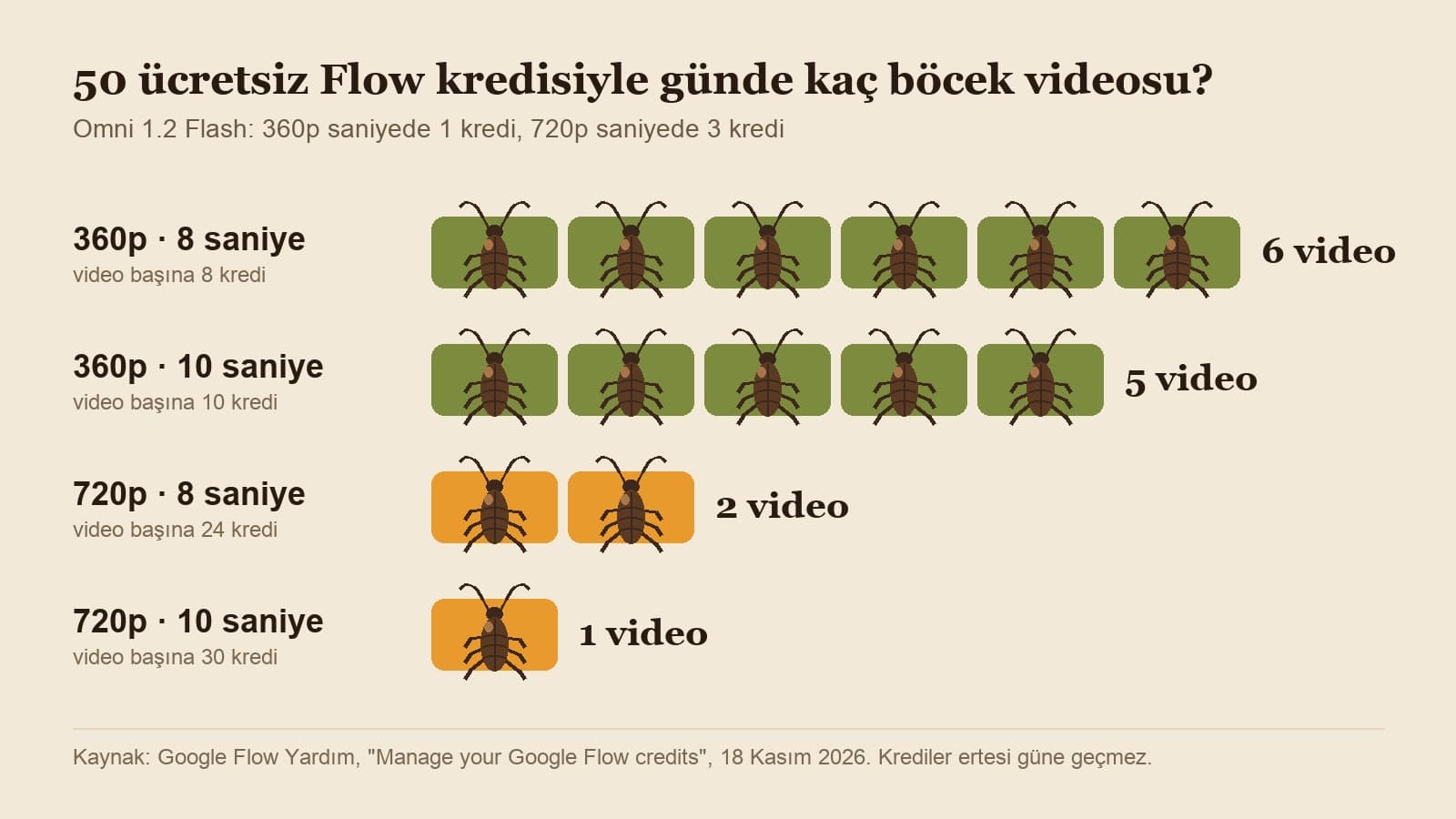
In Flow, every account without a subscription gets 50 credits a day, and unused credits don't carry over to the next day. Omni 1.2 Flash costs 1 credit per second at 360p and 3 credits per second at 720p. So 50 credits give you six 8-second videos at 360p, or five 10-second ones; at 720p an 8-second video costs 24 credits, which means 2 a day, and a 10-second video costs 30 credits, which means 1.
The practical approach: test the idea at 360p, and once the line and the movement work, generate the same prompt once at 720p. A Google AI Plus subscription adds 200 extra credits a month and Pro adds 1,000; Plus's 200 credits come to 8 more 8-second 720p videos a month. For subscribers, upscaling to 720p and 1080p costs no credits for the first 10 seconds.
Non-subscribers may be unable to generate videos during peak hours (around 14:00-17:00 UTC).
How Much Dialogue Fits in 8 Seconds?
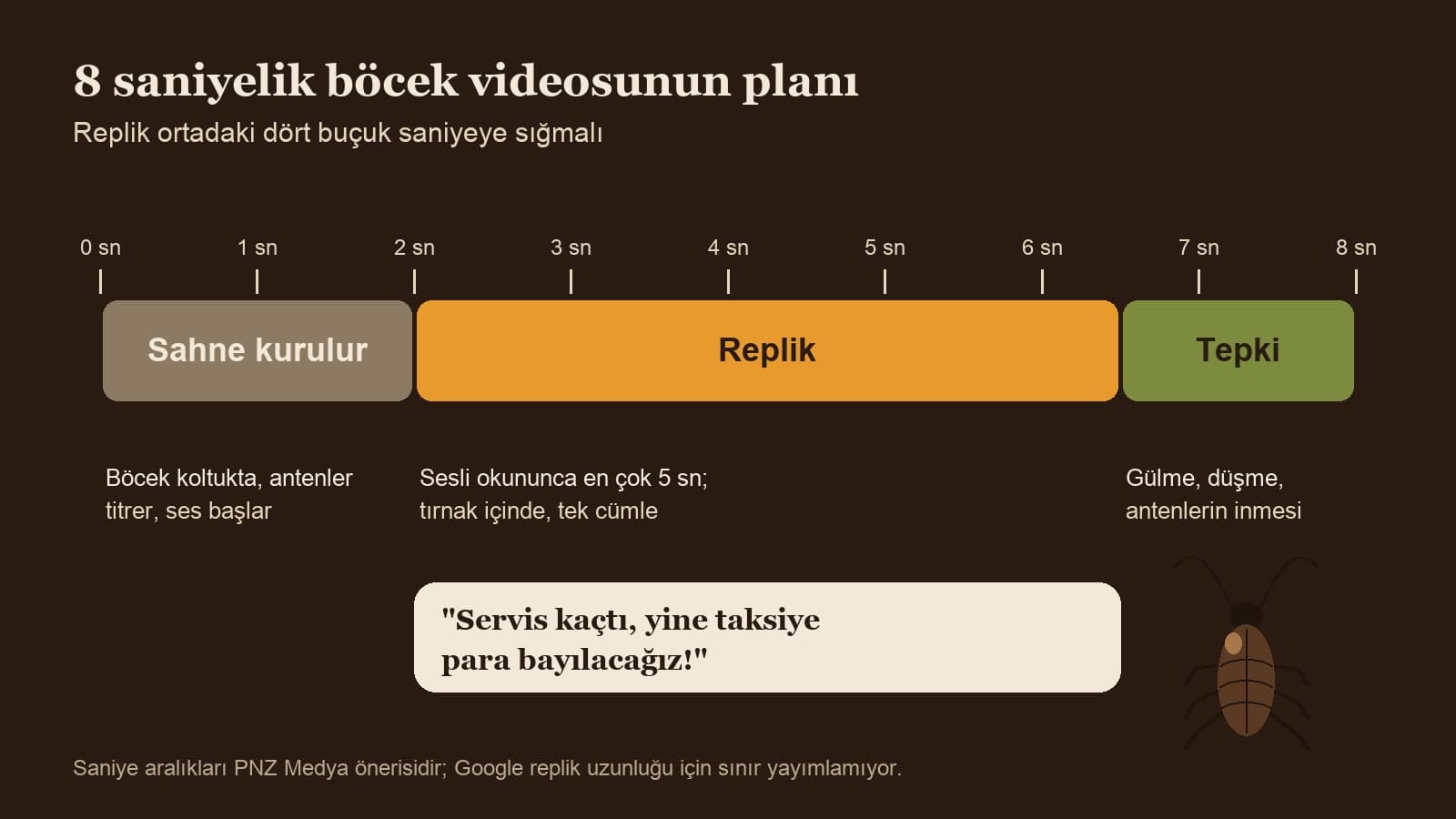
In the first seconds of the video the model sets up the scene and the character, and in the last seconds it plays the reaction; what's left for speech is the four or five seconds in the middle. Once you've written the line, open your phone's stopwatch and read it out loud at a normal pace. If it goes past 5 seconds, shorten it or make the video 10 seconds long.
- One sentence, one punchline: something like "Missed the bus again, there goes my taxi money!"
- Don't write digits or abbreviations: write "three dollars" instead of "$3" so the model doesn't garble the pronunciation.
- Right before the line, write who says it and with what emotion: "annoyed male voice", "whispering".
- If two characters talk, keep it to 15 words in total and ask for a 10-second video.
6 Details That Make a Cockroach Prompt Stronger
- Write the shell color and a single piece of clothing (dark brown shell, plaid pajamas). If you're making a series, copy this line into every video word for word.
- State the size: "human-sized" and "palm-sized" produce very different scenes.
- Say where the light comes from: the inside of the fridge, a phone screen, morning light through the curtain.
- Place the camera: an inch or two above the ground, at shoulder height, static or slowly sliding.
- Give the background sound a single source: stadium roar, wall clock, fridge motor.
- Put the line "No on-screen text, subtitles or logos" at the very end of every prompt; in scenes with signs, jerseys or phone screens, say it again for those too.
In our image tests, scenes that asked for text came out with garbled letters, and the model invented names for unnamed signs. For video too, the cleanest route is to never ask for text at all.
Common Cockroach Video Mistakes
- Expecting free video in the Gemini app: personal accounts need a Google AI plan, and the free route is Flow.
- Generating without choosing an aspect ratio: text-to-video comes out in landscape, and the sides get cropped on Reels.
- Writing the line without quotes: the model changes the sentence or skips it.
- Putting a brand name on a jersey, sign or product: the logo gets made up, and if it resembles a real brand, posting the video can cause trouble.
- Asking for a real celebrity's name or voice: this runs into Google's usage policy and can lead to a rejection or an account penalty.
- Trying to generate on an account without a subscription between 14:00 and 17:00 UTC (17:00-20:00 in Turkey): Flow can stop video generation for non-subscribers during peak hours.
Before You Post: AI Labels and Real People
TikTok's Community Guidelines require a label on AI content that shows realistic-looking scenes or people; unlabeled content can be removed or have its reach restricted, or TikTok may add the label itself. Turning on the AI-generated content setting on the posting screen takes one tap. Google also embeds an invisible SynthID watermark in every video made in Gemini.
Don't turn a real person into a cockroach, and don't mention anyone recognizable by name in the video. Gemini's help page asks you to upload only photos you have the right to use; using a photo of your neighbor or your teacher as a reference crosses that line. If you use your own kitchen, keep addresses, door numbers and family photos out of the frame.
If you have a Google AI subscription, choose Create video at gemini.google.com; if you don't, open Google Flow. Set the aspect ratio to vertical, copy one of the prompts above, fill in the square brackets and generate. If the line gets cut off, fix it in the same chat with Prompt 12.
Creating video in the Gemini app requires a Google AI plan on personal accounts. The free route is Google Flow: every account gets 50 credits a day, and an 8-second video costs 24 credits at 720p and 8 credits at 360p.
3-10 seconds in the Gemini app, and up to 15 seconds for AI Ultra subscribers. In Flow, accounts without a subscription can generate up to 10 seconds, and Plus, Pro and Ultra subscribers up to 15. For a skit with one speaker, 8 seconds is enough; for two speakers, 10.
When you write the line in English and in quotes, the model tries to generate the voice saying that sentence. Google's Gemini and Flow help pages do not list which languages are supported for speech; if you're not happy with the result, shorten the line and generate it once more.
Gemini understands prompts written in English. Some Turkish guides recommend writing the scene description in English; Prompt 1 writes two versions for you, so go with whichever gives the better result.
TikTok requires a label on realistic-looking AI videos. Turn on the AI-generated content setting on the posting screen; unlabeled content can be removed or have its reach restricted.
If the scene has a sign, a jersey, a phone screen or a TV, the model tries to put letters there and garbles them. Add "No on-screen text, subtitles or logos" to the end of the prompt, and don't ask for screens that face the camera.
If you'd like to try photo-to-video or ad-style clips, these two posts have different prompts:
When the trend fades, the template still works: a character pinned down by color and one piece of clothing, one location, one line in quotes, a seconds plan. If you're making a series, save the character line from your first video that works in a note; paste it unchanged into the second and third videos and viewers will recognize the same cockroach.
Short Videos and Reels for Your Brand
We turn trends into short videos in your brand's voice and build the script, production and posting plan for Reels and TikTok with you. Let's look at your account together in a free intro call.