


Virtual Glasses Try-On: 11 Gemini Prompts to Try On Glasses With AI on Your Own Photo
11 ready-made Gemini prompts for a virtual glasses try-on: one frame on your own photo, three frames side by side, glasses from a product photo, sunglasses and color tests. In our 36-attempt test, thick frames changed the face the most; we also show how to compare sizes using the three numbers on the temple arm.
- You don't need an app to try on glasses virtually: upload a photo that shows your face from the front to Gemini and describe the frame by shape, thickness, material and color.
- In our November 6 test, we ran 36 glasses try-ons on four people. In 24 of 24 single-frame images, the frame came out as described; in 12 of 12 images showing three frames side by side, the order was right.
- The face never turned into someone else's, but thick frames changed it the most: thick black acetate got the lowest identity similarity in 10 of the 12 three-panel images.
- To try on a pair you saw in a shop window or online, give the product photo as a second image. In our clothing test, the button count and collar shape from the product photo came out the same in 10 of 10 attempts.
- An image doesn't know sizes. Check whether a frame fits you by comparing the three numbers on the inside of the temple arm (e.g. 52□18-140); prescription and eye distance are the optician's job.
The quickest way to try on glasses virtually: upload a photo that shows your face clearly from the front to Gemini and describe the frame, for example "thin black metal, rectangular". You don't need to download an app or settle for one store's catalog; you can photograph a frame you saw in a shop window and see that one on your own face too. A free Google account is enough.
Two of the 11 prompts below are the exact prompts we ran 36 times on four people on November 6 (the test used the original Turkish prompts; they are translated here). The others cover trying on from a product photo, swapping the glasses you already wear, sunglasses, colors of the same frame, rimless models, suggestions based on face shape and a profile photo with glasses. At the end there is a text prompt that compares the measurements on the inside of the temple arm, and a message that fixes a face that came out changed.
We didn't run a new test for this post; on November 16 our test budget wasn't enough for a new round. The numbers come from 36 glasses try-ons we ran on November 6 for our face shape post, using Nano Banana 2 Lite, Nano Banana 2 and Nano Banana Pro through the Gemini API. The people were generated with AI and are not anyone real. Prompts 1 and 2 are the prompts from that test, run in Turkish and translated here; we only added the square brackets later. We built the other nine prompts from the findings of our clothing, hug and men's portrait tests between October 22 and November 11, but we did not measure them separately in this form.
How to Do a Virtual Glasses Try-On in 4 Steps
- Pick the photo: face straight on, calm expression, mouth closed, hair not covering the forehead and eyebrows. If you wear glasses, either take them off for the photo or use Prompt 4.
- Open Gemini (gemini.google.com or the app) and attach the photo to your message. To edit photos, your Google account has to show that you are 18 or older.
- Paste the prompt and fill in the square brackets. Describe the frame with four details: shape (round, rectangular, oval, aviator), thickness, material (metal, acetate) and color.
- Open the result side by side with your input photo. Check whether the eyebrows, moles and eyes are the same; if something changed, send Prompt 11 in the same chat.
In our earlier tests, when the prompt had a sentence removing the background or an object, glasses the prompt didn't mention disappeared from the photo in 3 of 4 attempts. In the November 11 men's portrait, once the glasses were named, they stayed in place in 3 of 3 attempts. Whether you're swapping your glasses or keeping them, describe the current frame once.
What We Saw in the Test: 36 Glasses Try-Ons on 4 People
First we put a different frame on each person: thin black metal rectangular, thin gold metal round, thick dark brown acetate and tortoiseshell oval. Each frame was tried twice on each of three models, 24 images in total; in all 24 the frame came out in the described shape, color and thickness. Then, with Prompt 2, we showed each person with three frames in the same image. In 12 of 12 three-panel images the frames were in the requested order: thin round metal on the left, thick black acetate in the middle, gold aviator on the right.
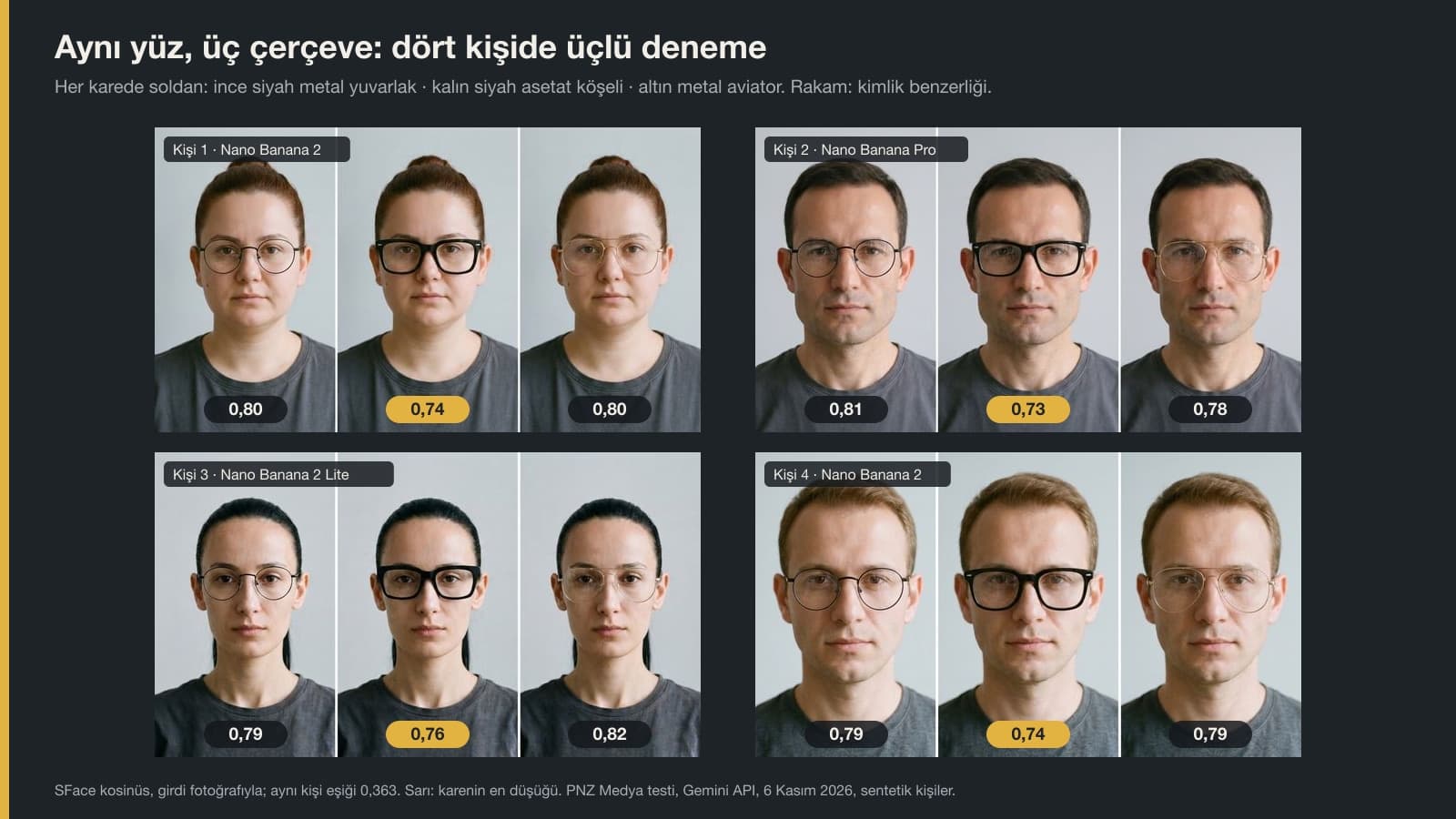
To measure the face we used a face recognition model called SFace: it gives 1 when two photos are identical, and anything above 0.363 means the same person. All 36 images stayed between 0.67 and 0.87. The height-to-width ratio we derived from facial landmarks moved by 3.1% at most, so the glasses didn't make the face longer or wider.
The difference showed up with thick frames. Thick black acetate got the lowest similarity of the three frames in 10 of the 12 three-panel images; its average was 0.74, against 0.80 for thin round metal and the aviator. In the single try-ons, the two lowest scores were also on acetate frames. Since each frame in the single try-ons was tested on a different face, the real comparison is in the three-panel images: there the face is the same and only the frame changes.
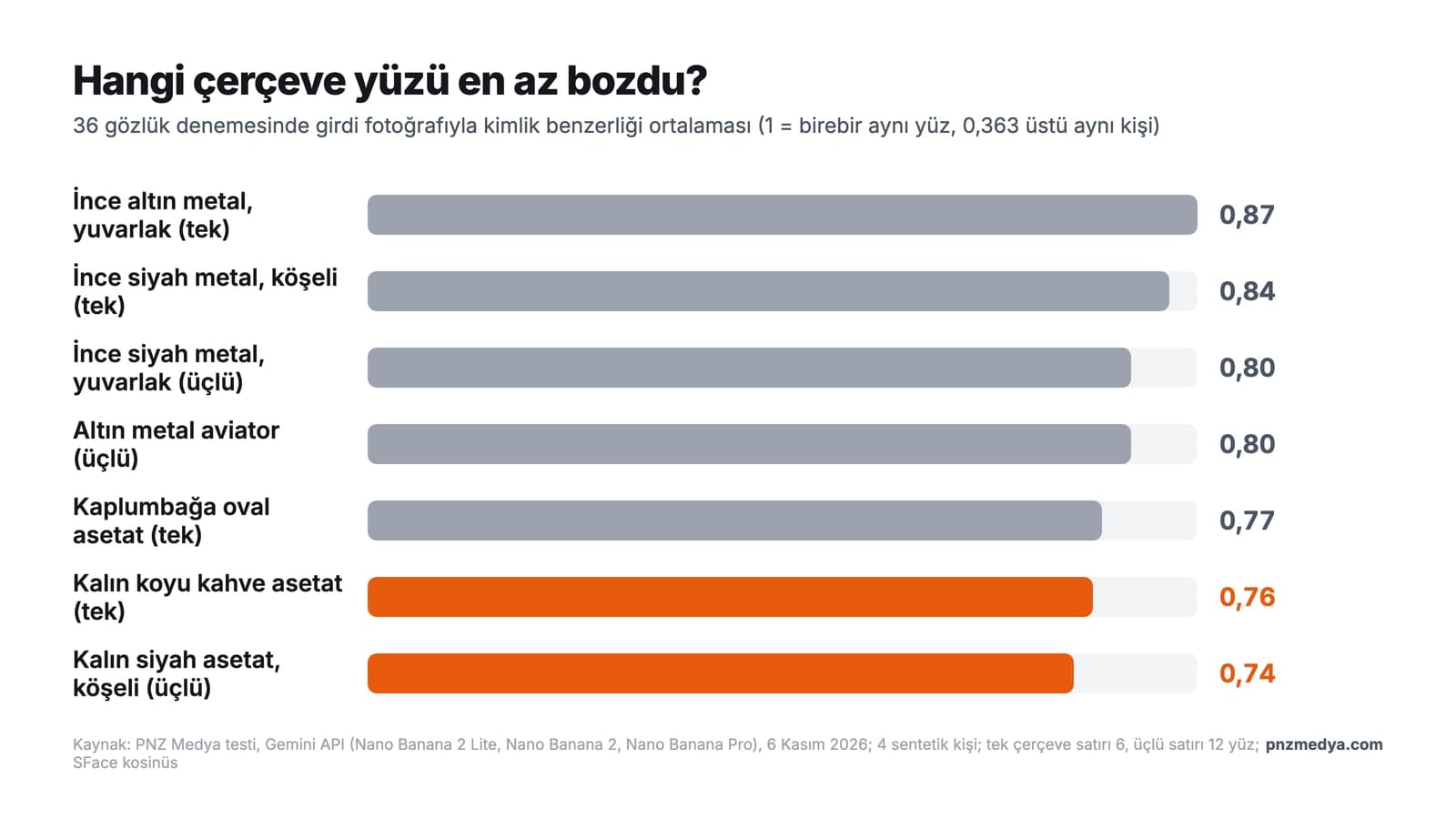
We don't read this as the model distorting the face. A thick frame covers more of the eyebrows, the area around the eyes and the top of the cheekbones; the software recognizes a face largely from that area, which is probably why similarity drops. In practice: open a thick-frame result side by side with your input photo and look at your eyebrows and eyelids. In the thick-frame images we checked, we saw no distortion by eye, but you know your own face better than we do.
11 Virtual Glasses Try-On Prompts (Copy and Paste)
Fill in the square brackets for your own photo and the frame you want, then delete the brackets. Don't shorten the "do not change the face" and "no text" lines; each one is there to block a specific problem.
1) Try one frame on your photo
Put prescription glasses with [thin black metal, rectangular] frames on the person in this photo. Do not change the face, face shape, hair, expression, [T-shirt], lighting or background; add only the glasses to the photo. The glasses sit correctly on the bridge of the nose, the temple arms go to the ears, the lenses are clear with little reflection, and the eyes are sharp behind the lenses. No other people, no text.In the test (run with the original Turkish prompt), the frame came out as described in 24 of 24 attempts. Asking for prescription glasses gets you flat, clear lenses; for sunglasses, switch to Prompt 5.
2) See three frames side by side
First sentence: a single image of the same person in three side-by-side panels, all three panels the same width, with a thin white line between them. Each panel shows the person from this photo, the same face, the same hair, the same expression, the same lighting and background; only the glasses change. Left panel: [thin black metal round frame]. Middle panel: [thick black acetate rectangular frame]. Right panel: [thin gold-tone metal aviator frame]. Clear lenses, eyes visible. Do not change the person's face or face shape. No text, no labels, no other people.This is the most useful prompt for making a decision: three options in the same light, at the same angle. The order came out right in 12 of 12 attempts.
3) Try on glasses from a product photo
I uploaded two images. Image 1 is my photo, image 2 is a product photo of the glasses I want to try. Put the glasses from image 2 on the person in photo 1: the frame's shape, color, thickness, bridge and hinge points match the product photo. No text, logos or brand names on the temple arms, lenses or frame. Do not change the face, face shape, hair, expression, clothing, lighting or background; add only the glasses to the photo. The glasses sit on the nose, the temple arms go to the ears, the lenses are clear, the eyes are sharp. Only this person is in the image; do not carry over the product photo's background or price tag.Saying which image is which in the first sentence prevented mix-ups in our multi-image tests. Keep the product photo simple: a front-on shot on a plain background with no price or logo on it gives the cleanest result. In the hug test, a half-visible piece of text in the input produced a made-up brand in 8 of 9 images; the logo line is there for that.
4) Swap the glasses you're wearing for another frame
The person in the photo is currently wearing glasses with [thin silver metal, oval] frames. Remove these glasses and put on glasses with [thick burgundy acetate, rectangular] frames instead; the new glasses sit in the same place as the old ones, on the bridge of the nose. Leave no trace, shadow or frame fragment of the old glasses. Face, [short salt-and-pepper beard], eyebrows, hair, expression, clothing, lighting and background stay the same. Lenses clear with little reflection, eyes sharp. No text or logos.5) Try on sunglasses
Put sunglasses with [thick black acetate, cat-eye] frames on the person in this photo. Lenses [dark brown, gradient: dark at the top, light at the bottom]; the eyes are [faintly visible] behind the lenses. Face, face shape, hair, expression, clothing, lighting and background stay the same; add only the sunglasses to the photo. Sun reflection on the lenses: [low]. No text on the lenses, no logos on the temple arms, no other people.6) Three colors of the same frame
First sentence: a single image of the same person in three side-by-side panels, all three panels the same width, with a thin white line between them. Each panel shows the person from this photo, the same face, the same hair, the same expression, the same lighting and background. All three panels have the same [round, medium-thickness acetate] frame; only the color changes. Left panel: [translucent honey, #C8A26B]. Middle panel: [dark green, #2F4A3A]. Right panel: [matte black, #1C1C1C]. Clear lenses, eyes visible. Color codes and color names do not appear in the image; no text, labels or other people.We give color codes because of the clothing test: when told "make it red", the models drew different reds, and with the code in the prompt Nano Banana 2 Lite came very close to the target. If you don't know the code for the color in the store, give the product photo with Prompt 3.
7) Rimless and half-rim frames
Put [half-rim: thin black metal top edge, rimless bottom edge] glasses on the person in this photo. The lens edges are thin and clear, and on the rimless side the lens edge catches a little light; the nose pads are small and clear. Face, face shape, hair, expression, clothing, lighting and background stay the same; add only the glasses to the photo. Eyes sharp behind the lenses. No text or logos.8) Three frame suggestions for your face shape
The attached photo is of me. First describe my face, one sentence each: forehead width, width at the cheekbones, jawline and its corners, face length relative to width. Then, based on these observations, suggest 3 eyeglass frames for me. Each suggestion includes shape (round, rectangular, oval, cat-eye, aviator, panto), thickness (thin metal, medium, thick acetate) and color; write in one sentence why it would suit me. Do not write any number you cannot measure from the photo. On the last line, write the three suggestions as frame descriptions only, separated by commas.When the answer comes, type Prompt 2 in the same chat and put the three descriptions from the last line into the square brackets. If you want to be sure of your face shape, use the measurement prompt in our face shape post: given tape-measure measurements, Gemini's Flash and Pro models named the same shape for four out of four people.
9) Profile photo with your new glasses
Create a [LinkedIn] profile photo of the person in this photo. The person wears glasses with [thin black metal, rectangular] frames; the glasses sit on the nose, the lenses are clear with little reflection, the eyes are sharp. The face is exactly as in this photo: face shape, eyebrows, [the mole on the right cheek], hair and expression stay the same, mouth closed, no beautifying. Clothing: [navy collared shirt, no tie, top button open]. Plain [light gray] background, shoulders up, face in the center of the frame. The image is a 1:1 square. Do not add earrings, earphones or a watch that are not in the photo; no text or logos.We spelled out the clothing piece by piece because when a prompt says "suit", the models add a tie on their own; in the November 11 test, with the line "no tie, top button open", no tie appeared.
10) Compare frame sizes (text)
The numbers on the inside of the temple arm of the glasses I wear now, which fit my face well: [52□18-140]. The measurements of the frame I'm thinking of buying: [54□16-145]. These three numbers are, in order, lens width, bridge width and temple length, all in millimeters. Compare the two frames: for each measurement, write the difference in millimeters and say in one sentence how that difference might feel when I wear them (will it look wider on my face, will it sit tighter on my nose, will it be long enough behind my ears). Use only the numbers I gave; do not make up new measurements. Do not comment on prescription lenses, pupillary distance or lens thickness; tell me I need to ask an optician about these.Image prompts can't answer this question: the model draws the frame to fit your face and doesn't know whether it's 52 or 54. When you give it the numbers, the model only calculates and explains the difference; in the face shape test, asking Gemini to "measure centimeters from the photo" made it assume an average face and make up numbers.
11) Fix message if the face changed
The glasses are right but the face has changed: [my eyebrows got thicker, the mole on my left cheek is gone, my eyes got bigger]. Make the same image again. Take the face exactly from the photo I uploaded first: [thin eyebrows, one mole on the left cheek, eye size as in the photo]. Do not touch the glasses: same frame, same color, same place. If any text or logos appeared on the temple arms or lenses, remove them.Send this message in the same chat; in a new chat the model can't see your first photo. In the family photo test, a message that fixed only one face brought back the glasses and the mole lost in that attempt and left the other faces alone.
Will the Glasses Fit My Face? The Three Numbers on the Temple Arm
Most frames have three numbers like 52□18-140 printed on the inside of the temple arm. According to All About Vision's frame size guide, updated in April 2026, the numbers are, in order, lens width, bridge width and temple length, in millimeters; between the first two numbers there is often a small square instead of a hyphen. The numbers on an old pair that fits you well are the most reliable measurement you have for comparing a new frame.
| Number (example 52□18-140) | What it measures | On most frames | What the difference feels like |
|---|---|---|---|
| First number: 52 | Horizontal width of one lens | 40-60 mm | The larger it is, the wider the frame looks on your face |
| Second number: 18 | The bridge between the two lenses | 14-24 mm | The smaller it is, the tighter it sits on your nose |
| Third number: 140 | Length from the hinge to the tip of the temple arm | 120-150 mm | A short temple won't reach behind the ear, a long one hangs loose |
The ranges come from the same guide. The guide also gives a warning: two frames with the same measurements can sit differently on the face if their shapes differ. So use the image and the numbers together: see the shape in Prompt 2 and the numbers in Prompt 10, then make the final call in the mirror.
Optical Store Virtual Try-On or Gemini?
In search results, virtual try-on pages from optical chains such as Atasun (in Turkey) and AI try-on sites rank near the top. A store page shows models from its own catalog; its advantage is that you see the exact model you would buy. Gemini's plus is that you can try any frame you saw in a shop window, on Instagram or on a friend from a photo of it, and see three options side by side in one image. The minus: the image is static, you can't turn your head to look from the side, and the model doesn't know sizes.
Does It Work on the Free Plan?
Yes. On an account without a plan, images are mostly drawn by Nano Banana 2 Lite and downloads are 1K; a Google AI plan adds 2K downloads and the option to regenerate the image with Nano Banana Pro. For glasses try-ons the difference between models was small: with a single frame, the average identity similarity was 0.82 for Lite, 0.80 for Nano Banana 2 and 0.81 for Pro; in the three-panel images, all three were between 0.77 and 0.78. 1K is enough to make a decision; 2K helps if you need to zoom in on screen.
Common Mistakes
- Asking for the frame in a single word ("put on glasses that suit me"). The model picks the shape, color and thickness itself; in the test, 24 of 24 attempts that specified shape, thickness, material and color matched the description.
- Not mentioning the glasses you're wearing in the prompt. When a sentence removed the background or an object, unmentioned glasses were erased in 3 of 4 attempts in our earlier tests.
- Using a selfie taken at arm's length. In the face shape test, the arm's-length selfies we generated measured 0.8% to 4.9% longer in the face than a photo taken from straight ahead; the frame is then drawn for that longer face.
- Uploading the product photo with its price tag and logo. The text and logo can stay in the image, or a similar brand gets made up; don't delete the text line in Prompt 3.
- Treating the image as a measurement. The image shows how the frame looks on you; it doesn't know millimeters. Fit is decided by Prompt 10 and the optician.
Prescription Glasses, Age and Consent
The image doesn't show your prescription or the lens thickness. In the test images we checked, the lenses were drawn flat and clear; the way a strong prescription lens makes the eye look smaller or larger, and the thickness at the edge, are missing from these images. Prescription, pupillary distance and lens type are measured at the optician; the prompts here are only for choosing the frame's shape and color.
According to Google's Gemini help page, you must be 18 or older to edit photos. If you're going to try glasses on someone else's photo, get their permission first; under KVKK (Turkey's personal data protection law), a face photo is personal data.
Upload a photo that shows your face from the front to Gemini and write a prompt that describes the frame's shape, thickness, material and color (Prompt 1). To compare three frames, Prompt 2 shows the same face with three pairs of glasses side by side; in our test (run with the original Turkish prompt), the order came out right in 12 of 12 attempts.
In Gemini a free Google account is enough, and you don't need a separate app; gemini.google.com in a browser works too. On an account without a plan, images download at 1K. In our test, the free plan's model (Nano Banana 2 Lite) preserved the face as well as the paid models did.
No. The model draws the lenses flat and clear; it doesn't show your prescription, the lens thickness or how a lens makes the eye look smaller or larger. This image is only for choosing a frame; prescription and pupillary distance are measured at the optician.
Describe your current glasses in the prompt and ask for them to be removed and the new pair put in the same place (Prompt 4). If you don't mention your current glasses at all, the model erases or keeps them as it sees fit; in our earlier tests, unmentioned glasses were erased in 3 of 4 attempts.
The image shows the shape, not the size. Compare the three numbers on the temple arm of an old pair that fits you well (lens, bridge, temple; e.g. 52□18-140) with those of the new frame. Prompt 10 writes out the differences in millimeters.
You can type the prompts into ChatGPT as well; ChatGPT can edit an uploaded photo. The numbers in this post come only from our Gemini test (run with the original Turkish prompts); we did not measure ChatGPT for glasses try-ons.
When you go to the optician, keep Prompt 2's three-panel image open on your phone and write down the numbers on the inside of the temple arm. You can ask the staff for that shape and that size, then add the numbers of the pair you liked in the mirror to Prompt 10 and compare it with your old one.
E-Commerce Website for Your Optical Store
If you sell frames online, customers look for sizes, color options and clear product photos on the product page. We build e-commerce sites for optical stores with size fields on every product page. Let's talk about your catalog in a free initial call.