


AI Photo Transformation: 12 Prompts and Which Ones Keep Your Face (2026)
12 ready AI photo transformation prompts: snow effect, Polaroid, studio portrait, 1985 and 1996 photos, 3D figure, emoji. We measured 614 Gemini test images with face recognition; here is which transformations keep your face and what a long prompt fixes.
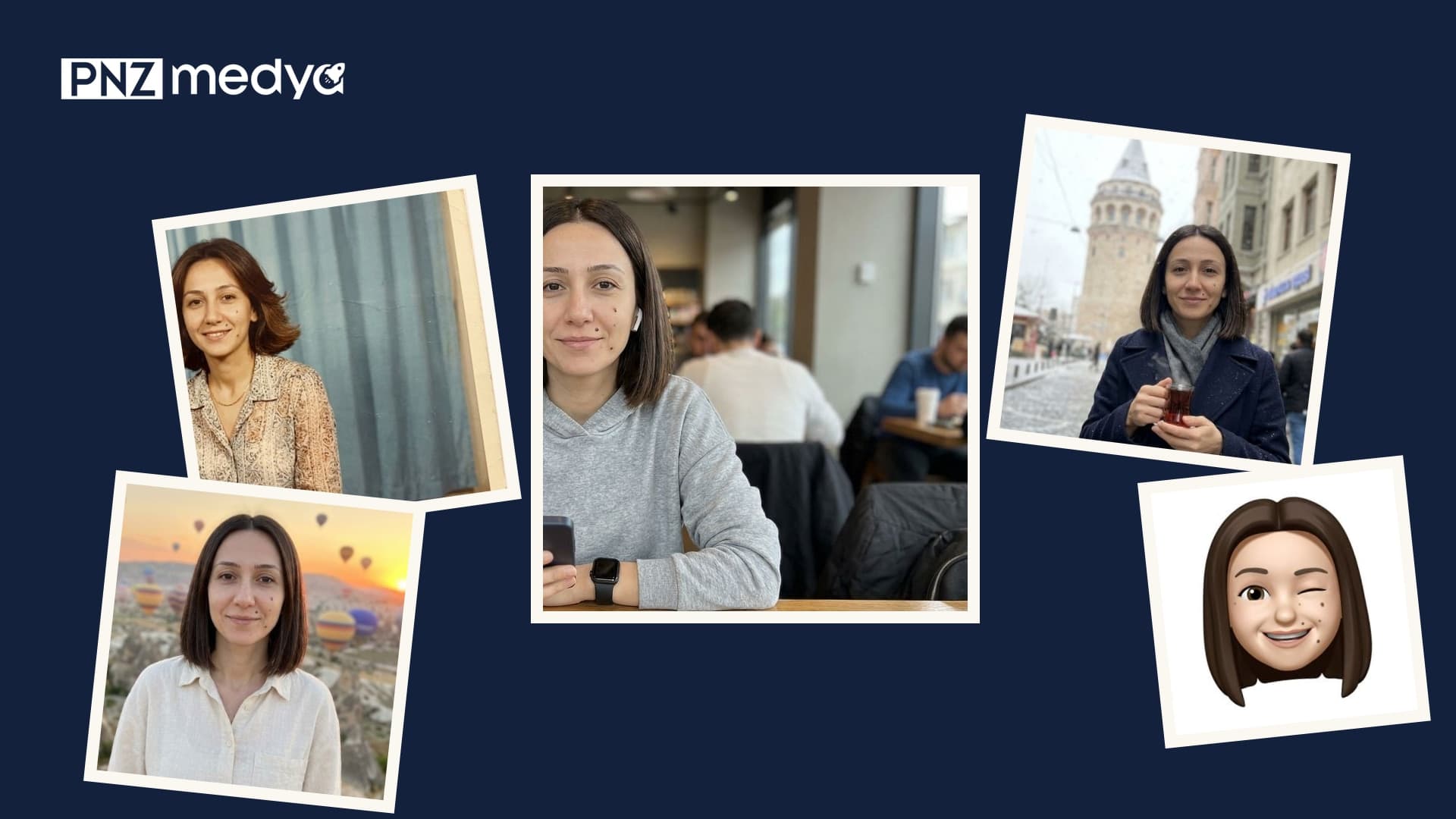
- To transform a photo with AI, upload it to Gemini or ChatGPT and write three things in one message: what it should become, what stays the same, and whether the image should have any text.
- We re-measured 614 images from our earlier tests with face recognition software. Adding snow to a photo kept the face best (median 0.94); emoji and mini toy kept it least (0.09 and 0.06).
- When the scene, era or print changed, the face stayed the same person: 144 of 144 80s and 90s photos were above the threshold. For 3D figures that dropped to 64 of 83.
- In most transformations a long prompt moved face similarity by only a few points. Its real job was stopping made-up text, date stamps, uncovered headscarves and the wrong aspect ratio.
- If you want to keep your face, frame the shot from the waist up: in the same scene, full-body shots dropped to a median of 0.65.
To transform a photo with AI, upload it to Gemini or ChatGPT and write what it should become: a Polaroid print, a studio portrait, a 1985 photo, a 3D figure, an emoji. What we wanted to know was this: in which transformations does your face stay your face, and in which does it get lost?
To answer that, we lined up the outputs of six separate tests run between October 29 and November 5, 2026, and on November 17 we measured all of them the same way. Below you'll find that ranking, the difference between a short and a long prompt, and 12 transformation prompts that went through our tests.
We didn't generate new images in Gemini for this post; on November 17 our test budget wasn't enough for another round. The numbers come from 614 images generated in the Gemini API with three image models (the models behind the Flash-Lite, Flash and Redo with Pro options in the app) for our posts on the 80s trend, 3D figures, Polaroids, face preservation, the snow trend and emoji. All of them used photos of six people we generated with AI who don't exist in real life. The tests used the original Turkish prompts: 11 of the prompts below are English translations of those exact prompts or their bracketed versions. Prompt 1 is the shared skeleton of those prompts and wasn't tested on its own.
How to Transform a Photo with AI: 4 Steps
- Pick the photo: face toward the camera and sharp, framed from the waist up. In a full-body photo the face is small, and it's the first thing to break in a transformation.
- Open Gemini (gemini.google.com or the app) and add the photo with the plus icon. Keep Flash selected in the model picker; Flash-Lite is faster but kept the face less well in our 80s test.
- Copy the prompt below that fits your transformation, fill in the square brackets for your own photo, and send it in the same message.
- Zoom in on the result: are your face, moles and glasses where they should be? Is there text or a date in a corner that you didn't ask for? If something changed, send Prompt 12 in the same chat.
With a one-line request like "Make a 3D figure from this photo", the model fills every gap you leave on its own. In our test that request put a name we never wrote on the figure's base or box in 8 of 20 attempts. Next to the goal, add what should stay the same and that you don't want any text.
Which Transformation Keeps Your Face? Ranking 614 Images
To measure faces we used a face recognition model called SFace. For two identical photos it gives a number close to 1; anything above 0.363 means the same person according to the model. We compared each output with its own input photo and grouped the results by transformation type.
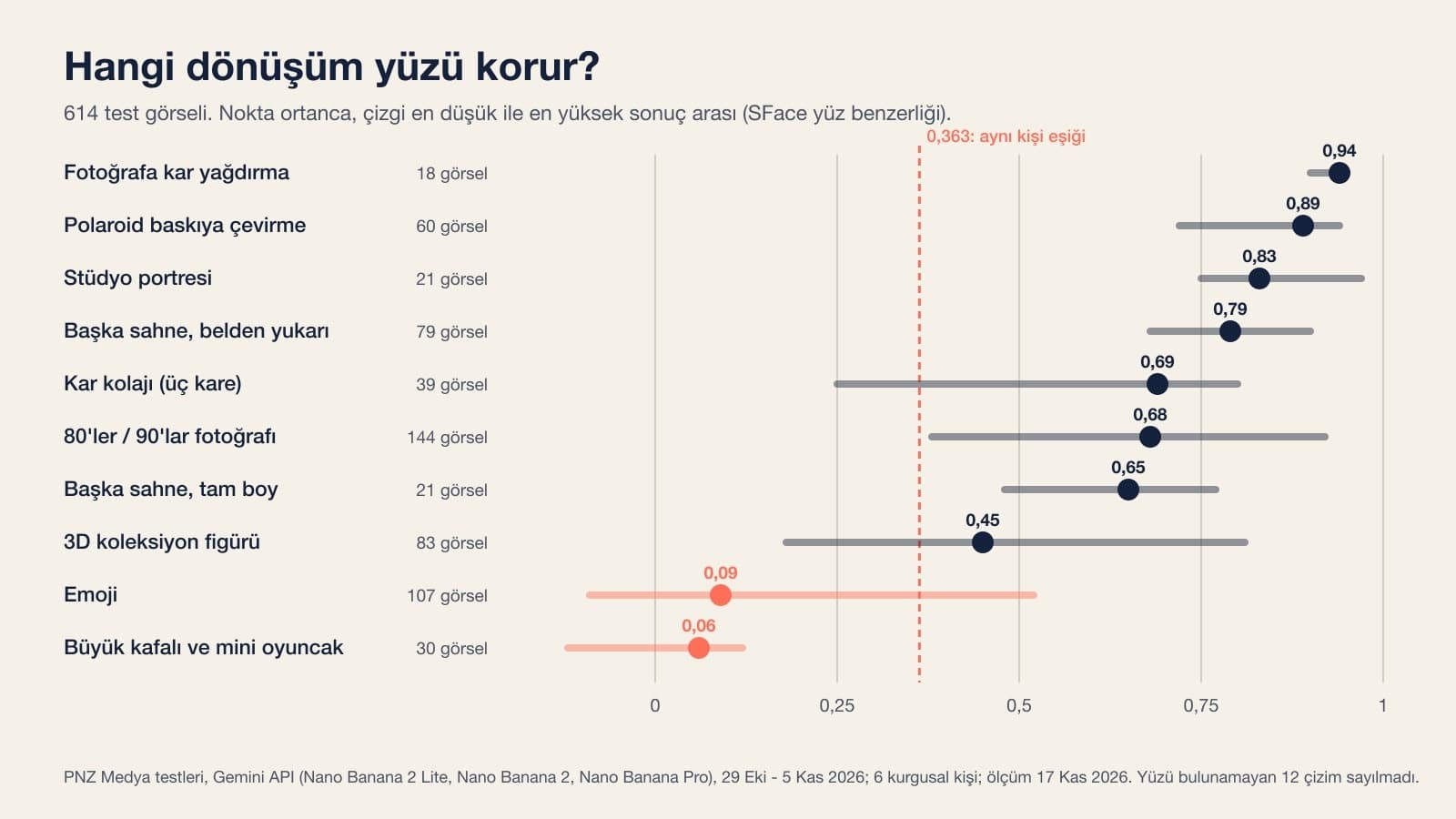
| Transformation | Images | Median similarity | Lowest - highest | Above the same-person threshold |
|---|---|---|---|---|
| Adding snow to a photo | 18 | 0.94 | 0.90 - 0.95 | 18 / 18 |
| Turning it into a Polaroid print | 60 | 0.89 | 0.72 - 0.94 | 60 / 60 |
| Studio portrait | 21 | 0.83 | 0.75 - 0.97 | 21 / 21 |
| New scene, waist up | 79 | 0.79 | 0.68 - 0.90 | 79 / 79 |
| Snow collage (three frames) | 39 | 0.69 | 0.25 - 0.80 | 36 / 39 |
| 80s and 90s photo | 144 | 0.68 | 0.38 - 0.92 | 144 / 144 |
| New scene, full body | 21 | 0.65 | 0.48 - 0.77 | 21 / 21 |
| 3D collectible figure | 83 | 0.45 | 0.18 - 0.81 | 64 / 83 |
| Emoji | 107 | 0.09 | -0.09 - 0.52 | 4 / 107 (plus 10 drawings where no face was detected) |
| Big-head and mini toy figure | 30 | 0.06 | -0.12 - 0.12 | 0 / 30 (plus 2 drawings where no face was detected) |
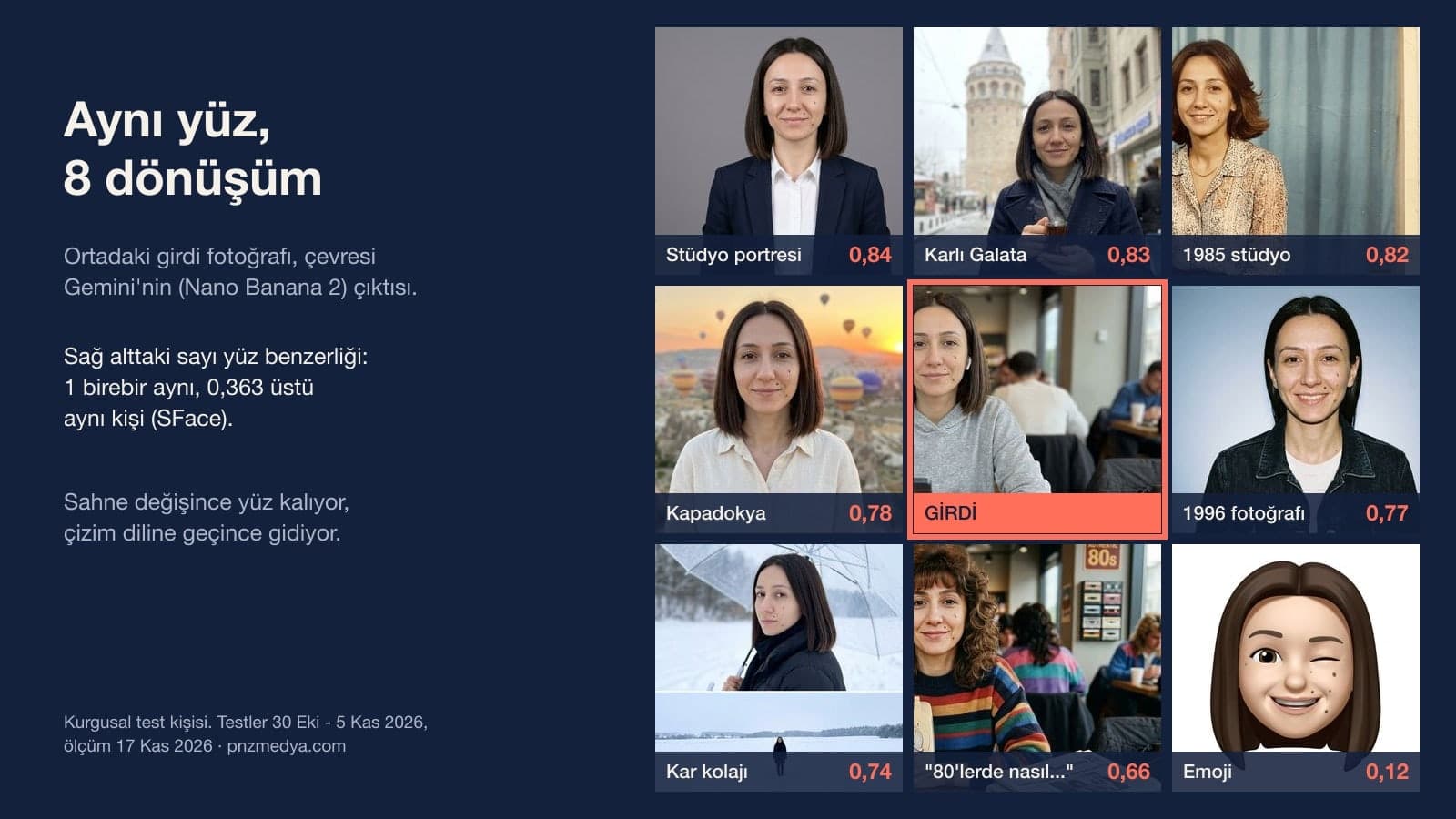
The rule behind the ranking is simple: the more of the photo a transformation makes the model redraw, the further the face drifts. When adding snow or a Polaroid frame, the model barely touched the face. When the scene or era changed, it redrew the face as a real photo, so the result was still the same person. With 3D figures, emoji and toys, the face moves into a drawing style. The low numbers there are expected: face recognition software can't match a cartoon face to a human face. That's why in our emoji post we checked hair color and mole position by eye.
Three small groups are left out of the table: a Polaroid lying on a desk (6 images, 0.76), a person inside a snow globe (4 images, 0.53) and a childhood version (9 images). In the childhood version the age changes, so the software's number doesn't tell you much there.
Short Prompt or Long Prompt?
In six transformations we had run both a one-sentence request and a tested long prompt on the same person. Face similarity changed less than we expected; what the long prompt really fixed showed up somewhere else.
| Transformation | Short request, tested in the original Turkish (median) | Long prompt (median) | What the long prompt fixed |
|---|---|---|---|
| Snow | Make it snow in this photo. (0.93) | Prompt 2 (0.94) | With the short request, Nano Banana 2 erased most of the pedestrians on the street and printed a made-up brand name on the chest of the coat; none of the 6 outputs from the long version had text. |
| Polaroid | Make this photo a polaroid. (0.88) | Prompt 3 (0.89) | The English trend prompt added a date we never wrote in 6 of 12 attempts. The version that described the frame and the text in detail came back without text in 10 attempts; the one-line Prompt 3 produced "SX-70 FILM" text in 1 of 6 attempts. |
| New scene | Show me in Cappadocia ... (0.77) | Prompt 5 (0.80) | In every version that didn't specify the expression, teeth showed in some of the outputs; with the prompt that specified it, they never did. |
| 80s | How would I have looked in the 80s? (0.63) | Prompt 7 (0.76) | The row with the biggest face difference. The popular trend prompt also brought print borders and stamps like "OCT 1985", and it uncovered the hair of the woman wearing a headscarf in 6 of 6 attempts. |
| 3D figure | Make a 3D figure from this photo. (0.47) | Prompt 10 (0.48) | The short request put a made-up name on the base or box in 8 of 20 attempts; the boxed version wrote only the requested text in 9 of 9 attempts. |
| Emoji | Make an emoji from this photo. (0.13) | Prompt 11 (0.08) | The short request stayed in landscape format in 13 of 15 attempts, the phone and watch stayed in the picture, and most outputs turned into cartoon portraits. |
In the similarity column the only clear gap is in the 80s: on the same woman's photo the short request scored 0.63, and the prompt describing a neighborhood studio in Turkey scored 0.76. When the short request left the era up to the model, the model picked the hair and clothes on its own; the detailed prompt sets the hair and clothes itself and asks the model to leave the face as it is. Emoji shows a gap in the opposite direction, and that one is expected too: the short request didn't fully transform the photo, so the face looked more familiar to the software.
12 AI Photo Transformation Prompts (Copy and Paste)
The prompts go from small changes to big ones. Each works in a single message after you upload the photo. Fill in the square brackets for your own photo and delete the brackets; never write in something your face doesn't have (a mole, glasses, a beard), because the model draws what you write.
1) A template for any transformation
Turn the photo I uploaded into [goal: a Polaroid print / a photo taken in a studio in 1985 / a painted PVC figure].
What changes: [lighting, color, clothing, background].
What stays the same: facial features, skin tone, [hair: length, color, style], [mole or mark and its position, left/right from the viewer's side], [glasses, beard, headscarf if any], age.
Expression: [mouth closed, slight smile].
Framing [waist up], face toward the camera.
No text, date stamp or logo in the image. Aspect ratio [vertical 4:5].We built this template from the lines the prompts below have in common; we didn't test it on its own. If your transformation isn't on the list, start here.
2) Adding snow to a photo
Make it snow in this photo. Don't change anything else: keep the people, clothes and framing the same, and don't add any new text or logo.The highest score in the test came from this prompt: a median of 0.94 over 6 attempts, and no output had any text. Without the second sentence, Nano Banana 2 once erased most of the pedestrians on the street and printed a made-up brand name on the chest of the coat. You can change the first sentence for rain or autumn leaves; we haven't tested those versions.
3) Turning a photo into a Polaroid print
Turn this photo into a flat scan of a Polaroid print: cream frame reaching all four edges of the image, thicker bottom border, square photo inside; face, hair and clothes unchanged; no text; vertical 4:5.4 of 6 attempts came out clean. Flash once placed the print on a table and wrote "SX-70 FILM" on the frame, and Flash-Lite once left a thin border outside the frame. If you want a handwritten note at the bottom, use the long version from our Polaroid post.
4) Studio portrait without makeup
Make a studio portrait from this photo: plain gray backdrop, soft front light, [navy jacket, white shirt].
Take the face exactly from this photo; this person has: [hair: length, color, style], [mole or mark and its position, left/right from the viewer's side], [glasses, beard, headscarf if any], [age range].
Skin texture as in the photo, no makeup.
Expression: [mouth closed, slight smile, no teeth showing].
Framing from the chest up, face toward the camera.
The [headphones, watch] from the photo are not in the new image, hands empty.Across three people, the median over 6 attempts was 0.84. A version that asked for "flawless skin, light makeup" got similar scores (0.83-0.85); the software measures identity and doesn't count moles one by one. If you want to keep your moles, don't delete the "no makeup" line.
5) Putting yourself somewhere else
Show the person in the photo I uploaded [in Cappadocia at sunrise, in front of hot air balloons].
Take the face exactly from this photo; this person has: [hair: length, color, style], [mole or mark and its position, left/right from the viewer's side], [glasses, beard, headscarf if any], [age range].
Expression: [mouth closed, slight smile, no teeth showing].
Framing from the waist up, face toward the camera, arms at the sides.
Clothing: [cream linen shirt].
The [headphones, watch, phone] from the photo are not in the new scene, hands empty.
Make it look like a natural photo taken with a phone.In 9 images the teeth never showed, and the headphones and watch didn't carry over into the new scene. We also tried the same structure on a snowy street in Istanbul's Galata: the tower was drawn with its conical roof in 8 of 8 images.
6) Three-frame snow collage
Make a three-frame vertical snow collage with the person in the photo I uploaded. The image is 9:16 vertical; three equal horizontal strips stacked on top of each other, with a thin white line between them.
Take the face exactly from this photo, no beautifying and no making younger; this person has: [hair: length, color, style], [mole or mark and its position], [glasses, beard, headscarf if any], [age range].
Calm expression, mouth closed, no teeth showing. Clothing: [black puffer jacket and black scarf].
The [headphones, watch, phone] from the photo are not in the new scene.
Frame 1: portrait from the chest up; holding a clear umbrella, turning the head slightly over the shoulder to look at the camera; blurred snow behind.
Frame 2: wide shot; standing alone in a wide, flat, snow-covered field, with their own footprints behind them.
Frame 3: close-up of only the eyes and eyebrows, a few snowflakes on the eyelashes.
Cold colors, mostly white. No text, signature or date in the frames.All 9 of 9 collages came with three equal frames and footprints. We narrowed the third frame to the eyes on purpose: in a close-up showing the whole face, Pro had lengthened the woman's chin-length hair to below the shoulders in 4 of 5 attempts.
7) As if shot in a neighborhood studio in 1985
Recreate the person in the photo I uploaded as if photographed in a neighborhood photographer's studio in Turkey in 1985.
Keep the facial features, skin tone, eyebrows, moles and marks as in the photo, and don't change the age.
Hair [blow-dried, touching the shoulders], wearing [a finely patterned blouse and a thin gold chain necklace], ears visible, hands empty.
Backdrop a plain light blue curtain, a small wooden side table next to the person with a vase of plastic flowers on it.
Slightly yellowed colors like a paper print, fine film grain.
No sign, stamp, date, text or logo.On the same woman, the question "How would I have looked in the 80s?" scored 0.63, while this prompt scored 0.76; Flash's two attempts scored 0.81 and 0.82. If you wear a headscarf, replace the hair line with "headscarf in place, [color], no hair visible"; in our 80s post, the trend prompt that described the hair uncovered the hair of the woman wearing a headscarf in 6 of 6 attempts.
8) A photo taken in 1996
Turn the person in the photo I uploaded into a photo taken in 1996.
Keep the facial features, skin tone, eyebrows, moles and marks as in the photo, and don't change the age.
Hair [straight, medium length, middle part]; wearing [an oversized denim jacket and a plain white T-shirt], ears visible, wrists bare, hands empty.
Backdrop a plain blue gradient studio curtain with no text. Direct flash, light grain, faded colors.
No text, date or logo.A median of 0.79 over 6 attempts, one of the highest among the era prompts. The "wrists bare" line is there so the smartwatch in the input photo doesn't travel back to 1996.
9) Desktop collectible figure
Make a 1/7 scale painted PVC collectible figure of the person in the photo.
The figure stands on a round clear acrylic base on top of a real work desk; no text on the base.
Facial features, hair, [glasses], clothing colors and [bag] are the same as in the photo.
The figure's surface is slightly glossy painted plastic; no pores or hair like human skin, clearly a figure.
An out-of-focus monitor and a pen holder in the background.
No text, logo or brand anywhere in the image.
Realistic product photo, soft daylight, 4:5 vertical.In 6 of 6 attempts the figure came on a clear base with no text. In one image Flash put a computer brand's logo on the monitor in the background; zoom in on any screens in the background before you share.
10) Boxed action figure
Turn the person in the photo into a boxed action figure.
Box: [navy] cardboard back and a clear plastic blister in front. The figure is inside the blister, on the left side, full body.
On the right side there are three separate slots stacked vertically, each holding a single accessory: top [an open laptop (no logo on the lid or keyboard)], middle [a single coffee cup], bottom [headphones]. 3 accessories in total.
The top band of the box has only this text: "[DENIZ]". Below it, in a smaller font, only: "[Graphic Designer]".
No other text, logo, barcode, age warning or brand.
The figure's face, hair, [glasses] and clothes are the same as in the photo.
The box stands in front of a plain light gray backdrop and fills almost the whole frame; straight-on product photo, 3:4 vertical.In 9 of 9 attempts both lines came out letter for letter, including the Turkish letters in our test text (the dotted capital I and the dotless i); all 9 also had exactly three accessories. If you don't give the box text, the model adds a series name, a city name or a barcode; a trend prompt that mentioned the box without giving its text did this in 6 of 6 attempts.
11) Emoji from a photo
Make a single emoji of the person in the photo I uploaded. Show only the head and neck, glossy and soft 3D like Apple emojis, with rounded shapes.
Keep these exactly as they are for this person: [hair color, length and cut; glasses frame if any; beard or mustache; number of moles if any and which cheek from the viewer's side; headscarf color and how it's tied if any].
Don't add moles, scars, glasses, headphones or jewelry that aren't in the photo.
Expression: [smiling and winking], mouth closed.
Plain white background to the edges (#FFFFFF), no shadow, no text. Square (1:1).With this structure, 12 of 12 attempts came back as a single head, square, on a plain white background; the moles were always on the correct cheek, though in 3 of 4 attempts one or two extra moles were added to that same cheek. The 0.08 the software gave is misleading here: the face is now an emoji. Zoom in and check by eye what stayed.
12) Fix message if the face changed
In this last image, fix only the face.
Take the face exactly from the first photo I uploaded; this person has: [hair: length, color, style], [mole or mark and its position, left/right from the viewer's side], [glasses, beard, headscarf if any], [age range].
Expression: [mouth closed, slight smile, no teeth showing].
Keep the clothing, background, lighting and pose as in this last image.Write this in the same chat. A one-word "fix it" isn't enough: in our face preservation test the model once asked for the original photo again instead of producing an image. If two attempts don't fix it, open a new chat, upload the photo again and start over with the transformation prompt.
In our tests Pro once refused the short "make a 3D figure" request, citing a content rule, and the same request worked in the next three attempts. If you get a refusal or a text-only reply, send the same prompt once more in a new chat; if that still fails, start with "Generate an image from this photo".
Which Gemini Model Is Better at Transforming Photos?
According to Google's Gemini help page, when the model picker is on Flash-Lite the images are drawn by Nano Banana Lite, and on Flash or Pro by Nano Banana 2; redoing with Nano Banana Pro requires a Google AI plan. The same page says this about Lite: it isn't designed for multiple reference images or many consecutive edits.
In our measurements the gap opened up most in era transformations: across the 144 images from the 80s and 90s prompts, the median was 0.65 on Lite, 0.75 on Nano Banana 2 and 0.67 on Pro. For 3D figures Pro was slightly ahead (0.50, versus 0.45 on Nano Banana 2). Our advice is to start with Flash. Try Pro for images with lettering, like box text, or to fix a detail Flash missed.
You can use the same prompts in ChatGPT too; we only ran these measurements in Gemini and didn't measure the results in ChatGPT.
Common Mistakes
- Writing only the goal. The model puts a name on the base, a date in the corner, a brand on the sweater; in the 3D figure test, a sentence about text added to the end of the one-liner cut made-up names to 1 in 12 attempts.
- Adding a feature your face doesn't have to the list. In the emoji test, the line "keep the glasses, beard, moles and headscarf as in the photo" made the model draw moles on a man who has none in 8 of 11 attempts.
- Uploading a full-body photo or asking for a full-body shot. In the same scene, waist-up images had a median of 0.79 and full-body ones 0.65.
- Not mentioning the headscarf. Era prompts that described the hair uncovered the headscarf; put the headscarf's color and the words "no hair visible" in the first lines.
- Asking for a fix with one word. Write what's wrong and what should stay, the way Prompt 12 does.
Someone Else's Photo, Age and Data Privacy (KVKK)
Google's help page requires you to be 18 or older to create and edit images in Gemini. If you're transforming your child's photo, upload it yourself from your own account. Get permission before you transform a friend's or relative's photo: under KVKK, Turkey's personal data protection law, a face photo is personal data, and it goes to Google's servers the moment you upload it. Don't share a transformed image as if it were a real old photo or a real product; the 1985 studio shot in particular looks like a real album photo at first glance.
Upload the photo to Gemini or ChatGPT and, in the same message, write what it should become, what should stay the same, and that you don't want any text in the image. Prompt 1 in this post is a template for those three lines; if there's a ready prompt for your transformation (Polaroid, studio portrait, 80s, 3D figure, emoji), use that one.
In Gemini, yes: you can upload and transform photos on an account without a plan, and the image is drawn by the model behind the Flash-Lite or Flash setting. Redoing with Nano Banana Pro requires a Google AI plan. According to the help page, Nano Banana 2 images have a daily quota; once it runs out, redoing with Pro is also unavailable.
In our 614-image measurement, adding snow to a photo (median 0.94), a Polaroid print (0.89) and a studio portrait (0.83) kept the face best. Era transformations, at 0.68, still stayed the same person. 3D figures dropped to 0.45, and emoji and mini toys fell below 0.1, because the face moves into a drawing style.
For the face, the difference is smaller than you'd think: between the short request and the long prompt there was a 0.01 gap for snow, Polaroid and 3D figures, and 0.03 for a scene change; only in the 80s did similarity rise, from 0.63 to 0.76. The real gain of the long prompt is that it prevents made-up text, date stamps, uncovered headscarves and the wrong aspect ratio.
Describe your face in the prompt: the length and color of your hair, where your mole is, your glasses, your age and your expression. Keep the framing waist up. If the result still looks different, send Prompt 12 in the same chat; if two attempts don't fix it, start over in a new chat.
The model draws objects like prints, boxes and bases the way they look in real life, and real boxes and prints have text on them. In our tests a date appeared on the Polaroid, a name on the 3D figure, and a stamp like "OCT 1985" on the 80s image. Add "no text, date stamp or logo in the image" to the end of your prompt; if you want a name, give it in quotes.
For your first try, start with Prompt 2 or Prompt 3; these two barely change the face, and when you put the result next to the input you'll see right away how the model behaves with your photo. Then move up the scale: studio first, then era, and figures and emoji last.
Real Photo Shoots for Your Brand
A transformed portrait is fine for a profile picture or a social post; a website, catalog or promo needs a real shoot. We plan product photography, corporate portraits and location shoots, and we deliver the photos. Let's talk about what you need in a free initial call.