



How to Make an ID Photo with AI: 12 Ready-to-Use Prompts (2026)
In Turkey, people search for ID photos about 22,200 times a month and for biometric photos 40,500 times. We cover where an AI ID photo works and where it gets rejected, the Turkish (NVI) and visa photo sizes, and 12 ready-to-use prompts for ChatGPT and Gemini.
- Demand: in Turkey, the Turkish term for 'ID photo' gets about 22,200 searches a month, 'biometric photo' 40,500 and 'making an ID photo' 1,300 (Google Keyword Planner, September 2026).
- The official limit: for ID cards, passports and driver's licenses, Turkey's civil registry (NVI) requires an ICAO-standard biometric photo taken within the last 6 months, and it does not accept photos reproduced on a computer. An AI-generated ID photo cannot be used for these applications.
- Where you're free: for informal uses such as a resume, LinkedIn, a job application form, or a school or club card, an AI ID photo works fine.
- 12 prompts: 3 are for checking and reviewing before an official application, and 9 are generation prompts for resumes, profiles and printing that work in ChatGPT and Gemini.
- For the best result: upload a sharp photo taken in daylight, in front of a plain wall, with the phone at eye level, and state clearly in the prompt that the face must not be changed.
Making an ID photo means preparing a picture that shows a person from the shoulders up, against a plain background, facing the camera straight on, at a set size. In 2026 you can do it two ways: have it taken by a photographer (or take it at home) and check it against the rules, or give an AI a selfie and have it generate an ID-style portrait. Which one you pick depends on where you'll use the photo.
In this post we split making an ID photo with AI into those two paths. Using the agencies' own wording, we show that for official applications such as ID cards, passports, driver's licenses and visas, AI is only useful as a checker. For informal uses like resumes, LinkedIn and forms, you'll find 12 ready-to-use prompts tested in ChatGPT and Gemini (in their original Turkish versions), a size table by document type, and the pixel math for printing.
Is an AI ID Photo Accepted for an ID Card or Passport?
Short answer: no. For Turkish ID card applications, the General Directorate of Population and Citizenship Affairs (NVI) requires the photo to meet ICAO 9303, the standard for Machine Readable Travel Documents, and to have been taken within the last six months. The agency's FAQ page is clear: photocopies, photos reproduced on a computer and non-biometric photos are not accepted. The same sentence appears on its passport and driver's license pages.
An AI ID photo is an image the model redraws to look like your face. No camera ever took that shot of you. A biometric photo exists so that a machine can match the face on the document to its owner. So a face that only resembles you and was derived from you defeats the whole purpose. Neither NVI nor ÖSYM has issued a specific notice about AI photos in Turkey; the existing rule already covers the case.
Agencies abroad are even more direct. The U.S. State Department's passport instructions ban digital alteration and beauty filters. The UK government requires that a digital passport photo has not been altered with computer software. German missions also state that a visa photo cannot be edited afterward and must reflect the person's real appearance.
Digitally altered and/or retouched facial images in photos are not acceptable. The use of beauty filters or other photo filter tools is also not acceptable.
With ÖSYM (Turkey's national exam agency), the issue takes care of itself: according to the 2026 KPSS Undergraduate guide, candidates don't upload their own photo. The photo on the Turkish ID card is transferred automatically, or staff at the application center take one with a webcam. The guide asks that there be no change in appearance such as hair, mustache or makeup, and says the exam may be declared invalid if the proctor can't recognize the candidate.
| Use | AI ID photo | Right approach |
|---|---|---|
| Turkish ID card, passport, driver's license | Not allowed | Biometric photo taken in the last 6 months (NVI) |
| US, UK, Schengen visa | Not allowed | Unaltered photo, taken to that country's size |
| ÖSYM exam application | No upload step | ID card photo or a photo taken at the application center |
| Resume and job application form | Allowed | Identity-preserving prompt, natural look |
| LinkedIn and website profile | Allowed | Slight smile is fine, plain background |
| School, club, gym card | Usually allowed | Ask the organization about its rules |
The table in one sentence: if a government system will use the photo for face matching, you need a real photo. If it's only so a person can recognize you, an AI ID photo will do. For organization cards in between, the organization decides; asking before you apply takes two minutes.
Biometric Photo Sizes and Rules (2026)
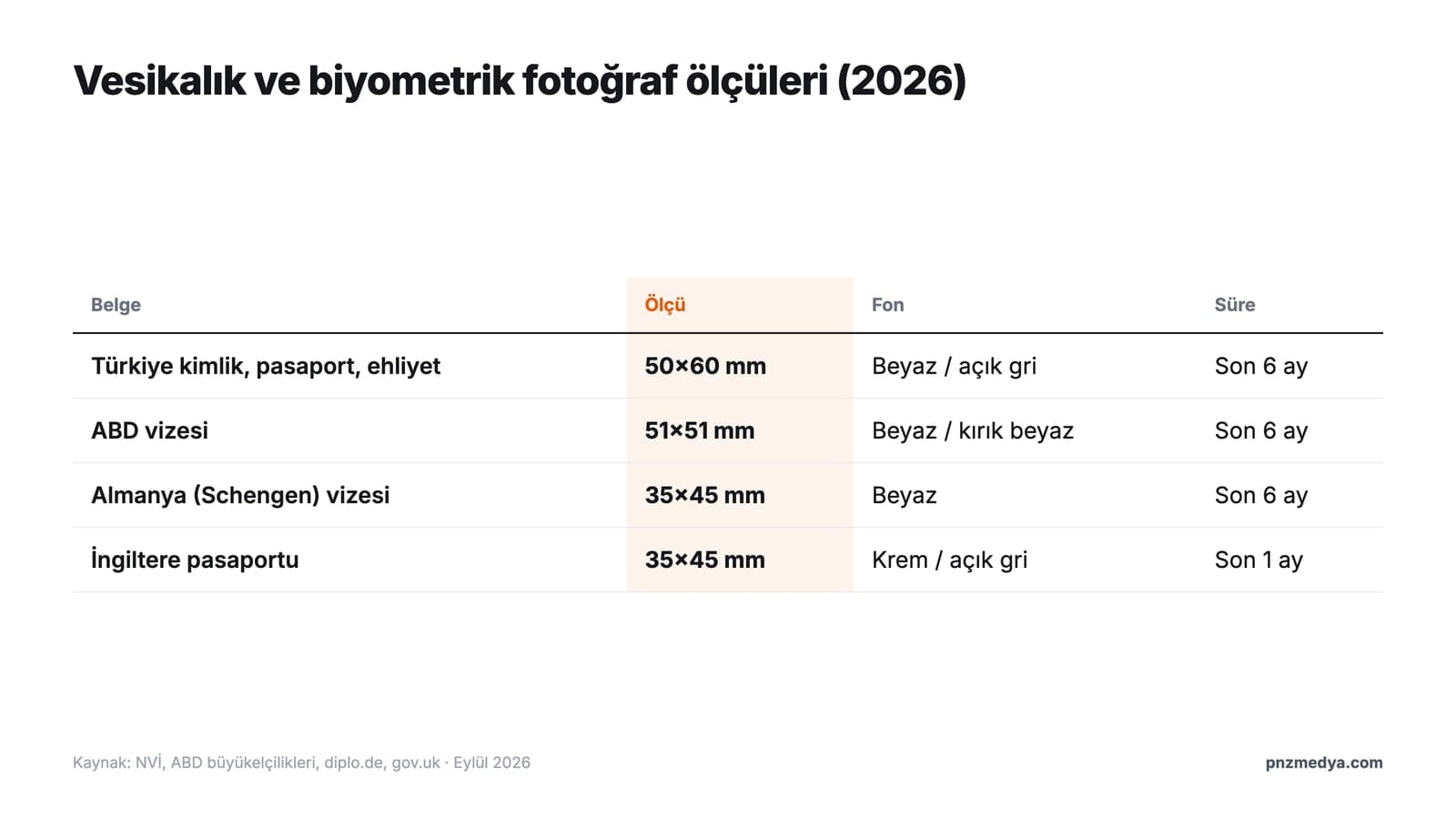
In Turkey, biometric photo sizes for ID cards, passports and driver's licenses follow the same standard. NVI's passport page requires a 50x60 mm photo taken within the last six months. Under the Second Generation Passport Implementation Directive, the face is 32 to 36 mm tall and fills 70% to 80% of the photo. The background must be plain and shadow-free; the directive recommends white for dark hair and a mid-tone gray for light hair.
| Document | Size | Background | Time limit and special rule |
|---|---|---|---|
| Turkish ID card, passport, driver's license | 50x60 mm, face 32-36 mm | Plain, white or light gray | Last 6 months; mouth closed, no tinted lenses |
| US visa | 51x51 mm (2x2 in) | White or off-white | Last 6 months; no glasses, no filters |
| Germany (Schengen) visa | 35x45 mm, face 70-80% | White | Last 6 months; no editing afterward |
| UK passport | 35x45 mm, digital at least 600x750 px | Cream or light gray | Last 1 month; not altered with software |
Two differences in the table are worth noting. For a UK passport, the photo must be taken within the last month, a much shorter window than six months. For a US visa, glasses are banned outright; if you need them for medical reasons, you need a signed statement. We verified the Schengen size with German missions; if you're applying to another country's consulate, always check that country's page.
ID photo rules: face, expression and accessories
- The face is seen straight on, eyes open, with the forehead, face and chin uncovered.
- The expression is neutral and the mouth is closed; expressions such as smiling are not accepted.
- No tinted lenses or sunglasses; with prescription glasses there must be no reflection on the lenses and the frame must not cover the eyes.
- Apart from required glasses, no hats or head coverings.
- In a photo with a headscarf, the face is visible from the tip of the chin to the forehead and the headscarf color differs from the background.
- Colors are neutral and the photo reflects the natural colors of the face.
How to Make an ID Photo with AI: 5 Steps
Short answer: take a good source photo, pick the prompt that fits your purpose, compare the result with the original and export it at the right size. For an official application, the final step uses the photo you took yourself; leave the AI-generated image out of it.
- Take the source photo: face a window that gets daylight, stand with a plain, light-colored wall behind you, and hold the phone at eye level about an arm's length away. Ask someone to help so you can use the rear camera instead of the front one.
- Decide the purpose: official application, resume or profile? For an official application, only run checks with prompts 1 and 2 below.
- Paste the prompt and attach the photo: in ChatGPT, drag the image into the chat window and type the prompt; in Gemini, attach the image the same way and send.
- Check your identity: open the result next to the original. Are the face shape, nose, eye spacing, moles and scars where they should be? Prompt 11 does this comparison for you.
- Crop to size and save: for printing at 300 dpi, 50x60 mm is about 591x709 pixels and 35x45 mm is about 413x531 pixels.
When AI turns a dim, blurry or side-angle selfie into a sharp ID photo, it redraws the face too, and the result may not look like you. The better the source, the fewer details the model has to make up. If your photo is blurry, try the methods in our photo sharpening guide first.
In ChatGPT you can upload a photo and ask for edits in the chat, or mark an area with the selection tool; on the free plan, image generation is limited and slower. In the Gemini app, images are generated with the Nano Banana 2 model, character consistency is supported, and image generation and editing are open to users 18 and over. Both tools add an invisible SynthID watermark and C2PA metadata to the images they produce, which means these images can be detected as AI output.
12 Ready-to-Use ID Photo Prompts (Copy and Paste)
Copy the prompts and fill in the bracketed fields with your own details. The first three are for before an official application: they don't change the image, they only check it. From the fourth on, the prompts generate an ID-style portrait for informal uses such as resumes, profiles and printing. All of them work in ChatGPT and Gemini; our tests used the original Turkish prompts.
1) Rule checklist by document type prompt
Give me the ID photo rules for a [Turkish ID card / Turkish passport / US visa / Schengen visa] as a checklist.
Include: size (mm), how much of the photo the face should fill, background color, the maximum number of months since the photo was taken, the glasses and headwear rule, and the expression rule.
Next to each item, write which official agency's page the information comes from.
If you're not sure about a rule, don't make it up; mark it 'verify on the official page'.
At the end, add 3 questions I should take with me when I go to the photographer.2) Check my photo against biometric rules prompt
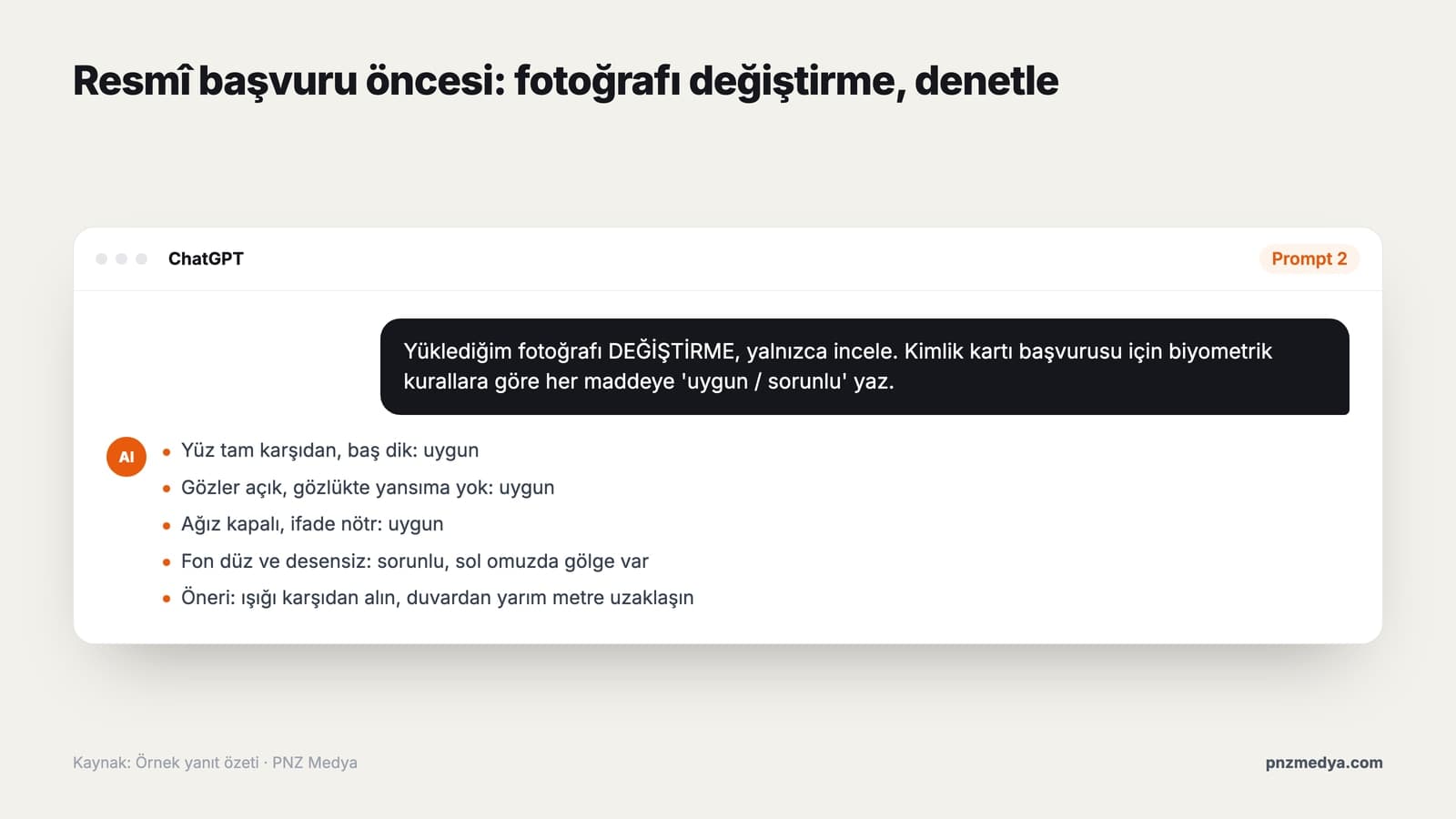
Do NOT CHANGE the photo I uploaded. Do not edit it and do not generate a new image. Only review it.
This photo was taken for a [Turkish ID card / passport / driver's license] application.
Check the following items one by one and mark each as 'OK / problem / not sure':
1. Is the face straight on and the head upright?
2. Are the eyes open and visible, and is there any reflection on the glasses?
3. Is the mouth closed and the expression neutral?
4. Is the background plain, without pattern and without shadows?
5. Is there any shadow, glare or blur on the face or background?
6. Is the head centered in the frame, with enough space above and below?
For each problem item, tell me what I need to change in the next shot.This prompt uses the AI like a photographer's assistant: the image stays your real shot, and you only learn what's missing.
3) Home ID photo shooting plan prompt
I'm going to take an ID photo at home with my phone. Here's what I have: [phone model], [the lightest plain wall at home], [direction of the window that gets daylight], [someone to help: yes / no].
Make me a step-by-step shooting plan:
- Where should I stand relative to the window, and where should the light hit my face from?
- How far away and at what height should the phone be?
- Should portrait mode, filters and beauty mode be on or off?
- What can I use at home to reduce shadows?
Keep the plan to 8 items at most, and if you use a technical term, explain it in parentheses.4) Basic ID photo prompt
Create an ID-style portrait from the photo I uploaded. This photo is not for an official document; it's for a [resume / school card / form].
Identity: do NOT CHANGE my face shape, eyes, nose, skin tone, hairline, moles or age; do not beautify or retouch.
Pose: facing the camera straight on, head upright, shoulders level, eyes looking at the camera, mouth closed.
Background: plain white, no pattern, no shadows.
Lighting: soft and even, no harsh shadows on the face.
Framing: shoulders up, head centered, 5:6 ratio (portrait).This is the base for the other prompts. Writing 'do NOT CHANGE' in capitals tells the model clearly what comes first; OpenAI's image prompting guide also recommends listing facial features and skin tone one by one and saying 'do not change' to preserve identity.
5) Resume headshot prompt (change of outfit)
Turn the photo I uploaded into a professional ID-style headshot for my resume.
Outfit: [navy suit and white shirt / black blazer / solid-color blouse], simple, no logos, looks freshly ironed.
Do not touch my face, hair, skin tone or age; change only the outfit and the background.
Background: light gray or off-white, plain.
Expression: natural, mouth closed or a very slight smile.
Framing: chest up, portrait orientation, 4:5 ratio.
No jewelry, badges or text in the result.6) LinkedIn profile photo prompt
Create a LinkedIn profile photo from the photo I uploaded.
I work as a [job, e.g. software developer / accountant / teacher]; the photo should look trustworthy and approachable.
Preserve my identity: keep my facial features, skin tone, hair and age the same; do not smooth my skin.
Expression: a slight, natural smile.
Background: a simple, slightly blurred office or a plain [color] background.
Framing: square (1:1), head and shoulders, face in the upper third of the frame; centered so it won't get cut off by a round profile frame.7) Change the background to white prompt
In the photo I uploaded, change only the background: make it plain white, with no pattern and no shadows.
Do not touch the person at all: face, hair, clothes, lighting and colors stay exactly as they are.
Keep the edges of the hair strands natural; do not create a cut-out look or an artificial halo.
Remove the shadow behind the shoulders.
Do not change the framing or the resolution.If the photo is already good but a door, a cabinet or a patterned curtain shows behind you, this one edit is enough. For an official application, changing the background afterward also counts as editing; keep this prompt for informal uses.
8) Gemini ID photo prompt
I'm uploading [2] photos of the same person. Use both as identity references; combine the facial features from both to get them right, and do not invent a new face.
Generate an ID-style portrait of this person:
- Facing the camera straight on, head upright, neutral expression, mouth closed.
- Plain white background, soft front lighting, no shadows on the face.
- Outfit: [dark, collared, simple].
- Shoulders up, portrait 5:6 ratio.
Keep the skin tone, age, glasses (or no glasses) and hairstyle as in the references.According to Google's API documentation, Gemini's Nano Banana 2 model can take up to 4 images of a person as references for character consistency. If the face angle in your single selfie is a problem, adding a second straight-on photo improves the result noticeably.
9) ID photo with headscarf prompt
Create an ID-style portrait from the photo I uploaded of me wearing a headscarf (informal use: [resume / school card]).
Do not change the color, pattern or way the headscarf is tied.
The face should be fully visible from the tip of the chin to the forehead; the headscarf must not cover any part of the face.
The background should be clearly different from the headscarf color: use light gray if the headscarf is light, white if it is dark.
Preserve the facial features, skin tone and age; do not retouch.
Framing: shoulders up, portrait 5:6.10) Arrange ID photos on a print sheet prompt
Arrange the ID photo I uploaded on a single sheet to be printed at a photo shop.
Sheet: 10x15 cm, portrait, 300 dpi (1181x1772 pixels), white background.
Photo size: [50x60 mm = 591x709 pixels / 35x45 mm = 413x531 pixels].
Place as many copies as fit on the sheet with equal spacing, and put thin light gray lines between them for cutting.
Do not change, redraw or sharpen the photo itself; only copy and place it.Image models are not always perfect at millimeter-precise layout. Before printing, check the pixel size of one photo in an image editor; if it's off, do the cropping and layout by hand in a free editor.
11) Did you change my face? Identity check prompt
I'm uploading two images: the first is my original photo, the second is the ID photo you generated.
Do NOT GENERATE a new image. Compare the two and honestly list the differences in:
- Face shape and jawline
- Shape of the eyes, eyebrows, nose and lips
- Skin tone and texture (have any moles, scars or freckles disappeared?)
- Hairline and hair color
- Apparent age
For each difference, write 'noticeable / slight / none'. At the end, tell me in one sentence whether someone who knows me would accept this image as me.12) Quick ID photo prompt (one line)
Turn this photo into a portrait-orientation ID photo with a white background, facing forward, neutral expression, shoulders up, without changing my face at all; do not retouch.Gemini and ChatGPT sometimes restrict edits to photos of real people. Add this sentence at the start of the prompt: 'This photo is of me and I want to edit it for use on my own resume.' If your face has changed, don't ask for fixes in the same chat; open a new chat and start over with the original photo. According to OpenAI's guide, repeated edits in a row can also change details you wanted to keep.
ChatGPT or Gemini: Which Is Better for ID Photos?
Both tools work with an ID photo prompt; they differ in how they preserve the face, how many reference images they take and the output resolution. The table is based on each company's own help and developer pages as of September 2026.
| Criterion | ChatGPT | Gemini |
|---|---|---|
| Image model | ChatGPT Images 2.5 | Nano Banana 2 |
| Upload and edit a photo | Yes; in chat or with the selection tool | Yes; in chat |
| Multiple references | Yes | Up to 4 images for person consistency |
| On the free plan | Limited and slower generation | 1K download; 2K with a Google AI plan |
| Invisible marking | SynthID and C2PA | SynthID and C2PA |
Practical tip: if you have one good selfie, start in ChatGPT with prompt 4. If your selfie is taken from the side or is blurry, use prompt 8 in Gemini with two reference photos. Whichever you choose, don't skip check prompt 11.
6 Common ID Photo Mistakes
- Taking an AI ID photo to the civil registry office: the application is rejected and you lose time.
- Leaving the phone's beauty mode on: the skin gets smoothed and the photo no longer shows how you actually look now.
- Shooting under a ceiling light: harsh shadows form under the eyes and under the nose.
- A background the same color as the headscarf or clothes: the edges disappear and the face blends into the background.
- Asking for fix after fix in the same chat: the face changes a little more with every round.
- Sharpening and reusing an old ID photo: official applications require a photo from the last 6 months, and the UK passport requires one from the last month.
ID Photos and KVKK in Turkey: Who Are You Giving Your Face To?
When you upload a photo of your face to an AI tool, you're sharing personal data. Article 6 of Turkey's Personal Data Protection Law No. 6698 (KVKK) classifies biometric data as a special category of personal data. According to the KVKK authority's March 2025 guide on biometric data, a facial image counts as biometric data only once it has gone through technical processing that makes it usable for identifying or verifying a person. So a plain selfie is not always biometric data on its own. It is always personal data.
In practice, watch three things. Don't upload someone else's photo without their permission; OpenAI's usage policy also prohibits using a photorealistic image of a person without their consent in a way that misleads others about what is real. Be more careful with photos of children; in Gemini, image editing is open only to users 18 and over anyway. If your business plans to prepare employees' profile photos in bulk, base it on explicit consent and a privacy notice.
No. For ID card, passport and driver's license applications, Turkey's NVI requires an ICAO-standard biometric photo taken within the last six months and does not accept photos reproduced on a computer. Use an AI ID photo only for informal purposes such as a resume, a profile or a form.
In Turkey, ID cards, passports and driver's licenses use 50x60 mm; the face is 32 to 36 mm tall and fills 70% to 80% of the photo. A US visa uses 51x51 mm, and a German visa and a UK passport use 35x45 mm.
For informal use, yes. Image generation is available on the free plans of ChatGPT and Gemini, though limited; the prompts in this post work on the free plan. For an official application, you need a biometric photo taken by a photographer.
Upload the photo and state four things clearly in the prompt: the purpose, that the face must not be changed (facial features, skin tone, age), the background color and the framing ratio. Prompt 4 gives you this structure ready to use.
Yes. In the Gemini app you can upload a photo and ask for an ID-style portrait; Nano Banana 2 accepts multiple reference photos for person consistency. Image editing is open to users 18 and over.
You can take one, but whether it's accepted depends on the agency's check. Shoot in daylight, in front of a plain light-colored wall, from eye level and with no filters, then check it against the rules with prompt 2; if you're not sure, go to a photographer.
AI ID photos have a clear place: for your resume, your LinkedIn profile and informal forms, you get a decent portrait in minutes. For ID card, passport, driver's license and visa applications, AI should stay in the role of checklist and checker; the photo itself has to be a real shot taken within the last six months. When you use the prompts, don't delete the lines that protect your face, and always compare the result with the original.
Corporate Portrait and Team Photography Service
AI is enough for a single resume photo. Your company website, LinkedIn page and press kit need real, consistent portraits of your team that people can trust. We shoot corporate portraits and team photos in our studio or at your office, with the same lighting and backdrop for everyone. Get in touch today for a free quote.