



How to Complete ChatGPT Ads Business Verification: 2026 Guide
We saw it in our own account on September 17, 2026: ChatGPT Ads Manager asks for business verification after campaign setup, and it runs through Persona. We cover Business vs Individual, the 10-digit VKN and document prep for companies in Turkey, and 8 ready-to-use prompts.

- Requirement: according to the OpenAI Help Center, ChatGPT ads currently require business verification only; identity verification is not on the list (September 2026).
- First-hand: we saw it in our own account on September 17, 2026. Ads Manager (Beta) asks for verification in a yellow banner, and "Start verification" first asks you to choose Business or Individual.
- Persona: the OpenAI screen that opens for Business says verification runs through its vendor Persona and that shared account information is kept for up to 30 days.
- Companies in Turkey: the local equivalent of an EIN/TIN is the 10-digit Tax Identification Number (VKN); enter the legal name exactly as on the tax certificate and the Trade Registry Gazette.
- Preparation: have the tax certificate, Trade Registry Gazette notice, chamber activity certificate and signature circular ready in case they are requested; 8 ready-to-use prompts speed up the consistency check.
ChatGPT ads business verification is the step in OpenAI's Ads Manager where OpenAI checks that the advertising business really exists and is eligible to advertise. On September 17, 2026, right after PNZ Medya set up a campaign with its Turkey-registered company, the panel asked for this verification. This guide explains how verification starts, how the Business and Individual options differ, and which details and documents a company based in Turkey should have ready.
We built this article on three kinds of information and label each one: what we saw on our own screen, documents published by OpenAI and Persona, and the equivalents in Turkish law. We have not yet filled in the forms inside Persona. For that stage we only give sourced general information and do not claim that ad verification will show exactly the same steps.
What Is ChatGPT Ads Business Verification and Why Is It Required?
Short answer: OpenAI wants to see that the advertiser account belongs to a legitimate business. According to OpenAI's ad policies, when an advertiser signs up for Ads Manager the company assesses whether it is a legitimate business and meets the advertiser eligibility requirements, and this may include advertiser verification. The same policy requires advertisers to provide accurate information about their business identity, ownership and affiliations.
Ads currently requires business verification only and does not require identity verification.
OpenAI's FAQ page explains why verification should not be postponed: if your account has not been verified, ads may not serve, and when this step is needed a banner appears in Ads Manager. The yellow warning on our screen was exactly this banner.
According to OpenAI's account setup article, completing verification does not mean the ad account is immediately ready to run campaigns. Keep an eye on the account status, emails and any in-product requests for further action.
What We Saw in Our Own Account on September 17, 2026
All observations below come from the screens we saw in PNZ Medya's ChatGPT Ads Manager (Beta) account on September 17, 2026, right after setting up a campaign. Our panel was in Turkish; the quoted texts are our English translations of what appeared on screen.
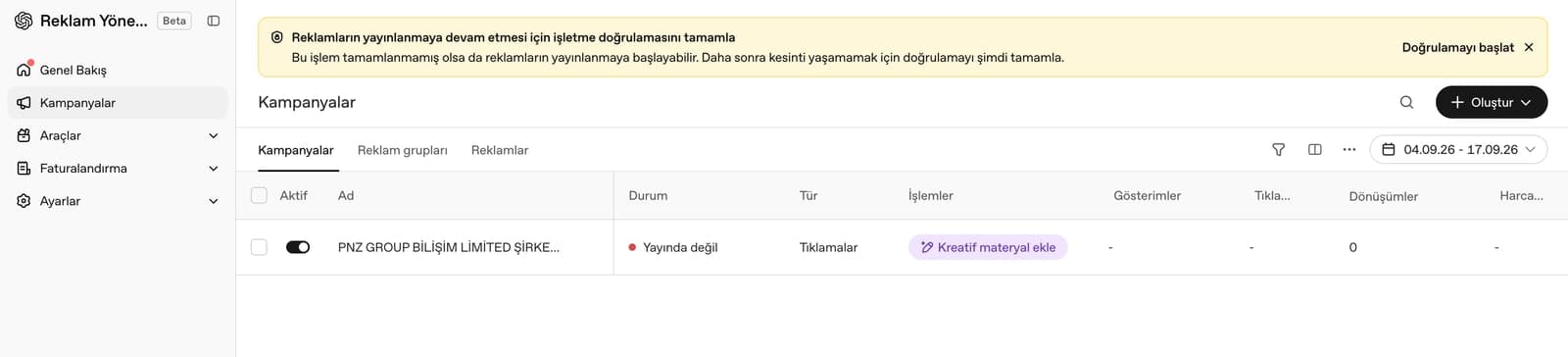
- A yellow banner sits above the campaign list: "Complete business verification so your ads can keep running. Your ads may start running even if this is not completed. Complete verification now to avoid interruptions later." A "Start verification" link appears on its right.
- The left menu shows Overview, Campaigns, Tools, Billing and Settings. In the campaign row the status reads "Not running", the type "Clicks", and the actions column "Add creative".
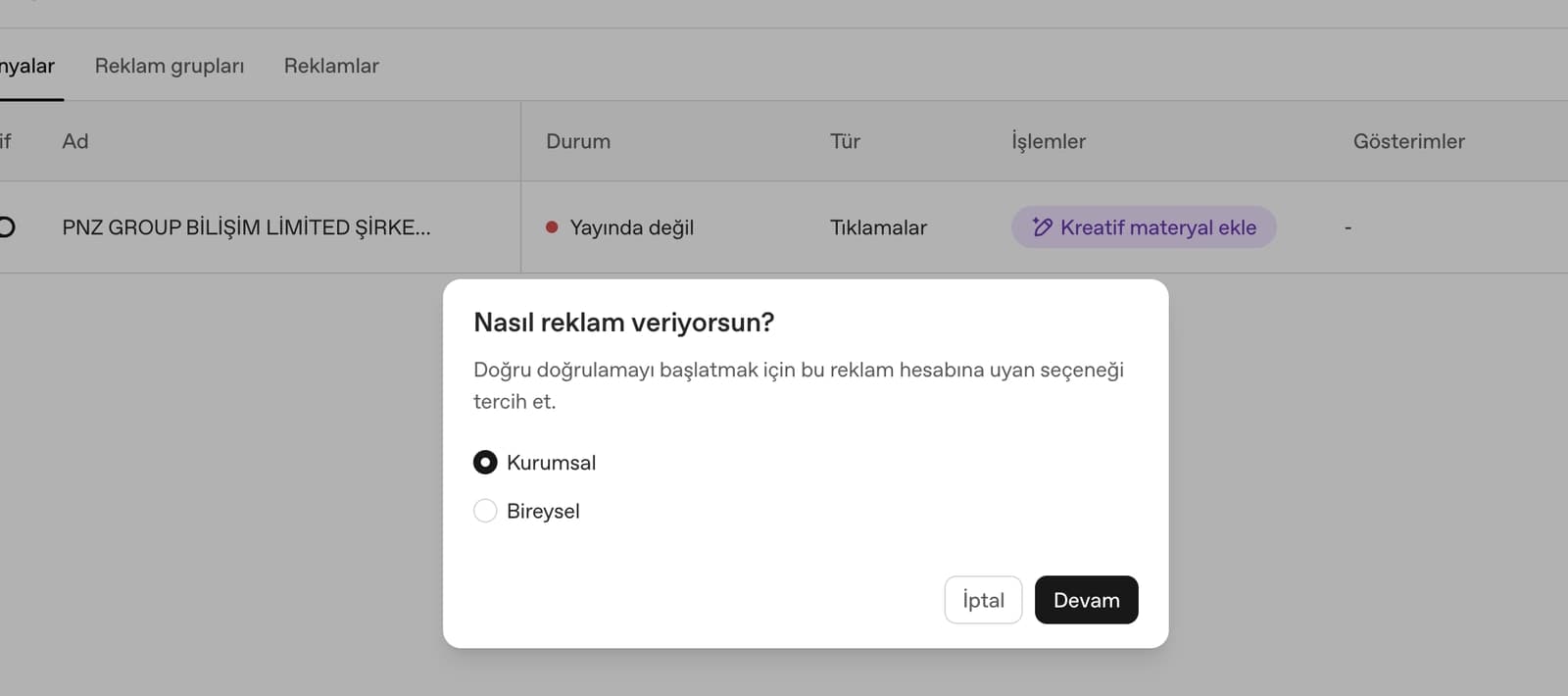
- "Start verification" opens a dialog: "How do you advertise? Choose the option that fits this ad account to start the right verification." The options are Business and Individual, with Cancel and Continue buttons.
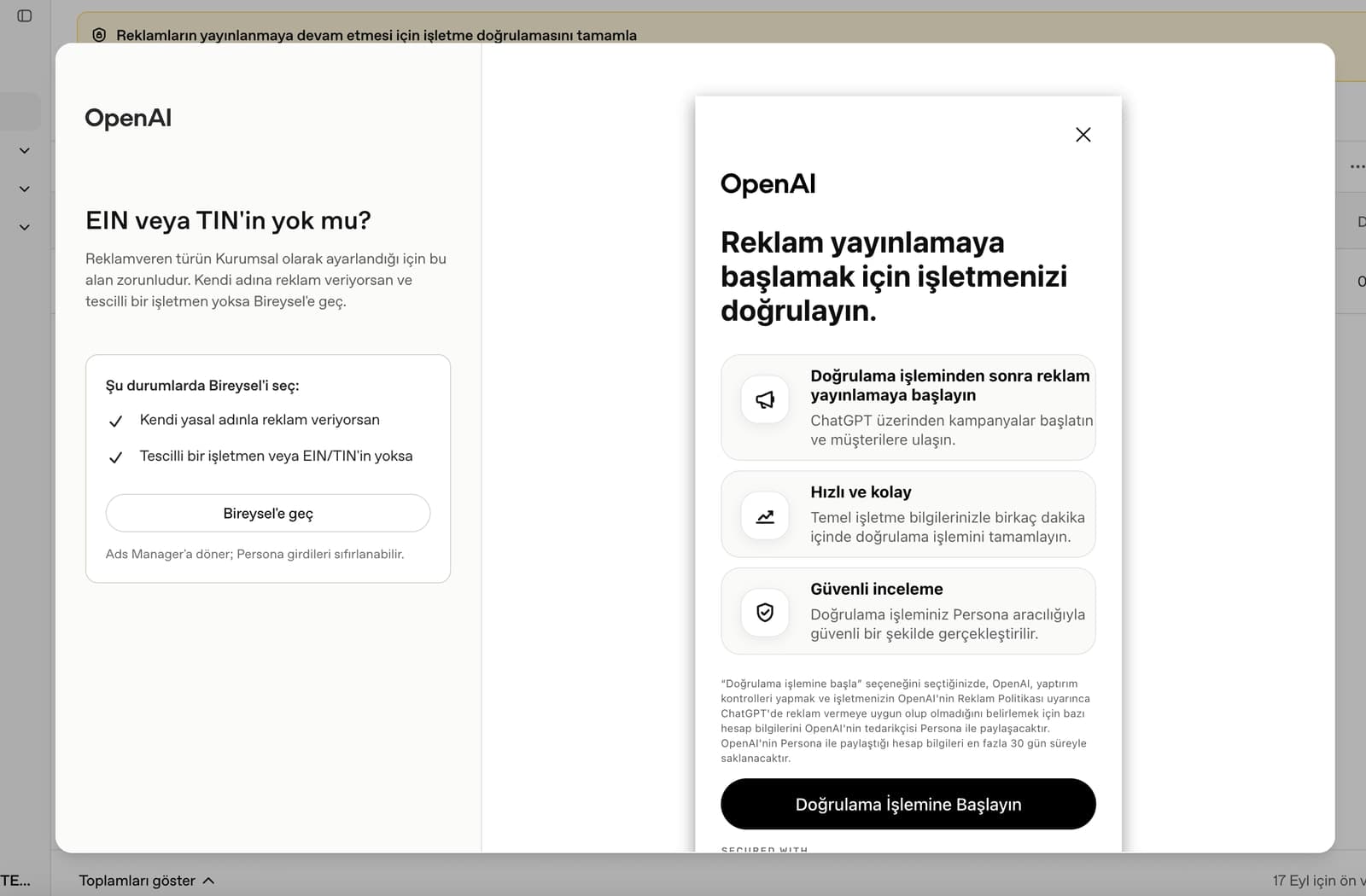
- Choosing Business opens an OpenAI screen: "Verify your business to start running ads." Three points follow: launch campaigns on ChatGPT after verification, complete verification in a few minutes with basic business details, and a secure review through Persona.
- The notice on the same screen says that when you choose to start verification, OpenAI shares some account information with its vendor Persona to run sanctions checks and to determine whether the business is eligible to advertise on ChatGPT under the Ad Policy; this information is kept by Persona for up to 30 days. The button reads "Start verification".
- A help box on the left of the screen asks "No EIN or TIN?" The field is required for the Business type. For people who advertise under their own name and have no registered business there is a "Switch to Individual" button, with the note "Returns to Ads Manager; Persona entries may be reset."
We have not yet seen, for a company in Turkey, the forms inside Persona, the document types requested, how long verification takes or how the result is communicated. Once we complete this stage we will add it to this section with screenshots; until then the "commonly requested" section below is sourced general information only.
How to Complete Business Verification in a ChatGPT Ads Account: Step by Step
Short answer: click "Start verification" in the yellow banner in Ads Manager, choose the type that fits your account, move from the OpenAI screen into the Persona flow and enter your business details exactly as they appear in official records. The first steps we saw, followed by the order OpenAI recommends, look like this:
- Open the Campaigns screen in Ads Manager and click "Start verification" in the yellow banner at the top.
- In the "How do you advertise?" dialog, choose Business if you have a registered company and click Continue.
- Read the notice on OpenAI's "Verify your business to start running ads" screen and press "Start verification".
- Enter the requested details in the Persona flow. The EIN or TIN field is required for the Business type; the equivalent for a company in Turkey is its 10-digit VKN (we have not yet seen how the form handles this number).
- If requested, upload current official documents and information showing you are authorized; if you leave before finishing, OpenAI recommends returning to the flow from Ads Manager.
- After submitting, watch the account status and your email; do not submit a second application or open a second ad account with the same details.
| Screen | Text or option we saw | What to do |
|---|---|---|
| Campaigns | Yellow banner + "Start verification" | Start before launching the campaign |
| Type selection | Business / Individual, Cancel / Continue | Business for a registered company |
| OpenAI notice | "Start verification", Persona, 30-day retention | Read the notice and continue |
| Help box | "No EIN or TIN?", "Switch to Individual" | Stay on Business if your VKN is ready |
| Persona forms | Not seen yet | Enter details exactly as in official records |
OpenAI's account setup article says that duplicate or inconsistent information can slow review, that duplicate applications and extra accounts do not bypass review, and that review cannot be expedited. Complete the preparation section below before you start.
Business or Individual? Choosing the Right Option

According to the panel's own guidance, Individual is for people advertising under their own legal name and for those without a registered business or an EIN/TIN. The tax ID field is required for the Business type. If you switch from the Business flow to Individual, you are sent back to Ads Manager and your Persona entries may be reset, so choosing the right type first saves time.
One contradiction is worth noting: OpenAI's account setup article says Ads Manager supports eligible business advertiser accounts and that individual advertiser onboarding and agencies creating accounts on a client's behalf are not supported. Our panel, however, showed an Individual option. Until it is clear which accounts the Individual path is open to, we recommend continuing with Business if you have a company registered in Turkey. For agencies, the article says the client should create its own account and invite the agency afterwards.
| Your situation | Suggested choice | Note |
|---|---|---|
| Limited or joint-stock company | Business | Have the VKN and registered legal name ready |
| Sole proprietorship (taxpayer) | Not clear yet | For individuals the tax number is the national ID number; we have not seen how the form handles it |
| Advertising under own name, no registered business | Individual (panel guidance) | The Help Center says individual onboarding is not supported |
| Agency working for a client | Client opens its own account | The agency is invited afterwards |
What Is Persona and What Is Commonly Requested?
Persona is an identity verification company founded in 2018 and headquartered in San Francisco (Persona Identities, Inc.). It helps businesses verify their customers online, and LinkedIn also uses Persona as its partner for profile identity verification. The OpenAI text on our screen stated clearly that ad account verification is carried out through Persona.
OpenAI's verification article lists what to have ready for business verification as follows. This list is not specific to ads; it describes business verification across OpenAI, so read it as "commonly requested":
- Your organization's legal name exactly as it appears in official records.
- Your current registered or operating address and contact information.
- A tax identifier, business registration number or equivalent official identifier, if requested.
- Accurate information about your organization's activities or intended use of OpenAI.
- Clear, complete and current official business documents, plus information showing you are authorized to complete verification, if requested.
According to the same article, the review may include checks against official business registration or tax records, document verification and compliance or risk screening. OpenAI may approve the submission, decline it or request additional information. Persona's own know-your-business (KYB) product generally covers business registry verification, tax number and VAT checks, corporate document retrieval and checks on ultimate beneficial owners; Persona says it connects to registries in more than 150 countries.
We do not know which Persona steps OpenAI uses for ad verification. The list above comes from OpenAI's general verification article and Persona's general product description; we will document exactly which documents are requested from a Turkish company once we finish verification.
Preparing a Company in Turkey: VKN, Legal Name and Documents

An EIN is the US employer identification number; TIN is the general term for a taxpayer identification number. According to the Turkey document that Turkey's Revenue Administration submitted to the OECD, legal entities are given a 10-digit tax identification number, which is different from the 11-digit national identity number. So for a company in Turkey the TIN equivalent is the 10-digit VKN. The same document says that since July 1, 2006, Turkish citizens use their national identity number as their tax identification number.
The most common mistakes when entering the legal name are abbreviations and character differences. OpenAI asks for the name exactly as it appears in official records. Article 43 of the Turkish Commercial Code requires the words "anonim şirket" (joint-stock company) or "limited şirket" (limited company) in the trade name, and they cannot be abbreviated if the name contains a real person's name. Practical rule: enter the name letter for letter as it appears on your tax certificate and in your Trade Registry Gazette notice. The same applies to the address, which should match the trade registry record.
| Document or detail | What it shows | Where to get it |
|---|---|---|
| Tax certificate (vergi levhası) | Legal name, address, VKN, tax office, activity code | Revenue Administration online tax office or the e-Devlet tax certificate service; its approval code replaces certification |
| Turkish Trade Registry Gazette | Notices on incorporation, officers, address and capital | TOBB's ticaretsicil.gov.tr site or the e-Devlet service |
| Activity certificate (faaliyet belgesi) | That the company is registered with and active in its chamber | Your chamber of commerce; the Istanbul Chamber of Commerce also issues it in English |
| Signature circular or signature declaration | People authorized to sign for the company | Notary; the signature declaration can also be issued at the trade registry via MERSIS |
| MERSIS number | Unique 16-digit company number | Ministry of Trade service on e-Devlet or the MERSIS Mobile app |
We have not yet seen any of these documents requested in ad verification; we list them so they are ready if requested. Keep the documents current, legible and as full-page PDFs in one folder. Corporate taxpayers print a new tax certificate every May, so check that yours shows the latest period.
We found no official information that OpenAI or Persona requires sworn translations or an apostille for Turkish documents. If an English document is requested, it helps to know that some chambers, such as the Istanbul Chamber of Commerce, issue the activity certificate directly in English.
8 Ready-to-Use Prompts to Prepare for Business Verification
The prompts below help you check that the details in your documents are consistent and prepare an English description if requested. They are written in Turkish for companies in Turkey and work in ChatGPT, Gemini or Claude. Fill in the square brackets. Do not paste personal data such as national ID numbers, ID photos or signatures into the chat; mask numbers where needed.
1) Legal name and address consistency check
Sen dikkatli bir kurumsal evrak kontrol uzmanısın.
Aşağıda şirketimin farklı kaynaklarda yazılan unvanı ve adresi var.
Vergi levhasında: [unvan] / [adres]
Ticaret Sicili Gazetesi ilanında: [unvan] / [adres]
Web sitemizin künyesinde: [unvan] / [adres]
Bunları harf harf karşılaştır; büyük-küçük harf, Türkçe karakter, kısaltma (Ltd. Şti., A.Ş.), noktalama ve boşluk farklarını tablo halinde listele.
Resmî kayıttaki yazımı esas alarak doğrulama formuna girilmesi gereken tek bir unvan ve adres öner.
Emin olmadığın noktayı tahmin etme, "kontrol et" diye işaretle.2) Business activity description (English)
You are a business writer helping a Turkish company complete an advertiser verification form.
Company: [şirket unvanı], based in [şehir], Türkiye.
What we do: [faaliyetin Türkçe özeti].
What we will advertise on ChatGPT: [ürün veya hizmet].
Write a factual English description of our business activities in 3 to 4 sentences (max 500 characters).
Do not add claims, awards, numbers or customer names that I did not give you.
Then give the Turkish translation so I can check the meaning.3) Document content summary
Sen bir şirket evrakı asistanısın.
Aşağıya vergi levhamızdaki bilgileri kişisel veri içermeyecek şekilde yapıştırıyorum:
[unvan, vergi dairesi, VKN, adres, ana faaliyet kodu ve adı, işe başlama tarihi]
Bu bilgileri "Alan | Türkçe değer | İngilizce alan adı" sütunlu bir tabloya dök.
İngilizce alan adlarını uluslararası formlarda geçen karşılıklarıyla yaz (ör. Tax Identification Number, Registered Address).
Değerleri çevirme veya değiştirme; unvan ve adres olduğu gibi kalsın.
Sonunda bu tablonun resmî çeviri olmadığını not düş.4) Address format check
Şirket adresim resmî kayıtta şöyle yazıyor: [adres].
Bir yabancı platformun formunda Adres satırı 1, Adres satırı 2, Şehir, İl/Bölge, Posta kodu ve Ülke alanları var.
Adresi bu alanlara nasıl böleceğimi göster.
Kurallar: resmî kayıttaki kelimeleri değiştirme, kısaltma ekleme veya çıkarma yapma.
Türkçe karakterleri koru; form Türkçe karakter kabul etmezse hangi harflerin nasıl yazılacağını ayrıca listele.
Posta kodunu bilmiyorsan uydurma, "PTT posta kodu sorgusundan kontrol et" yaz.5) Ad policy pre-check
Sen reklam platformu politikalarını bilen bir danışmansın.
İşletmem: [sektör], sunduğum ürün veya hizmet: [ürün/hizmet], hedef kitle: [kitle].
ChatGPT reklamlarında finans, sağlık, hukuk gibi kısıtlı veya yasaklı kategorilere girme ihtimalimi değerlendir.
Her risk için: neden risk olduğu, hangi ek doğrulama veya inceleme çıkabileceği ve reklam metninde nelerden kaçınmam gerektiği.
Politikanın güncel metnini bilmediğin yerde tahmin etme; "OpenAI reklam politikasından kontrol et" diye yaz.
Bu bir hukuki görüş değildir.6) Website trust check
Sen bir web sitesi denetçisisin.
Sitem: [site adresi]. Reklamda kullanacağım açılış sayfası: [sayfa yolu].
Aşağıya sitenin iletişim ve künye sayfasındaki metni yapıştırıyorum:
[metin]
Bir reklam platformunun işletmemi doğrularken bakabileceği bilgileri kontrol et: ticaret unvanı, MERSİS numarası, adres, telefon, e-posta, gizlilik politikası, iade veya hizmet koşulları.
Eksik olanları ve resmî kayıtla çelişen yerleri madde madde yaz, her biri için eklenecek örnek metni ver.7) Reply draft for an information request
Write a short, polite English email to the ChatGPT Ads support team ([email protected]).
Context: Our company [şirket unvanı], based in Türkiye, started business verification in Ads Manager on [tarih].
Situation: [ör. we were asked for additional information / the status has not updated / verification failed].
Our advertiser account name: [hesap adı]. Do not include any ID numbers.
Ask what information or document is needed and confirm that our legal name matches our Turkish tax certificate and trade registry records.
Keep it under 120 words, no exaggeration, no urgency pressure.8) Short version: preparation checklist
Türkiye'de kayıtlı [şirket türü, ör. limited şirket] olarak ChatGPT reklam hesabında işletme doğrulaması yapacağım.
Başlamadan önce kontrol etmem gereken bilgi ve belgeleri 10 maddelik bir kontrol listesi olarak yaz.
VKN, unvanın birebir yazımı, adres, yetkili bilgisi ve güncel belgeleri mutlaka dahil et; bilmediğin platform kuralını uydurma.What to Do If Verification Fails or Gets Stuck
OpenAI's verification article names three common reasons for failure: information that is incomplete, inaccurate or does not match the account, organization or documents; the organization not meeting current eligibility requirements; and a technical issue during submission. According to the article, verification results cannot be manually overridden and additional details about a specific decision are not available. If you are not approved, you can keep using OpenAI with your existing access.
- First compare the legal name, address and tax number with your documents letter by letter again; the most common mismatch comes from abbreviations and Turkish characters.
- If you left the flow halfway, return to it from the link in Ads Manager; do not open a new account.
- If additional information is requested, send only the requested document, current and legible.
- If the status does not update, write to the ChatGPT ads support address ([email protected]) with your account name.
- If you are in a restricted category such as finance, health or legal services, expect that the ad policy may require enhanced verification or manual review.
Is Persona Identity Verification Safe?
According to Persona's privacy policy dated April 9, 2026, the company acts as a processor on behalf of the customer that contracts its verification service; it says it does not use personal data for AI or model training and does not sell it. It states that, subject to the customer's retention period, it permanently destroys ID and selfie scans upon completion of verification or within three years of your last interaction, stores such data encrypted and primarily uses data centers in the United States and Germany. Its security page lists SOC 2 Type II and ISO 27001 certifications.
On the ads side, the OpenAI text on our screen said account information shared with Persona is kept for up to 30 days. Persona asks people to exercise privacy rights through the customer they have a direct relationship with, which here is OpenAI. If information about authorized officers will be shared, we recommend reviewing the transfer with your company's data protection (KVKK) officer first.
ChatGPT Ads Business Verification: Frequently Asked Questions
According to OpenAI's FAQ, ads may not serve if your account has not been verified. On September 17, 2026, our panel said ads may start without verification but that it should be completed now to avoid interruptions.
OpenAI does not publish a timeframe and says it cannot expedite reviews. Our screen said it can be completed in a few minutes with basic business details; we will see when the result arrives during our own verification.
Persona is an identity and business verification company founded in 2018 and headquartered in San Francisco. OpenAI's ad account screen states that business verification is carried out through Persona.
Persona says it does not use data for model training or sell it, stores ID scans encrypted and deletes them within three years at most, and holds SOC 2 Type II and ISO 27001 certifications. For ad accounts, the OpenAI screen says account information shared with Persona is kept for up to 30 days.
For companies in Turkey the TIN equivalent is the 10-digit tax identification number (VKN). For individuals, the national identity number serves as the tax number. We will add how the form handles these numbers once we finish verification.
It is not clear yet. The panel directs people without a registered business to the Individual option, while the OpenAI Help Center says individual advertiser onboarding is not supported. We will update this answer as the situation for sole proprietors becomes clear.
They are described in the same umbrella article but differ in scope. On the API side identity verification may also be required for some models; according to OpenAI, ads currently require business verification only. Approval for one product does not necessarily activate another.
We are updating this guide screen by screen as we complete verification. When Persona forms, requested documents, timing and results are added, the update date at the top of the article will change.
Business verification in a ChatGPT ads account is a new step for companies in Turkey, but not one to postpone. Start verification from the yellow banner right after setting up your campaign, choose Business if you have a registered company, enter your VKN and legal name exactly as in official records, and keep your tax certificate, registry gazette notice, activity certificate and signature authority documents ready in case they are requested. PNZ Medya supports ChatGPT ad account setup, verification preparation and campaign management.
Digital Marketing and Ad Management Services
We set up your ChatGPT ad account, check your details and documents for business verification, and manage campaigns, budget and measurement together with Google Ads. To start this new channel without interruptions, get in touch now for a free consultation.