


How to Reduce Photo File Size and Resize Images: 4 Ways Without Software, 12 ChatGPT Prompts
Reducing photo size comes down to two settings: pixels and JPEG quality. We measured 12 phone photos and put the best-looking setting for 100, 200 and 500 KB limits in a table. Built-in ways on iPhone, Samsung, Windows and Mac, plus 12 ready-to-use prompts that get ChatGPT to shrink photos with code.
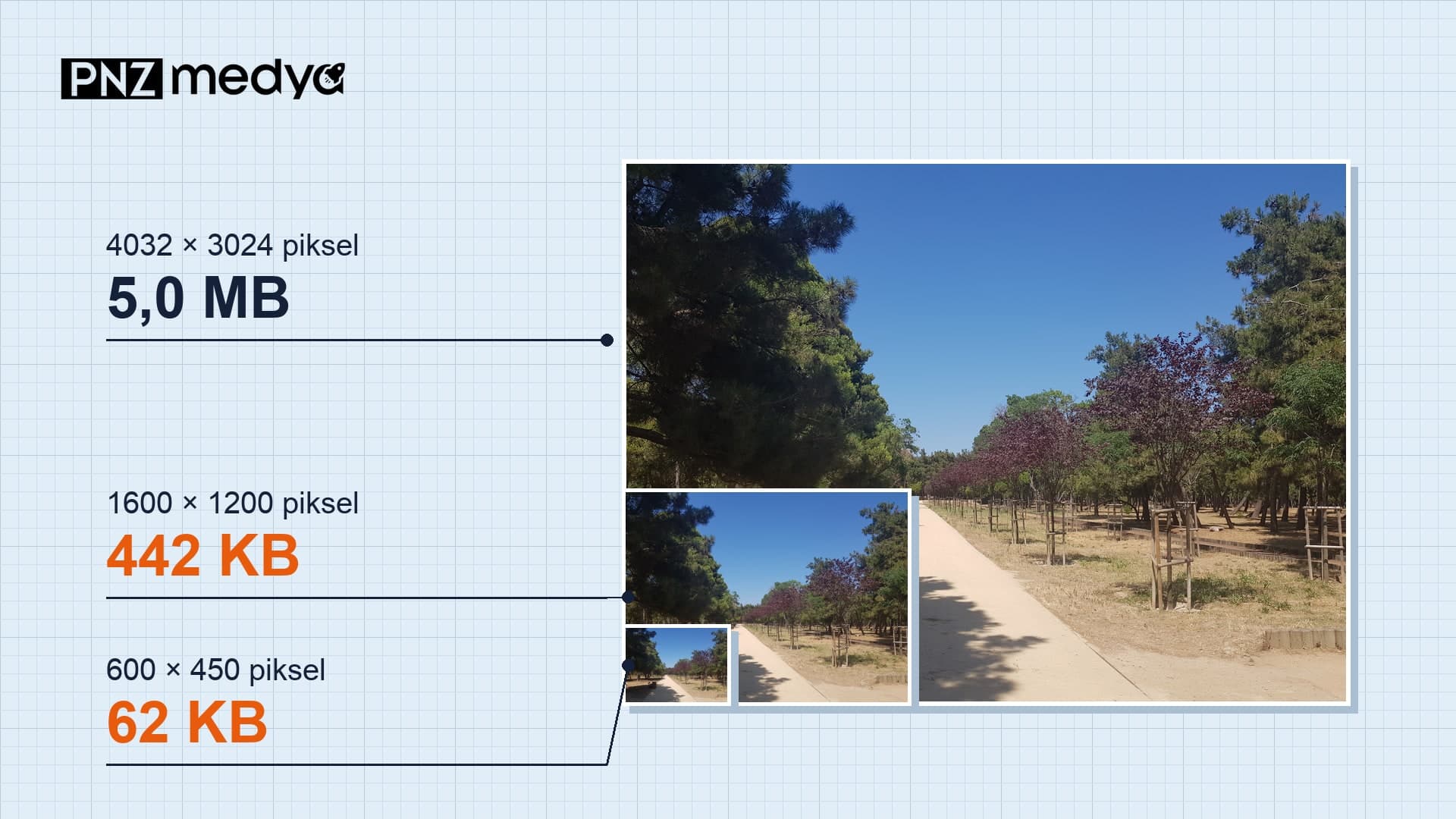
- Reducing photo size comes down to two settings: pixel dimensions and JPEG quality. Across 12 phone photos, the copy with a 1600-pixel long edge at quality 85 went from a median of 3.4 MB to 416 KB.
- At a tight limit like 100 KB, 1600 or 1080 pixels gave the best result. Dropping to 800 pixels gave the worst-looking result on screen, even though the quality stayed at 78.
- Every device has a way that needs no extra software: Shortcuts on iPhone, Gallery on Samsung, Paint and PowerToys on Windows, Preview on Mac.
- Ask ChatGPT to shrink the photo with code; if it redraws it, faces and text can change. The 12 prompts below cover KB limits, exact pixels, cm sizes, batch resizing and removing location data.
The application form says "max 200 KB," and the photo on your phone is 3.4 MB. Reducing photo size takes two settings: lowering the pixels (width × height) and lowering the JPEG quality. Most jobs need both. In our measurement, dropping only the quality to 60 got just half of the 12 photos under 1 MB.
On November 20, 2026, we took 12 phone photos from Wikimedia Commons (4032 × 3024 pixels, 1.4 to 5.8 MB, median 3.4 MB) and re-saved them with 25 different settings. The copy with a 1600-pixel long edge at quality 85 came out at a median of 416 KB, so the file got 88% smaller. Viewed at phone screen width (1080 pixels), its similarity score against the original was 0.993. A score of 1 would mean the two images are identical.
These are our own numbers: the 12 photos were re-saved as JPEG with Pillow, Python's widely used image library, and similarity was measured with SSIM. None of the photos show human faces, and all are freely licensed. This time we did not put the prompts through a measured test in ChatGPT or Gemini. ChatGPT's file limits come from OpenAI's help page and the device steps from Apple, Samsung and Microsoft documentation, all read on November 20, 2026.
How to Reduce Photo Size: Adjust Pixels and Quality Together
Pixels tell you how many dots make up the photo; KB and MB tell you how much disk space it takes. Centimeters only matter in print: a 3.5 × 4.5 cm ID photo printed at 300 DPI is 413 × 531 pixels. If a form says "max 200 KB," it is checking file size; if it says "600 × 600 pixels," it is checking dimensions. Some forms ask for both.
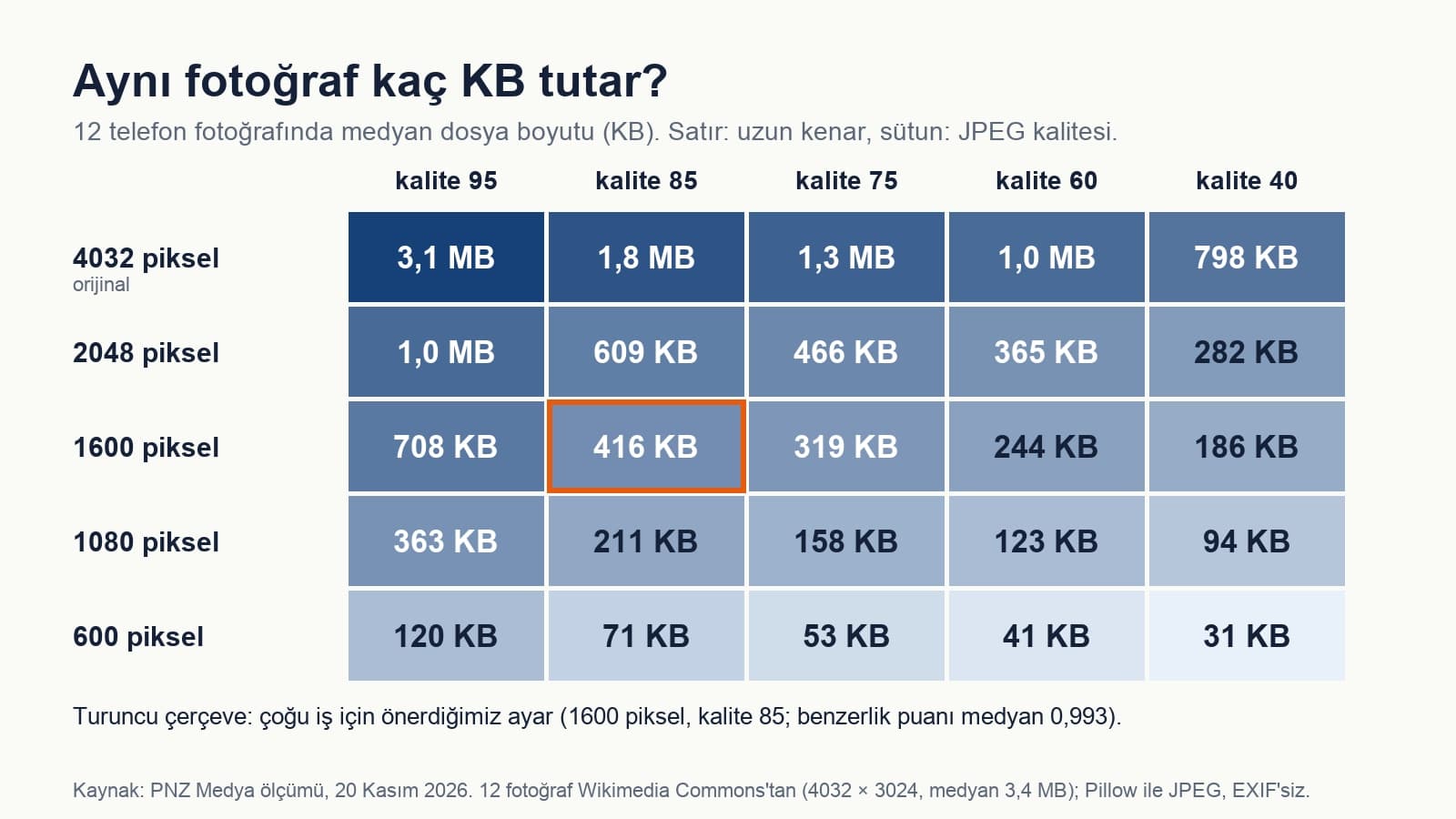
| Target | Long edge | JPEG quality (median, range) | Similarity (median) | Note |
|---|---|---|---|---|
| Under 100 KB | 1600 pixels | 15 (8-52) | 0.931 | 1080 pixels works just as well: quality 44 (24-81), similarity 0.930 |
| Under 200 KB | 1600 pixels | 45 (21-83) | 0.979 | 1600 pixels gave the best result for 9 of the 12 photos |
| Under 500 KB | 1600 pixels | 89 (71-95) | 0.994 | 2048 pixels also works: quality 77, similarity 0.994 |
| Under 1 MB | 2048 pixels | 85 | 0.996 | 11 of the 12 photos fit, median 609 KB |
| 1080 pixels wide | 85 | 0.973 | Median 211 KB; Instagram scales anything wider down to 1080 anyway | |
| Exact size, e.g. 600 × 600 | 600 pixels | 85 | not measured | Median 71 KB; crop first to get a square |
How to Reduce a Photo to 100 KB: Lower the Pixels or the Quality?
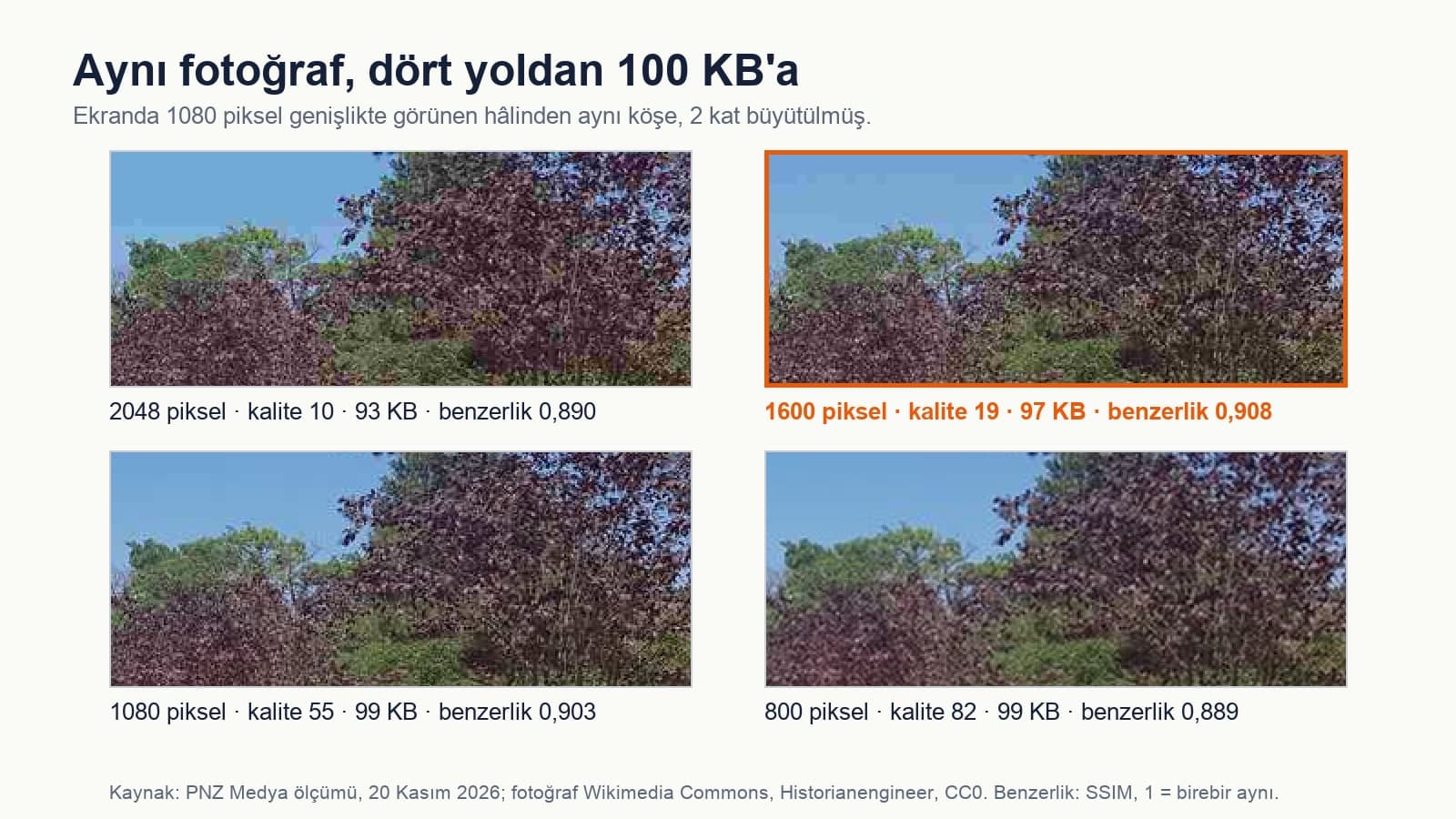
The most striking result came at the 100 KB target. We took the same file under 100 KB four ways. At 2048 pixels the quality had to drop to 9, at 1600 to 15, at 1080 to 44; at 800 pixels it could stay at 78. The best-looking results on screen were 1600 and 1080 pixels (similarity 0.931 and 0.930). 800 pixels came last at 0.908 despite having the highest quality: the phone enlarges it to fill the screen, and the image goes soft.
One more warning: converting a photo to PNG makes the file bigger. Saved as PNG, the 1080-pixel copies came to a median of 1.3 MB, 6.2 times the size of a quality 85 JPEG at the same dimensions. PNG suits screenshots, logos and flat-color drawings.
Reduce Photo Size Without Software: iPhone, Samsung, Windows, Mac
| Device | Where | What you set | Note |
|---|---|---|---|
| iPhone, iPad | Shortcuts app: add the Resize Image action to a new shortcut | Width or height; the other is calculated to keep the ratio | If you show the shortcut in the Share sheet, it runs from the photo with one tap |
| Samsung Galaxy | Gallery > photo > Edit > three-dot menu > Resize | Size as a percentage; the result is saved as a copy | According to Samsung, available on Android 10 and later |
| Windows | Paint: Home > Resize (Ctrl + W). For many files, Image Resizer in Microsoft PowerToys | Pixels or percentage; PowerToys also sets JPEG quality and can remove metadata | PowerToys is installed separately; it shows up in the menu when you right-click files |
| Mac | Preview: Tools > Adjust Size | Width, height or percentage; the new file size appears at the bottom of the window | You can select several images in the sidebar and resize them together |
If you need to shrink dozens of photos on Windows, PowerToys Image Resizer does it in one go. According to Microsoft's documentation, you can enter sizes in pixels, percent, centimeters or inches, and there are three fit modes: Fill fills the box and crops whatever spills over, Fit fits the image without cropping, and Stretch ignores the aspect ratio and stretches the image. Choose Fill if the form wants exact dimensions and Fit if you want the whole photo to show; Stretch distorts faces.
An iPhone photo may be HEIC instead of JPEG. According to Apple's support page, HEIF compresses better than JPEG and takes up less space at the same quality, while some application forms only accept JPG. If you choose Settings > Camera > Formats > Most Compatible, new photos are taken as JPEG. To convert a HEIC file you already have, open it in Preview on a Mac and save it as JPEG from File > Export.
How to Reduce Photo Size with ChatGPT: 12 Ready-to-Use Prompts
According to OpenAI's help page, ChatGPT can write and run Python code for some tasks and work with files uploaded to the conversation. That is exactly what photo resizing needs: the model should shrink the photo with code, without redrawing it. Every prompt below asks for this explicitly and requires the result to be reported in pixels and KB. That makes it easier to hit a limit like "max 200 KB" through trial and error.
Limits: according to OpenAI, a single image can be up to 20 MB, and the free plan allows 3 file uploads per day. If you have many photos, send them all in one ZIP file; with data analysis turned on, ChatGPT can open the ZIP and work with the files inside.
If the model uses its image generation tool instead of code, faces, text and small details can change. If the reply has no pixel and KB figures, or the photo looks different to you, send the fix in prompt 12. In the Gemini app, editing is done with the Nano Banana model and the result is a newly generated image; according to Google's help page, accounts without a plan download it at 1K resolution and accounts with a Google AI plan at 2K. If you need a specific KB or pixel size, ChatGPT's code route or the tool on your device is more reliable.
1. Get under a KB limit
Reduce the photo I uploaded to under [200] KB.
Do not redraw the photo or generate a new image; only resize and compress it with Python (Pillow).
First reduce the long edge to [1600] pixels, then set the JPEG quality to the highest value that stays under the limit. If the quality would have to drop below 40, stop and suggest reducing the long edge instead.
At the end, write the file's pixel dimensions, its size in KB and the quality you used; give me the file as a downloadable JPG.Fill in the square brackets with the value your form asks for. For a tight limit like 100 KB, set the long edge to [1080]; in our measurement 1600 and 1080 pixels gave almost the same result.
2. Short version
Shrink this photo with code: max [500] KB, JPG. Do not redraw it. Write the pixel and KB values of the result and give me a download link.3. Exact pixels and a square
Make this photo exactly [600 × 600] pixels and at most [240] KB. Work in Python and do not regenerate the photo.
You will need to crop it to make it square: first tell me where the face or main subject is, describe the area you would crop and wait for my approval.
Once I approve, crop it, set the dimensions and bring the JPEG quality to the highest value that stays under the limit. Write the final file's dimensions and KB value.4. Resize by centimeters and DPI
Prepare this photo for a [3.5 × 4.5] cm print at [300] DPI.
First calculate the pixel dimensions needed and show the calculation (cm ÷ 2.54 × DPI).
Then bring it to those dimensions with Python. If the aspect ratio does not match, do not stretch the photo; crop equally from the top and bottom. Write [300] DPI into the file.
Write the file's pixel dimensions, its KB value and the part you cropped.By this calculation, 3.5 × 4.5 cm at 300 DPI comes to 413 × 531 pixels. If you plan to make your own ID photo with AI, we collected the rules official agencies have on digitally altered photos in our ID photo post.
5. Change the aspect ratio without cropping
Change this photo to a [4:5] ratio without cropping ([1080 × 1350] pixels for Instagram).
Add [white / the dominant color in the photo] padding to the missing edges; do not touch the photo itself and do not draw anything new.
Do it with Python, use JPEG quality [85] and give me the result as a download.Filling the edges with more of the scene instead of a flat color is a different job: then the photo is expanded with AI, and everything at the edges is newly generated.
6. Batch resize (ZIP)
Shrink all the photos in the ZIP file I uploaded with the same settings: long edge [1600] pixels, JPEG quality [85], each one at most [500] KB.
Keep the file names and add [-small] to the end. Apply the EXIF rotation data so portrait photos do not end up sideways.
When you are done, give me each file's old and new KB values as a table and make them all downloadable as a single ZIP.7. Convert HEIC to JPG
Convert the HEIC photo I uploaded to JPG and make it at most [1] MB.
If the HEIC file does not open in the Python environment, do not give me a made-up output; tell me it did not open and I will convert it to JPG on my phone.
If it opens, reduce the long edge to [2048] pixels, set the quality to fit the limit and write the result in KB.8. Screenshot with readable text
Get this screenshot under [300] KB but keep the text readable.
Try two ways with Python: PNG compression with fewer colors, and a quality [90] JPEG. Give me whichever is smaller, as long as the text edges have no smudges.
Do not take the width below [1280] pixels. Write the format you chose and the KB value.9. Shrink and remove location data
Before I share this photo, shrink it and clean out the data stored in it.
With Python, first list what is in the EXIF: GPS location, capture date, phone model. Then delete all of it (apply the rotation data, then drop it) and save the photo as a JPEG with a [1600]-pixel long edge at quality [85].
Check that no EXIF is left in the new file and write the result.5 of the 12 photos we measured had GPS location data. If a resizing tool copies the EXIF into the new file, the location goes along with it; this prompt deletes it explicitly.
10. Three sizes for email
Make three copies of this photo: small (long edge [800] pixels), medium ([1600] pixels), large ([2560] pixels); all as quality [85] JPEG.
Do not redraw the photo, only shrink it with code. Give me the pixel and KB values of each copy as a table and make all three downloadable in one ZIP.11. Website and product images
Prepare these product photos for my website: width [1600] pixels, each under [200] KB, in both JPG and WebP.
Make the file names lowercase, with no accented or special characters, and with hyphens (e.g. [red-mug-1.jpg]).
Do not change the color or sharpness, and do not add anything new. Give me a table with the format, pixels and KB for each file.Image weight on a site feeds straight into page load time. On our own blog we use a 300 KB target and a 500 KB ceiling for every image; the images in this post are between 156 and 300 KB.
12. Fix it in the same chat
I checked the file you gave me: [it is still 230 KB / the face is blurry / the photo looks changed].
Do not regenerate the photo; start from the file I uploaded first and work in Python.
[To hit the limit, reduce the long edge to 1080 pixels / do not lower the quality below 60].
Show me the code you used too, and write the result in pixels and KB.Instagram Photo Size: 1080 Pixels Wide
Uploading a 4032-pixel file to Instagram gains you nothing. According to Instagram's help page, photos are uploaded at a width of up to 1080 pixels; if the aspect ratio is not between 1.91:1 and 3:4 the photo is cropped, and if it is narrower than 320 pixels it is enlarged. For a portrait post, 1080 × 1350 pixels (4:5) falls within this range.
If you share a photo at a higher resolution, we size it down to a width of 1080 pixels.
Lower the pixels and the JPEG quality together. Across 12 phone photos, the copy with a 1600-pixel long edge at quality 85 went from a median of 3.4 MB to 416 KB and stayed very close to the original on screen (similarity 0.993).
On iPhone, the Resize Image action in the Shortcuts app; on Samsung, Gallery > Edit > three-dot menu; on Windows, Paint (Ctrl + W); on Mac, Preview > Tools > Adjust Size. None of them needs extra software; for batch jobs on Windows there is Microsoft's free PowerToys tool.
Reduce the long edge to 1600 or 1080 pixels and set the quality to the highest value that stays under the limit. In our measurement, 1600 pixels needed a median quality of 15 and 1080 pixels needed 44; both looked the same on screen. Going down to 800 pixels gave the worst result.
On a phone screen you usually will not notice. At 1600 pixels and quality 85, the median similarity score was 0.993. The damage becomes visible at tight limits like 100 KB and in leafy, detailed scenes.
Yes. If you ask it to process the photo with Python code, it can hit a pixel and KB target. According to OpenAI, a single image can be up to 20 MB, and the free plan allows 3 file uploads per day. If the model redraws the photo, faces and text can change; in that case, ask it again to work with code.
Divide the centimeters by 2.54 and multiply by the DPI: at 300 DPI, 3.5 × 4.5 cm is 413 × 531 pixels. Bring the photo to those pixel dimensions and save it with the DPI set to 300. Prompt 4 has ChatGPT do this calculation for you.
One last note: do not save the shrunken copy over the original file. A 1600-pixel copy prints at most 13.5 cm wide at 300 DPI; if you ever want to print the same photo for an album or a frame, you will be looking for the 4032-pixel original.
Web Design Services
We build fast-loading websites with images at the right size: every file is measured, from product photos to blog images. Let's look at your site in a free first call.