


How to Remove the Gemini Watermark: Media Watermark Setting and the Marks That Stay (2026)
Removing the Gemini watermark takes one setting: the corner logo turns off with the Settings > Media watermark toggle, but the setting doesn't apply to older images and two invisible marks stay. We tested what cropping and re-saving do to the C2PA record on 60 Gemini images, and we cover video, Flow and Turkey's ad disclosure rule.
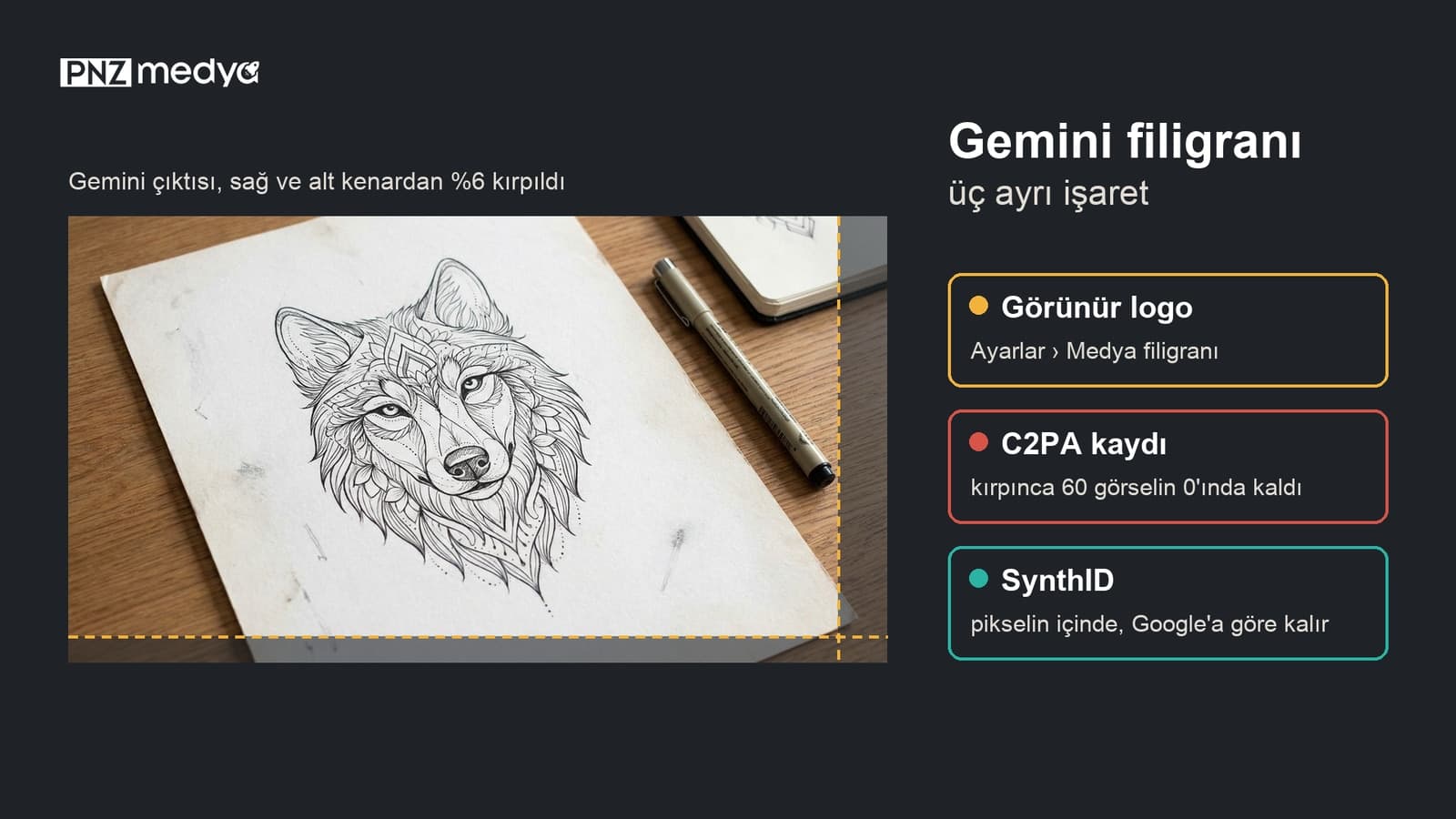
- The official way to remove the Gemini watermark is a setting: on a computer, Settings at the bottom left > Media watermark; on a phone, Menu > Settings > Media watermark. Images generated while the toggle is off don't have the corner logo.
- The setting doesn't work retroactively. According to Google's help page, the logo is added to newly created images; for an older image, your options are to regenerate it or crop the edge.
- Two invisible marks stay in place: the C2PA record in the file and SynthID embedded in the pixels. Every one of the 2,469 files we got from Gemini had a C2PA record signed by Google.
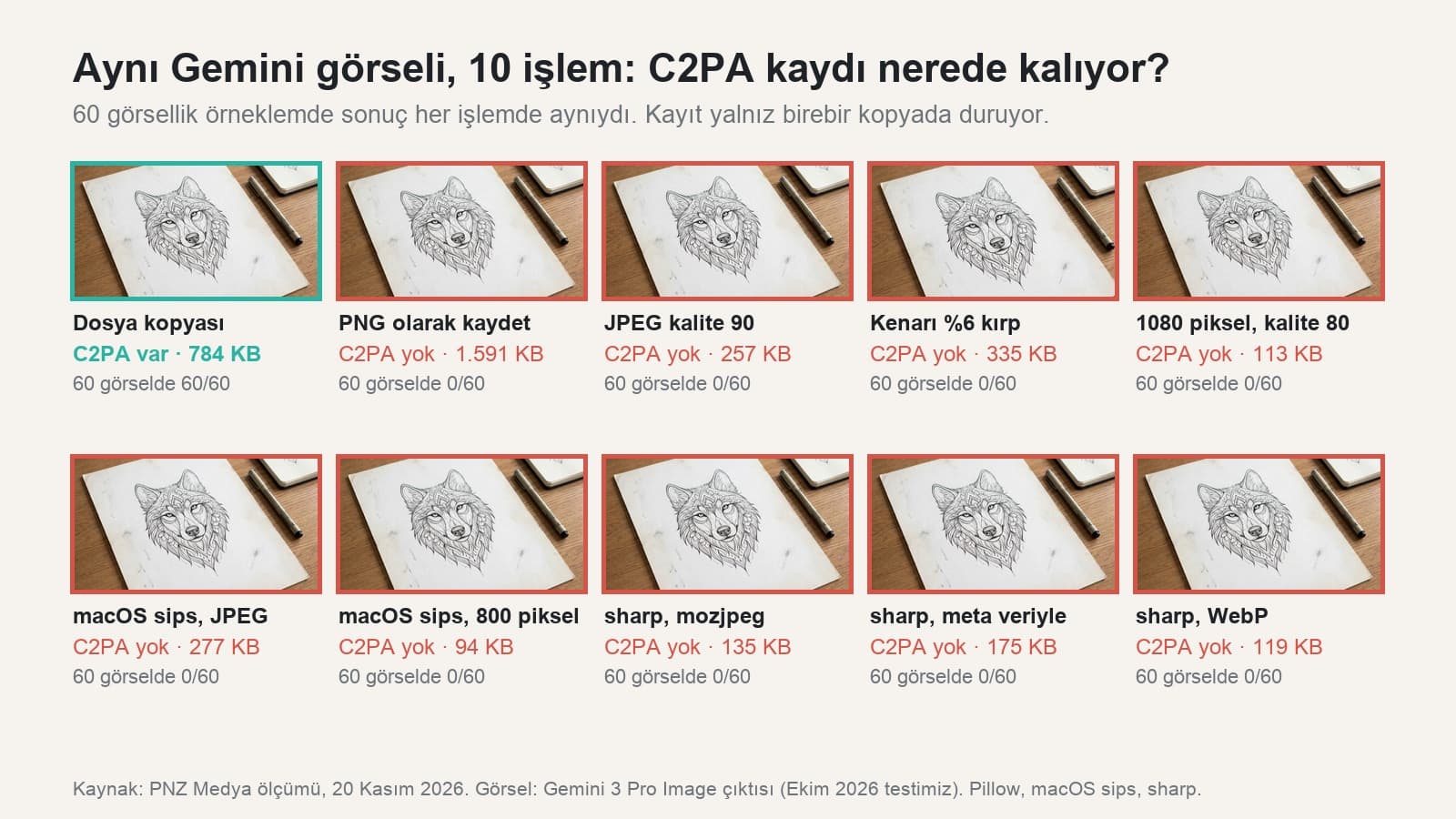
- In our 60-image test, cropping, re-saving, resizing and converting to WebP deleted the C2PA record every time; the record survived only in an exact file copy. According to Google, SynthID is still there after these edits.
- In India, South Korea and Vietnam the setting appears only with an AI Ultra subscription; the help page lists no extra requirement for Turkey. Under Turkey's advertising rules, AI content used in ads has had to be disclosed since August 1, 2026.
You don't need a separate app or website to remove the Gemini watermark. Since August 2026, the logo in the corner of images turns off with the Media watermark toggle in Gemini's settings. Once you switch it off, the images, videos and music videos you generate next carry no visible mark. Google's help page states plainly that the setting controls only this visible mark.
We checked the invisible marks in our own files. Each of the 2,469 images we pulled from the Gemini API between October 16 and November 11, 2026 for tests in our articles has a C2PA record signed by Google LLC. The record also includes the line "Applied imperceptible SynthID watermark". We copied, cropped and re-saved 60 of these files in ten different ways. The record stayed only in the exact file copy; the other nine operations removed it from all 60 files.
The sample took at most two files from each of 35 test folders: 40 JPEGs and 20 PNGs. We checked whether the file had a C2PA section; we did not separately verify the signature. The operations were done with Python's Pillow library, the macOS sips tool and the sharp library. There's no tool for measuring SynthID locally, so our statements about it come from Google's documentation. We didn't run separate tests in the Gemini app; the setting steps were read from Google's Turkish help page on November 20, 2026.
Where Is the Gemini Watermark Setting?
In the English interface the setting is called Media watermark. Short answer: on a computer, open gemini.google.com, click Settings at the bottom left and turn off the Media watermark toggle. On a phone the path is one step longer. Google also put a separate toggle in Flow; the Gemini setting doesn't apply to Flow.
| Where | Path | Note |
|---|---|---|
| Computer (gemini.google.com) | Settings at the bottom left > Media watermark, turn the toggle off | The path on the Computer tab of the help page |
| Android phone and tablet | Menu on the left > Settings > Media watermark | Same steps in the Gemini app and in the phone's browser |
| iPhone and iPad | Menu on the left > Settings > Media watermark | The help page gives the same steps as for Android |
| Google Flow | Visible watermarking toggle in the dropdown under your profile picture | Flow's own setting, independent of the Gemini toggle |
| India, South Korea, Vietnam | The setting appears only with an AI Ultra subscription | On other plans the logo is added automatically to all images and videos |
Google rolled the setting out gradually in mid-August 2026. Update the app and check gemini.google.com on a computer. If you signed in with a work or school account, try your personal account too; the help page has no separate information for those accounts. The setting applies to content generated after you turn it off.
What the Gemini Logo Setting Removes and What It Leaves
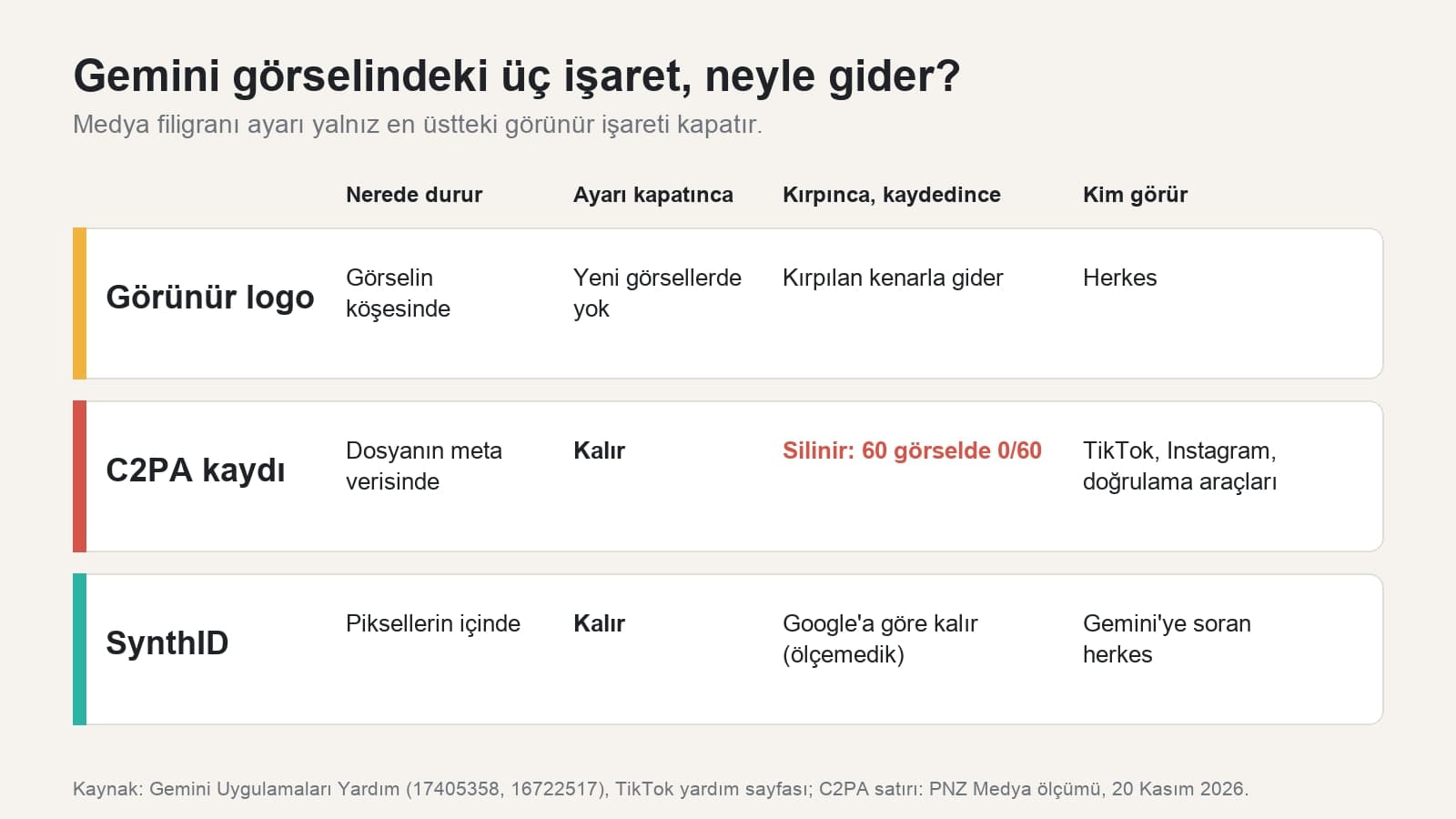
A Gemini image carries three separate marks. The visible logo sits in the corner where anyone can see it. The C2PA record (Content Credentials) is written into the file's metadata and leaves no trace in the image. SynthID is embedded in the pixels and you can't pick it out by eye. Turning off the setting removes only the first one.
This setting only controls the visible watermark. It doesn't affect SynthID watermarks or Content Credentials for media you create with Gemini Apps.
The C2PA record in our files holds a few lines of information: the signer is Google LLC, the content type is "trainedAlgorithmicMedia" (media produced by a trained model), the actions are "created" and "edited", and the edit description says the SynthID mark was applied. According to a Search Engine Journal report dated August 17, 2026, these two invisible marks are added to every file even when the visible logo is off.
What Cropping and Saving Delete: We Tested 60 Images
| Operation | Tool | C2PA record kept? (60 files) |
|---|---|---|
| Exact file copy | Copying the file | Kept in 60/60 |
| Re-saving as PNG or JPEG (quality 90) | Pillow | 0/60, deleted in both formats |
| Cropping 6% from the right and bottom edges | Pillow | 0/60 |
| Resizing: 1080 pixels at quality 80, 800 pixels | Pillow, macOS sips | 0/60 |
| Format conversion: JPEG, mozjpeg, WebP | macOS sips, sharp | 0/60 |
| Saving with metadata preserved | sharp, withMetadata option | 0/60 |
The result went one way: every operation that rewrote the image dropped the C2PA record. Even sharp's metadata-preserving option didn't carry this section into the new file. In practice, if you crop a Gemini image and share it, platforms that read C2PA records can't automatically label it as AI content. According to Google, the SynthID in the pixels can still be checked in Gemini after cropping and compression.
How to Remove the Gemini Logo from Older Images
The setting has no effect on the past. Google's page says the logo is added to newly created images, so an image you downloaded before turning off the setting keeps its logo. You have three options.
- Turn off the setting and ask for the image again in the same chat. The new generation comes without the logo. Don't expect the exact same image: faces, text and small details can change.
- If the logo sits in an unimportant corner of the image, crop that edge. Choose the crop margin based on the logo's size; in our test this also deleted the file's C2PA record.
- If cropping ruins the image, use the erase tool in your phone's photo editor. We covered the steps for each device in our article on removing text from photos.
A stock site, photographer or news agency watermark shows who owns the image. To remove it and use the image, you need permission or a license from the owner. The methods in this article are only for Gemini images you generated yourself. Think twice before uploading images to sites that call themselves "Gemini watermark remover": the file goes to a server you know nothing about.
The Logo in Gemini Videos: Same Toggle for Video and Music
The Media watermark setting covers videos too. According to the help page, while the setting is on, the logo stays as an overlay visible from start to finish in videos generated in Gemini. When you create music in Gemini, the logo appears in the video or visual player generated with the track. Videos generated after you turn off the toggle come without the logo. For the logo in a video you already downloaded, the options are the same as for images: regenerate it or tighten the frame in a video editor.
Do AI Studio and Gemini API Images Have a Logo?
The visible logo belongs to the Gemini app. We laid out the bottom-right corners of the 60 images we got from the API side by side on a single sheet and saw no visible mark on any of them. Google's API documentation, however, says every generated image contains SynthID, and all 2,469 of our files had a C2PA record. So if you work through the API, the logo isn't your concern; the two invisible marks are there as well.
Can You Tell an Image Without a Watermark Was Made With AI?
Yes, in at least two ways. The first is Gemini itself: upload the image and ask. The steps on Google's verification page are:
- Open gemini.google.com on a computer.
- Upload the image, video or audio file with the Add files button.
- Ask: "Was this image created or edited by Google AI?"
The limits are on the same page: one file at a time, up to 100 MB; video under 90 seconds, audio under one hour. In a 24-hour period you get roughly 10 image, 10 video and 10 audio checks. For now, Gemini recognizes only content made with Google's AI tools.
The second way is platform labels. According to TikTok's help page, an "AI-generated" label can be added automatically when content carrying a C2PA record is uploaded, and people who share realistic AI content are required to add this label themselves. Meta bases the "AI info" label on Instagram and Facebook on shared industry signals and on the user's own disclosure. Even if cropping deletes the C2PA record, the obligation to label is still yours.
Turkey's Advertising Rule for AI Images Without a Watermark
The help page doesn't list Turkey among the countries where the setting is restricted, so on an account in Turkey you can turn the logo off. If the image is going into an ad in Turkey, things change. An amendment published in Turkey's Official Gazette on July 1, 2026 and in force since August 1, 2026 added a new paragraph to Article 18 of Turkey's Regulation on Commercial Advertising and Unfair Commercial Practices.
Under this paragraph, if an ad uses AI in a way that could significantly affect the consumer's decision, or features digital characters that can't be told apart from humans, this must be stated clearly, understandably and distinguishably. A paragraph added to Article 27 by the same amendment bans ads that show an AI-made digital copy of a real person as if that person uses or recommends the product. If you'll use an image with the logo removed in an ad in Turkey, you need to add the disclosure to the copy yourself.
Common Mistakes
- Assuming that turning off the setting cleans up older images too. The setting applies only to what you generate next.
- Thinking that removing the logo also erases the image's AI trace. SynthID stays in the pixels and can be checked in Gemini.
- Turning off the toggle in Gemini and expecting Flow videos to come without the logo as well. Flow's setting is a separate toggle in the profile menu.
- Uploading images that contain personal photos to watermark removal sites.
- Using an AI image without the logo in an ad without a disclosure. In Turkey, the regulation has required a disclosure since August 1, 2026.
On a computer, open Settings at the bottom left of gemini.google.com and turn off the Media watermark toggle; on a phone, the path is Menu > Settings > Media watermark. Images and videos generated after that won't have the corner logo.
Google's help page sets a subscription requirement only for India, South Korea and Vietnam; in those countries the setting appears only with AI Ultra. It lists no separate plan requirement for Turkey. You don't need paid watermark removal sites.
The same Media watermark setting covers videos and music videos; videos generated after you turn it off come without the logo. For a video you already downloaded, you'll need to regenerate it or tighten the frame.
Yes. The invisible SynthID mark stays, and you can check it by uploading the image to Gemini and asking. The file's C2PA record, on the other hand, was deleted every time we cropped and re-saved in our test.
For your own Gemini images you don't need them; the setting is inside Gemini. Files you upload to these sites go to a server you don't know, and the risk is bigger with personal photos.
Google rolled the setting out gradually in August 2026; update the app and check gemini.google.com on a computer. In India, South Korea and Vietnam the setting shows up only with AI Ultra.
For the logo on your own Gemini images, all it takes is one toggle: Settings > Media watermark. Regenerate older images or crop their edges, and share them knowing that cropping also deletes the C2PA record while SynthID stays. If the image is going into an ad, add an AI disclosure to the copy.
Digital Marketing Services
We prepare your ad and social media visuals to fit platform labels and advertising regulations, and we plan the disclosure for AI-generated content from the start. Let's look at your accounts in a free initial call.