



ChatGPT Resume Prompts: 12 Ready-Made AI Prompts for Your CV (2026)
In Turkey, people search for CV writing about 165,000 times a month. We cover the 6 steps of writing a resume with ChatGPT, Gemini and Claude, 12 copy-paste prompts, the formats an ATS can't read and which personal details to leave off a CV in Turkey.

- Demand: In Turkey, the Turkish search for 'CV writing' gets about 165,000 searches a month, 'CV examples' 60,500 and 'free CV writing' 22,200 (Google Keyword Planner, September 2026).
- Method: Don't hand the AI a blank page. Let it ask you questions first, then turn your raw information into a single-column resume with standard headings, and only at the end tailor it to the job posting.
- Free limits: ChatGPT's free plan allows 3 file uploads a day; Gemini accepts 10 files in a single request. If you paste your resume as text, the file limits don't apply.
- ATS rule: Greenhouse says resumes with tables, column layouts, headers and footers, or graphics may fail to parse, and files over 2.5 MB are not parsed at all.
- Privacy: The Generative AI Guide from KVKK (Turkey's Personal Data Protection Authority) advises against entering your name, address, phone number and ID details into the chat. Use placeholders for these fields in the prompts.
Writing a CV (resume) means turning your education, work experience and skills into a document an employer can scan in a few seconds. In 2026 you can use ChatGPT, Gemini or Claude for the hardest parts of the job: filling the blank page, finding the right word and rewriting for every posting. AI can't invent experience for you; it organizes the information you give it, shortens it and fits it to the posting.
In this guide you'll find the sections a resume is made of, the 6 steps of writing a resume with AI, and 12 ready-made prompts you can copy for each step. The prompts were written to work on ChatGPT's free plan, Gemini and Claude. We also cover, with sources, what applicant tracking systems (ATS) can't read and which personal details go on a CV in Turkey and which don't.
What Is CV Writing? The 5 Parts of a Good Resume
CV (Curriculum Vitae) is the term used in Turkish for a resume, and it is the first document that introduces you in a job application. A good resume answers the employer's question, 'can this person do the job?', at first glance. Five sections are enough for that; anything more often goes unread.
| Section | What goes in | How AI helps |
|---|---|---|
| Contact | Full name, phone, email, city, LinkedIn | None: don't type these into the chat, add them yourself at the end |
| Profile summary | Who you are and what you're looking for, in 3-4 lines | High: turns raw notes into a smooth summary |
| Work experience | Company, title, dates, 3-5 results-focused bullets | High: turns a list of duties into result statements |
| Education | School, major, graduation year, honors if any | Low: formatting only |
| Skills and certifications | Tools, languages, certificates | Medium: matches them to keywords in the posting |
The last column shows where you should use AI. The profile summary and experience bullets take the most time to write and get read the most; that is where AI really helps. You already have your contact and education details, so you don't need to give them to the model.
According to an eye-tracking study Ladders published on November 6, 2018, recruiters look at a resume for an average of 7.4 seconds on the first scan. In the 2012 version of the same study, the figure was 6 seconds. In that time, recruiters mostly look at layout, job titles, text flow and keywords.
How to Write a Resume with AI: 6 Steps
Short answer: Write down your own information first, even if it's messy, have the AI ask about what's missing, have it produce the draft, then make a separate version for each posting. The order below is also the order of the prompts.
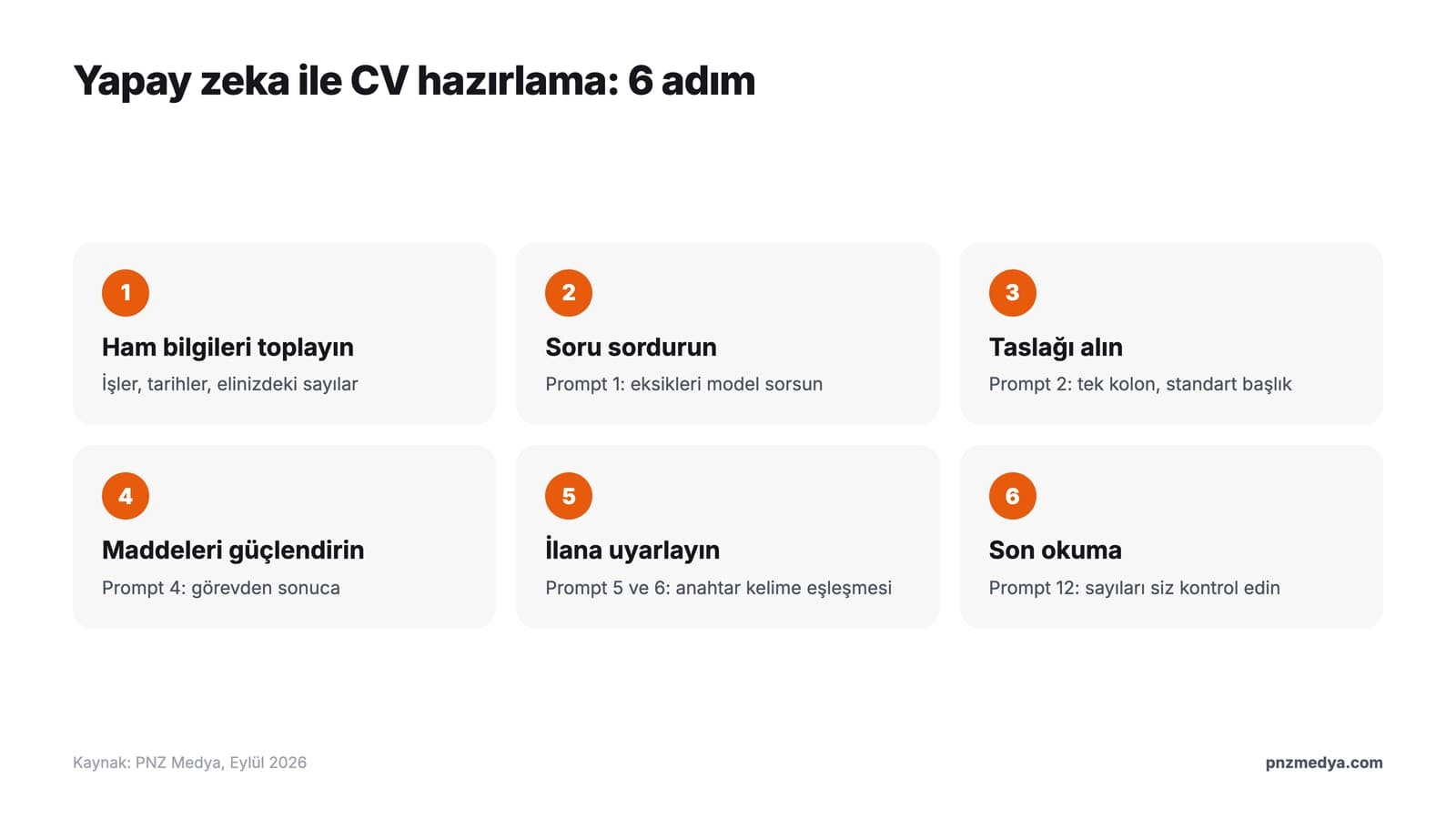
- Gather the raw information: Where you worked, dates, what you did and any numbers you have (how many clients, how many projects, what percentage increase). You don't need full sentences.
- Have the AI ask you questions: With Prompt 1, the model asks you about missing details one by one. This step does the most to reduce the risk of made-up content.
- Get the draft: With Prompt 2, get a single-column resume with standard headings that an ATS can read.
- Strengthen the experience bullets: With Prompt 4, turn each duty into 'what I did and what came of it'.
- Tailor it to the posting: With Prompts 5 and 6, compare the keywords in the posting you're applying for and produce a version of your resume for that posting.
- Do the final read: With Prompt 12, get a critique from the AI through a recruiter's eyes, then check every number and date yourself.
A resume requested without any information turns into a template full of generic lines that fit anyone, and the model fills the gaps with its own guesses. Use the AI as an editor: you supply the material, it builds the structure.
12 Ready-Made Resume Prompts (ChatGPT, Gemini and Claude)
Replace the fields in square brackets with your own information. For details like your name, phone number, address and ID number, leave placeholders such as [FULL NAME] as they are; fill them in yourself once the resume is finished. Each prompt works on its own, but you get the best results when you use them in order in the same chat.
1) Information-gathering prompt: let the AI ask you first
You are an experienced HR specialist and resume editor. We are going to prepare a resume (CV) for me, but don't write it yet.
My target position: [position title, e.g. accounting specialist]. Industry: [industry]. Total experience: [years].
First, ask me questions to gather the information needed for the resume. Rules:
- Ask at most 5 questions at a time, and continue after you get my answers.
- For every job, always ask about: my duties, the tools I used, measurable results (numbers, percentages, time).
- Where I haven't given a number, don't guess; ask me.
- Don't ask for personal details such as name, address, phone number or ID number.
When you have enough information, write "Ready for the draft" and stop.We recommend this prompt for first-time resume writers and for anyone who hasn't updated their resume in years. The model's questions remind you of results you wouldn't think of on your own.
2) Prompt for an ATS-friendly resume draft from scratch
Using the information below, prepare a one-page, ATS (applicant tracking system) friendly resume in English.
Target position: [position]
My information: [jobs, dates, education, skills; it can be messy]
Formatting rules:
- Single column. Do not use tables, columns, icons, graphics or text boxes.
- Use only these headings: Profile, Work Experience, Education, Skills, Certifications, Languages.
- List work experience from newest to oldest; write 3-5 bullets per job, each starting with a verb.
- In the contact line, put only the placeholders [FULL NAME] | [PHONE] | [EMAIL] | [CITY].
- Do not add any number, title, certification or date I didn't give you. Mark anything missing as [MISSING: ...].3) Short profile summary prompt (quick version)
Using the information below, write 3 different profile summaries for the top of my resume. Each should be at most 3 sentences and 60 words.
Position: [position]. Experience: [years and field]. My two strongest results: [result 1], [result 2].
Make the first version formal, the second plain, and the third results-focused. Do not use unsupported adjectives like "hardworking, dynamic, team player".The reason for asking for three versions is that at least one will sound close to your own voice. Combine the sentences you like.
4) Prompt for rewriting experience bullets to focus on results
Rewrite my work experience bullets below for my resume.
Turn each bullet into a "verb + what I did + result" structure, at most 2 lines.
Position and company: [title, company, years]
My current bullets:
- [e.g. Dealt with customer complaints]
- [e.g. Prepared monthly reports]
Numbers I know: [e.g. about 40 calls a day on average, report time cut from 3 days to 1 day]
Do not add a number to a bullet where I gave none; instead, suggest in parentheses which number I should find.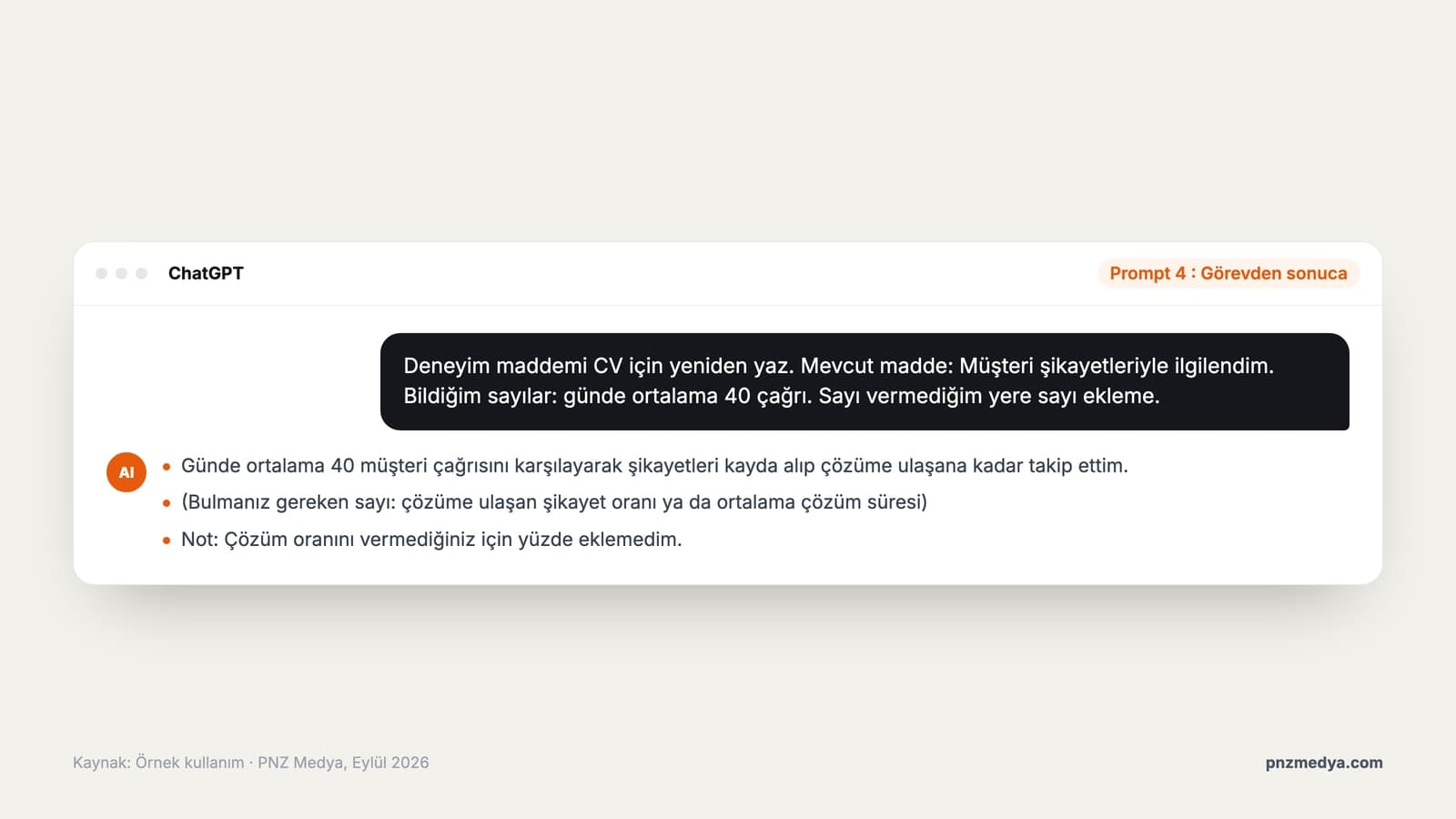
5) Prompt for tailoring your resume to a job posting
Below are my resume and the job posting I want to apply for. Tailor my resume to this posting.
- Highlight the skills and experience from the posting that I actually have, and reorder accordingly.
- Where the posting's terms match my experience, use the same words.
- Do not add a skill I don't have; list those in a separate "Gaps" list.
- At the end, briefly list which bullets you changed.
My resume: [resume text]
Job posting: [job posting text]6) ATS keyword gap analysis prompt (with files in Gemini)
Compare the two attached files: the first is my resume, the second is the job posting.
Make a table with the columns "Keyword in the posting", "In my resume? (yes/no/partly)", "Where it could go in the resume".
Take only skills, tools, certifications and task names; collect general phrases like "strong communication skills" in a separate row.
After the table, pick at most 5 of the missing keywords that I can honestly add based on my experience, and show which bullet each one goes into and how.Since Gemini accepts 10 files in a single request, you can upload your resume and the posting as PDFs and type this prompt. If you're low on daily file uploads on ChatGPT's free plan, paste the two texts into the chat instead of uploading files.
7) Resume prompt for recent graduates with no experience
I'm a recent graduate with no full-time work experience. Help me prepare a one-page resume for [position].
What I have: [major, graduation year, GPA if I want to include it], [internships and their length], [school projects], [clubs, volunteering, part-time jobs], [tools and languages].
- Replace the experience section with a "Projects and Internships" section; for each project, write what I did and what came out of it.
- Put education at the top.
- Do not exaggerate any experience; call an internship an internship and a school project a school project.8) Career change resume prompt
I want to move from [old field] to [new field]. Target position: [position].
My duties in previous jobs: [duties].
Training and work I've done for the new field: [courses, certifications, projects].
1) Pull out the skills from my past experience that transfer to the new position, and list each one with the duty it is based on.
2) Write the profile summary as 3 sentences that explain the switch.
3) Rewrite my experience bullets in the language of the new field, but do not change what the work actually was.9) Prompt for translating a Turkish CV into an English resume
Translate my Turkish CV below into an English resume. Target country: [e.g. Germany, UK, USA] and position: [position].
- Do not translate word for word; use the job title equivalents and verbs that resumes in that country use.
- Explain Turkey-specific terms: e.g. use the country's equivalent for "lise" (Turkish high school), keep the GPA on the 4-point scale and say so.
- If the target country is the USA, remove photo, date of birth and marital status; if it is Germany, mark them as optional.
- Format dates for the target country.
My CV: [CV text]10) Cover letter prompt
My resume and the job posting are below. Write a cover letter in English for this posting.
- At most 250 words, 3 paragraphs.
- Paragraph 1: Which position I'm applying for and why I chose the company ([one concrete thing I know about the company]).
- Paragraph 2: Two concrete experiences of mine that match the two most important requirements in the posting.
- Paragraph 3: Short closing and a request for an interview.
- Do not use stock openings like "I'm excited about this opportunity" or exaggerated adjectives.
My resume: [resume text]
Job posting: [job posting text]11) LinkedIn 'About' and Kariyer.net summary prompt
Create two short texts from my resume:
1) A plain, 120-180 word introduction written in the first person for my LinkedIn "About" section.
2) A summary of at most 400 characters to paste into the summary field on job sites such as Kariyer.net or Yenibiris.
In both, do not add anything that isn't in my resume, and do not include personal contact details.
My resume: [resume text]12) Prompt for a final read through a recruiter's eyes and a fabrication check
You are a recruiter who has read hundreds of resumes for this position: [position].
Tell me how you see the resume below in the first 10 seconds, then produce this list:
1) Spelling and language errors
2) Vague or unsupported statements
3) Date gaps and inconsistencies
4) Every number, title and certification that needs to be verified (I will check these)
5) Unnecessary lines that can be removed
Do not write a corrected resume; give only the list.
Resume: [resume text]In the final review we don't ask the model for a corrected text, because the goal is for you to see the mistakes. Check every number and date on the list against your own documents.
AI can add percentages, certifications or job titles you never gave it, especially when you ask for numbers. If you see something like that, type 'Remove all the information I didn't give you and show it in a separate list' in the same chat. Any claim on your resume can come up in an interview; a sentence you can't back up shouldn't stay on it.
ChatGPT, Gemini or Claude? Which Is Best for Writing a Resume
| Criterion | ChatGPT | Gemini | Claude |
|---|---|---|---|
| Files on the free plan | Yes, 3 files a day | Yes; paid plans extend audio and video length | Plan limit not stated on the help page |
| Files per request / chat | 80 files every 3 hours (general limit, paid plans included) | 10 files per request, 100 MB per file | 20 files per chat |
| Resume file types | DOCX, PDF, TXT; no Google Docs files (.gdoc) | Most file types, according to the help page | PDF, DOCX, TXT |
| Best step | Gathering information and rewriting | Comparing resume and posting as files | Editing long text into plain, natural language |
All three tools are good enough for resume text; the difference shows up with files. According to OpenAI's help page, free ChatGPT users can upload 3 files a day, and Google Docs files aren't supported. Gemini's help page allows 10 files per request and 100 MB per file; Claude lets you upload 20 files per chat. If you paste the text directly, none of these limits affect you.
ATS-Friendly Resume: What Can't Applicant Tracking Systems Read?
An ATS (Applicant Tracking System) is software companies use to collect, parse and search incoming resumes. The system reads your resume and splits it into fields such as name, experience and skills; anything it can't read shows up incomplete on the recruiter's screen. The help page of Greenhouse, a widely used ATS, lists the cases where parsing can fail:
- Complex resumes with tables, headers and footers
- Resumes where the name and contact details sit in a header, footer or text box
- Resumes in a column layout
- Resumes with graphics, photos or WordArt
- Resumes uploaded as images instead of documents (.docx or .pdf)
- Files larger than 2.5 MB: Greenhouse can't parse resumes above this size
That's why Prompt 2 asks for a single column, standard headings and no tables. Two-column templates with icons in tools like Canva look nice but can get split up in the system. The safe route: put your contact details on the first line of the body, save the file from Word as DOCX or as a PDF with selectable text, and don't upload your resume as a scanned image.
This figure shows up on many resume sites, but it doesn't come from published research with a stated method; the source usually cited is a sales presentation from a company that shut down in 2012. Most ATSs parse resumes and make them searchable, and rejecting them is a much smaller part of what they do. The real risk is that your information lands in the wrong field and you don't come up in the recruiter's search.
What to Include on a CV in Turkey, and What to Leave Out
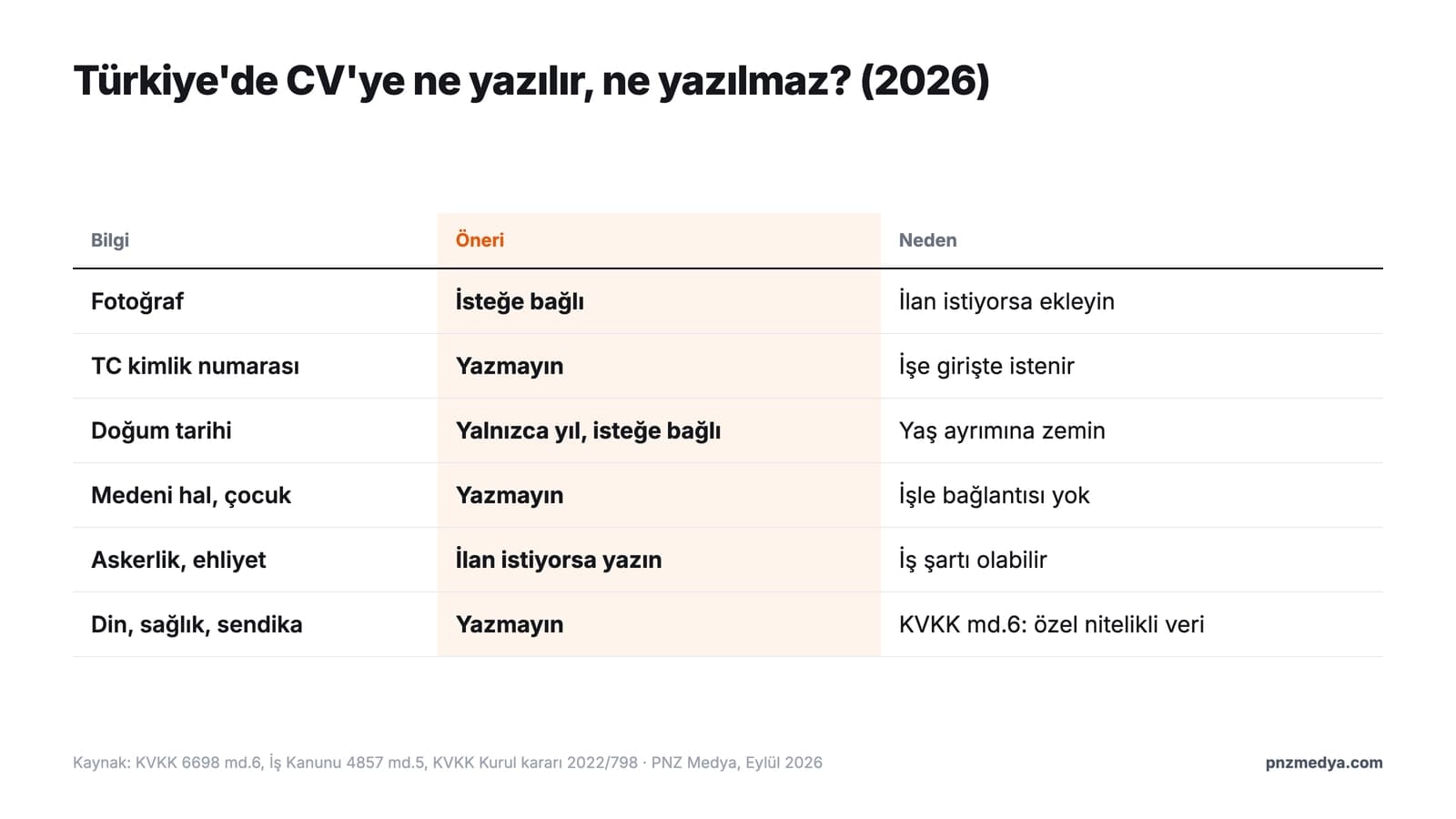
CV habits in Turkey differ from those in the US and the UK. Many postings still ask for a photo, and for some positions military service status and a driver's license are job requirements. On the other hand, some information has no place on a CV; including it gives you no advantage and puts your data into circulation for nothing.
| Information | Recommendation | Reason |
|---|---|---|
| Photo | Optional; add one if the posting asks | Common in Turkey and in Europass; not expected in the US and UK |
| Turkish ID number (T.C. kimlik no) | Leave it out | Not needed at the application stage; requested when you're hired |
| Date of birth | Optional; the year alone is enough | Can open the door to age discrimination |
| Marital status, number of children | Leave it out | Not related to the job |
| Military service status | Include it for male candidates if the posting asks | Listed as a requirement in many postings |
| Driver's license | Include it if it's relevant to the job | A requirement in field, sales and logistics postings |
| Religion, health, union membership | Leave it out | Special category personal data under Article 6 of KVKK |
The legal framework rests on two articles. Article 6 of KVKK, Turkey's Personal Data Protection Law No. 6698, treats information such as religion, health, union membership and criminal convictions as special categories of personal data. Article 5 of Labor Law No. 4857 prohibits discrimination based on language, race, sex, disability, religion and similar grounds. In its decision No. 2022/798, the KVKK Board also stressed that the information an employer collects from a candidate must be related to the job, limited and proportionate.
In particular, sharing personal data that can directly or indirectly identify a person, such as name and surname, address, phone number and identity information, should be avoided.
You can apply this advice directly when writing your resume. In the prompts, use placeholders such as [FULL NAME] and [PHONE] in place of contact details, and don't type the names of clients or coworkers from previous employers. Once the draft is done, add your real details yourself in Word or Google Docs.
Free Ways to Make a CV in Turkey: ISKUR, Europass, Kariyer.net and Word
You need somewhere to put the text the AI produces. In Turkey there are four free and reliable options:
- ISKUR (via e-Devlet): ISKUR is Turkey's public employment agency. Sign up with the 'ISKUR Job Seeker Membership' service, then enter your education, job preferences and experience in the resume menu. According to ISKUR, your registration doesn't become active until you enter your education and occupation details.
- Europass: The European Union's CV tool is free and works in 31 languages, Turkish included. You first need to create a Europass profile. Turkey's National Europass Center is the Vocational Qualifications Authority (MYK).
- Kariyer.net: This Turkish job site lets you build a free CV by picking a sample that fits the position and adding your details; the short summary from Prompt 11 suits profiles like this.
- Word and Google Docs: Both have ready-made resume templates. Microsoft removed the Resume Assistant feature from Word on August 9, 2022 and recommends templates instead. For ATS, pick a single-column template without tables.
Common Mistakes in AI-Written Resumes
- Sending the same resume to every posting: Use Prompt 5 to make a version for each application.
- Not checking numbers the model added: A percentage you can't explain when asked in an interview destroys trust.
- Stock phrases: 'Results-driven, dynamic, team player' shows up in every AI resume; write a concrete result instead.
- Two-column template with icons: Looks nice, but can get split up in an ATS.
- Pasting personal data into the chat: Use placeholders for your ID number, address and phone.
- Leaving the AI language as is: Read the text out loud; change any sentence you wouldn't say yourself.
Employers notice AI text that hasn't been personalized. In the 2025 'AI and the Applicant' report by resume builder Resume Now, 62% of recruiters said AI-generated resumes that weren't personalized were more likely to be rejected. Since the survey comes from a resume company, read the number as a rough signal of direction. To make AI writing sound more natural, you can also use the prompts in our guide to turning AI text into human writing.
Yes. The 12 prompts in this article work on ChatGPT's free plan. Since the free plan lets you upload 3 files a day, it's more practical to paste your resume as text than to upload it as a file.
A generic, unpersonalized resume full of stock phrases does get noticed. If you provide your own results and numbers and edit the text to match your own voice, using AI to prepare it isn't a problem; the content is yours.
In Turkey a photo is optional; add one if the posting asks. Your Turkish ID number (T.C. kimlik no) isn't needed at the application stage, so leave it out; the employer will ask for it when you're hired anyway.
For most candidates with under 10 years of experience, one page is enough. Since recruiters spend an average of 7.4 seconds on the first scan, the important information should be in the top half of the first page.
Use a layout with a single column, standard headings and no tables or graphics. Greenhouse accepts doc, docx, pdf, rtf and txt files; send a PDF with selectable text or a DOCX, and don't send a scanned image.
The Current Turkish Dictionary of TDK (the Turkish Language Association) lists it as two separate words. In job postings and on job sites the one-word spelling is common; for your document's title you can use the TDK spelling or simply write 'CV'.
Skip the word-for-word translation and use Prompt 9 to adapt your Turkish CV to the target country's resume conventions. If you're applying in the US, remove your photo, date of birth and marital status.
Writing a resume with AI comes down to this: you supply the material, and the model builds the structure and the language. Gather your information with Prompt 1 first, get the single-column draft with Prompt 2, tailor it to each posting with Prompt 5, and do a final read with Prompt 12 before sending. Put your personal details only in the final document, never in the chat, and make sure you can stand behind every number on your resume.
Personal Website and Portfolio Design
Your resume reaches the employer as a single page; a portfolio site on your own domain shows your projects, references and work in detail. We design fast, mobile-friendly personal websites that people find in search engines when they look up your name. Get in touch today for a free quote.